r/shimeji • u/KaleNaive9033 • 2d ago
Technical Assistance Why are shime18 and shime21 the same image?
Trying to make my own, and I noticed this. Is the "lying down" pose used elsewhere?
r/shimeji • u/Auroralore • Sep 19 '25
We all know the default Shimeji guy is great (Shimeji is a type of mushroom, hence why Shimeji is named the way it is!), but what if you want little guys running around that aren't mushrooms? This guide is here to teach you how to get custom Shimeji of your favorite characters working in Shimeji-ee!
Now, if you've seen my previous post on how to get Shimeji-ee running properly, you should already have Shimeji-ee set up and ready to go! If not, here's a link to the post:
https://www.reddit.com/r/shimeji/comments/1nkjrif/troubleshooting_how_to_get_shimejiee_running/
You will need:
A working installation of Shimeji-ee
A custom Shimeji folder that you downloaded from somewhere online (Make sure the source is safe!)
Before we begin, we need to get Shimeji-ee ready for the new Shimeji!
IT IS VITAL TO MAKE SURE THE CHOOSE SHIMEJI WINDOW IS SET TO ALWAYS APPEAR UPON STARTING UP SHIMEJI-EE WHEN ADDING CUSTOM SHIMEJI, AS THIS WILL ALLOW YOU TO DESELECT THE CUSTOM SHIMEJI AND GET THE PROGRAM RUNNING CORRECTLY IN CASE YOU MAKE A MISTAKE WITH THE CUSTOM SHIMEJI!
_____________________________________________________________________________________________________
First, click on the arrow in the bottom right of your Taskbar. This will bring up a pop-up window with the Shimeji-ee icon in it. Right-click the icon to bring up the menu.

___________________________________________________________________________________________________
When the menu pops up, click on "Settings" and make sure the box that is next to "Always Show "Choose Shimeji"" is checked.
___________________________________________________________________________________________________


__________________________________________________________________________________________________
__________________________________________________________________________________________________
Grab your custom Shimeji's folder and move it into shimejiee's img folder.
I'll be using my own Kirby Shimeji that I made using Kirby: Super Star Ultra sprites as an example.


__________________________________________________________________________________________________
__________________________________________________________________________________________________
If the custom Shimeji folder only has a conf folder (and a sounds folder in some cases) and a whole bunch of .png images, then you don't need to do anything further and are ready to load up your new custom Shimeji!
___________________________________________________________________________________________________


________________________________________________________________________________________________

______________________________________________________________________________________________
_______________________________________________________________________________________________
First things first, we need to delete some stuff from the custom Shimeji's folder.
Delete the Shimeji-ee.jar from your custom Shimeji's folder, along with the lib folder, licence.txt, and readme.txt.


__________________________________________________________________________________________________
Then go into the conf folder and delete everything in there EXCEPT for the actions.xml and the behaviors.xml.
__________________________________________________________________________________________________


________________________________________________________________________________________________
Go into the custom Shimeji's img folder and go into the folder named Shimeji. Move all of the .png images in that folder into the custom Shimeji's folder name directly.


________________________________________________________________________________________________

__________________________________________________________________________________________________
Once you have moved all of the .pngs from the custom Shimeji's Shimeji folder into the custom Shimeji's folder directly, delete the custom Shimeji's img folder.


_______________________________________________________________________________________________
Now all you have to do is start up Shimeji-ee and select your custom Shimeji from the Choose Shimeji window, and you're good to go!
Repeat this whole process for every custom Shimeji you want to add.
_________________________________________________________________________________________________
_________________________________________________________________________________________________
If your custom Shimeji is throwing out an error involving a frame of one of the .pngs, make sure you moved all of the .pngs out of the Shimeji folder inside the custom folder and into the custom Shimeji's folder directly, where the conf folder and sounds folder should be.
Make sure your custom Shimeji's folder looks exactly how it's supposed to, like with the example custom Shimeji shown above.
If it is still giving an error, it might be a problem with the custom Shimeji's actions.xml or behaviors.xml itself. if you're not the one who made the custom Shimeji, you should notify the creator of the error immediately so they can fix it.
If you are the creator of the Shimeji and have no clue why it's throwing out an error, head on into Lord Kilkakon's Discord channel and we'll do our best to help you figure out what the problem is!
_________________________________________________________________________________________________
If you get an error involving a sound file, first try:
1. Making sure the sound file is a .wav file.
Sounds will only work if the sound file is a .wav. If it's not, download Audacity and export the sound file as a .wav file.
2. Make sure the sound file's name is spelled correctly in the actions.xml/ the code is correct.
3. Re-export the .wav file in Audacity as a .wav file.
Sometimes, you just need to re-export the .wav file again to get it to work!
And that's it! Enjoy your new custom Shimeji!
r/shimeji • u/Auroralore • Sep 18 '25
__________________________________________________________________________________________________
First, let's go over how to get Shimeji- which should be simple enough.
You will need:
The shimejiee .zip file
Java 8
An installation of 7-Zip to extract the folder from the archive (Make sure to download from the official site!)

____________________________________________________________________________________________________
Click "Download Now" and when the pop-up window appears, click "Save" and- if the option appears- select to save to your Desktop.


________________________________________________________________________________________________
Make sure it is Java Version 8 specifically. Other Versions of Java will NOT work for Shimeji-ee. You can have multiple versions of Java installed at once, so you don't need to worry about uninstalling older versions or any conflicts with newer versions.
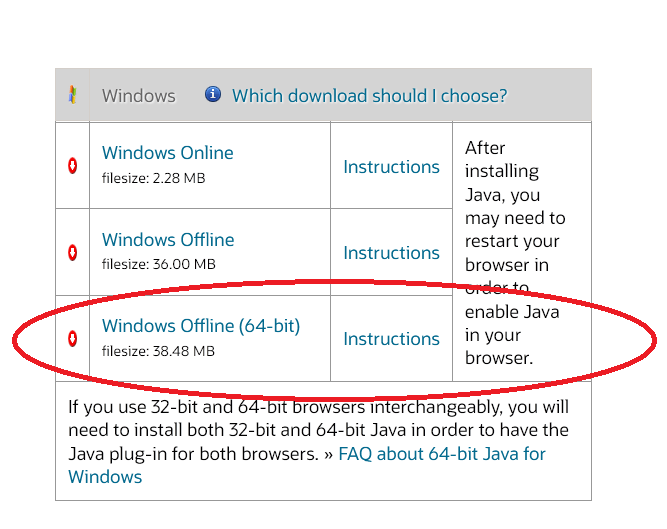
Make sure to install the Offline version. Whether you install 32-bit or 64-bit doesn't really matter. I personally would go for 64-bit unless you have specific reasons why you need to go with 32-bit.
_____________________________________________________________________________________________________
Once you have Java 8 installed and the .zip file downloaded (and you have 7-Zip installed), right-click the .zip file and go down to 7-Zip, then go to the mini-menu that pops up and click "Extract to "shimejiee\"".

_________________________________________________________________________________________________
Wait a bit for the archive to fully extract the folder. A brand-new folder named "shimejiee" will appear on your desktop!
At this point, you should be able to open up the folder and double-click Shimeji-ee to get the program running!
____________________________________________________________________________________
This section is for if the Shimeji does not appear/you get an error message/nothing happens.
In the rare case that Shimeji does not work when you double-click the .jar, this next section will cover how to get it running properly.
_____________________________________________________________________________________________________
The Shortcut Trick is designed to get your Shimeji running properly, and in 99.99% of cases all you need to do is the Shortcut Trick to fix your Shimeji.
Lord Kilkakon has a video for how to do the shortcut trick that I will link to below.
If, however, you happen to have trouble with following along with video instructions (like I do), I will be posting detailed instructions in text form to help you do the Shortcut Trick below the video, so just scroll past the video link to reach the instructions.
______________________________________________________________________________________________________


____________________________________________________________________________________________________
You will need to move the shimejiee folder to your C Drive. Sometimes having your folder in a different place causes it to not work, so moving it directly into the C Drive will help get it running.
_____________________________________________________________________________________________________
Go into shimejiee and right-click the file that says "Shimeji-ee.jar".
If you don't have your explorer set to show file extensions, then the file will simply appear as "Shimeji-ee".

_____________________________________________________________________________________________________
After right-clicking on Shimeji-ee.jar, click on "Create Shortcut". (If you are on a version of Windows that doesn't have this, look through the right-click window that pops up for an option that gives you more options in another pop-up window for the "Create Shortcut" option.)
_____________________________________________________________________________________________________

____________________________________________________________________________________________________
Rename the shortcut to "Run Shimeji".
____________________________________________________________________________________________________

_____________________________________________________________________________________________________
Right-click your shortcut and click "Properties".

____________________________________________________________________________________________________
This window will pop up. First, we will be setting the Target to your installation of Java 8.
____________________________________________________________________________________________________

___________________________________________________________________________________________________
___________________________________________________________________________________________________
The correct Java 8 folder will either be in Program Files or Program Files (x86). Both will have a Java folder in them, so search through both until you find the one with the right folders inside (which I will be showing you momentarily).

________________________________________________________________________________________________
________________________________________________________________________________________________
Java

______________________________________________________________________________________________________
Then to your installation of Java 8 (it will always have 1.8.0 somewhere in its name):
______________________________________________________________________________________________________

_____________________________________________________________________________________________________
bin:
_____________________________________________________________________________________________________

_____________________________________________________________________________________________________
Now, click on the Address Bar in your Explorer window and copy the path.
_____________________________________________________________________________________________________

_________________________________________________________________________________________________________
Go back to the Shortcut's Properties Page and put a couple of quotation marks in the Target, then paste the path in between them. Then add "\javaw.exe" after "bin".
_________________________________________________________________________________________________________

________________________________________________________________________________________________________
Put a space after the quotation mark at the end and type "-jar Shimeji-ee.jar".
_______________________________________________________________________________________

___________________________________________________________________________________________________
Now, make sure your Start In is "C:\shimejiee".
___________________________________________________________________________________________________

____________________________________________________________________________________________________
Click "Apply", and then "Okay".
_____________________________________________________________________________________________________
Now, double-click your shortcut and the default little guy should fall from the sky after a minute!
_____________________________________________________________________________________________________
Due to the image limit in posts, I will be making a guide on how to add custom Shimeji to your shimejiee folder in another post.
Enjoy Shimeji!
r/shimeji • u/KaleNaive9033 • 2d ago
Trying to make my own, and I noticed this. Is the "lying down" pose used elsewhere?
r/shimeji • u/KaleNaive9033 • 2d ago
Trying to get the Hatsune Miku from https://canarypop.ciao.jp/shimehatsune.htm to work, but it just kept giving me this error in Japanese. Clicking "No" just closes it, and "Yes" opens the Japanese localized website for Java. I tried making a second shortcut for Miku instead, but it gave me the error seen in the second image. Adding Miku's img and conf files to my main shimejiee folder did add her to my shimeji list, but running it just gave the error seen in the fourth image. Does anyone know what to do?
r/shimeji • u/KaleNaive9033 • 2d ago
I managed to find the Kasane Teto Shimeji by Brittany-M, but this Hatsune Miku seems unfindable.
The closest link I've been able to find is https://canarypop.ciao.jp/shimehatsune.htm, but the sites that it links to either close themselves when opened, or look very scammy. Does anyone actually have this shimeji?
r/shimeji • u/Isimpongiyuu • 8d ago
Hihii, I'm a bit new to shimeji, but I have the software, I just can't find the shimeji I want (Julie Joyful from Welcome Home, or any other Welcome Home characters) so does anyone know where I can find sum? or can anyone make a .zip file for me??
r/shimeji • u/Big-Lawfulness-2558 • 14d ago
Chubbidust recently deleted their Kris + Susie + Ralsei and Aqua + Seth Shimejis off of their Ko-Fi and Vgen. I was wondering if anyone archived any of them before they got wiped so we can preserve them?
Trailer for the Kris Susie & Ralsei one. https://youtu.be/dxHbCpUpl9k?si=HGipwsqMBq-AnOy7
The only one I have is their old free Kris one which I will link down below. https://archive.org/details/kris-shimeji-pack
Edit: Update someone named SaturnRingDing uploaded all of them to the Internet Archive.
https://archive.org/details/fun-gang-shimeji-pack
r/shimeji • u/Devi_Hydra • 15d ago
I'm excited!!!!
r/shimeji • u/PracticalGarbage7451 • 15d ago
Thoughts? Any bells ringing for a very specific iconic propaganda poster? xD
r/shimeji • u/chuudles • 15d ago
I got the Rick Prime shimeji today and he is the most adorable thing ever! But I really want him to interact with my tabs and Google cus i know it can do stuff like that, since it has the images for it. Though, every thing i found to help me with this issue is always through windows or chrome and i use Opera GX and i was wondering if there was any way I could make him interact with my stuff?
r/shimeji • u/Forward-Constant1860 • 16d ago
Hello, this is my first time hearing about shimeji and trying to get one. I downloaded the extension as the instructions say but when trying to activate a shimeji, it keeps saying I don't have the extension downloaded. The extension is indeed downloaded and enable, I have tried to refresh but nothing is changing. I also tried to reload the web page through the extension but that says "the current web page does not allow shimejis". The extension already has permission to run on all sites too. I really could use some help, I just want a fat usagi on my laptop 🥀 the laptop im using is a HP Windows 11
r/shimeji • u/GoldenLugia16 • 18d ago
I would love to have both of these (especially Kit since i just ordered a plushie, they're up there with Grogu for me).
Im not good at sprite work or coding so i cant make it myself
r/shimeji • u/Devi_Hydra • 20d ago
Does anyone remember a recent WIP project someone had where they were making a tool to make shimejis? It had a mouse/rat mascot and tools to do like, dialogue! Kind of a white-whale sitch for me, sorry if this isn't relevant to here!
Aside from that, hi! I really like desktop pets/buddies/etc. they're really cool and I remember my older sister having them on her pc way back in like... 2009/2010!
r/shimeji • u/Equivalent-Yard-68 • 24d ago
r/shimeji • u/MR7137 • 24d ago
ive managed to download the default shimeji characters on my computer, but i cant find any other characters that i can download for mac. i can only find for windows. Does anyone have tips for this?
i have found a few that i can download but after downloading the file im not sure how im supposed to get the character to actually activate.
r/shimeji • u/Maperbill • 24d ago
It took me months to make a shimeji frames but I'm having a problem drawing all over again since the 128x128 frame rate is very blurry. I did 512x512 canvas but it turns out that it's very blurry. And when i tried 2048x2048, it's still blurry. My character wasn't even detailed, idk if i need to bold the lines or something. Btw, here's my design progress so far.


You may or may not recognise this character but her name is Haru Urara from Uma Musume. There's no mobile friendly uma musume shimeji (tachyon is pc only)
Since it's my first time, i gotta say, it's very difficult since i use separated body parts to adjust the position of a character instead of just actually draw the parts. Idk if I'm gonna use shimeji bases from the internet or just continue editing this shimeji.
Do you have any advice? Btw, I'm an android user and my app i use to draw is ibis paint x. Hopefully i could finish it before her birthday (not the end of 2026). Other than that, have a great day!
r/shimeji • u/Enough-Armadillo-685 • 24d ago
brusha too but she is optional
maybe my ocs...i dunno...
r/shimeji • u/snakeocean • 25d ago
it'd be cool.
r/shimeji • u/Equivalent-Yard-68 • 27d ago
i found this really cute shimeji and i wanna use it on my PC but it's android only
it has a cute bounce anim and everything but im not the smartest with this type of coding so im not sure how to get it to work
(cant put link here sadly)
if anyone can help me thatd be great !
r/shimeji • u/snakeocean • 27d ago
I would like to know if there is an IMAGE_FRIEND or DEVICE_FRIEND from DELTARUNE shimeji, any assistance is appreciated!