When posting, please set your flair according to what platform you're utlizing to make it easier to receive help. The system should now force it and won't let you post without selecting flair. Please reach out if there are missing options.
Was just thinking I should share my experience with Smartmi support for whoever is going to consider their ecosystem.
My Smartmi evaporative humidifier (CJXJSQ04ZM) (gift, using daily to help my daughter with her asthma) broke down due to malfunction of water level sensor — device kept showing "tank is not installed" regardless of clean-up attempts with sensor and pogo pins.
I tried to contact Smartmi support. Since it was a gift (no receipt) and SN sticker got worn off from the bottom over time, they said they cannot trace the dealer. Fair enough — I didn't expect anything for free from warranty. I offered to send the device at my cost for checking, to purchase a replacement part, and even to provide the MAC address/Device ID from the application to confirm the device authenticity. No dice.
Since the official support was not an option anymore, I reverse engineered the system and created my own small circuit to simulate the water level sensor signal to make motherboard recognize a constant 85% of water level inside the tank. Dynamic level indication was sacrificed for the working humidifier.
I contacted the support team once again with the picture of broken component and requested only the number of the part or the information about OEM supplier to get the part and make the device work again. Their answer was: the device is discontinued, there are no spare parts, and they "simply don't have that information available."
Not a single number, not a single escalation path, not even a discount code as some goodwill gesture to loyal customer. It is really frustrating to see the device goes to the garbage so quickly just because of a cheap sensor.
I've had this system installed for 6 mos and it's great, works flawlessly. This morning I noticed for the first time the display showed both the "wavy lines" (heating active) icon and a new one that looks like floor boards. This icon is not shown in the manual. (I didn't snap a pic) Once the heating went off based on the heating sked, the floor icon disappeared.
Anybody seen this? I'm wondering if it's a firmware update thing. But I don't recall seeing an update. Maybe in means the floor is warm or has come up to temp?
So, I live in a rental apartment in the Netherlands. The apartment has District heating with a heat exchanger, the heat exchanger was controlled by a central on/off thermostat, which lives in the same room as one radiator without thermostat valve. Needless to say that that is far from ideal, even though the other radiators had simple thermostatic valves, they would do nothing when the central thermostat didn't call for for heat. I needed this to be smarter and be able to control the system per radiator/room. I started with replacing the dumb thermostatic valves with Smart TRV's (Sonoff TRV-ZBT) and it was already a bit better, but still dependent on the central thermostat and the heat sensors in the TRV's did not really represent the true room temperature, so I added external temperature sensors (Sonoff SNZB-02B). Nice!! But still the central thermostat was in charge, so temperatures in the other rooms lacked most of the time.
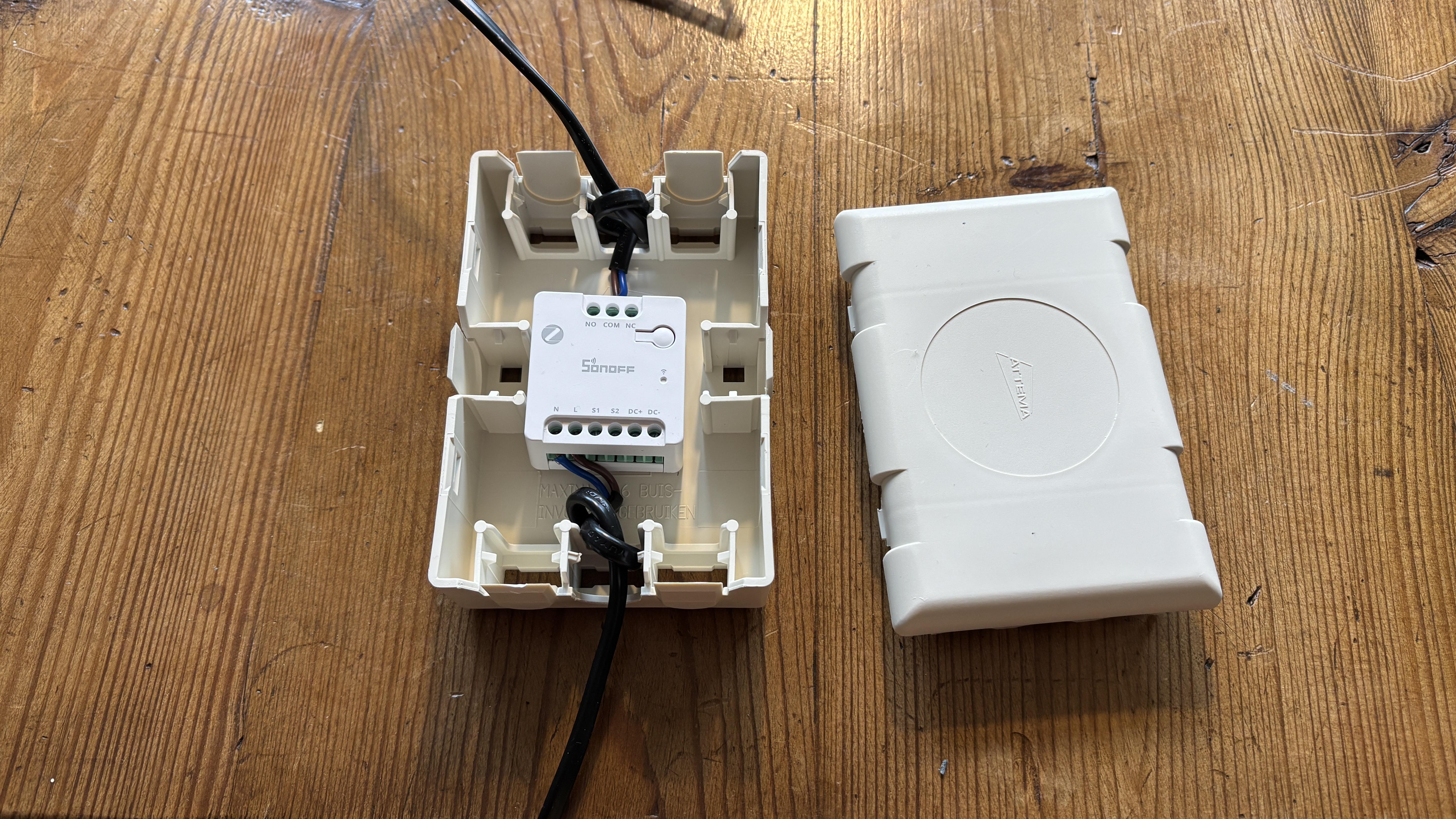
At some point I thought, OH! Lets get a smart thermostat, dumbest thought ever, because it would still do the same thing. send on/off to the heat exchanger. When I figured that out I came up with the idea to find a smart on/off relais and make that switch on/off depending on heat demand per room/trv/sensor. I found one of those (sorry again Sonoff, a Mini-ZBD dry contact relais).
This is what it looks in terms of hardware and scheme:
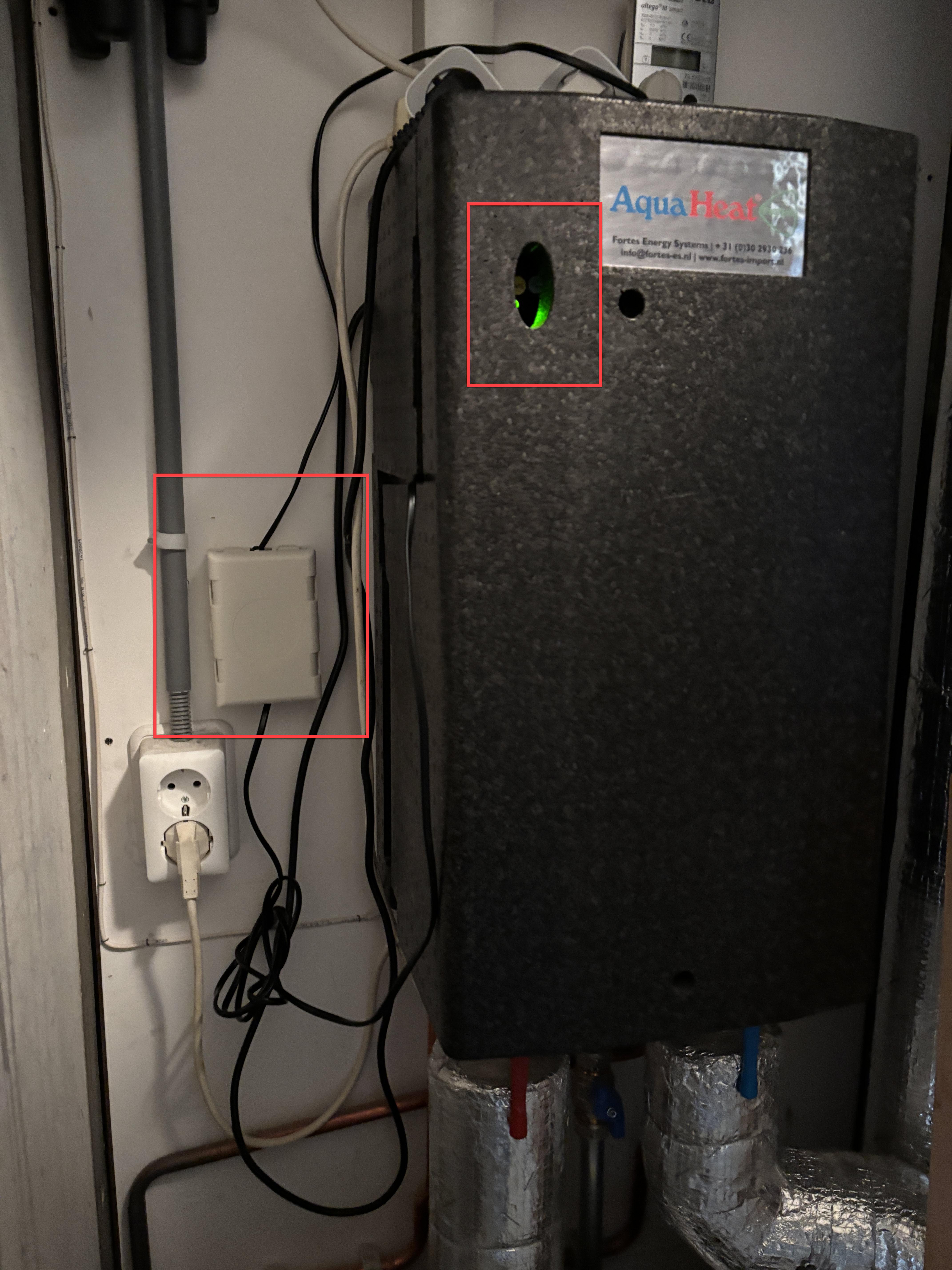
Most important part was leaving the original system in place since this is a rental apartment, so all works in parallel with the original system. The original thermostat is set to 18, the room stays cozy because of the other rooms are providing the heat.
Now this all needed to be connected, working together in a smarter way. A custom template and two automations needed to be created and a bit of tweaking on the reporting settings and disabling smart control on the TRV's in Z2M settings, and creating scheduled setpoints (and changes) for every day of the week.
One automation for syncing the measured temperatures from the external sensors to the TRV's:
alias: Sync External Temp to Sonoff TRV-ZBT (All Rooms)
Now what actually happens is that, if either one of the TRV's is receiving temperatures that are 0.4 degrees Celcius below the current setpoint (from the schedules), it opens up its valve, and the HA automation switches the relais to on and the Aquaheat heat exchanger turns on. Because the central room has a dumb valve that is open, there are no hydraulic restrictions for the heat demanding room to start heating.
The delays in the relay automation prevent brief changes in TRV heat demand from immediately switching the district-heating supply, reducing unnecessary cycling.
System has been dry running for about a week and needed tweaks, but I created a small dashboard to control what is happening (sorry in Dutch):
Action just took place. Early morning, 5.30, setpoints changed from 19 to 20 and automation started, after 45 seconds the relais switches to on:
Put all components in line yesterday and all seems to be working flawlessly since. Future will tell whether there are still remaining issues. I had some issues in my Z2M mesh, but those seem to be solved with some tweaks, replacing controller and changing reporting intervals. The dumb room, my living room, stays up to a nice temperature and that is good because that is were I am most of the time. Fun part is, I am an audiophile, and whenever my amplifiers are turned on in the back room, my listening and plant room, the TRV shuts down after 10-ish minutes because the amplifiers start heating the room :-)
I hope this is useful for others, it was an interesting journey, and I had some great help from my friend Copi!
And please shoot holes in the design. Winter is just starting here, and I'd rather discover a failure mode from a Reddit comment than during the first properly cold week. :-)
Added after initial post:
This is what it looks like in terms of installation:
I bought a house that is kitted out with vivint’s bs. Every window, every door, cameras, flood lights, motion detection, glass break, water/smoke detection, locks, WiFi mesh, lights, ect. I own the devices but Vivint wants >$50 a month subscription to use it.
Has anyone cracked this to work with HA?
I tried to set Claude on it, but got a warning / refusal that it wouldn’t help me crack or reverse engineer a proprietary system.
Debating between these 2 auto shutoff valve from Yolink.
I just ordered EVO. Before purchasing I contacted company and they said EVO is best fit. Then I replied that I have enough clearances. So they said, both will work just fine.
It was $60 price difference, so I ordered EVO at $205 from amazon. Now once it arrived I noticed that there is no STOP in Evo that I can see. May be internal stop is available?
Now I am curious what if EVO malfunctioned and try to over closing or over opening. If no internal stop built into EVO then it can ruined valve and eventually heavy flood.
Anyone knows? I am planning to return EVO and going to purchase Bulldog to existing valve which have STOPs on it for over tightening.
Link provided below is from homedepot which shows Built in STOP on valve itself and handle with downward design stops.
Can you please recommend what things in a smart home could my elderly mother life easier. She is wheelchair bound and has arthritis in her hands so moving around inside the house can be a struggle for her.
I am going to get her house re-wired and redecorated and any suggestions would be great.
I built my own house and without going out of my way to install hackable items, I find myself with loads.
The internet gateway, ovens, dishwasher, hob, extractor, fire alarms, central heating, security cameras, RING door bell, exterior lighting - all are connected to some unknown and unaccountable server in Ireland, China, and wherever else.
For example the Central Heating support people were telling me the real time temperature in my rooms and how to modify my schedules. It is like I am being watched.
The security cameras connect to some server in Ireland and if the internet is down, then I cannot do anything with the cameras, even if I am inside the house.
My exterior lighting is controlled remotely and I have no idea where the servers might be.
My Samsung ovens (SmartThings), the Siemens hob and the Neff extractor - all could be controlled externally. Not sure if the dishwasher is on the wifi also.
Anyone can turn my ovens on, I suppose, or the hob, or control my cameras or whatever else they may want to do. These people typically would be hackers, but could also be disgruntled employees leaking out passwords etc
And the electricity smart meter could also be hacked and switch me off.
Every Black Friday I see thousands of people in the UK grabbing £49 Ring doorbells without realising they’re locking themselves into £50+ a year forever just to view recordings.
Plus, half the advice online is US-centric and ignores UK realities—like 8V chimes that don't power wired doorbells properly, or solid brick walls killing the Wi-Fi signal at the front door.
If you're shopping this week in the UK, look at local-storage options like Eufy, Reolink, or Tapo instead. Make sure you check:
Does it actually work on battery or a standard UK 8–24V transformer?
Is local microSD/HomeBase storage genuinely free with no paywalled AI alerts?
Happy to answer any UK-specific wiring or setup questions if anyone's trying to ditch Ring this week.
Does anyone use smart battery-operated smoke/CO protectors that work with Google Home? I am not interested in the Ring ecosystem. I see Xsense out there, but I am just asking the community what they use.
Hello everyone Need your help choosing a smart lock
I’m stuck between two smart locks and could really use some advice.
I currently have a wooden door with a European-style mortise lock and multipoint locking mechanism. I previously used an Aqara U200, but it failed, and I also had issues with it wobbling and not feeling securely mounted. I also hate the aqara app but it was ok since I barely used it.
My two options: 1. Nuki Smart Lock Ultra with NFC 2 Keypad— $538
Works with my existing European door without modifications. Keeps my current locking mechanism. Much more expensive. I’m concerned about how securely it mounts, especially after my experience with the U200. Has WiFi which is good. Has all the features I want.
2. Aqara U400 — $200 Significantly cheaper. Supports Apple Home Key, which is a must-have for me. Would require modifying my wooden door to replace the existing European locking setup with an American-style deadbolt. I’m concerned about losing the convenience and security of my current multipoint locking system. I’m also unsure how convenient a deadbolt would be for everyday use, particularly when leaving the house and locking/unlocking from inside. Has UWB which is a bonus but worried about reliability
My main questions: Is converting a European mortise/multipoint door to an American deadbolt a bad idea from a security standpoint?
Would the U400 actually be worth the modifications and potential additional costs?
How secure and stable is the Nuki Ultra’s mounting compared with the Aqara U200?
For anyone using the U400, can turning the interior thumbturn slightly trigger motorized locking/unlocking, or do you have to operate it manually?
Which option would you choose for long-term reliability and convenience?
I mainly use Apple HomeKit, and Apple Home Key is non-negotiable.
I’m leaning toward the cheaper Aqara, but I’m worried I’ll regret permanently modifying my door just to accommodate it.
A Matter Bridge can bring compatible Zigbee and Bluetooth devices into platforms like Apple Home, Google Home, and Alexa, so you can control them alongside other Matter devices.
With native Matter over Thread devices, the devices connect to Matter platforms directly over Thread, without relying on a bridge for that connection.
Native Thread devices may sound simpler, but bridges can also help bring existing devices into a Matter setup. I’m curious how that tradeoff feels in real life:
Do you prefer native Matter over Thread devices, or using a bridge to connect devices you already own?
How important are reliability, setup, responsiveness, and cross-platform support to you?
Have you found any limitations with either approach?
I’d love to hear what’s worked well for you and what you’d choose for a new smart home setup.
I make AndrIoT, a hosted service for turning an old Android phone (Android 7 or newer) into an indoor camera. The phone runs the app and you watch it in a browser through my servers, so an account is needed. It has live video with two-way audio, motion zones where the detection runs on the phone, sound and power-loss alerts, and a tamper alarm. Browser push alerts are free. The free plan is one phone at 480p with 24 hours of history, and $4.99 a month covers 5 phones at 1080p with 7 days of history. There are no ads. It is indoor only: no infrared night vision, not weatherproof, the phone needs power and Wi-Fi all the time, and there is no RTSP, ONVIF or Home Assistant integration. If you already run a smart home, what would an old phone camera like this need before it is worth setting up for you?
Recent installed a Yale Assure 2 with WiFi. The door unlocks just fine and locks manually from inside fine as well. When I'm leaving the home and press the Yale button, it makes the sounds below, but does eventually lock. Any suggestions?
CO2, you don't notice it slowly rising in a room: no smell, no warning. Only when it's way too high, your focus fades, your head feels heavy and you start yawning.
That's why I wanted a CO2 sensor to warn me early so I can take action. Good ones are not cheap, so I looked into how I could build one myself. It turns out it's quite easy, much cheaper and fun to make. All you need is a CO2 (SCD40) sensor and an ESP board running ESPHome. You connect them with just a few wires, so no soldering is required. This sensor has also a temperature and humidity sensor in it.
With the data pushed to Home Assistant, I created notifications on my phone and visual light indicators in the rooms for when it's time to open a window. I also show nice graphs of the values over time on my dashboard.
This resulted in better air quality at home and a sharper mind when I'm working from home in my office, because now I know when to take action.
I wrote a blog post about this project with the components, wiring, ESPHome and Home Assistant config, so it's easy to create by yourself: https://vdbrink.github.io/esphome/co2_scd40
good day everyone! for christmas, i’ve been really wanting an alexa, google home, echo dot, etc. the main reason i want it is because i’m not allowed to have my phone in the morning while i get ready for school, but i want to be able to call out to the device and ask it to play my music without needing my phone. my issue is that my mom cannot be convinced and does not want me to have an alexa or any type of those devices in our house because she knows it listens to all of our conversations and she thinks it’s very disturbing. i want to note that i understand her perspective, but i think that’s a little strange considering the fact that we all have phones, macbooks, ipads, airpods, etc. i would imagine they all do the same thing. is there any convincing her? does anyone else have suggestions of something i can get instead that i can call out to it to play my music without needing my phone or other devices in the room? thanks!!
I’m new to smart-home setups and want to choose a system I can gradually build on. Lighting is the first project, but eventually I’d like to integrate HVAC, a smart lock for my apartment door, and other devices into the same system. I’m mentioning that for context—right now, I’m focused on getting the lighting right.
I’m in the Apple ecosystem and want full color, adjustable white light, and straightforward everyday controls. I’m interested in an open-source platform like Home Assistant, but don’t currently run it. An electrician will handle installation.
Current setup and constraints:
Thin, canless LED panels with separate drivers, in roughly 5-inch holes. I’m fine enlarging the openings for 6-inch fixtures.
The ceiling is 1 inch thick, with metal framing immediately above part of at least one opening, so fixture depth and spring-clip clearance matter.
I have an older Lutron Caséta four-button dimmer and dislike both its layout and clicking feel.
Ideally, I want a large paddle: top for on, bottom for off, plus a small physical dimming slider.
Existing Govee bulbs upstairs can be replaced if that helps standardize everything.
The setup suggested to me:
Philips Hue 6-inch Slim color downlights (UPC 046677609375).
Inovelli Blue VZM31-SN switches in Smart Bulb Mode.
Home Assistant Green + Connect ZBT-2, using Zigbee/ZHA.
Lights and switches on the same Zigbee network, with direct binding for wall control.
Apple Home/Siri through Home Assistant’s HomeKit Bridge, without a Hue Bridge.
Question:
I mainly don't understand all the platforms and how they work together. Does all of this make sense given my goals/do all of these platforms make sense and work together?
So I am looking to do this (not sure if It can be done exactly)
pretty much I want to mount an IPAD in my kitchen area, that then just has a main menu of options that are locked so to speak.
-sonos
-resideo 2.0 alarm
-total connect Honeywell smart thermostat
-lutron casaeta switches
-nest harwired doorbell
-lts hikivision NVR
chamberlain garage doors smart
my thoughts are that the IPAD has a locked type of main screen of icons and you would tap, play Sonos and then you could control the Sonos app from there, (similar to the function of BRILLIANT Smart home switches)
, nest rings it pops up the video and notiification , lights in other rooms, temperature , etc;
kind of a whole view of the houses smart systems in a icon or widget type of setup that can be accessed.
my thing is I hate using media off of my phone because ima always running around and then nexts thing you know your blasting gangster rap at 9am on a Saturday and your girl can't find you to lower it...
Our new living room has ten windows, five up high and five right below them. My husband and I originally thought we’d save some money by hanging sheers or linen curtains from the ceiling. But the lower windows face the street, and we’d like to close those for privacy while leaving the top five open for daylight. So we’ve decided to go with smart blinds. I’ve looked at Lutron, SmartWings, EaseEase, Hunter Douglas, and a few others. Prices are all over the place, and what’s included varies too.
I like Lutron, but doing all ten windows is a little more than we want to spend. The Hunter Douglas and EaseEase options we’re looking at are in a similar price range, but EaseEase comes in a bit cheaper. I like that we could assign each row to its own group button on the Hunter Douglas remote. The EaseEase motors are also supposed to last longer between charges, which matters to me.
The other thing I’m nervous about is measuring the top five. With SmartWings, we could pay a local installer to measure them for us. If we measure them ourselves, EaseEase has a measurefit option that adds 3% to the order before tax. If we get a measurement wrong, we’d have 90 days after delivery to ask them to remake that blind once.
Anyone here have smart blinds on a bunch of windows, especially high ones? What did you pay per window, and how often do you have to charge them? I’ll update the post with our final setup and budget once we decide. Thanks!
This is my first time trying anything smarthome related and I found a solution for my problem with the IKEA Home Smart but I am reading that Google Home can be a problem. These information are at least 6 months old so I am wondering if this is still valid? I want to use the TIMMERFLOTTE (temperature sensor) as part of an automation to use my airconditioning and for that it needs to connect to Google Home. I am wondering is it (and anything else like light bulbs) can connect to something as a Nest Hub (second gen) without problems or that the only way is to use the IKEA smart hub.
Hello, recently got a Sensibo Air Pro to make my AC smart, but quickly found out that the sensibo app is extremely limited if you don't pay for the subscription, this is the worst paywall on a premium priced device I have every seen, and really would like to return it, but anyway.
When using Climate React above and below a temp, it turns on and off the AC about 12 times in 24 hours, is this wise? I thought a heat pump should stay on all the time and just regulate the temp.
I also need to have a turn off at a temp because I have a fireplace, but the Climate React heats up to this threshold, not the the set value in the "below"
Am I missing something or are the Sensibo app so limited and useless that it is basically a overpriced remote control for your phone, it dosen't feel smart at all.