r/tcltvs • u/Practical_Repeat_393 • 5h ago
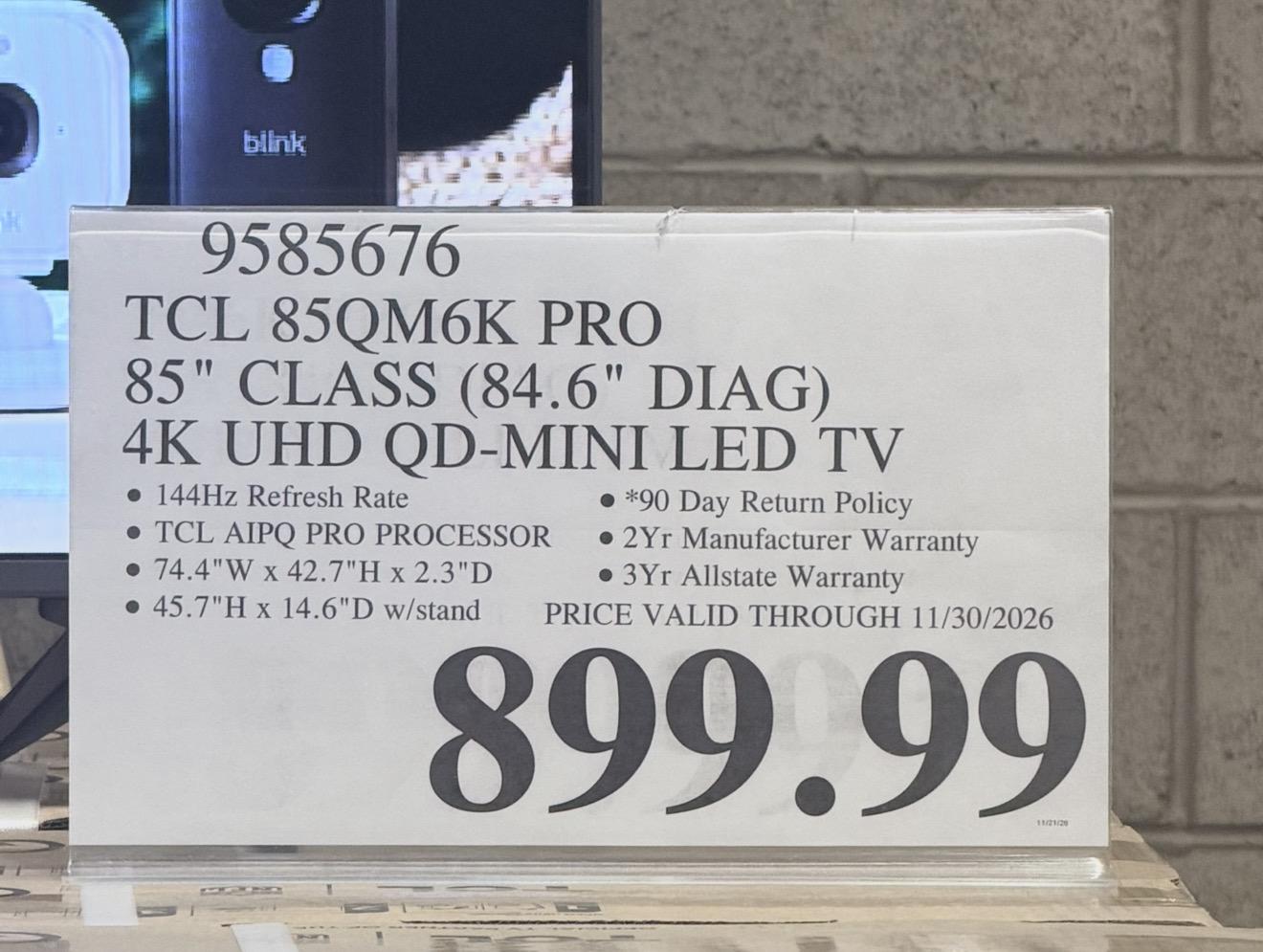
Costco deal right now , worth it???
43
Upvotes
I am writing this as a public service, particularly for older consumers and anyone who may not have the time, resources, or confidence to challenge a manufacturer's warranty findings.
My sister and I are elderly women with accents. We also happen to have extensive professional backgrounds in engineering, business, and quality management. We are accustomed to asking questions, documenting problems, and challenging questionable procedures.
Even so, our experience with a TCL television purchased from Costco has been deeply troubling.
Here is what happened.
I purchased a 75-inch TCL television from Costco in December 2025. After approximately five hours of total use, the screen suddenly went completely black during normal viewing.
I filed my warranty claim on September 16, 2026.
For more than two months, I dealt with repeated requests for photographs, videos, receipts, and documentation, including information I had already provided.
Eventually, TCL approved a refund because comparable replacement televisions were unavailable.
TCL instructed me in writing to mark the television's serial-number sticker "VOID" as part of the refund process. I followed those instructions.
Then came a technician's visit on November 21.
This is the part I particularly want other consumers to know about.
The technician spent nearly an hour in our home. During approximately the first 20 minutes, he focused on what he described as a blue line on the screen. During the following 20–30 minutes, he concentrated almost exclusively on the lower-left corner.
Although I offered to move a desk so he could inspect the entire television, he declined.
My sister was standing immediately beside him. She states that she witnessed him making scraping or scratching movements against the screen, including at its outermost lower-left corner, while holding keys. She became alarmed and intervened, demanding to know what he was doing.
I was farther away and did not have an unobstructed view of his hands, but I clearly remember her protest.
The technician subsequently alleged that the television had physical damage.
We dispute that finding and have requested a formal investigation. We do not know whether his actions caused damage, and I am not suggesting that his intentions have been established.
He also questioned why the serial-number sticker had been marked VOID, expressing disbelief that TCL had instructed me to do so. Fortunately, I have TCL's written instructions.
Why am I sharing this?
Because I trusted Costco.
I assumed that purchasing a television from a retailer with Costco's reputation for customer service meant I could rely on a fair and reasonable warranty process.
Instead, I found myself dealing with a prolonged claim, a disputed inspection, and the need to assemble detailed evidence to protect my interests.
My sister and I were able to challenge what happened. But imagine an older person living alone, someone who is intimidated by technical explanations, someone who speaks English with an accent, or someone who simply cannot spend months pursuing a warranty claim.
How would that person challenge a technician's assertion that a television had been physically damaged?
My advice before any warranty inspection:
My question to Costco is simple:
Does Costco hold the manufacturers and service providers associated with its products to the same customer-service standards that its members have come to expect?
I have submitted a formal complaint to Costco, supported by photographs, TCL correspondence, and my sister's signed eyewitness statement. I am awaiting a substantive response.
I am not asking anyone to accept my conclusions without evidence. I am sharing our experience so that other consumers can protect themselves before a disputed inspection becomes their word against a technician's report.
Costco members deserve a warranty process they can trust.

has anybody encountered an issue where local dimming does not work as it does when watching movies/yt videos? I've been playing GTA, and when character dies you get the famous WASTED screen. On my C7K local dimming is set to highest, and this wasted screen is should be an easy task for it and whole background should be completely black, but the whole backlight is turned on and it gives greyish/milky black colour instead.
Watching the clip of that same screen on youtube gives much better contrast that almost looks like oled, but native game looks like cheap LED.
any help?

I bought my TV last year of June, it is a QM6K and I've gotten these dirty spots / smudges on the screen... initially I thought it was just dust or somebody touching the screen. I tried wiping it down with a microfiber cloth and it just doesn't seem to go away. It is not that noticeable while watching movies. But it gets pretty annoying while gaming or while watching videos with Sky (grey colours) in it.
Is there a fix for this or should I go for replacement as it is still under warranty?
I've heard the service is pretty shit, y'all got any suggestions?
Country: India.
r/tcltvs • u/Gandyredevil • 3h ago
Hello all,
I am unable to decide between these 2 TVs here for my living room. Most use is watching movies, sports and occasional casual gaming.
The distance from the couch is ~10ft
r/tcltvs • u/FL_Couple95 • 1h ago
I have a TCL R646 that I purchased in 2022, along with the 5-year Geek Squad Protection Plan through Best Buy. The plan expires in March 2027, so I recently opened a service claim.
I’m noticing some screen uniformity issues, including a mild dirty screen effect, particularly noticeable during certain scenes and camera panning. There’s also some inconsistency in gray uniformity across the panel.
I wouldn’t say the TV is unusable, but the picture quality isn’t quite what it used to be.
I have Geek Squad scheduled to come out next week. For anyone who’s gone through this process, how thorough are their inspections? Do they typically run uniformity tests, inspect the panel, and evaluate whether the issue falls outside normal panel characteristics?
Also curious how these situations are generally handled. Is panel replacement typically the first course of action, or have people had TVs exchanged when repairs aren’t practical?
For those who have successfully gone through this process, is there anything I should specifically mention or demonstrate during the inspection to make sure the issue is properly documented? Any particular tests I should ask them to run, things I should point out, or advice on navigating the claim so it has the best chance of being approved if the panel is genuinely defective?
r/tcltvs • u/Legitimate-Peanut135 • 5h ago
Hey guys,
I have a standard PS5 connected to a 65-inch TCL C745 QLED TV, and I’m having some frustrating visual issues.
I first noticed this in Cyberpunk 2077, and now I’m experiencing the same thing in GTA 6. The colors look a bit washed out and the overall image feels dull. Colors are not vivid as in the trailers or other youtubers videos. Even during daytime, areas without direct sunlight look too dark, while night scenes are almost pitch black. Another issue is that reflections on the ground, especially neon lights and other bright surfaces, look really grainy and noisy. The actual light sources look fine, though.
What’s confusing is that GTA 6 gameplay videos I watch on YouTube look much more vibrant and visually clean than what I get on my TV. (Even the ones with standart ps5)
I’ve tried changing pretty much every setting on my TV, PS5 and in-game, including HDR on and off, but nothing seems to help.
Has anyone experienced something similar or have any idea what might be causing this?
r/tcltvs • u/Naive-Coat2351 • 2h ago
I have a qmk6 pro and have been toying with settings on my TV , in game and on my ps5 for a while now and after some trial and error I believe I have gotten this game to play really smooth as if it's constantly running at 40-45z I had this issue where the game would jutter a lot at Jason's house and a few other areas and during intense gun fights but now it all runs so smooth, below is what I did (neatly summed up with the help of AI) I know it's a very specific but I'm pretty sure most of the newer tcls can pull this off.
On PS5:
• Turn off VRR & 120Hz Output: (Settings > Screen and Video > Video Output). VRR clashes with TCL's Motion Clarity at 30 FPS and ruins the frame pacing. Locking the output to a standard 60Hz signal gives the TV a steady rhythm to smooth out.
• Turn off HDCP: (Settings > System > HDMI). Stops tiny HDMI handshake hiccups when the game streams dense safehouse zones. (Just remember to turn it back on if you use Netflix/YouTube)
On TCL TV (in Game Mode):
• Set Motion Clarity to Custom: (Picture > Advanced Settings > Motion).
• Adjust Judder Reduction to 5 (keep Blur Reduction at 0). Maxing it out makes the TV hallucinate broken frames when panning past porch railings and doorways.
• Check your TCL Game Bar to confirm it reads 60 FPS and VRR: Off.
In-Game:
• Keep Motion Blur around 4-6 instead of 0 so the TV's processor doesn't overreact to minor frame dips.
There is no noticeable input lag or anything usually associated with messing with motion clarity, and also make sure your TV isint running any extra processing like enhanced shadows or different HDR modes, keep the image on standard with HGIG turned on
r/tcltvs • u/mathdebatea • 2h ago

Any help would be appreciated on checking panel time.
r/tcltvs • u/jackburtonexpress • 2h ago
Bought this last week, incredible for gaming, and have enjoyed most movies and tv.
When watching sports or through YouTube, there’s an insane motion blur on the ball and the players moving round.
I’ve read the out of the box settings aren’t that great, but I’m not sure what I should be changing. I guess specifically sports is the main problem I’m finding. Is there any universal settings I should be using / changing for all things to do with this TV, as I feel I’m probably missing something
r/tcltvs • u/Unclesalty72 • 2h ago
I bought a newer TCL Roku tv a while ago and recently the sound will go out when I use my HDMI ports for my gaming consoles. Anyone else have this issue and know of a fix?
r/tcltvs • u/lukaszcichocki • 3h ago
r/tcltvs • u/Dont-believe-the-MSM • 9h ago

Recently bought a 50c7k and the colour seems off. The reds are showing as very dark almost maroon and skin tones don’t look right does anybody else have this issue? When I take a picture with my phone it looks slightly more red on the photo than in real life but still darker. Have also tried the colour test videos on YouTube and they look considerably different to phone screens and even more basic tv systems. I’ve tried a lot of suggested settings from Reddit but I just can’t seem to get it to be right. Skin tones also seem off check ant and dec they look very pasty.
r/tcltvs • u/EscapeEmbarrassed164 • 4h ago
Honest reviews on this TV anyone? I just got the 85”
Coming from an old 2019 Samsung TV.
And any settings you guys recommend, I know I’ve read a lot on having to do that right off the bat.
But please give you your honest opinions. My living room is not that bright since I have blinds that make the room dark and at night it’s SUPER dark. So hopefully I made a good investment
r/tcltvs • u/Electrical-Foot9276 • 4h ago
In late 2023 I bought my mom a TCL TV from Best Buy. The one with DK Metcalf on it. It's already has a line going through it and blue and green colors burning through. Is there any type of manufacturer warranty to be redeemed? Crazy 3 years and it's already looking like trash.
Can the TCL A400U pair with the TCL Z100 speaker(s)?
I'm considering buying the 98-inch TCL QM7L Pro, but I'm concerned about its brightness in a bright room with large windows and lots of daylight. I want to know how well it handles reflections, glare, HDR highlights, and whether the picture remains bright, vivid, and enjoyable during daytime viewing without needing to close the curtains. I'd especially like experiences from owners rather than just advertised brightness specifications.
r/tcltvs • u/Slow-Internal-592 • 5h ago
r/tcltvs • u/testmast • 5h ago
I bought a TCL 50Q7C TV, and I'm having an issue with subtitles.
Whenever I play movies from a USB flash drive, subtitles automatically appear, even though I don't want them.
I've checked Settings → Accessibility → Subtitles, and the option is already turned off.
Interestingly, subtitles don't appear when I play the same movies on my PC.
How can I permanently disable automatic subtitles when playing videos from a USB drive?
Thanks
r/tcltvs • u/Cool-Veterinarian477 • 23h ago

I mainly use my TV for watching movies, anime, TV shows, and occasional gaming. Picture quality is my biggest priority.
My priorities:
I know the QM8L is the higher-end model, but I’m wondering if the picture quality difference is really worth an extra $500.
For anyone who owns either TV or has compared them side by side:
Which one would you personally buy, especially for movies and anime, and why?
r/tcltvs • u/BigandTallGuy • 6h ago
I currently have a Vizio PQ65-F1 in our living room and I'm considering replacing it with an 85 inch TCL QM7L Pro from Costco for black Friday. The Vizio is on its last legs with signs of picture degradation
This past year I got a Hisense AX700 5.1.4 and it doesn't seem to work well with the Vizio and the connection drops (sometimes just a noticeable but quick drop, and other times I need to power cycle the soundbar and tv). Can I expect better performance of the soundbar with the TCL tv?
I'm also using an Onn 4k pro 2 (2026 model) for streaming with the projectivity launcher.
I also have a TCL 55R613 In our master bedroom that was built in 2019 and is still going strong like a champ, although I don't use the built in Roku interface anymore Because it's gotten too bloated and slow (except when watching TV through the antenna). been very happy with that TV overall
r/tcltvs • u/GreyDusted • 1d ago
I went into Best Buy to buy the 75” qm8l for $1500, and ended up walking out with a QM9K 65” for $540, the app shows the QM9K 65” for $1,599 and no it wasn’t an open box deal as far am I’m aware it was brand new. Also, loving the TV the brightness and contact is such a step up from the Walmart Vizio I got last year.
r/tcltvs • u/AdriftMosquito • 6h ago
Hi all!
Looking to get a new TV and I keep getting suggested TCL TVs. Mostly used for every day use including TV/movies as well as gaming (GTA specifically)
Max budget is around £700. Any ideas?
Thanks!