r/uBlockOrigin • • 21h ago

News uBlock Origin (uBO) 1.77.* Announcement Thread

439 Upvotes

This version (plus prior minor versions) come with important security updates. Click the GH release link for more details.
Edit: Or see the pinned comment below.

Changelog:

https://github.com/gorhill/uBlock/releases/tag/1.77.0

https://github.com/gorhill/uBlock/releases/tag/1.76.6

https://github.com/gorhill/uBlock/releases/tag/1.76.4

https://github.com/gorhill/uBlock/releases/tag/1.76.2

Visit GitHub releases page for more information.

Extension will be auto-updated after browser restart! (when available for your platform)

If you want to update manually:

  • Do NOT use links from the release page's "Assets" section - these are not signed.
  • Use your add-on store or links in release description on the GitHub releases page when they are available.

    • Firefox will have a (signed) direct install link. Other browsers will link to their uBO extension store pages.
  • In some cases, installation may be blocked until browser restart. This is protection against accidental mid-session reloads, Issue #717.

Or force an update via Manage extensions:


When will my browser update uBO?

  • Firefox

  • Chromium

    • Install the signed .crx file from GitHub releases, if your browser still allows MV2 installs. Chrome no longer does.
    • Once installed, it should then update automatically for future releases. If the browser still supports MV2.
  • Edge

    • Edge Add-ons - Review pending.
    • Warning: importing a profile from Chrome may cause issues.

      • You may need to reinstall uBO on Edge to fix this.
      • You can transfer your uBO config by creating and then restoring a backup at the bottom of uBO's Dashboard > Settings.
  • Opera

  • Brave

    • Brave now Self-Hosts uBO. It installs via a special setting and updates automatically or when prompted via the Extensions' Developer mode. After Brave updates the file on their servers.
    • If you installed it via CWS, it's best to make a backup and install the self-hosted version instead.
    • Brave installation video.


Previous announcement thread: https://www.reddit.com/r/uBlockOrigin/comments/1xr3euz/ublock_origin_ubo_176_announcement_thread/

Posting Guidelines | Subreddit Rules

Chromium - end of support megathread.

Please report YouTube Issues on Github: uBO | uBO Lite


r/uBlockOrigin • • 14h ago

Waiting for feedback Problems with some sites using block element

3 Upvotes

Updated to v1.77.0 today with latest Firefox nightly 163.0 and some sites do not respond when right clicking the context menu Block element. Sometimes it works once then stops.

An example is here:

https://eu.startpage.com

With Firefox 128.0 there's no response to any site at all, reverting to ublock version 1.76.4 resolved it. Same with the nightly.

Are there possibly new settings or changed settings in these newer ublock versions?


r/uBlockOrigin • • 17h ago

Bug Number of items block over icon displaying even when disabled in settings

2 Upvotes

I am on Firefox 161.0, Ubo 1.77.1bo and in settings I have the following unchecked

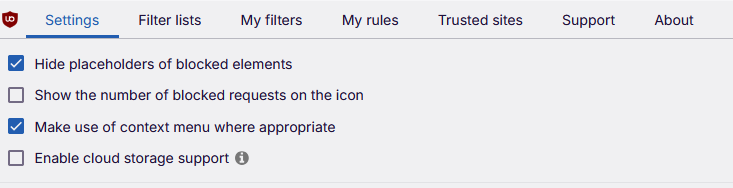
Show the number of blocked requests on the icon

However they are appearing since the update to 1.77.1bo. https://i.postimg.cc/nV29gZFg/1.png https://i.postimg.cc/YqSLwV0d/2.png

uBlock Origin: 1.77.1b0
Firefox: 161
filterset (summary):
 network: 251407
 cosmetic: 105390
 scriptlet: 48674
 html: 4429
listset (total-discarded, last-updated):
 removed:
  plowe-0: null
 added:
  https://raw.githubusercontent.com/xx/MyBlockLists/refs/heads/master/ModifyTwitter.txt: 65-0, 1d.18h.48m
  https://raw.githubusercontent.com/xx/MyBlockLists/refs/heads/master/UBOXPI: 633-19, 1d.18h.48m
  https://raw.githubusercontent.com/xx/MyBlockLists/refs/heads/master/yahoocomplete.txt: 438-69, 1d.18h.48m
  adguard-spyware-url: 2759-128, 5d.20h
  fanboy-cookiemonster: 48545-127, 5d.19h.10m
  ublock-cookies-easylist: 5875-115, 5d.19h.11m
  fanboy-social: 18074-14, 5d.19h.10m
  ublock-annoyances: 4797-38, 23m Δ
 default:
  user-filters: 2-0, never
  ublock-filters: 55643-78, 23m Δ
  ublock-badware: 10626-17, 23m Δ
  ublock-privacy: 4173-18, 23m Δ
  ublock-unbreak: 2906-34, 23m Δ
  ublock-quick-fixes: 579-29, 23m Δ
  easylist: 86184-127, 23m Δ
  easyprivacy: 57319-23, 23m Δ
  urlhaus-1: 112175-2, 1h.18m
filterset (user): [array of 2 redacted]
trustedset:
 added: [array of 72 redacted]
 removed: undefined
switchRuleset: undefined
hostRuleset: undefined
urlRuleset: undefined
userSettings:
 advancedUserEnabled: true
 showIconBadge: false
 userFiltersTrusted: true
 webrtcIPAddressHidden: true
hiddenSettings:
 autoCommentFilterTemplate: unset
 autoUpdateAssetFetchPeriod: 10
 autoUpdateDelayAfterLaunch: 10
 extensionUpdateForceReload: true
 filterAuthorMode: true
 trustedListPrefixes: ublock- user- easylist-
 updateAssetBypassBrowserCache: true
 userResourcesLocation: [redacted]
 cacheStorageAPI: indexedDB
supportStats:
 allReadyAfter: 443 ms (selfie)
 maxAssetCacheWait: 169 ms
 cacheBackend: indexedDB

r/uBlockOrigin • • 21h ago

Solved (ad-shield) hallo-muenchen.de - Ads, reappearing video overlay, and high RAM usage (endless block loop)

2 Upvotes

Hi everyone,

I am experiencing several unblocked ads, a persistent video overlay, and severe memory/CPU spikes on hallo-muenchen.de.

Exact URL:

https://www.hallo-muenchen.de/gewinnspiele/gewinnspiel-weihnachtsgschicht-auf-boarisch-94595915.html

Issues observed:

In-article ads: Ads are loading in the middle of the page under the section "Das könnte Sie auch interessieren" (Recommended/Related articles).

Reappearing video overlay: When scrolling down, a floating video overlay appears. Clicking the "X" closes it, but a new video overlay pops up again after just a few seconds.

Empty ad container: At the bottom of the screen, an empty sticky/tab container labeled "Anzeige" (Advertisement) remains visible.

Bottom ads: Additional ads are loaded at the end of the article, right before the "Kommentare" (Comments) section.

High RAM usage / Request loop: The uBO blocked request counter climbs rapidly (300+ and counting), causing Firefox to freeze for 5–10 seconds and spiking memory usage by over 4 GB on a single tab.

Setup & Configuration:

  • Browser: Firefox ESR 153.7
  • uBlock Origin: 1.76.6 (default settings, no other adblockers installed)
  • Enabled Filter Lists:

    • uBlock filters (including Annoyances)
    • EasyList & EasyList Germany
    • EasyPrivacy
    • Online Malicious URL Blocklist
    • Peter Lowe’s Ad and Tracking List
    • AdGuard / uBO – Cookie Notices

Could someone please take a look at this? Thanks in advance!


r/uBlockOrigin • • 22h ago

Answered 1.76.6 seems to break Firefox esr

2 Upvotes

The latest uBO (1.76.6) seems to break esr Firefox (115.*) installations. Attempted page loads just spin forever unless uBO is disabled. Worked fine till this latest update.


r/uBlockOrigin • • 20h ago

Fixed adblock detected on caseyseemavoid.com (voe.sx) using ublock origin with default filters in firefox nightly

1 Upvotes

example: https://caseyseemavoid.com/ksupjadhhi6o

worked fine 3 days ago, not anymore


r/uBlockOrigin • • 21h ago

Solved Help blocking an unpickable black bar

1 Upvotes
https://www.cinenerdle.app/

The footer of this website has a 'Support this site' banner which I can block, but leaves behind a black bar that I can't select with the picker tool.

On Firefox, but tried on chrome with the same result.


r/uBlockOrigin • • 14h ago

Unable to reproduce Any way to prevent the scrolling down when clicking anywhere in the lower-half of the screen at YTDown?

0 Upvotes

I'm using YTDown for downloading YouTube videos and it does the job pretty well. It just got a recent change in the UI design. However, when I click anywhere at the lower half of the screen, it suddenly scrolls down, which can be really irritating. Is there a way to block this behavior without disabling the scripts of the site entirely? I couldn't find the source of this weird behavior. Thanks in advance!

Here's the site: https://app.ytdown.to/en38/