General Post GTA VI on my Sony Vaio VGC-LV150J

3
Upvotes
r/vaio • u/RaduTek • Jul 28 '26
I want to highlight a forum post from the 4PDA thread on the VAIO P device, about replacing capacitors on the VAIO P motherboard to fix the power instability issue when the laptop is connected to AC power.
My unit (VGN-P31ZK) suffers from this issue, as well as others that have been posted on this subreddit. I have yet to attempt this fix on my unit, but I do plan on doing it once I get the parts and required tools.
All credits go to DJ_URAN over on the 4PDA forum, for finding this out and writing a nice guide.
https://4pda.to/forum/index.php?showtopic=112652&view=findpost&p=96732441
DISCLAIMER: I used AI to make this translation since I don't speak the language. Refer to the original source for accuracy if possible.
From now to the end, a direct translation of the post:
It's well known that our little critter frequently develops one and the same typical problem: the machine stops turning on while the charger is connected, or it doesn't start on the first try, or it gets as far as the OS splash screen, then a black screen and a freeze... At the same time, running on the battery shows normal booting and operation. Another possible symptom of these "death throes" (in my case) that users most often encounter: freezes happen while the machine is cold. After several attempts to power on (once the motherboard warms up a bit), it starts successfully and you can work. But if you leave the laptop turned on and idle for a while, it goes to sleep, cools down, and when waking it from sleep the freeze happens again.
So what could the trouble actually be? Right: power supply. More specifically, worn-out capacitors on the motherboard (there's probably nothing else there that could wear out).
The capacitors' ESR rises, their capacitance drops. In short, power ripple increases and you get a freeze/no-boot.
Naturally, when running only on the battery there are usually no such problems. Because the PWM voltage regulators operate at a different frequency and from a "cleaner" source.
Link to MBX-187 datasheet / schematic (idk why OP calls it datasheet)
Let's look at the datasheet for the MBX-187 motherboard. We're interested in page 18:

We can see that the most current-loaded lines are +1.05VRUN (3.5A) and +1.8VSUS (3.5A):

Let's find out which capacitors are on these lines:
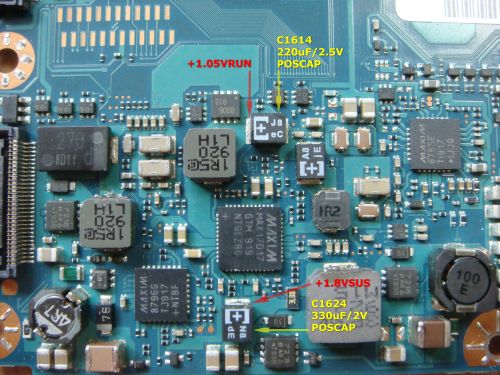
On the +1.05VRUN line there's capacitor C1614, rated 220µF/2.5V:

On the +1.8VSUS line there's capacitor C1624, rated 330µF/2V:

Notice that both capacitors are marked in the manual as POSCAP!
These aren't ordinary tantalum electrolytic capacitors, but polymer tantalum capacitors with very low ESR (around 0.015 Ohm).
In this case it's the POSCAP series (POlymer Solid CAPacitors) from Panasonic, size B2 (3528), which the manufacturer itself calls industrial-grade.

To pinpoint the "culprit" of the problem, ideally you'd need to replace each of these capacitors with a new one. But finding such an exotic part in my small town, naturally, wasn't possible. So I had to dig around for a long time in the depths of the household stash to find a replacement.
In the end, I managed to find a pair of solid polymer capacitors from NEC/TOKIN on a USB port board from an ASUS laptop:

Though their rating is 100µF/6.3V and the ESR should be significantly higher than the original low-voltage ones, they'll do for testing.
The ESR meter, by the way, showed 0.01 Ohm when checking these donor parts.
For the test I soldered these capacitors in parallel with the original ones. As a somewhat makeshift dead-bug style mount:
(a neater version - link to 4PDA thread showing a nicer cap install, also by DJ_URAN)


Observing polarity!
I cleaned the board of flux and put everything back together.
In the end, everything worked. No glitches or freezes at any temperature. Also, the chokes on these lines heated up less.
Of course, these capacitors need to be replaced with new ones. But they'd need to be ordered from trusted suppliers. And the price is "impressive." If you were to replace all the similar ones on the board, it would add up to a pretty penny. Specifically, these capacitors can be replaced with (the replacement for C1614 is highlighted in red, C1624 in blue):

Though, personally, I'd replace both of them with the ones circled in green :yes2:
P.S.
I'd also like to draw attention to the large capacitor C1508 on the processor's +VCPUCORE power line:


In some cases, it also needs replacing. Judging by the datasheet, it's an SPCAP — again from Panasonic, but this time a polymer aluminum electrolytic capacitor. Also with low ESR (0.0045 Ohm in this case):

Datasheet for the POSCAP series
Datasheet for the SP-CAP series
Datasheet for the MBX-187 motherboard
UPD: By the way, SANYO also makes similar capacitors
r/vaio • u/ShadowCodeGaming • Apr 13 '26
r/vaio • u/bitwarrior80 • 20h ago
I fixed up another early 2000s VAIO, this time an AMD variant from the FX series. It's built around an 800MHz Duron CPU, with 256MB of SDRAM and an ATI Rage Mobility M1 3D accelerator with 8MB VRAM.
The original hard drive was gone, so I upgraded to a 32GB SSD and installed Windows 98 SE. I couldn't find a recovery disc online, but the original OS was Windows ME, I'm OK with that. I located all of the correct hardware drivers anyway, so it's no big loss.
The screen's polarizer film was delaminating, so I replaced the whole LCD panel. I found a site with new old stock extremely cheap, and fortunately they had the exact panel I needed. The screen is brand new and super crisp.
I'll mainly use it for DOS gaming, but it's nice to have the extra horsepower for 3D games too.
r/vaio • u/Own-Objective-6446 • 4h ago
Hello.i have a vaio laptop.how can i turn on fn lock?
Kind of a longshot but I am looking for the recovery media for a VGC-RA825G. I have one that had a hardrive crap out before I could create recovery media.
r/vaio • u/unconnectedgloss25 • 6d ago

Thought i did take a pic while i clean it.
r/vaio • u/23-andrew-23 • 7d ago
r/vaio • u/Hz_Lolchik • 7d ago
Help! I have a Sony Vaio VGN-UX1XN. After reinstalling Windows Vista and installing the drivers, the main camera stopped working—it seems the system doesn't even detect it. I don't know what to do. Interestingly, when I installed Windows XP and the corresponding drivers, the camera worked fine! But after switching back to Vista, it stopped working again. Please help—what should I do?
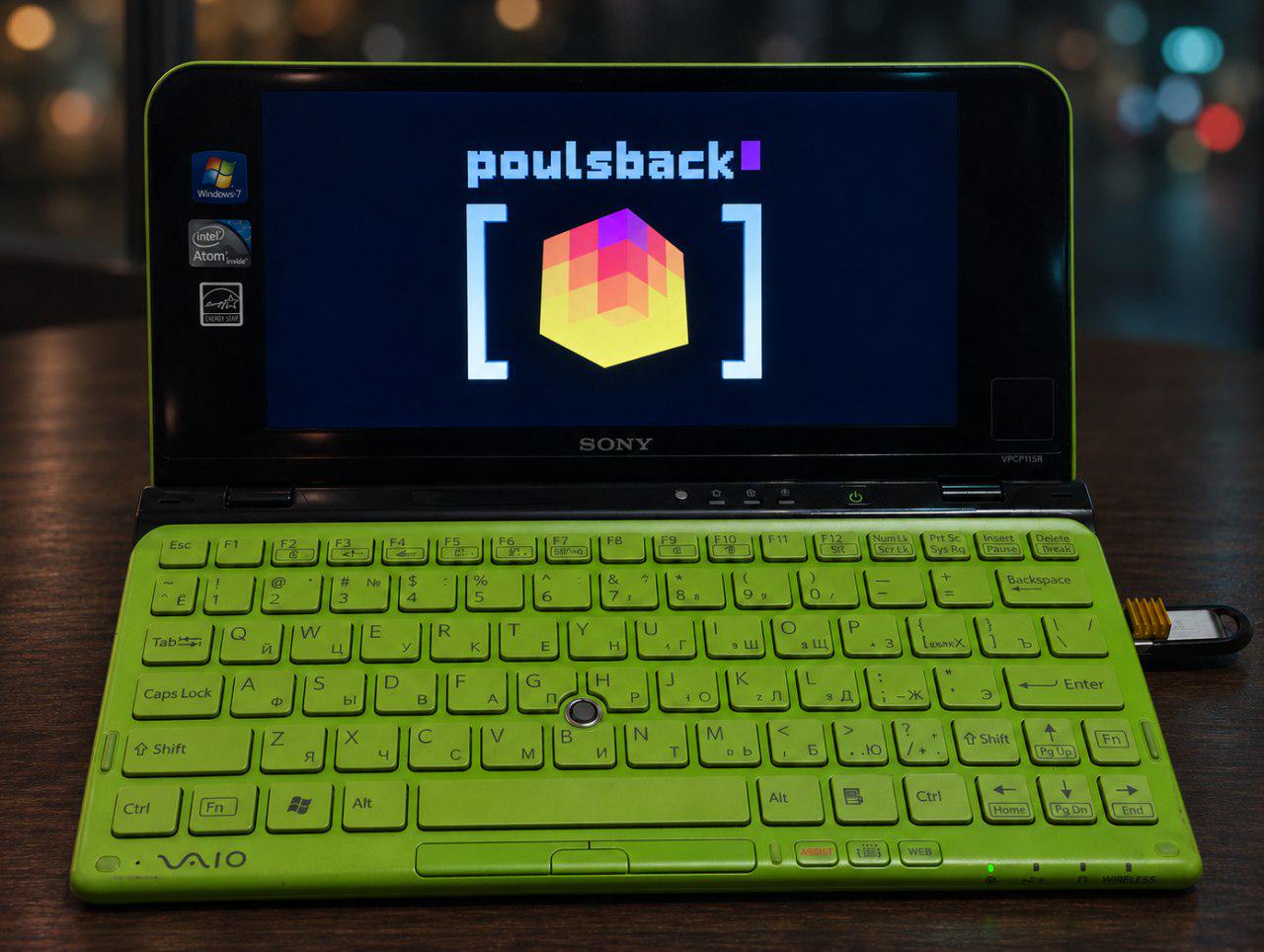
Hello again, r/vaio , r/SonyVaioP , r/umpc!
poulsback is our open graphics stack for the PowerVR SGX535 inside Intel GMA 500 (Poulsbo) and GMA 600 (Oak Trail): a kernel module, a Mesa Gallium driver and an Xorg driver.
The first public test build is out as a Debian 12 live USB stick. Nothing gets installed on your machine.
What you can do with it:
poulsback; your changes stay on the stick), or drop your own small builds onto the stick's FAT partition POULSBACK from any other computer.🎉 poulsback test stick updated: d8 (733adac4)
What's new (compared to d4 release):
glDrawTex🔥 New: the `poulsback` driver on its own (for Debian 12).
If you run Debian 12 i386 with the same kernel the test driver is built for (6.1.0-54-686-pae) and know your way around, you can try it on your installed system.Every system is different, so adapt the steps to yours, and make sure you can restore your system if something goes wrong. Reports are very welcome: boot Device report (the third boot entry), then post the -summary.txt and attach the .tar.gz here or in GitHub Discussions.
Boot the third menu entry, Device report. It runs about 12 minutes of tests and benchmarks, saves the results to POULSBACK and powers off. Paste the -summary.txt file into GitHub Discussions or our Discord, with your machine's make and model (keep the .tar.gz to yourself: it holds serial numbers).
Every new machine helps. ❤️
Tested so far on a Dell Inspiron Mini 12 (GMA500), a Fujitsu LOOX U / C50N (GMA500).
And a Fujitsu Stylistic Q550 (GMA600).
Other Intel GMA 500 / 600 machines are very welcome.
My new Vaio P (VPCP) is on the way home!
Some videos from my FMV U / C50N:
r/vaio • u/PANSIT022 • 7d ago
I'm trying to do a dual boot with Windows and Fedora but even if it's installed "correctly" my VAIO skips the Dualboot and starts Windows without asking for confirmation. How can I solve it?
r/vaio • u/E_D___B_A_N_G_E_R • 9d ago
S13 (VJS137) specs: https://vaio.com/products/s137/13-3/specification/
F14 (VJF143) specs: https://vaio.com/products/f143/14-0/specification/
F16 (VJF163) specs https://vaio.com/products/f163/16-0/specification/
Via:
https://kunkoku.jp/2026vaios13.html &
https://kunkoku.jp/vaio-f14-f16-2026.html
SX12 & SX14 are still using Core 100 series CPUs which are just renamed/"refreshed" Raptor lake CPUs originally launched in 2022, also used by the previous S13/F14/F16 models. Wouldn't be surprised if they'll also be upgraded to Wildcat Lake in the upcoming months.
r/vaio • u/Toolset2012 • 10d ago
Sony Vaio SVS13A25PXB
Carbon Fiber
256GB SSD
3RD GEN 17
2GB GT640M LE Nvidia Graphics
12GB RAM
r/vaio • u/Krlos_official • 12d ago

Woke up on time,
Mom packed me a sandwich,
Took Amtrak to work,
I'm heading to little Tokyo to grab a coffee before heading to work,
Honestly the day is going so great.
r/vaio • u/Solid-Account-1323 • 12d ago
Hi! So I just bought a used pink VAIO VGN-CS31S (PCG-3G2M) because I wanted a little nostalgic DVD/CD machine for my desk. Mostly for watching DVDs and listening to my CDs, nothing heavy. English isn't my first language so sorry if something sounds weird lol
It boots into Windows 7 fine, DVDs and CDs play, screen has zero issues and the pink case is in well enough shape.
The problems:
The plastic around the DC jack is broken (the case piece, not sure about the jack itself). The plug goes in but doesn't really stay, there's nothing holding it so it kind of slips out a little. And the tip of the plug gets pretty hot while using it, so I got scared and stopped using it for now. I don't even know how firmly it was supposed to sit when the case wasn't broken.
No sound from the speakers at all. Headphones kinda work though (from headphones, only one side has sound and it's weird? but sound comes out, especially when i move the cable or push it). Windows shows the volume meter moving so I'm guessing it's a loose cable or dead speakers?
Original battery (VGP-BPS13/S) still holds a tiny bit of charge, no idea how long it actually lasts.
I'm a CS student but I've never opened a laptop before and I don't really solder. I think this could be a good opportunity but I also don't trust myself. A local repair shop wasn't very helpful so I'm wondering:
Is this something I could realistically fix myself?
Can the broken case part be fixed somehow, like with epoxy?
How hard is it to get to the speaker cable?
Is it worth putting Linux on it or should I just keep Win7 offline and clean it up?
Has anyone restored one of these? What did you upgrade?
I know it's an old machine and I'm not expecting miracles, I just really love the color and i hope i haven't wasted my money :( I have a normal desktop pc and a laptop, I don't need this to do everything. I just want to know if it can be upgraded into like a nostalgic dvd player?
r/vaio • u/Status_Apartment_596 • 12d ago
r/vaio • u/frago21ps • 15d ago
So after 4000 hours the mod it's working great
Asus Rog ally motherboard inside Sony Vaio tap
r/vaio • u/OrganicTitMilk • 15d ago
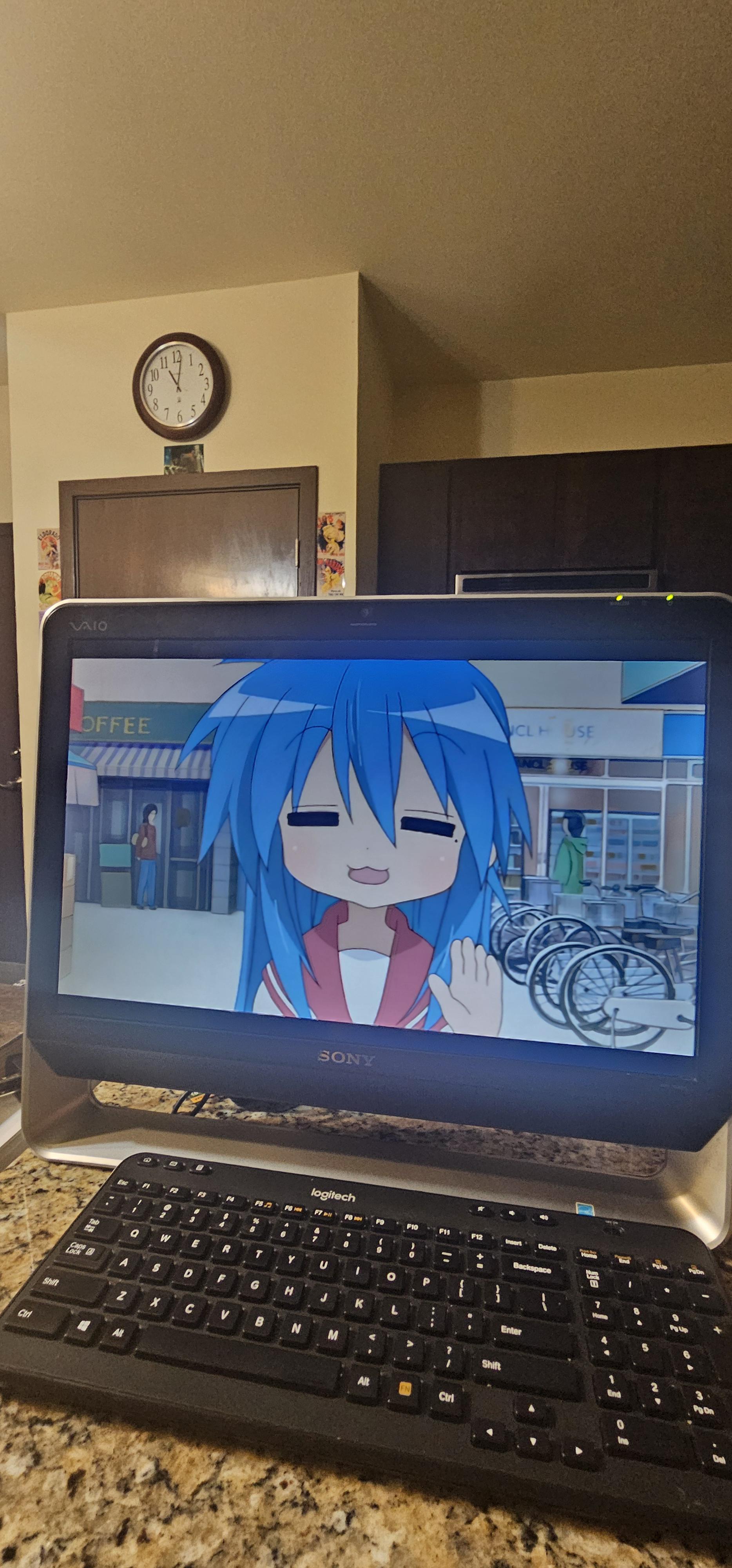
All in one @ goodwill for $4.99 ($22 ebay for power adapter). Back two usb ports are damaged from previous owner.
This guy's video helped me take off the back cover. Bezel plastic clips are broken here and there, also from previous owner(s).
Cleaned out a cacoon, hatched eggs, dust and reapplied thermal paste. Swapped out their HDD for an SSD.
Slapped Linux Mint 22.3 XFCE on it.
Had display issues of right hand side being cut off and the bottom of the display being off screen. This page helped me fix that.
Installed Brightness Controller, display was blinding.
Computer sees ethernet controller, Intel 82567V-2, but theres no driver available for it. Not sure why, tried following instructions from Intel's device page. Still wasn't able to get it working. Just gonna use wifi.
Basic office suite, internet browsing, music playing and 720p videos from Plex are done well. Youtube and multitasking kinda crunchy.
Fun little project over past few days. Not really sure what to do with this now...
Edit:
Already got bored of mint, so I put Vista on it. Had to burn vista onto disc for this, and got drivers from archive.
The ethernet driver still doesnt work, but thats fine. Overall a lot better experience, and a majority of videos i want to watch are on my home network. Now watching 1080p on vlc no problem. 4k not so much.