r/videography • u/justwhal • 16m ago
Feedback / I made this! first year iphone videographer
3
Upvotes
small snippet from a music video i made, what do u think?
r/videography • u/Mysterious-Bug-7530 • 1h ago
So I’ve been a videographer working at a news station for about 4 years. I make commercials, lifestyle content, documentaries, branding, etc. I get a few side gigs here and there to help support me.
I would love to go completely freelance. Like I said I get a few side gigs, but nothing ongoing or enough to support me on its own.
How should I best promote myself or what steps should I start taking to get to a point where I can be completely freelance?
r/videography • u/ConsumerDV • 3h ago

This is 8-bit 4:2:0 Rec 709 @ 28 Mbps. Yes, I should have used more light and set WB properly. Still, does not look half bad, IMO.
r/videography • u/Exall77 • 5h ago
I just landed a corporate gig for a multimillion-dollar corporation. I'm a drone pilot, amateur videographer, with a background in professional photography for context. I'm running this solo, one cam, one operator for the whole thing.
It's a two part gig, the first part which mainly involves some quick drone work and photography that I'm pretty comfortable pricing.
The second portion involves me filming short interviews of approximately 4-8 people consecutively (one subject at a time) along with photography at the facility. My client wants it fully edited, color graded, and ready to go for trade shows, social media, and web. We are still hammering out details and scope along with the duration of the shoot. They also want full rights to the footage and this is part of where I'm absolutely lost.
I've always done work for clients that allow me to utilize my own work promotionally, but this time they want an NDA with full rights.
With so many different deliverables; the shoot itself, the editing, and the copyright I am completely in over my head as far as pricing goes. I am excited and comfortable doing the work that they're asking, but I have seriously no clue what to charge for the second portion. This company is extremely successful, and they're the best in the country at what they do. Money is not an issue for them, and I have connections within the business that gave me the credibility to get the job in the first place. But I want to get hired again, so I'm really not trying to fleece them either.
I would also take advice on pricing the first. I'll mainly be flying my DJI Mavic 3 for video and stills, and shooting photos and grabbing some quick b-roll with my Nikon ZR. I'm not looking for gear advice, or even execution advice. Simply pricing.
Thank you in advance, and I hope this is the right thread for this!
r/videography • u/Old-Ingenuity-4901 • 5h ago
Hello everyone, I am about to start filming video for a high school basketball team and other multiple teams but would like to know which budget friendly cameras are worth to explore and a potential buy. Thank you!
r/videography • u/Gabee42 • 6h ago

r/videography • u/Halfbloodprince_1992 • 6h ago
Hi fellow travel photographers and filmmakers!
I travel quite a bit, and before visiting a new destination, I usually spend a lot of time researching photography opportunities and planning my shoots.
I collect photos and video screenshots for reference, add notes and sketches, mark camera angles and compositions, and even plan potential drone flight paths. I used to do all this in a physical scrapbook with printed photos and handwritten notes, which I actually loved!
But now I'd like to go completely paperless and find an app or software that can bring everything together in one place, ideally something I can easily access while I'm out shooting.
What tools or apps do you use for this kind of detailed travel and photography planning? I'd love to hear about your workflow and recommendations!
r/videography • u/alemonspot • 7h ago

Shot on Fx3 and Nikon Ai-s lenses
r/videography • u/DiamondAcePlace • 7h ago
So I own 2 MicroSD cards (both from SanDisk).
One is the SanDisk Ultra (Silver) with 512GB of storage. The other is the SanDisk Extreme (Gold) with 128 GB of storage. (Don't ask me how/why I own two so different MicroSDs... the answer is I don't know).
I'm now wondering which one to (primarily) use for storge from cameras that aren't my phone. From what I can tell (in some basic research) the "gold" card is faster/better, but the "silver" (in my case) has far more storage.
If anyone has experience with this, which one would you favor? The faster one with less storage (it's still 128 GB, I get that), or the "sower" one with 4x the storage space?
r/videography • u/Desperate_Sock9951 • 7h ago
Band mom here. I record every performance, but there's always at least 1 person talking in the background that gets picked up in the videos. Would one of those noise reduction microphones with the fuzzy top i see everyone using help? Or would it do the opposite & try to focus on the chatter instead of the band? I'm recording on a Samsung S25
r/videography • u/nxboecket • 8h ago
I've been into photography for a few years, mostly taking photos of my girlfriend, so I know a little about lighting. But I've never really messed around with a proper video lighting setup. She's planning to start streaming from home and I offered to help her get everything set up. Turns out I know a lot less about continuous lighting than I thought lol. Did some reading and came up with this basic three-point setup. I started looking at Godox since it's one of the names I already knew from photography and keeping everything in the same app sounds a lot easier. Right now I'm thinking an LE300R with a softbox for the key, an LP600R for fill, and maybe an ML100R behind her for some color, but I could be totally overthinking this.
My main concern is not having a harsh light shining in her face for hours. It'd also be cool to have some colors or lighting effects in the background so she can switch things up depending on the stream.
Does this setup make sense? Would you change the light placement or use a different type of light for any of these positions?
r/videography • u/nxboecket • 8h ago

I've been into photography for a few years, mostly taking photos of my girlfriend, so I know a little about lighting. But I've never really messed around with a proper video lighting setup. She's planning to start streaming from home and I offered to help her get everything set up. Turns out I know a lot less about continuous lighting than I thought lol. Did some reading and came up with this basic three-point setup. I started looking at Godox since it's one of the names I already knew from photography and keeping everything in the same app sounds a lot easier. Right now I'm thinking an LE300R with a softbox for the key, an LP600R for fill, and maybe an ML100R behind her for some color, but I could be totally overthinking this.
My main concern is not having a harsh light shining in her face for hours. It'd also be cool to have some colors or lighting effects in the background so she can switch things up depending on the stream.
Does this setup make sense? Would you change the light placement or use a different type of light for any of these positions?
r/videography • u/Intrepid_Coat_5409 • 9h ago
I'm a professional photographer for 20 years, and the last year I started filming. It was by accident, I filmed a music video, and I liked it. Since then I filmed several videos and all of them are in 16:9. But I noticed different aspect ratios on YT, and I prefer this one: https://www.youtube.com/watch?v=-C8tUtthP2g
Is that 1.90:1? Is it good for general use for music videos, fashion videos etc?
I have Lumix S5IIX, should I set it to film 1.90:1 by default?
r/videography • u/UnableSite6745 • 10h ago
Filming from the side of the pitch for two-time FA Cup winners Bury FC, when one of their players tumbles into the tripod after making a cross...
Would you be annoyed if you were the player falling into a tripod. I personally wasn't annoyed from a videographer POV, but maybe that would be different if something had broken!
Disclaimer: I was as far back from the pitch as possible, much further than the photographers/regulations require. No damage to equipment.
r/videography • u/Dandanbingobam • 10h ago
Hi everyone,
I’m a teenager with a strong passion for filmmaking and cinematography, and I’m looking for advice from working professionals on what my next steps should be.
Right now, I shoot on a Panasonic AG-AC8 shoulder camcorder. Since it has a fixed lens and a smaller sensor, I want to focus on mastering the fundamentals I can control—like composition, camera movement, and lighting—rather than worrying about upgrading my gear.
For those of you working in the industry:
Thanks in advance for any insight you can share!
r/videography • u/Alkh_Nowakowski • 17h ago
Around a year ago I bought myself a nisi swift VND and 4 stops ND filters, and while I love them, I have one problem:
I'm a automotive videographer, and a lot of time I record cars in motion, ie. Drifting, and up close, which sometimes can flung rocks or other debris my way, and I really wouldn't like to lose an expensive filter that way, so I went looking for a clear cheap filter, that would work just as a shield
I looked through nisi's website and I cannot find a clean filter, is there maybe an alternative that anyone knows of? It would be great for it to be in swift system so I can quickly put it either on VND directly or on 4stops ND filter
r/videography • u/entresssol • 19h ago
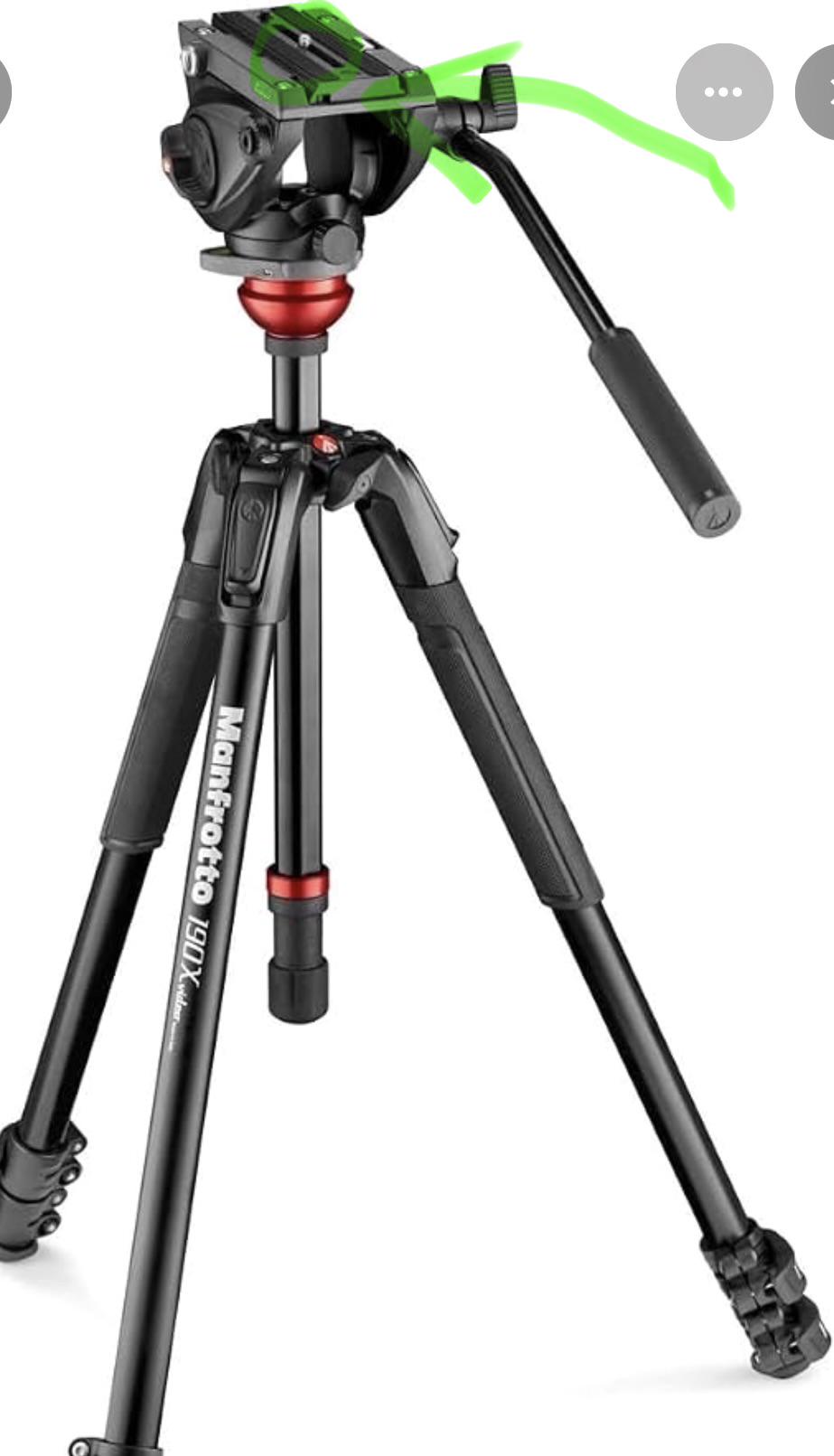
Hello! I’m not really the most technologically savvy guy out there but a friend of mine lost the camera mount screw in a Manfrotto 190x tripod that we borrowed and I was looking to get it replaced. Does anyone know what its dimensions are and if this is something I can buy a replacement of online? Thanks a bunch!
r/videography • u/dontevenknowwhat1904 • 20h ago
I used an app to emulate this
And yes the original video was recorded on tape
r/videography • u/RivVidProd • 1d ago

TLDR; I recently shot & edited this short documentary, and I'd love some constructive criticism & feedback.
If this isn't allowed, feel free to delete.
I've been doing videography since 2020 - mostly freelance corporate/event gigs. I've wanted to make documentaries the whole time, but never actively pursued. A new mentor recently challenged me to create something by the end of the year, and this is what was born!
I have several notes & areas of improvement that I'd like to see from myself next time, but I'm curious to hear what y'all have to say. I'm also happy to answer any questions you have about how I shot it, what my thought process was, etc.
Thanks in advance for your feedback!
r/videography • u/A-Scorpion • 1d ago
Hi everyone!
I recently started working as a videographer, mainly filming in nightclubs and at electronic music events. I'm still relatively new to this kind of work, so I'm looking for some advice from people with more experience.
I'm currently using a Lumix S1II, and I'd love to hear the best camera settings when shooting in clubs, with low-light environments.
thanks
r/videography • u/hollywood_cmb • 1d ago

Hey all. Not really any specific point to this post other than to share what I built and use for a teleprompter setup. I don't necessarily LIKE using prompters, but sometimes you're dealing with a client who will be better if they use one. Alternatively, sometimes you might find someone who wants a "Zoom"-style production with real cameras, sound, lights, whatever and this setup can work for that as well.
I've never liked prompters where you have to mount the camera to the prompter's bracket. I feel like the only ones in my budget are mostly that style, and that style of setup severely limits your choice of camera, lenses, etc. Some of them are also rather janky to set up. I prefer something more modular that I can add onto my existing camera rig and tripod setup easily.
I found these OneTakeOnly prompters that have a light stand version, and this particular one I bought used on Craigslist for something like $100. I just found 2-3 more on eBay for around $125, so that seems like what you can find them for used. They're made for iPads, and while I do own an iPad I don't like having to control the iPad when it's laying in the tray. I saw a video where another filmmaker got a portable monitor from Amazon for his, and so I did the same thing with this 13.5" monitor. The monitor is powered by a single 6ft USB-C 4.0 Thunderbolt cable which also carries the signal. I can use my iPad to control it, or better yet I can use my MacBook Pro. In theory, anything that will output a display signal over USB-C should work. The monitor itself nearly fills the tray, but there's just enough room for a middle angle adapter, which allows the cable to run flat on the side of the monitor and avoid a protruding connector.
For basic teleprompter software, I'm using an app called Prompt+, which has a one-time fee of $20 to own it. The app works on my iPhone, iPad, and MacBook Pro. It has the necessary mirror and flip options for the text and a handful of other useful features. One of my favorite features is you can use another device to control the app. So if I'm using my MacBook Pro with the prompter, I can set up my iPhone as the "remote" so the client can control the scroll silently from their fingertips out of frame. I've also set up the app to work with this Bluetooth presentation remote as an alternative control option.
I think that pretty much covers everything. My favorite thing about this setup is that the monitor, cable, remote, and a small bottle of glass cleaner fit inside the prompter, which goes in a zip case the same size as a laptop zipper case. So the entire setup is basically a cheap Westcott light stand and the prompter case.
I keep a mattebox on my camera rig that uses a step up ring to clamp to the lens. I simply remove the mattebox and then the step up ring helps to hold the bungee shroud fabric on the lens. I also keep a baby pin to 3/8" adapter on the light stand, so that I can screw that into the prompter and set it ontop of the stand easily. I don't like the idea of spinning the prompter or spinning a light stand to attach the threads, so this solves that problem. I did have to cut the 3/8" threads shorter with my dremel and also glued on a rubber washer, but alternatively you could use something like this. One other adjustment I made to the OneTakeOnly, I removed the flimsy iPad tray and used adhesive felt to line the tray for the monitor. I also placed a couple pieces of that felt folded over the flaps that prop up the glass so that they never scratch the glass. The felt was an aesthetic touch, but it's not necessary if any of you decide to copy this setup.
If I need to use this setup for a Zoom meeting, it's set up the same way except the camera would also connect to the computer via an HDMI capture cable. I would select the capture card as the source for Zoom, and then just display the other zoom participant full screen on the prompter. I don't think I would need to mirror the computer feed to the prompter in most situtations, but if I did I could use something like BetterDisplay to help with that.
r/videography • u/Prestigious_Cry7697 • 1d ago
r/videography • u/Cumquatinator • 1d ago
I've recently shot another one-take live music video, and I'm looking to improve my colour grading workflow.
In the past, I've graded these videos in Premiere Pro by adding an adjustment layer with Lumetri Colour over the footage. I'd create separate, individually graded adjustment layers for each moment the camera settles on a subject. Then, whenever the camera moves between subjects, I'd add a cross dissolve during the movement to transition between the different adjustment layers.
This technique has worked reasonably well for me in the past, but I'm starting to feel like I'm getting a bit repetitive with it, and I'm not entirely happy with the results I'm getting. I'd love to explore other approaches that might give me more creative control and help me achieve a more polished, cinematic look.
I've been considering making the switch to DaVinci Resolve, but I'm not sure whether the same workflow would apply or if there's a better way to approach grading a one-take video in Resolve.
So, for those of you who work with one-take videos or have experience colour grading this kind of footage:
Any tips, advice, or recommendations would be massively appreciated! I'm keen to learn, experiment and take my colour grading to the next level.
r/videography • u/yeetman5000 • 1d ago