r/visualbasic • u/GameAddict5150 • 13d ago
Vb.net app can not load Calendar ActiveX on Windows 11 domain user but admin user works
We have a vb.net program that has been running for well over 15 years. Developed in visual studios 2003. Inside this vb.net app we incorporated a Calendar ActiveX Control from viscomsoft.com. We have installed this app hundreds of times and the O/S installs included Windows 7, Windows 8, Windows 10, and now Windows 11 and it loads no issue after installing the correct exe files and moving the dependency files into the C drive when app is installed.
We just purchased a new Windows 11 PC, installed the App and launched the app which includes the Calendar ActiveX Control built into the app's front page - it works no issue when i login as a domain administrator. When i switch over to domain user and launch, the app opens everything works except for this Calendar ActiveX Control i just see a little red dot on the top corner of the Calendar ActiveX Control the actual Calendar will not load.
this Computer is Windows 11 Pro and version 23H2
Here is app with calendar control when logging in as domain administrator, its working as intended and shows NOV 26

Here is the app with Calendar not loading when we log in as a domain user, its a little red dot top left corner of calendar screen

Here is what steps i've taken to troubleshoot :
- Computer Manager ->Group-> Administrator ->added domain users and this particular domain user to 'Administrator' on the local machine. So the domain user is now a Administrator with admin rights on local machine.
2)uninstall and reinstall while logged in as domain user
3)open Registry Editor - HKEY_Classes_Root\CALENDAR.CalendarCtrl.1 - granted permissions , fully control to domain users.
Also HKEY_LOCAL_MACHINE\SOFTWARE\CLASSES\CALENDAR.CalendarCtrl.1 - granted permissions , fully control to domain users
4)Using Admin Command Prompt
C:\Windows\SysWOW64>regsvr32.exe "C:\Program Files (x86)\Calendar ActiveX Control\Calendar.ocx"

Interesting when i ran
C:\Windows\SysWOW64>regsvr32.exe "C:\ISS\Calendar.ocx" I did get a different error when opening the app, so that was promising but it still failed to open the Calendar control, so thought i was on to something there. It seems it was at least attempting to draw the Calendar based on the below error message i got.

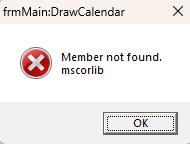
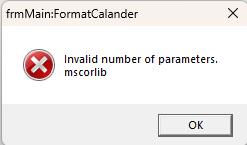
5) i copied the files relating to this control Calendar.osx, Axinterop.CalendarLib.dll, and AxInterop.MSACAL.dll and pasted those files directly into the two below locations:
C:\windows\System32 and granted fully control privileges to domain users
C;\windows\SYSWOW64 and granted fully control privileges to domain users
Below is screen shot of X86 folder, it stores the Calendar ActiveX Control program.


Below is screen shot of c drive folder with app named ISS and all of the dependency files which includes the OCX calendar files.

Any suggestions i am running out of ideas of what to look at next ? frustrating that other PCs are running Windows 11 and on a domain user account the APP and Calendar control work no issues. Tomorrow my plan is to log into the other Windows 11 PC running the app and see if i can replicate any files relating to OCX control, perhaps its a version mismatch, but still cant explain why admin works and domain does not on this PC.
4
u/2mnycooks 13d ago
Run procmon, run the app as each user, filter on the exe and compare which ocx path and registry keys each session actually resolves
1
u/Hel_OWeen 13d ago
Is the right .NET Runtime installed on that machine?
1
u/jd31068 13d ago
Have you checked Smart App Control? Try turning it off to see if that helps. ActiveX controls have been deemed a security risk in recent years and MS have been tightening the screws in Windows 11.
2
u/mika 13d ago
I'm pretty sure Ai would sort this out for you in no time. Install Claude code and ask it why it doesn't work... (might cost you $20)
Possibly it's some path permission issue...
1
u/fasti-au 11d ago
Ocx needs regsrv32 perms. Welcome to 1990s registry