r/xToolOfficial • • 10d ago

Welcome to r/xToolOfficial. Happy Making!

3 Upvotes

r/xToolOfficial • • 5d ago

Black Friday Week: Deals & xTool Squad Live Demos Schedule

Thumbnail
gallery
3 Upvotes

The countdown to Black Friday is on, and our Black Friday best prices are already live. Here’s what’s coming up for Nov 23–29, including Friday’s limited-time offers and live sessions to help you choose a machine that fits your projects.

🔥Black Friday Offers — Nov 27

  • Up to 55% OFF selected Lightning Deals
  • Extra gifts for the first 1,000 machine orders
  • 6 giveaways throughout the day

📌Live Webinars: Help Choosing Your Next Machine

Still comparing machines or figuring out what you need for your business? This week’s xTool Squad sessions bring together buying guidance, project ideas, and practical tips from experienced makers and business owners.

  • Mon, Nov 23: Last-Minute Thanksgiving Table Setting Prep
  • Tue, Nov 24: Buying Guide: P3 or X1?
  • Wed, Nov 25: Apparel Business: From Prints to Profits

Join the hosts on YouTube or Facebook to see the machines in action and ask questions about your own projects.

Extras at every webinar:

  • 🎟️ A $50 OFF coupon, stackable with eligible Black Friday deals
  • 🎁 3 × $100 gift card giveaways during the livestream

Also Available This Week

  • Free gift packs worth $70–$350 with eligible purchases
  • Free 1-on-1 setup and training with eligible purchases of MetalFab, F2 Ultra, F2 Ultra UV, and Apparel Printer Plus
  • Nov 27–29: Final-round materials flash sale — 40% OFF selected materials

Which machines are you deciding between, and what would you mainly use yours to make? Let us know in the comments.

Check Official Black Friday offers:
https://www.xtool.com/pages/black-friday-cyber-monday


r/xToolOfficial • • 7h ago

Custom challenge coins using my OMNI ONE.

Thumbnail
gallery
10 Upvotes

Just a few coins I have been working on. This machine is awesome. Way better than my EUFYMAKE E1.


r/xToolOfficial • • 3h ago

Help!- I encountered a problem F1 ultra single line in image

Thumbnail
gallery
3 Upvotes

I'm engraving in a business card this card image. It does a great job. But it's seemingly, there's this random line to the left of his head. It's not in the source image, and it's not showing in studio nor when I preview. It was printed horizontal.

It was done with fiber ir, 150 dot, 70 power, 350 dpi 1 pass and stucki unidirectional.


r/xToolOfficial • • 5h ago

M2 10W for scoring XPS?

2 Upvotes

I'm a complete novice to lasers and engraving, looking to learn whether or not the M2 10W would be the solution I'm looking for.

I want to score an estimated 2cm into xps foam boards, potentially of varying degrees of thickness/density.

In addition to wondering about the capability of the machine for my purposes, I understand that some toxic byproducts would need to be vented out. Any advice I can get in that regard would be very welcome.


r/xToolOfficial • • 6h ago

Rant Supply Chains

2 Upvotes

So. Marketed as a small business tool, as a small business, it seemed like a good fit. So we bought the Omni printer. We make a few prototypes, walk them into a friend’s shop. Sure enough - they sell like hot cakes. Problem is: we are stacking up orders faster than our ink is arriving. We just got our first refill, it might last another week or two, and it took nearly 3 months to arrive. In addition to that refill, we’ve had 2 in the pipeline since early October and to be safe I placed another order earlier this week, too.

I’m feeling a bit discouraged. What good is it if we find a product that sells but can’t keep a steady supply of the stuff you need to make it?

I can’t be the only one in this situation. What is everyone doing?


r/xToolOfficial • • 3h ago

Which xTool machine would fit best for these needs?

Thumbnail
gallery
1 Upvotes

Trying to make adhesives/stickers for mouth guards such as these and xTool has so many cool machines. Which one or couple of machines would you guys recommend so I can print, cut, and transfer these


r/xToolOfficial • • 6h ago

800w metalfab welder D.O.A .

1 Upvotes

So I'm not sure if anyone on here has purchased the 800w laser welder but after setting it up was immediately welcomed with a wire feeder anomaly error and can't seem to get it to clear. I haven't even been able to try it out. Has anyone else had this issue?


r/xToolOfficial • • 7h ago

Help!- I encountered a problem I have a question

Post image
1 Upvotes

OK, I am a brand new two all things laser engraving. I just got a F2 ultra I was setting it up in the instruction say that the blue light and the red light need to be overlapping and mine are not then it proceeds to say that I need to put the screwdriver that they gave me into the correct hole to adjust the light, but when I do that, the screwdriver has nothing to grab onto almost like there’s nothing to adjust. Has anyone else had this problem or know what to?


r/xToolOfficial • • 8h ago

Help - Materials&Settings Question for people who use a laser on undyed leather

1 Upvotes

Do you put the dye and conditioned before the laser? Or after?

I had been using undyed veg-tan leather because where I buy my leather doesn't check if is laser safe. I had my machine for less than a week, so I had learned how to get different tones by burning at different speed and power.

My leather was kind of dry before the laser, and after dyeing with an alcohol dyed, the piece was dry enough I was afraid it would crack soon enough. So, I buffed the piece and then applied some mink oil.

I realized only after that the darker areas where the laser has pass through, had become a lot lighter in colour. I figure the fibres below had either been disturbed and shifted, or, I took upper layer of leather since it was the most burned areas, leaving the underneath part that of course wasn't as dark.

I am unsure what to do now; can I at least use mink oil on the leather, wait until it absorbs, and then use the laser? Should I just try to be careful to avoid the engraved areas when I am buffing?

Any guidance would be appreciated.


r/xToolOfficial • • 14h ago

Discussion Looking to get the X1 but the FB group is making me second guess.

2 Upvotes

Been torn between the X1 and P3. I have seen a lot of posts and comments on the X1 group about issues with the CO2 head hitting materials and causing damage to the machine. I know negative posts don’t always paint the real picture and I’m sure for every negative there are at least 10 ppl that have had very positive experiences.

I currently have a S1 10/40w and want a CO2 machine, the P3 was always my goal until the X1 came out. Mainly want to use it to cut things faster, do acrylics, able to reverse engrave clear acrylics.

I’ve also thought about the P2S but keep seeing ppl say it’s going to get phased out.


r/xToolOfficial • • 11h ago

xTool F2 comparing the results! #xtool #xtoolmade

Thumbnail
youtube.com
1 Upvotes

r/xToolOfficial • • 11h ago

xTool F2 Comparing the settings on slate coasters

Thumbnail
youtu.be
1 Upvotes

r/xToolOfficial • • 13h ago

Anyone else experiencing inconsistencies between back to back prints?

Post image
1 Upvotes

Basically the same image, printed within 10 minutes of eachother. The one with VK63 was first, then the one with N35 second and failed. The settings and image is basically the same.


r/xToolOfficial • • 13h ago

Atomm Christmas

0 Upvotes

Anyone have a spare Christmas Stocking? I'm collecting all 9 for a share of the Coin pool in Atomm Christmas Wish Tree 🎄 The event has $20,000 in prizes, and the more people join, the richer the rewards. We could even unlock a mystery new xTool machine together.

Send one my way:

https://www.atomm.com/christmas-tree?ornamentLinkId=70babc28941205b8e84c5251fceb6f43&utm_medium=referral&utm_campaign=sharetoearn2&utm_id=155909&utm_source=copylink

#AtommChristmasWishTree


r/xToolOfficial • • 13h ago

Simple Personalized Wooden Christmas Stocking Ornament

Thumbnail
atomm.com
1 Upvotes

I created a simple stocking ornament using the CO2 on the X1 to cut and score, and the diode module to engrave the personalized name and the holly berries. The SVGs for the stocking, holly leaves, and snowflakes were put together using Inkscape to have a bit more control over the shapes and layouts.

I also created a quick YouTube short for the process as well, it took right at 1m11s to create the ornament


r/xToolOfficial • • 14h ago

xTool P2 + RA3: “Camera is abnormal” during axis calibration

1 Upvotes

I’m using an original xTool P2 with the RA3. When I try to calibrate the RA3 axis coordinates, it fails with this message:

“Calibration failed. The camera is abnormal, please contact after-sales service for processing.”

I also get “device already in use” when trying to take a Close shot.

Has anyone experienced this on the original P2? What caused it, and how did you fix it? Screenshot attached.


r/xToolOfficial • • 1d ago

Discussion XTool UV DT at Microcenter

Post image
11 Upvotes

Currently at Microcenter in Tustin CA and they have some Omni’s in stuck with wonderpress and laminators and roll feeders. Just a heads up! This is Black Friday.


r/xToolOfficial • • 19h ago

FAQ FAQ: How to Deal with Wi-Fi Connection Issues on the xTool O1 Omni Printer

2 Upvotes

Having trouble connecting your xTool O1 Omni Printer to xTool Studio via Wi-Fi?

Connection detection can help identify whether the issue is related to VPN or firewall settings, signal strength, computer health, network configuration, or local network permissions. Follow the corresponding troubleshooting steps below.

🔍 Possible Causes

  1. VPN or network acceleration software interfering with communication.
  2. Firewall settings blocking communication between xTool Studio and the printer.
  3. Weak or unstable Wi-Fi signals.
  4. A loose or damaged Wi-Fi antenna connection.
  5. Low battery power, an extended period without restarting the computer, or third-party security software.
  6. The computer and printer connected to different networks or network segments.
  7. Local network access disabled for xTool Studio on macOS.

🛠️ Before You Begin

  • 1️⃣ Update xTool Studio to the latest version.
  • 2️⃣ Connect the printer to your computer using a USB cable and configure its Wi-Fi connection.
  • 3️⃣ Make sure your Wi-Fi network broadcasts its network name (SSID).
  • 4️⃣ Use WPA or WPA2 encryption instead of WPA3.
  • 5️⃣ Run Connection detection in xTool Studio and follow the section that matches the reported error.

🛠️ Scenario 1: VPN or Firewall Detection Error

🔹 Step 1: Check VPN and Proxy Settings

Close any running VPN or network acceleration software, such as V2Ray, Clash, or Cloudflare, then disable the system proxy.

For Windows:

📋 Procedure:

  • 1️⃣ Open Settings → Network & internet → Proxy.
  • 2️⃣ Turn off the proxy settings, then try connecting again.
  • 3️⃣ If the connection is still unavailable, right-click the Windows icon and open Terminal (Admin) or Command Prompt (Admin).
  • 4️⃣ Enter the following command and press Enter:

netsh winsock reset

  • 5️⃣ Restart your computer and try connecting again.

If you need to keep the VPN running, configure a bypass rule in the VPN software so xTool Studio traffic does not pass through it.

For macOS:

Open System Settings → Network → Wi-Fi → Details → Proxies. Turn off all proxy switches, then try connecting again.

🔹 Step 2: Check Firewall Settings

Temporarily turn off the system firewall and test the connection. If third-party antivirus software includes a network firewall, temporarily disable that protection for the test as well.

  1. Windows: Search for Firewall, open Turn Windows Defender Firewall on or off, and temporarily turn it off for all network profiles.
  2. macOS: Open System Settings → Network → Firewall and temporarily turn off the firewall.

Restore firewall and antivirus protection after testing. If disabling protection resolves the issue, configure it to allow xTool Studio before testing again.

🛠️ Scenario 2: Signal Strength Detection Error

🔹 Step 1: Check the Wi-Fi Environment

Make sure your computer and printer are in an area with a strong Wi-Fi signal. Move both devices closer to the router if necessary.

You can use the ping command to check communication between your computer and the printer.

📋 Procedure:

  • 1️⃣ Connect the printer to your computer using a USB cable.
  • 2️⃣ In xTool Studio, open Device Settings → Basic Information → Wi-Fi Settings.
  • 3️⃣ Note the IP address assigned to the printer.
  • 4️⃣ Open Command Prompt on Windows or Terminal on macOS.
  • 5️⃣ Enter the command below, replacing [IP address] with the printer’s actual IP address:

ping [IP address]

  • 6️⃣ Check the response times. Responses exceeding 150 ms indicate poor communication according to this troubleshooting procedure.

🔹 Step 2: Test with a Mobile Hotspot

Use a mobile hotspot to help determine whether the router is causing the connection issue.

📋 Procedure:

  • 1️⃣ Enable your phone’s personal hotspot and select the 2.4 GHz band. On an iPhone, enable Maximize Compatibility if available.
  • 2️⃣ Use only English letters and numbers in the hotspot name and password. Avoid spaces and special characters.
  • 3️⃣ Connect both your computer and printer to the hotspot. Use USB to configure the printer’s Wi-Fi connection if needed.
  • 4️⃣ Search for and connect to the printer in xTool Studio.

Check the Results:

  1. The printer cannot be found or connected despite a strong hotspot signal: Computer permissions may be affecting the connection. On macOS, follow Scenario 5 to check local network access.
  2. The printer connects through the hotspot but not through the router: Check whether AP isolation or firewall rules on the router prevent devices from communicating. Also check whether other devices can use the router’s Wi-Fi normally.
  3. The printer connects only when very close to the hotspot and disconnects at a distance of 1–2 meters: The antenna connection may require inspection. Continue to Step 3.

🔹 Step 3: Check the Wi-Fi Antenna Connection

Turn off the printer and unplug its power cable before inspecting the antenna.

📋 Procedure:

  • 1️⃣ Follow the enclosure disassembly tutorial to remove only the right-side enclosure.
  • 2️⃣ Check that the Wi-Fi antenna connector is securely attached to the metal socket on the mainboard.
  • 3️⃣ Inspect the thin black or gray coaxial cable and antenna extension cable for pinching, damage, or exposed metal shielding.
  • 4️⃣ If the connector is loose, carefully align it with the socket and press straight down until it clicks into place.
  • 5️⃣ If the cable is severely damaged, contact xTool Support for assistance with replacing the Wi-Fi antenna.
  • 6️⃣ Reinstall the enclosure before reconnecting power and testing the Wi-Fi connection.

🛠️ Scenario 3: Computer Health Detection Error

📋 Procedure:

  • 1️⃣ If you use a laptop, connect its charger and make sure sufficient battery power is available.
  • 2️⃣ Turn off low-power mode.
  • 3️⃣ Restart your computer if it has not been restarted for a long time.
  • 4️⃣ Temporarily exit third-party antivirus software, then test the connection again.

Restore antivirus protection after testing.

🛠️ Scenario 4: Network Segment Consistency Check Error

Your computer and printer need to be on the same Wi-Fi network and able to communicate with each other.

📋 Procedure:

  • 1️⃣ Connect your computer and printer to the same Wi-Fi network, then try connecting again.
  • 2️⃣ If the connection is still unavailable, connect the printer to your computer using a USB cable.
  • 3️⃣ In xTool Studio, select another suitable Wi-Fi network and configure the printer’s Wi-Fi connection again.
  • 4️⃣ Connect your computer to that same network, then retry the connection.

🛠️ Scenario 5: Local Network Permission Detection Error — macOS Only

📋 Procedure:

  • 1️⃣ Open System Settings → Privacy & Security → Local Network.
  • 2️⃣ Enable local network access for xTool Studio.
  • 3️⃣ If access is already enabled, quit xTool Studio.
  • 4️⃣ Turn the permission off, then turn it on again.
  • 5️⃣ Reopen xTool Studio and try connecting.

⭐ Still Need Help?

To help us investigate, please prepare:

  1. Your xTool Studio version.
  2. Your printer’s firmware version.
  3. Exported device logs.
  4. The connection detection error and the troubleshooting steps you have completed.

If your O1 Omni Printer still cannot connect to xTool Studio via Wi-Fi after completing the applicable troubleshooting steps above, please feel free to contact us through the live chat on our website, submit a support ticket or join our Discord community for additional support.

Our xTool Support Team is here to help.


r/xToolOfficial • • 1d ago

OMG CANNOT WAIT

3 Upvotes

I just ordered the M2 on the Black Friday sale for myself for my birthday! I cannot wait to play!


r/xToolOfficial • • 23h ago

Apparel Printer/Plus Experience 34 items in 68 minutes using the xTool Apparel Printer Plus!

2 Upvotes

We decided to take on the #MinutesToMoney challenge while fulfilling an actual customer order.

At the 30-minute mark, we had completed five sweatshirts. Once we got into our production rhythm, we finished all 34 items in just 68 minutes!

That’s an average of one finished item every two minutes. As small business owners, we’re loving what in-house DTF printing is doing for our production workflow!

#MinutesToMoney #xTool #xToolApparelPrinterPlus


r/xToolOfficial • • 1d ago

P2S Drama!

10 Upvotes

I got my brand new P2S delivered 11/17/26 and it had been damaged, which I noticed during unpacking. I immediately took pictures and contacted XTool. Then when I turned it on the laser did not work. I updated XTool of this. Since then they have been bouncing me around with emails. Can not speak to anyone directly because they seem to have set it up that way. I am still sitting here with a damaged machine and they are no closer to resolving the issue since the day I reported it!

You would think a company like thus would do everything they can to resolve an issue like this. Especially considering how expensive their machines are!!!! I am floored by how sadly they are handling this situation and seem to care less about my inconvenience, or the money I am losing each day!!!

And this is not my first machine purchase from them. But it is the first I have seen how poorly they take care of their customers!


r/xToolOfficial • • 1d ago

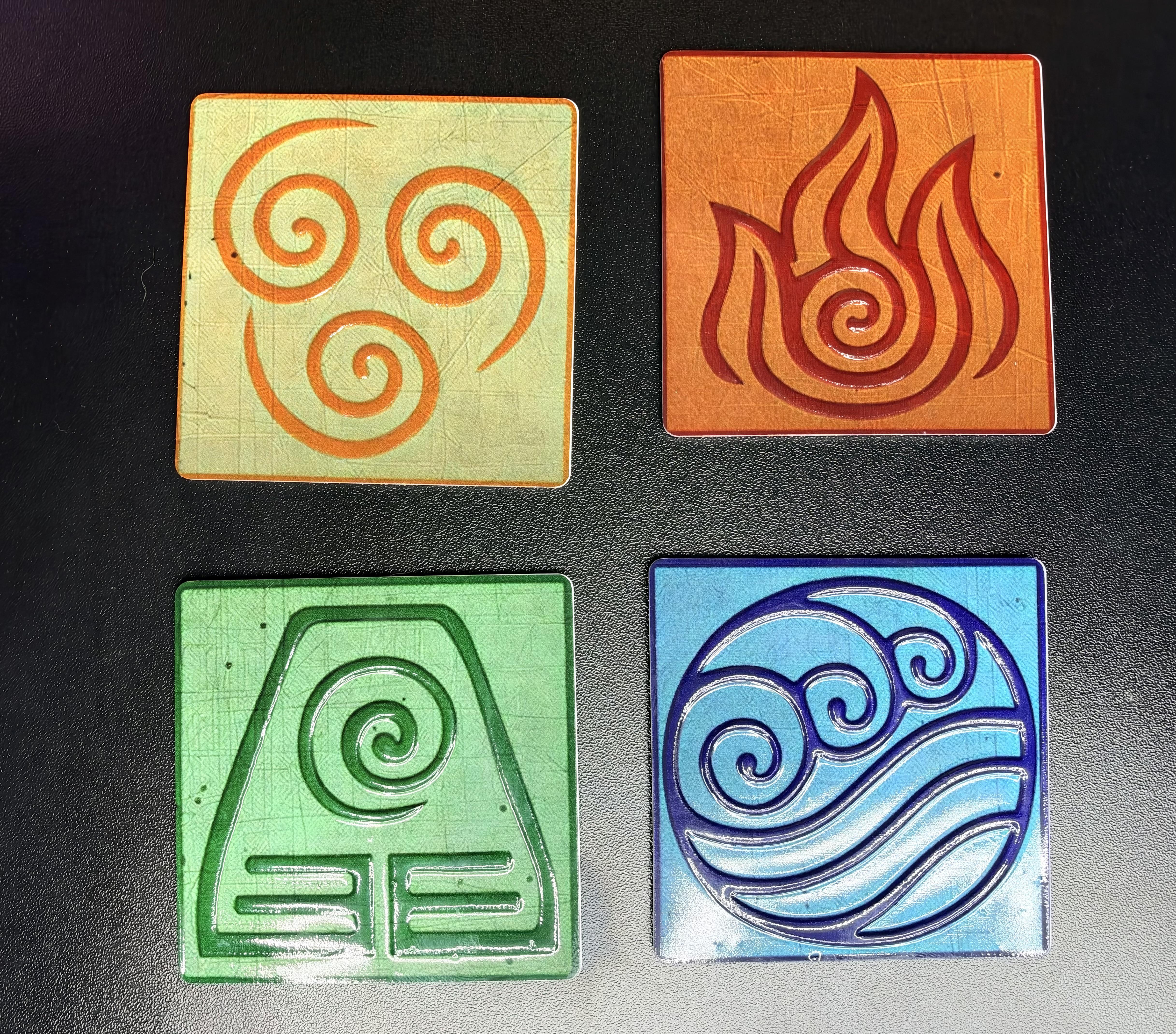
Gloss varnish really finished these Omni printed Last Airbender magnets

Post image
4 Upvotes

r/xToolOfficial • • 1d ago

Best Buy Pre-Order Pickup Delay / xTool O1 Omni Printer

Post image
5 Upvotes

So on the 17th I pre-ordered the xTool O1 Omni Printer from Best Buy for local store pickup on the 27th. Fast forward to today and Im now getting this message from Best Buy. Is it safe to assume that the delay is on xTools end since Im also noticing delays on pre-orders from xTool directly or is this something separate and just a fluke? It's a pretty big hunk of change that I was charged on the 17th.


r/xToolOfficial • • 1d ago

F2 Ultra owners: how are you batch engraving names without the conveyor? Here's my LightBurn workaround

Thumbnail
youtu.be
2 Upvotes

Genuine question for the F2 Ultra crowd (and xTool if you're reading): why can't the F2 Ultra batch process on the bed without the $500 conveyor add-on, when my M2 can do it no problem?

Until I get an answer, I've been doing batches in LightBurn instead. I just did 24 chess club name tags, each with a different name, from one file:

• Names in a CSV → a %0 text box set to Merge CSV

• Grid Array with auto-increment so every tag gets the next name

• "Advance by 12" to roll into the next batch

• A 3D-printed jig for pre-cut blanks, or edge padding when cutting from raw sheet

One tip: keep the variable text on the same layer as your design if the name sits on an engraved area, or it double-engraves and the name disappears.