r/youtubedl • • 7h ago

Release Info yt-dlp release 2026.11.23

80 Upvotes

Changelog

Core changes

Extractor changes

Misc. changes


NOTE: The nightly release channel is strongly recommended for most users, as it gets all important fixes sooner.

# To update to nightly from the executable/binary:
yt-dlp --update-to nightly

# To install/upgrade to nightly with pip:
python3 -m pip install -U --pre "yt-dlp[pin,pin-curl-cffi]"

# To install/update to nightly with pipx:
pipx uninstall yt-dlp
pipx install --pip-args=--pre "yt-dlp[pin,pin-curl-cffi]"

# To install from master with homebrew:
brew uninstall yt-dlp
brew update && brew install --HEAD yt-dlp

# To upgrade to latest master with homebrew if you've already installed with --HEAD:
brew upgrade --fetch-HEAD yt-dlp

r/youtubedl • • 10h ago

What's your recommended sleep intervals/sleep requests?

2 Upvotes

I'm actively building a personal wrapper (Been learning myself to code for the past few months, it's fun but frustrating). Having gone through a few different iterations, I've landed at the following:

    '--min-sleep-interval', '10',
    '--max-sleep-interval', '20',
    '--sleep-requests', '4',

While it works without hitting any rate limitations, I also find that a large % of the time, I'm just waiting for downloads to start rather than actually downloading. My current session looks like this:

Elapsed: 23:54:08

Download stopwatch: 04:16:56 (Active)

-- Status: Connected --

Speed: 3.04 MB/s

File size: 72.67 MB

35%/100%

Total size of new downloads: 102.58 GB

Total downloads: 1245

Basically, 24 hours running in total but only 4 hours of actively downloading content.

Now, I'm patient enough to let this run it's course (9/34 channels done) but I'm also sure my choice of wait time is likely superfluous... But I don't know by how much! So, what's the recommendations here? How much should I actually set these at?


r/youtubedl • • 15h ago

Looking for a way to filter on more than one video (or audio) codec

2 Upvotes

I can't figure out the syntax to do something like this, where av01 DOES work, but to add others if need be. In my case also include vcodec~='avc1' as a fallback, for instance, or potential others as they become obvious.

--format "bestvideo[height<=1080][vcodec~='av01']+bestaudio[acodec~='mp4a']","best[height<=1080]","0"

Just looking to exclude newer Google codecs from being used with .mp4 extension, which seems to be a newer thing with YT. An example of this being VP9/Opus audio being used in .mp4 extension files. This is unsupported in avidemux, hence my motivation.


r/youtubedl • • 16h ago

How to download videos with different quality and have audio and video in same file?

0 Upvotes

I don't know much about coding i tried to do a test run and download a video but the video and audio files are seperate also I want to download videos in 144p( i will download them again later with higher quality but since where I live the Internet is limited so I want to download them as 144p as a safety net if they get deleted and I will download them with higher quality after semester end)


r/youtubedl • • 14h ago

Help, latest ytldnis not working

0 Upvotes

I downloaded it's latest version of YTDLnis from official site , but it says this when i try to download using revanced manager, and this app set as external downloader.

CANNOT LINK EXECUTABLE "/data/app/~~U3ptmZVhwkyXmZkpyJrfGQ==/com.deniscerri.ytdl-9w_dv_uQZQWxqT2rEQn1hA==/lib/arm64/libpython.so": library "libandroid-support.so" not found: needed by main executable


r/youtubedl • • 16h ago

Files with the same name

0 Upvotes

I'd like to download some videos from Instagram that all have different URLs but I guess they download with the same file name so it looks like they're already downloaded.
I'm using Tartube. Any suggestions?


r/youtubedl • • 1d ago

How to download video in format other than opus?

2 Upvotes

So I'm a beginner at using ytdl and noticed that when I download videos using merge-output-format mp4, there is no thumbnail shown in the folder and no audio when using windows media player / movie tv. But VLC/Davinci editor has audio (since those are more advanced I guess)

Is there any string or method to download them in a format that windows media can play the audio? Or It's a situation where it's merge-output-format mp4 gives the best quality and audio but using a opus format ? I would like to use VLC but for some reason it has an awkward delay for me which is why I want to try keeping windows media.


r/youtubedl • • 2d ago

YTDLP will I get banned for this?

6 Upvotes

So I made a script using YTDLP to download all 812 videos (some are unavailable) from a playlists into mp3 by batches (50 per batch) with reasonable interval between each downloads like 6 secs and save it to my GDrive automatically, will i get banned for this? Didn't use cookies, I ran the script in a cloud VM and looking at the logs there's no rate limit triggered even one. Will I be okay?


r/youtubedl • • 2d ago

YouTube-dl's repository is back up

2 Upvotes

Hey everyone, just wanted to share that the YouTube-dl repository has been restored. You can check it out here: https://github.com/ytdl-org/youtube-dl.


r/youtubedl • • 2d ago

YTDLnis refusing to save my cookies

0 Upvotes

I'm trying to download some stuff but for some reason, probably cause I changed my Google account password, YTDLnis is refusing to save my cookies. Even when I log in again to Youtube via YTDLnis it refuses to save my cookies.

If it helps, this is the log:

ERROR: [youtube] 2Bixs45SV2I: Sign in to confirm your age. This video may be inappropriate for some users. Use --cookies-from-browser or --cookies for the authentication. See https://github.com/yt-dlp/yt-dlp/wiki/FAQ#how-do-i-pass-cookies-to-yt-dlp for how to manually pass cookies. Also see https://github.com/yt-dlp/yt-dlp/wiki/Extractors#exporting-youtube-cookies for tips on effectively exporting YouTube cookies


r/youtubedl • • 2d ago

How can I download 600–700 YouTube videos from a text file in bulk? Looking for an easy method without coding or command-line tools.

0 Upvotes

Hi everyone,

I have around 600–700 YouTube video links in a text file. These are educational videos that I want to download and save for offline viewing.

My main concern is that some educational videos get deleted from YouTube over time. I also live in an area where internet access is not always reliable. I want to keep these videos saved locally so that I can continue studying even without an internet connection.

The problem is that all my video links are separate. They are not organized into a YouTube playlist.

I have tried a few things:

- I use SnapTube, but it seems to require downloading videos one by one.

- I have heard about yt-dlp, but its command-line interface looks quite complicated to me.

- I am an ordinary student with no programming or terminal experience. I have always used regular software with a graphical interface, so I feel a little uncomfortable using command-line tools.

What I am looking for:

- Is there any easy way to convert a text file containing 600–700 YouTube links into a single playlist?

Is there any safe software with a simple graphical interface (GUI) that can download all these videos in bulk?

- Can yt-dlp be used through an easy graphical interface without having to write commands manually?

Is there any method that doesn't require creating an API key or logging into a YouTube account?

- I don't mind spending some time setting things up, but I would really appreciate a beginner-friendly solution.

My goal is simply to preserve educational content for personal offline study, especially in places where internet access is limited.

I would be very grateful for any suggestions, tutorials, or recommendations.

Thank you!


r/youtubedl • • 4d ago

Would this be workable command line or am I working off outdated info?

2 Upvotes

I have a ~450 video playlist on youtube that is in a specific order I need to download. There is no DRM content as far as I'm aware.

I plan on using the following command line with the goal of downloading the best quality of the video that rips with sequential numbers as a prefix to the file names. I have also added a command to randomly create a sleep interval between each download to hopefully not attract youtube's attention:

yt-dlp -S "ext" --min-sleep-interval 30 --max-sleep-interval 3600 URL

Would it be better to use this command with the cookiees work around instead or would I get my account blocked?

yt-dlp -S "ext" --min-sleep-interval 30 --max-sleep-interval 3600 --cookies-from-browser firefox URL

Any input is welcome, it's been a while since I've used this program.


r/youtubedl • • 4d ago

Region blocked yt video

0 Upvotes

How do I download a region blocked yt video?
https://www.youtube.com/watch?v=jVMd4IxJlnY


r/youtubedl • • 5d ago

Answered Error troubleshooting: unsupported version of Python

3 Upvotes

Really hoping someone can help me troubleshoot this. (Apologies in advance as I'm literate enough to have followed instructions and used yt-dlp frequently in the past, but still pretty much a computer dummy by the standards of most ppl here lol)

Trying to use yt-dlp on youtube for the first time in a while and getting this error:
"ImportError: You are using an unsupported version of Python. Only Python versions 3.11 and above are supported by yt-dlp"

However, I have python 3.15.2 installed (tried upgrading via homebrew just in case and got back "Warning: python 3.15.2 already installed")

I'm on a Mac running Sonoma 14.7.8


r/youtubedl • • 6d ago

Answered I appear to be rate-limited. How long should I wait before restarting?

6 Upvotes

I am using a custom wrapper that I adapt as I go as I wanted to simplify some aspects for future archiving but I've noted a significant decrease in speed over the last day or so. Can't manage to get "average speed" working but quick math of 23GB download over 7 and a half hours suggests it's pretty low.

So do I wait 24 hours? 48? A week? What's the recommendations?


r/youtubedl • • 6d ago

Answered dl 5.1 tracks

2 Upvotes

Hello,
I'm trying to find 5.1 content on youtube but it doesn't work. When I do this:
yt-dlp -F https://www.youtube.com/watch?v=-inG50Fcce4
I can't find any track with 6 channels. Only 2. However, according to this thread:
https://www.reddit.com/r/youtubedl/s/KPvG3mKbkK
This video should own several 6 channels tracks. I am on the latest yt-dlp version. Has youtube changed its API? Or did I do something wrong?
Thank you


r/youtubedl • • 7d ago

Answered Youtube --list-formats no longer showing separate audio/video only thumbnail pics and combined formats

1 Upvotes

I have aliases for downloading yt vids:

alias yt4='~/.local/bin/yt-dlp -f 397+ba[ext=m4a]/135+ba[ext=m4a] "$(wl-paste)"'
alias yt7='~/.local/bin/yt-dlp -f 398+ba[ext=m4a]/136+ba[ext=m4a] "$(wl-paste)"'

Something changed a few days ago and now the videos no longer show the separate audio and video formats and the English language audio code changes for each video. Here's an example section of --list-fornmats output:

94-0 mp4   854x480     30    │ ~ 72.36MiB  772k m3u8  │ avc1.4D401F mp4a.40.2     [de-DE] Untested
94-1 mp4   854x480     30    │ ~ 72.37MiB  772k m3u8  │ avc1.4D401F mp4a.40.2     [pt-BR] Untested
94-2 mp4   854x480     30    │ ~ 72.37MiB  772k m3u8  │ avc1.4D401F mp4a.40.2     [fr-FR] Untested
94-3 mp4   854x480     30    │ ~ 72.37MiB  772k m3u8  │ avc1.4D401F mp4a.40.2     [it] Untested
94-4 mp4   854x480     30    │ ~ 72.37MiB  772k m3u8  │ avc1.4D401F mp4a.40.2     [hi] Untested
94-5 mp4   854x480     30    │ ~ 72.37MiB  772k m3u8  │ avc1.4D401F mp4a.40.2     [en] Untested
94-6 mp4   854x480     30    │ ~ 72.37MiB  772k m3u8  │ avc1.4D401F mp4a.40.2     [es-US] Untested
94-7 mp4   854x480     30    │ ~ 72.38MiB  772k m3u8  │ avc1.4D401F mp4a.40.2     [id] Untested
94-8 mp4   854x480     30    │ ~ 72.37MiB  772k m3u8  │ avc1.4D401F mp4a.40.2     [en-US] Untested, (original)
95-0 mp4   1280x720    30    │ ~129.45MiB 1382k m3u8  │ avc1.4D401F mp4a.40.2     [de-DE] Untested
95-1 mp4   1280x720    30    │ ~129.46MiB 1382k m3u8  │ avc1.4D401F mp4a.40.2     [pt-BR] Untested
95-2 mp4   1280x720    30    │ ~129.46MiB 1382k m3u8  │ avc1.4D401F mp4a.40.2     [fr-FR] Untested
95-3 mp4   1280x720    30    │ ~129.46MiB 1382k m3u8  │ avc1.4D401F mp4a.40.2     [it] Untested
95-4 mp4   1280x720    30    │ ~129.47MiB 1382k m3u8  │ avc1.4D401F mp4a.40.2     [hi] Untested
95-5 mp4   1280x720    30    │ ~129.47MiB 1382k m3u8  │ avc1.4D401F mp4a.40.2     [en] Untested
95-6 mp4   1280x720    30    │ ~129.47MiB 1382k m3u8  │ avc1.4D401F mp4a.40.2     [es-US] Untested
95-7 mp4   1280x720    30    │ ~129.47MiB 1382k m3u8  │ avc1.4D401F mp4a.40.2     [id] Untested
95-8 mp4   1280x720    30    │ ~129.46MiB 1382k m3u8  │ avc1.4D401F mp4a.40.2     [en-US] Untested, (original)
96-0 mp4   1920x1080   30    │ ~431.87MiB 4609k m3u8  │ avc1.640028 mp4a.40.2     [de-DE] Untested
96-1 mp4   1920x1080   30    │ ~431.87MiB 4609k m3u8  │ avc1.640028 mp4a.40.2     [pt-BR] Untested
96-2 mp4   1920x1080   30    │ ~431.87MiB 4609k m3u8  │ avc1.640028 mp4a.40.2     [fr-FR] Untested
96-3 mp4   1920x1080   30    │ ~431.88MiB 4609k m3u8  │ avc1.640028 mp4a.40.2     [it] Untested
96-4 mp4   1920x1080   30    │ ~431.88MiB 4609k m3u8  │ avc1.640028 mp4a.40.2     [hi] Untested
96-5 mp4   1920x1080   30    │ ~431.88MiB 4609k m3u8  │ avc1.640028 mp4a.40.2     [en] Untested
96-6 mp4   1920x1080   30    │ ~431.88MiB 4609k m3u8  │ avc1.640028 mp4a.40.2     [es-US] Untested
96-7 mp4   1920x1080   30    │ ~431.89MiB 4609k m3u8  │ avc1.640028 mp4a.40.2     [id] Untested
96-8 mp4   1920x1080   30    │ ~431.88MiB 4609k m3u8  │ avc1.640028 mp4a.40.2     [en-US] Untested, (original)

Can I change it back to the prior separate audio/video codes that worked for every video?


r/youtubedl • • 6d ago

Use AI to reverse engineer YouTube to download videos?

0 Upvotes

I used Google Gemini to code a Python script to resolve the info (it gets the same data as yt-dlp) and also manages to extract download URLs.

It also can, without ffmpeg, mux a video or launch mpv to stream.

It uses several methods and techniques to bypass certain blocks and errors (which I didn't understand) In the end, it manages to load the video in the format I want.

but it fails after a few minutes of loading (error 403) So I think I'll eventually create a clone of YT-DLP for personnal use. knowing that Google AI checks while running tests to resolve/download the videos.

Since YouTube also uses AI to constantly change its protection, I find it funny to use its tools to bypass it. And given the powerful code of the AI. It can easily code a Freetube in C or a mobile app.

the future is great my friends 😂


r/youtubedl • • 9d ago

1080P Super Resolution can't be detected

7 Upvotes

yt-dlp --list-formats "https://www.youtube.com/watch?v=t5XNWFw5HVw"

It doesn't return the 1080P Super Resolution but only 480P.

ID EXT RESOLUTION FPS CH │ FILESIZE TBR PROTO │ VCODEC VBR ACODEC ABR ASR MORE INFO

───────────────────────────────────────────────────────────────────────────────────────────────────────────────

sb3 mhtml 48x27 0 │ mhtml │ images storyboard

sb2 mhtml 80x45 1 │ mhtml │ images storyboard

sb1 mhtml 160x90 1 │ mhtml │ images storyboard

sb0 mhtml 320x180 1 │ mhtml │ images storyboard

233 mp4 audio only │ m3u8 │ audio only unknown Default, low

234 mp4 audio only │ m3u8 │ audio only unknown Default, high

139 m4a audio only 2 │ 1.56MiB 49k https │ audio only mp4a.40.5 49k 22k low, m4a_dash

249 webm audio only 2 │ 1.82MiB 57k https │ audio only opus 57k 48k low, webm_dash

250 webm audio only 2 │ 2.38MiB 75k https │ audio only opus 75k 48k low, webm_dash

140 m4a audio only 2 │ 4.13MiB 129k https │ audio only mp4a.40.2 129k 44k medium, m4a_dash

251 webm audio only 2 │ 4.62MiB 145k https │ audio only opus 145k 48k medium, webm_dash

228 mp4 128x72 │ ~ 2.78MiB 87k m3u8 │ avc1.42000A 87k video only

602 mp4 256x144 15 │ ~ 2.97MiB 93k m3u8 │ vp09.00.10.08 93k video only

269 mp4 256x144 30 │ ~ 5.32MiB 167k m3u8 │ avc1.4D400C 167k video only

160 mp4 256x144 30 │ 1.90MiB 59k https │ avc1.4D400C 59k video only 144p, mp4_dash

603 mp4 256x144 30 │ ~ 4.72MiB 148k m3u8 │ vp09.00.11.08 148k video only

278 webm 256x144 30 │ 2.18MiB 68k https │ vp9 68k video only 144p, webm_dash

394 mp4 256x144 30 │ 2.05MiB 64k https │ av01.0.00M.08 64k video only 144p, mp4_dash

229 mp4 426x240 30 │ ~ 9.27MiB 290k m3u8 │ avc1.4D4015 290k video only

133 mp4 426x240 30 │ 3.87MiB 121k https │ avc1.4D4015 121k video only 240p, mp4_dash

604 mp4 426x240 30 │ ~ 8.05MiB 252k m3u8 │ vp09.00.20.08 252k video only

242 webm 426x240 30 │ 3.80MiB 119k https │ vp9 119k video only 240p, webm_dash

395 mp4 426x240 30 │ 3.00MiB 94k https │ av01.0.00M.08 94k video only 240p, mp4_dash

230 mp4 640x360 30 │ ~18.89MiB 591k m3u8 │ avc1.4D401E 591k video only

134 mp4 640x360 30 │ 6.96MiB 218k https │ avc1.4D401E 218k video only 360p, mp4_dash

605 mp4 640x360 30 │ ~17.88MiB 560k m3u8 │ vp09.00.21.08 560k video only

243 webm 640x360 30 │ 8.37MiB 262k https │ vp9 262k video only 360p, webm_dash

396 mp4 640x360 30 │ 5.97MiB 187k https │ av01.0.01M.08 187k video only 360p, mp4_dash

231 mp4 854x480 30 │ ~33.12MiB 1037k m3u8 │ avc1.4D401F 1037k video only

135 mp4 854x480 30 │ 11.62MiB 364k https │ avc1.4D401F 364k video only 480p, mp4_dash

606 mp4 854x480 30 │ ~32.32MiB 1012k m3u8 │ vp09.00.30.08 1012k video only

244 webm 854x480 30 │ 19.76MiB 619k https │ vp9 619k video only 480p, webm_dash

397 mp4 854x480 30 │ 10.75MiB 337k https │ av01.0.04M.08 337k video only 480p, mp4_dash

r/youtubedl • • 9d ago

Answered Skip forward problem

1 Upvotes

I’m using the latest version of yt-dlp. Recently, after downloading and saving YouTube livestreams, I noticed that when playing the videos and skip forward them, the video playback lags by around 3–4 seconds, while the sound still function normally. I’m not sure whether this is a bug caused by yt-dlp. Does anyone know how to fix this issue?


r/youtubedl • • 9d ago

Can we select the portions of a youtube video we want to download?

13 Upvotes

Sometimes for my videos I have to download whole hour long videos just to use a couple seconds of it. Can I save trouble and time by just selecting a portion out of the video and downloading it then? It would be such a huge relief. thank you to anyone in advance!


r/youtubedl • • 9d ago

Which "when" option runs right before files are moved to the "home" folder?

0 Upvotes

I have a --exec /post-processing command that uses video metadata as parameters which currently runs after the files are moved into the home folder from the temp folder. Sometimes this command fails, but since it's after file is moved , I don't know about it unless I'm keeping a log file and checking it for command failures. The video is also added to the download_archive which means it won't be re-downloaded on the next run.

What I'd like to happen is for the command to run before the file is moved from temp to home. My reasoning is that I think yt-dlp will count it as a failed download as a result. That will leave the downloaded file(s) in the temp folder, and it will not add the video id to the download archive.

My download script checks for failed downloads in the temp folder several times during its run, and it will exit if it finds one. That plus having the same video download over and over will get my attention!

From the docs, these are the options for "when". I think "video" is what I want, but a second set of eyes would boost my confidence. Here is the snippet from the docs:

The "when" argument determines when the                                postprocessor is invoked. It can be one of                                "pre_process" (after video extraction),                                "after_filter" (after video passes filter),                                "video" (after --format; before                                --print/--output), "before_dl" (before each                                video download), "post_process" (after each                                video download; default), "after_move"                                (after moving the video file to its final                                location), "after_video" (after downloading                                and processing all formats of a video), or                                "playlist" (at end of playlist). This option                                can be used multiple times to add different                                postprocessors

I put them into a ordered list for readability

  1. "pre_process" (after video extraction)
  2. "after_filter" (after video passes filter)
  3. "video" (after --format; before --print/--output)
  4. "before_dl" (before each video download)
  5. "post_process" (after each video download; default)
  6. "after_move" (after moving the video file to its final location),
  7. "after_video" (after downloading and processing all formats of a video)

I think the "before --output" means before the file is moved into the home folder, which is why I think "video" is the answer though "after_video" is my second guess.


r/youtubedl • • 9d ago

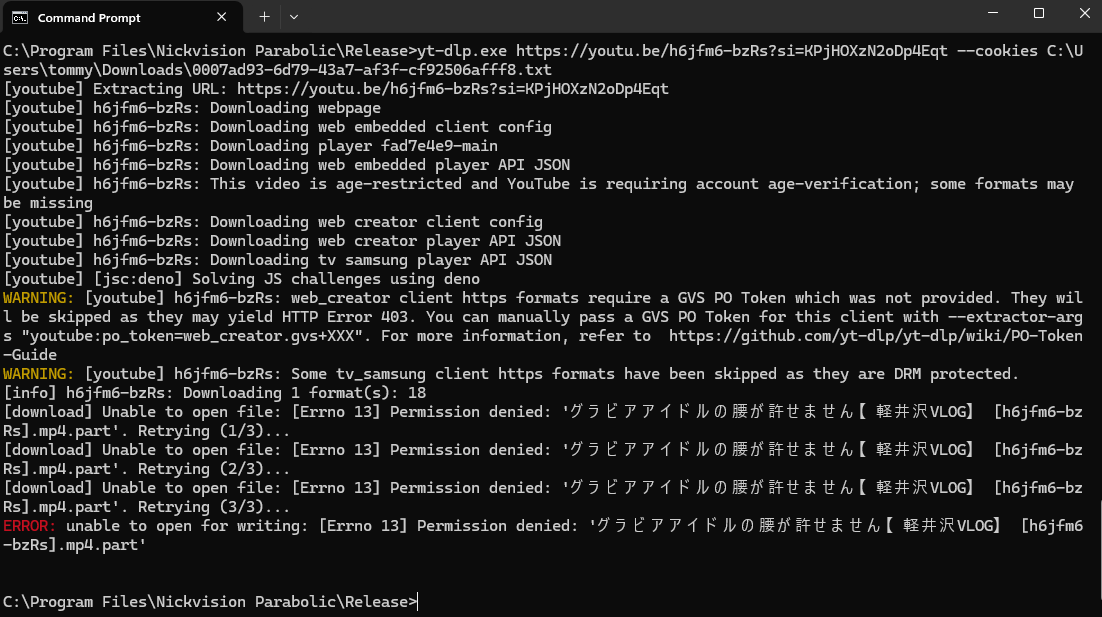
Unable to download video

0 Upvotes

I'm trying to download this specific video, but I can't. When I try to use Parabolic, it hangs at the discovering media screen. When I use yt-dlp, I get I get this error. What am I doing wrong?