r/AzureVirtualDesktop • • 22h ago

CPU Peaks during logon storms

2 Upvotes

Some tips what can be causing CPU Spikes during logon storms ?

We are running E8as v6 VMs with 256GB OS Disk, max session limit is set to 20 but we are mostly having 12-13 sessions on 1 VM. Users having standard workload, edge, office apps, just standard workload. I have opened ticket with Microsoft for more than 6 months now, but no results. Thats why im trying the power of comunity.

-rulled out defender

-FSLogix on newest version

-deployed edge optimization

the CPU Spikes seems to be caused by svchost, LaunchExperienceHost

If you have any tips or recommendations, ill be more than glad.


r/AzureVirtualDesktop • • 2d ago

Is Windows 11 26H2 raising the bar for 8GB machines?

Thumbnail
go-euc.com
2 Upvotes

r/AzureVirtualDesktop • • 3d ago

Scaling plan not logging to Analytics or Storage Account

1 Upvotes

Pretty much the title. My scaling plan is assigned to the host pool, the scaling plan has 2 diagnostic settings going to log analytics and a storage account. Waited hours and there aren't any JSON in the storage account ( insights-logs-autoscaleevaluationpooled) nor entries in WVDAutoscaleEvaluationPooled.

I watched the scaling plan take down two session hosts today, so I know it's working. But this is bugging me.


r/AzureVirtualDesktop • • 3d ago

IaC with Azure Virtual Desktop

Thumbnail reddit.com
1 Upvotes

r/AzureVirtualDesktop • • 7d ago

Management solutions for AVD

14 Upvotes

Looking to get a read on what everyone is using for AVD management solutions?
Seeing Nerdio is really capitalized on the market and what other platforms people have adopted and if any feed back on them?


r/AzureVirtualDesktop • • 10d ago

Windows 11 26H2 enablement auto-installed on 25H2 AVD hosts

3 Upvotes

We have our AVD's hybrid-joined and recently semi-configured via Intune. In such a way that we have some WufB settings configured in the settings catalog, we don't use the windows updates one (or autopatch). We set the quality updates (defer x-days for our rings) but haven't set the feature ones.

Today our second ring was supposed to start installing the quality updates, when we noticed the enablement update (KB5121794) was installed. Ready to upgrade to 26H2.

I've never experienced this before, was under the impression that upgrades wouldn't be offered. As I understand, previously there was no patch policy, which the machine only got quality updates offered. Because of this change, and no configuration on the feature update, we get the update offered?

Is this correct or am I missing something? Thanks!


r/AzureVirtualDesktop • • 14d ago

Sysprep error

Post image
2 Upvotes

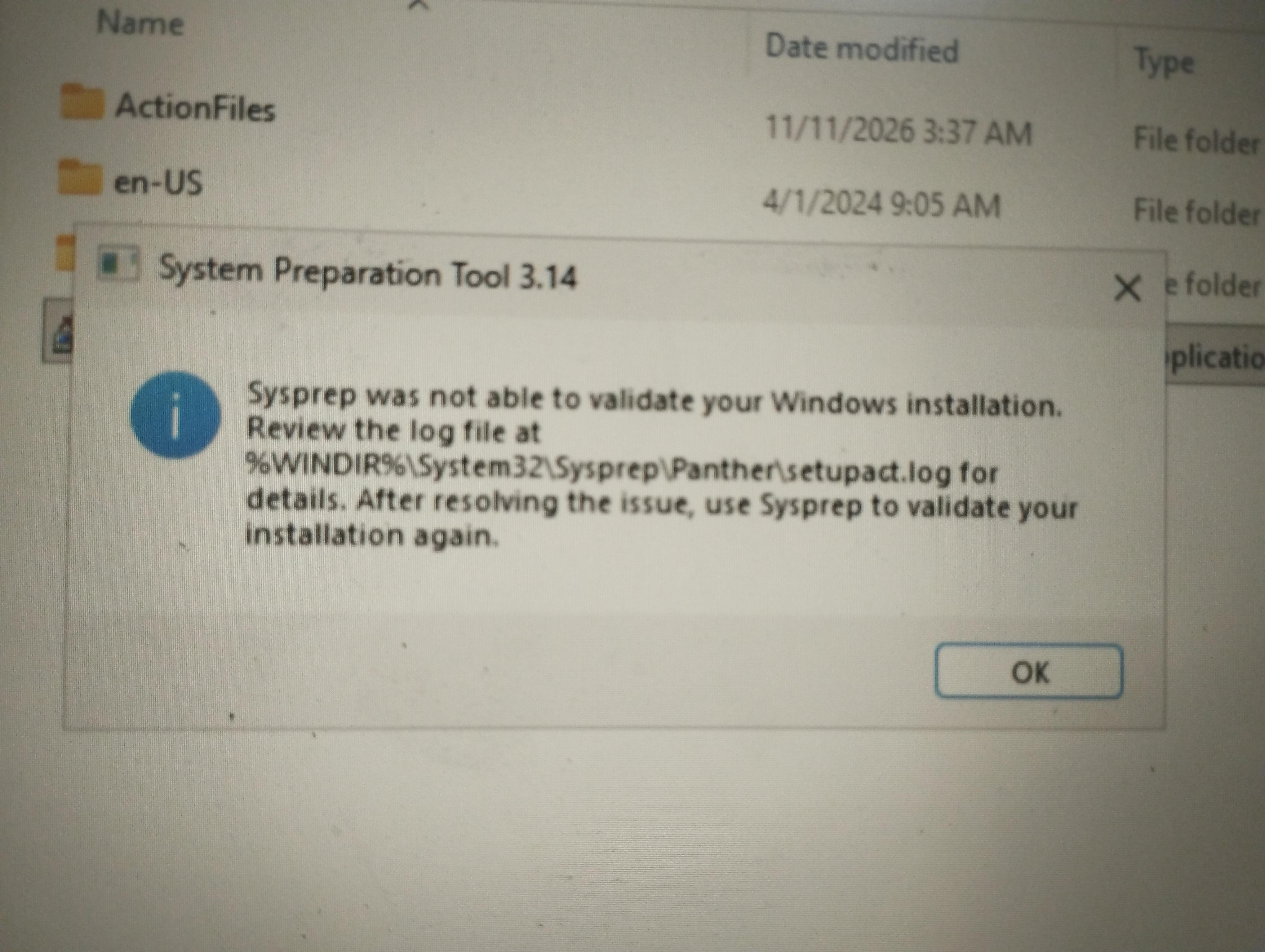
Could any one please help , I am creating a golden image to publish to azure compute gallery, while I am running sysprep I am encountering this error


r/AzureVirtualDesktop • • 14d ago

What's in your AVD enclave stack for CMMC?

4 Upvotes

A CMMC enclave on Azure Government typically starts with AVD deployed in Azure Government, paired with Microsoft 365 GCC High for sensitive CUI scenarios, with session hosts as the only path to CUI. Identity is Microsoft Entra ID with Conditional Access enforcing MFA and compliant device policies, role-based access control limiting CUI access to authorized users only, and Privileged Identity Management for admin-level access. Monitoring is typically Microsoft Defender for Endpoint on the session hosts, Azure Monitor and Log Analytics capturing audit logs, and SIEM integration for continuous monitoring. What did you end up adding on top?


r/AzureVirtualDesktop • • 15d ago

KB5132061 affecting the cloud kerberos portion of Hybrid Entra join

Post image
16 Upvotes

I have patched my AVD image with November updates and KB5132061 is causing issues with Azure AD joining.

If I uninstall KB5132061 and reboot the server, it will Azure AD join immediately. Anyone else seeing this?

Kerberos Ticket Test : FAIL [0x80090311]


r/AzureVirtualDesktop • • 16d ago

New to AVD: Teams reinstalling after login and New Outlook missing

3 Upvotes

Hey guys, I’m fairly new to Azure Virtual Desktop and I’m troubleshooting an issue in an existing AVD environment. Hoping someone can point me in the right direction.

The environment is currently running Windows 11 Enterprise multi-session 23H2.

We’re seeing two issues:

  • Users apparently have to reinstall Teams when they sign into AVD.
  • New Outlook is not available, while Classic Outlook is working.

One thought internally was that the Windows version could be contributing to the issue. However, before assuming an OS upgrade will fix it, I want to understand whether this is more likely related to the AVD image, AppX/MSIX provisioning, session hosts, or FSLogix profiles.

For those of you who manage AVD regularly, where would you start troubleshooting this?

Would you suspect the 23H2 image itself, application provisioning in the image, FSLogix, or something else?

Appreciate any pointers. I’m still learning my way around AVD.


r/AzureVirtualDesktop • • 17d ago

Can AI deploy your entire EUC infrastructure?

Thumbnail
go-euc.com
3 Upvotes

r/AzureVirtualDesktop • • 17d ago

Windows App – session display stops updating during sign-in (screen refresh issue)

10 Upvotes

For the past few days we’ve had the following issue with the Windows App, on several different client devices:

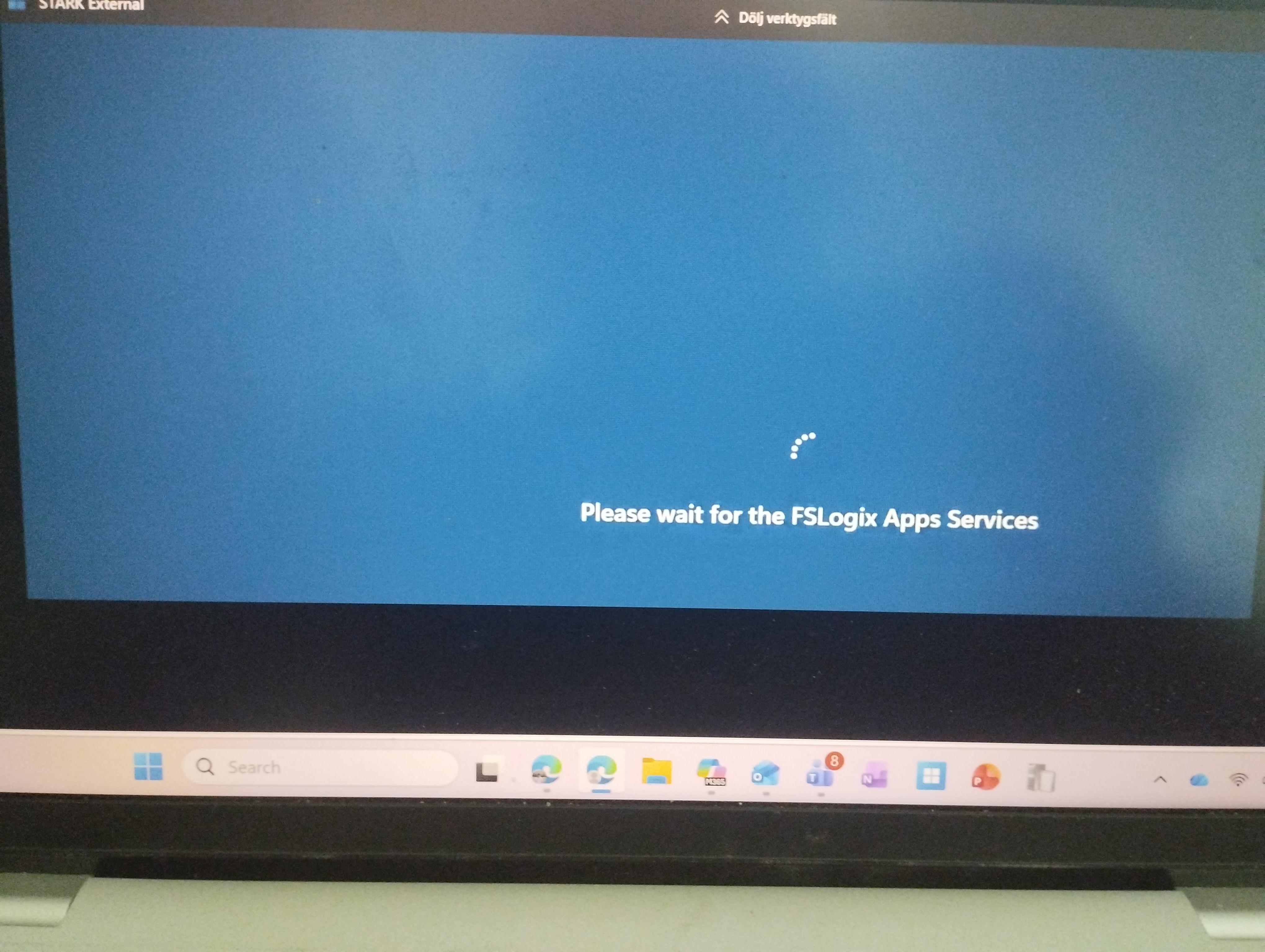
When a user connects, the progress spinner stops turning during sign-in, for example at “Please wait for the FSLogix Apps Services” or at other sign-in steps. After that, the screen doesn’t change anymore and the session looks frozen.

If the user minimizes the Windows App window and maximizes it again, the display refreshes and shows the current state of the session.

The sign-in itself completes successfully in the background. Only the display inside the Windows App stops updating, so this looks like a screen refresh/rendering issue on the client side, not a problem with the sign-in or with FSLogix.

Has anyone else run into this recently? Is it a known issue with a recent Windows App or Windows update, and is there a fix or workaround other than minimizing and maximizing?

br Roland


r/AzureVirtualDesktop • • 17d ago

Missing Mouse pointer since yesterday

3 Upvotes

Hello everyone,

we have a strange problem, some of our users are missing their mouse pointer after starting the session. Seems like only the windows app on windows is affected. they can open it trough the browser. No changes were made.

we are also effected by the minimized published app issue posted yesterday. There seems to be a connection, feels like some backend changes were made.

does anyone have the same issue?


r/AzureVirtualDesktop • • 17d ago

In-place Upgrade Win11 multi-user edition

4 Upvotes

I have a Windows 11 multi-user edition VM that is running 22H2. I really need to get it onto a supported OS without rebuilding it. I've tried everything I can think of to get it to install updates from Windows updates and it will not. Anyone have any ideas for upgrading this VM?


r/AzureVirtualDesktop • • 18d ago

Just for fun - KQL

6 Upvotes

For many of us that don’t have the luxury of using Nerdio or Hydra and outside of the AVD built in insights.

What are your go to queries for overall platform health checks. I am currently building a dashboard and want some inspiration.


r/AzureVirtualDesktop • • 18d ago

Remote app doesn't open and stay visible only in the taskbar

8 Upvotes

Hello,

we are experiencing a widespread issue with Azure Virtual Desktop RemoteApps when using Windows App (version 2.0.1485.0 in out tests).

Users can successfully connect to the AVD host pool and launch a published RemoteApp. However, the application does not become visible on the desktop.

The application appears to start and its icon is visible in the Windows taskbar, but clicking the icon does not bring the application window to the foreground and the application UI remains inaccessible.

The issue affects multiple users and multiple client devices.

We used remote apps since five years and this is the first time we see this issue.

What do you suggest?


r/AzureVirtualDesktop • • 21d ago

Workplace Ninjas US 2027 Pre-Day Details Revealed!!

Thumbnail reddit.com
1 Upvotes

r/AzureVirtualDesktop • • 21d ago

Inactive Session disconnect (not logout) after some time

4 Upvotes

Hi,

i have the problem with our AVD env that if a user let the session idle (like for lunch break oder a meeting) the session will disconnect after about 30 min.

We checked a lot of things like screensafer, display lock, remote session host timeout and others. But all theses settings are configured for at leased 2 h.

Are there any other configs i should check? Because all i find if i google for that issue is that the idle session should be logged out, but thats not our problem at the moment.

Thanks.


r/AzureVirtualDesktop • • 21d ago

Some users can't reconnect after idling out or getting disconnected.

Post image
5 Upvotes

Hello, having an issue on our AVD environment, all Win 11 24h2 and 25h2 multi session AVDs.

When users idle out or get kicked due to internet issues, some cannot reconnect back to their already established sessions and I have to manually sign them out. It happens once in a while but not super often.

We have idle time set to 10 mins and disconnect time set to 2 hours.

Set Time Limit for active but idle Remote Desktop Services Sessions : Enabled , Idle session limit : 10 mins. End a disconnected session : 2 hours

All Hybrid joined , Entra SSO enabled. Random users no correlation , except a few that do have the issue more often. Issue happens across all host pools (Around 5 total). FS logix profiles stored in Azure NetApp. Screenshot attached, on AVD insights shows as "Generic Transport Failure"

All AVDs use RDP shortpath and AVD traffic uses Azure Nat Gateway for outbound traffic.

Anyone run into this issue before?

Thank you,


r/AzureVirtualDesktop • • 23d ago

AVD Disconnecting 10+ times for multiple users when on TCP WebSocket (UDP Multi-Path works fine)

3 Upvotes

We have an issue that seems to mainly be impacting only one of our host pools, where if a user connects to the session host using TCP WebSocket then they will face multiple disconnections, sometimes 10+ disconnections within a few hours.

If they connect over UDP Relay Multi-Path then they get no disconnections and it works like a treat. The issue is, its so intermittent as to them getting connected over UDP.

If the user signs out from the Desktop and signs back in, sometimes after 3 attempts they get in via UDP, sometimes after 8 attempts and sometimes not until the next day. But what we have seen is the moment they connect to a different host pool from the same laptop, same network then it connects straight in over UDP. So the issue feels very much related to this single host pool that is having the most issues, the impacted host pool and the non-impacted host pools are on the same vnet just different subnets and very little difference between them, same route configurations, same rules in the firewall, same NAT gateway being used, same proxy configurations, just that there are more people on the effected pool (around 70 a day) and less on the non-impacted host pool (around 20 a day)

They are using the Windows App, on the latest version, this is impacting multiple regions India, UK, South Africa, we have a route table to send all our traffic through the azure firewall, i have gone through the required FQDNs MS website multiple times and confirmed our AVD host pool has all the FQDNs and IP ranges allowed, we have a route on the route table to send WindowsVirtualDesktop Service Tag traffic direct to the internet.

The list of errors below is what we are seeing happen mainly:

RDStack -> ShortpathFallbackToGatewayTransport -> {"FallbackReason":"NotSupported"}

RDGateway -> ConnectionFailedServerDisconnect (-2147467259) -> The network connection between the Session Host and the service was unexpectedly terminated. This indicates the network connection from Session Host to the service was prematurely terminated and may show reliability problems. Any help would be greatly appreciated.


r/AzureVirtualDesktop • • 24d ago

Access issues

2 Upvotes

I keep getting a you cannot access this right now message with my AVD login. How can I fix this issue?


r/AzureVirtualDesktop • • 24d ago

GitLab pipeline for Windows 11 images: Packer or Azure Image Builder?

2 Upvotes

Has anyone created a GitLab CI/CD pipeline for building customized Windows 11 images in Azure?

I am considering:

  1. GitLab + HashiCorp Packer
  2. GitLab + Azure Image Builder

The important requirement is that the build must use an existing resource group and existing VNet/subnet. The pipeline should not create a new resource group or network.

The final image should be published to Azure Compute Gallery and temporary build resources should be removed after the build.

If you have implemented this, could you share your experience or repository structure? I would also appreciate information about RBAC requirements, authentication from GitLab, and any issues with using an existing VNet.


r/AzureVirtualDesktop • • 25d ago

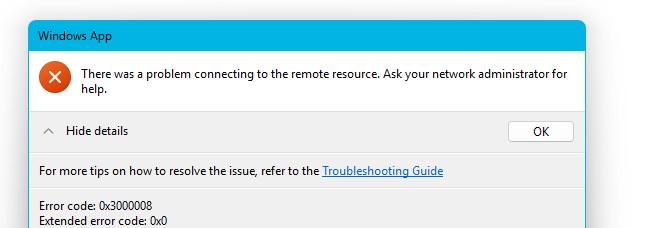
Why will we get this type of error

Post image
0 Upvotes

If you know any possible solutions please comment


r/AzureVirtualDesktop • • 27d ago

VDI Administration Help

6 Upvotes

I am currently deploying an Azure VDI host pool. This will utilized FSLogix and Azure files for user profiles.

I work at a college and this host pool will be used as our “elab” - an environment where students can use to do their coursework.

What are the most important things I should be monitoring to maintain this environment?

We currently host our “elab” on an on-premise Remote Desktop services environment. FSLogix has been a pain point there….