r/cricut • • 1d ago

Quarterly Megathreads Holiday Project Idea, Inspiration, or Showcase Megathread

Post image
11 Upvotes

Made something cool for the holidays? Show it off here!

Need ideas for what to make? Ask here!

Want to share a cool project idea you have? Share it below!

This thread will be the one thread you can promote your own templates or project files, make it count!


r/cricut • • Apr 20 '26

Welcome to r/cricut! A cricut is not a printer.

33 Upvotes

r/cricut • • 14h ago

** Project Showcase ** when it works, it works…

Thumbnail gallery
468 Upvotes

hosted my nieces bridal shower. 150 paper flowers and 75 paper leaves later it turned into table decorations and a selfie station. was weeks and hundreds of hours of work, but i got it done!


r/cricut • • 8h ago

**Look Ma! My First Project!** It’s the little things!

Thumbnail gallery
6 Upvotes

My cricut explore 5 got delivered today!! I had been eyeing one for a while but could never justify the purchase. Amazon had an early Black Friday deal and I got it for an absolute steal and used some Amazon gift cards I had sitting aside to purchase it. Within 10 minutes of it being delivered I had to add a decal of my golden boy to it :)


r/cricut • • 6h ago

HELP! - Design Space sucks Print and Cut

2 Upvotes

Hi,

I have a Cricut Air Explorer 2 and I've set up a Print and Cut project. It seems that I can only create a Print and Cut project if I select Stickers. When I do that, Design Space will not let me pick any other material than sticker material. I've even tried to modify sticker material and then it removes that from being selected as well. Additionally, it will only do kiss-cuts.

Is there a way to create a Print and Cut project with a thicker material and/or do die-cuts? Basically, anything that would allow me to print and cut, but make deeper cuts.

The only thing I can see to do which, doesn't work that well, is to run the cut job multiple times to get it to cut "better."

Any help appreciated!


r/cricut • • 14h ago

HELP! - Hardware woes brand new cricut maker 5… carriage not even coming close to making contact with paper/vinyl

2 Upvotes

so i just bought a maker 5 today— the starter kit. everything seemed like it was working until the “test” sticker didn’t even work. the blade wouldn’t go down low enough to reach the vinyl & even so much as scratch it, let alone cut anything out.

mod says there isn’t enough context so— it’s the Cricut Maker 5, i’ve used both desktop & mobile Design Studio, and i don’t have a video of it, but did cricut support does.

we contacted cricut support, they did the zoom call & are sending us a new blade. but what i don’t get is, we tried the pen tool on cardstock & yet AGAIN, the carriage didn’t come down low enough for the pen to touch the cardstock at all, loaded on a mat this time.

i’m just wondering if anyone has had this issue? i tried printing from desktop & from mobile, neither work. it seems more like a hardware issue.

if it is, do i need to return the cricut?? are they aware this is happening?? just curious. thanks !


r/cricut • • 17h ago

HELP! - Hardware woes What is Cricut machine error -45, 53

2 Upvotes

Keeps making me restart during print, then cut; the machine power button flashes red and white, and the screen of my Mac laptop (running Tahoe 26.5.1) gives me the message, "There was a critical error, and you need to restart your Cricut machine. -45, 53"

I have SO many holiday gifts and cards to make - and have already wasted so much cardstock - any guidance or suggestions would be appreciated!


r/cricut • • 13h ago

HELP! - Material issues What product is this?

Thumbnail gallery
1 Upvotes

I used a Makerspace at my local library to cut out these vinyl stickers on a Cricut. They are great for stained glass because they cut out patterns accounting for the foil thickness between pieces, plus the stickers are waterproof and stay on during grinding. However, the library only has a limited supply of the sheets and cuts them down to smaller sizes to save on costs. I want to print larger ones, so I'm trying to buy my own full-size sheets. When I bought Cricut Printable Sticker Paper, one of the makerspace employees told me that was the wrong product and that the stickers were vinyl. However, when I got Cricut Printable Vinyl, it was a single sheet, not the double sheet of vinyl sticker on front and then a backing. Does anyone know what product this is? I've looked on the Cricut website and there's so many different products, but none of them seem like the one I'm looking for.


r/cricut • • 20h ago

HELP! - Print then Cut Problems Cricut explore 5, takes long to scan the sensor marks and then cuts wrong

Post image
3 Upvotes

I have a cricut explore 5, i got it like less than 2 months ago. Never had issues once i learned how to use it, now when I do print then cut, my machine takes like 5-10 seconds to scan each black sensor mark when it used to be almost immediate, and then it cuts completely to the wrong side. Do i have to get a replacement or something? What's going on? I keep wasting materials


r/cricut • • 14h ago

Cricut Complaint Club It's been a good run.

0 Upvotes

I picked up a Joy a few years ago to create stencils for custom dye projects. The learning process was relatively quick and the software worked great on my Macbook Pro. Having the right materials in stock locally was an added plus.

Unfortunately, after firing up the cutter for a project this weekend, I've discovered that the laptop no longer supports any version of the software, old or new, and while the app on the iPad functions it's nowhere near as easy to work on.

I've found information about running the Cricut software on the Linux OS, which I'll work on over the holiday week, but short of that solution...I have a chunky paperweight, don't I?

(Yes, I've gone through a number of the Cricut subs, and I'm clearly not the first or only person dealing with this silliness. End to end, proprietary environments are only good for the manufacturer.)


r/cricut • • 1d ago

HELP! - Design Space sucks Did cricut just removed their "Curve"effects functionality?

1 Upvotes

How do I achieve this inside Design Space, I cant find the curve option??


r/cricut • • 1d ago

HELP! - How do I make this? Do things get better?

3 Upvotes

So I’m updating a memorial board at a animal shelter. I have about 40 names that I cut individually, then place them. My machine is an older cricut but still works well. I’m using oracle 651 material. The font is Myriad Pro, 32. Rather small size. I experienced every problem known to cricut, from terrible weeding, letters completely sticking to material, and even a software problem where cricut couldn’t read cut lines.

I changed the cutter about 5 times during the process. i used the washi material setting from default, to more pressure. I did not use the less pressure setting. I don’t think I’ve ever had a more frustrating time with this job. The letters did not stay on the paper backing. I tried reverse weeding that didn’t work. I can’t think of one thing material wise that I would change for another batch of names. I burnished very, very hard. It took my about 8 hours just to get names cut. It was a two day effort. I cut each name individually be cause there’s no way I could cut even 4 in a column at a time.

I can only think of a couple of things. The material could have been too old. I’ll try some fresh material. My font was too small. But still if the font is small I shouldn’t have had all these problems.
if you have any ideas to make my second list of names easier it’d be greatly appreciated.


r/cricut • • 2d ago

HELP! - Material issues Help!

Post image
6 Upvotes

I am losing my mind, why does my pen/marker keep doing this? Is my mat not sticky enough? Is my marker crappy? The marker will still work even afterwards.


r/cricut • • 2d ago

HELP! - How do I make this? Help, please. I want my Maker to cut this!

Post image
5 Upvotes

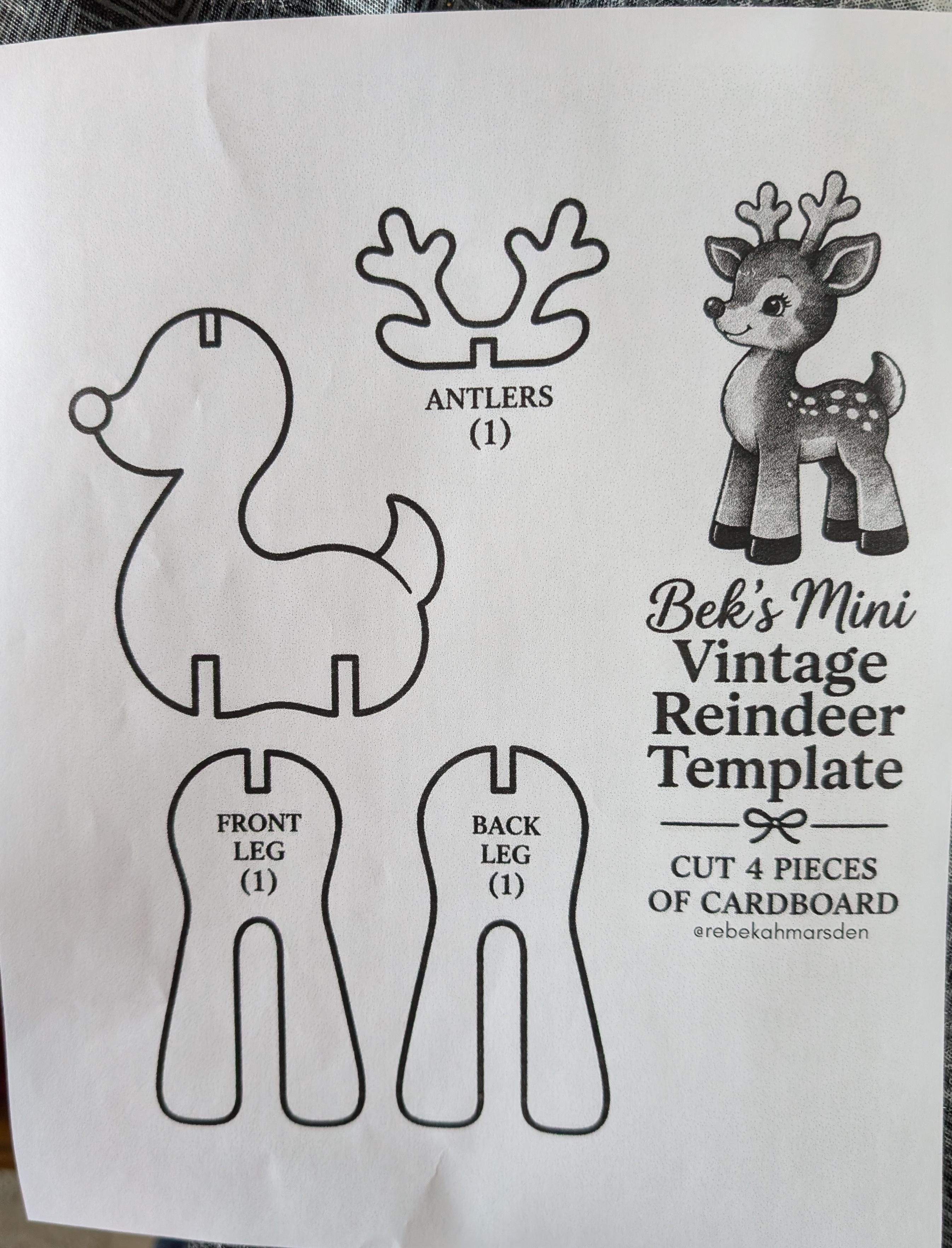
I have this printout on an 8.5" x11" sheet of paper. I want to cut it from cardboard using my Maker. How do I get this pattern into Design Space, keeping all the measurements the same? I tried cutting the cardboard with scissors, but I would like a cleaner cut, if possible. Any help is appreciated.


r/cricut • • 2d ago

Shopping Questions - Machines Best iron on vinyl?

3 Upvotes

I’ve played around with a few brands and I’m having issues with the print lifting or cracking in the wash.
Is there a better brand that works best for longevity?
Or is there any tricks to get it to last longer?
Thank you!


r/cricut • • 2d ago

HELP! - Print then Cut Problems How do I even go about calibrating this?

Post image
3 Upvotes

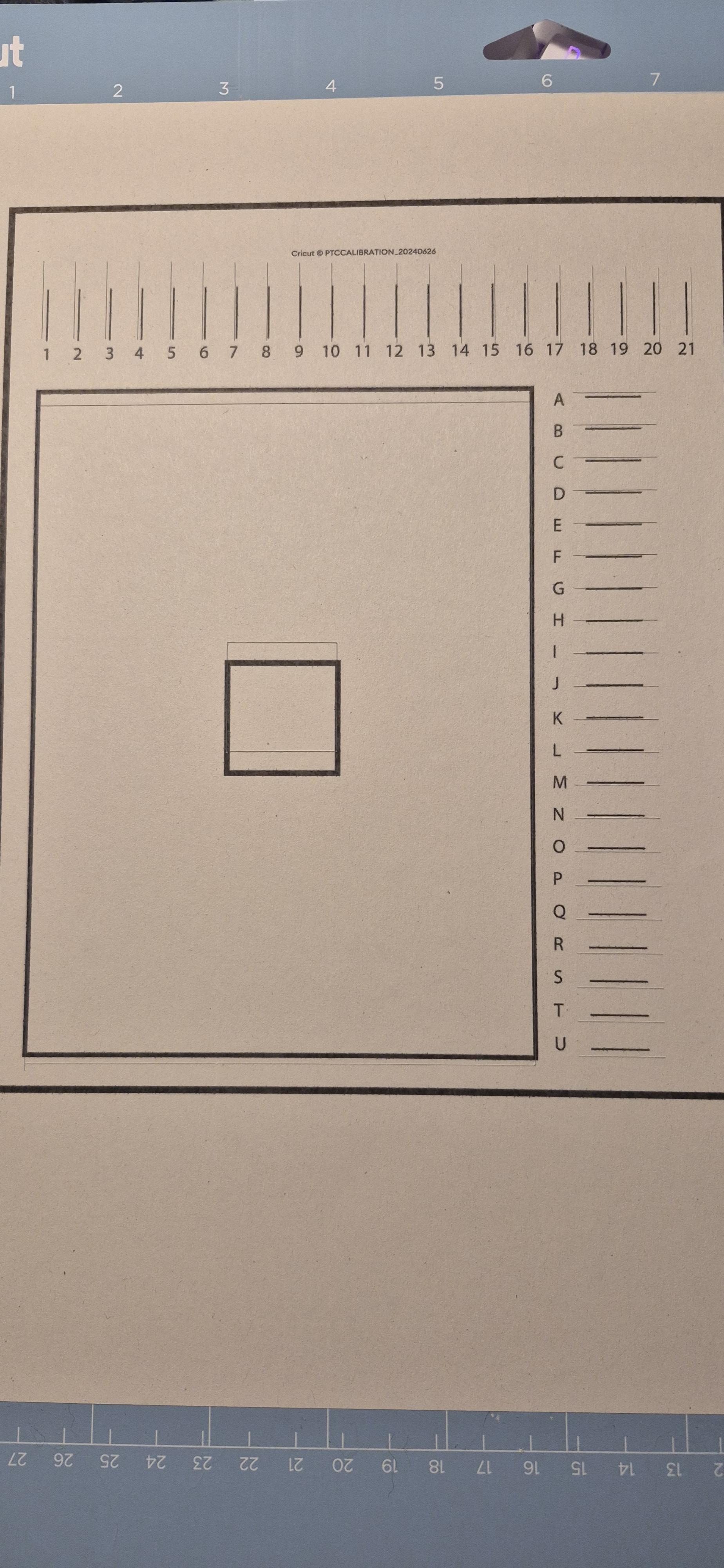
I've already followed the calibration guide and this is probably my 20th pass at calibration. The inner and outer Squares will not line up at all.

I would love if someone could give me a tip on how to proceed.

Cricut is a Maker 4 if that is at all relevant.

Thank you in advance!


r/cricut • • 3d ago

**Look Ma! My First Project!** faux taxidermy cicada!

Thumbnail gallery
97 Upvotes

just got the cricut explore 5 yesterday! truthfully i didn’t know anything about this machine, not even that it existed 😓 !! my partner bought it for me, and i’m soo glad he did! i’m dying to make printed stickers, but until i get my hands on a printer, i’m learning the basics!

i illustrated this cicada by hand in iartbook on my ipad, used a real taxidermy cicada listing as an image reference, exported it to adobe capture to save it in the SVG format, then played with the pieces and did some test rounds in the cricut! and it came out so cute! it’s cut out of the cardstock that comes with the kit and elevated by some pieces of cardboard. i’m eager to learn what other materials i can use with this design!

the only other thing i may add is a tag with the specimen name to match the style of a pinned bug display. overall, fun project and super cool machine! excited to get more use out of it, especially around the holiday season!

happy cricuting! 🤍


r/cricut • • 2d ago

HELP! - Design Space sucks Design Space no longer remembers Base Material settings between cuts?

2 Upvotes

I swear I used to be able to do multiple cuts with the same base material, just reloading and clicking go between each one. Now the system is forcing me to select the material again each time between every cut. Is there a setting to put this back the way it used to be or am I out of luck?

It's increased the amount of time it takes by a good 30-40% on what was already a tedious process so I would love if someone could tell me how to fix this and that it's not just another case of an update making software worse than it was before.

Thanks.


r/cricut • • 3d ago

Cricut Complaint Club Help please, has anyone had the same problem?

Post image
2 Upvotes

Okay, a little context. I had my cricut maker 5 since early October and I had to use the guarantee twice already.

First, when debossing and cutting it will be on one side, I thought it was me but apparently it was a sensor problem straight from factory so I got a replacement. I watched steps by step on how to use the tool and nothing worked.

Then, got paper jammed and stopped working, not cutting, debossing, nothing. It will pretend it’s doing it but when it went down it would not touch the paper, had to get another one.

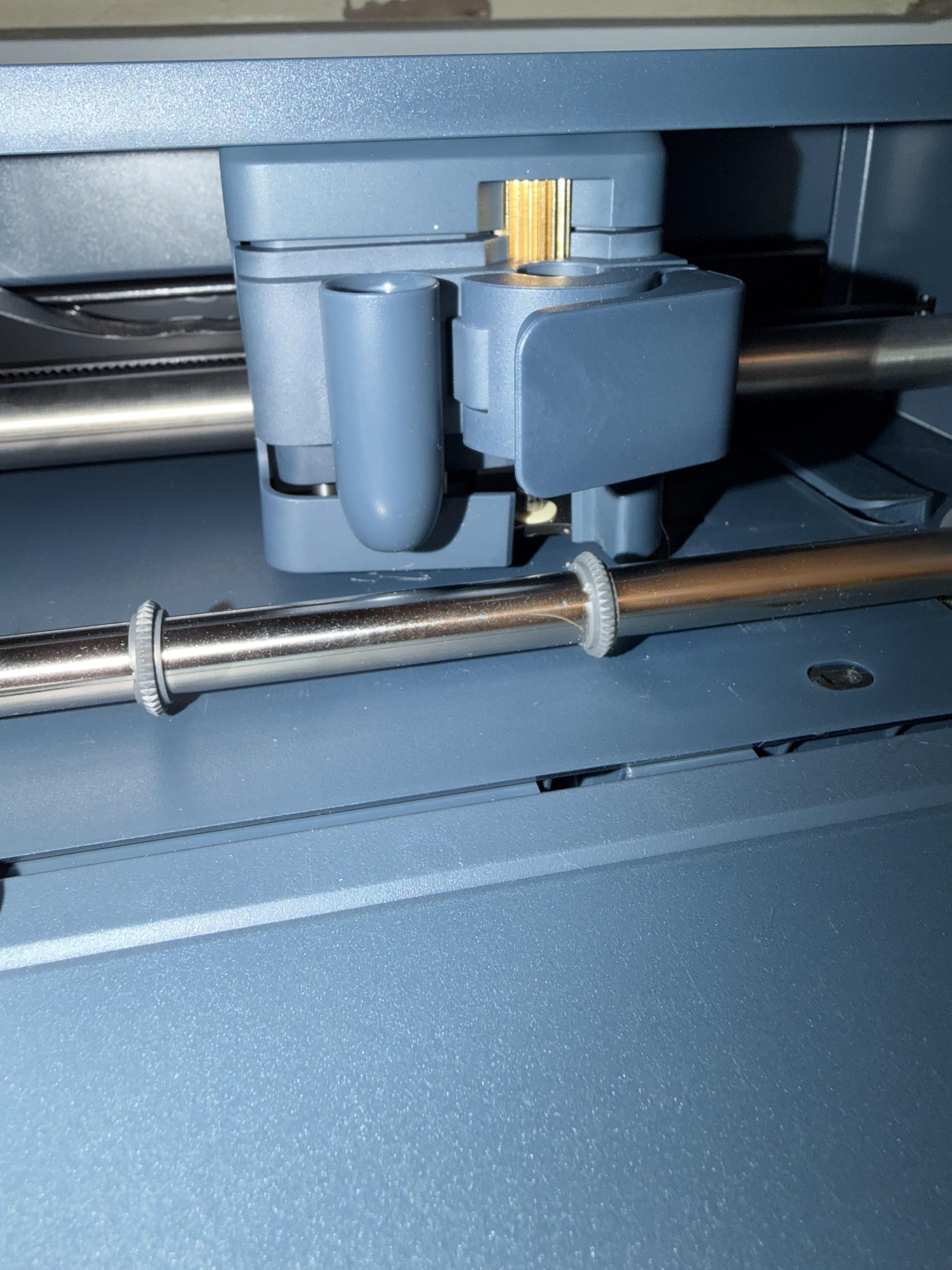
Now I use it almost every day. Been doing some projects and wanted to do something for friends and holiday but I swear I’ve been careful, not getting paper jammed, it was working great but it doesn’t cut all the way through now. I noticed something is a little low now in the back (part of the plastic) and I believe that’s why but I don’t understand why,
Nothing got stuck, it didn’t stop or anything it happened from one project to another.

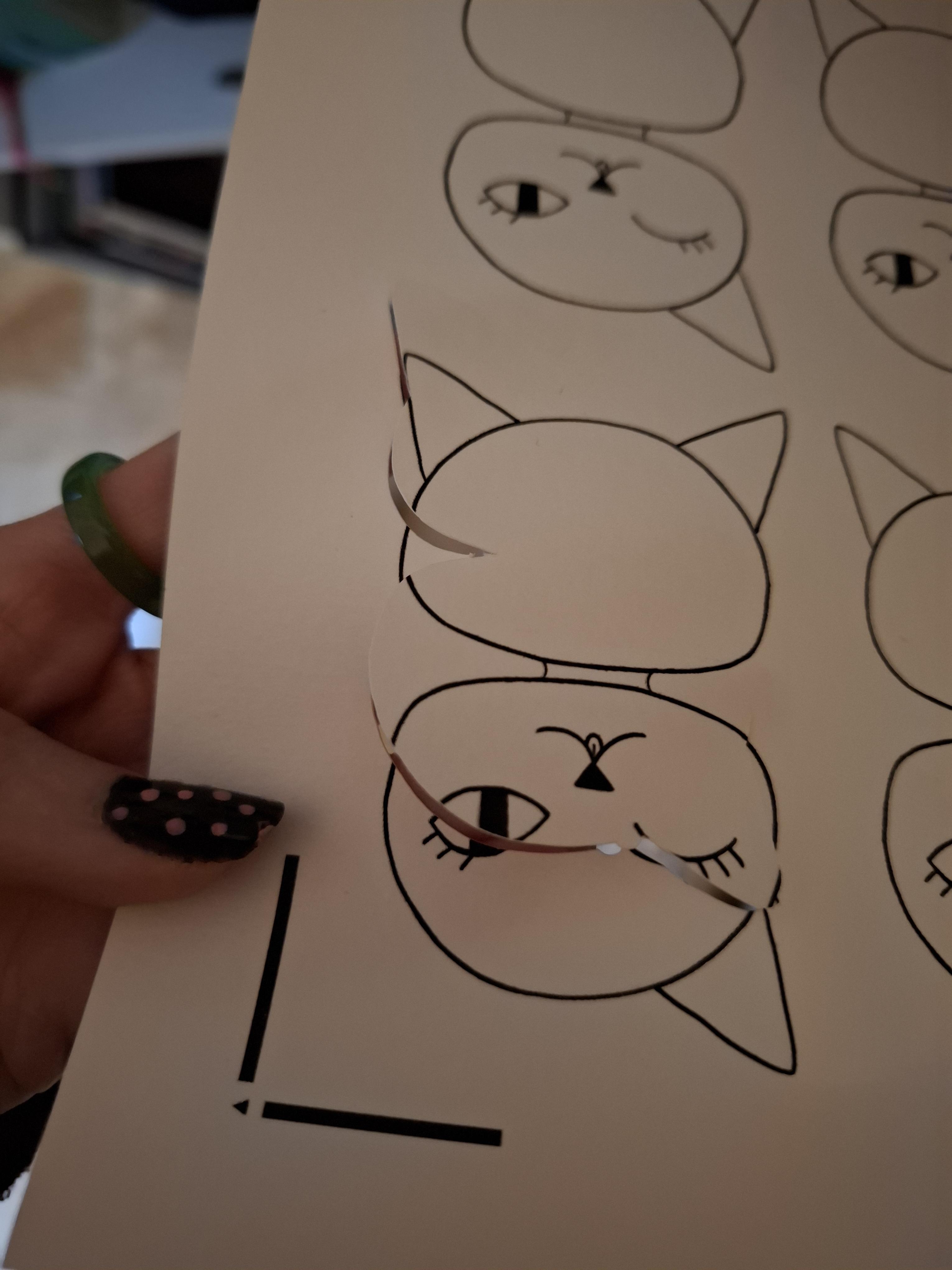
Any advice? Is someone having same problems, should I get a different machine? At this point I’m very frustrated am I using it wrong? This is the photo of the part I’m talking about

r/cricut • • 2d ago

Cricut Complaint Club Celebrating my boxing up of Cricut. Bye bye arch nemesis.

0 Upvotes

I will honestly be so happy to get rid of this thing today! And I really hope my daughter in law is able to use Design Space without pulling all her hair out! It has kept me out of my favorite room and I’m looking forward to good old fashioned die cutting for a while. I’m not going to buy another brand until i really see how it’s used. I did all the research on cricut and I really thought how difficult could it be…..I’m not an idiot. Am I? Design space is the WORST!


r/cricut • • 3d ago

Asked, answered, and locked. Compatible Base Materials Issues

3 Upvotes

I'm having issues with getting my Cricut Joy XTRA to use other base materials in Cricut Design Space that I believe should be compatible but is not allowing me to select the options. I'm trying to cut through laminated sticker paper that is laminated on both the front and the back. ( I prefer it to self adhesive laminating sheets because the final result, not the process ) With Medium Cardstock - 80lb (216 gsm) selected it just barely doesn't cut through the back side lamination.

The second photo I have inserted here shows all the Compatible Base Material settings I've been able to use. I've tried creating custom ones and they also do not allow me to select them. I have selected the model of machine I'm using in the settings as the correct one.

I'm asking two questions. Am I mistaken and does the Cricut Joy XTRA not allow these other base material settings? If it does allow me to set other base materials, is there something I'm doing wrong in the design space to restrict me to only a handful?

I would really appreciate some feedback. Thanks for reading if you did!


r/cricut • • 3d ago

HELP! - How do I make this? Cricut Files for Sewing

2 Upvotes

Hello, I design sewing patterns and for the smaller patterns i would love to include files for cricut. However, I don't have one myself and I am around many different versions of the machines, some that can cut fabric, some that can't and I'm wondering which file type is best for the typical user. Plain pngs or svgs? Would I need to delete all explanatory text and logos on pattern pieces? Please point me on the right direction so i can Research a little bit better informes on how they would actually be used. Ty


r/cricut • • 3d ago

HELP! - How do I make this? Trying to make sticker sheets with Cricut Joy. Confusing myself

Post image
0 Upvotes

I have sticker sheets with laminate that cut into rectangles. im uploading the designs and the white border as one layer but I just can't get the blade to align with the white outlines correctly. It's always off. Am I missing something. How would the process go here?


r/cricut • • 4d ago

Cricut Complaint Club Why does Cricut hate us? Pay for the machine, app, but cant use SnapMat because iI don't use Apple? Bullshit.

15 Upvotes

What title says. This is getting stupid. Paid $600 for the maker 4, then canva, cricut app, then silhouette studio app as well because the cricut one can't even handle rhinestone templates, all to find I can't use the new feature because I use a windows laptop and android phone. Pissed off.