r/Esphome • • 9h ago

Project ESPHome/ESPNow smart remote with OLED display

Thumbnail
gallery
142 Upvotes

For a while now I'm working on my smart remote to control all entities in Home Assistant.
Project started from out of the shelf combination of PCB + Wroom Lolin module, but after a while I realized that power loss on that dev board was too high, so I redesigned it totally to achieve 15uA consumption on standby for couple of months standby.

For more details I described configuration of project on my github: https://github.com/plugowski/esphome_remote

And more details about remote as well as online configurator with live preview of how menu behaves available on my website.

I'm open for discussion if you would like to use remote to control HA, or in an era of smartphones it's rather obsolete?


r/Esphome • • 10h ago

Project HomeAssistant Touch Device

Thumbnail gallery
15 Upvotes

r/Esphome • • 19h ago

Project Built a sleep-schedule & now/next clock for my 8yo with AuDHD on a £20 5" ESP32-S3 (ESPHome + LVGL)

Thumbnail gallery
2 Upvotes

r/Esphome • • 1d ago

Help CrowPanel 2.1" Rotary

Thumbnail reddit.com
4 Upvotes

r/Esphome • • 1d ago

Project Yet another Garage Door Controller using ESP Home

3 Upvotes

I got sick of the crappy z-wave controller that used a battery operated tilt sensor. I live in Minnesota where freezing temperatures make those sensors not worth it. I got a bike stolen from my garage cause it failed to auto close the door one night, so I decided to start down the path of making my own garage door closer/opener with a timer that natively connects with Home Assistant.

The first rev of the code I used chatGPT to help make. It was not good- as in it got it 90% of the way there. But still lacked the ability to turn on/off auto close timer. This week I’ve had some time to come back to it using Claude to troubleshoot it, and it’s fully functional with home assistant now.

I’m using reed switches and a magnet mounted to the door for door positioning data. I have a garage door opener from the 2000s, so it just a dry contact with a relay to send open/close commands.

https://github.com/videoman/esphome-projects/tree/main/garage-door


r/Esphome • • 2d ago

Vibe Coded I got native Apple HomeKit running on a Broadlink RM4 Pro

3 Upvotes

I started this project because I wanted to get my 300 MHz gate working in HomeKit and ended up getting HomeKit running directly on the RM4 Pro itself.

It pairs with Apple Home as a bridge without relying on Homebridge, Home Assistant, Scrypted or any additional hardware.

I opened up the RM4 Pro, soldered some wires to the UART pads (I suck at soldering lol) and flashed ESPHome using seb5594’s firmware:

https://github.com/seb5594/ESPHome-Broadlink-RM4-Remote-Firmware

All subsequent updates are now done over Wi-Fi, but I left the uart wires attached and tucked back into the case

The RM4 Pro has a Realtek RTL8720CF with 256 KB of RAM and 2 MB of flash. With the help of Claude, I ported esp-homekit and wolfCrypt.

It’s super bare bones right now. Claude built a basic web UI for learning and managing IR/RF codes directly on the RM4.
There were quite a few issues getting everything working, particularly with mDNS, HomeKit characteristic compliance and FlashDB storage limitations.

One of the main reasons I wanted to do this was because the stock Broadlink firmware only supports 315 and 433 MHz. Turns out the hardware itself is capable of 300 MHz, and under ESPHome I’m now able to learn and transmit at that frequency.

I’m using it daily to control my 300 MHz gate and Woozoo IR fan in my office (power, three-speed slider and oscillation), all directly from the Apple Home app.

TV and AC support have passed host tests, but I haven’t tested either on actual hardware yet.

Still very much experimental, but I plan on continuing to build it out with the help of Claude.


r/Esphome • • 2d ago

Project I reverse-engineered Belimo's proprietary NFC protocol to read live telemetry & write settings into Home Assistant using an ESP32 + $5 PN532 (No ZIP-BT-NFC gateway needed)

Post image
76 Upvotes

TL;DR: Built a native ESPHome external component that talks directly to Belimo NFC actuators. It lets you continuously read live operating data and change parameters in Home Assistant—permanently replacing Belimo's $200+ handheld ZIP-BT-NFC / LINK.10 Bluetooth adapters and mobile app.

GitHub Repo: https://github.com/ibtinker/esphome-belimo-nfc

The Breakthrough

Common wisdom (and Belimo's own docs) says you can't get continuous live data out of Belimo NFC actuators without buying their proprietary Bluetooth field tools—because standard passive NFC readers only see static identity tags.

After decompiling the Belimo Assistant Android app (using blutter on the compiled Dart code) and mapping out the embedded XML/YAML device profiles, I uncovered how it actually works: the actuator's processor speaks a device-agnostic MP-Bus protocol tunneled through a 64-byte SRAM mailbox on the NXP NTAG I²C plus chip.

Why This Matters for Any Belimo NFC Setup

Whether you have Belimo actuators on hydronic radiant manifolds, zone dampers, VAV boxes, or energy valves, you can now pull real-time telemetry locally without expensive gateways:

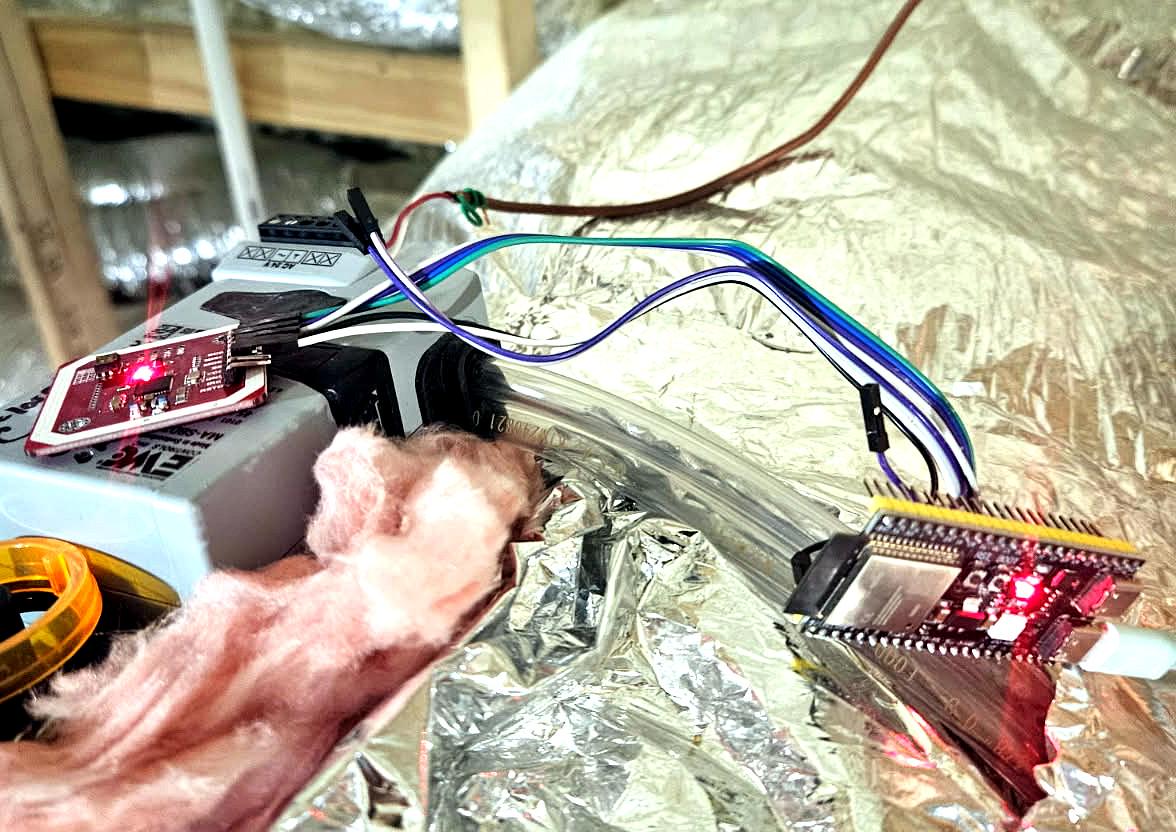
  • 100% Local & Cheap: Just an ESP32 + a $5 red PN532 module (set to SPI mode—I²C locks up under continuous polling) mounted flat over the actuator's NFC logo.
  • Universal Transport Engine: The SRAM handshake, CRC-16/ARC framing, and MP-Bus polling are identical across Belimo's NFC product line. Reading any Belimo NFC actuator just comes down to listing its pool_id numbers and scaling factors from the app's device profiles.
  • Two-Way Control (Optional & Safe): Read-only by default (SRAM reads cause zero flash wear), with guarded write support for changing setpoints/modes directly from Home Assistant automations.

My First Working Implementation (EWC SBD2 Bypass Damper)

To prove it out, I built the first device component (belimo_sbd) for my EWC SBD2 Smart Bypass Damper, which has been running rock-solid for over two weeks. In Home Assistant, it gives me:

  • Live Damper Blade Position (%)
  • Measured Duct Static Pressure ("wc)
  • Active Pressure Setpoint ("wc)
  • Total Fan & Bypass Runtime (hrs)
  • Setpoint Preset Dropdown: Lets me dynamically tune duct pressure targets from HA without climbing into the attic.

Want to Add Your Belimo Actuator?

If you have another Belimo NFC valve, damper motor, or VAV controller and want to get it into Home Assistant, drop your model number in the comments or open a PR on GitHub!


r/Esphome • • 2d ago

Project So I made a thing. IR tv remote

Thumbnail community.home-assistant.io
0 Upvotes

So I tried to make an easy to use remote for an elderly person.

It seems to work stand alone with out any other device or server on the network.

I made the Case in onshape.

It needs to be adjusted to each tv with the IR-codes.

Have a good day!


r/Esphome • • 4d ago

Meme Because my drawers didn't have enough ESPHome

653 Upvotes

A week or so ago I finished building a dressing area in the bedroom. I was very pleased with it, but there was one problem: there simply wasn't enough Zigbee, electronics, complication or lighting involved. It had been a very carpentry-style project, so that had to change.

The result is the Drawer Illumination Subsystem, because turning on the main light is just too simple. Full write-up with the build, wiring and a playable demo of the effects: https://marcuslab.uk/projects/drawer-lights/

How it works:

  • 12 drawers, each with a wired door contact on the inside of the carcase
  • An addressable RGBW COB strip routed into the underside of the top, split into three partition lights
  • An ESP32-C6 running ESPHome as a Zigbee end device, on a custom PCB I designed
  • A Zigbee2MQTT external converter so HA sees the state of all 12 drawers

Open a drawer and only its column lights, sweeping out from the middle. It goes off a second after the last drawer in that column shuts.

What else it unlocked:

  • Dim red at night instead of white
  • An amber nudge if a drawer is left open
  • A 15-minute sunrise before my alarm
  • A drawer alarm, for reasons

The one thing that fought back: the C6 shares one radio between Wi-Fi and Zigbee, and Wi-Fi was hogging it so it would never join. Wi-Fi now stays off at boot and zigbee: on_join switches it on.


r/Esphome • • 5d ago

Project I reverse-engineered the 2.4 GHz remote of a no-name ceiling lamp so it works in Home Assistant (ESPHome, no SDR needed)

16 Upvotes

Crossposting from r/homeassistant, since the HA side is an ESPHome external component.

It's an ESP32-S3 + CC2500 that clones the lamp's 2.4 GHz remote. In HA you get a button per remote button, hold buttons for dimming and colour temperature, and an `esphome.velua_bridge_press` action for scripts.

Known limitation: a press blocks the loop for ~1.7 s while it transmits. Feedback on the component is welcome, especially on making that non-blocking.

Code: https://github.com/HenrikBiscuit/lindby-velua-rf-bridge


r/Esphome • • 5d ago

Thinking through water system control both mains and otherwise

Thumbnail reddit.com
3 Upvotes

r/Esphome • • 5d ago

🗣️ WallDock – Votre tablette murale s'allume désormais avec VOTRE mot personnalisé

Thumbnail
reddit.com
0 Upvotes

r/Esphome • • 5d ago

I was looking at these esp32_8266 chips, I have a cycle and a power bank, I was thinking, if I use a power bank, could I just have a esp32_8266 chip and powerbank on my bike and then just amplify free wifi to use wherever I go?

1 Upvotes

question.


r/Esphome • • 6d ago

bme280 sensor stops updating

2 Upvotes

I have a pico running esphome that has an adc door sensor attached. I recently added a bme280 sensor to it as well and it works for a period and then stops updating. Looking at the logs remotely don't show any errors so I'm at a bit of a loss trying to troubleshoot. Free heap is ~132K so not likely an out of memory issue. Doing a reset through HA is enough to get the device reporting in again - so not even a hard power off. Its currently running the latest esphome version but I think it also happened on 2026.10 as well.

relevant config if it helps

i2c:
  sda: GPIO8
  scl: GPIO9
  scan: true

sensor:
  - platform: bmp280_i2c
    temperature:
      name: "Temperature"
      oversampling: 16x
    pressure:
      name: "Pressure"
    address: 0x77
    update_interval: 30s  
  - platform: aht10
    address: 0x38
    variant: AHT20
    humidity:
      id: humidity
      name: "Humidity"
    update_interval: 30s
  - platform: adc
    id: fridge_door
    pin: GPIO26
    name: "Door Sensor"
    update_interval: 1s
    accuracy_decimals: 0
    internal: True

r/Esphome • • 7d ago

I built my own wireless smart home remote using ESP32-C6 and Home Assistant

Post image
43 Upvotes

r/Esphome • • 7d ago

Help using an esp32 to calibrate ESC

2 Upvotes

Hello, I have built a quadcopter with an esp32 as the flight controller. My plan is to program it myself, and I am using ESP-IDF. So far, I am able to read the radio controller joysticks using IBUS. I am currently trying to control the ESCs for the motors. From what I have researched, most ESCs expect a 50hz PWM pulse from the flight controller (esp32), and high throttle is a 10% pwm pulse while low throttle is 5%. (Also it’s at 8 bit duty resolution if that matters.) I am converting the high and low throttle values from the RC controller to map out to these percentages and update the PWMs accordingly. I have verified that the PWM is indeed correctly set up and outputting (I connected LEDs and controlled their brightness using the same code and they worked); however, the ESCs are just not responding. They have been trying to calibrate and are beeping, which requires you to give it a sequence of low and high throttle input, but they just WILL NOT respond to the PWM. I have played around with various frequencies, percentages, etc. and at one point they started to respond but then went back to beeping.

I appreciate everyone’s help in this - I’m sorry if this isn’t the correct subreddit, but it heavily involves the ESP32 so I feel this is the best one to post


r/Esphome • • 7d ago

Heatmiser UH1/PRT-N UFH - Into the 21st Century with ESP32-S3

Post image
11 Upvotes

r/Esphome • • 8d ago

My LD2450 shorted internally and dragged a XIAO ESP32-C6’s 5V pin down to 1.7V. Here’s what I’d check first next time

3 Upvotes

Built a second presence sensor: XIAO ESP32-C6 + HLK-LD2450 + BME280. Config compiled, board joined Wi-Fi, BME280 readings came through, but the radar entities stayed empty.

Metered it: 3.3V pin read 3.3V. The 5V (VBUS) pin read 1.7V with USB plugged in.

Assumed I was measuring wrong, so I swapped everything: two meters, different leads, different USB supplies, different cables. Same 1.7V every time.

The reason the board kept running: on the XIAO the 5V pin sits behind the board's power-path parts, not a straight wire from the USB jack. A heavy load drags that pin down while the ESP32 keeps running fine on USB. So a good 3.3V reading told me nothing.

Stripped it back to the bare board: 5V pin read 5V. Added parts back one at a time: the LD2450 had shorted internally and took the BME280 with it. A second LD2450 did the same thing, including on an ESP32 DevKitC, so it wasn't the XIAO.

What I check now before anything goes on a board:

- Ohm out each module's supply pin to GND, unpowered. A few ohms or a dead short = don't connect it.

- Add parts one at a time and measure the supply pin after each.

- Measure the pin that actually feeds the part, at the part's header if you can. Don't trust 3.3V as proof.

- Feel for heat. A shorted module's main chip gets warm within seconds.

- Check reused jumper harnesses for nicked wires shorting 5V to GND.

- If in doubt, power the radar from its own 5V supply with grounds tied.

I've gone back to an LD2410C for this one (same as my shop sensor, which has been solid). Anyone else had an LD2450 fail like this?

Full write-up with photos: https://imakethings.fyi/esp-projects/blog/ld2450-radar-short-vbus-1-7v/

r/Esphome • • 8d ago

Powering a 4" ESP32 display in a bathroom

Thumbnail reddit.com
1 Upvotes

r/Esphome • • 8d ago

ESPHome 2026.11.0 Release Notes: Lighter builds and tougher updates

Thumbnail
esphome.io
141 Upvotes

r/Esphome • • 8d ago

Has anyone gotten the speaker output working on the Guition ESP32-4848S040C_I?

1 Upvotes

Hi everyone,

I’m trying to use a passive 8 Ω, 2 W speaker with the speaker connector on my Guition ESP32-4848S040C_I (4") display.

I tried an ESPHome I²S speaker configuration with:

  • BCLK: GPIO1
  • LRCLK: GPIO2
  • DOUT: GPIO40

The speaker produced quiet noise rather than the test tones and became hot, so I disconnected it.

I subsequently found documentation saying that the I²S pins are shared with the relay outputs and that the 0 Ω resistors need to be moved from R25–R27 to R21–R23 for audio. My board appears to have the relay-side positions populated, but I haven’t modified it yet.

Has anyone successfully used the onboard speaker output on this board? Did you need to move those resistors, and would you be willing to share your ESPHome configuration?

I’d also appreciate any ideas about what could have caused the speaker to heat up. Thanks!


r/Esphome • • 9d ago

Vibe Coded I made a plug-in ESPHome board for Kaidi standing desks (height, up/down, presets in Home Assistant)

Post image
27 Upvotes

Crossposting from r/homeassistant with a bit more detail for this sub.

It's a single YAML file on the ESP-IDF framework, with two UARTs at 9600 baud (one for the control box, one listening to the handset) and template sensors and buttons, with the frame handling in lambdas. Two things others with desk-powered ESP32s might find useful: the desk's 5 V supply is weak, and `cpu_frequency: 80MHz` is what stopped the resets and failed OTA updates.

Disclosure: the firmware and docs were written with a lot of help from an AI assistant. The protocol was worked out with a logic analyser and a multimeter on my own desk, and everything was tested on real hardware, including a board revision that came back with mirrored jack pins.

Repo: https://github.com/yog18r/kaidi-desk-esphome


r/Esphome • • 9d ago

SwitchBot Universal Remote → Home Assistant without a hub: ESP32 Bluetooth Classic HID bridge (ESPHome component)

Thumbnail gallery
19 Upvotes

I built a small ESPHome external component (bt_classic_hid) that lets an ESP32 pair with the SwitchBot Universal Remote directly over Bluetooth Classic and forwards key presses to Home Assistant as events — no SwitchBot hub, no cloud.

Since ESPHome only supports BLE, this uses Bluedroid's BT Classic HID host profile with a generic HID report parser (usages, not hard-coded byte patterns), so it should work with other BT Classic keyboards/remotes too.

  • All 14 keys as esphome.switchbot_remote events
  • Pairing survives restarts/OTA, auto-reconnect
  • Setup: flash one YAML, component fetched from GitHub at build time
  • Needs original ESP32 (BT Classic radio) — no S2/S3/C3/C6
  • Currently press events only; release/hold WIP

Repo: https://github.com/lepatrick/esp32-sbremote

Feedback welcome!


r/Esphome • • 9d ago

Project ESPHome on The Waveshare ESP32 S3 PhotoPainter, all the components, without the struggle.

Thumbnail
github.com
7 Upvotes

I saw folks struggled with I2C unavailable on this device. I did a deep dive, I learned a lot, and I made a package so you don't have to.