Hello,
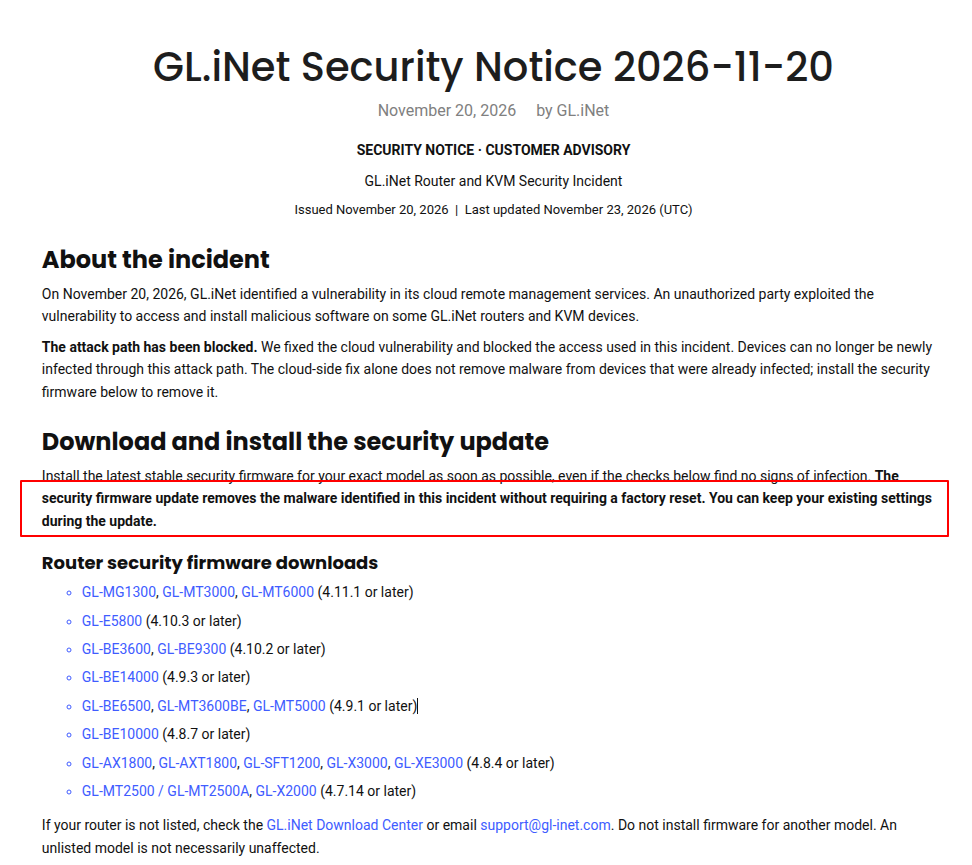
I'm looking for clarification from GL.iNet support and other Flint 3 owners regarding an unexpected local Linux account I discovered while investigating my router following the recent GoodCloud security incident (CSA-2026-01).
My question is: Does the GL-BE9300 firmware create a local admin account with UID 0, GID 0, home directory /tmp**, and login shell** /bin/ash**? Is this expected behaviour?**
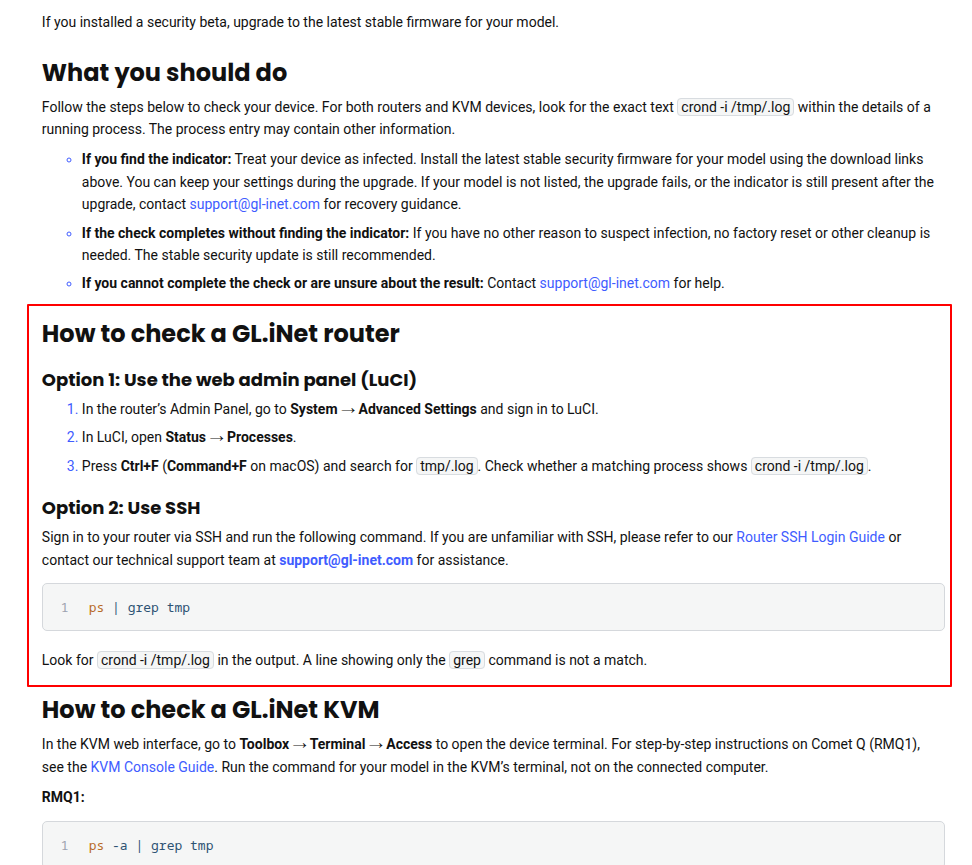
I'm asking because I had GoodCloud enabled and the router was bound to my GL.iNet account during the period of concern. I followed the available community triage recommendations, but the checks did not identify any clear indicators of compromise.
One limitation is that my router had already been restarted before I performed the checks. In addition, it is configured to restart automatically every day at 3 AM, meaning some runtime evidence may have been lost.
During further investigation, I noticed an admin account in /etc/passwd that I do not recall creating. I normally administer the router using root.
These are the two entries:
root:x:0:0:root:/root:/bin/ash
admin:x:0:0:admin:/tmp:/bin/ash
The admin account has the same UID and GID as root (0:0), meaning it has root-level privileges. It also has an interactive shell, with /tmp configured as its home directory.
An important discovery:
I checked two older router backups:
- June 28, 2026
- October 19 2026
Both backups contain exactly the same admin entry. This establishes that the account existed before the November 21 security incident, although I cannot establish when or how it was originally created.
I also checked the current /etc/shadow file and found no corresponding admin entry. The account therefore appears in /etc/passwd but not in /etc/shadow.
Checks performed so far
My router details:
- Model: GL.iNet Flint 3 (GL-BE9300)
- Firmware: 4.10.1
- GoodCloud: Previously enabled and bound to my account; subsequently disabled
- Administration: Normally use root over SSH
I ran the community CSA-2026-01 triage script:
sh /tmp/gl-helper-triage.sh --no-report
Its summary was:
IOC=0 PERSIST=2 REVIEW=13 INFO=6
Verdict: no gl-helper indicators found
It did flag several items for review, including the additional UID 0 account, custom startup and firewall configuration, and files differing from the base firmware. Some of these changes are expected given my custom configuration.
Other checks included:
ps | grep tmp

ps ww | grep -E '[n]c |[n]etcat|[s]ocat|[/]bin/sh -i|[m]kfifo'

ls -la /etc/mp_ip_mapping_info
ls -la /tmp/f

grep -E '^(root|admin|sing-box):' /etc/passwd

id admin

grep '^admin:' /etc/group

uci show dropbear

grep -n '^admin:' /etc/shadow | cut -d: -f1
wc -l /etc/passwd /etc/shadow
The last checks showed:
admin has UID 0 and GID 0.- There is no separate
admin group. - There is no matching
admin entry in /etc/shadow. - Dropbear has password authentication and root password authentication enabled.
I also checked my custom /etc/rc.local and root crontab. My startup script contains my own Sing-box/VLESS routing setup. The crontab entry invokes /usr/sbin/gl-update-cable-mac.sh, which opkg search identifies as belonging to the GL.iNet gl-sdk4-cable package.
Questions for GL.iNet and other owners
- Is this
admin account created by GL.iNet firmware on the Flint 3? - If so, what feature or service uses it, and why does it have UID 0?
- Is
/tmp intentionally configured as its home directory? - Is it normal for the account to have an entry in
/etc/passwd but no corresponding entry in /etc/shadow? - Can other GL-BE9300 owners on firmware 4.10.1 check their routers and report whether they have the same account?
- If other owners have it, can anyone confirm that their router is known to be clean and that the account is part of the normal firmware configuration?
I would particularly appreciate confirmation from someone with a Flint 3 that has not had GoodCloud enabled, as this might help establish whether the account is a standard firmware feature or something introduced through another mechanism.
For anyone checking their own router: the following command displays the account entry without exposing password hashes:
grep '^admin:' /etc/passwd
To check whether a corresponding shadow entry exists without displaying its contents:
grep -n '^admin:' /etc/shadow | cut -d: -f1
Please do not post the contents of /etc/shadow, VPN private keys, or other credentials publicly.
I am not claiming that this account is proof of compromise. Since it was present in my June and October backups, I am trying to establish whether it is expected behaviour, an older configuration artefact, or something that warrants further investigation.
Any confirmation from GL.iNet support or other Flint 3 owners would be greatly appreciated.
Thank you.