r/GlInet • • 5h ago Bravo

News Continued: GL.iNet Security Notice 2026-11-20

Thumbnail
gl-inet.com
118 Upvotes

.

This is a continuation of the original Security Notice post in order to provide further updates (the other was out of space).

Update - Nov 23, 12:05am US CST (not official GL statements)

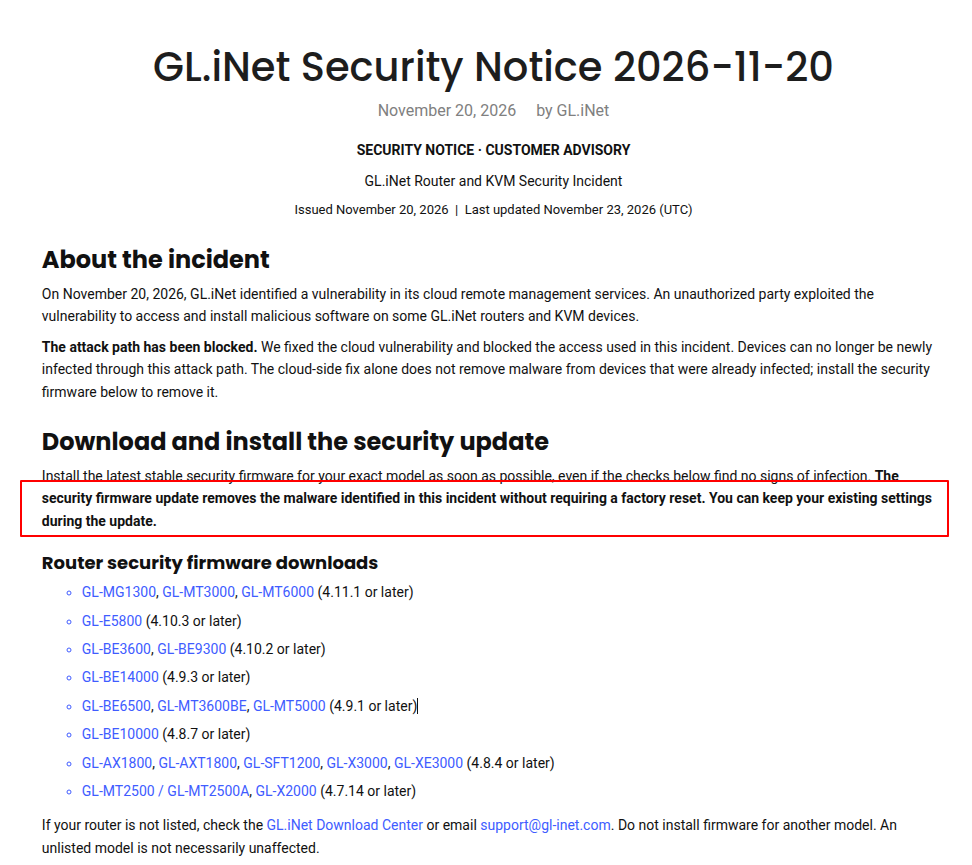
On a very positive note, GL has posted updated router firmware. Unfortunately, for the past several hours the advisory site has stated:

"The security firmware update removes the malware identified in this incident without requiring a factory reset. You can keep your existing settings during the update." (link)

We're going to take a minute to list, in very plain (tired) language, a few of the reasons this advice is wrong:

  1. We tested it live. We loaded an MT3000 with harmless stand-ins: copies of the persistence we found on live routers, plus entries in other places an intruder with root could use. We then upgraded to the newest "fixed" firmware with "keep settings" enabled. 5 out of 7 remained, and 3 of those ran again on the fixed firmware.
  2. Even *if* GL could clean all the tainted files: on most of the routers where we found the older backdoor, "/etc/config/wireguard_server" was modified within seconds of the backdoor being installed. We don't have a before/after to say exactly *what* was altered, but we'd expect it's not a *good thing*, and "keep settings" keeps this file.
  3. Beyond this, once your device has an IOC you have to assume all your keys have been harvested: VPN keys, SSH keys, Tailscale/ZeroTier identities, root password hash, WiFi passwords, all of it. There is nothing left you *want* to retain on the device. The future impact of using compromised keys *far* outwiegh
  4. The exact same logic applies to the KVM upgrades. We tested that too: a boot script and an "extra" added SSH key both survived an upgrade to 1.10.3 with the configuration kept.

Details here:
https://github.com/RemoteToHome-io/gl-security-incident-2026#fixed-firmware

There is no practical scenario in which "Keep Settings" is appropriate for a device that has been compromised. This is industry-standard knowledge and we're extremely disappointed to see this language appear. It's rather embarrassing.

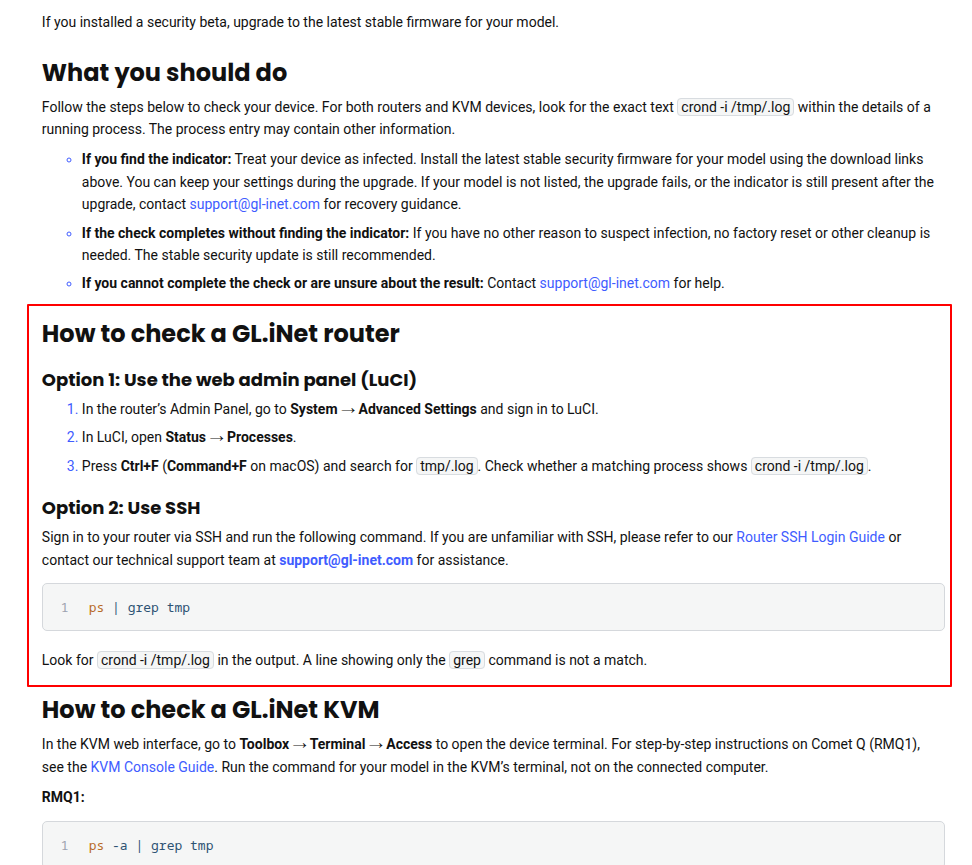
Also, we sadly continue to see this entire section about running "ps | grep tmp" as a way to check your router for infection. We have checked about 200 routers at this point, 166 of them affected, and not a single one had this indicator. Running it tells you nothing about whether your router is infected or clear, and it's extremely disappointing to see this misinformation still up after multiple notifications to GL.

To say it lightly: we would strongly urge our friends at GL to take whoever directed this wording off this incident response (before they get you sued). It is actively detracting from the collective community's efforts to support GL.

The guidance for post-infection recovery remains the same: reinstall the firmware with "keep settings" turned off, so the firmware image and the writable layer are both replaced at the same moment.

We're still working on a way to pull this off for remote devices without losing access and have a design, but it's tricky and my phone has a few thousand notifications before Monday's even started - so it could take a minute. I still can't guarantee it, so please plan accordingly.

Future updates to come below

EDIT for those newly joining the saga: Admon’s community script remains the best automated scanning and detection tool for checking your GL router: https://gl-i.net/security/csa-2026-01/fix


r/GlInet • • 54m ago

Questions/Support GL.iNet Beryl AX - FritzBox to FritzBox VPN Problems

1 Upvotes

Hello dear GLiNet enthusiasts.
I recently got the chance to get my hands on a Beryl AX GL-MT3000 travel router. I would like to use it to connect to my home network to a) Access my local devices and b) have a constant IP for work reasons. For that reason, I have generated and loaded a Wireguard config. Device is up to date. It looks like this:

[Interface]
PrivateKey = XXXX
Address = 192.168.178.130/24,fdd5:6e36:4107::130/64
DNS = 192.168.178.1,fdd5:6e36:4107::2699:ff:fe8d:338b
DNS = fritz.box

[Peer]
PublicKey = XXXX
PresharedKey = XXXX
AllowedIPs = 192.168.178.0/24,0.0.0.0/0,fdd5:6e36:4107::/64,::/0
Endpoint = XXXX.myfritz.net:58041
PersistentKeepalive = 25

The most used router brand in Germany is AVM FRITZ!Box. Therefore, my setup would often look like this: Device (WiFi) GLiNET (WiFi) FritzBox (VPN) FritzBoxHome

However I run into a problem, whenever I try to initiate the connection.

Tunnel 3 IP Address (192.168.178.130/24) conflicts with the eth0/apcli0.

IPV6 is set to Native.

I understand the issue is with the 192.168.178 part being the same on both FritzBox. The Glinet doesnt know wether the local or vpn connected ip is being referenced. Unfortunately I cant change the subnets of either of the fritzbox (local because im just using its wifi without further access, and remote because i am not there).

An online search has yieleded no further results and I'm wondering wether I'm just overlooking something super trivial. Can it really be that there is no solution to a simple subnet clash?

I would appreciate any kind of help. At the end of the day, it wouldnt matter if I cant access my remote devices. The IP should stay the same though.

Thank you guys!


r/GlInet • • 1h ago

Discussion Mudi 7 stable v4.10.3 released

0 Upvotes

RELEASE NOTES
V4.10.3
Overview
To keep your device secure, we strongly recommend upgrading to the latest version immediately. This release fixes a vulnerability in the cloud platform’s remote management that could lead to unauthorized access to affected devices and the installation of malware.
Improvements and Enhancements
Security: Strengthened the security of the cloud-based remote management service.
Kernel: Incorporated the security patch for CVE-2026-98432 and CVE-2026-99288.
Tor: Updated to version 0.4.9.15.
CA certificates: Updated the CA certificate bundle to version 20260816 and added “emSign ECC Root CA - G3” to the blocklist.


r/GlInet • • 1h ago

Questions/Support How long will Flint 2 get Firmware Updates

1 Upvotes

Looking at getting the Flint 2 but worried it might not be supported that much longer. How long will Flint 2 get Firmware Updates?


r/GlInet • • 2h ago

Discussion Goodbye GoodCloud

13 Upvotes

On a similar but seperate note to the Megathroads 1 & 2 - does anyone have any thoughts on how to some ditch GoodCloud and other GL services like the router Default GL DDNS?

Not at all experienced in either (esp with LuCi setup), but initially thinking say Cloudflare DDNS+VPN or Tailscale - open to other ideas.

My situation:

Home - Unifi (phew)

Family members - Flint 2s & Beryl AX (remote 20 mints / 3 hours drive)

Travel - Beryl 7

The only real must have is remote access to manage & troubleshoot Family GL routers.

Anyone have recommendations, or willing to outline their approaches, to using non-GL DDNS and GoodCloud?


r/GlInet • • 7h ago

Questions/Support Spitz AX owners, anyone else frustrated about losing SQM with the GoodCloud security update?

2 Upvotes

Well, this kinda sucks lol.

With the recent GL.iNet GoodCloud security vulnerability, I've been going through all of my GL.iNet routers, checking for signs of compromise and getting ready to reinstall the patched firmware without keeping my old settings (just trying to be extra safe... rotating creds / keys as well).

So far, all my checks have come back clean, thankfully.

The one router I'm a little bummed about is my Spitz AX (GL-X3000).

I've been running the newer beta firmware with built-in SQM support, and it's been a really nice addition, especially on a cellular connection where bufferbloat and latency can be a pain.

Unfortunately, the newly released security-patched firmware for the Spitz AX is 4.8.4, which doesn't include the newer SQM functionality.

I know it's probably possible to get SQM working manually through LuCI, but honestly, I really liked having the simple configuration built right into the GL.iNet interface. It was easy to set up, easy to adjust, and just worked without having to mess around with packages and advanced settings.

I'm planning to go back to the patched stable firmware because security obviously comes first. Still sucks having to give up a feature I was really enjoying.

I actually made a post on the GL.iNet forum asking whether they could release a security-patched version of the SQM beta (prior to release of their patched update), or eventually bring SQM into the stable security release.

Here's that post if anyone wants to follow along or chime in:

https://forum.gl-inet.com/t/spitz-ax-gl-x3000-goodcloud-security-patch-for-sqm-beta-firmware/73089

Anyone else running the SQM beta on their Spitz AX and dealing with the same dilemma?

I'm hoping GL.iNet can get a patched SQM build out soon. I'd really rather not have to choose between security updates and useful features.


r/GlInet • • 8h ago

Questions/Support AdGuard Home CVE-2026-41448

8 Upvotes

I haven't seen the AdGuard Home CVE-2026-41448 (authentication bypass) discussed. I know it affects the Flint 3, and I'd assume other products that come with Adguard Home installed. I've found no confirmation that this has been patched. Adguard fixed the vulnerability in version 0.107.77 on June 2nd of this year. Does anyone have more information on the installed version GL.iNet is using?


r/GlInet • • 8h ago

Questions/Support Wireguard - site to site (Brume 3 in both locations)- Cant access

0 Upvotes

I am trying to set up a site to site wireguard tunnel between two brume 3. I followed the instructions or so i thought but when i turn it on I am unable to access the remote router. When i go in the Wireguard server tab on the local router it apears that its connected (1 client (1 online) but I cant seem to ping the other side. The client side is below. (

any ideas?

[Interface]
Address = 10.1.0.2/24
PrivateKey = YxxxxxxxxxxE=
DNS = 10.1.0.1
MTU = 1420

[Peer]
AllowedIPs = 192.168.8.0/24
Endpoint = kxxxx1.gxxxxxs.com:51820
PersistentKeepalive = 25
PublicKey = 14xxxxxxxx6Alg=

r/GlInet • • 10h ago

Questions/Support Spitz AX 3000 firmware question

0 Upvotes

So, for the GoodCloud exploit…. Router checked out clean…. We only use it for backup cellular internet if our home internet goes out & for mobile internet in our RV. So, only online here & there.
My question lies with the firmware version.
I’m running the 4.11 beta.
Should I drop back to 4.8.4 or wait for an update to the 4.11 beta (assuming one will come)?

Thanks for any guidance on this.


r/GlInet • • 10h ago

Questions/Support Should i upgrade?

0 Upvotes

Currently running Firmware 4.9.0 on my flint 2, should i upgrade / do i need to upgrade to version 4.11.1. I’m not running any vlans or cloud based stuff so im not at risk surrounding the current goodcloud issue. Im very much of the idea that if it aint broke dont fix it, so if i dont need to i would rather not.

If i was to upgrade, i have seen mixed feedback on whether to wipe everything for a clean firmware install and not save any settings, what is the consensus on this?


r/GlInet • • 11h ago

Questions/Support NOT IT SMART. -Firmware Question

3 Upvotes

With the recent security breach, I understand it closes the door to the breach. But if your device was impacted does it wipe all that away too?


r/GlInet • • 12h ago

Questions/Support Flint 3e not getting security patch? ETA?

0 Upvotes

Flint 3e not getting security patch? ETA?

I see flint 2 and flint 3 got firmware update.


r/GlInet • • 12h ago

Discussion Upgrade Firmware ASAP - Security Risk to Flint 2 Router

Thumbnail dl.gl-inet.com
66 Upvotes

To keep your device secure, we strongly recommend upgrading to the latest version immediately. This release fixes a vulnerability in the cloud platform’s remote management that could lead to unauthorized access to affected devices and the installation of malware.

This release improves GoodPAS secure private access between home and travel routers, and adds a whitelist guidance page for blocked web admin access.

Optimizations & Enhancements

  • Security: Strengthened the security of the cloud-based remote management service.
  • GL.iNet Mesh: Adds support for the GL.iNet Mesh App.
  • GoodPAS: Improves the GoodPAS feature for the secure private access system between your home router and travel router.
  • Web: Adds a guidance page when the web admin page is blocked because a custom DNS domain is not whitelisted, directing users to whitelist it.
  • kernel: Merges the CVE-2026-98432 and CVE-2026-99288 security patch.
  • Tor: Upgrades to version 0.4.9.15.
  • ca-certificates: Upgrades to version 20260816 and adds the blacklist entry 'emSign ECC Root CA - G3'.
  • AmneziaWG:Upgrades to 3.1 with stronger DPI resistance.

r/GlInet • • 12h ago

Questions/Support Beryl 7 firmware

2 Upvotes

I bought a Beryl 7 a few months ago to have the latest version... I'm disappointed to see that this model isn't updated very often compared to my Beryl AX.

It's a shame that a recent product receives updates last.


r/GlInet • • 13h ago

News Flint 3 Patch V4.10.2

Post image
31 Upvotes

The Flint 3 Security Patch (V4.10.2) is now available. If you have a Flint 3 or Flint 4 and have been waiting for this update, you can check for it now.


r/GlInet • • 14h ago

Announcement non-affiliated post Lawrence Systems released video about Goodcloud

25 Upvotes

Good job community… thanks for sharing your experience and knowledge with us.

https://youtu.be/wG9pk65cMcs


r/GlInet • • 16h ago

Discussion GoodCloud alternatives

9 Upvotes

Following the recent security incident, are there any alternative remote device management solutions for users who require ability to remotely access GlInet devices?


r/GlInet • • 16h ago

Questions/Support MT-2500 port disabled/offline since 20/11

1 Upvotes

Just saw the security announcements. I'd tried to connect to my unit yesterday or this morning and couldn't connect. My cats tend to climb around in that area so I just assumed something had got knocked loose.

I didn't have time to troubleshoot.

Looking into it further now it looks like the connected 2.5 Gb WAN interface has been disabled and not connecting to my switch (no lights). If I plug in to the 1Gb LAN port it lights up but I can't connect or see an ip registering so it doesn't look like a cable or hardware issue.

It was ring-fenced on its own vlan on unifi config with no other devices.

I've now unplugged it completely.

It appears to have gone offline 20/11 06:34am (GMT).

Unifi logs showing multiple network intrusion attempts being blocked 4 times an hour before that (05:34) - source IP showing a German Hamburg data center IP.

Safe to assume it's compromised?

Download page not showing new firmware available yet.

edit: logs show no traffic to/from 170.39.226[.]219


r/GlInet • • 18h ago

Questions/Support Unable to SSH in

0 Upvotes

I'm away from home and I'm trying to remote to my router via SSH. I've tried Admin and Administrator with my router password and it won't take . Luci won't load either. I really need to remote in to confirm if my router has been compromised.


r/GlInet • • 19h ago

Questions/Support v.4.11.1 for fix?

19 Upvotes

Just got this - i checked both my flint 2 with script (you all are godsend for this, i love this community) and somehow on 4.11, they both have been clean!

Have people tried this? I cant find a lot of online documentation/ reviews for this firmware.


r/GlInet • • 20h ago

Questions/Support GL-BE9300 (Flint 3): Unexpected UID 0 admin account – Is this normal firmware behaviour?

7 Upvotes

Hello,

I'm looking for clarification from GL.iNet support and other Flint 3 owners regarding an unexpected local Linux account I discovered while investigating my router following the recent GoodCloud security incident (CSA-2026-01).

My question is: Does the GL-BE9300 firmware create a local admin account with UID 0, GID 0, home directory /tmp**, and login shell** /bin/ash**? Is this expected behaviour?**

I'm asking because I had GoodCloud enabled and the router was bound to my GL.iNet account during the period of concern. I followed the available community triage recommendations, but the checks did not identify any clear indicators of compromise.

One limitation is that my router had already been restarted before I performed the checks. In addition, it is configured to restart automatically every day at 3 AM, meaning some runtime evidence may have been lost.

During further investigation, I noticed an admin account in /etc/passwd that I do not recall creating. I normally administer the router using root.

These are the two entries:

root:x:0:0:root:/root:/bin/ash
admin:x:0:0:admin:/tmp:/bin/ash

The admin account has the same UID and GID as root (0:0), meaning it has root-level privileges. It also has an interactive shell, with /tmp configured as its home directory.

An important discovery:

I checked two older router backups:

  • June 28, 2026
  • October 19 2026

Both backups contain exactly the same admin entry. This establishes that the account existed before the November 21 security incident, although I cannot establish when or how it was originally created.

I also checked the current /etc/shadow file and found no corresponding admin entry. The account therefore appears in /etc/passwd but not in /etc/shadow.

Checks performed so far

My router details:

  • Model: GL.iNet Flint 3 (GL-BE9300)
  • Firmware: 4.10.1
  • GoodCloud: Previously enabled and bound to my account; subsequently disabled
  • Administration: Normally use root over SSH

I ran the community CSA-2026-01 triage script:

sh /tmp/gl-helper-triage.sh --no-report

Its summary was:

IOC=0 PERSIST=2 REVIEW=13 INFO=6
Verdict: no gl-helper indicators found

It did flag several items for review, including the additional UID 0 account, custom startup and firewall configuration, and files differing from the base firmware. Some of these changes are expected given my custom configuration.

Other checks included:

ps | grep tmp

ps ww | grep -E '[n]c |[n]etcat|[s]ocat|[/]bin/sh -i|[m]kfifo'

ls -la /etc/mp_ip_mapping_info
ls -la /tmp/f

grep -E '^(root|admin|sing-box):' /etc/passwd

id admin

grep '^admin:' /etc/group

uci show dropbear

grep -n '^admin:' /etc/shadow | cut -d: -f1
wc -l /etc/passwd /etc/shadow

The last checks showed:

  • admin has UID 0 and GID 0.
  • There is no separate admin group.
  • There is no matching admin entry in /etc/shadow.
  • Dropbear has password authentication and root password authentication enabled.

I also checked my custom /etc/rc.local and root crontab. My startup script contains my own Sing-box/VLESS routing setup. The crontab entry invokes /usr/sbin/gl-update-cable-mac.sh, which opkg search identifies as belonging to the GL.iNet gl-sdk4-cable package.

Questions for GL.iNet and other owners

  1. Is this admin account created by GL.iNet firmware on the Flint 3?
  2. If so, what feature or service uses it, and why does it have UID 0?
  3. Is /tmp intentionally configured as its home directory?
  4. Is it normal for the account to have an entry in /etc/passwd but no corresponding entry in /etc/shadow?
  5. Can other GL-BE9300 owners on firmware 4.10.1 check their routers and report whether they have the same account?
  6. If other owners have it, can anyone confirm that their router is known to be clean and that the account is part of the normal firmware configuration?

I would particularly appreciate confirmation from someone with a Flint 3 that has not had GoodCloud enabled, as this might help establish whether the account is a standard firmware feature or something introduced through another mechanism.

For anyone checking their own router: the following command displays the account entry without exposing password hashes:

grep '^admin:' /etc/passwd

To check whether a corresponding shadow entry exists without displaying its contents:

grep -n '^admin:' /etc/shadow | cut -d: -f1

Please do not post the contents of /etc/shadow, VPN private keys, or other credentials publicly.

I am not claiming that this account is proof of compromise. Since it was present in my June and October backups, I am trying to establish whether it is expected behaviour, an older configuration artefact, or something that warrants further investigation.

Any confirmation from GL.iNet support or other Flint 3 owners would be greatly appreciated.

Thank you.


r/GlInet • • 22h ago

Discussion Adguard v1.0.0 released, Hopeful this will be added to future firmware updates

Post image
44 Upvotes

Adguard Home finaly released v1.0.0 promising huge improvements over the past versions.. Hoping GL-inet team will add/include this in their firmware updates. Yeah Adguard Home for GL-inet devices by Admonstrator works fine in updating the Adguard Home in GLinet devices, but it would be awesome if we can update Adguard Home without relying from third party.. When all the mess with this Goodcloud exploit, hopefully the Glinet team will improve their security. I can only hope them to improve and continue selling. I hate to have to throw my Beryl AX when they go bankrupt and no more firmware updates for my devices...

Adguard Home changelog


r/GlInet • • 1d ago

Questions/Support Slate 7 Pro completely unusable due to dial up era speeds

0 Upvotes

IDK what's going on here. I've set up AP's no problem in the past. Yet this thing when set in AP mode (main router is a Synology RT6600ax), any device connected to my network via the Sate 7 pro goes to shit. I.e. Internet speed goes down to pre-dial up era speeds. Move same device off the Slate 7 pro and onto my Wifi 6 based Synology and bam! speed goes back to modern day times.

What do???


r/GlInet • • 1d ago

Discussion Malware from 2025

Thumbnail
forum.gl-inet.com
0 Upvotes

Is the malware from 2025 in this post referencing the cloud breach? I also feel AGH and AG is also having issues, especially the Security blocklists in AdGuard Private DNS as those blocklists are not open source. There might be a darker motive behind AdGuard selling the lifetime plans for 15 USD on sites. GL Inet has completely tarnished its image with massively incompetent management. Hope the head of software has resigned.

Time to switch to a non Chinese/ Russian anything networking.