r/GoogleAppsScript • • Jul 26 '25

Question Delete old gmail threads within a label (exclude Sent and Starred)

Could someone help me fix the code?

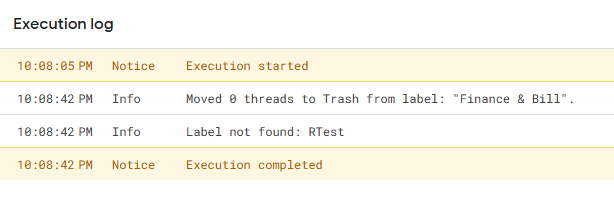
I have quite some threads (oldest is 12/11/2023, not in Sent folder, not starred) meeting the deletion requirement, but the code does not delete any of those old threads.

What is wrong with the code?

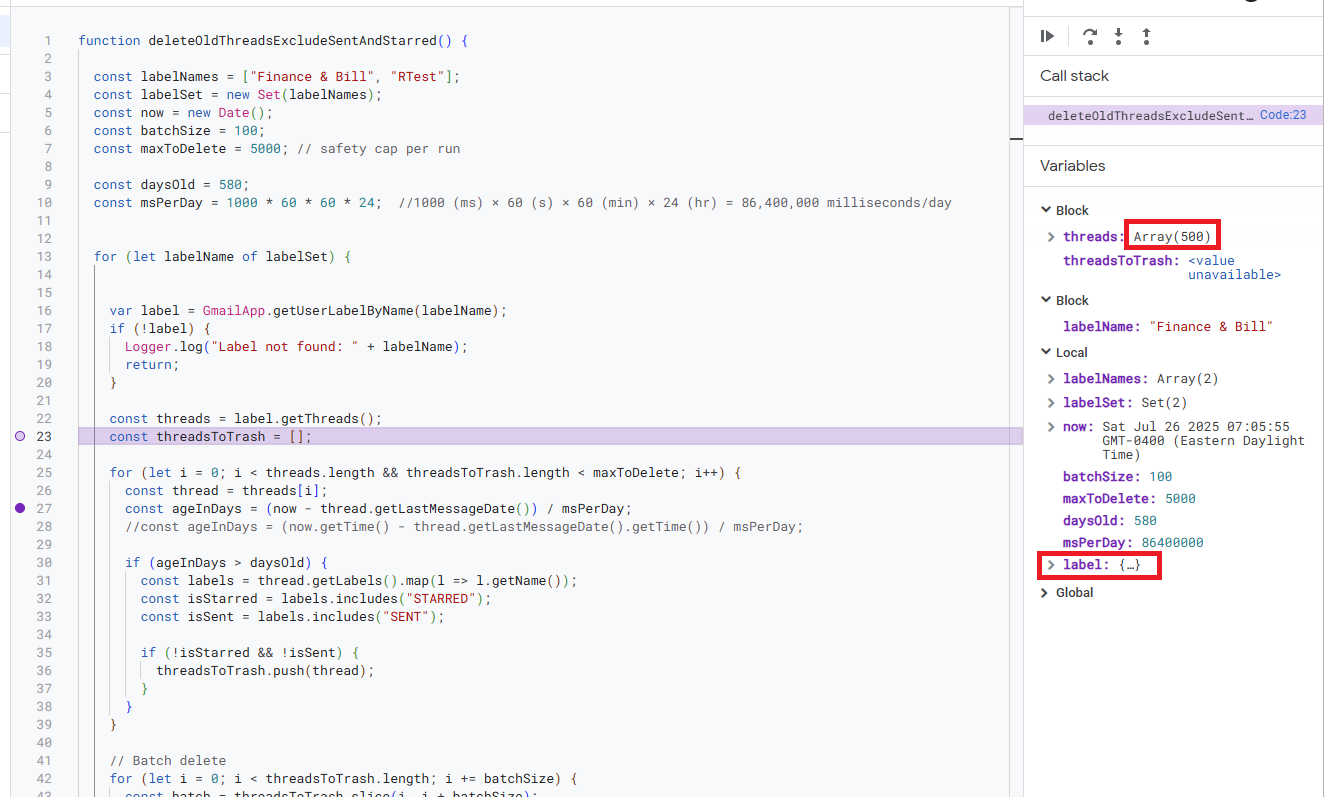
Edit: I added two screenshots, for debug variables, not sure why Array size for threads is only 500, not 4314. It seems the code can only read first 5 pages of gmail thread (there is limit 500?). Not sure why label does not have value
function deleteOldThreadsExcludeSentAndStarred() {

  const labelNames = ["Finance & Bill", "RTest"];
  const labelSet = new Set(labelNames);
  const now = new Date();
  const batchSize = 100;
  const maxToDelete = 5000; // safety cap per run

  const daysOld = 530;
  const msPerDay = 1000 * 60 * 60 * 24;  //1000 (ms) × 60 (s) × 60 (min) × 24 (hr) = 86,400,000 milliseconds/day


  for (let labelName of labelSet) {
    
    
    var label = GmailApp.getUserLabelByName(labelName);
    if (!label) {
      Logger.log("Label not found: " + labelName);
      return;
    }

    const threads = label.getThreads();
    const threadsToTrash = [];

    for (let i = 0; i < threads.length && threadsToTrash.length < maxToDelete; i++) {
      const thread = threads[i];
      const ageInDays = (now - thread.getLastMessageDate()) / msPerDay;

      if (ageInDays > daysOld) {
        const labels = thread.getLabels().map(l => l.getName());
        const isStarred = labels.includes("STARRED");
        const isSent = labels.includes("SENT");

        if (!isStarred && !isSent) {
          threadsToTrash.push(thread);
        }
      }
    }

    // Batch delete
    for (let i = 0; i < threadsToTrash.length; i += batchSize) {
      const batch = threadsToTrash.slice(i, i + batchSize);
      GmailApp.moveThreadsToTrash(batch);
      Utilities.sleep(1000); // slight delay to avoid rate limits
    }

    Logger.log(`Moved ${threadsToTrash.length} threads to Trash from label: "${labelName}".`);

  }


}
1 Upvotes

64 comments sorted by

View all comments

Show parent comment

1

u/VAer1 Jul 26 '25 edited Jul 26 '25

Could you please help me with this part of code? It simply does NOT exclude starred thread and thread in Sent folder. I marked two threads for test (they should not be deleted, but they are moved to trash.

Are STARRED and SENT case sensitive?

if (ageInDays > daysOld) {

const labels = thread.getLabels().map(l => l.getName());

const isStarred = labels.includes("STARRED");

const isSent = labels.includes("SENT");

if (!isStarred && !isSent) {

threadsToTrash.push(thread);

}

1

u/stellar_cellar Jul 26 '25

I am not sure if they are actual labels that you can refer to. You can try using the thread.hasStarredMessages() and thread.isInInbox() for your If conditions.

1

u/VAer1 Jul 26 '25

Maybe you are right, I just get code from online, one piece at a time and put them together, some code may be wrong.

However, I don't see isInSent . isInBox is not what I what, most of old threads are Inbox, but they need to be deleted.

I still need correct code to check if the thread is also part of Sent folder.

https://developers.google.com/apps-script/reference/gmail/gmail-thread

1

u/stellar_cellar Jul 26 '25

then the GmailApp.search() function would be better, has you can specify to exclude the sent folder

1

u/VAer1 Jul 26 '25 edited Jul 26 '25

Thanks, follow up questions:

How can I re-write const threads to include variable gmailLabel and exclude Sent/Starred? What is the correct syntax?

const gmailLabels = ["Finance & Bill", "Shipping Carriers (USPS)","InvalidLabelForTest"];

var gmailLabel = GmailApp.getUserLabelByName(gmailLabels[i]);

const threads = gmailLabel.getThreads(start, batchSize); //label.getThreads(0, 100) is threads 0 through 99 — just like array indexing in JavaScript.

//const threads = GmailApp.search('label:YourLabelName -in:sent');

//const threads = GmailApp.search('label:YourLabelName -is:starred');

Edit:

//const threads = GmailApp.search('label:YourLabelName -in:sent -is:starred');

Edit 2: Maybe something like this, I will try

const query = `label:${gmailLabel} -in:sent -is:starred`;      
      const threads = GmailApp.search(query);

1

u/stellar_cellar Jul 26 '25

const threads = GmailApp.search(`label:${gmailLabels[i]} is:unstarred -in:sent`);

If you the ` characters (located below the escape key) instead of quotes, you can use the ${} parameters to insert variable value into a string.

If you use " or ', you can concatenate variable to string using + (example: "I have " + 5 + " apples")

1

u/VAer1 Jul 26 '25 edited Jul 26 '25

Is below code structure correct? Or does it work?

particularly the line of code in For statement, is it correct?

I would like to check no more than 100 threads in each label, per run. In order to reduce program execution time per run, otherwise, it may already exceed time limit before deleting any threads.

      const query = `label:${gmailLabel} -in:sent -is:starred`;      
      const threads = GmailApp.search(query);  //isStarred and isSent in below commented code do not really work correctly, so to exclude them from variable threads, by using search function
      //const threads = GmailApp.search(label:${gmailLabels[i]} is:unstarred -in:sent);  //Alternative, has not tested yet

      if (threads.length === 0) break;  //stop looping, but the function keeps running after the loop

      if (threads.length > 100) {
        var numberOfThreadsToCheck = 100;
      }
      else {
        var numberOfThreadsToCheck = threads.length;
      }

      var endIndex = threads.length - numberOfThreadsToCheck; //this thread will be checked last in the loop. E.g. if there are only 50 threads in the label, threads.length = 50, it will check threads from index 49 to index 0

      for (let j = threads.length -1; j >= endIndex; j--) {

      }

1

u/stellar_cellar Jul 26 '25

Looks good. Word of advice, avoid using var when declaring variables, use let instead.

2

u/VAer1 Jul 26 '25

Thanks. I will test the program later, and see if it runs correctly or if there are more issues. At the meanwhile, I would like to write another small program to record the number of threads in each label, and get the result to google sheet, on daily basis. so that I can compare the difference.

It is easier to notice the change within google sheet, just in case the code does not run correctly and mistakenly delete some threads in Sent or Starred.

1

u/stellar_cellar Jul 26 '25

you should add the "-in:trash" in the search parameters, so the deleted one are not included.

→ More replies

1

u/VAer1 Jul 26 '25
if (threads.length > 100) {
        let numberOfThreadsToCheck = 100;  //prefer let than var
      }
      else {
        let numberOfThreadsToCheck = threads.length;
      }

In this case, I use let to declare numberOfThreadsToCheck, which gray out the variable numberOfThreadsToCheck.

In this case, how to avoid variable being grayed out?

Should I declare let numberOfThreadsToCheck; outside?

1

u/stellar_cellar Jul 26 '25

Declare you variable outside the IF block, the line above it. var can be accessed from anywhere in the script while let is limited by scope (var run the risk of being overwritten by accident by a different function).

1

u/stellar_cellar Jul 26 '25
//Here is a sample code with a 5 minutes timer, if you want to avoid the 6 minutes time out failure.function deleteOldThreadsExcludeSentAndStarred(){
  const startTime = Date.now();
  const gmailLabels = ["Finance & Bill", "Shipping Carriers (USPS)"];
  const batchSize = 500;
  for (let gmailLabel of gmailLabels){
    console.log(`Process started for ${gmailLabel}`)
    if (cleanThreads(gmailLabel, 0, batchSize, startTime)){
      console.log("5 minutes time limit reached.");
      break;
    };
    console.log(`Process completed for ${gmailLabel}`)
  }
  console.log("End of execution.")
}

function cleanThreads(gmailLabel, start, max, startTime){
  if (timeLimit(startTime)){
    return true;
  }
  let trashThreads = [];
  const threads = GmailApp.search(`label:"${gmailLabel}" -is:starred -in:{sent,trash} older_than:2d`, start, max); //Quotation around the label allows for the use of label with spaces in them. Older than is set to 2 days, can be adjusted
  for (let thread of threads){
    trashThreads.push(thread);
  }
  if (trashThreads.length > 0){
    GmailApp.moveThreadsToTrash(trashThreads);
  }
  console.log(`${trashThreads.length} moved to trash`);
  start = (start + max) - trashThreads.length;
  if (threads.length < max){
    return false;
  }
  return cleanThreads(gmailLabel, start, max, startTime);
}

function timeLimit(startTime){
  return (Date.now() - startTime) > 300000;
}
→ More replies

1

u/VAer1 Jul 26 '25

for (let j = threads.length -1; j >= endIndex; j--)

  1. I am not sure if threads.length is limited by 500, if yes, I need more code to get the full count. I need to investigate this part of code when I am free, I suspect that it is also limited by 500, which causes not deleting old threads.
  2. If #1 needs to be changed, which means more code and more running time, I have trouble running it within 6 minutes, even if I want to check no more than 100 threads for each label. That being said, if #1 change is needed, I will need to completely rewrite the program, my next idea is --- the program will be triggered on hourly basis, if the hour is 0 (12am-1am), then only get a full count on labels index 0 and delete old threads in label index 0 (only checking oldest 100 threads for possible deletion); then if it is 1am-2am, then take care of label index 1; etc.....

I will move this standalone script file into Google Sheet. I will need more time to fix the code, which still does not run correctly. But I have invoked too many times of service within the Google Sheet, I will continue this project next week.

1

u/stellar_cellar Jul 26 '25

Array can be extremely large, like 4 billions elements big.

Calling on the Google Services is relatively slow, that's where your will get most of your optimization. For example, in your original code, you use getThreads(), then use getLastMessageDate() and getLabels() hundreds of time to find your specific threads; each of this call takes time to access the Google Services. You might see a boost in run time if you use the search() function instead to directly get those threads.

→ More replies

1

u/VAer1 Jul 27 '25 edited Jul 27 '25

https://i.postimg.cc/9fkfs8Dn/Screenshot-2025-07-26-223755.png

How to correctly write the code?

Third line: syntax error.

First two lines: I debugged it, the array size of threads is 0. While there are threads in the label. There is no syntax error for these two lines, but it does not run correctly.

Edit with new screenshot: https://i.postimg.cc/8kY0sx3C/Screenshot-2025-07-26-232517.png

https://i.postimg.cc/vTD8hCLB/Screenshot-2025-07-26-233732.png

Edit: Never mind, I think the issue is related to label name, I should remove special characters from label name, it seems some special character does not work well in GmailApp.search

1

u/stellar_cellar Jul 27 '25

You are missing the ` around the query parameter (key below the escape key). Also the is:unstarred doesn't seem to work and combine the -in together. See below:

const threads = GmailApp.search(`label:"${gmailLabel}" -is:starred -in:{sent,trash}`);

1

u/VAer1 Jul 27 '25

By the way, Is:unstarred is not really what I want, I want to exclude threads which has at least one star . -is:starred is what I need.

 -is:starred 

"Is:unstarred" is a Gmail search operator that filters for emails that are not marked with a star. It's used in the search bar to display all conversations where at least one message is not starred, according to Gmail Help. 

1

u/VAer1 Jul 27 '25

https://i.postimg.cc/QNWYv04K/Screenshot-2025-07-27-002841.png

GmailApp.search() only returns 500 threads, which is wrong too. I have far more than 500 threads in above screenshot label.

Maybe GmailApp.search() works fine, but threads.length does not return correct value, one of them is wrong.

1

u/stellar_cellar Jul 27 '25

1

u/VAer1 Jul 27 '25 edited Jul 27 '25

Well, that does not work then. I want to check oldest 100 threads in GmailApp.search(query) , but first 500 threads do not include those oldest threads.

I may need to go back with old code label.getThreads(start, batchSize) , but isStarred and isSent do not really work correctly

I need to find a way to get to oldest 100 threads.

const threadLabels = thread.getLabels().map(l => l.getName());  //labels for that thread only
          const upperThreadLabels = threadLabels.map(threadLabel => threadLabel.toUpperCase());
          const isStarred = upperThreadLabels.includes("STARRED");
          const isSent = upperThreadLabels.includes("SENT");

1

u/stellar_cellar Jul 27 '25

Use before:YYYY/MM/DD or older_than:Xd (where X is a number of days) in the search(). Might not get you the oldest threads but you can skip the newest one more easily.

1

u/VAer1 Jul 27 '25

I have a function getFullThreadCount, which can correctly count the # of threads in the label (however, it could include threads in Sent or Star.

So I am able to get to the oldest 100 threads, even if they could be in Sent or isStarred. All I need to do is identifying each thread and see which thread is in Sent or Starred.

I manually mark a thread (in Sent) with label Perm Studio, and one of message in the thread is starred, that is the only thread in label Perm Studio. When I run function logInformationForThreadInLabel , it seems that thread.getLabels() is not able to get label Sent. If Sent can be pulled into output data in some way, then it will become easier.

It is easy to identify if a thread has starred message, so this part of issue can be solved.

The only issue left is to check if a thread is in Sent folder.

function logInformationForThreadInLabel() {
  const label = GmailApp.getUserLabelByName("Perm Studio"); // Replace with your label name
  const threads = label.getThreads(0, 100); // You can paginate if needed

  threads.forEach(thread => {
    const labels = thread.getLabels();
    const labelNames = labels.map(l => l.getName());
    
    Logger.log(`Thread ID: ${thread.getId()}`);
    Logger.log(`Labels: ${labelNames.join(", ")}`);

    if (thread.hasStarredMessages()) {
      Logger.log(`Thread with ID ${thread.getId()} has starred messages.`);
    } else {
      Logger.log(`Thread with ID ${thread.getId()} has no starred messages.`);
    }

  });
}

1:18:39 AM
Notice
Execution started


1:18:40 AM
Info
Thread ID: 15f474e9138ed578


1:18:40 AM
Info
Labels: Perm Studio


1:18:40 AM
Info
Thread with ID 15f474e9138ed578 has starred messages.


1:18:40 AM
Notice
Execution completed


function getFullThreadCount(label) {
  let count = 0;
  const batchSize = 100;
  let threads;

  do {
    threads = label.getThreads(count, batchSize);
    count += threads.length;
  } while (threads.length === batchSize);

  return count;
}