r/Outlook • • Dec 17 '15

Please report spammers

97 Upvotes

Their posts & comments can be removed, and their accounts banned.

Edit: Just to be clear, I'm talking about spammers here on Reddit. I don't have anything to do with Microsoft.


r/Outlook • • Dec 05 '18

READ ME: Rules + STATE Product/Service in Title + FLAIR Your Post

30 Upvotes

Thank you for your participation in this Outlook subreddit. This is an unofficial subreddit and we do not formally represent Microsoft Corporation in any way.

Rules of Conduct

In order to keep this subreddit a conducive place for Outlook-related discussions and technical support, please abide by Microsoft Community Code of Conduct. We may also refer to enactment of policies from other official Microsoft sources applicable to Outlook such as Microsoft Terms of Service, or involve the interpretation of our rules based on its policies and precedence.

Here are some of the key takeaways:

- Be polite and respectful in your posts, and in your replies to other people.

- Keep conversation threads on track and constructive. It's okay to disagree with another user's post, but don't take the thread off track to do so. Always address your comments to the person who asked the initial question, not the other posters.

- Cite the source of anything you post or upload, if it isn't your own original content. Be honest about your sources.

- Don't divert or change a thread for your own purposes; just start a new thread with the subject you want to discuss.

- Don't link to websites that require payment to access information.

- Don't invade anyone's privacy by attempting to harvest, collect, store, or publish private or personally identifiable information, such as passwords, account information, credit card numbers, addresses, or other contact information without that person's knowledge and willing consent.

- Don't impersonate a Microsoft employee, agent, manager, host, administrator, moderator, another user, MVP, or any other person through any means.

State the product/service in your post title

As we strive to resolve your issue as quickly as possible with the most relevant solution(s), we need your help to identify the Outlook product/service that you are using so that users equipped with the right expertise can recognise your thread and step forward to help you.

Refer to this link to identify the version of Outlook you are using: https://support.office.com/en-us/article/what-version-of-outlook-do-i-have-b3a9568c-edb5-42b9-9825-d48d82b2257c

This is a list of Outlook products/services:

NameTypeDescription
Outlook.comwebfor personal users
Microsoft OutlooksoftwareOutlook 2007, Outlook 2010, Outlook 2011, Outlook 2019, etc.
Office 365web/softwarethis is a new denotation, please state if you are using web or software version
Outlook for Androidsoftwarefor Android smartphone users
Outlook for iOSsoftwarefor iPhone/iPad users
Outlook on the Webwebfor Office365 for business/education users
Outlook Web Appwebfor Microsoft Exchange users
Microsoft Exchangesoftwarefor Microsoft Exchange users

Help reference: How do Outlook.com, Microsoft Outlook and Outlook Mobile differ?

If you, however, fail to state the appropriate Outlook product or service that you are using in the title, we will personally help you to categorise your thread with a flair. This is an irreversible action (we cannot edit title) and you will lose your ability to flair your own post.

Flair your post

To keep track of the thread's status, we use Reddit's Flair functionality which is accessible to the Original Posters (OP). This allows you (OP) to frequently update the thread's latest status, which helps to expedite your issue as your thread will receive the maximum you need to users who are here to help.

  • Status: Open — Need Help
  • Status: Pending Reply — Waiting for OP response
  • Status: Resolved — Closed

If you are not an OP and you see a post that is incorrectly flaired, you can help to correct them by commenting "This is an Informative/Opinion post/piece/thread" (excluding quotes, with case-sensitive).

Example: This is an Informative post.

If you have any enquiries, please do not hesitate to submit a text post in this subreddit. We may feature your post here as FAQ.

Happy Reditting!

— XP

r/Outlook • • 1h ago

Status: Open Why the hell do I need an authenticator app to log in to y authenticator app???

8 Upvotes

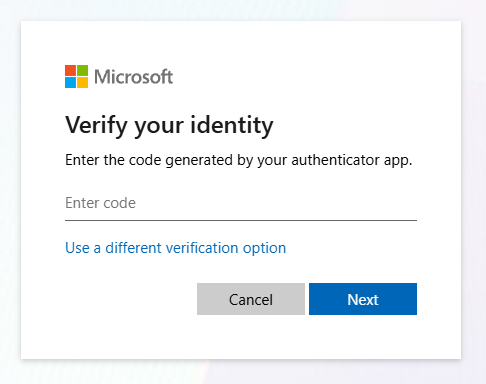
I feel like I'm losing my goddamn mind how the hell am i supposed to get the code when I can't even log in to the authenticator app cause they're asking me for a code IN THE AUTHENTICATOR APP.


r/Outlook • • 6h ago

Status: Open Outlook rejecting all email reply and forward emails

4 Upvotes

Is anyone else getting this? Since about [date], every time I reply to or forward an email from my Outlook account, it bounces with:

550 5.7.520 Message blocked because it contains content identified as spam. AS(4810)

The weird part:

  • A brand-new email that just says "test" sends fine to the same person.
  • Replies and forwards fail, even normal emails from people I know.
  • The exact same email forwarded fine last week.
  • It's an [@outlook.com / u/hotmail.com] account, using the Outlook app on a Samsung S25.

Has anyone found a proper fix?

Thanks


r/Outlook • • 8h ago

Opinion I’ve built a tool to group multiple Outlook email threads into a single “case” with a Kanban board — looking for feedback!

2 Upvotes

r/Outlook • • 7h ago

Status: Resolved How do I leave a group? Outlook mobile

0 Upvotes

I'm not sure if this is the right subreddit, I'm in a group on outlook mobile app. I quit the job, I want to leave the group, how do I do that?


r/Outlook • • 1d ago

Status: Pending Reply Login impossible.

10 Upvotes

Email 1 wants me to verify the login to send me an email to email 2.
Email 2 wants me to verify the login to send me an email to email 1.

Okay??! What the fuck? That's why I hate Outlook. It's by far, the WORST EVER email provider ever with a nanny state approach to my security that is absurd. How do I ever get into my emails again that I had for 20 years??????????????????????????????


r/Outlook • • 16h ago

Status: Pending Reply Compte Hotmail bloqué malgré vérification manuelle + pièce d'identité et clôture du ticket Microsoft — des solutions ?

1 Upvotes

Bonjour à tous,

​Je viens chercher des retours d'expérience ou des pistes si quelqu'un a déjà réussi à débloquer une situation similaire avec le support Microsoft.

​Le contexte :

Mon compte historique @hotmail.fr (créé il y a environ 15 ans et utilisé quotidiennement jusqu'à son blocage) est inaccessible. Comme les procédures automatiques habituelles ne suffisaient pas, mon dossier a été transféré au support avancé (Executive Relations).

​Ce que j'ai déjà fait :

​Plusieurs soumissions du formulaire de récupération automatique (ACSR), dont une double soumission demandée par l'agent.

​Remplissage complet du questionnaire de vérification manuelle (MV) avec mes informations de profil, dates clés, numéro de téléphone associé, liste élargie de contacts personnels et professionnels, objets et dates exactes d'e-mails envoyés, éléments de connexion habituels (adresses IP, port, localisation) et anciens mots de passe.

​Dépôt sur leur portail officiel Secure File Exchange d'une copie de ma pièce d'identité ainsi que du questionnaire complet.

​Contestations formelles par e-mail lorsque l'agent m'a indiqué que les informations sur mes contacts étaient jugées insuffisantes, puis que le ticket allait être clôturé administrativement.

​Où j'en suis :

Malgré tous ces justificatifs transmis et mes relances pour exiger une réouverture et un réexamen manuel complet, le ticket a été fermé et je n'ai plus aucun retour.

​Mes questions :

​1. Est-ce que certains d'entre vous ont déjà réussi à faire rouvrir un dossier de récupération après une clôture sur Executive Relations ?

​2. Y a-t-il un canal spécifique, une formulation ou un levier (RGPD / accès aux données personnelles, médiation, autre procédure) qui a fonctionné pour vous ?

​3. En dehors de la migration de mes autres comptes vers une nouvelle adresse e-mail, y a-t-il une étape que j'aurais pu manquer ?

​Merci d'avance pour votre aide et vos conseils !


r/Outlook • • 1d ago

Status: Pending Reply How to forget an old 365 portal on chrome?

3 Upvotes

Sorry if this is a chrome question and not a Microsoft question but basically I was at one point using Outlook thru the university I went to years ago, now I am working at another university that also uses outlook for emails. Anytime I try to go to the sign in page for Outlook 365 every link (even ones from the new job) are directing me to the sign-in page for my old school. And i cant seem to "forget" this account/direction on my chrome browser. I hope that makes sense and someone can help me


r/Outlook • • 1d ago

Status: Pending Reply Folders Have Disappeared in Desktop Client but are There in Web Client

2 Upvotes

Some weird things have been happening recently to my Outlook desktop client. First, strange changes happened to my conversation threads, which started to show deleted items even though I did not change any settings. This is really irritating.

But the biggest problem is that all of my folders have disappeared from my desktop client even though they're there in new Outlook and the web client. Again, I didn't change any settings.

Any idea what might be going on here? I want to keep using the full desktop client but at the moment I'm being forced to use new Outlook, which I don't like.


r/Outlook • • 1d ago

Status: Pending Reply I declined a previous invitation. But now I want to accept it. That option doesn't exist? Really?

21 Upvotes

I declined a previous invitation. But now I want to accept it. That option doesn't exist? Really?


r/Outlook • • 1d ago

Informative Keeping cookies and temp data to keep outlook/microsoft accounts verified. Is it a permanent change?.

6 Upvotes

So we've all been having problems with our Outlook/Microsoft Accounts constantly looping to get us to verify our accounts with security codes sent to our recovery email every time we try to login. This started to happen after they changed how they verify accounts since Microsoft put through two updates last week on the 10th and 11th october to upgrade their Cloud Servers and the Microsoft Entra ID that is the verification system.

I've ran it through a google search continuing the search in AI Mode which is obviously using gemini and it's saying that because of how they've changed how they verify our accounts, we now need to keep the Cookies and Site Data for the Microsoft and Live websites because Microsoft saves a small Security Token (cookie) in your Browser that tells its Servers, "This device is already verified." so the cookies are your "Trusted Device" ID now.

Wiping the cookies resets your trust. So when you clear your Browser Data on Exit, that Token is deleted. The next time you open your Browser, Microsoft sees a completely unrecognized device and triggers a Security Verification check all over again😐

Previously, typing your password on an unrecognized browser was often enough. Now, whenever Microsoft detects a login with no existing browser cookies, its updated security system treats it as a high-risk sign-in and enforces a secondary verification code (or a passkey) before letting you in.

New authentication relies on cryptographic device tokens stored in your browser's local storage/cookies. Without that local token, Microsoft's servers have no secure way to tell the difference between you opening a freshly wiped browser at home and a hacker logging in with a stolen password from across the world.

The reason is because over the past year, Microsoft tightened its sign-in rules so they could ditch 2FA/SMS Codes and shifting accounts to a Passwordless Accounts. Although there are some glitches too atm with the verification of accounts, and on Windows 11 it doesn't seem to be holding onto the Verification when someone signs into Windows 11 using their Microsoft Account https://learn.microsoft.com/en-ca/answers/questions/6065597/windows-keeps-asking-me-to-verify-my-account-every

Sooo basically if this is a permanent thing now they've made this completely self-service and put the security of our Outlook/Microsoft Accounts entirely in our hands. Whereas before while we always used passwords they saved the security verification on their servers which was easier. Microsoft relied heavily on server-side signals (like your home IP address and basic browser details) paired with your password.

But because hackers now routinely spoof IP addresses and steal passwords in data breaches, server-side trust alone is no longer considered safe.

So i think my instincts on this were correct that we should keep Outlook logged in on our Internet Browser on another Profile so then the Cookies and Data don't get deleted. If you have more than 1 account maybe open them in multiple Profiles or open them in the Apps. I think i plan on deleting my 2nd Outlook/Microsoft account though and just only have 1 account to make it easier to manage.

Can someone verify that this is indeed the way we have to keep our Outlook/Microsoft Accounts verified now?.

Edit: So it's saying that we'd have to keep the Cookies & Data on our Browser if we don't have a Passkey setup, but to avoid asking to be Verified we'd have to setup a Passkey.

I think it's meant to be a temporary workaround by keeping the Cookies & Data and occasionally like every 2 or 3 months Verifying with our Recovery Email if we can't currently setup a Passkey. And it's also part of the fallback plan when we switch to a new device.

Atm though because it's also glitching and repeatedly asking to Verify i think it would be a good idea to keep the Cookies & Data upon exit of your Browser until they fix all the glitches and bugs.


r/Outlook • • 1d ago

Status: Pending Reply Folders Have Disappeared in Desktop Client but are There in Web Client

Thumbnail reddit.com
1 Upvotes

r/Outlook • • 1d ago

Status: Pending Reply OUTLOOK.LIVE.COM CONTACTS DO NOT ALWAYS LOAD

1 Upvotes

windows 10, microsoft 365 personal, outlook.live.com

many times when i want to look at my contacts list, it does not load and i get this error message:

something went wrong and we are unable to open this page. please check your connection or reload to try again.

what does that message mean? how can i correct it? why does this happen?


r/Outlook • • 1d ago

Status: Pending Reply How to provide email business continuity when primary mail server (Exchange Online) outage occurs? (In relation to MO1550821)

Thumbnail reddit.com
1 Upvotes

r/Outlook • • 1d ago

Status: Pending Reply Account hacked

7 Upvotes

Hello,

I am facing the following problem: my account has been hacked, and I am unable to recover it. It is extremely frustrating; this is the email address I use for many other accounts, credit cards, and more—an account I have held for many years.

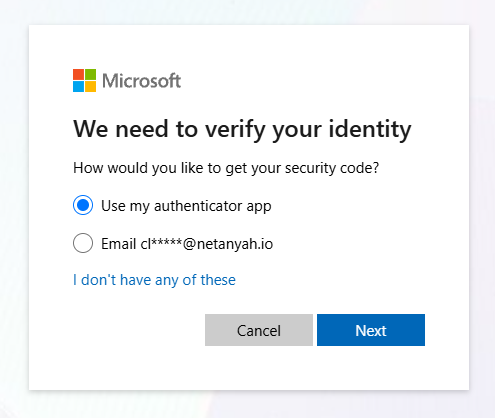
When I try to log in, it asks for an authenticator code (I never set one up).

https://i.postimg.cc/htjKG7mX/a.png

Furthermore, my alternative recovery email address has been unlinked, and the mobile phone number associated with the account has been removed.

https://i.postimg.cc/fLxNPcGv/b.png

A Google search for "@netanyah.io" reveals many instances of accounts being stolen, where this specific email address is added as an alternative recovery address.

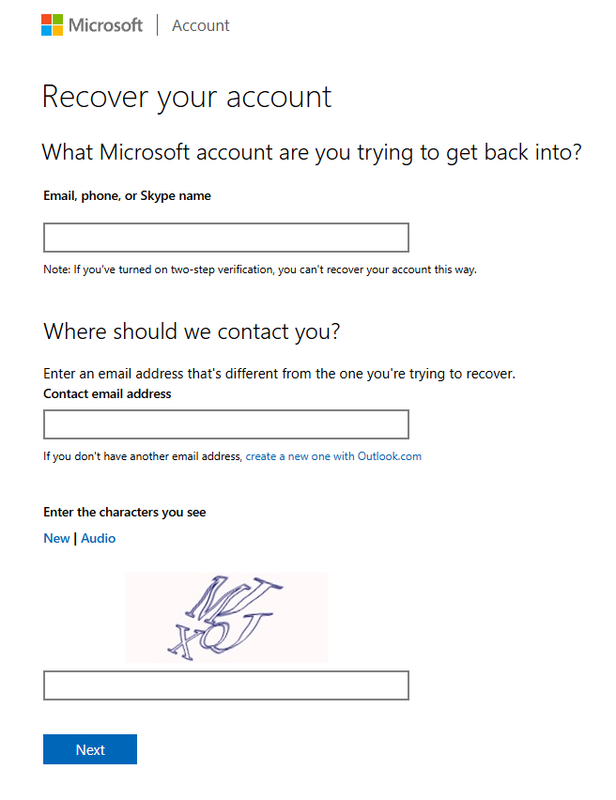
I also tried filling out the Microsoft recovery form (linked below), but the response I consistently receive is that, because an authenticator is enabled on the account, the form-based recovery process is rejected. I am told there is no way to recover the account, as support staff cannot access it.

https://i.postimg.cc/MTySL0kq/c.png

Is it truly impossible for me to recover my account? I find it hard to believe that such a large company cannot help someone regain access to their own account. In all the posts I have seen across various forums, almost no one manages to recover their account. Is there no record showing that the account was accessed from, presumably, another continent? Is there no log of login attempts or the tampering with the account's access methods?

I truly hope someone here can assist me—and please, do not suggest that I submit that form again; it has not helped anyone.

Thank you.


r/Outlook • • 1d ago

Status: Open All my images are blocked

1 Upvotes

This just seemed to have happened randomly, quite possibly after the Microsoft outrage but I’m not sure.
Suddenly all my emails coming in, the images are automatically blocked (similar to if they were in junk mail) but this is not happening even in my regular inbox. Basically every email that comes in I have to manually click on “Show Content” which is a bit annoying. This is happening on both my home and work computer using Chrome.

However this issue doesn’t come up on my iPhone using Safari.

Can anyone help solve this?


r/Outlook • • 1d ago

Status: Pending Reply Can someone help me log back into my outook

0 Upvotes

I recently got a new phone. I have the outlook app and Authenticator app on my new phone, but I am not logged into either of them. When I try to log in asks me to confirm on the Authenticator app but then it brings me to the Authenticator app trying to sign in. How do I fix this, has anyone else had this problem.


r/Outlook • • 1d ago

Status: Open My old Hotmail account.

2 Upvotes

Does anyone know how I can recover an old Hotmail account if I no longer have access to the registered phone number because it now belongs to someone else? Is there any way to recover the account without sending a verification code to that number?


r/Outlook • • 2d ago

Informative New Outlook PDF Attachment Issue

28 Upvotes

Hello,

Part of an IT department. Just wanted to share an issue and fix for anyone who may run into it.

In new outlook we had an issue where when a user would try to open a pdf in new outlook, it'd just load a blank preview but it'd work in classic or browser. Additionally the open button would do nothing. Everything was fully up to date (even edge). We tried uninstalling and reinstalling, etc etc the basics.

I went on another computer and tested it. It worked on that computer. I noticed the webview2 versions were different, the computer it was working on had the version before the most up to date. I couldn't get it to update to the newest one so I manually did it. Once it was up to date it stopped working. The webview2 version 158.0.4370.33 is the issue. Heres the steps to revert webview2 to an earlier version.

  1. Go to Webview2
  2. Scroll down to 'Fixed Version' and select the version you want (In this case I selected 158.0.4341.60).
  3. Open filed Explorer, Go to C drive, Temp and create a folder called FixedVersion
  4. Open CMD and run expand "<path-to-cab-file>" -F:* "<destination-folder>" EX: expand "C:\Users\John\Downloads\FixedVersion.cab' -F:* "C:\temp\FixedVersion" which will extract it to C:\temp\FixedVersion.
  5. Open Regedit
  6. HKEY_LOCAL_MACHINE\SOFTWARE\Policies\Microsoft\Edge
  7. Create new key called 'WebView2'
  8. In 'WebView2' create another key called 'BrowserExecutableFolder'
  9. In 'BrowserExecutableFolder' create a string value called 'olk.exe'
  10. In 'olk.exe' set the value data to C:\temp\FixedVersion\Name of folder that happened in step 4
  11. Restart outlook and it worked.

Any questions let me know.


r/Outlook • • 1d ago

Status: Open Archive has lost it's way.

0 Upvotes

I have 365 OST set to archive items older than 2 mths to separate PST file. In general , is working as intended on all folders except "Trash" folder. For some reason, appears archive function is doing it's job, but emails never appear in archive. Is as though they simply disappear. Have double checked all archive settings and also run scanpst on OST and PST with no results. Also tried completely rebuilding indexes. Stumped... and hoping all my archived emails have not been simply sent into the black hole... Can anyone suggest diagnosis steps or solutions??


r/Outlook • • 1d ago

Status: Open I don't understand the Outlook outage

0 Upvotes

How does Microsoft's outage affect Outlook? I thought Outlook was a program that I rent from Microsoft but lives on my computer so I can read/write my email.


r/Outlook • • 1d ago

Status: Open All my images are blocked

Thumbnail reddit.com
1 Upvotes

All my images are blocked. Every new email that comes in I have to manually click on “Show Content” which gets tedious and annoying. This used to only happen to my junk mail but this is my main inbox. Is there any fix or setting?