r/PXSDesktop • • 7d ago

PXS Desktop for Android is out: a real desktop on any Android 13+ phone or tablet, and Netflix full screen on the big screen

9 Upvotes

PXS Desktop is on Google Play now: Google Play

On an iPhone? App Store

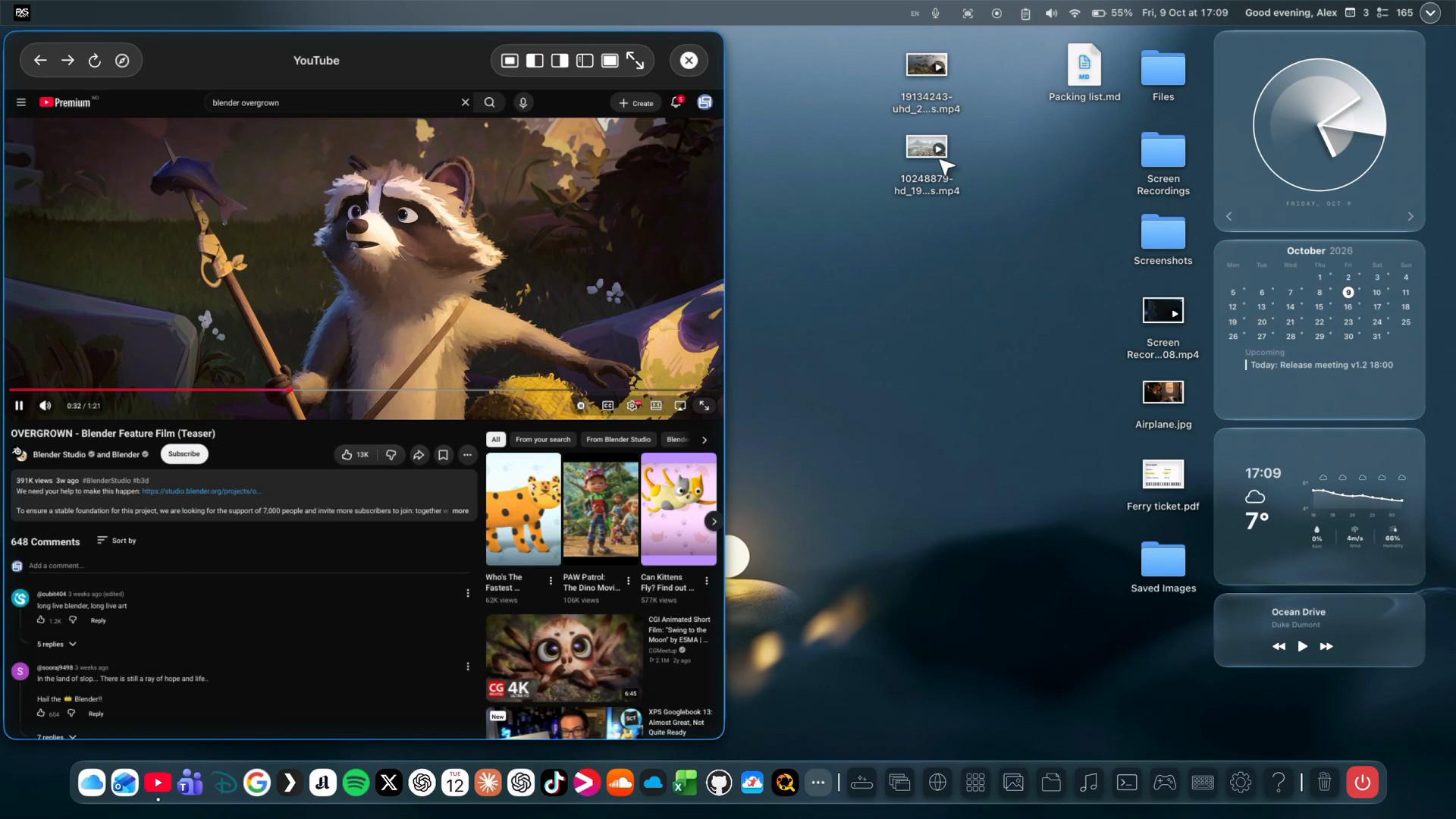
The same desktop as on the iPhone and iPad: windows, a dock, a launcher and a desktop-class browser, on a monitor, a TV, AR glasses or any web browser (AnyScreen). On a tablet, the tablet's own screen becomes the desktop, with a Bluetooth keyboard and mouse.

On Android:

  • Netflix in the Netflix app: pick a film on Netflix's website in PXS and it plays full screen in the Netflix app on the wired screen or glasses, with your phone or tablet as the remote (skip 10 seconds or 1 to 30 minutes, volume, and its screen dims).
  • Head tracking (3DoF) for VITURE glasses, built on VITURE's own SDK with their permission.
  • Your notifications on the desktop, and replies with a real keyboard.
  • Your own Android apps in the dock and the launcher (they open outside PXS).

Also there: 3D mode for glasses, Screen Sharing with your Mac or Windows PC (free PXS Helper), GeForce NOW and Xbox Cloud Gaming with a controller, and Files with SD cards and USB drives.

You need Android 13 or newer. For a cable, the phone's or tablet's USB-C port must carry video (DisplayPort Alt Mode). On Samsung, set Settings › Connected devices › Samsung DeX › Connected display to Mirrored.

3 days free (only days you use the desktop count), then $29.99 once (launch price, normally $39.99), $19.99 a year or $5.49 a month.

It's the first Android version, so tell me here what breaks and I'll fix it fast. :)


r/PXSDesktop • • 16d ago

Preview of version 1.5 of PXS Desktop - Light Theme, Better File browser, Password Management

Post image
7 Upvotes

Other feature requests for version 1.5 are welcome!


r/PXSDesktop • • 20d ago

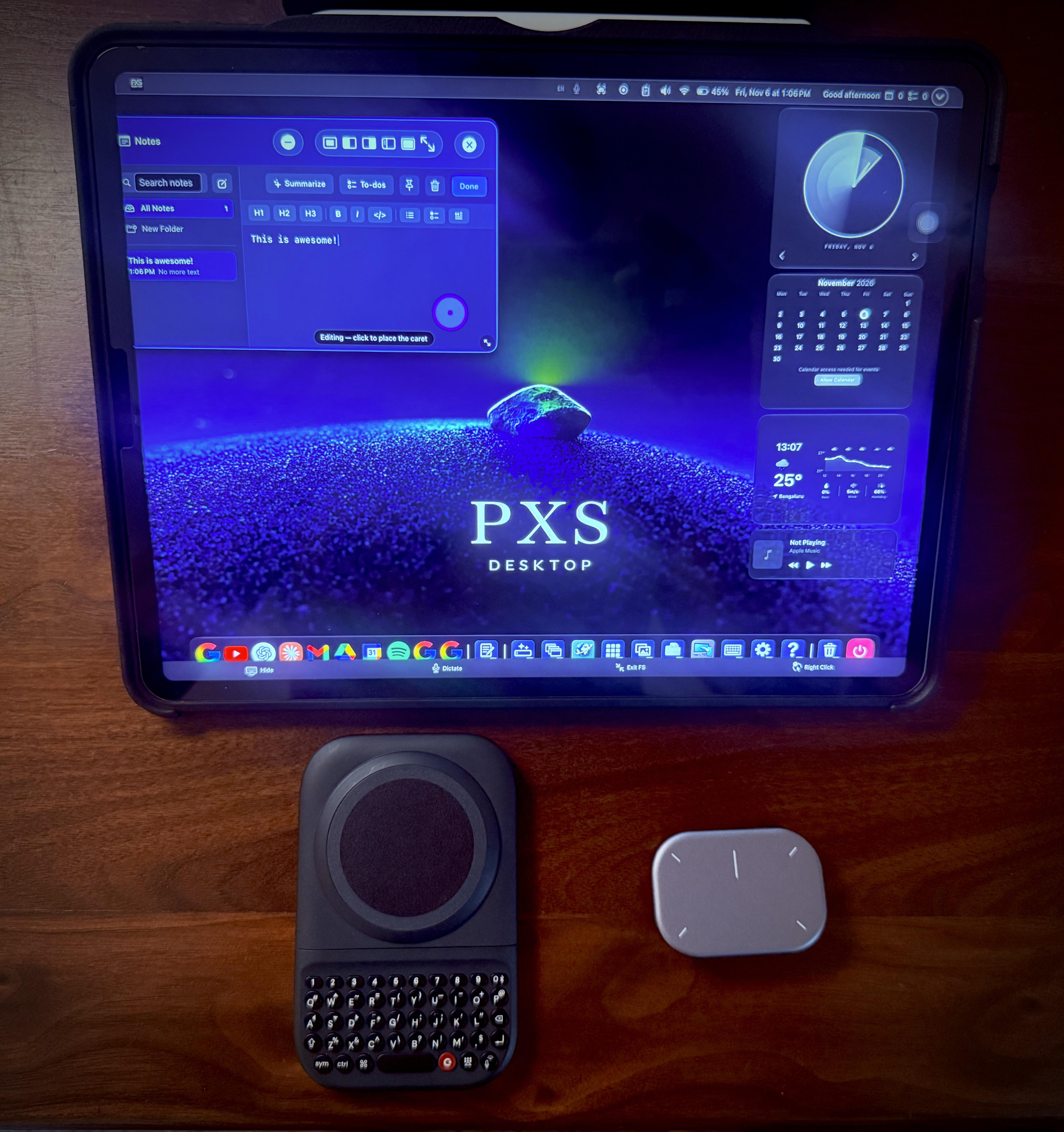
The Ultimate Travel Workstation: PXS Desktop + Clicks Keyboard + Cheerdots 2

Post image
7 Upvotes

r/PXSDesktop • • 20d ago

PXS Desktop 1.4 is out: your Windows PC in a window, Reader, and Pages, Numbers and Keynote on iCloud.com

13 Upvotes

1.4 is live on the App Store. First everything new, then what PXS does if you're new here.
The video is an animation I made in Blender; what’s on the screens is the real app.

New in 1.4

PXS 1.4 brings a Reader to the browser, game controllers to the built-in games, and Windows PCs and zoom to Screen Sharing.

The browser

  • Reader: any article in clean, larger text, dark, light or sepia
  • Listen: the Reader reads the article aloud
  • Reader in web apps too
  • A ⋯ menu in the title bar: Reader, Listen, text size and page zoom, favorites, Save as Web App and Share
  • iCloud.com: Pages, Numbers and Keynote open as on a Mac, instead of asking for a tablet or desktop browser
  • A document you open on iCloud.com gets a window of its own
  • Servers on your own network open by their address, over http when they have no https, with Visit Anyway for a certificate of their own
  • New windows: a site that opens a game or a page in a new window gets a real window, linked to the page that opened it, as in a desktop browser

Screen Sharing

  • Windows PCs: your PC in a window, with its sound, through the free PXS Helper for Windows (https://pxsdesktop.com/helper)
  • As with a Mac: pair once with a six-digit code, pick a display, and control it with the pointer and the keyboard
  • Zoom up to 800% on your Mac or PC: pinch the picture or the touchpad, or use − and + in the bar
  • The pinch zooms right where your fingers or the pointer are
  • Zoomed in, the picture follows the pointer to every edge, in full screen too
  • Its own place in the dock

Games

  • Game controllers play the built-in games
  • Your phone as the controller: hold it sideways
  • Steer with the stick: the further you push it, the faster you go
  • Four button sizes for your phone as a controller, in Settings › Mouse
  • The phone's sticks take a longer push to reach full speed, and follow your thumb when it slides past the edge

iPhone Duo

  • Folded, the touchpad fills the outer screen, with its buttons in a bar along the bottom and the status bar back at the top
  • Windows from a cable fit the screen when you open the desktop on the phone, and a finger reaches every part of them

Your desktop

  • Your setup on all your devices: install PXS on another iPhone or iPad, and it offers to bring over your web apps, your dock and your settings through iCloud
  • A screen you connect starts at 1080p or more
  • The Launcher closes with a tap outside it, with its button on the phone, or with Esc
  • Premium apps come first in Apps, larger and with new icons
  • The spoken greeting starts sooner

Fixes

  • Pages load again when iOS ends their process, also pages kept while the screen was away
  • Less memory in the background: PXS lets go of pictures it does not need when you switch to another app
  • The purchase page fits the folded iPhone Duo's outer screen
  • Plus many smaller fixes

What PXS does best

Your phone is the computer. Any screen is your desktop.

Any screen

  • AR glasses that work as a USB-C display: VITURE, XREAL, RayNeo, Rokid, Lenovo Legion Glasses
  • A monitor or a TV: USB-C, HDMI with an adapter, or AirPlay
  • Any web browser, with AnyScreen: a laptop, a smart TV, even the browser in a parked car
  • Right on the device: on an iPad, or on the big inner screen of an iPhone Duo

A real desktop

  • Windows you can move, resize, snap, minimize and put in full screen, with a dock and a launcher
  • Your phone is the touchpad and the keyboard, or pair a Bluetooth mouse and keyboard
  • Any website as an app, with its own icon, and your phone's own apps in the dock (they open on the phone, outside PXS)
  • Talk instead of typing: dictation runs on your phone and works with no signal, and the launcher takes voice and plain-language commands

A desktop-class browser

  • Tabs, Gmail, Google Docs, Office, video calls with camera and mic, and downloads
  • Streaming: Netflix, HBO Max, Disney+ and Prime Video
  • Reader: any article in clean, larger text, or read aloud

Your computer, on your phone

  • Screen Sharing: your Mac or Windows PC in a window, with its sound, through the free PXS Helper
  • Zoom in up to 800%

Games

  • Cloud gaming with a game controller, or with your phone as the controller

AR glasses in 3D

  • 3D mode: the desktop gets depth, and 3D films and photos show in 3D

iPhone Duo

  • Unfolded, the desktop fills the big inner screen
  • Half folded, it stands like a laptop: the desktop on top, a touchpad or a controller below

Built-in apps

  • Files, Photos, Notes, Preview with PDF markup, Camera and scanner, Clock with alarms, Calculator, a video player, a text editor, a terminal and games

No strings attached

  • No ads, no tracking, no account
  • The free trial starts when you first connect a screen, not when you install

Earlier: new in 1.2 and 1.3, built after your requests

The browser

  • Netflix and HBO Max play in the browser (1.3)
  • Signing in (1.3): sign-in popups finish, and signing in no longer jumps to the site's own app
  • Your pages stay as they were when you go to another app and back, so a code from a text message no longer starts a sign-in over (1.3)
  • Favorites with the star in the title bar (1.2)
  • Block Ads, off until you turn it on (1.2)
  • YouTube in full screen: buttons to skip and pause, in 3D too (1.2)

Screen Sharing

  • Screen Sharing (1.2): another computer in a window, with your pointer and keyboard. A Mac's built-in Screen Sharing works with nothing installed, and the free PXS Helper adds smooth video with sound and a choice of displays
  • Away from home through a VPN, with the Mac's sound (1.3)

Games

  • Game controllers in web pages (1.3): play cloud and browser games on the big screen
  • Your phone as the controller (1.3): hold it sideways for sticks, a D-pad and buttons, with the touchpad in the middle. It stays controller 1, even with another controller connected
  • Cloud gaming sites play in a browser window (1.3)

AR glasses and 3D

  • 3D mode (1.2): the desktop is drawn once for each eye, with the wallpaper behind the windows
  • 3D films and pictures (1.2): side-by-side films, spatial videos and photos, and depth for ordinary pictures and comics, worked out on your phone
  • 3D films stay in 3D when you click or skip, and Help has a 3D topic (1.3)
  • Desktop Size (1.3): the whole desktop smaller and centred, for glasses with blurry edges and TVs that cut the edges off

iPhone Duo

  • Half folded like a laptop (1.3): the desktop on top and a touchpad below. The lower half can be a game controller, and the keyboard comes up over the touchpad

The desktop

  • Your phone's own apps on the desktop, in the dock and in the launcher (1.3). They open on the phone, outside PXS
  • The dock (1.3): choose its size, and an icon shows its name when the pointer rests on it
  • Full-screen windows: their buttons step out of the way when the pointer rests (1.2)
  • Mouse Mode: the phone's keyboard stays down while you type on a Bluetooth keyboard or the desktop's own keyboard (1.2)
  • iPad: the Touchpad / Mouse switch shows in landscape (1.2), and in Mouse Mode the pointer no longer stops at the edge of the screen (1.3)

The honest part

  • Other iOS apps can't run in a window (iOS doesn't allow it).
  • Protected video (Netflix and the like) plays on the cable, not over AnyScreen. Apple TV+ won't play in the browser.
  • A Bluetooth mouse needs AssistiveTouch switched on once.

For the cable you need a USB-C iPhone (15 or newer) and a cable that carries video. AirPlay, AnyScreen and the iPad's own screen need no cable. Free download, and three days of use free: only days you connect a screen count. Then $39.99 once (launch price, down from $49.99), or $24.99/year or $6.99/month.

App Store: https://apps.apple.com/app/apple-store/id6756102352?pt=125393472&ct=reddit_pxsdesktop_14&mt=8

Tell us what you want next: the feedback board drives the roadmap. https://bytenine.com/apps/pxs-desktop


r/PXSDesktop • • 23d ago

Accessing local hosted sites and systems in browser

Post image
7 Upvotes

It may be an iOS 27 thing where some sites aren’t ready for that version of safari - but when trying to access a homelab resource while connected to my vpn, I cannot reach site.
Any public domain site so far hasn’t been an issue.


r/PXSDesktop • • 26d ago

Thank you! What you’ve said about PXS so far

Post image
8 Upvotes

I went through every comment about PXS on Reddit and YouTube and put the ones that made my day in one picture. Thank you to everyone who tried it, wrote back and asked for things. The cloud gaming controller in 1.3 started as a request right here.

Coming next in v 1.4: Pages, Numbers and Keynote from iCloud.com in the browser, and pinch to zoom in Screen Sharing. Screen Sharing from Windows Computers.

Keep the requests coming, here or on the board: https://bytenine.com/apps/pxs-desktop

App Store: https://apps.apple.com/app/apple-store/id6756102352?pt=125393472&ct=reddit_pxsdesktop_feedback&mt=8


r/PXSDesktop • • 29d ago

Got my iPhone Duo Today!

Thumbnail
gallery
9 Upvotes

More updates for the Duo and other things coming soon :D


r/PXSDesktop • • Oct 25 '26

Keep this project going through the years.

7 Upvotes

You are an amazing coder. Your App is top tier. How can it persist through the years as iOS is updated. Will you be able to maintain it and if not, how can a ‘community’ of enthusiasts keep it alive? I am telling people about your app and promoting it online where relevant.


r/PXSDesktop • • Oct 24 '26

PXS Desktop 1.3 is out: cloud gaming with a controller, and Netflix and HBO Max in the browser

7 Upvotes

1.3 is live on the App Store. This one is about playing and watching on the big screen.

GAMES

- Pair a controller with your phone and it works in web games and cloud gaming on the big screen. I test with a DualSense.

- GeForce NOW and Xbox Cloud Gaming play right in a browser window. GeForce NOW used to stop at "set up as a web app".

- No controller? Choose Controller on the phone and hold it sideways: sticks, D-pad and buttons, with the touchpad in the middle.

- Keyboard keys can be held down in browser games.

WATCHING

- Netflix and HBO Max now play in the PXS browser, with their own controls. Disney+ already did.

- Apple TV+ won't play in the browser, so tv.apple.com opens the Apple TV app instead.

- Use the cable for protected video: it can't be sent over AnyScreen. YouTube works everywhere.

YOUR PHONE'S APPS

- Add the apps on your phone to the desktop, the dock and the launcher (Apps › iPhone Apps). A click opens the app on the phone, and your windows wait in PXS.

SIGNING IN

- Two-factor sign-ins work: go to Messages for the code and come back to the same page, not a reloaded one.

- "Sign in with Google" and other sign-in popups finish instead of stopping on a white page.

- Signing in no longer jumps to the site's own app on the phone.

THE DESKTOP

- Desktop Size (Settings › Display): the whole desktop smaller and centred, for glasses with blurry edges and TVs that cut them off.

- Choose the dock's size, and rest the pointer on an icon to see its name.

- iPad: in Mouse Mode the pointer no longer stops at the edge of the iPad's screen.

ALSO

- 3D: a click on a 3D film, or a skip, keeps it in 3D.

- Screen Sharing: with PXS Helper 1.0.4 (https://pxsdesktop.com/helper), reach your Mac away from home through a VPN, with its sound.

Free download with three free days of use, and lifetime is still at the launch price.

App Store: https://apps.apple.com/app/apple-store/id6756102352?pt=125393472&ct=reddit_pxsdesktop_13&mt=8

What should come next? Tell me here, or vote on the feature board: https://bytenine.com/apps/pxs-desktop

2-minute tour: https://www.youtube.com/watch?v=Hibo-54Z-fA


r/PXSDesktop • • Oct 24 '26

PXS Desktop 1.3.1: half fold your Duo into a laptop, with a desktop on top and a touchpad, keyboard or game controller below

Thumbnail
gallery
11 Upvotes

Last week I posted a simulator teaser of PXS on the Duo and said the laptop posture was coming. It's out now, in 1.3.1.

Half fold the Duo and stand it up like a laptop:

- Top: a real desktop. Windows you can move and resize side by side, a dock, a menu bar, and a full desktop browser with tabs (Gmail, Docs, Office, video calls).

- Bottom: a touchpad. Tap Controller and it turns into a game controller for cloud gaming. GeForce NOW and Xbox Cloud Gaming play in a browser window on the top half.

- Tap a text field and the keyboard comes up over the touchpad, so the desktop above stays as it is.

- Netflix plays in the browser too, so the Duo works as a small TV between work sessions.

Open it flat in landscape and the whole inner screen is the desktop. The touchpad goes away, and you use it with touch or a Bluetooth keyboard and mouse (a mouse needs AssistiveTouch switched on once).

Plug it into a monitor or AR glasses over USB-C and you get a large desktop there.

Screen Sharing puts your Mac's screen in a PXS window, next to your other windows. With the free PXS Helper (https://pxsdesktop.com/helper) it's smooth video with sound, it pairs once with a six-digit code, and it reaches a locked or sleeping Mac. Away from home it works through a VPN. With nothing installed, PXS signs in to the Mac's own Screen Sharing, and a Windows PC works through a VNC server.

Why it matters on the Duo: iOS only gives apps 50/50 Split View on the inner screen. PXS draws its own desktop there, so windows can be any size, and as many as you like.

Also new in 1.3:

- Two-factor sign-ins work: go to Messages for the code and come back to the same page.

- "Sign in with Google" and other sign-in popups finish.

- Add your phone's own apps to the dock. A click opens them on the phone, and your windows wait.

One more thing: my own Duo hasn't arrived yet, so all of this is built and tested in Apple's Duo simulator. That makes you the first to run it on a real Duo, and I'd love to hear how it feels. If anything is off, tell me here and I'll get on it right away.

Free download with three free days of use, and lifetime is still at the launch price.

App Store: https://apps.apple.com/app/apple-store/id6756102352?pt=125393472&ct=reddit_pxsdesktop_131&mt=8

Questions or wishes for the Duo version? Ask here.


r/PXSDesktop • • Oct 21 '26

Version 1.3 of PXS Desktop is delayed.

Post image
8 Upvotes

Apple has recently been taking longer than usual to review new versions, but I expect it will be released soon.

In the meantime, here is some information on what to expect when version 1.3 is released:


r/PXSDesktop • • Oct 15 '26

Sneak peek: PXS Desktop on iPhone Duo (simulator)

8 Upvotes

iPhone Duo pre-orders are opening around the world.. Here's PXS in Apple's Duo simulator: folded, unfolded, and with a touchpad and keyboard.

What I'm working on for the Duo:

- The inner screen as a full desktop: free windows instead of iOS's 50/50 split

- The Duo as a trackpad for a monitor, a TV or AR glasses, where iOS on its own only mirrors the phone

- After that: the half-folded laptop pose

Simulator only so far. I'll post again when I've had it on a real one.

Getting a Duo? Tell me what you'd want from a desktop on it.

https://apps.apple.com/app/apple-store/id6756102352?pt=125393472&ct=reddit_pxsdesktop&mt=8

2-minute tour: https://www.youtube.com/watch?v=Hibo-54Z-fA

All our videos: https://www.youtube.com/@byteNine


r/PXSDesktop • • Oct 15 '26

PXS Desktop 1.2 is out: your Mac's screen in a window, and 3D mode for AR glasses

8 Upvotes

1.2 is live on the App Store. Thanks to everyone who tried it, bought it and sent feedback.

The two big ones:

SCREEN SHARING

See and control your Mac from a PXS window.

- With the free PXS Helper (https://pxsdesktop.com/helper): smooth video with sound. It pairs once with a six-digit code, and there's no password after that.

- With nothing installed: PXS signs in to the Mac's own Screen Sharing.

- Same network only, for now.

How to set it up: https://pxsdesktop.com/blog/screen-sharing-your-mac/

3D MODE FOR AR GLASSES

Put your glasses in 3D (side-by-side) mode and the desktop is drawn once for each eye, with the wallpaper behind the windows.

- Side-by-side 3D films in the browser or from a file, and spatial videos from a file

- Spatial and SBS photos in 3D. Ordinary photos and the pictures on a web page get depth worked out on the phone (a one-time 50 MB download in Settings › Display › 3D Mode).

More: https://pxsdesktop.com/blog/3d-mode-for-ar-glasses/

ALSO NEW

- Browser favorites: the star in the browser's title bar

- An ad blocker, off until you turn it on

- YouTube full screen with buttons to skip 5 or 10 seconds and pause, in 3D too

Everything new, with short videos: https://pxsdesktop.com/blog/

App Store: https://apps.apple.com/app/apple-store/id6756102352?pt=125393472&ct=reddit_pxsdesktop&mt=8

What should come next? Tell me here, or vote on the feature board: https://bytenine.com/apps/pxs-desktop

2-minute tour: https://www.youtube.com/watch?v=Hibo-54Z-fA

All our videos: https://www.youtube.com/@byteNine

Do you review apps or gear (YouTube, a blog, here on Reddit)? PM me for a free lifetime code :)


r/PXSDesktop • • Oct 13 '26

Welcome! Your phone is the computer. Any screen is your desktop.

Post image
5 Upvotes

PXS Desktop turns an iPhone or iPad into a desktop computer. Plug in a screen and you get windows, a dock, a launcher, a desktop-class browser and a full set of apps, all running on the phone in your pocket. Leave the laptop at home.

Try it free: https://apps.apple.com/app/id6756102352

Three days of full use, no card, no account. Nothing is locked in the trial.

YouTube Videos
PXS Desktop in 80 seconds: https://youtu.be/P8KQTidPBNE
5-minute tour: https://youtu.be/YGEkVbQy-DY

The

Use any screen

  • a USB-C or HDMI monitor, a portable monitor or a lapdock: one cable
  • AR glasses (Viture, XREAL and others): a desktop in front of your eyes
  • a TV over AirPlay
  • any browser with AnyScreen: a laptop, a smart TV, even the screen in a parked Tesla, with no cable at all
  • no second screen? Run the desktop on the iPhone or iPad itself

Control it your way

The phone is the touchpad. Or pair a Bluetooth mouse and keyboard and work like on any computer.

What is inside

  • windows you can move, snap and resize, with a dock, a launcher and a menu bar
  • a desktop-class browser: web mail, Google Docs, Microsoft 365, Teams, your bank, all as on a computer
  • save any site as its own app, with its own window and a place in the dock
  • YouTube, Disney+, Prime Video and Plex on the big screen
  • Files, with the phone's folders
  • Preview: read, mark up and sign PDFs and images
  • Notes in Markdown, with sticky notes on the desktop
  • a text and Markdown editor
  • Photos, a video and audio player, and Music (your Apple Music library)
  • Calendar, Tasks and a Daily Overview of your day
  • Camera and a document scanner that makes PDFs
  • Clock with alarms, a Calculator with a paper tape, and an Activity monitor
  • a Terminal, a music tracker and a few small games
  • widgets, wallpapers and themes
  • screenshots and screen recording of the desktop

No ads. No tracking of what you do. No account.

Coming next

  • Screen Sharing: your Mac or another computer in a window, over VNC
  • 3D mode for AR glasses: 3D films, 3D photos and a desktop with depth
  • PXS Desktop for Android

Price

Free to download and to use for three days. After that, $39.99 once and it is yours (launch price), or $6.99 a month, or $24.99 a year.

What this community is for

  • news and release notes for every version
  • show your setup: which screen, glasses or lapdock do you use it with?
  • questions and tips
  • what should come next? Tell me

Links