r/PcBuildHelp • • Oct 09 '26

Moderator Post PSA: READ THE RULES

24 Upvotes

Hello everyone, this is a public service announcement reminding everyone on r/PcBuildHelp to please read the rules before posting and commenting, as there is still a small issue continuing on the sub that needs to be properly addressed.

To start, I will explain each rule here more in depth, following the official order of rules:

  1. Don't use language that can be considered offensive or triggering by another party; no swears, slurs, name-calling, flaming, trolling, etc. Essentially, don't be a d**k, civility is a requirement.
  2. Posts are required to be related to your PC build problems, this isn't a general tech or tech news sub where you can just talk about whatever related to PCs, this is specifically about helping people make build lists and troubleshooting real problems so they can use their builds without difficulties.
  3. When asking if a build is good or not, use pcpartpicker.com links (or links to similar websites like buildcores if your country's currency isn't supported on pcpartpicker if desired). Posts that just use screenshots or images of such a list that can't be edited by users or just an image of a texted list will just get removed.
  4. Any comments or posts involving links to a retailer URL can't contain affiliate or referral data. Someone gets money out of those and we aren't about that here.
  5. Images that are completely unrelated to the post will get a post removed as spam/off-topic.
  6. Posts and comments asking for cheap Windows license keys will be removed as it's easy to get scammed on the sites that distribute them as they're not well regulated and constantly making new sites after old ones get taken down.
  7. Companies of any scale are not allowed to advertise products here, we want to keep things unbiased. Users are not permitted to sell or ask for valuations of what they have, this isn't a marketplace; this also ties into rule 2.
  8. Comments must be on-topic to the original post. Don't go off on tangents about something unrelated to the OP, especially if it's not even helpful. Memes and jokes will be removed. This ties into Rule 9.
  9. Comments that are plainly unhelpful to posters will be removed. Lazily telling people to use search engines, read the manual or RTFM, etc. are not permitted on this sub. If you're going to make a comment to help, put real effort into trying to help the poster understand what it is they need to do, or don't bother commenting at all. We are here to help people.
  10. This partially relates to rule 6. Any and all software shared or referenced on this sub must not violate any license agreements, laws, Reddit ToS, etc. This includes tools that may modify Windows beyond what Windows itself normally allows, as Microsoft's EULA doesn't permit external modification of their OS.
  11. AI tools are not permissible due to the possibility of mistakes that require human intervention from someone that knows what they're talking about. Do not use AI generated answers in comments as they could easily mislead posters.

Now onto the problem at hand:

There has been consistent toxicity towards those who are new to computers and are coming to the sub for help, only to be given sarcastic, rude, or unhelpful comments.

This has been a long standing issue in this sub that was often reported to the mod team but only more recently has started to be properly addressed since a new mod team was appointed after the previous moderators all went inactive and allowed the sub to get overrun by bot accounts.

We've been dealing with all of this behind the scenes but there's always new accounts coming in and repeating the same behavior, so it needs more visibility but we aren't about to implement a "Read The Rules" integration that forces you to acknowledge the rules before you can post, yet. We will if we have to.

There is absolutely zero tolerance for that kind of behavior. If it's rude or helpful, your comment will be removed and temporary bans will be issued. If you're a repeat offender or you make a severely horrible first impression, moderator action can be made permanent.

Thank you to those that consciously chose to remain kind and helpful to others, you are the backbone of r/PcBuildHelp. Continue to be good people.

r/PcBuildHelp • • Sep 28 '26

Tech Support PCBuildHelp Simple Q&A Megathread (Q4 2026)

4 Upvotes

Greetings everyone, trying something new here.

This is possibly the first of many megathreads where people can ask simple questions in the comments and people that decide to browse the comments can answer. I'll also help answer questions myself, as with any of the other mods at their own discretion.

Basic Guidelines

  • Simple questions such as, "What parts should I buy?" along with any pertinent details such as hardware you might already own, what you plan on using it for, etc.

    • Example: "I want to build a gaming PC for around 2K, what should I get?"
  • Follow the rules of the sub-reddit like any post; be respectful, remain on topic, don't make jokes or memes, etc. Discipline will be issued on comments that don't abide by the rules.

r/PcBuildHelp • • 4h ago

Build Question I just build my pc but the screen is black

Thumbnail
gallery
20 Upvotes

all the fans work, the graphic card has energy too. Also, I read that the motherboard show some led lights when something is not connected properly. I also move the ram and nothing happened.

News: It doesn't even turn on now, all my savings to the garbage 😭 3k for nothing


r/PcBuildHelp • • 9h ago

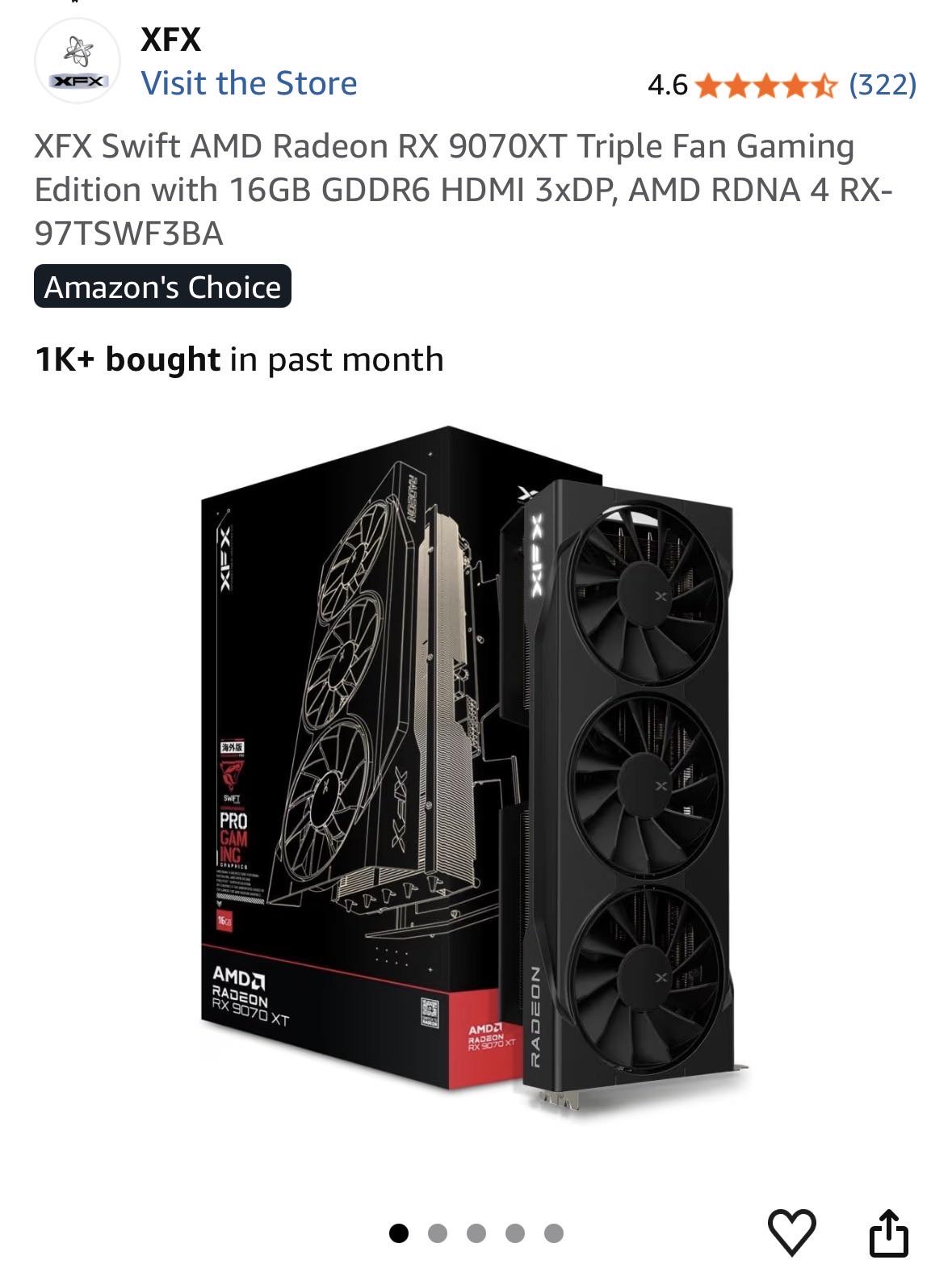
Build Question Is this xfx 9070xt worth it for $960?

Post image
17 Upvotes

I even went to microcenter, no luck on a better deal


r/PcBuildHelp • • 30m ago

Tech Support Pc is crashing with BSOD after new GPU

3 Upvotes

Specs:
7800x3D
MSI B650 gaming plus WiFi
32gb ddr5 6000 ram
9070 xt (had a 3080 prior)
EVGA 850w gold PSU

Upgrading my GPU today to the 9070xt. Did DDU in safe mode and removed my 3080. Installed my new GPU, booted up and installed the latest drivers. At this point I’ve had no issue.

I then played an hour of BF6 and an hour of deadlock. I monitored my temps, GPU in adrenaline didn’t go above 65. CPU was also low temp, 65-67.

I then started RDR2 and turned up all the settings to max. I noticed I had it on Vulcan and switched to DX12. About 10 minutes into playing my pc just shuts off. No blue screen. It appears to be in sleep mode because my RAM RGB is on which is the case if I put my pc in sleep mode. I tried the power button and it didn’t work. Gave it a minute and switched the PSU OFF.

After 2 reboot attempts with no post sign, I switched the PSU off again and unplugged it. After that it posted again and has some sort of message about repairing something on the MSI screen. It then got hung up again and just cycled through debug lights. Did the whole unplug thing again and it’s now booted normally to desktop. A little nervous to run anything.

Prior to this I’ve had no issues. Thinking it was just a crash but it’s weird how it just shut down no blue screen.

new GPU has 3 8 pin. I have 2 cables for the 3 connectors, since they are double headed. I only have one other cable that’s a single VGA. Is that possibly the issue? 850w should be enough… PSU is about 5 years old.

nothing is overclocked


r/PcBuildHelp • • 5h ago

Build Question What should I do?

3 Upvotes

I have a i5 6600k with a B250 motherboard,

I am thinking of upgrading it to i5 12600k or maybe i7 14700k something (if i have that kind of money)

Do should I save for a i5 or i7 14gen Plus motherboard and ram, or should I switch to AMD platform, I have never used AMD and I am kind of sceptical about AMD CPUs.

Please tell me you suggestions.


r/PcBuildHelp • • 3m ago

Build Question I wanted to improve the graphics card of my PC, can you help?

Thumbnail
gallery
1 Upvotes

I'll leave you the details of my build, the only upgrade so far was going to 32 GB RAM. I was planning on upgrading to a better graphics card, to play future games at least at a decent level of detail.I've only started getting more interested in PC this year; I've always played on PS before, so I don't really understand it. What would be a good upgrade for a budget around €500? The computer was purchased in 2022, from PC Specialist, and they were selling them a 16GB AMD RADEON RX 9060 XT at 580€. Is this a good price? What would you do? Any advice is appreciated.


r/PcBuildHelp • • 30m ago

Tech Support Random freezes

1 Upvotes

Random stuttering/freezes while gaming

I recently bought a new PC, and for the past week I've been experiencing an issue where my games freeze for a few seconds at random times. It doesn't usually happen when something demanding is happening in-game; sometimes it just freezes out of nowhere while I'm playing.

I've run benchmark tests, and all components seem to be performing as expected. Neither the CPU nor the GPU is overheating.

This has happened in several games, including Final Fantasy XVI, Final Fantasy VII Rebirth, 007 First Light, and even Balatro. Im using anti lag and radeon boost i dont know if thats a problem

My PC specifications:

- CPU: AMD Ryzen 7 7800X3D

- CPU Cooler: Deepcool AG620

- GPU: ASRock RX 9070 Challenger 16GB

- Motherboard: ASUS PRIME B850M-K

- RAM: 32GB Kingston Fury DDR5 5200MHz (1×32GB)

- SSD 1: PNY 1TB NVMe

- SSD 2: PNY 1TB NVMe

- PSU: Seasonic Core GC-850 850


r/PcBuildHelp • • 4h ago

Build Question Looking To Upgrade My 10 Year Old (Estimated) PC, Need Help With What I Can Do? Windows 10, LENOVO.

Thumbnail
gallery
2 Upvotes

Hello, everyone! I'm looking to upgrade my PC and would like some help doing so. I mostly wanna upgrade RAM and my Graphics Card, any help is very appreciates, so TIA! I currently have 8 GB, which is two sticks of 4 GB inserted, I'm wonder if I could do two 8 GB sticks of RAM instead? I was told my PC RAM slots will only handle up to 4 GB per stick, it sounds weird to me, so I'd like a second opinion, please and thank you. Also, any recommended brands which be great, I'm Canadian, so I use CAD, so anything that'll work with my PC and not too expensive would be great! While I'm here, is it okay to ask if GTA V Legacy would work on my current set up? I really wanna play. I hope my screenshots are enough info, I apologize if not.

Do wanna point out that my PC can run Cobblemon on Minecraft Java for a long time, briefly lagging every 20 minutes, I think? I tend to play for several hours on end in a single day which any crashes or anything, I also love to reset my PC before booting up any game, just in case.

Anyway, have a good day!


r/PcBuildHelp • • 9h ago

Build Question 1440p worth it?

5 Upvotes

Built it in 2021. Still runs perfectly. My current monitor is 144hz 1080p

Looking to upgrade to 1440p QD OLED, on sale for 279.99 USD

I mainly play: WoW retail, CS2, Destiny 2.

My specs are 3060ti 8GB, Ryzen 5 5600x, 16GB DDR4 3200Mhz cl18.

Is upgrading to 1440p QDOLED worth it for my specs and the game I play? Also is it possible to have the current 1080p monitor as a secondary monitor? Like my won’t look weird?


r/PcBuildHelp • • 4h ago

Build Question Connecting a DeepCool PN750D PSU to a Dell Inspiron 3470 motherboard in an ATX case?

2 Upvotes

Hi everyone,

I’m upgrading my Dell Inspiron 3470 by moving the motherboard into a standard ATX case, and I want to power it using a DeepCool PN750D ATX power supply.

Since the Inspiron 3470 is an OEM board with proprietary power/front-panel connectors, I want to make sure I wire everything safely without damaging the board.

Current setup:

Motherboard: Dell Inspiron 3470 (stock OEM)New PSU: DeepCool PN750D (750W ATX)New Case: Standard ATX case

Questions:

Which specific PSU adapter cable (e.g., 24-pin to 6-pin or 8-pin Dell adapter) do I need for the Inspiron 3470 motherboard?Are there any specific pinout quirks for the front-panel power switch/LEDs or BIOS fan/power errors I should watch out for when moving this board to an ATX case?

(Note: Add clear photos of your motherboard's power headers and front-panel pins when you post!)

Thanks in advance for any help!

If there are any other suggestions for my setup feel free to say.........


r/PcBuildHelp • • 7h ago

Build Question Should I upgrade to am5

3 Upvotes

My Pc Specs:
GPU ASUS ROG Strix RTX 3070 8GB
CPU AMD Ryzen 7 5800X
RAM 32GB DDR4 3600 MT/s
SSD WD Black SN7100 1TB NVMe
Motherboard ASUS B550

Would you guys recommend upgrading just my GPU for now or switching to AM5 (CPU, motherboard and DDR5) for better longevity and future upgrade potential?
Just wondering what would make the most sense performance-wise and long-term.


r/PcBuildHelp • • 7h ago

Build Question Build Opinion

3 Upvotes

Hello! I just wanted some opinions on my build I have going. I plan on playing a variety of games as well as streaming. I know a few things might be a little looks over performance, but I want honest opinions even considering that! Or if anyone has a different part they'd recommend id love to know. This will be my first ever build. Thanks!

https://pcpartpicker.com/list/98q9R4


r/PcBuildHelp • • 1h ago

Build Question PC upgrade reccomendations

1 Upvotes

Built my computer ~8 years ago and have done no major upgrades besides a new mb after my old one died. FPS in games has always been fine but recently just got Battlefield 6 on sale and it runs like garbage unless I drop all the graphics settings, then the whole thing looks blurry. I've read that game is pretty CPU intensive so it may be bottlenecked there but I am looking for all around upgrades to make other games run smoother, namely Fortnite and tarkov. Specs below, thanks in advance. Wondering if its worth upgrading one thing or just building something new.

CPU: Ryzen 7 2700x

GPU: RTX 2070 8g

Memory: 2x16 GB TEAMGROUP T-Force Vulcan Z DDR4-3200

MB: Gigabyte B450M DS3H

Storage: WD black SN770 1TB m.2 SSD

Power: Coolermaster G650M


r/PcBuildHelp • • 5h ago

Build Question broken wifi antenna

Thumbnail
gallery
2 Upvotes

recently my Asus WiFi antenna has snapped (the triangle looking one and I'm wondering is there any good replacement ones I have these old antennas from my past PC that Im starting to use but I plan on ither buying another of my old one or is there a better one I should get for my PC any advice would be greatly appreciated (I play a lot of PCvr so if anything is better for that as well then epic)


r/PcBuildHelp • • 2h ago

Build Question How's this build?

Thumbnail pcpartpicker.com
1 Upvotes

Already have the gpu and motherboard. Couldn't find the reverse blade option for case fans on part picker but plan to get those for side and bottom fans. Went with a high end psu for future upgrades.

Any changes recommended or does it look good?


r/PcBuildHelp • • 6h ago

Build Question Will my build last?

2 Upvotes

I am looking for some advice about my pc. Built it a few years ago and did some minor upgrades. I have the following

CPU: Ryzen 5700x3d

GPU: power color hellhound 9700xt

RAM: 32GB 3200mhz

1 tb nvme (boot drive)

2 ssds ( 1 1tb 1 2tb ) and a 2tb hdd.

I just want to make it through the crazy pricing we are in now. Should it hold up for future games?


r/PcBuildHelp • • 8h ago

Build Question 3060 ti for 200 bucks

3 Upvotes

I’m looking to upgrade my set up and I’m currently on a 1650 gtx and was wondering if a 3060ti evga 8 Gb was worth copping? Won’t need to make any other changes to my setup and will just directly upgrade my graphics card


r/PcBuildHelp • • 6h ago

Build Question Is it worth $1500 ?

2 Upvotes

Hi someone offers me his gaming pc

Specs:
CPU - 14900KF
GPU - 5070 PNY
RAM - 32GB 6000mt
Storage - 2TB SSD
PSU - 1000watts ATK 3.1 with the native plug for the new 50 series GPU - will throw in all the extra wires that came with the PSU

For $1500

Is it a good price for used? Condition still good

Thank you


r/PcBuildHelp • • 3h ago

Build Question Recommendations of CPU coolers and general review of build

1 Upvotes

Hello.

Can somebody help with CPU coolers recommendations? I prefer an air-based cooler since its easier on maintenance and safer (I guess). My main concern is the size of the cooler against motherboard components, for example on this 3D build tool the cooler is very close to the RAM sticks. Any recommendations on the cooler and the build is greatly appreciated 😄

This is my planned build:
CPU: AMD Ryzen 7 9700X 3.8 GHz 8-Core Processor ($257.02 @ Amazon)

CPU Cooler: Thermalright Peerless Assassin 120 SE 66.17 CFM CPU Cooler ($34.90 @ Amazon)

Motherboard: MSI MAG B850 TOMAHAWK WIFI ATX AM5 Motherboard ($179.99 @ MSI)

Memory: Patriot Viper Venom 32 GB (2 x 16 GB) DDR5-6000 CL30 Memory ($487.99 @ Amazon)

Storage: Samsung 9100 PRO 1 TB M.2-2280 PCIe 5.0 X4 NVME Solid State Drive ($209.99 @ Amazon)

Video Card: Asus PRIME OC GeForce RTX 5070 12 GB Video Card ($909.99 @ Amazon)

Case: Deepcool CG530 4F ATX Mid Tower Case

Power Supply: Corsair RM750x (2024) 750 W Fully Modular ATX Power Supply ($122.99 @ B&H)


r/PcBuildHelp • • 7h ago

Build Question New build hangs on restart: Windows shuts down but fans and RGB keep running

2 Upvotes

Hey everyone, I've got a freshly built PC with a weird issue and I'm hoping someone has run into it before.

When I hit Restart, Windows closes everything and the peripherals power off, but the PC never actually restarts. The case fans, CPU cooler, and RGB keep spinning and I'm stuck there until I hold the power button.

The same thing happened with a normal shutdown at first. That got fixed after I disabled Fast Startup in Windows, but restart is still broken.

Specs:

  • CPU: ryzen 7500f
  • Motherboard: gigabyte b850m eagle ice (1.0)
  • OS: Windows 11 Pro
  • BIOS version: F9

r/PcBuildHelp • • 4h ago

Build Question Thoughts on this build, found on fb

1 Upvotes

found for about 500cad off the prices i could find ( assuming some cause idk what fans they used, etc, and some accessories they have in the build ) - using black friday prices i assume.

says brand new, havent chatted to the guy yet.

https://ca.pcpartpicker.com/list/mGpJNp

just thought id see from others if this is worth messaging the guy. Im upgrading from a oldddd dying gaming laptop cause i finally have the money to throw around and do not want to upgrade for a while. But don't want to make stupid decisions.

-no prices on part picker for the specific ram for some reason though i found estimated prices elsewhere.


r/PcBuildHelp • • 10h ago

Build Question should i get a 500 hertz monitor if i get 400 to 500 fps? (rarely 350-)

3 Upvotes

i have right now a random ips 1080p 240hz random aoc monitor and im thinking about upgrading to a oled monitor, and im tempted between the MSI MAG 272QP X50 with 500hz and the 27GX790A-B with 480hz, i mainly play valorant and my fps are in the range of 500 and sometimes going down to 400, my question is, should i get any of these monitors with that kind of hertz or should i stick with a 360hertz one? (heard about the asus rog xg27acdng) if i get lower fps than what my monitor offers would i get input lag


r/PcBuildHelp • • 4h ago

Tech Support Help!

1 Upvotes

After updating my RTX 5050 to the latest driver, I was able to use it for a while without any issues. However, it suddenly crashed and shut down. Since then, my monitor has been detected and receives a signal, with the backlight turning on, but there is no actual display. I can still hear the Windows startup sound, which suggests that the PC is booting into Windows despite the lack of display output. What can I possibly do to resolve this?