r/PcBuildHelp • • 4h ago

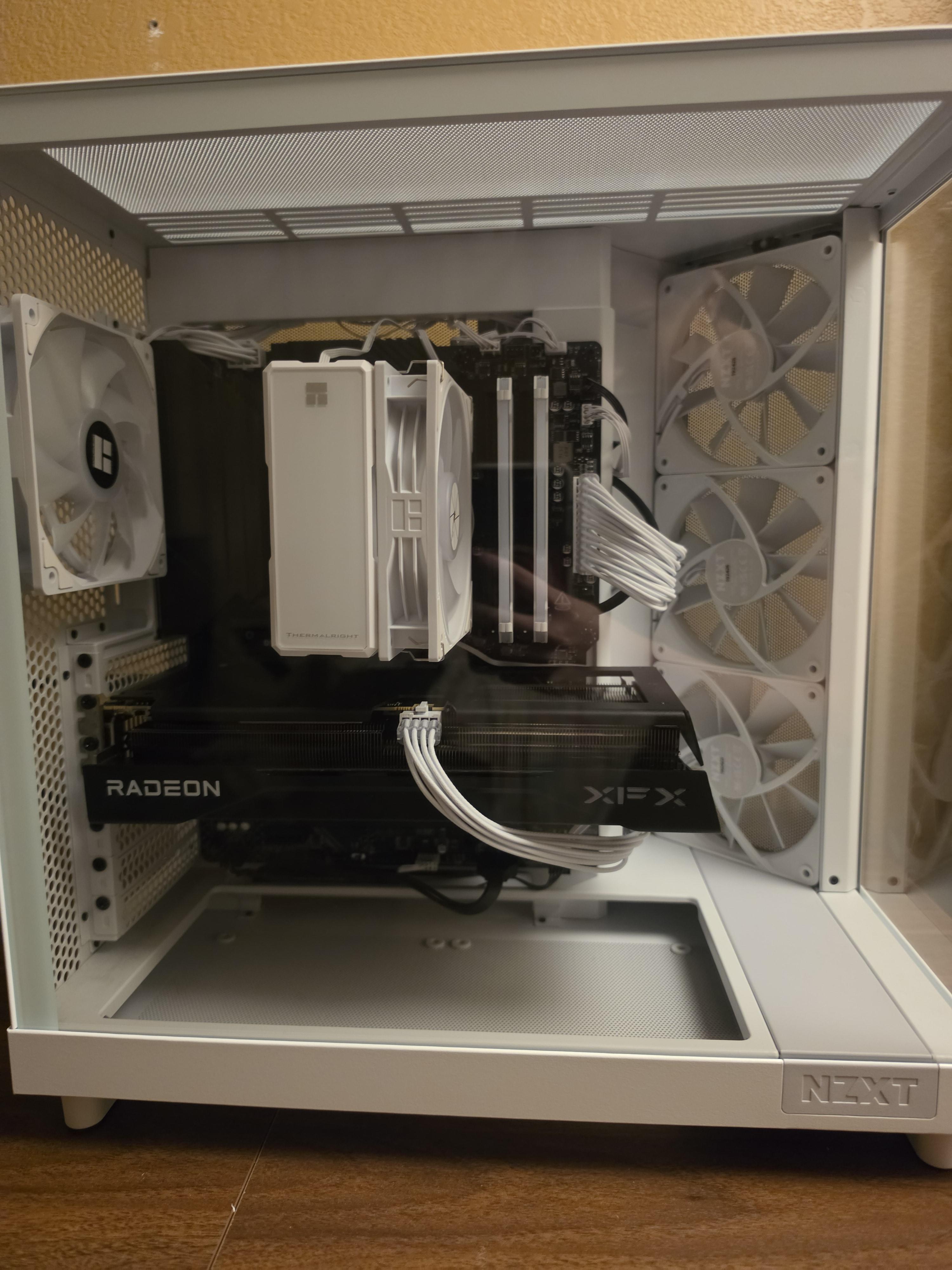
Build Question I just build my pc but the screen is black

Thumbnail
gallery
20 Upvotes

all the fans work, the graphic card has energy too. Also, I read that the motherboard show some led lights when something is not connected properly. I also move the ram and nothing happened.

News: It doesn't even turn on now, all my savings to the garbage 😭 3k for nothing


r/PcBuildHelp • • 9h ago

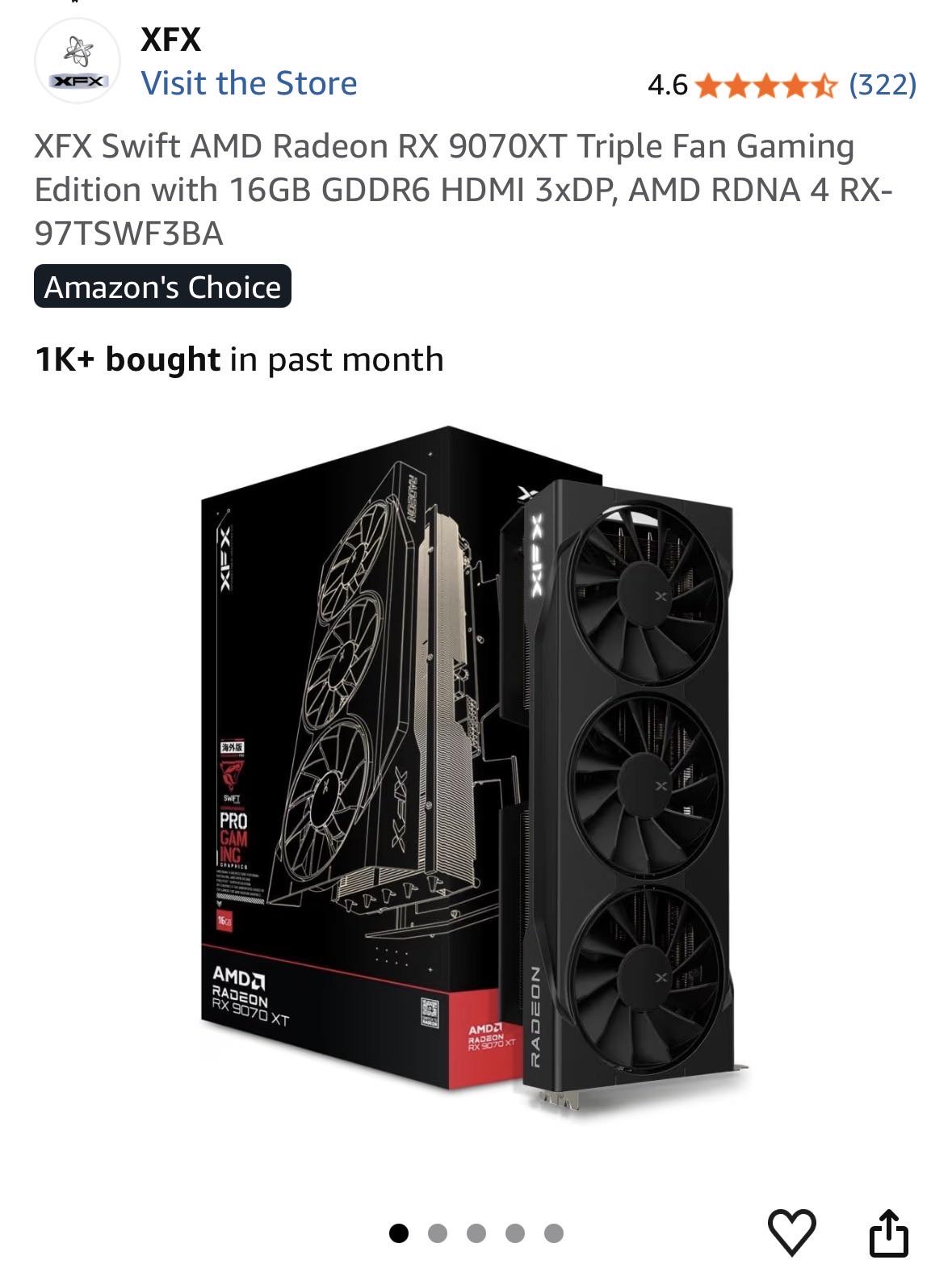
Build Question Is this xfx 9070xt worth it for $960?

Post image
17 Upvotes

I even went to microcenter, no luck on a better deal


r/PcBuildHelp • • 22h ago

✓ Solved pc won't connect to monitor

Post image
13 Upvotes

UPDATE: one of the ram sticks is faulty. 💔

i basically finished my first pc build, and it can turn on, but it won't show my bios on the monitor? the cpu light is on on the motherboard. let me know if any more info is needed! please help 💔

pc part list: https://pcpartpicker.com/list/DThTjG


r/PcBuildHelp • • 23h ago

Build Question Cooler master mf mesh 400 gold timeless

Thumbnail
gallery
10 Upvotes

My first ever pc build , however gotta say this casing fit & finish is so good , gap is consistent & minimal all accross .
Especially the front mesh 😍 had no idea how they make mesh design using steel, loving it . Side note . The casing is actually not that copper . Its more to champange gold . It changes colour from depending on the colder or warmer ceiling light .

Build :-
CPU : intel ultra 5 225f
Mobo : MSI MAG B860 mortar wifi
GPU : asus prime rx9070 GRE OC
RAM : KLEVV urbane V RGB 2x16GB 6000 CL30
SSD : Lexar NQ790 1TB
CASING : Cooler master mf mesh 400 gold
PSU : corsair RM750E
AIO : Thermalright peerless vision 360 V1
Front intake fan : 2x ARCTIC P12Pro PST
Bottom fan : Thermalright tl-m12QR x3

GPU Settings :-
Undervolt : -75 mV
Power limit : +10%
Vram : 2560MHz

Benchmark 1-10minutes my gpu fan barely spin , staying around 49-58 C temp . Same goes for my CPU

How u guys build yours and what setting . Would be really interested to exchange more build discussion


r/PcBuildHelp • • 17h ago

Build Question Are these good GPUs and good prices for them?

Thumbnail
gallery
9 Upvotes

Hi sorry complete noob here, I am looking to build my first gaming rig and was shopping for GPUs secondhand on Facebook market place, I came across these two ( see pictures).

Firstly are they good graphics cards, and secondly are the prices for them good, and lastly which one is better?

Thanks!


r/PcBuildHelp • • 21h ago

Build Question worth upgrading cpu?

7 Upvotes

right now i have an rx9070xt oc , r5 9600x, 32gb ddr5ram. Should i upgrade cpu now or wait until the zen6 x3d chips come out?


r/PcBuildHelp • • 9h ago

Build Question 1440p worth it?

5 Upvotes

Built it in 2021. Still runs perfectly. My current monitor is 144hz 1080p

Looking to upgrade to 1440p QD OLED, on sale for 279.99 USD

I mainly play: WoW retail, CS2, Destiny 2.

My specs are 3060ti 8GB, Ryzen 5 5600x, 16GB DDR4 3200Mhz cl18.

Is upgrading to 1440p QDOLED worth it for my specs and the game I play? Also is it possible to have the current 1080p monitor as a secondary monitor? Like my won’t look weird?


r/PcBuildHelp • • 22h ago

Tech Support Could I get help with this pervasive boot fault in my PC

4 Upvotes

It all started when I cleaned my PC 2 weeks ago. I should have never done such a thing.

After putting it back together I started to get a 1-2 (1 long and 2 short beeps) beep code (RAM error) .Re-seated the RAM, sticks and it worked for a few days. Then I took out some USB cable out of a port and the video failed. Booting gave me 1-3 error (GPU).

Tested another GPU that was working fine and still got 1-3 so I concluded the MOBO was at fault (partly my fault for using a loose screw so the PCIE was probably fucked up).

I've swapped into an old board I have written off back when I didn't understand that much about PCs (Aorus B550 ELITE). After updating the BIOS everything worked but when I fiddled around with the DP cables 2 days ago it again stopped working. Cleared CMOS and it worked again.

Today when inserting another cable (which wobbled the case a bit) the PC AGAIN shut down. Now theres no beep codes at all. Fans spin but no beep. Can't even turn it off. Tried to short the PWR headers directly with a screwdriver but even then I can't turn it off like that (does that mean the power regualtion in the MOBO is at fault?).

I've done a bit of digging in the boot logs into a list. It seems important but I don't know what to make of it, or where to begin:

Machine check shown on the boot screen

[ 2.549244] mce: [Hardware Error]: CPU 0: Machine Check: 0 Bank 27: faa000000002080b

[ 2.549255] mce: [Hardware Error]: TSC 0 MISC d01a000000000000 SYND 5d020002 IPID 1002e00000500

[ 2.549266] mce: [Hardware Error]: PROCESSOR 2:870f10 TIME 1794231315 SOCKET 0 APIC 0 microcode 0

  • Extended error code 2 = "Error on GMI link"
  • Flags: UC, PCC, OVER
  • Mar 30 2026: fatal processor machine check, then a corrected one a minute later (Kernel-WHEA Event 20)
  • Oct 31 and Nov 6 2026: unexpected shutdowns, Kernel-Power 41 with BugcheckCode=0 and PowerButtonTimestamp=0 (sudden power loss/reset, no BSOD)
  • Nov 20: crash dump initialization failed (volmgr 46)
  • Nov 21: after a planned Windows Update restart, firmware took ~3 h 55 min before the OS loader started (Kernel-Boot 30). The next boot took ~21 s. No crash events for that restart.
  • Both boots that morning: TPM / measured-boot errors and the hypervisor failed to load (Kernel-Boot 235/208/158), but Windows still booted
  • Jan–Feb 2026: GPU watchdog reports (LiveKernelEvent 141 and 117, plus an AMD report)

Bought the PC at 10/10/21

ComponentDetails
CPUAMD Ryzen 5 3600, 3.6GHz, AM4 (tray)
CoolerArctic Freezer 34
MotherboardAorus ELITE B550
RAMKingston Fury Beast 2x8GB DDR4 3733MHz
StorageKingston NV1 NVMe 500GB M.2
PSUCorsair CX650F RGB 650W, 80+ Bronze
CaseCorsair 275R Airflow, black, windowed
GPUXFX Speedster MERC319 Radeon RX 6800 XT, 16GB

r/PcBuildHelp • • 30m ago

Tech Support Pc is crashing with BSOD after new GPU

3 Upvotes

Specs:
7800x3D
MSI B650 gaming plus WiFi
32gb ddr5 6000 ram
9070 xt (had a 3080 prior)
EVGA 850w gold PSU

Upgrading my GPU today to the 9070xt. Did DDU in safe mode and removed my 3080. Installed my new GPU, booted up and installed the latest drivers. At this point I’ve had no issue.

I then played an hour of BF6 and an hour of deadlock. I monitored my temps, GPU in adrenaline didn’t go above 65. CPU was also low temp, 65-67.

I then started RDR2 and turned up all the settings to max. I noticed I had it on Vulcan and switched to DX12. About 10 minutes into playing my pc just shuts off. No blue screen. It appears to be in sleep mode because my RAM RGB is on which is the case if I put my pc in sleep mode. I tried the power button and it didn’t work. Gave it a minute and switched the PSU OFF.

After 2 reboot attempts with no post sign, I switched the PSU off again and unplugged it. After that it posted again and has some sort of message about repairing something on the MSI screen. It then got hung up again and just cycled through debug lights. Did the whole unplug thing again and it’s now booted normally to desktop. A little nervous to run anything.

Prior to this I’ve had no issues. Thinking it was just a crash but it’s weird how it just shut down no blue screen.

new GPU has 3 8 pin. I have 2 cables for the 3 connectors, since they are double headed. I only have one other cable that’s a single VGA. Is that possibly the issue? 850w should be enough… PSU is about 5 years old.

nothing is overclocked


r/PcBuildHelp • • 5h ago

Build Question What should I do?

3 Upvotes

I have a i5 6600k with a B250 motherboard,

I am thinking of upgrading it to i5 12600k or maybe i7 14700k something (if i have that kind of money)

Do should I save for a i5 or i7 14gen Plus motherboard and ram, or should I switch to AMD platform, I have never used AMD and I am kind of sceptical about AMD CPUs.

Please tell me you suggestions.


r/PcBuildHelp • • 7h ago

Build Question Should I upgrade to am5

3 Upvotes

My Pc Specs:
GPU ASUS ROG Strix RTX 3070 8GB
CPU AMD Ryzen 7 5800X
RAM 32GB DDR4 3600 MT/s
SSD WD Black SN7100 1TB NVMe
Motherboard ASUS B550

Would you guys recommend upgrading just my GPU for now or switching to AM5 (CPU, motherboard and DDR5) for better longevity and future upgrade potential?
Just wondering what would make the most sense performance-wise and long-term.


r/PcBuildHelp • • 7h ago

Build Question Build Opinion

3 Upvotes

Hello! I just wanted some opinions on my build I have going. I plan on playing a variety of games as well as streaming. I know a few things might be a little looks over performance, but I want honest opinions even considering that! Or if anyone has a different part they'd recommend id love to know. This will be my first ever build. Thanks!

https://pcpartpicker.com/list/98q9R4


r/PcBuildHelp • • 8h ago

Build Question 3060 ti for 200 bucks

3 Upvotes

I’m looking to upgrade my set up and I’m currently on a 1650 gtx and was wondering if a 3060ti evga 8 Gb was worth copping? Won’t need to make any other changes to my setup and will just directly upgrade my graphics card


r/PcBuildHelp • • 10h ago

Build Question should i get a 500 hertz monitor if i get 400 to 500 fps? (rarely 350-)

3 Upvotes

i have right now a random ips 1080p 240hz random aoc monitor and im thinking about upgrading to a oled monitor, and im tempted between the MSI MAG 272QP X50 with 500hz and the 27GX790A-B with 480hz, i mainly play valorant and my fps are in the range of 500 and sometimes going down to 400, my question is, should i get any of these monitors with that kind of hertz or should i stick with a 360hertz one? (heard about the asus rog xg27acdng) if i get lower fps than what my monitor offers would i get input lag


r/PcBuildHelp • • 13h ago

Build Question Help me with my new PC build

3 Upvotes

Hello, I want to upgrade my PC. And I build my current one back in 2020/2021 i think (before DDR5)
here’s what i have planned so far:

CPU; AMD Ryzen 9 9950X3D

Motherboard; GIGABYTE X870E AORUS ELITE X3D

RAM; Corsair Vengeance RGB RS DDR5 32GB (2×16GB), 6000MT/s

CPU cooler; ARCTIC Liquid Freezer III Pro 360 A-RGB

GPU; AMD Radeon RX 7800 XT 16GB (currently have)

Storage: WD_BLACK SN8100 PCIe Gen 5 NVMe,
WD Blue M.2 SATA (from current build)

Power Supply: CORSAIR RM1000x

I’m also open to any monitor recommendations because my current one is only 1080p and would like to upgrade that too eventually.
Thanks!


r/PcBuildHelp • • 18h ago

Build Question Sleeved cables compatible with multiple brands

3 Upvotes

If heard / read that depending on what brand / type of powersupply you have, you cannot use all sleeved cables. By sleeved cables i dont mean extensions, rather individually sleeved replacements.

In my last build i had a corsair psu (sf 750 80+ plat), therefore i bought corsair sleeved cables.

In my current build i bought a rog psu (strix 1000p 80+ plat) , simply because of availabillity, and now i am wondering why I shouldnt be able to use the same sleeved cables.

Not like the lanes in the plugs on the motherboard would change layout depending on what brand of psu i end up buying? So if anyone can tell me why tf it matters, or if i got bamboozled reading that stuff.


r/PcBuildHelp • • 18h ago

✓ Solved Pc on but not displaying anything

3 Upvotes

As the title suggests my new pc build turns on just fine but doesn't display anything. I have tried resetting the ram, checking both ram sticks one at a time, reseating the gpu, removing the GPU and directly putting the HDMI cable into the motherboard, checked each cable from the psu, used another HDMI cable, tried a different input in the monitor, and restarted the monitor, if anyone knows what else I could try that would be greatly appreciated.

Edit: turns out the issue was that I hadn't properly installed both the CPU cables and the GPU, my motherboards CPU cable slot is a 4x2 with a 2x2 right next to it and the cpu cable itself is 2 2x2s and I had put one of them into the secondary slot, the GPU was placed into the second GPU slot (the one further from the CPU) which prevented the motherboard from properly recognizing it.


r/PcBuildHelp • • 18h ago

Build Question Choices for upgrading kids computer.

3 Upvotes

I am tossing around the idea of upgrading my son’s PC for Christmas. I am trying to debate the best bang for the buck. I am limiting myself to a 600ish dollar upgrade. I could either go full motherboard upgrade or upgrade the GPU to a 5070 or 9070XT. I am thinking the motherboard upgrade would be the best choice. I just thought I would double check here before committing to one choice or another.

Ryzen 5 3600
32 GB RAM
Nvidia RTX 3070


r/PcBuildHelp • • 4h ago

Build Question Looking To Upgrade My 10 Year Old (Estimated) PC, Need Help With What I Can Do? Windows 10, LENOVO.

Thumbnail
gallery
2 Upvotes

Hello, everyone! I'm looking to upgrade my PC and would like some help doing so. I mostly wanna upgrade RAM and my Graphics Card, any help is very appreciates, so TIA! I currently have 8 GB, which is two sticks of 4 GB inserted, I'm wonder if I could do two 8 GB sticks of RAM instead? I was told my PC RAM slots will only handle up to 4 GB per stick, it sounds weird to me, so I'd like a second opinion, please and thank you. Also, any recommended brands which be great, I'm Canadian, so I use CAD, so anything that'll work with my PC and not too expensive would be great! While I'm here, is it okay to ask if GTA V Legacy would work on my current set up? I really wanna play. I hope my screenshots are enough info, I apologize if not.

Do wanna point out that my PC can run Cobblemon on Minecraft Java for a long time, briefly lagging every 20 minutes, I think? I tend to play for several hours on end in a single day which any crashes or anything, I also love to reset my PC before booting up any game, just in case.

Anyway, have a good day!


r/PcBuildHelp • • 4h ago

Build Question Connecting a DeepCool PN750D PSU to a Dell Inspiron 3470 motherboard in an ATX case?

2 Upvotes

Hi everyone,

I’m upgrading my Dell Inspiron 3470 by moving the motherboard into a standard ATX case, and I want to power it using a DeepCool PN750D ATX power supply.

Since the Inspiron 3470 is an OEM board with proprietary power/front-panel connectors, I want to make sure I wire everything safely without damaging the board.

Current setup:

Motherboard: Dell Inspiron 3470 (stock OEM)New PSU: DeepCool PN750D (750W ATX)New Case: Standard ATX case

Questions:

Which specific PSU adapter cable (e.g., 24-pin to 6-pin or 8-pin Dell adapter) do I need for the Inspiron 3470 motherboard?Are there any specific pinout quirks for the front-panel power switch/LEDs or BIOS fan/power errors I should watch out for when moving this board to an ATX case?

(Note: Add clear photos of your motherboard's power headers and front-panel pins when you post!)

Thanks in advance for any help!

If there are any other suggestions for my setup feel free to say.........


r/PcBuildHelp • • 5h ago

Build Question broken wifi antenna

Thumbnail
gallery
2 Upvotes

recently my Asus WiFi antenna has snapped (the triangle looking one and I'm wondering is there any good replacement ones I have these old antennas from my past PC that Im starting to use but I plan on ither buying another of my old one or is there a better one I should get for my PC any advice would be greatly appreciated (I play a lot of PCvr so if anything is better for that as well then epic)


r/PcBuildHelp • • 6h ago

Build Question Will my build last?

2 Upvotes

I am looking for some advice about my pc. Built it a few years ago and did some minor upgrades. I have the following

CPU: Ryzen 5700x3d

GPU: power color hellhound 9700xt

RAM: 32GB 3200mhz

1 tb nvme (boot drive)

2 ssds ( 1 1tb 1 2tb ) and a 2tb hdd.

I just want to make it through the crazy pricing we are in now. Should it hold up for future games?


r/PcBuildHelp • • 6h ago

Build Question Is it worth $1500 ?

2 Upvotes

Hi someone offers me his gaming pc

Specs:
CPU - 14900KF
GPU - 5070 PNY
RAM - 32GB 6000mt
Storage - 2TB SSD
PSU - 1000watts ATK 3.1 with the native plug for the new 50 series GPU - will throw in all the extra wires that came with the PSU

For $1500

Is it a good price for used? Condition still good

Thank you


r/PcBuildHelp • • 7h ago

Build Question New build hangs on restart: Windows shuts down but fans and RGB keep running

2 Upvotes

Hey everyone, I've got a freshly built PC with a weird issue and I'm hoping someone has run into it before.

When I hit Restart, Windows closes everything and the peripherals power off, but the PC never actually restarts. The case fans, CPU cooler, and RGB keep spinning and I'm stuck there until I hold the power button.

The same thing happened with a normal shutdown at first. That got fixed after I disabled Fast Startup in Windows, but restart is still broken.

Specs:

  • CPU: ryzen 7500f
  • Motherboard: gigabyte b850m eagle ice (1.0)
  • OS: Windows 11 Pro
  • BIOS version: F9