r/PcBuildHelp • • 3d ago

Tech Support PC com stuttering constante mesmo sem queda de FPS — Ryzen 5 5500X3D + RX 5700 XT

Thumbnail
gallery
1 Upvotes

Fala, pessoal. Preciso muito da ajuda de vocês porque já estou há um tempo tentando resolver um problema de stuttering no meu PC e estou começando a ficar sem alternativas.

Montei recentemente o PC que sempre quis e estou tendo um problema que está me deixando bastante frustrado. A configuração é:

Processador: AMD Ryzen 5 5500X3D
Placa-mãe: B550M Gaming Frozen
Memória RAM: 16 GB (2x8 GB) Kingston Fury DDR4 3200 MHz
Placa de vídeo: ASRock Radeon RX 5700 XT Taichi
Armazenamento: SSD NVMe 512 GB
Fonte: MSI 650 W
Refrigeração: Water Cooler Gigabyte 360 mm

Problema

O PC apresenta stuttering/microtravamentos constantemente.

O mais estranho é que não parece ser simplesmente queda de FPS. Em jogos, o contador de FPS pode continuar relativamente estável, o áudio também continua normalmente, mas a imagem dá umas travadas/microcongeladas.

E o problema não acontece somente em jogos. Às vezes consigo perceber o mesmo comportamento até em tarefas simples no Windows, como navegar pelo Chrome.

Já tentei várias coisas:

  • Troquei os drivers da placa de vídeo diversas vezes;
  • Fiz instalação limpa dos drivers;
  • Atualizei a BIOS da placa-mãe;
  • Atualizei drivers/chipset;
  • Fiz diversos testes e ajustes no sistema;
  • Tentei algumas configurações sugeridas em outros lugares.

Em alguns momentos parece que melhora, mas o problema acaba voltando.

O que mais me intriga é justamente o fato de acontecer até fora dos jogos. Se fosse apenas uma questão de configuração gráfica ou falta de desempenho da RX 5700 XT, eu entenderia, mas o problema aparece inclusive em situações em que o PC está praticamente sem carga.

O que eu gostaria de descobrir

Queria saber se alguém com experiência em Ryzen/X3D, B550 ou RX 5700 XT já passou por algo parecido e quais testes vocês recomendam fazer para identificar a origem do problema.

Se precisarem, posso mandar vídeos do stuttering, prints, temperaturas, uso de CPU/GPU, gráficos de frametime, informações do HWInfo, configurações da BIOS ou qualquer outro teste que possa ajudar no diagnóstico.

Se alguém puder me orientar sobre quais métricas eu devo monitorar e quais testes fazer, agradeço demais.

Esse PC foi uma conquista muito importante para mim e eu realmente queria conseguir aproveitar a máquina sem ficar convivendo com esses travamentos.

Obrigado desde já a quem puder ajudar! 🙏

r/PcBuildHelp • • 3d ago

Build Question intake & exhaust placement

2 Upvotes

i have a lian li a3 case (it's a mATX case with small holes all over it) and there are 4 available fan placements on my build, 3 on top and one for the rear. there isn't enough space for the bottom due to the size of my gpu.
my question is: how should the fans layout look like? top intake and rear exhaust? or vice versa?


r/PcBuildHelp • • 3d ago

Tech Support Pls help, kernel power 41 bugcheck 278

1 Upvotes

Build:

GPU: 3060 12 GB zotac

CPU: i5 11400f

Motherboard: ASUS PRIME B460M-A R2.0

Power supply: MSI 650 Watts 80 plus bronze

I have tried everything, i will detail what happened in order, I bought a used CPU of market place tested on that guys house with cinebench, no problem and normal temps and scores, I get home I get horrible temps due to a stock intel fan and bad thermal paste, I try not to force the pc, but it doesn't shutdown I change the paste and it starts to restart at random moments, it could be at the lobby when playing a game, sharing screen on discord.

I have tried everything

Clean ddu instal

New PSU

New CPU cooler

Clean the pc

Reduced watts with thermal trottle

Reduce watts with bios

Change energy plan

Changing the display port and monitors

Taking out the usb WiFi adapter and Bluetooth adapter

I don't know what else to do pls help any suggestions are welcomed


r/PcBuildHelp • • 3d ago

Tech Support White VGA light on after trying to enter BIOS

2 Upvotes

My PC was working perfectly fine until I tried entering BIOS to enable Secure Boot for Call of Duty.

I went through Windows Advanced Startup, but the PC restarted before I could finish. During the restart, I repeatedly pressed Delete to enter BIOS. Since then, my PC won't boot.

PC Specs:

Motherboard: MSI B560M PRO-E

CPU: Intel i3-10100F

GPU: GTX 1080 Ti

RAM: 2x Crucial Ballistix DDR4

PSU: Thermaltake Smart 700W

Symptoms:

PC powers on, all fans spin.

DRAM debug light briefly illuminates, then turns off.

White VGA debug light comes on and stays solid.

Monitor displays a stationary white dot on a black screen.

Cannot access BIOS or Windows.

What I've tried:

Reset CMOS using JBAT1.

Completely removed and reseated GPU.

Reconnected GPU power cables.

Tried HDMI and DisplayPort.

Tested both RAM sticks individually.

Full power discharge.

Tried BIOS keyboard shortcuts.

Nothing has worked. Same white VGA light every time.

I'm wondering if this could be a UEFI/GPU initialization issue rather than a dead GPU, especially since everything worked perfectly before attempting to enter BIOS.

Has anyone experienced this or have suggestions for what else I can try? I don't have another GPU or PC available for testing


r/PcBuildHelp • • 3d ago

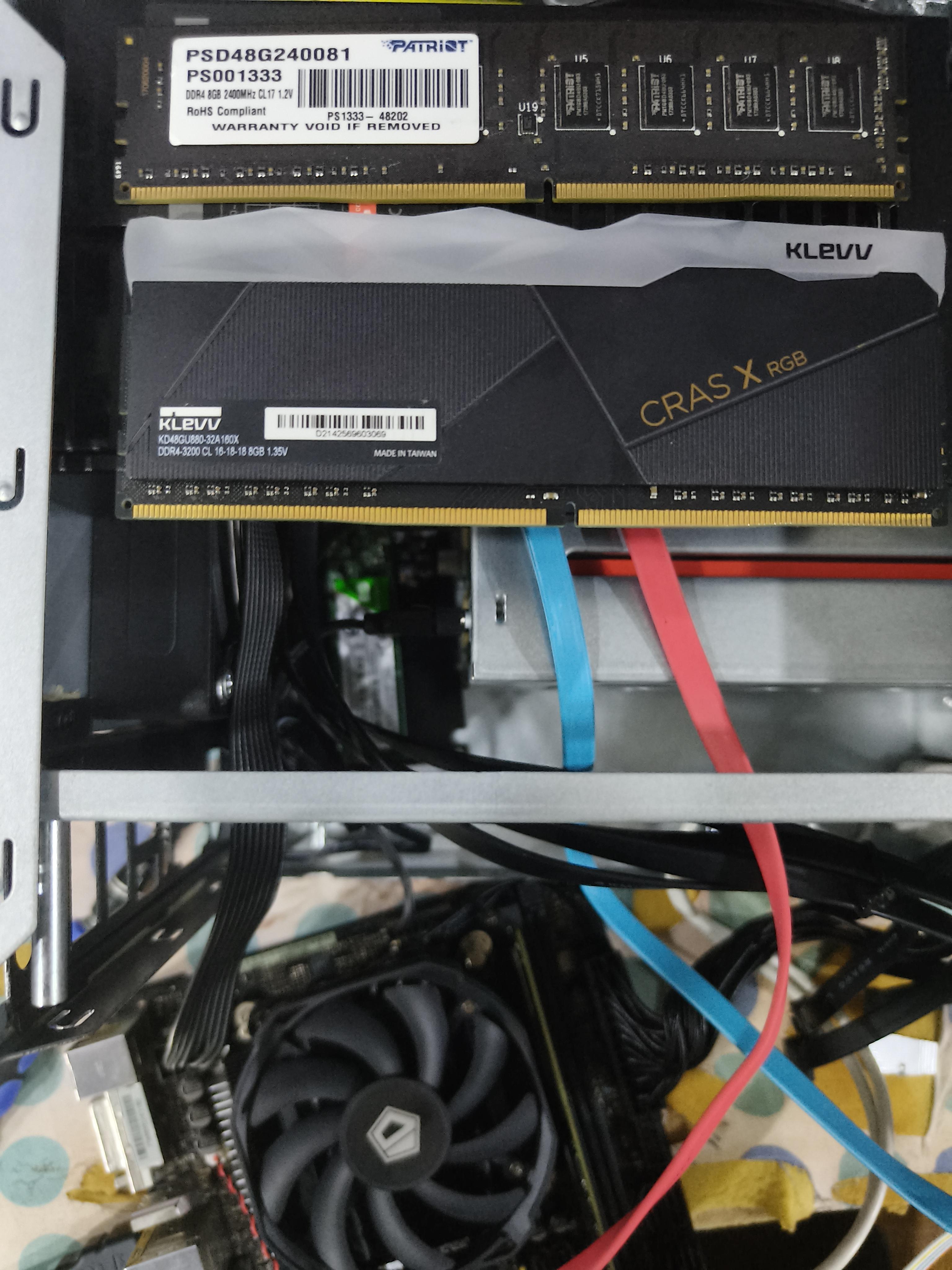
Installation Question RAM misconfiguration?

Post image
1 Upvotes

was building a nas with the 2x patriot sticks. It has no issues until today, so i decide to take it out any test if maybe 1 stick of ram is faulty or the slot is faulty.

All doesnt work, so i took out a cras x from my gaming rig to test it, it works. I tried to test the combinations of cras, patriot by itself different slots of the motherboard.

And the conclusion i came out was that cras enabled the motherboard to boot, but the patriot itself doesnt work by itself. It must be cras only or cras + patriot.

the only plausable clue was that the mb mentions it ran at 1.35V while the patriot only ran 1.20V. but couldnt figure out a solution to that. As patriot still wont work by itself. I tried another method which was to reset the cmos but unfortunately nothing came out of it.

CPU: i3-7100T

RAM: Patriot PSD48G240081 & Klevv Cras X KD48GU880-32A160X

Motherboard: H270M-ITX a/c (bios P2.50)

PSU: Metalfish 350M


r/PcBuildHelp • • 3d ago

Build Question Hoe long is a daisy chain pcie connector safe for?

2 Upvotes

I need 2 type 3 Corsair 6pin to 6pin for my new 3080 but they are out of stock on Corsair, cable mod, and their respective Amazon storefronts. How long would a daisy chain connector be safe for? Or where could I potentially find the cable I need? I've already checked microcenter and best buy to no luck, any help is appreciated.


r/PcBuildHelp • • 3d ago

Build Question PC upgrade reccomendations

2 Upvotes

Built my computer ~8 years ago and have done no major upgrades besides a new mb after my old one died. FPS in games has always been fine but recently just got Battlefield 6 on sale and it runs like garbage unless I drop all the graphics settings, then the whole thing looks blurry. I've read that game is pretty CPU intensive so it may be bottlenecked there but I am looking for all around upgrades to make other games run smoother, namely Fortnite and tarkov. Specs below, thanks in advance. Wondering if its worth upgrading one thing or just building something new.

CPU: Ryzen 7 2700x

GPU: RTX 2070 8g

Memory: 2x16 GB TEAMGROUP T-Force Vulcan Z DDR4-3200

MB: Gigabyte B450M DS3H

Storage: WD black SN770 1TB m.2 SSD

Power: Coolermaster G650M


r/PcBuildHelp • • 3d ago

Build Question Help me choose components for my €1000-1500 PC build

1 Upvotes

Greetings, I'm planning to build my first computer by the end of the year. I'd like to know your opinion on some builds that my acquaintances (option 1 and 2) and a local electronics vendor (option 3 and 3) have recommended to me. My goal is a computer that wouldn't exceed the budget of 1500 euros, but would be able to run games like Cyberpunk 2077, Baldur's Gate 3, Resident Evil Requiem, Marvel's Spider-Man 2, Red Dead Redemption 2 and the upcoming GTA6 port on PC at the highest possible graphics settings. I just don't know 2 things yet:

1) Where to get the operating system? Let's say Windows 11

2) How to choose the computer case itself?

Feel free to suggest alternatives, point out builds that could be improved, recommend better-compatible options, or add anything that might be missing.

Option 1:

Motherboard - АМ4 B550

RAM - DDR4 2x8gb (16gb) 3200 MHz CL16

CPU - Ryzen 5 5500x3d або 5800x3d

GPU - RX 9060 XT 16gb

Power supply - Gold+ 750-800 watt

Storage - NVME SSD 240gb + 960gb

Option 2:

CPU - AMD Ryzen 7 9800X3D

CPU Cooler - Thermalright Phantom Spirit 120 SE

Motherboard - Gigabyte B850 GAMING X WIFI6E (or ASUS TUF Gaming B650E-PLUS WiFi)

GPU - Sapphire PULSE / NITRO+ Radeon RX 9070 XT 16GB (or ASUS PRIME RTX 5070 Ti 16GB)

RAM - 32GB (2x16GB) DDR5-6000 CL30/CL36 (e.g., Crucial Pro or Patriot Viper)

Storage - 1TB or 2TB PCIe 4.0 NVMe SSD (e.g., Samsung 990 EVO Plus / WD Black SN7100)

Power Supply - MSI MAG A850GLS PCIE5 (850W, 80+ Gold, ATX 3.1)

Case - NZXT H6 Flow or Phanteks XT Pro Ultra

Option 3:

CPU - AMD Ryzen™™ 7 7800X3D (4.2GHz 5.0GHz /104MB CACHE / AM5)

Motherboard - ASUS TUF GAMING B850-PLUS WIFI (AM5, DDR5, M.2 PCIe 5.0, Wi-Fi 7)

RAM - 16GB DDR5 PCS PRO 5600 MHz CL46 (2x8GB)

GPU - MSI GEFORCE RTX 5060 SHADOW 2X OC 8GB HDMI, 3 x DP

Storage - SSD M.2 PCS M.2 PCIe NVMe SSD 512GB (up to 3500 MB/s read, 3100 MB/s write)

Liquid cooler - PCS FrostFlow 240 ARGB WHITE 240mm with white ARGB fans

Power supply - CORSAIR 800W 80+ White

OS - Windows 11 Home 64-bit

Option 4:

CPU - Intel® Core™ i5-12400F Six-Core (up to 4.4 GHz), 18 MB cache

Motherboard - ASUS PRIME H610M-A-CSM D4 mATX, LGA1700, DDR4, PCIe 4.0

RAM - 16GB DDR4 PCS PRO 3200 MHz (2x8GB)

GPU - MSI GeForce RTX 5050 VENTUS 2X OC 8GB GDDR6, HDMI, 3 x DisplayPort

Storage - M.2 SSD 512GB PCS M.2 PCIe NVMe SSD (up to 3500 MB/s read, 3100 MB/s write)

Power supply - CORSAIR 550W CX SERIEST™ CX-550


r/PcBuildHelp • • 3d ago

Build Question Dual GPU??

1 Upvotes

In 2022 I purchased a cyber power pc with the 3060 5600x. This year I've begun upgrading it. Two weeks ago I replaced the rtx 3060 with an Asus 9060xt dual, last week I upgraded the cooling system: replaced the front panel with mesh, added a liquid freezer 3, 3 140mm fans for intake on the front, and a 140 rear exhaust fan... after seeing how little my fans need to work to keep me around 50c even while playing games like Forza on high or extreme settings I decided I'd go ahead and get the 9950x3d bundle from micro center with the X870e Elite WiFi7 Ice MOBO since I do some modeling and want to buy a 3d printer soon. Now I'm sitting here looking at my 3060 that's just in a clear gasketed case by my desk and though what if I put the 3060 in with the 9060XT and used lossless scaling for my frame generation and upscaling. I know it would only plug into a 4.0 x4 slot if it fits so I was wondering if that'd make it inefficient to the point it's no longer worth doing. I'm also curious what kind of psu power rating I would need for this setup. Any advice or knowledge would be appreciated, I've been spit balling this whole time and have no clue what I'm doing.


r/PcBuildHelp • • 3d ago

Build Question GPU upgrade and price help

1 Upvotes

Hi, I currently have an AMD Radeon RX 7600 (8 GB GDDR6 VRAM), and am looking to upgrade, as it has been giving me trouble. However, I don't know that much about GPU's and where to upgrade or search from here. I was also wondering if now is a smart time to buy with these upcoming black Friday and cyber Monday deals.

I don't want to spend a ton of money which is unfortunate, but I would say my absolute limit is roughly 700 USD. If that doesn't give me enough room to upgrade please let me know.

Is there somewhere I should go specifically? Just looking for suggestions and advice I guess, thank you.

Wanting to upgrade so I can play GTA6 at a decent level when it comes to PC


r/PcBuildHelp • • 3d ago

Build Question I wanted to improve the graphics card of my PC, can you help?

Thumbnail
gallery
0 Upvotes

I'll leave you the details of my build, the only upgrade so far was going to 32 GB RAM. I was planning on upgrading to a better graphics card, to play future games at least at a decent level of detail.I've only started getting more interested in PC this year; I've always played on PS before, so I don't really understand it. What would be a good upgrade for a budget around €500? The computer was purchased in 2022, from PC Specialist, and they were selling them a 16GB AMD RADEON RX 9060 XT at 580€. Is this a good price? What would you do? Any advice is appreciated.


r/PcBuildHelp • • 3d ago

Tech Support Random freezes

0 Upvotes

Random stuttering/freezes while gaming

I recently bought a new PC, and for the past week I've been experiencing an issue where my games freeze for a few seconds at random times. It doesn't usually happen when something demanding is happening in-game; sometimes it just freezes out of nowhere while I'm playing.

I've run benchmark tests, and all components seem to be performing as expected. Neither the CPU nor the GPU is overheating.

This has happened in several games, including Final Fantasy XVI, Final Fantasy VII Rebirth, 007 First Light, and even Balatro. Im using anti lag and radeon boost i dont know if thats a problem

My PC specifications:

- CPU: AMD Ryzen 7 7800X3D

- CPU Cooler: Deepcool AG620

- GPU: ASRock RX 9070 Challenger 16GB

- Motherboard: ASUS PRIME B850M-K

- RAM: 32GB Kingston Fury DDR5 5200MHz (1×32GB)

- SSD 1: PNY 1TB NVMe

- SSD 2: PNY 1TB NVMe

- PSU: Seasonic Core GC-850 850


r/PcBuildHelp • • 3d ago

Build Question Looking To Upgrade My 10 Year Old (Estimated) PC, Need Help With What I Can Do? Windows 10, LENOVO.

Thumbnail
gallery
2 Upvotes

Hello, everyone! I'm looking to upgrade my PC and would like some help doing so. I mostly wanna upgrade RAM and my Graphics Card, any help is very appreciates, so TIA! I currently have 8 GB, which is two sticks of 4 GB inserted, I'm wonder if I could do two 8 GB sticks of RAM instead? I was told my PC RAM slots will only handle up to 4 GB per stick, it sounds weird to me, so I'd like a second opinion, please and thank you. Also, any recommended brands which be great, I'm Canadian, so I use CAD, so anything that'll work with my PC and not too expensive would be great! While I'm here, is it okay to ask if GTA V Legacy would work on my current set up? I really wanna play. I hope my screenshots are enough info, I apologize if not.

Do wanna point out that my PC can run Cobblemon on Minecraft Java for a long time, briefly lagging every 20 minutes, I think? I tend to play for several hours on end in a single day which any crashes or anything, I also love to reset my PC before booting up any game, just in case.

Anyway, have a good day!


r/PcBuildHelp • • 3d ago

Build Question Connecting a DeepCool PN750D PSU to a Dell Inspiron 3470 motherboard in an ATX case?

2 Upvotes

Hi everyone,

I’m upgrading my Dell Inspiron 3470 by moving the motherboard into a standard ATX case, and I want to power it using a DeepCool PN750D ATX power supply.

Since the Inspiron 3470 is an OEM board with proprietary power/front-panel connectors, I want to make sure I wire everything safely without damaging the board.

Current setup:

Motherboard: Dell Inspiron 3470 (stock OEM)New PSU: DeepCool PN750D (750W ATX)New Case: Standard ATX case

Questions:

Which specific PSU adapter cable (e.g., 24-pin to 6-pin or 8-pin Dell adapter) do I need for the Inspiron 3470 motherboard?Are there any specific pinout quirks for the front-panel power switch/LEDs or BIOS fan/power errors I should watch out for when moving this board to an ATX case?

(Note: Add clear photos of your motherboard's power headers and front-panel pins when you post!)

Thanks in advance for any help!

If there are any other suggestions for my setup feel free to say.........


r/PcBuildHelp • • 3d ago

Build Question Should I upgrade to am5

3 Upvotes

My Pc Specs:
GPU ASUS ROG Strix RTX 3070 8GB
CPU AMD Ryzen 7 5800X
RAM 32GB DDR4 3600 MT/s
SSD WD Black SN7100 1TB NVMe
Motherboard ASUS B550

Would you guys recommend upgrading just my GPU for now or switching to AM5 (CPU, motherboard and DDR5) for better longevity and future upgrade potential?
Just wondering what would make the most sense performance-wise and long-term.


r/PcBuildHelp • • 3d ago

Build Question broken wifi antenna

Thumbnail
gallery
2 Upvotes

recently my Asus WiFi antenna has snapped (the triangle looking one and I'm wondering is there any good replacement ones I have these old antennas from my past PC that Im starting to use but I plan on ither buying another of my old one or is there a better one I should get for my PC any advice would be greatly appreciated (I play a lot of PCvr so if anything is better for that as well then epic)


r/PcBuildHelp • • 3d ago

Build Question What should I do?

2 Upvotes

I have a i5 6600k with a B250 motherboard,

I am thinking of upgrading it to i5 12600k or maybe i7 14700k something (if i have that kind of money)

Do should I save for a i5 or i7 14gen Plus motherboard and ram, or should I switch to AMD platform, I have never used AMD and I am kind of sceptical about AMD CPUs.

Please tell me you suggestions.


r/PcBuildHelp • • 3d ago

Build Question 1440p worth it?

4 Upvotes

Built it in 2021. Still runs perfectly. My current monitor is 144hz 1080p

Looking to upgrade to 1440p QD OLED, on sale for 279.99 USD

I mainly play: WoW retail, CS2, Destiny 2.

My specs are 3060ti 8GB, Ryzen 5 5600x, 16GB DDR4 3200Mhz cl18.

Is upgrading to 1440p QDOLED worth it for my specs and the game I play? Also is it possible to have the current 1080p monitor as a secondary monitor? Like my won’t look weird?


r/PcBuildHelp • • 3d ago

Build Question How's this build?

Thumbnail pcpartpicker.com
1 Upvotes

Already have the gpu and motherboard. Couldn't find the reverse blade option for case fans on part picker but plan to get those for side and bottom fans. Went with a high end psu for future upgrades.

Any changes recommended or does it look good?


r/PcBuildHelp • • 3d ago

Build Question Will my build last?

2 Upvotes

I am looking for some advice about my pc. Built it a few years ago and did some minor upgrades. I have the following

CPU: Ryzen 5700x3d

GPU: power color hellhound 9700xt

RAM: 32GB 3200mhz

1 tb nvme (boot drive)

2 ssds ( 1 1tb 1 2tb ) and a 2tb hdd.

I just want to make it through the crazy pricing we are in now. Should it hold up for future games?


r/PcBuildHelp • • 3d ago

Build Question 3060 ti for 200 bucks

3 Upvotes

I’m looking to upgrade my set up and I’m currently on a 1650 gtx and was wondering if a 3060ti evga 8 Gb was worth copping? Won’t need to make any other changes to my setup and will just directly upgrade my graphics card


r/PcBuildHelp • • 3d ago

Build Question Recommendations of CPU coolers and general review of build

1 Upvotes

Hello.

Can somebody help with CPU coolers recommendations? I prefer an air-based cooler since its easier on maintenance and safer (I guess). My main concern is the size of the cooler against motherboard components, for example on this 3D build tool the cooler is very close to the RAM sticks. Any recommendations on the cooler and the build is greatly appreciated 😄

This is my planned build:
CPU: AMD Ryzen 7 9700X 3.8 GHz 8-Core Processor ($257.02 @ Amazon)

CPU Cooler: Thermalright Peerless Assassin 120 SE 66.17 CFM CPU Cooler ($34.90 @ Amazon)

Motherboard: MSI MAG B850 TOMAHAWK WIFI ATX AM5 Motherboard ($179.99 @ MSI)

Memory: Patriot Viper Venom 32 GB (2 x 16 GB) DDR5-6000 CL30 Memory ($487.99 @ Amazon)

Storage: Samsung 9100 PRO 1 TB M.2-2280 PCIe 5.0 X4 NVME Solid State Drive ($209.99 @ Amazon)

Video Card: Asus PRIME OC GeForce RTX 5070 12 GB Video Card ($909.99 @ Amazon)

Case: Deepcool CG530 4F ATX Mid Tower Case

Power Supply: Corsair RM750x (2024) 750 W Fully Modular ATX Power Supply ($122.99 @ B&H)


r/PcBuildHelp • • 3d ago

Build Question Build Opinion

2 Upvotes

Hello! I just wanted some opinions on my build I have going. I plan on playing a variety of games as well as streaming. I know a few things might be a little looks over performance, but I want honest opinions even considering that! Or if anyone has a different part they'd recommend id love to know. This will be my first ever build. Thanks!

https://pcpartpicker.com/list/98q9R4


r/PcBuildHelp • • 3d ago

Build Question New build hangs on restart: Windows shuts down but fans and RGB keep running

2 Upvotes

Hey everyone, I've got a freshly built PC with a weird issue and I'm hoping someone has run into it before.

When I hit Restart, Windows closes everything and the peripherals power off, but the PC never actually restarts. The case fans, CPU cooler, and RGB keep spinning and I'm stuck there until I hold the power button.

The same thing happened with a normal shutdown at first. That got fixed after I disabled Fast Startup in Windows, but restart is still broken.

Specs:

  • CPU: ryzen 7500f
  • Motherboard: gigabyte b850m eagle ice (1.0)
  • OS: Windows 11 Pro
  • BIOS version: F9

r/PcBuildHelp • • 3d ago

Build Question Thoughts on this build, found on fb

1 Upvotes

found for about 500cad off the prices i could find ( assuming some cause idk what fans they used, etc, and some accessories they have in the build ) - using black friday prices i assume.

says brand new, havent chatted to the guy yet.

https://ca.pcpartpicker.com/list/mGpJNp

just thought id see from others if this is worth messaging the guy. Im upgrading from a oldddd dying gaming laptop cause i finally have the money to throw around and do not want to upgrade for a while. But don't want to make stupid decisions.

-no prices on part picker for the specific ram for some reason though i found estimated prices elsewhere.