r/PcBuildHelp • • Oct 09 '26

Moderator Post PSA: READ THE RULES

26 Upvotes

Hello everyone, this is a public service announcement reminding everyone on r/PcBuildHelp to please read the rules before posting and commenting, as there is still a small issue continuing on the sub that needs to be properly addressed.

To start, I will explain each rule here more in depth, following the official order of rules:

  1. Don't use language that can be considered offensive or triggering by another party; no swears, slurs, name-calling, flaming, trolling, etc. Essentially, don't be a d**k, civility is a requirement.
  2. Posts are required to be related to your PC build problems, this isn't a general tech or tech news sub where you can just talk about whatever related to PCs, this is specifically about helping people make build lists and troubleshooting real problems so they can use their builds without difficulties.
  3. When asking if a build is good or not, use pcpartpicker.com links (or links to similar websites like buildcores if your country's currency isn't supported on pcpartpicker if desired). Posts that just use screenshots or images of such a list that can't be edited by users or just an image of a texted list will just get removed.
  4. Any comments or posts involving links to a retailer URL can't contain affiliate or referral data. Someone gets money out of those and we aren't about that here.
  5. Images that are completely unrelated to the post will get a post removed as spam/off-topic.
  6. Posts and comments asking for cheap Windows license keys will be removed as it's easy to get scammed on the sites that distribute them as they're not well regulated and constantly making new sites after old ones get taken down.
  7. Companies of any scale are not allowed to advertise products here, we want to keep things unbiased. Users are not permitted to sell or ask for valuations of what they have, this isn't a marketplace; this also ties into rule 2.
  8. Comments must be on-topic to the original post. Don't go off on tangents about something unrelated to the OP, especially if it's not even helpful. Memes and jokes will be removed. This ties into Rule 9.
  9. Comments that are plainly unhelpful to posters will be removed. Lazily telling people to use search engines, read the manual or RTFM, etc. are not permitted on this sub. If you're going to make a comment to help, put real effort into trying to help the poster understand what it is they need to do, or don't bother commenting at all. We are here to help people.
  10. This partially relates to rule 6. Any and all software shared or referenced on this sub must not violate any license agreements, laws, Reddit ToS, etc. This includes tools that may modify Windows beyond what Windows itself normally allows, as Microsoft's EULA doesn't permit external modification of their OS.
  11. AI tools are not permissible due to the possibility of mistakes that require human intervention from someone that knows what they're talking about. Do not use AI generated answers in comments as they could easily mislead posters.

Now onto the problem at hand:

There has been consistent toxicity towards those who are new to computers and are coming to the sub for help, only to be given sarcastic, rude, or unhelpful comments.

This has been a long standing issue in this sub that was often reported to the mod team but only more recently has started to be properly addressed since a new mod team was appointed after the previous moderators all went inactive and allowed the sub to get overrun by bot accounts.

We've been dealing with all of this behind the scenes but there's always new accounts coming in and repeating the same behavior, so it needs more visibility but we aren't about to implement a "Read The Rules" integration that forces you to acknowledge the rules before you can post, yet. We will if we have to.

There is absolutely zero tolerance for that kind of behavior. If it's rude or helpful, your comment will be removed and temporary bans will be issued. If you're a repeat offender or you make a severely horrible first impression, moderator action can be made permanent.

Thank you to those that consciously chose to remain kind and helpful to others, you are the backbone of r/PcBuildHelp. Continue to be good people.


r/PcBuildHelp • • Sep 28 '26

Tech Support PCBuildHelp Simple Q&A Megathread (Q4 2026)

5 Upvotes

Greetings everyone, trying something new here.

This is possibly the first of many megathreads where people can ask simple questions in the comments and people that decide to browse the comments can answer. I'll also help answer questions myself, as with any of the other mods at their own discretion.

Basic Guidelines

  • Simple questions such as, "What parts should I buy?" along with any pertinent details such as hardware you might already own, what you plan on using it for, etc.

    • Example: "I want to build a gaming PC for around 2K, what should I get?"
  • Follow the rules of the sub-reddit like any post; be respectful, remain on topic, don't make jokes or memes, etc. Discipline will be issued on comments that don't abide by the rules.

r/PcBuildHelp • • 2h ago

Build Question Upgrading from rtx 3060 12gb

5 Upvotes

So recently I’ve been trying to upgrade my graphics card from my 3060 12gb for 1440p gaming my current system is a ryzen 5 5600x,64gb ddr4 ram (4 channel if it’s worth adding),a b550 motherboard and a 750w power supply what would be my best option? Under $1200


r/PcBuildHelp • • 27m ago

Build Question New build issue

3 Upvotes

Games take forever to load and I have major lag issues. I think the issue might be my old hard drives but I'm not sure.

AMD Ryzen 7 5800x

Gigabyte B550 aorus elite ax v2

16gb corsair vengeance lpx ddr4 ram

ASRock Radeon RX 9070 challenger

Corsair RM1000e ATX

The hard drives are the 1tb Seagate barracuda ST1000DM010, and two 500gb western digital drives. It says I'm currently using 1 TB of 2 TB. They're really old and worked really well for a long time. I feel stupid for asking this because I feel like the issue has to be that I don't have a good internal ssd for my motherboard but I just want to make sure before spending $300 on a new one. Please let me know if you have any suggestions for what to do to try to fix this I'm still new to all this and don't know what to do.


r/PcBuildHelp • • 7h ago

Build Question Got an old PC to learn

Thumbnail
gallery
8 Upvotes

Hello everyone. I just got an old PC (2013 or so) that a relative was going to throw for free. My main goal is to learn about PC building and (if possible) game a little. I would like to upgrade it little by little but keeping it as cheap as possible as this is not my main PC.

Any help and tips are appreciated. Thank you very much.

Specs:

Processor Intel core i5 4400 CPU @ 3.10GHz

RAM 6GB DDR3 (one 2gb and one 4gn sticks. It does not fit more sticks).

Intel HD graphics 4600

SSD 1TB (this is the only "modern" part)


r/PcBuildHelp • • 2h ago

Build Question Nervous about if I got a good price on my first build. Also nervous about how soon i'll have to upgrade.

3 Upvotes

I have had a few gaming laptops and I decided to go PC. Heres the specs

Ryzen 5 9600x
Asrock Challanger 9070
16gb ddr5 ram 6000mhz
Gigabyte B850m motherboard
Asrock 3.1 750w gold power supply
Kingston 1tb drive
Montech 903 max case
Rosewill AIO 360mm cooler

Total cost: $1500 after tax

Is this a good price, did I make the right choices, will the parts work well together, and what do I need to upgrade first?


r/PcBuildHelp • • 39m ago

Tech Support Upgrading from Intel to AMD AM5 - How should I handle Windows and my existing data?

2 Upvotes

I've bought all the parts for switching my current PC with an Intel cpu to start an AM5 build, new motherboard and everything but gpu and ssd. however, I'm worried and want to know what the steps are before just shutting down and plugging everything out and into the new pc?

Some people have said to use sysprep but is there a way I can back up my data? And then do I still need a USB for a windows IO or will my key automatically transfer?


r/PcBuildHelp • • 41m ago

Build Question Upgrading from rtx 2060

Post image
2 Upvotes

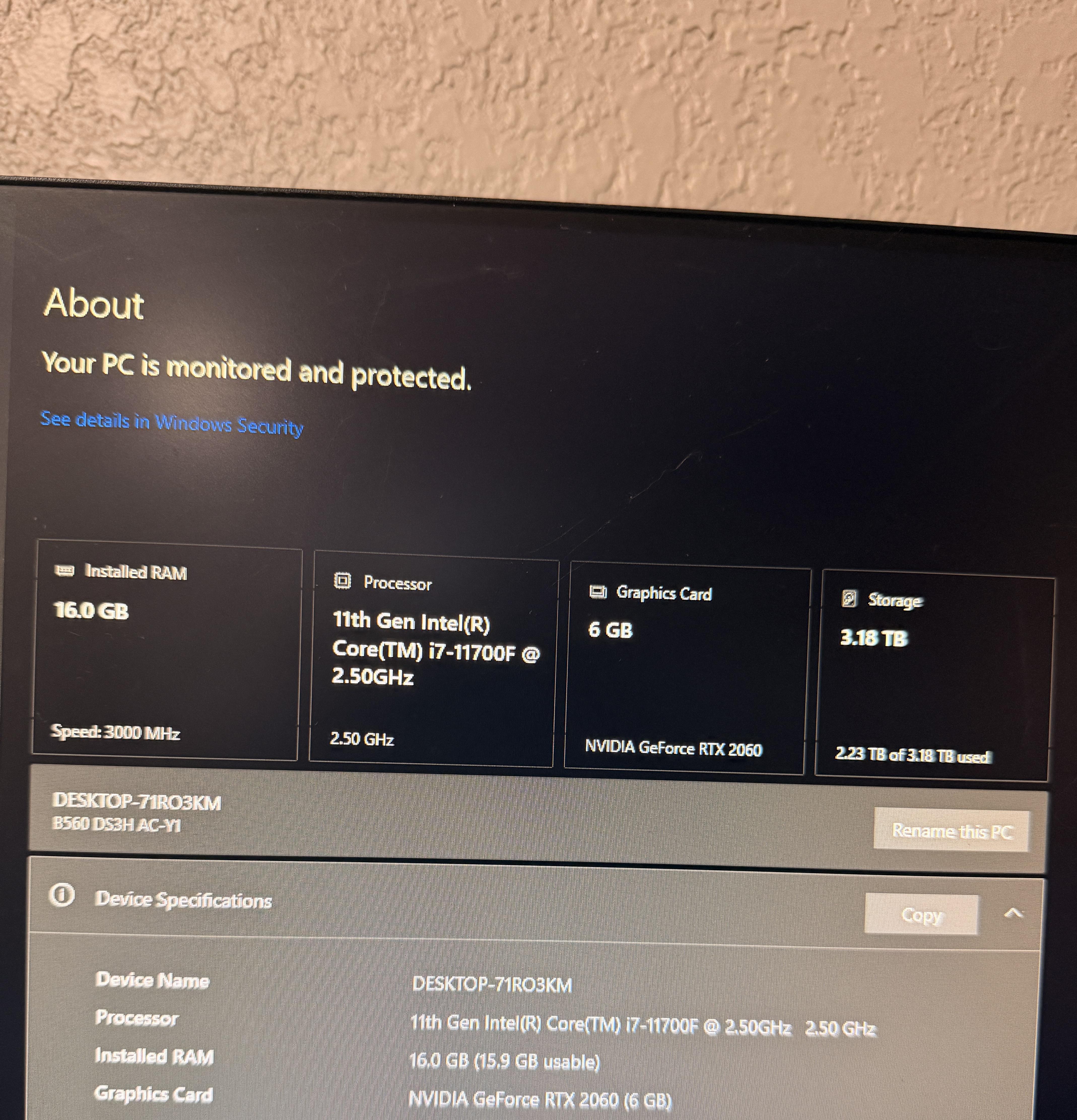
So i have a 2060 and ive been needing to upgrade, but idk what to buy. Could someone list me a on a budget upgrade, a middleground, and a pricier one?


r/PcBuildHelp • • 7h ago

Build Question I don't know what to buy

6 Upvotes

I got all components for my first build. I have a 2k budget (including mouse and keyboard) and was doing a 2k quality build but now I'm left with roughly 800€ and I'm missing ram and a GPU I was taking advantage of the black Friday offers but idk what to do. Any help?


r/PcBuildHelp • • 6h ago

Build Question Is my graphic card cable damaged or is this normal?

5 Upvotes

Im scared it could burn 🔥


r/PcBuildHelp • • 2h ago

Tech Support Gigabyte B650 Eagle AX + 7800X3D boot lottery (DRAM/CPU LEDs, memory training hangs, BSODs) – which BIOS/software setup is actually stable?

2 Upvotes

Hey everyone,

I’m honestly at my wit's end with my AM5 build. Booting this PC feels like a complete lottery — it rarely starts up cleanly without throwing some kind of issue, and I just want a normal, reliable computer without having to gamble every time I press the power button.

**Specs:**

* **CPU:** AMD Ryzen 7 7800X3D

* **Motherboard:** Gigabyte B650 Eagle AX

* **RAM:** 32GB G.Skill DDR5 6000MHz CL30 (EXPO enabled)

* **GPU:** Radeon RX 9070 Gaming OC

* **PSU:** Deepcool 1000W

**The issues I’m dealing with:**

* Random boot failures — sometimes it gets stuck on the **DRAM** debug LED, sometimes on the **CPU** LED, and sometimes it just hangs indefinitely during RAM memory training.

* Occasionally the PC powers on with **no video output** at all.

* Random Windows critical errors / BSODs on startup (*"Your device ran into a problem and needs to restart"*).

* I’ve also had Radeon driver headaches (game crashes, screen flickering).

* Cold starts are definitely the worst, **but even when I boot or restart it multiple times in the same day**, it still randomly hangs or throws weird errors.

**What I’ve already tried:**

* Updated BIOS to **F40** (also ran **F41e** previously).

* Disabled **Fast Startup** in Windows.

* Disabled **Fast Boot** in BIOS.

I’ve never had anything remotely this unstable on my previous rig, and it feels completely abnormal for hardware at this price point.

For anyone running a similar **B650 Eagle AX + 7800X3D + 6000 CL30** combo: is there a specific, rock-solid BIOS version (like rolling back to F37 or F39) or specific BIOS/driver settings that actually eliminate this boot instability once and for all? How did you guys overcome this?

r/PcBuildHelp • • 2h ago

Software Question New pc is chopping frames when moving the camera on highend pc

2 Upvotes

Hello,

I’m not a very skilled tech guy, but i wanted an upgrade from an rx 580 so I bought a new pc 2 weeks ago with the specs:
Rx9070xt oc edition
Ryzen 7 9700x
32 ddr5 ram

Since then i updated every driver.
First game played was spiderman remastered and i was getting a very low performance even tho i was getting a high fps, even on low settings. I tried to follow some guides regarding windows performance settings, adrenaline settings, i set the ram to expo in bios and so on.
Nothing worked so i thought it was just a bad port from ps5.
Now i wanted to replay rdr2 and surprize: im getting the same low performance as when i m moving the camera it seems like the frames are skipped or cutted or chopped all that with 100+ fps on ultra but it does not matter what settings im using as the result is the same.

Here is a video, could you tell me if that is normal?
If yea it does not seem a great upgrade from my old pc. https://youtube.com/shorts/-XKQza4QRls?is=GCJ51iRyDKAnD-Gf


r/PcBuildHelp • • 2h ago

Build Question Need help with my build please

2 Upvotes

Im hitting 90 Celsius on my cpu just playing valorant. You guys have any idea how to lower it? Better AIO? Change fan config? Also what case do you guys run?

Processor AMD Ryzen 7 7700X 8-Core Processor, 4501 Mhz, 8 Core(s), 16 Logical Processor(s)

BaseBoard Product PRIME X670-P WIFI

Installed Physical Memory (RAM) 32.0 GB

GPU : 4080 Founders edition

AIO: Kraken Elite 360 RGB

Case: Lian Li O11 DYNAMIC

AIO mounted on top Exhaust sandwich with 3 fans
3 Side Fans intake
3 Bottom Fan Intake


r/PcBuildHelp • • 5h ago

Build Question Do i need to buy that component again?

3 Upvotes

built and saved up money for this pc months ago and ive been using it with only one stick of ram because when i put the other stick in it doesn’t boot up like it will only boot up with one stick

but both sticks are fine and not defective because i tried them both and switch them back to back and i tried other slots too

i think its the motherboard…

idk tho like is there some software to check all components work or not

i dont wnna buy a wrong thing and waste money :(

i was saving up some money for 2nd monitor too but now i gonna fix this ram thing

heres my specs

r7 9850x3d
9070
32gbs ram
1tb ssd


r/PcBuildHelp • • 3h ago

Build Question Are PCI 6+2 cables compatible between PSUs?

2 Upvotes

I have a Corsair AX850 modular power supply from way back when. I did not put all of the modular cables inside the PC.

I am trying to install a new sapphire Radeon 9070 XT GPU which has an additional 8 pin compared to my last GPU (sapphire radeon RX 5700 XT).

I have spare modular pci cables from an RM850x modular PSU. Are they compatible with the AX850 PSU? Or do I need to order new cables or get a new PSU?


r/PcBuildHelp • • 3h ago

Build Question Looking for some advice

2 Upvotes

I'm building my first PC since 2018, and I'm looking for some help.
The main thing I'd like help with is the graphics card.

I'd like to be able to run games at 1440p, 120 fps+ and for it to last for another 8ish years. The main game I play is War Thunder.

Right now, I'm looking at a 5070 (ti) and a 5080.

If you could offer some help with picking a GPU or general build advice, I'd appreciate it!


r/PcBuildHelp • • 3h ago

Tech Support AIO help please

2 Upvotes

I bought a prebuilt from Chillblast in 2020. This month I bought another prebuilt. I wanted to give my daughter a PC in a white case so I removed all the components from the 2020 PC and bought a new white case. I thought it would be easy to simply put the old components in the new case.

I am not skilled in PC building, just YouTube and Reddit.

I have screwed in the mobo, seated the RAM, seated the Intel GPU with new thermal pad, installed the PSU, connected the single fan to the splitter lead from the pump and connected the pump to the CPU Fan header.

The Nvme SSD with windows on it was not touched. I did install a SATA SSD drive around the back.

I powered it up because I wanted to check if the build was stable but it it not.

Corsair H80i v2 AIO

Z390 Aorus Pro Wifi

Intel i7 - can't remember which one

Corsair CM750 PSU

2x16 GB DDR 4 Goodram

The Internet tells me to check the cables which I have and that there could be a cooling issue.

I did use thermal paste first but when this happened I removed it all and used a thermal pad.

If anyone can help me to troubleshoot, I'd be grateful. There may be something blindingly obvious I haven't done or done incorrectly.

(I was using my new prebuilt for ideas but hasn't helped!)

Thanks.


r/PcBuildHelp • • 8m ago

Build Question Updated Build Progress

Thumbnail pcpartpicker.com
1 Upvotes

Hello! Here's an update on my build progress.

I am currently in a situation where I need to upgrade my build due to my PC not being compatible with Windows 11 specs. Trying to make use of some things I already have so really I think all I’m looking for is:

-Motherboard

-Processor

-Ram

-Cooling

My current build has had almost no issues running modern games so i think this partial upgrade will work fine for me.

I currently have and want to keep:

-Asus TUF Gaming v2 RTX 3070 TI GPU

-EVGA 850 BQ 850 w 80+ Power Supply

-Phantom PC Tower

-CD/DVD Drive

-Memory Storage SSD

On the parts picker i set up what I think will work with the parts I have and it lists everything as compatible, but I wanted to make sure with the community before pulling the trigger since I don't know much. Any help would be much appreciated! 🙏


r/PcBuildHelp • • 1h ago

Tech Support GPU (9070gre) not turning on, please help.

Post image
1 Upvotes

Just got a brand new 9070gre reaper power color from micro-center as a birth day gift to my self, and it’s not turning on.

I’ve tried using a pig tailed (2+6)*2 and two separate wires as shown in the photo, upgraded from a 590 that was working just fine early today.

The pc turns on and I get a display through my cpu but nothing through my gpu no display or fans doesn’t show through task manager

Build

7600x3d

9070gre

G.skill flare 1*16gb

Asus tuf b850 plus Wi-Fi

Samsung 1tb nvme


r/PcBuildHelp • • 1h ago

Build Question Is this system worth buying?

1 Upvotes

I think this is a good build but need some outside advice. Other then the case and the ram would you guys say everything looks good for the price. https://pcpartpicker.com/list/WDwdJw ( want to keep the current price or lower it if i can)


r/PcBuildHelp • • 5h ago

Build Question Question about AMD GPUs

2 Upvotes

Hi, I’m new to AMD gpus in general but recently i’ve been looking to get a new gou for my pc. I like the rx 9070 xt but upon some research and talking to some people they advised be against it because they tell me AMD gpus have persistent issues with their drivers and that they are always gonna crash and my screen will black out and whatnot. Just wanted to ask is there any validity to these claims or are they exaggerating? For context I have a GTX 1650 right now and I don’t even update my drivers. regularly but overall I ran into no issues related to that


r/PcBuildHelp • • 7h ago

Tech Support I am losing my mind over this. Black Screening Issue.

3 Upvotes

Hi there, I have recently been having really bad issues with my pc black screening. There is no video output but I can still hear the audio playing through sound bar.

History:
I used to have this issue on and off for a couple of months but recently it has gotten really bad.

Problem:
While running, the pc will mostly randomly black screen. I can still hear the audio from the either a youtube video or anything still playing through my sound bar. The black screen does not restore itself and it will stay like that until I restart the pc.

When Black screens happen:
These are the times I've noticed a somewhat of a pattern for these black screens.

  1. After extended period of pc being shut off, booting the pc up and running furmark has caused it to black screen fairly consistently, however getting it to black screen again after restart is more random.
  2. Soon after starting up a game. Even if I am idling in the game, it will black screen.
  3. Soon after closing the game (more recent along with num 1). This would usually happen when after a long gaming session of no issues, I would close the game and continue to watch the youtube video and it would black screen.
  4. Completely random (not so much as of very recent)

Computer Specs:
Ryzen 5 5600
GIGABYTE RTX 3070 Ti Gaming OC
GIGABYTE A320M-S2H Motherboard with a failing CMOS (has been swapped for b450 see below)
DDR4 32GB 3200MHz RAM (Dual sticks)
EASE 650W 80 PLUS Bronze PSU
1TB SATA SSD
500GB NVME SSD
1TB Hard Drive
128GB SATA SSD
Dual Monitor Setup (main at 144hz, secondary at 60hz)

Things I've tried:
- Tried undervolting gpu.
- Tried setting gpu power limit to 70%
- Multiple complete driver reinstalls (using DDU)
- Tried using a complete fresh windows install
- All the little nick-knacks of setting tweaks
- Updating mobo BIOS
- Changing PCIE gen lanes from gen 3 to gen 2
- Tried turning off/on XMP
- Tried single monitor. both monitors on Display Port, HDMI, one on each, Both set to 60hz.
- Swapped mobo to B450M-A PRO MAX II
- Tried cleaning contacts of both RAM and GPU
- Tried using 1 RAM stick at a time

Some things I noticed:
- Nothing has overheated. Yes the hotspot on GPU has hit around 104C and is 20C above the normal temperature reading of GPU. But still no decisive overheating on it.
- No artifacting on GPU at all.
- PC runs fines when it isn't black screening. No sudden hiccups or anything just before black screening.
- Event Viewer does not show anything at all other than PC recovered from unexpected shutdown (from me holding the power button to shut it down)
- There were dumps that showed 0x116 VIDEO_TDR_ERROR all the way back in July but I don't know if relevant to current issues.
- I tried using google's remote desktop to view what was going on in my pc after a black screen and it just shows black screen on both monitors with sometimes border of a window flashing in or out (Brave for example)

I really am at my wits end. I don't know exactly what the issue is anymore. I have tried using Furmark2, Superposition benchmark and OCCT's tests. Even if it black screened on OCCT's tests and after a reboot, it would just say that it didn't detect any issues.

EDIT: I have noticed from the logs of hwinfo that when PC black screens, the gpu telemetry readings freeze and it keeps on recording the same readings.


r/PcBuildHelp • • 1h ago

Build Question Should I sell my 5090?

1 Upvotes

Been thinking on this for awhile but I got a gigabyte windforce 5090 ive had for about a year, its been fine but recently ive been doing alot more couch gaming and it makes me think of having that 5k gpu just sitting there while im playing on a ps5, should I sell it and get a 5080 or what are some of the other options I should consider


r/PcBuildHelp • • 5h ago

Build Question Help with pc build

2 Upvotes

Hi everyone! Just wanted to take to this sub and ask for some help about my pc build since I'm not terribly experienced

I'm currently looking to build a pc with the following specs:

MSI X870 Motherboard

AMD Radeon RX 9070 XT

CORSAIR VENGEANCE RGB RS DDR5 16GB 6000 MHZ (2 x 8GB)

Samsung SSD 990, Internal M.2 NVMe SSD Hard Drive, 1TB, PCIe 4.0 x4

These are the items I've looked out so far (although I'm unsure about the 16GB of ram maybe being an issue), but I'm unsure about what CPU i should be looking at getting for my build and I'm assuming and 850W psu would be okay? I'm using it to play games at 1440p and just wanting to make a strong build that i won't need to replace anytime soon.

If anyone who is a bit more knowledgeable about pc building could lend me some help on what components i should be using I would appreciate it a lot!