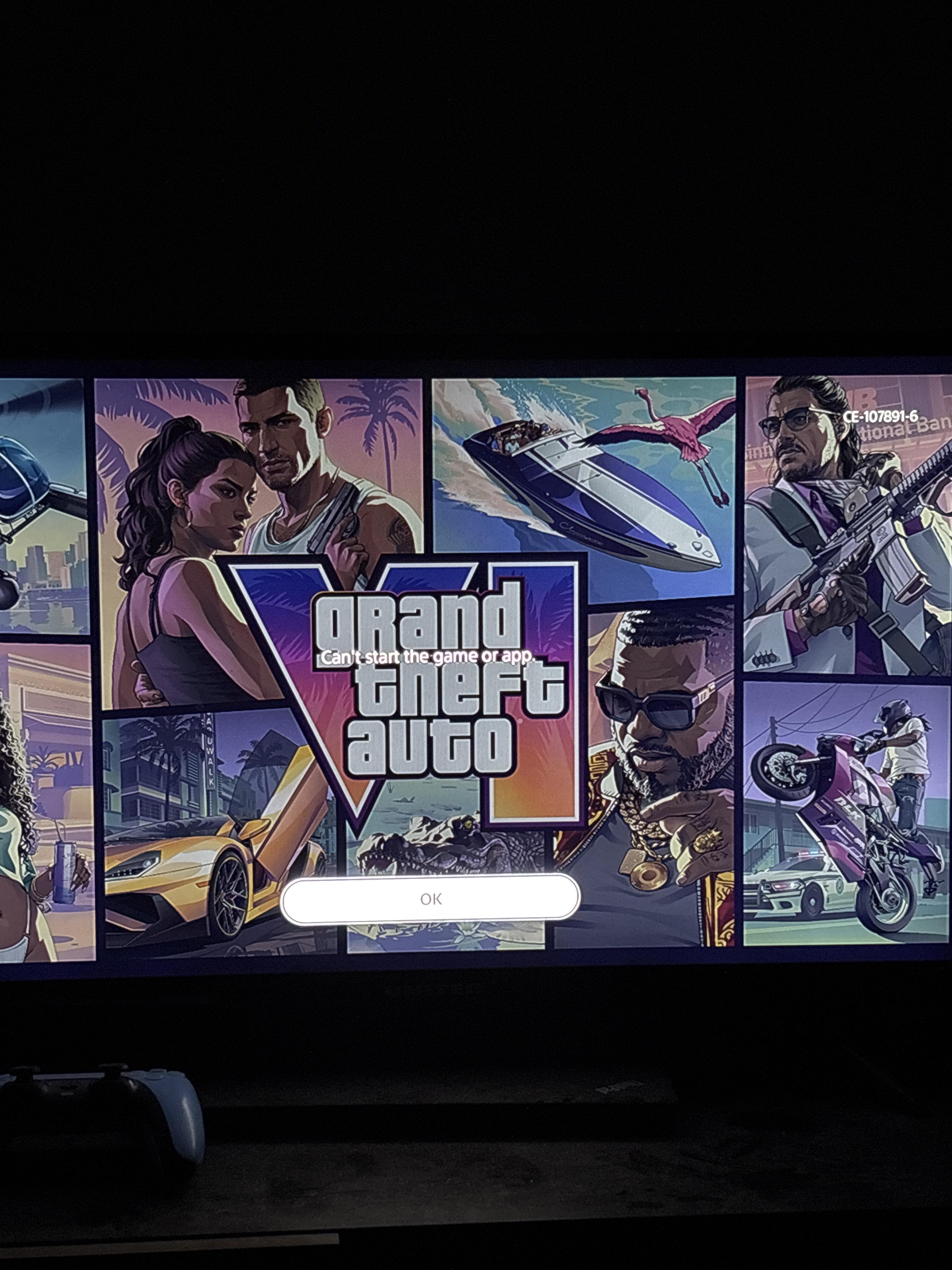
r/PlayStationSolutions • u/RONA-Boy • 27m ago
PlayStation Help Found a fix for CE-108255-1 GTA 6
reddit.com
1
Upvotes
r/PlayStationSolutions • u/Ill-Reveal-5007 • 45m ago
Hey everyone, I'm hoping someone can help me out. I accidentally requested to close my PSN account, and now I can't log in or recover it. Every time I try, I get an "An error has occurred" message.
I've tried contacting PlayStation Support through calls, emails and their online support, but I haven't been able to get through to a live agent.
I really don't want to lose my account. Has anyone experienced this before or know another way to get this sorted?
I'd really appreciate any help. Thanks!
r/PlayStationSolutions • u/Secure_Plate_2668 • 51m ago
I want to say up front that I have backed PlayStation for 30 years, and I would much rather have this fixed quietly than write this post. I am writing it because I have run out of ways to reach a human, and because other PULSE Elite owners should know what the support chat actually does when you ask for one.
TL;DR
\- PULSE Elite headset (CFI-ZWH2) with the PlayStation Link USB adapter (CFI-ZWA2), adapter manufactured January 2024.
\- The headset links to the adapter for about one second, drops, and reboots. It loops like that forever and never appears under Audio Output.
\- Both devices are on device software 2.06. I have done every reset Sony publishes, plus the wired USB-C update that fixed this for other people after the September 21, 2026 accessory firmware rollout. No change.
\- PlayStation Support's chatbot told me three times it was escalating me to a live agent. An agent named "Olivia" appeared, asked for my name, said she did not have enough detail about my issue (the full write-up was directly above her message), and the moment I re-sent the details, the next message was the chatbot saying "I'm sorry, it looks like there was an error" with its opening menu. Olivia never came back. No case number. No follow-up.
THE FAULT
Adapter in a front USB-A port, blinking white (searching), so the PS5 sees it. Turn the headset on: three quick green blinks (battery full), slow blue (searching), a brief white (connected), then it drops and goes straight back to the green power-on blinks. Repeat forever. Because the link never holds, the headset never shows up under Settings > Sound > Audio Output > Output Device.
WHAT I HAVE ALREADY DONE (ALL OF IT, MORE THAN ONCE)
WHY THIS IS BIGGER THAN ONE HEADSET
On September 21, 2026, Sony pushed an accessory firmware update with no patch notes. PlayStation LifeStyle and others reported PULSE Elite disconnects right after it, traced to a sync problem between the headset and the PS Link adapter. The community fix was the wired update. I did it. Mine still fails. Either my hardware died or the fix did not work for everyone. Either way, the failure I am asking Sony to stand behind showed up after Sony's own update.
THE SUPPORT EXPERIENCE (November 23, 2026, Central time)
\- 7:16 PM: Open chat. It is the AI "PlayStation Online Assistant," clearly labeled as a chatbot. Fair enough.
\- 7:17 PM: I paste a complete write-up: models, symptom, the ten steps above, and a request for a replacement and a case number. Bot: it cannot process replacement requests, please "contact PlayStation Support directly through the official support channels."
\- 7:20 PM: I ask for an email or a direct link. Bot: no email addresses, here is the support page.
\- 7:21 PM: The support page routes back to the same chatbot. I ask for a human. Bot: "I will escalate your request to a live agent," then the boilerplate that this is a messaging service, not live chat, and "the last person received a response within 20 minutes."
\- 7:35 PM: A message arrives labeled "PlayStation Support" instead of "Online Assistant." "My name is Olivia... Could you please provide me with your first and last name?"
\- 7:40 PM: I give it.
\- 7:41 PM: Olivia says she "just read the conversation with the BOT" but does not have enough details about my contact reason, and asks how she can help. My full write-up was sitting in the same thread.
\- 7:45 to 7:46 PM: I explain again in plain language and re-paste the write-up.
\- 7:46 PM: The very next message is from the Online Assistant: "I'm sorry, it looks like there was an error," followed by the opening menu (Refund Eligibility, controller issues, Get help with GTA VI). Olivia is gone and does not return.
\- 7:48 PM: I restate the request in one sentence. Bot: "I will connect you with a live agent," the same messaging-service boilerplate, and in the same message, "I'm sorry, it looks like there was an error," and the menu again.
\- 7:51 to 7:52 PM: I ask directly whether I was ever routed to a person. Two near-identical apologies and a third promise to "escalate your request to a live agent immediately."
As of posting: no case number, no email, no human follow-up.
WHAT I CAN AND CANNOT SAY ABOUT "OLIVIA"
I cannot prove Olivia was not a real person. Here is what I can show with timestamps: she asked me to re-explain an issue that was documented in detail directly above her first message, and the one time I sent her those details, the session errored out to the chatbot within the same minute and she never reappeared. If she was a real agent and Sony's tooling dropped her, Sony has a tooling problem it should fix. If she was not, Sony has a much bigger problem. Either way, a customer who asked for a human three times deserves to know which one it was.
WHAT I AM ASKING PLAYSTATION FOR
If I cannot get a human response, my next steps are a BBB complaint and a consumer protection complaint with my state attorney general. I would rather not do either. I will update this post with the outcome, and I hope the update is that Sony made it right.
r/PlayStationSolutions • u/Carnag-333 • 1h ago
So me and a friend are game sharing and I when I went to play a game and I am unable so is there any solutions or am I just screwed
r/PlayStationSolutions • u/EasyPeasy_SE • 1h ago
Anyone else having issues with their PS5 after playing GTA 6?
My PS5 is only 6 months old and was working fine until yesterday. Now both GTA 6 and FC 27 keep freezing, usually within a minute of starting the game.
I also noticed some weird graphical glitches in FC 27, like players and pitch textures suddenly changing colors for a second. Sometimes the picture freezes but the sound keeps going for another 20–30 seconds before stopping too.
The PS5 menu works fine though. Both games give me CE-108255-1.
I’ve tried clearing the cache, rebuilding the database and restarting the console. Nothing helped.
Not sure if GTA 6 has anything to do with it or if my PS5 just happened to develop a hardware issue.
Has anyone had something similar happen since especially with other games starting to crash too?
r/PlayStationSolutions • u/Ill-Reveal-5007 • 2h ago
Just wondering if anyone can help me out. I accidentally requested to close my PlayStation account, and now I can't log in or recover it. I keep getting an error saying "An error has occurred" every time I try.
I've tried contacting PlayStation support through their website, phone and email, but haven't had any luck reaching an actual person.
I really don't want to lose my account. Does anyone know another way to get in touch with PlayStation support or get this sorted?
Any help would be appreciated. Thanks!
r/PlayStationSolutions • u/Ill-Reveal-5007 • 2h ago
I accidentally requested to close my PlayStation account, and I'm now trying to recover it before the 30-day closure period ends. Unfortunately, every time I try to sign in or recover my account, I get an "An error has occurred" message.
I've tried everything I can think of, including the recovery process, the support website, phone calls and emails, but I haven't been able to reach a live agent who can actually help.
It's disappointing that something as important as recovering an account can be so difficult, especially when you're trying to resolve the issue before your account is permanently closed. There doesn't seem to be a clear way to speak to someone directly when the automated options aren't working.
I genuinely just want to keep my account and get this sorted out, but the lack of accessible customer support makes the whole situation incredibly frustrating.
PlayStation really needs to make it easier for customers to reach a real person when they're dealing with serious account issues.
r/PlayStationSolutions • u/Professional_Fan_788 • 3h ago
Hi! Hopefully this is the right community to post this. I decided to dust off my PS account, but after I talked to someone, they mentioned my account was suspended bc of a chargeback. I vaguely remember several years ago that I had charges I didn’t actually initiate.
I can’t get a hold of anyone on the phone, and I’m not able to log into my account bc I have MFA enabled, but don’t have any of my backup codes.
TIA!
r/PlayStationSolutions • u/henrizxl • 6h ago
r/PlayStationSolutions • u/Arthyficier • 6h ago
LOOKING FOR REINSTALL PLAYER AFTER PATCH, DOES IT WORK ?!
Hi everyone, just to say, the patch of to day doesn’t give the pleasure of playing the game, it’s gonna be 5 days I can’t play on it, I hoped that patch gonna be the good one, it is not, that’s fucking crazy, how it can be possible to shit on players who has paid 100€ for that game, the waiting was wild.
I think they really don’t care about that shit, maybe we have to create a group and go to tribunal, the 16,78Mb is related to an internal SSD problem, conversion in Mebioctets, you have a round number, we have to find something, make Rockstar and Sony face to their rights. Can be patch by sony devs or rockstar devs to adapt for specific PS5. It’s gonna be crazy long but they have all the informations.
If someone has more informations for that problem, give us please. Give feedback if you have 16.78 Mb Autosave crash at prologue, and if it’s fixed by the patch. Very important to have feedbacks of guys working.
UPDATE : Someone has a 37,75Mb data save crash, it corresponding to 36 mebioctets round, like 16.78Mb is 16Mio, 10,49 is 10, 20,98 is 20.
Someone has 25.17Mo crash, 24 Mio, interesting, always pair numbers, insane.
Called PS SUPPORT FRANCE another time (My country), they have all of my explanations of the mebioctets theory, they have all the datas of my subreddits from the 2 last days, and I think, it is the real issue, guys, we found oil in the desert.
My theory here : https://www.reddit.com/r/PS5HelpSupport/s/rcBzuKBFrK
THEORY : Today patch was to do a bridge with future PS patch maybe ? We just have to wait a sony patch
Information : If it’s a material problem, it is not related to specific serial number, CPI-1216B, 1016 debunked
r/PlayStationSolutions • u/Accomplished_Cat9235 • 8h ago
r/PlayStationSolutions • u/Old-Shape-7801 • 8h ago
r/PlayStationSolutions • u/Winter-Inflation4334 • 9h ago
my PlayStation keeps crashing due to memory error, it's relatively new maybe 4months old unsure why it's happening as i have 200gb at least of storage. i have already rebuilt database and reinstalled mw4 as that the only game i play and its still happening and has gradually started to happen more
any help would be much appreciated
r/PlayStationSolutions • u/benmorris410 • 10h ago
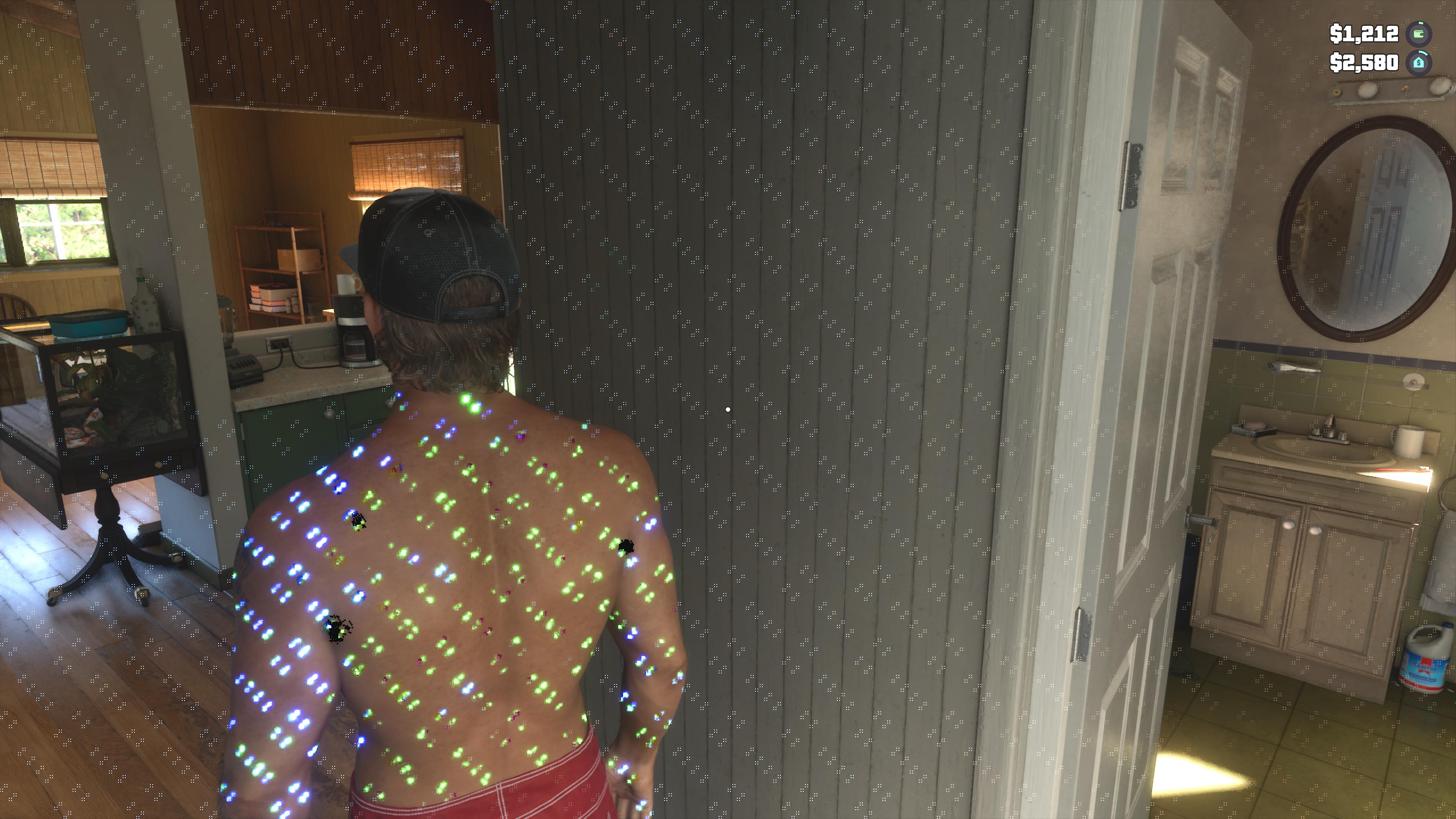
My GTA 6 been like this since release, never had any issues before. It’s only a year old and doesn’t get overly used, anyone any ideas ?
r/PlayStationSolutions • u/SquareSpace2491 • 10h ago
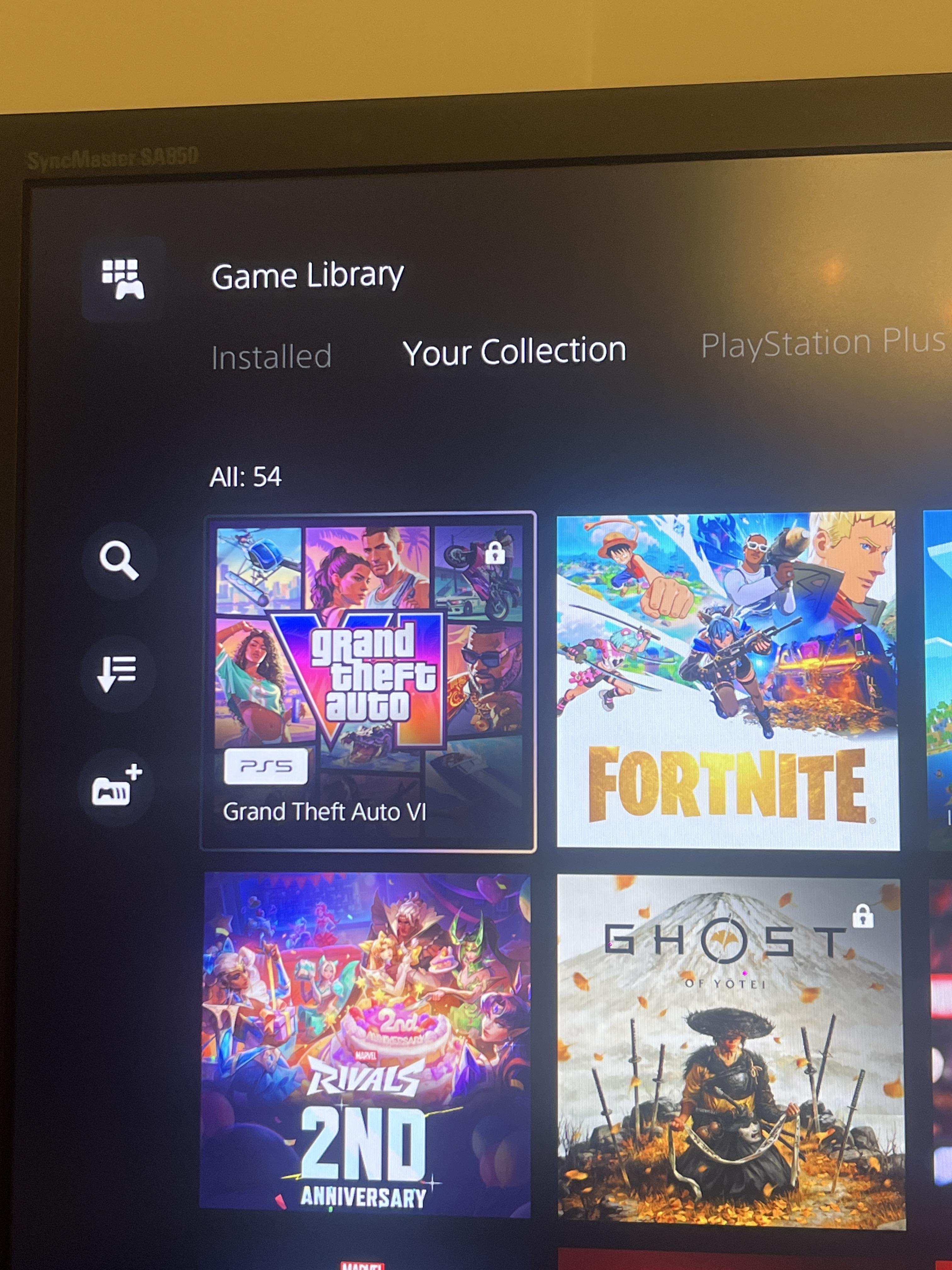
Title: PS5 Game Sharing problem – GTA 6 shows a lock even though my friend owns the game
Hey everyone!
I’m having a really frustrating issue trying to game share GTA 6 with a friend, and I’ve tried almost everything I can think of. Hopefully someone here knows what’s going on.
Here’s the situation:
My friend has purchased GTA 6 digitally through the PlayStation Store.
The purchase is confirmed in his transaction history.
He can download and play GTA 6 perfectly fine on his own PS5.
I want to play the game on my PS5 using his account and Console Sharing.
The weird part is the Console Sharing setting:
On his PS5, when he goes to:
Settings → Users and Accounts → Other → Console Sharing and Offline Play
It says “Enable”, meaning Console Sharing is currently disabled.
However, when I log into his PSN account on my PS5, the setting already says “Disable”, meaning Console Sharing is enabled on my console.
So, as far as I understand, Console Sharing is already activated on my PS5.
The actual problem:
When I log into his account on my PS5 and go to GTA 6 in his Game Library:
The game has a lock icon.
When I select it, I get the option “View Product”.
When I select that, the PlayStation Store asks me to buy GTA 6 for £89.99.
The game doesn’t even appear as available to download on his account on my PS5.
Things I’ve already tried:
Restoring licences on my PS5.
Restoring licences on his PS5.
Turning Console Sharing on and off.
Restarting both PS5 consoles.
Updating the system software.
Clearing the PS5 system software cache.
Checking his purchase history to confirm that GTA 6 was actually purchased.
None of these things have worked.
One more potentially important detail:
My friend lives in Norway, but his father is British, and his PSN account seems to be registered in the UK. His PlayStation Store displays prices in GBP (£) rather than NOK. He purchased GTA 6 through this account and can play it normally on his own PS5.
Could the UK account region have anything to do with this issue, or am I missing something with Console Sharing or game licences?
Has anyone experienced something similar? I’d really appreciate any help or suggestions. I don’t want to purchase the game again when it’s already been paid for.
Thanks!
r/PlayStationSolutions • u/Zestyclose-Monk8315 • 11h ago
ho effettuato la pulizia delle ventole e c’è un rumore fastidioso nella mia ps5 è normale?
r/PlayStationSolutions • u/RemD0G • 11h ago
I'm writing this as a long-time PlayStation user with a 20+ year old account which was recently suspended. I have tried following up via the Support chat and via the phone; I am currently at a total loss of what to do.
**Context:** For some background, I tried signing into my PlayStation account last week (November 8th) and was surprised that I got a suspension error message. I had not received any emails or notices about a suspension, so figured I'd check in with support.
I followed up with chat support and they mentioned that I have a temporary suspension to protect my account from suspicious activity and that they'd need to follow up with a specialist team to see what could be done (and that this team would follow up via email). I hadn't received a response over the next few days, so followed up via chat support a couple other times to try to get a status update (citing the prior ticket numbers) and each time the agent would mention they'd get the specialist team to reach out and would immediately close my current chat session, without any additional comment on if they looked into the prior case numbers.
I waited a week (the last agent had mentioned it could take 5 business days) and still had not received a response, so I tried the phone line today. Over the phone, I was informed that my account had violated the terms of service and that it was permanently suspended, not temporarily suspended. This was shocking to me, as this whole time I had been told that there was a temporary suspension in place to protect my account.
My mind was racing as to what could have triggered a suspension: I hadn't played in months, I don't have family members or anyone else who has access to my console, I use 2FA and passkeys to safeguard my account, etc. The only thing I had done recently was change my email address, which I did after switching providers in September. My email provider change was to Proton Mail, using SimpleLogin (a Proton service) as an alias to forward my emails directly to my Proton Mail. I told the agent over the phone that that's the only thing I could think of; that maybe a new email on a long-standing account would be deemed suspicious and trigger a suspension.
The agent mentioned that they could not provide additional information around the triggers for my suspension, but just mentioned that I had violated terms of service and that I can create a new account to continue using my PlayStation. I pushed back, as I had not received any suspension notice, I had received no follow ups from the prior inquiries I had made (yes, I have checked junkmail/spam folders), and I have not been provided an explanation as to why my account is suspended. I requested that, at the bare minimum, I wanted the team to send me written notice around the nature of the suspension, with the hope that I could at least discuss whatever is going on with someone.
He stated that the backend team has denied my request and that there is no further course of action for me. I asked to escalate as I adamantly want to be provided with some details. In my head, surely if this was triggered by an email change, we could just revert my email. He mentioned there's nothing to do and that he'd have to terminate the call as there was nothing he could do and they were busy with Grand Theft Auto VI calls coming in.
**Possible suspension trigger and what doesn't add up:**
Here's something that doesn't make sense to me. After researching, I now know there is an appeals page for suspensions, but that page says there have been zero actions issued against me in the last six months. I only switched email providers in late September, and was able to login to my account and update my email address after that. If my account was accessible in September/October and now locked in November, how could it be possible for my Moderation History logged over the last six months be zero?
I'm gutted and at a total loss here. Has anyone had any success in figuring out how to restore access to their account or come across a similar situation?
**TLDR:** I tried logging into my PlayStation account a week ago, got a suspension error code, followed up w/ chat support and informed it was a temporary suspension to protect my account and that a specialist team would email me. I followed up again this week over the phone (as I hadn't received an email) and was informed my account is permanently suspended and they cannot tell me why.
r/PlayStationSolutions • u/NewConsideration480 • 12h ago
108255-1 at the loading screen as soon as it hits Jason’s knees. 16.78mb. Since Wednesday. Silence from PS and Rockstar since then. Latest patch: didn’t fix shit.
It’s safe to say no fix is coming that doesn’t involve buying a new console and hoping it is a lucky one.
I know for certain R* just doesn’t care and does not have a fix in progress: PlayStation has tipped their hand by allowing refunds.
Sucks I won’t get to play this game, since my PS5 plays literally everything else I’m just gonna wait for a PS6.
r/PlayStationSolutions • u/SpecialistShelter598 • 12h ago
Hey there.
I recently accidentally logged out of my account because i wanted to switch emails,however the email tied to that account is now gone and when i want to log back in it asks a verification code. I was wondering is there any way to get it back or not really.
r/PlayStationSolutions • u/nafkk • 14h ago

It’s very annoying
r/PlayStationSolutions • u/vecom1312 • 15h ago

Only with GTA VI all other games work fine. Is there anything i could try except for reinstalling the game? I don’t wanna wait lol
r/PlayStationSolutions • u/nihilist5800 • 15h ago
Ok, here is my situation. Over a week ago, by mistake, instead of switching users, I clicked "log off" on my PSN account. When I try to log back in, after I enter my password, I get a message along the lines of: "It looks like you're trying to sign in to your account from another device or browser. A verification code was sent to your email address."
The big problem is that this email never arrives. I've already checked my spam folder and all my other email folders. I also checked that my Gmail isn't blocking any Sony addresses, and I even added Sony support's email as a contact. Nothing. The email with the verification code never comes through.
I've been contacting online support all this past week, and unfortunately, it has been impossible to get a resolution.
When the chatbot transfers me to a live agent, it asks to send a verification code—which always arrives at my email without any issue.
Once I'm connected with an agent, they ask for my console's serial number, which I provide, and then tell me that to continue I have to give them the receipt for a purchase I made on PSN.
And that's where everything hits a dead end.
The purchases I've made on PSN have all been through digital card top-ups/recharges. I don't have "receipts" like that. When I explain this, the agent says they can't proceed unless I have what they're asking for, and ends the chat. Basically, "lol, good luck."
Support hours are from 7 a.m. to 5 p.m., and agent wait times are around 40 minutes, so I've been able to go through this process at most twice a day after getting off work. Every single time, I get the exact same result. They don't even offer other verification methods or alternatives—they just close the chat.
And it's not even that I don't know my password; the issue is that the sign-in verification email never arrives.
I feel like customer service is supposed to make things easier, but my experience with online support—both bots and agents—has been the exact opposite.
Is there any other way I can reach some kind of technical support? A phone number maybe?
Any help would be greatly appreciated.