r/QidiTech3D • • 10h ago

Plus4: nylon disaster

Thumbnail
gallery
8 Upvotes

Had a nylon bed adhesion last night and awoke to this manga looking blob growing on my extruder ....

Any thoughts on clearing nylon?

I'm thinking whole new assembly!


r/QidiTech3D • • 17h ago

Questions Best Black Friday Deal on Qidi Q2

5 Upvotes

I've been looking to get a Qidi Q2 and am ready to pull the trigger but the deals out there are hot garbage. I sadly missed out on the Ali Express deal for $299.69 and just can't bring myself to pay $450 when it was so recently on sale for $300.

Who has the best price out there for a Q2 going into the holiday?


r/QidiTech3D • • 22h ago

Qidi plus 4 issues and upgrades

5 Upvotes

I’ve had my QIDI Plus4 for a couple of years. It’s been pretty reliable, though most of my prints have been fairly simple. Lately, I’ve been having trouble with the nozzles and the bed mesh.

This morning I found a big blob of filament stuck to the hotend, and I can’t get it off. These days I find myself crossing my fingers every time I start a print, so I’d like to hear from people who’ve modified their Plus4. Which upgrades actually made a difference for you?

I’m considering replacing the entire hotend with a Phaetus Conch, adding a Beacon3D probe, improving the lighting inside the printer, and installing a second camera. What do you think? Which of those would you do first, and are there any guides or tutorials you’d recommend?

Also, are you still using QIDI’s own slicer, or have you switched to standard OrcaSlicer?


r/QidiTech3D • • 1h ago

Q2 Finally operating as it should have out of the box

Post image
3 Upvotes

r/QidiTech3D • • 4h ago

Qidi Q2 and Qidi Box issues. Failed loading, filament grinding errors, T_MANAGER crashes, and camera not working

3 Upvotes

At this point idk what else to do with this printer. I've reached out to Qidi support and sent them logs, but figured I'd make a new thread with everything that's been going on to see if anyone else has experienced all or some of these issues.

I'm currently running firmware 01.01.03.02.

Qidi Box issues:

The Box feeds filament relatively quickly through the hub and then slows to an absolute crawl before eventually stopping just short of the extruder. The slot turns red and I get error QDC_100_005_000_001. This happens on all four slots.

The Fluidd console gives me the following:

QDE_004_006; Message: Extruder loading failure.

Step BOX_LOAD failed. Pausing flow.

I've done the following trying to diagnose it:

  • Replaced the extruder filament detection sensor.
  • Verified through Fluidd that the new sensor detects filament and correctly reports when there is no filament.
  • Checked the PTFE tubing for resistance.
  • Checked the hub for resistance.
  • Disconnected the PTFE tube at the extruder to eliminate the extruder as a possible obstruction. Filament still stops just short of exiting the tube.
  • Trimmed a small amount off the PTFE tube.
  • Reseated communication cables.
  • Updated firmware.
  • Factory reset the printer.
  • Checked the endstop states through Fluidd.

One thing I noticed is that the b_endstop changes states but I haven't been able to get the e_endstop to change. Idk if that's significant or if I'm misunderstanding what that particular sensor does.

External spool issues:

I figured I'd just use the external spool until Qidi got back to me. Well, now that's giving me issues too.

When trying to automatically load filament, the printer heats up and then tells me "Filament grinding detected."

I've literally taken the extruder gears out and inspected them. There is no filament or debris in there. The gears don't even attempt to turn during the automatic loading process before giving me the grinding error.

However, if I use the manual extrusion controls on the touchscreen, the gears turn, pull filament in and extrude perfectly fine.

The Fluidd console gives me this during automatic loading:

Unable to parse 'slot16' as a literal

I found this GitHub issue that appears to describe the same problem:

https://github.com/QIDITECH/QIDI_Q2/issues/29

Printer shutdown:

While attempting to print from the external spool with the Box physically powered off, the printer completed its startup routine and then completely shut down Klipper.

Internal error on command:"T_MANAGER"

Looking through the Klippy logs, I found this:

File "multi_color_controller.py", line 1830, in cmd_T_MANAGER
File "multi_color_controller.py", line 1421, in filament_printing_manager
File "box2base.py", line 1239, in filament_printing_manager_box2
IndexError: list index out of range

I've since disabled the Box through Fluidd using the enable_box variable and verified that it's set to 0.

Camera issues:

On top of all of this, I've also discovered that my camera no longer works. It worked a while ago, but idk exactly when it stopped working.

Qidi Studio says the camera is playing, but the screen is completely black. Moonraker shows that the camera is enabled, but trying to access the camera stream directly through the printer's IP gives me a 502 Bad Gateway error.

Where I'm at now:

I'm starting to question how much of this is actually hardware related and how much of it is firmware related. I'm not necessarily saying all of these issues are connected, but there are clearly some software errors occurring.

I've probably spent more time troubleshooting this damn thing than actually printing lately. I'm in the middle of trying to organize my woodshop with Gridfinity and bought the Box specifically because I wanted to do multicolor bins and labels.

Has anyone else experienced this many issues with the Q2 or this particular firmware version? Has anyone had any luck with downgrading the firmware or doing a complete reflash rather than a factory reset?

At this point I'd be happy just getting the printer back to functioning normally, let alone getting the Box working.

It was working fine yesterday as I've had the new detection sensor in for a month with no issues. While trying to get the box fixed, which has been down for a month and I've been putting off fixing it, this has gone to shit quick.

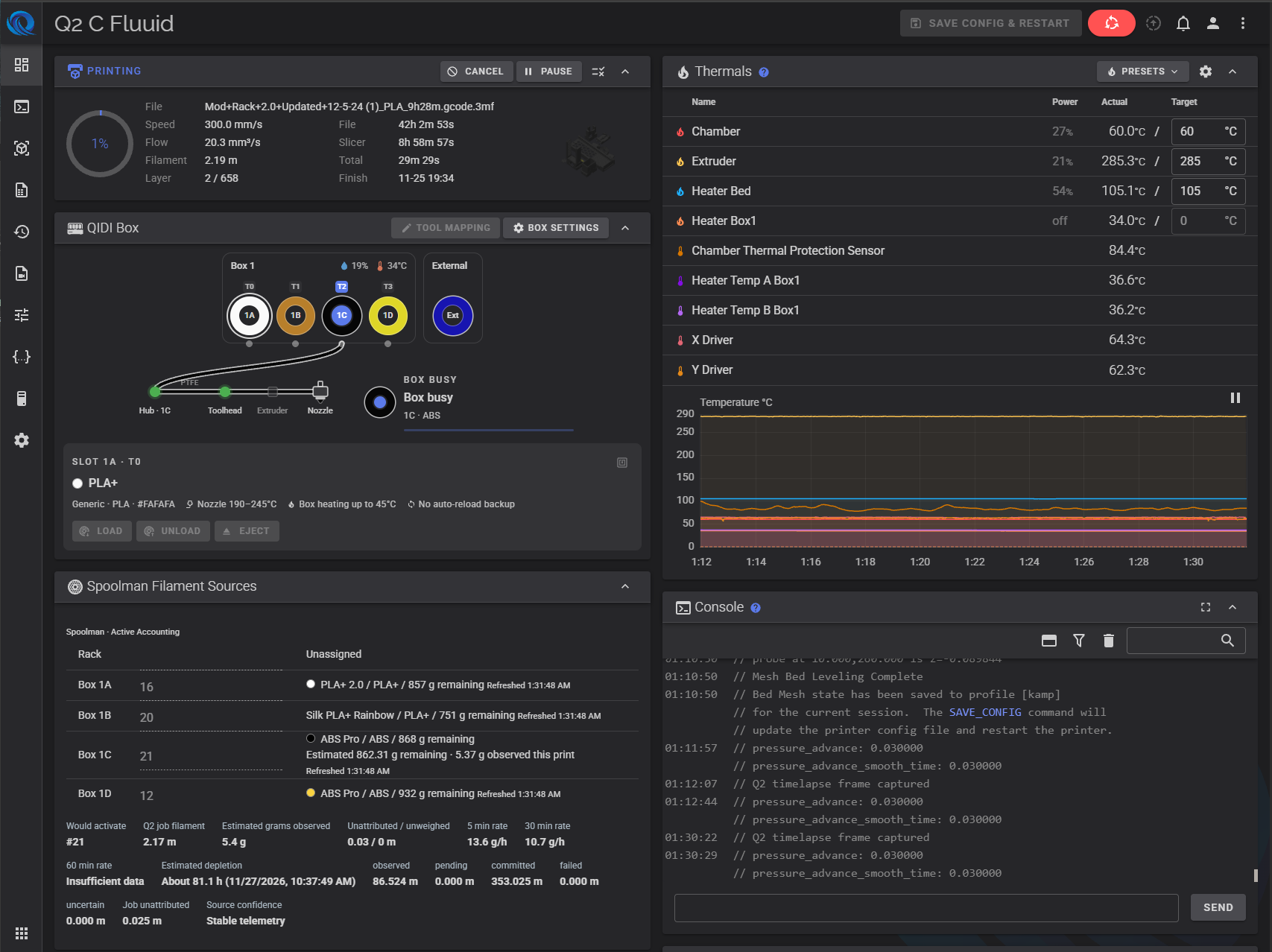
r/QidiTech3D • • 11h ago

Qidi box problems...

2 Upvotes

Alright, I have a Q2, and it was printing just fine until I attached the Qidi box.

It tells me it's having a problem feeding filament into the print head, but there is filament in the head.

If I go into manual mode and turn the extruder temp up and hit the feed arrow, it extrudes filament.

I've unloaded and loaded the filament multiple times.


r/QidiTech3D • • 12h ago

Questions Insignia filaments for Q2

2 Upvotes

2 part question. 1. Does anyone have any actual experience using Insignia filaments in a Q2 (or same gen print head)? 2. Is there a reliable way to use their cardboard spools in the Qidi Box?

I've got a source that can get me Insignia filaments dirt cheap (legally). The consensus seems to be that Insignia filament is Polymaker white label, so I'm willing to gamble on the quality. But from what I gather, the cardboard spool is a bigger issue. From what I can tell, most people simply print spool adapters for cardboard spools. But if I'm reading everything right, Insignia spools are 200mm and the Qidi box takes a maximum spool size of 202mm. Given the neccesary wall thickness of the spool adapter, I'm wondering if that 202mm is a hard limit, or what the repercussions of going slightly over would be? I haven't ran anything hrough the printer yet, as the random filament included was petg translucent, which is probably not the ideal beginner filament, though a welcome spool for later use. This is my first foray back into 3d printing after a decade out (bad experience with 2016 printer tech), so it's all brand new to me, or close enough.


r/QidiTech3D • • 17h ago

Questions Filament getting stuck between box and nozzle

2 Upvotes

I've now had this happen two times in a row with q2 and qidi box printing petg with standard plastic spools:

Qidi box slot 1 roll runs out of filament (the box does correctly log it's run out).

But there is a long piece of filament remaining in the pfte tubes: all the way from just inside the box through the 4-way splitter all the way into the extruder head.

Thus the filament is inside the box but just far enough to be beyond the box sensor, yet also far enough inside the extruder for the head's filament sensor to detect filament. But the filament is stuck...

My q2 just keeps trying to print despite not being able to get any filament.

Any suggestions/ideas? I haven't taken apart everything yet, so I don't know where the motors are. Is this a problem with the box motor or the extruder motor?


r/QidiTech3D • • 8h ago

Qidi Q2 and Qidi Box filament loading issue. Running out of ideas

1 Upvotes

Qidi Q2 and Qidi Box filament loading issue – Running out of ideas

I'm having an issue with my Qidi Q2 and Qidi Box that I can't seem to figure out. Whenever I try to load filament from the Box, it feeds through the hub and gets almost to the extruder before stopping. The light on the corresponding slot turns red, and I get error code QDC_100_005_000_001.

It happens on all four slots at the exact same spot. The Box has worked before, but I've had trouble getting it to work in the past as well.

Here's what I've done so far:

  • Replaced the extruder filament detection sensor.
  • Bypassed the Box and loaded from an external spool. Works perfectly fine.
  • Disconnected the PTFE tube at the extruder and attempted to load. The filament gets to the very end of the tube but never comes out.
  • Checked the PTFE tubing and hub for resistance. Filament passes through both freely.
  • Verified that the blue and green lights in the hub respond to filament and spring movement.
  • Reseated all the communication cables.
  • Updated to firmware 01.01.03.02.
  • Performed a factory reset.

All the PTFE tubing is original, and nothing I've done has made a difference.

I also pulled the Klipper and Moonraker logs. The Klipper log shows an internal QDE_004_006 error, a BOX_LOAD failure, and the following sensor states:

  • b_endstop_state = 1
  • e_endstop_state = 0

I'm also getting a ridiculous number of "Can not find 485 device" warnings in the logs. Not sure if that's related or not.

My initial guess was that something was wrong with the hub, but at this point I'm wondering if it's the mainboard in the Box itself.

I've already contacted Qidi support and sent them the logs, but figured I'd ask here in the meantime.

Has anyone else dealt with this and actually figured out what the hell was causing it? I'm about out of ideas at this point.

UPDATE: I've spent quite a bit more time troubleshooting this and still haven't gotten anywhere.

I went through Fluidd, looked through the config files and Klippy logs, and started manually querying the sensors. The extruder filament sensor works as intended. The Box recognizes the correct slot, and the hub detects filament. However, the e_endstop remains triggered regardless of what I do with the hub.

The filament feeds rapidly through the hub, then slows to an absolute crawl before stopping just short of the extruder. I even trimmed a small amount off the PTFE tube to see if that would make a difference. No luck.

The console consistently throws QDE_004_006: Extruder loading failure, and the Klippy log is constantly throwing "Can not find 485 device."

To make things more interesting, I also received an error about being unable to parse slot16 as a literal when trying to load filament externally. Apparently, there's already a GitHub issue regarding that.

https://github.com/QIDITECH/QIDI_Q2/issues/16

At this point, idk if I'm dealing with a bad hub, wiring issue, firmware issue, or some combination of the three.

I've sent Qidi all of my findings and logs. I'm pretty much done messing with it until I hear back from them.

Has anyone else experienced anything remotely similar? I'd be particularly interested in hearing from anyone who actually got it resolved and what the fix ended up being.


r/QidiTech3D • • 22h ago

Qidi plus 4 hotend e update

1 Upvotes

Ciao a tutti.
Ho una plus 4 da un paio di anni. Non mi ha mai dato grossi problemi ma stampavo cose abbastanza semplici. da qualche tempo ho problemi con i nozzle e con il bed mesh.
Ho visto che alcuni di voi hanno fatto delle modifiche alla stampante per migliorarla.
Mi consigliate cosa modificare e che slicer utilizzate?
Siccome stamattina ho trovato la stampante che sull'hotend era piena di filamento che non si stacca più, e devo sempre sperare che la stampa vada a buon fine, cercavo di capire quali siano le migliorie da fare...ad esempio, cambiare completamente l'hotend con il phateus conch, mettere il beacon3d, aggiungere una migliore illuminazione interna e una seconda telecamera...
voi cosa ne pensate? ci sono guide e tutorial da seguire? chi ha fatto ha notato davvero miglioramenti? utilizzate ancora lo slicer originale qidi o orcaslicer standard?