r/SamsungDex • • 34m ago

Question My solution to the death of old Dex - rest in peace

Thumbnail
gallery
4 Upvotes

As you know, the Dex interface has changed in this version of android, and thats really sad to me.

Trying to bring back some of the old desktop experience, i installed this launcher github.com/jovanovski/windowslauncher

Sadly, i was not able to find a solution for the double taskbar bellow the desktop, any tips?


r/SamsungDex • • 1h ago

My Setup I missed DeX for PC, so I made a free replacement that needs no USB debugging (Bluetooth, no ADB)

Thumbnail
gallery
7 Upvotes

When Samsung dropped DeX for PC, the usual answer was scrcpy, which needs USB debugging. I didn't want to leave developer options and USB debugging switched on, so I built something that doesn't need them: PhoneDeck, a free, open-source Windows app. (I'm the author.)

How it works

Your PC pairs with the phone over Bluetooth as a keyboard, mouse, touchscreen and pen. To the phone it's just a Bluetooth keyboard and mouse, so:

  • nothing to install on the phone
  • no developer options or USB debugging
  • it works in the work profile and even on the lock screen

You see DeX on the PC one of two ways (pick on the Home page):

  • Wireless: cast DeX to Windows' built-in Wireless Display app. No extra hardware.
  • Capture card: USB-C video into a cheap USB capture card. Less delay, and work apps that refuse to show on a cast screen show up, because the phone just sees a monitor.

What you get

  • Ctrl+Alt+Q moves your PC's keyboard and mouse to the phone and back
  • Multi-finger touch on touchscreen PCs (pinch, two-finger scroll), and the pen with pressure
  • A small bar with Split screen, Recents, Home and Back

Tested on: Galaxy S26 Ultra and S22 Ultra, with a Surface Pro 11 (Snapdragon) and a Surface Go 3 (Intel). Your PC's Bluetooth needs to support the "LE peripheral" role, and the app tells you if it doesn't.

Honest limitations

  • The builds aren't signed yet, so Windows warns the first time.
  • With Wireless Display, don't minimise the window (Windows ends the cast). The app has a button to send it behind other windows instead.
  • No clipboard, file transfer or audio routing like scrcpy has; it's input plus DeX's own screen.

Download and source: https://github.com/BeShO-ShO/PhoneDeck

I'd love to hear whether it works with your phone and PC, especially non-Ultra Galaxies and non-Surface laptops.


r/SamsungDex • • 2h ago

Question Notes apps not really working on Dex. Any setting I'm missing?

Thumbnail
gallery
1 Upvotes

I'm looking for the perfect Notes app for my use case and it's the second time their behaviour on Dex stops me on my tracks. The apps are Amplenote and NotesNook.

They work perfectly fine on my phone (Samsung Galaxy fold 5, folded and unfolded) and also on Dex using a browser, but when I open them in Dex as Apps they show like in the screenshots, using only a tiny space in the top left corner, regardless how I resize them.

I have seen this happening only on these two apps so far and I wonder if anybody knows of some setting that might help.


r/SamsungDex • • 8h ago

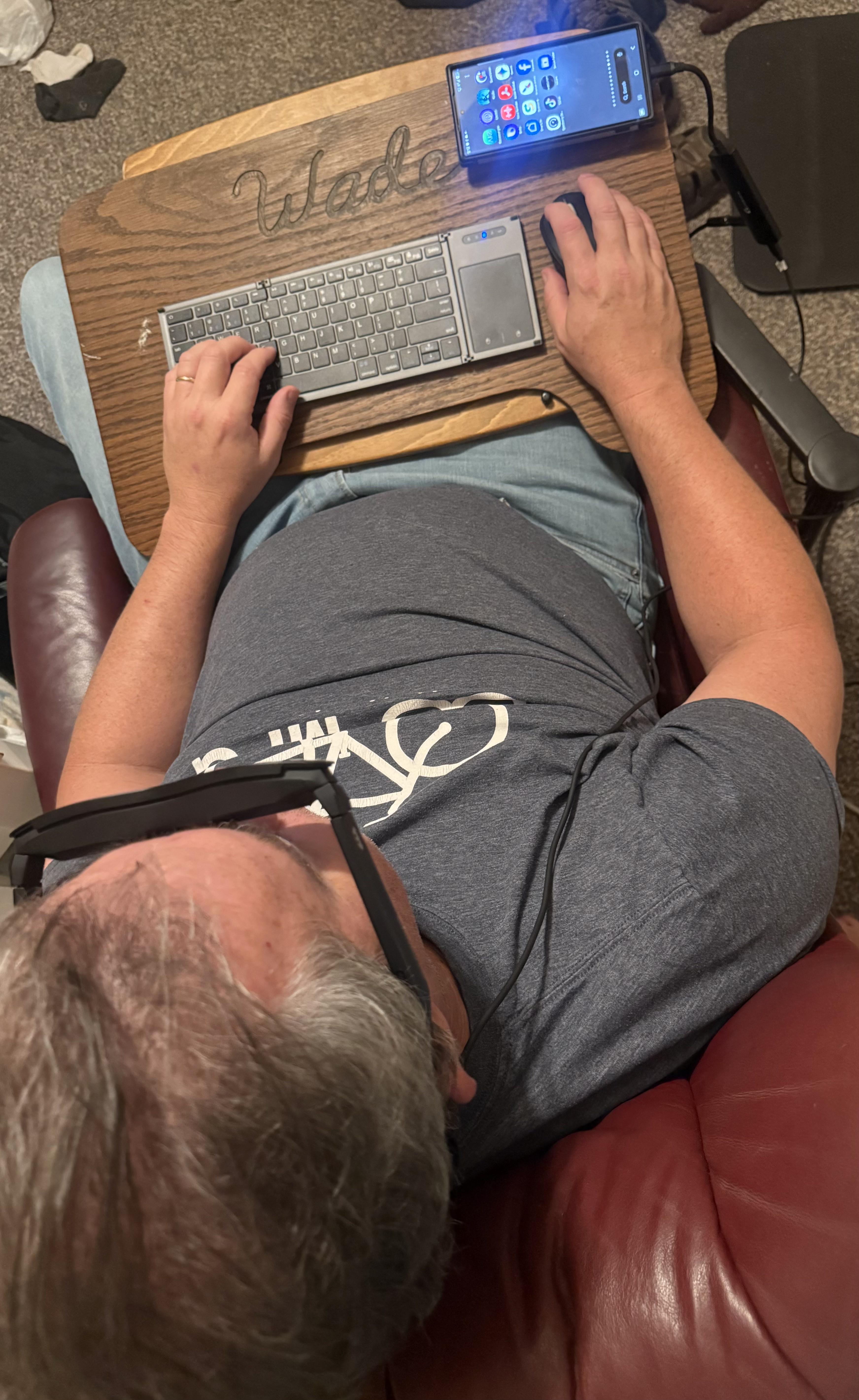
My Setup Personal Dex setup

Post image
40 Upvotes

Because I like ultra portable setups this is my new arrangement. Using RayNeo glasses with (sometimes without) a docking device https://a.co/d/0e0hmu9W

Foldable keyboard with tackpad and separate mouse.

Doing a lot of field work soon. Map editing by remoting into a virtual desktop for GIS and video editing. Just need my lapdesk and ready to roll! Samsung galaxy s23 ultra. Adding a 100 watt usb-c power supply and battery backup to the mix soon.


r/SamsungDex • • 14h ago

Useful info HzUnlock works on my S25 Ultra – DeX at 120 Hz, no root.

70 Upvotes

Just wanted to thank the dev for HzUnlock and recommend it to anyone using DeX on an external monitor.

I tested it on my Samsung Galaxy S25 Ultra with a Rayneo air 4 pro, connected through usb c. Before, DeX was stuck at 60 Hz. With HzUnlock it runs at 120Hz and everything feels way smoother: moving windows, scrolling, the cursor, all of it.

Setup was easy: install Shizuku, start it with wireless debugging (no root needed), open HzUnlock, allow it in Shizuku and turn it on. The phone's own screen keeps working normally; it only changes the refresh rate on the DeX monitor.

Download (GitHub releases): https://github.com/npfp222/HzUnlock/releases

Original post from the dev: https://www.reddit.com/r/SamsungDex/s/FwtKPGF6VR

Great work, and thanks for making it free and open source!


r/SamsungDex • • 20h ago

Question Office Hardware Question

4 Upvotes

I'm looking to run DeX on my office screens from my S26 Ultra. They are providing two monitors, a mouse and keyboard. Do I need anything other than an adapter like the Anker USB C Hub, 7in1 multi port adapter?


r/SamsungDex • • 23h ago

Discussion DeX UI overhaul coming in One UI 9.5. It looks similar to Googlebook OS, and I'm not mad about it. Are we finally living in an age when the mobile desktop isn't an afterthought?

Post image
251 Upvotes

I just watched this video, and the new interface looks awesome!

There's a been some of activity around this sub about how DeX might be affected by the new Android Desktop OS. For example, this post, an effort to re-create a new Googlebook OS feature on DeX. Also, my own post that ended with speculation DeX might benefit from the "mainstream" Android development being easily ported across Android devices.

Thanks to the knowledge of this sub, I'm daily driving the Googlebook OS version of Chrome that intuitively resizes according to phone and mobile screens. Desktop Chrome plugins are working. But, for anyone who wants to try it, I don't think the version I installed from apkmirror auto-updates. It's also possible the regular version of Chrome will auto-update from the play store and overwrite the Googlebook version, I haven't been using it long enough to know exactly how this works.

And now this UI overhaul that mimics some Googlebook OS UI elements. I'm excited for the overhaul to come to the stable channel. And I'm beyond stoked to see this category of mobile computing finally getting the kind of attention it deserves. Let them cook!


r/SamsungDex • • 1d ago

Useful info S21 Ultra + Dual BT Sonos Roam Setup 34” Ultra Wide Setup

Post image
8 Upvotes

r/SamsungDex • • 1d ago

Question Anybody have favorite thin/flexible usb-c cables with 4k 60hz video output that they like to use with Dex?

1 Upvotes

Looking for favorite thin and flexible usb-c video cables for Dex!


r/SamsungDex • • 2d ago

Question Small glitches/datamosh on the screen while using Wireless connection

1 Upvotes

So I just bought Galaxy S25 FE and I'm trying to use Sam DeX to watch some videos on my TV.

The problem I'm facing is some glitches keep appearing on the screen more often than I'd like them to show up.

The glitches itself look like some kind of datamosh.

I know it's probably because of the wireless connection and it may be common, just asking this here to know if there's an option where I can solve this issue.


r/SamsungDex • • 2d ago

Question Did someone tried using the clevetura keyboard (touch on keys keyboard) with dex ?

3 Upvotes

r/SamsungDex • • 2d ago

Question keyboard voice input while using dex

2 Upvotes

i used to be able to use gboard and its voice to text input while using dex. after upgrading to one ui 8.5, i am no longer able to use voice to text input. i can't even use the voice input from the samsung keyboard. any help?


r/SamsungDex • • 3d ago

My Setup DroidDeck won't run in DeX?? Only mirroring works 😭

Thumbnail
gallery
6 Upvotes

ok so real quick, DroidDeck straight up refuses to open in DeX πŸ’€ it says "can't run in Samsung DeX, designed for phone Home screens." mirroring works but it's not it for me 😩

my setup:

S21 Ultra (Snapdragon 888)

monitor + keyboard DeX

anyone else getting this? is there a workaround or setting i'm missing? or a DeX-friendly alt u'd recommend? πŸ™

ty in advance, fr appreciate it


r/SamsungDex • • 3d ago Bravo

News HzUnlock: High Refresh Rate Samsung DeX with No Root

83 Upvotes

Yesterday I posted DeX running at 240 Hz, but it needed temp root. A lot of you asked if it could work with Shizuku instead. It can, so I turned it into an app.

It's called HzUnlock. You just need Shizuku running (wireless debugging works, no root needed). Open the app, allow it in Shizuku, and turn it on. There's also a slider if you want a lower refresh rate to save battery.

I've tested it on my S24 Ultra and on an S24+, both on One UI 9. My monitor is an Odyssey G40B (1080p 240 Hz) through a USB-C to DisplayPort hub. Other Samsungs should work too. The app has a compatibility page that tells you what your phone supports, and even if it can't do full speed you should still get 120 instead of 60.

To answer some questions from last time: it's only for DeX on the monitor, your phone screen works like normal. It works on Snapdragon, I haven't been able to try Exynos yet. And the code is up on GitHub if you want to look through it.

Download: https://github.com/npfp222/HzUnlock/releases

If you try it, let me know your phone, your monitor, and whether it worked. There's a Copy Report button under Compatibility in the app that helps a lot.

Edit: 1.1.0 is out: It fixes DeX restarting every few minutes, the Reconnect Monitor loop, and a black monitor at very high rates (turning High Refresh off now fully undoes it). It makes unplugging safer, and the slider now offers all of your phone's rates. If something goes wrong, Diagnostics in the app has a report you can share.

Edit 2: 1.2.0 is out. If your monitor or TV is stuck at 60 Hz but can do more, open the app and tap Start at 120 Hz (or whatever it offers), then tap Keep. No root needed (Snapdragon only). If the screen goes black, wait 20 seconds and it switches back.


r/SamsungDex • • 4d ago

News Samsung DeX running at 240 Hz

235 Upvotes

Root was required to achieve this.

Overall, it feels very smooth, even on my almost 3-year-old phone (S24 Ultra). It only gets slightly warm during normal use, and I get a few microstutters here and there when opening apps.

Sorry if the video quality’s a little rough since I recorded it on an older phone.


r/SamsungDex • • 4d ago

Question Samsung internet browser different tab sites on Dex

3 Upvotes

Hey guys, recently after OneUI 9.0 I noticed mobile vs Dex Samsung Internet is now separated. I usually have same instance when I want to continue on Dex mode for bigger screen, but now when I switch to Dex it has different instance, different open tabs.

Any way to change this back? I lost the seamless transition.


r/SamsungDex • • 5d ago

News One UI 9.5 beta update for DeX

Post image
113 Upvotes

One UI 9.5 Beta has started to release for the S26 series in some countries.
There are a few updates for DeX.
I do not have the update but SamMobile posted a video on it. Link

The update detail that contains Dex:

  1. Optimized window maximizing
    Maximizing a window now fills the entire screen, window controls are now integrated with the status bar at the top of the screen, and the apps background color is visible behind the taskbar at the bottom, providing a more immersive experience.
  2. Auto split and more snap options
    You can now snap windows to all four corners in addition to the top, bottom, left, and right. You can also arrange your running apps into 2, 3, or 4 split-screen windows at once.

r/SamsungDex • • 6d ago

Question Struggling with Dex

27 Upvotes

Several months ago I thought about swapping over to Dex for my job. I am a teacher and everything is practically google workspace/classroom based.

But, I just couldn't get my head around some stuff or had barriers.

  1. I found it difficult to work just in the browser. At the same time really wanted to not touch the apps because they lack so many features. How could I set up webapps for all the main google workspaces like Docs, Sheets, Drive etc? But also not have the app open up.
  2. I really wanted to be able to project to my whiteboard. This I can do easily with a splitter but I do not exactly want personal messages and notifactions popping up while I teach. How can I avoid this?
  3. Im fine with 1080p 60fps. But it still felt off compared to working with my schools ancient stuck in windows 10 used by several previous teachers laptop. How do I optimise this? Or maybe ive done something wrong.
  4. Is an ultrawide monitor the only way to get more screen real estate. I currently rock 3 monitors with the school laptop. And do not really want to go back to 1.

Any and all tips welcome. I have a Fold 6 and a reasonably decent usb hub with hdmi out (can do 4k 30 but dont care about that, purely for doc and sheets work).


r/SamsungDex • • 6d ago

Question Media Controller

3 Upvotes

Im trying to find an S26 TV style controller for media playback via Dex including being able to adjust the volume


r/SamsungDex • • 6d ago

News Was this version ever posted? DIY lapdock, actually pretty awesome. I remember seeing some of his initial mockups, but the final version is pretty cool. If the maker can post up, love to give credit and highlight (it's also legit possible I just missed it, and we should pin the original post)

Thumbnail
youtube.com
29 Upvotes

r/SamsungDex • • 6d ago

Question Some games not showing up correctly

Thumbnail
gallery
12 Upvotes

In this example, I am showing genshin impact. I am only able to play this game on mirrored mode, because as you can see, it's either partly black and partly distorted or almost totally distorted or even flipped in dex. I cannot find Dex labs options either or the "about samsung dex" button to enable dex developer option. There should be a force resize option or something like that for dex, but it's gone. I never activated dex developer option. I am using a S24 plus (android 17, UI 9.0, europe version with exynos 2400). Before you ask why I use dex for gaming: it's useful when playing in the train and when you have to show your ticket, you do not have to minimize the game. Is dex lab / are the dex lab options really completely gone?


r/SamsungDex • • 7d ago

News Major updates to Open Android DeX

Post image
200 Upvotes

Open Android Dex, now supports:

  1. Opening Android/Linux apps directly on windows/mac
  2. Photos integration
  3. Improved CPU performance
  4. support for postmarketOS / Nura
  5. Windows/Mac drag & drop files
  6. Connection over USB / Wifi / Data
  7. And more!

https://github.com/dotnetdreamer/open-android-dex


r/SamsungDex • • 7d ago

Question How do I fix the lag on an LG webOS TV UJ620V?

1 Upvotes

I've tried wireless DeX and Smart View, but both make games appear very laggy on the TV screen. Would a cable help? Or is there a better solution?


r/SamsungDex • • 7d ago

Question How do I exit Dex or exit fullscreen mode in 2026?

1 Upvotes

I connected my Fold 8 Ultra to my Windows 11 monitor via HDMI.

I also used a BT mouse and keyboard.

Then used the Extended mode.

But I'm unable to exit Dex or exit fullscreen mode.

Moving the cursor to the top of the screen and hovering there doesn't reveal a drop down menu.

Moving anywhere over the screen doesn't reveal anything.

Left click or right clicking any icons or menus doesn't give any options to quit either.

Disconnecting the cable is the only option I've found.

Thanks for any advice.