r/ThrottleStop
•
u/Valour-549
Asus Scar 18 / i9-14900HX
•
Dec 14 '24
•
 2
Ultimate Throttlestop Settings Guide
ASUS ROG Strix Scar 18 i9-14900HX (Cinebench R23 score 35838 // Cinebench 2024 score 2021)
✅ Throttlestop Guide here (PDF version here) — seems long at first, but it's actually half the length due to it being written in two different languages, just work through it one screen at a time.
✅ Liquid Metal Repaste Guide here — includes common temperature questions and testing.
In particular FAQ 3 is worth reading if you're struggling with high temperatures.
✅ CPU Throttling vs. Game Performance here — understanding FPS, CPU/GPU usage explained.
✅ GPU Mode and Display Mode Guide here — Optimus, Adv Optimus, MUX switch explained.
✅ Asus ROG Laptop Standard Advice here — just a list of advice for Asus laptop users.
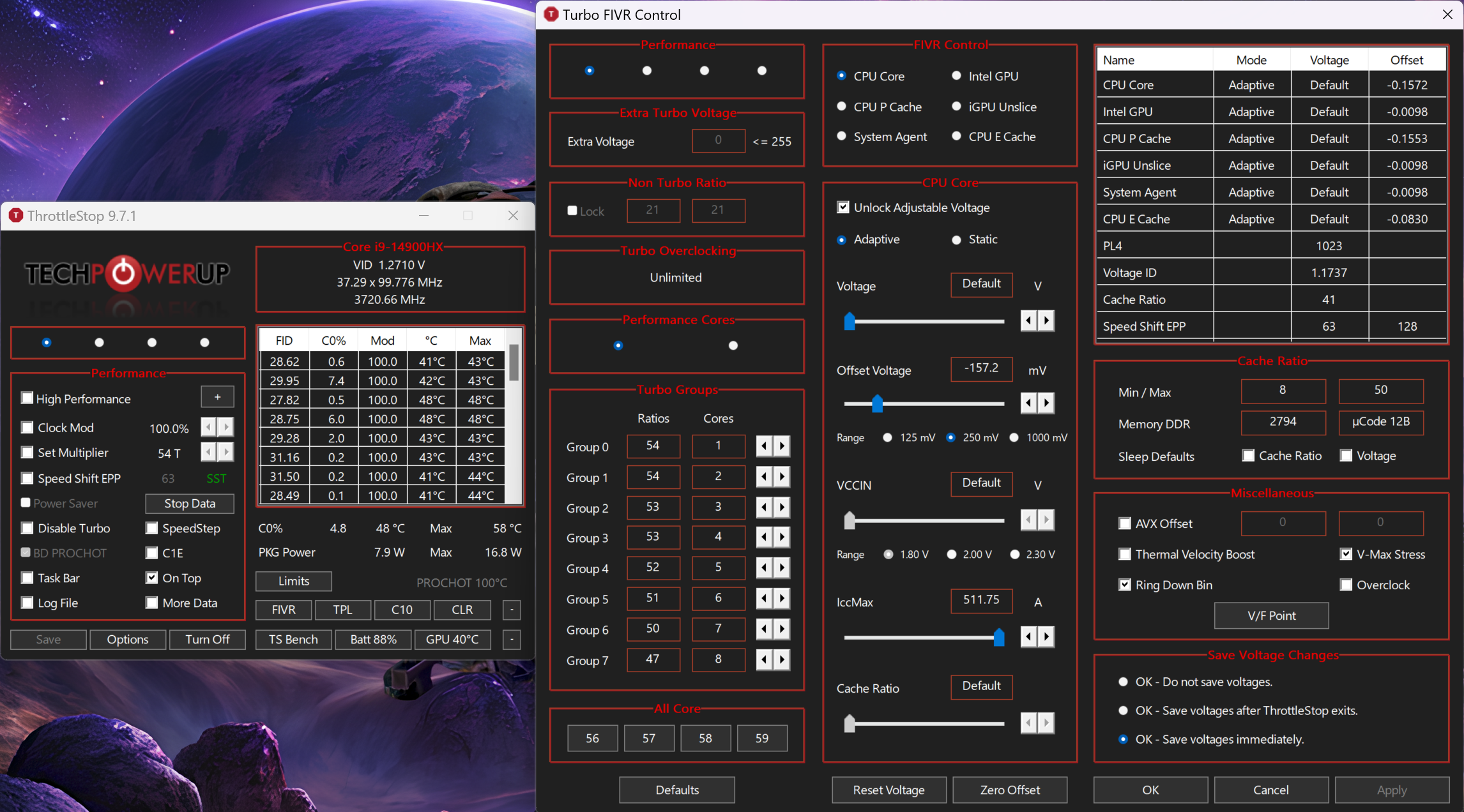
⚠️If you need help with Throttlestop, post your Main screen + FIVR settings side by side.
6
u/dc_IV i9-13900HX with E31 Dec 15 '24
Wow, this is an amazing write up! I hope u/unclewebb sees it too!
3
u/Top-Feedback-5261 Jan 20 '25
Hello good sir, I also have the same Cpu as you, but when I put my Under volt and copied it set as -155.3, My laptop BSODs, and it seems that I cant run cinebench when I have thise settings from the 9.6 throttlestop undervolting guide. Please help. I have 14900hx and 4070 on a legion 5 pro
2
u/gianmaranon Dec 28 '24
Thanks for the guide! I have a legion 7i pro with the same cpu as you but also with rtx 4080. Wondering if you also have any guidance on GPU undervolting/over locking guide so settings work seamlessly together?
2
u/L1N3B3CK Dec 29 '24
Thanks for the guide, I managed to hit 35856 / 2116 in cbr23 single run, and 35629 / 2115 in a 10m run.
No more thermal or power throttling. Losing a bit of performance in 1 / 2 / 4 cores load but that's normal since the core clock has lowered.
2
u/OFZatt Jan 02 '25
Hi, please take a look at my setup and results, am I on the right track (continuing to reduce mV)? my rig is Legion 7i 2024, 14900hx, 4070. Thanks a lot.
2
u/desiscatrc Feb 24 '25
My FID values of P cores jumps all over the place around 0.0x rate under heavy load. Did I do something wrong ?
2
u/Remz_Gaming Feb 26 '25
Hey. I'm hoping you can help.
Lenovo Legion 5i with i9-14900HX with RTX4060.
No matter what I seem to do, I'm getting POWER throttled while running Cinebench. Thermal throttling kicks in a little (to be expected) but the power throttle is happening often. Even setting Group 7 below 48 still reaches a power throttle.
I've watched your video of your near-perfect Cinebench run and my cores cannot hold that clock.
Here is a picture of my settings while running Cinebench. Any ideas? Thanks in advance.
2
u/brontozabra Feb 26 '25
Hey, I was trying to follow your guide but for some reason my FIVR settings are locked. I did everything it says in the guide (enable overclocking in bios, turn off core integrity, disable vt, disable win features, delete .ini) but still no luck :(
Do you happen to know what what might cause this?
My BIOS version is N0CN29WW
2
u/SynStark- Mar 17 '25
Hey, thank you very much for all this info. I have the G834JY model with the 13980HX do you have any suggestion when it comes to undervolting that model? Thanks again!
2
u/Rang_90 May 15 '25
This all looks a little intimidating lol Is there any point in under volting i7 14650HX I just can’t stand the fans on the MSI vector
2
u/hahaharsh_007 Jun 14 '25
Thank you so much for this guide. Make a understand a lot about how things work in general and helped me with my first ever undervolt.
You mentioned in your guide to always set the p core and P cache undervolt the same or it won't work, but I have seen people (on YouTube vids + reddit) more often with an aggressive p core uv than p cache and have a stable overall system in gaming, cinebench etc. So I was wondering if I misread something. Thanks again I'm super new to all this (:
5
u/FoundationOpening513 Jan 16 '25 edited Jan 16 '25
Where has MV Boost 800 Mhz gone? I dont see that option
ETA: Ok nevermind I see new changes now for 9.7, I'm gonna use 9.6 lol don't want to add more complexity to an already complex exercise!
4
u/thesanter77 Feb 04 '25
Just tried this out today and it worked great! Thank you so much for the in depth and easy to follow guides!
1
u/Chemical_Low2547 Dec 16 '24
I simply activated the hidden option through the regedit. Set up max processor frequency less to prevent a throttling and switch off eCores. Idk how many scores I have now in CPU synthetic tests, but have not more than 85 °C while any game I play
PS I have the same laptop as you have.
1
u/TheFlyingAlamo Dec 17 '24
I'm just about sold on ordering a Lenovoe Legion 7 with the 14900hx and 4090.
I'm quite new to modern gaming laptops. I take it these settings will be suitable for me to utilize initially?
2
u/M1ndtheGAAP Dec 28 '24
Would you have any idea why the MV Boost option wouldn't be showing in the FIVR settings?
1
u/Far_Training3438 Dec 29 '24
Here is my 10 min run score. Managed -170mV core and cache with all cores locked to 4.9GHz, mV boost @ 800mhz is set to 105. Been running like this for 2 months without a crash so seems to be stable.
1
u/1Kaztro Jan 19 '25
Thank you!! Hands down the best undervolting guide I have found for the scar 18! Much appreciated bro.
I copied your settings (I have scar 18 - 4080, 14900hx, 64gb kingston fury CL40)
Here are my results. for a 10 minute run
1
u/Deniz1433 Feb 16 '25
Hello, the V/F points and their MHz values seem to be missing for me, why could that be the case? I have an i7-11800H, and it should support V/F Points since I read online that they were introduced in Comet Lake (10th Gen)
1
u/No-Recipe2927 Mar 17 '25 edited Mar 17 '25
Hey,very useful guide,i was looking through your guides and saw the FAQ 3 on how to detect how often the cores thermal throttle and i've noticed my P-core 4 thermal throttling pretty much all the time(as shown in the picture) while my other cores rarely throttle and only in the long run they do so,also the temps on P-core 4 are at about 96 degrees while other cores sit at around 85-92 degrees. what do you think is the issue? Is it simply bad liquid metal application as my laptop is relatively new and has ASUS's stock LM application or could it be related to something else?
1
u/kookymonkey6823 Apr 11 '25
I have a question, you mention "CPU Core and P Cache need to be similar values or the same, or it won't work", for a 14900hx, what is the furthest you'd go in difference between the P-Cache and Core undervolt? 5mv? 30mv?
If I use intel XTU, do i still need to worry about this.
1
u/Optimus_XIV May 02 '25
Hey I'm not too good with computer stuff but somehow found my way here. I've been having problems with my rog strix G16 where I keep getting clock and synthetic watchdog timeout bsods while playing games (Expedition 33 so far). Would applying these settings help?
I've only had the laptop for about a year but I've been having a really bad experience with laptop performance in general :/
1
u/Phonk_32123 Jun 21 '25
can you post it somewhere else? i can't see it on imgur for some reason
1
u/AdParticular2152 Jun 22 '25
Hi friend, I completely disabled virtualization and all Windows settings related to it. I also turned off memory integrity, but FIVR still doesn't work
1
u/Wide-Sprinkles-2037 Jun 25 '25
Hi there, I also have a i9-14900HX (Legion Pro 5i). I live in a warm climate with no luxury of cool temperatures (ambient 27-34C) so I only can rely on my laptop cooling pad (Llano V12). I have managed to undervolt to -110mV whilst following all your settings at 175W PL1/PL2, but it is just too hot for the laptop so it thermal throttles too often.
Because of this, I lowered the PL1/PL2 limits to around 120W and 150W respectively to achieve a reasonable result (Cinebench 29927 score) but it is still quite hot at 88-90C average / 13% core thermal throttling during the 10 minute cinebench R23 test. Do you think this makes sense or am I doing something wrong here? Great to get some advice as I am still learning about undervolting and this is rather exciting for me. Thank you.
1
u/UsernameReee Jul 01 '25
I have a question here.
In the FIVR panel part, you show the mV Boost @ 800 Mhz, with "if your cpu core undervolt is -60, put 60 here."
Does that mean I have to undervolt in BIOS first, and put that number into that spot, or do I just do it all in that panel? Also mine says 4100MhZ, not 800, so what difference would that make? (Sorry I'm very ignorant and new to this)
1
u/myfavoritecatisspot Jul 19 '25
Attempting to under volt my legion 7i using this guide, but running into issues with Cinebench crashing my lab top a few seconds into tests even with small under volts of -60mv like suggested. I’ve tried everything I can think of and thats listed in the guide, any ideas on what I could be doing wrong? I have the same CPU model as the guide (i9-14900HX). https://imgur.com/a/w7eK9xM
1
u/[deleted] Jul 28 '25
Hello valour ive been using throttlestop and followed your guide, it worked perfectly fine and still does, but last month i had an issue, when I used the v/f tuning curve idle power draw would become 1.4-2w at 60z, but for some reason that doesnt happen at all now, Idle power is 5.4-6w now regardless of the refresh rate, and i should also mention i unchecked all the v/f tuning curve setting once and got the same result so its basically not working at all, please help it would be much appreciated
1
u/Teomaniacos Aug 12 '25
Hello there ! first of all thank you for your guide it was very helpful to me.. i recently bought a scar 2023 with the 13980HX and 4080...it is a monster of a laptop... this is my first 3 days attempt for untervolting
any suggestions?
for sure i have to change the LM ...and i been thinking to put thermal paste so it will not make a corrosion to the matal...what is your suggestion about that? also you have some pads to suggest ?
thank you again for your posts
1
u/Wintoxx Aug 22 '25 edited Aug 22 '25
Hello man,
Amazing guide! However when I have these values in TS and start running Cinebench, I instantly get the HOT message and start going to 97/98/99/100 degrees.
I wanted to undervolt to lower the temps. Am I doing something wrong? Pls help me.
Thanks in advance!
1
u/Lucienk94 Aug 22 '25
How safe is it to change the PROCHOT to 0? My operating temperature is by Intel classified as 110 degrees celsius. When gaming it reaches 102 max.
1
u/Adri-01 Sep 30 '25
i knows its a bit late to ask but whats your cpu e cache?
1
u/Expensive-Love-6577 Nov 13 '25
Will the different modes on legionspace affect or counteract while undervolting using throttlestop ? Like balanced, performance modes?
Also what values are ideal for gaming in these settings ?
1
u/labizoni Dec 09 '25
Does this apply to Acer's laptops equipped with a Ultra Core 9 275HX as well? Most options in the FIVR Control are not available.
3
u/Mike5461 Oct 06 '25
Thanks! My Legion 7 Gen 8 is running great!
1
u/[deleted] Dec 15 '24
prochot is 95 by default because variance can go from 95 to 100 if you set to 100 it means CPU will get up to 105 for short period until throttle acts idk what long term effect of it. undervolt it's too way aggressive and incorrectly guided. cinebench is NOT enough for testing stability. bsod can happen in cinebench or after 5 hours, 1 week because of low voltage. I highly recommend less than 100mv undervolt , stability and no headache is better in my opinion. or if do heavy testings (24 hour stress) cooling pad and auto settings you will get a similar score.
2
u/Haachama2x Jun 24 '25
Can i get your file settings of throttlestop? We have same laptop anyway :) thanks
2
u/Longjumping_Disk_930 Jul 11 '25
Thanks for your detalied guide u/Valour-549 . I never achieve real resutls using xtu. Here are my scores on R23 with the Vector 16hx 14V
1
u/NoRisk8031 Apr 28 '25
What bios version do you recommend? I have 320
1
u/gnillihcs May 12 '25
the bdprochot really sets it to 400.00MHz D: so depressing
1
u/Some_Lion_3763 May 24 '25
It's runs okay when I play Arma 3 reforged. The fans been running between 5 and almost 6 thousand rpms for each one. My GPU get kinda hot when I game but the cpu seems to be doing a lot better then when I first started using my MSI, i7, 10 gen, RTX 2070. I'm worried I'm gonna ruin my laptop if I keep playing on it like this. Help please,. Regards, Joshua
1
u/calmrefri Jun 09 '25
Hi, why is Power Limit 4 set as 248? Is it better to have it 0 or 248?
1
u/AdParticular2152 Jun 22 '25
Hi buddy, on my MSI Raider GE78HX with an i9-13980HX, the FIVR tab is locked. Could you suggest anything that can be done about it?
1
u/Sea_Nothing_4373 Jun 29 '25
need help with throttlestop for less temperature, high performance and longer hardware life
1
u/Signal_Ad8476 Jul 07 '25
i dont know why my throttle stoper is not working
the fiver cantroler option is showing unavelabl
1
u/No_Mud1636 Jul 23 '25
Hey legend, thanks so much for your guide! I'm stuck on the final step though... What should I set as the maximum processor frequency within the power options. Any recommended value, or should I leave it as zero? My laptop is a Lenovo Legion Pro 7i, i9 13900HX CPU, 4090 GPU. Cheers.
1
u/Primary-Funny294 Jul 25 '25
Hello. As I see that this is the most recent post about throttlestop, I want to make the most of my old Legion Y540 i7 9750HF, RTX 2060 6 Gb, 16 ram. I read most of the topics regarding my laptop but none seem to be as elaborate as this even though is not specifically for my legion. Next week I,ll repaste with arctic mx-4 or thermal grizzy kryo( i don’t know if I should use liquid metal or not) and I’ll ask more then. I’ll come back with more questions hope I could get some help.
1
u/VoidPelt MSI Pulse GL66 11UGKV/i7-11800H Jul 29 '25
Hi! So, I am new to undervolting/overclocking laptop CPU's, and I was wondering what would be the more recommended settings for my MSI Pulse GL66 (that is sort of on it's last leg due to MSI not caring about proper cooling...) I have an i7-11800H, and my settings are shown here. (Yes, it's always this hot and it's honestly a nightmare. I'll admit the CPU took some damage when the fans suddenly died when I was in the middle of a Warzone match last year, and then it's sorta been a downward spiral. And since I cannot afford a proper rig yet, I'm trying to do everything I can to extend this things lifespan and make gaming a little more enjoyable?)
1
u/Remote_Flan_3511 Aug 03 '25
Hello sir,
I’m currently using a Zephyrus G16 (2024) with an Intel i7 and RTX 4070. I’ve noticed that my CPU temperature reaches 95–98°C while playing Apex Legends. I’ve already repasted the CPU, but the temps haven’t improved. Do you happen to have a tutorial specific to my laptop model, or could someone assist me with this issue? I’d really appreciate any help or guidance. Thank you, and I hope to hear from you soon.
1
u/hayashyeah Aug 05 '25
i7 14700HX - sharing some inputs. Please let me know what your tuning setting is for this CPU.
Edit: added HX to the CPU
1
u/MausSica Aug 05 '25
Hello. This for the first time I have a high-end gaming laptop and I never did overclocking/undervolting so I am kinda anxious about starting this, but I heard that I should undervolt my cpu
Laptop is legion i7 with ultra 9 275HX and 5070ti. How would you recommend me to proceed with setting up my machine or undervolting the cpu?
1
u/SebbyboyWasTaken Aug 20 '25
Hey! No idea why, but I can't see the checkboxes even though they are there. I can click on them, and they work. I just don't see them.
Also, why are all of these settings greyed out? I also can't modify the MMIO...
I can modify the voltages, (even though the checkbox isn't there, I can check it and change the undervolt)
1
u/Scrimismyballsack Sep 02 '25
I did this
On my i7 14650hx laptop
But for some reason my FID is constant 38
3800mhz
What do I do???
I'm getting about 19k score
1
u/CraftyPercentage3232 Sep 03 '25
Hello, I have a MSI GP66 Leopard and I am trying to get as much CPU performance as possible without it going into the 90 degree range.
Here is my current Cinebench, Throttlestop settings, and thermal advanced BIOS settings.
If I could get some assistance achieving this goal I'd greatly appreciate it because I've been beating my head against the wall with this issue for awhile lol.
1
u/CookieFunny Sep 04 '25
Great guide OP. Thanks a lot. I have an issue btw. I cannot select the e-cores radio button in the Turbo ratio limit settings (in the FIVR window) on a series H mobile intel processor (intel ultra 5 135H). Is it due to lack of support on ThrottleStop for such processors?
1
u/Theallseer97 Sep 11 '25
ive been looking through guides but im honestly still not 100 percent sure what to do. im wanting to undervolt my cpu to reduce the temps a bit. can anyone please tell me what settings i should change?
1
u/CarWeird3939 Sep 21 '25
ive got acer nitro v16 i7 14650HX with 4050 and it has only 135w charger
can someone help me here to use throttlestop properly?
what changes should i do and what things i shouldnt touch
1
u/Denial94 Oct 10 '25
Can you tell me guys what do you do when you put laptop into sleep mode and back?
Are you leaving throttlestop program in background?
Do you get any crashes/BSOD when you wake up laptop from sleep mode with changed voltage?
1
u/Dazzling-Yoghurt2114 Oct 17 '25
Hey all, I've been spending days with ChatGPT and I'm not unfamiliar with ThrottleStop, Intel Extreme Tuner, nor working in the BIOS. I have an RTX 4060TI 16GB with an i7-8700. My motherboard is an ASUS ROG Z390-E Gaming.
So, before I reapplied thermal paste two weeks ago -- my machine would never broach 75 degrees, even in like Borderlands 4 or Black Myth: Wu Kong, it just ran so beautifully and I took screenshots of all my BIOS settings. Glorious. After re-applying my thermal paste, it's not out of control.. but it was. To make this boring post shorter and wrap it up, can anyone help me with good settings for Throttlestop? It is undervolted a bit.. and I'd be happy to share my settings from BIOS and ThrottleStop. But I dislike it when I'm idling at like 40 degrees and opening Chrome bounces it to 55 briefly. And I dislike seeing 80 degrees or even 75 in WoW or Diablo 4 or Borderlands. I just don't know what happened and could use some help.
Thank you.
1
u/UamirDeElepant Nov 05 '25
is there any way to fix my cpu not being able to be undervolted? and do i still need to create a task scheduler if im doing everything but undervolt?
1
u/Big-Dare-2376 Nov 29 '25
newbie here, is this settings also applicable for i5 11400H?
1
u/dizzna Dec 04 '25
Hi,
so i bought a new msi sword 17 hx b14v with 14650hx and found this guide while trying to undervolt.
I tried to follow most of the guide steps (not aiming for ultimate performance) to get a bit cooler and less stressed system. I made following settings in throttlestop and they are stable (occt/3dmark) so far :There are some things i was wondering about:
System always seems to have some workload for no reason. Taskmanager and TS show literally no usage but clock stays high.
If someone can have a look and say if this makes sense would be nice. Thx in adavance
1
u/LifePuzzleheaded3561 Jan 03 '26
Hi! Thanks for the guide. I have an MSI Raider GE78 14v with the same tester and a 4070. One question: what are your temperatures like? So far, I've only lowered the voltages (-80, -50, -50) and the temperature has dropped significantly. I haven't touched anything else yet. If I increase the ICC (default 74), the temperature does rise. What advice do you have? I don't want to damage my system.
1
u/Nevesoothe Feb 11 '26
To bad the ThrottleStop is abandonware at this point, as in: the ThrottleStop.sys driver has a critical vulnerability since 6 August 2025 - when the vulnerability was reported: https://www.cve.org/cverecord?id=CVE-2025-7771 and still no update in sight as of 12 February 2026. :\
1
u/Public_Recognition44 Feb 22 '26
Hey, can someone please help me out? I followed the entire guide but ended up with a worse score than with the BIOS -80 mV undervolt on my ROG G18 14900HX: • BIOS -80 mV undervolt: 30,500 • ThrottleStop -150 mV: 28,500
1
u/delectable_boomer Mar 28 '26
After doing undervolting with TS, should we set CPU overclocking toggle on in legion space software to get the optimal performance because temperature are in control ?
1
u/wesmarpl Mar 29 '26
I've written a version that works with virtualization enabled and is independent of the operating system. It runs before the hypervisor in Ring -1 alongside the EFI firmware; you just need to select the appropriate offsets, which are very easy to find:
https://kvc.pl/repositories/undervolter
1
u/Happy_Body3634 Apr 11 '26
need help what should i adjust when my cpu clock speed is below the base speed ex base speed 2.5 its dropping below 1
1
u/kimchi_watilike May 25 '26
I just got the Lenovo Legion Pro 7 2025 (16IAX10) with Core Ultra 9 275HX and RTX 5070 Ti. I’ve been reading that Intel locked undervolting on 12th gen and newer H-series, but I’ve also seen some mentions of BIOS unlocking methods.
Is CPU undervolting completely impossible on Core Ultra 9 275HX, or is there any workaround?
1
u/Valuable_Witness1481 May 27 '26
Un favor saben porque mi Alienware m18 R2 esta capado y siempre me mantiene los E-core del I9 14900hx en 1.6 y de ahi no suben solo los P-core, probe tanto con cinebench R23 y el 2024 me pasa igual
Incluso hice undervoting a -80.2 V y pasa igual mi info
Windows 11 Home 25h2
1
u/Competitive_Sale_914 Jun 13 '26
hi. can you make an updated one for version 9.7.3 or it works the same? im just confused other people keeps suggesting different settings.
1
u/NeighborhoodHot2600 Jun 17 '26
I have a i9 13900HX and rtx 5070ti laptop what would my settings be? Sorry for just blatantly asking someone to do it for me. Im not good with throttlestop.
1
u/Brawkens Jun 24 '26
Voilà ce que j’ai, je suis sur pc portable asus 16, Intel 5 210h, rtx4050, 32go de ram et nvme de 500gb
1
u/Admirable_Spirit_222 Aug 20 '26
Hello,
Firstable thanks for this guide,
I have made few extra resherche after i folloew the guide bc i still had some trouble. But they are still here... so I ' m asking for help.
my curent situation is that my computer keeps crashing after a certain period of time during gaming and I suspect it's coming from overheating.
In my situation right now, I can't apply new liquid metal, so that leads me to the only solution: trying to undervolt to reduce temperatures.
For two days now, I have read and followed multiple guides to try experimenting on ThrottleStop, but I made things worse, and I cannot achieve my goal.
The difficulty comes from the language barrier (I'm relatively bad at English) and I don't really understand what I'm doing sometimes.
Here is my specs : 13th Gen Intel® Core™ i9-13980HX Processor 2.2 GHz (36M Cache, up to 5.6 GHz, 24 cores: 8 P-cores and 16 E-cores)
edit : I forgot to mention that i made a terrible score after running cb23 with a score of 22 800 on 30 min test. and when i do the cyberpunk benchmark, it crash right at the begening
1
u/[deleted] Feb 22 '25 edited Feb 22 '25
[removed] — view removed comment
0
u/[deleted] Mar 25 '25
[deleted] — view deleted comment