r/ThrottleStop • u/Relevant_Impress7390 • 4h ago
Thermal putty missing from my Legion 5 Pro 16IRX8
gallery
0
Upvotes
r/ThrottleStop
•
u/Valour-549
•
Dec 14 '24
ASUS ROG Strix Scar 18 i9-14900HX (Cinebench R23 score 35838 // Cinebench 2024 score 2021)
✅ Throttlestop Guide here (PDF version here) — seems long at first, but it's actually half the length due to it being written in two different languages, just work through it one screen at a time.
✅ Liquid Metal Repaste Guide here — includes common temperature questions and testing.
In particular FAQ 3 is worth reading if you're struggling with high temperatures.
✅ CPU Throttling vs. Game Performance here — understanding FPS, CPU/GPU usage explained.
✅ GPU Mode and Display Mode Guide here — Optimus, Adv Optimus, MUX switch explained.
✅ Asus ROG Laptop Standard Advice here — just a list of advice for Asus laptop users.
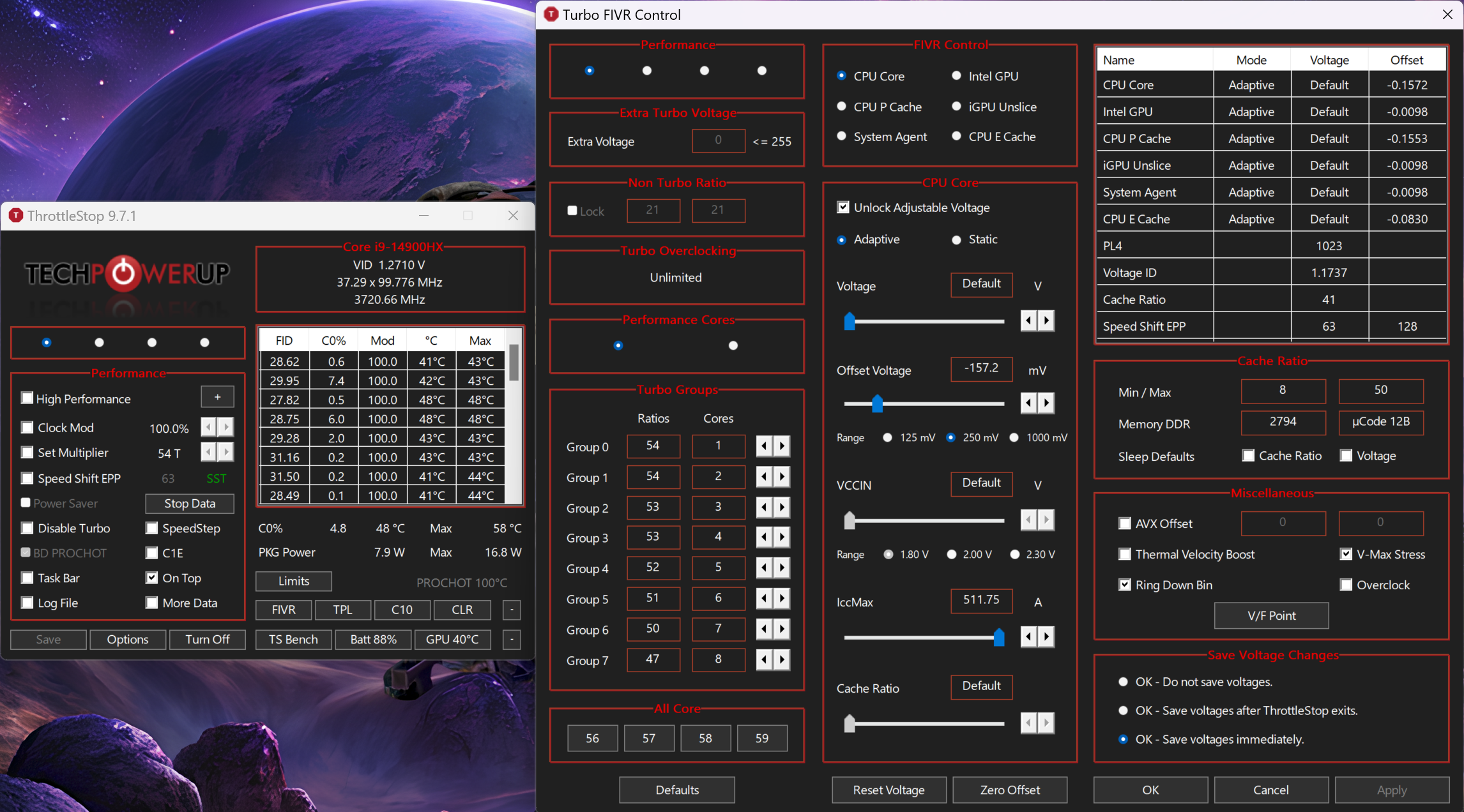
⚠️If you need help with Throttlestop, post your Main screen + FIVR settings side by side.
r/ThrottleStop • u/Relevant_Impress7390 • 4h ago
r/ThrottleStop • u/CommercialSilver77 • 1d ago
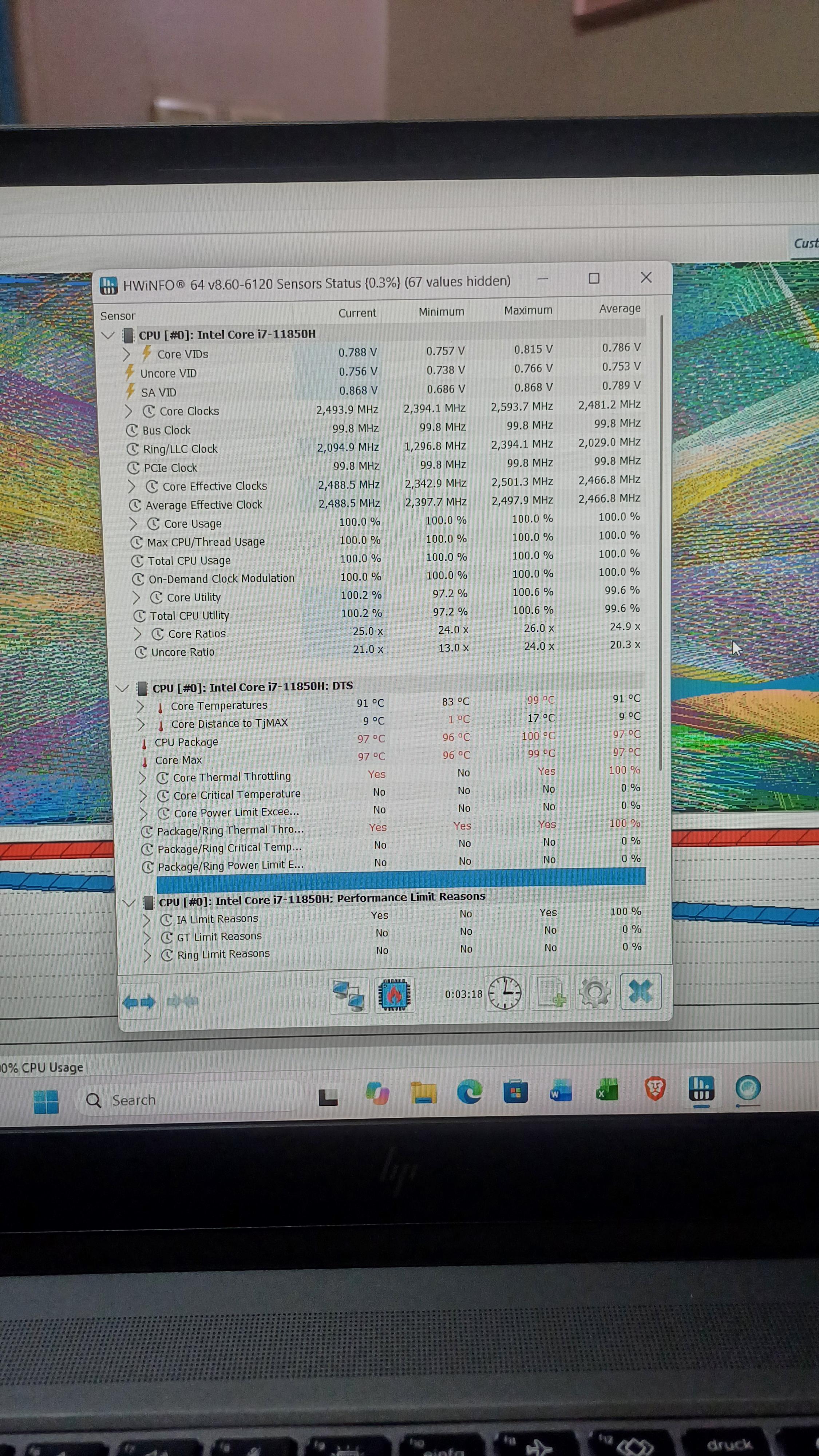
Is this normal, especially since the processor frequency is already low and thermal throttling Or should I go to the seller and exchange the device?
r/ThrottleStop • u/Evader101 • 1d ago

So I was undervolting my i9 14900HX to find the absolute sweet spot and I was using OCCT AVX2 and my CPU Core and P Cache were at -160mV each and throughout the run it didn’t crash but I noticed the laptop got relatively slow and was having delayed response so I assume the laptop was clock stretching. The run completed and the laptop was still lagging very much so I had to restart. Does this point to undervolt instability even tho the laptop didn’t crash during the occt run?
r/ThrottleStop • u/TemporaryStandard256 • 2d ago
r/ThrottleStop • u/Technologician7 • 2d ago


.060 undervolt Package power reaches 102 C in 10 minute cinebench r23 stress test but effective clocks stay above 5.5 ghz all cores
r/ThrottleStop • u/jacolbs • 3d ago

It's specifications are (16IRX10)
Display 240hz IPS
CORE
CPU: Core i9-14900HX
GPU: RTX 5070 8GB
Ram :32GB
Storage: 1TB
Wanted some expertise tips for undervolting GPU and CPU for sustained long term perfomance and controled temp limit according to this configuration and from where to do it safely because i'm pretty new for this matter and gaming laptops i don't know shit about them if any one could help me with that i would be very much grateful
r/ThrottleStop • u/Upper-Chart326 • 3d ago
Hi everyone, I'm new here. I've had an Acer Nitro 5 for over 4 years, and for the past few months, the keyboard has been overheating excessively. It got to the point where I had to stop after typing just one sentence because it got way too hot, making it really hard to keep typing.
A week ago, I finally got a general maintenance done on it since I had never cleaned it before and it was packed with dust inside, on top of the keyboard overheating issue. I got it back yesterday, and even though the technician did a great job—he was very transparent and showed me before, during, and after photos of the process—the keys are still heating up. It's not as bad as before, but it's still noticeably warm and a bit uncomfortable.
Do you have any recommendations on how to keep the keyboard at a normal temperature? What products would you recommend? Any advice would be greatly appreciated. Thanks in advance for your help. Cheers!
P.S. Apologies for my English, I'm using a translator.
r/ThrottleStop • u/EffectiveReason1493 • 3d ago
r/ThrottleStop • u/Objective-Tap-8652 • 4d ago
Salut
Mon i5 12600k que je veux de monter se bloque à 3.8ghz, il ne va pas au dessus.. pourtant le max en boost c’est 4.9
Ce n’est pas un problème de chauffe car il reste dans les 55-60 degrés..
J’ai fait des choses dans le bios et sur Windows pour essayé de régler mais rien..
Mon ancien cpu (i5 11400) allait à 4.2 et il était TOUJOURS même au repos a 4.2ghz et j’aimais bien alors j’aimerais que celui là reste aussi toujours à 4.9..
Si vous avez des conseils merci !!
r/ThrottleStop • u/Far_Chair9470 • 4d ago
Legion Pro 5 8745HX hitting 100°C consistently
I've been dealing with overheating issues on my Legion Pro 5 Gen 10 (16ADR10, Ryzen 7 8745HX, RTX 5060 8GB) for quite some time now, and I'm trying to understand what's actually going on.
The laptop started exhibiting unusually high CPU temperatures around quite a while ago. The CPU would regularly reach 95–100°C under workloads that I wouldn't necessarily consider particularly demanding. Gaming would push it to 100°C, fans would ramp up aggressively, and I eventually started experiencing occasional hard crashes though very rarely.
I initially suspected the cooling system, so I opened the laptop, cleaned the accumulated dust and removed/reinstalled the heatsink assembly. Unfortunately, I reused the existing thermal compound because I didn't have replacement paste available at the time. Following this, gaming would sometimes cause the fans to ramp up dramatically, followed by a black screen and system restart.
Eventually, I took it to an authorised Lenovo service centre.
Here's where things got complicated: when the technicians attempted to enter BIOS, they encountered a password prompt. I genuinely don't remember ever setting a BIOS password. I had previously accessed BIOS myself and changed settings such as enabling virtualization and disabling the power-button LED, so this came as a surprise.
The technicians explained that without BIOS access, they couldn't perform certain hardware diagnostics, and that if BIOS access became necessary, motherboard replacement might be required.
They eventually cleaned the fans properly and replaced the thermal paste. They also performed their generic diagnostics, but couldn't complete the hardware tests.
Unfortunately, I'm still not particularly satisfied with the thermal behaviour.
During a subsequent cs2 session, the CPU temperature remained around 100°C for practically the entire session. Even multitasking with relatively light muktiple desktop applications had previously caused sustained temperatures at 99–100°C.
This brings me to what I think might be the actual issue.
I understand that repasting, cleaning the fans and restoring proper heatsink contact are important. However, aren't those measures primarily addressing heat dissipation?
What if the CPU is generating excessive heat in the first place?
Could something be causing unnecessarily high power consumption, aggressive voltage/boost behaviour, abnormal background CPU utilisation or incorrect power-management behaviour?
I'm not expecting a Ryzen 7 8745HX to operate at 60°C under gaming loads. I understand that these processors are designed to operate at relatively high temperatures. But sustained operation at its thermal limit, particularly under workloads that shouldn't necessarily saturate it, makes me question whether the underlying cause has actually been addressed.
I'd particularly appreciate input on the following:
What should I investigate to determine whether the CPU is consuming excessive power or boosting unnecessarily?
Could abnormal voltage, power limits or firmware/EC behaviour cause this kind of sustained thermal behaviour?
What telemetry should I examine in HWiNFO to distinguish excessive heat generation from inadequate heat dissipation?
Has anyone encountered a similar issue on a Legion Pro 5 with the Ryzen 7 8745HX?
How significant is the BIOS password situation? Can the relevant diagnostics be performed without BIOS access?
I'm honestly getting tired of troubleshooting this machine. I bought it for its performance, not to spend months investigating why it can't sustain that performance reliably.
I want to establish whether this is simply how the machine behaves under load or whether there's an underlying hardware, firmware or power-management issue that Lenovo hasn't identified yet.
Any informed suggestions or similar experiences would be appreciated.
r/ThrottleStop • u/Complete-Flounder-46 • 5d ago
r/ThrottleStop • u/somerandomnewguyhere • 5d ago
How to keep my motherboard safe?
Guys I just got a loq 15irx9 with i7 13650hx and rtx 4050.
I have heard that it is notorious for heating issues so how do I keep my motherboard safe?
I'm new to pc and stuff...
r/ThrottleStop • u/Rhaegal6 • 6d ago
Recently i changed my Laptop Cooling fans, ever since then, when gaming my CPU temp is at 90-100c. The CPU usually will be at 80 to 90 degree, not its 100c. what could be the issue?
The cooling fans are perfectly fine. Could it be the thermal paste or any other issue?
r/ThrottleStop • u/Inevitable-South2513 • 6d ago
r/ThrottleStop • u/Danka935 • 8d ago
r/ThrottleStop • u/2real_Amdy • 9d ago

r/ThrottleStop • u/CommunityOpening7945 • 10d ago


