r/UNIFI • • 7h ago

Help! DM Pro Max vs Cloud Gateway Fiber + UNVR or NVR Instant

5 Upvotes

Hi I'm new to the Unifi world and trying to buy more into the ecosystem. I could use some help in making a purchase decision for my home setup. I have a 10gb Pro XG 10 Poe. I want to:

  • Replace my current router with a Unifi one
  • Add NVR (I have 8 non-unifi cameras and will only grow that)
  • Keep a 10gb backbone
  • Minimum 5gb IPS
  • No cloud dependency (especially for accounts and login)
  • Willing to pay more for future readiness. $1k-ish budget?

I'm trying to figure out if I should get the DM Pro Max, or the Cloud Gateway Fiber and either the NVR Instant or NVR combined. The comparison in my head:

  • Money: roughly the same price
  • Physical Size: Doesn't matter, need to go rack mount anyway
  • Ports: I already have a POE+ switch for my cameras and don't need more.

Previous threads suggest keeping the NVR on a separate box than the router is a smarter play than trying to combine them in a single unit. I could add a dedicated NVR to the DM Pro Max, but with only owning 8 cameras it feels like overkill. The NVR Instant says it only supports 6 total streams and I already exceed that, while the UNVR with 64 stream support feels like overkill :D

In the UNVR vs NVR Instant, I think I'm better with the UNVR for additional streams. Can I get a read from the room here about which configuration to go with? Most expensive to least:

  • DM Pro Max + UNVR
  • DM Pro Max + NVR Instant
  • DM Pro Max solo
  • Cloud Fiber Gateway + UNVR
  • Cloud Fiber Gateway + NVR Instant

Thank you for any advice you can give me.


r/UNIFI • • 4h ago

Help! UACC-CM-RJ45-1G not working at 100 Mbps

2 Upvotes

I have a UACC-CM-RJ45-1G SFP module installed in my UCG Fiber. According to Ubiquiti, it supports 10/100/1000 Mbps, but it doesn't establish a link with a 100 Mbps device.

In the UniFi settings, Auto Negotiation doesn't work, and when switching to Manual, the lowest available speed is 1 Gbps.

Is this a limitation of the UCG Fiber, or am I missing something? Has anyone managed to get this module working at 100 Mbps?


r/UNIFI • • 1d ago

Routing & Switching Can Identity work locally?

3 Upvotes

Hello guys, I got UNAS2 and I setup identity to backup phone photos, however, after disabling public access it stopped working.
Cant it work over LAN? I find it a bit pointless to have a NAS and firewall with VPN if you’re going to expose your data to the cloud…
Is there an alternative native to Unifi app that I’m missing, or do I have to self host nextcloud from home server with Unifi mount point? Thanks


r/UNIFI • • 1d ago

Wireless Network Setup Advice

Post image
18 Upvotes

I'm looking for some assistance, and I'm not sure if this is in the correct group. I'm not an expert by any means - I have an electrical engineering background, not any network engineering.

I've setup a network a couple of years ago for my in-law's bed and breakfast, and the normal day-to-day setup seems to be adequate (though, admittedly I should probably setup more VLAN's for extra security and I need to read up on how to properly set that up). Normal traffic usually includes about 10-30 clients, maybe just over 100 for a busy wedding. I can achieve almost 1G network speeds on the WiFi when the traffic is pretty low.

Once a year, we host a rather large fair with about 4000+ people on site. I obviously cannot support this type of traffic, so I just open it up to our vendors - maybe about 200 people who we've authorized to use it via a hidden SSID network. Every year it seems that even this traffic is enough to overwhelm my setup, so I've slowly modified the network topology to what you see here. Most of the traffic is confined to the two U6 Enterprise APs as well as the UWB XG AP - the rest of the APs are inside (the UAP Outdoor+ will be replaced with a new U6 or U7 Enterprise, but is in a location where not may people are located - just over an area where vendors camp overnight so it doesn't see any of the busy peak traffic). The outdoor coverage is rather large so I've got one of the APs separated by a fiber run located on the other end of the field which has helped with coverage.

This past year, I got a warning that the number of IP addresses was exceeded. So I discovered that I needed to decrease the DHCP lease time and modified the subnet with /23 to boost the number of clients. I've also thought about using the /22 subnet mask as well. Regardless, the WiFi network was still operating at a crawl and interesting enough the SSID would also disappear across all APs, though a separate hidden one I had set up for other devices would still broadcast.

I'm sure I'm doing something wrong and possibly have ineffective hardware somewhere. Is there a resource that anyone can point me towards to help? Sadly, it seems that I can only really test this setup once a year in a real-time environment.

I tried consulting with a couple of different network engineers and one suggested that I move everything to 2.4GHz radio only to get better coverage and disable the 5GHz, but that seemed to make the problem worse. Another wanted me to trash can it all and move to Aruba equipment so he could remotely configure it all as he set up several car dealerships and other small businesses and other high-end clients. Turns out, the owner was arrested shortly after for remotely accessing networks and security cameras (maybe some installed in personal spaces?) and was forced to dispose of his business which was sold to a different security company. I'm not sure if he avoided jail time or not.

So, any assistance, resources, or recommendations would be GREATLY appreciated!! Thanks.


r/UNIFI • • 19h ago

Accessories Wifi only for G6 Instant

0 Upvotes

Does the G6 Instant include a
power adapter in the box, and what
is the correct 230V power solution
for WiFi-only deployment?


r/UNIFI • • 1d ago

Routing & Switching Noob needing help - Not able to manage from LAN

0 Upvotes

Hey everyone! I'm newer to networking and I've been going out of my way to learn in hopes of getting certifications soon!

I heard great things about Ubiquiti so in my excitment, I ended up getting a pair of Express 7's and wanted to pair it with an upstream third party firewall. I ran into the classic "double NAT" issue (lesson learned about taking my time and properly selecting the hardware I need for my homelab).

I know I can set the firewall to IP passthrough but I'm looking to use this as an opportunity to learn so I'm using the firewall to manage security rules and I'm letting the firewall handle DHCP/NAT. I've gone through and disabled NAT and DHCP in my Express 7's and I have my cable plugged into LAN and things seem to be okay.

My question revolves around manging the Ubiquiti management portal. I'm able to manage from the WAN port but not the LAN port but I'm able to get internet from LAN but not WAN. What am I missing? How should I go about solving management console access?


r/UNIFI • • 1d ago

Routing & Switching Adding a local CA?

1 Upvotes

Does anyone know if you can add a local CA to unifi? I want to add internal CA so I can pull a local network list over HTTPS from one of my containers.

It's not a big deal for me to use lets encrypt, but as I have a local CA I thought it would be better.


r/UNIFI • • 2d ago

Help! Wired clients “ghost” dropping

9 Upvotes

UniFi logs show thousands of wired client disconnects/reconnects. Devices immediately reconnect, and continuous ping commands verify that devices are not actually going offline. Network feels slow. Anyone seen this before?


r/UNIFI • • 2d ago

Help! Hoping someone can help me out, never had such a botched update before 6.0.17 UCG-max

4 Upvotes

So my UCG-max auto updated to 6.0.17, I've never had an issue and never really thought about it. Post update I started getting massive failures where my WAN drops and the gateway becomes frozen or something unless I power cycle it then it works for 1-2 hoursish before happening again.

I've read a lot of threads on Unifi forums however most are network engineers it seems like and I am not. I rolled back my UCG-max to 5.1.34 which I believe is what it was on before, which also rolled my network app back to 10.6.109. However, I can not get the network app to work so I've essentially lost my management plane. It just power cycles unless I update the UCG-max back to 6.0.17.

I'm a bit lost on what to do with this. I don't have any crazy setups, just a VLAN for my work PC, a VLAN for my IoT devices and my normal VLAN along with some port forwarding for my game servers.. Seems like rolling back causes random issues while updating makes things unworkable.


r/UNIFI • • 2d ago

Routing & Switching U7 Lite AP problem with VLAN/WAN2

1 Upvotes

Hi, in a LAN consisting entirely of Ubiquiti networking devices, an U7 Lite AP is connected to a UCG Max through multiple switches. The configuration has been unchanged for years.

However, if I enable WAN2 on the UCG Max (Starlink configured on a separate VLAN that is explicitly blocked on every port of all upstream switches), after some time the U7 Lite drops off the network completely. It can't even be re-adopted.

As soon as I disable WAN2, the U7 Lite immediately comes back online. 😄

Meanwhile, a U6+ AP connected directly to the UCG Max continues to work flawlessly the entire time.

Has anyone run into anything similar, or have any ideas what could cause this?


r/UNIFI • • 1d ago

Routing & Switching Newly upgraded fiber speeds. Where is the wifi bottleneck in my system?

Post image
0 Upvotes

I upgraded my home internet speed from 1 gbps to 5 gbps because the price was a wash. I have a Dream Machine Pro with the WAN connected via SFP+. The UDM ISP speed tests at 4.5 GBPS. I have a U7 Pro XG connected to the UDM via SFP+ but the WiFi speed on 5 ghz hasn't exceeded 700 mbps down/up. I have fiddled with the radio settings for several days but returned it to what you see in the screenshot.

I realize the speed won't be 4 gbps, but it should be better than 700, right? How do I maximize the wifi speed?


r/UNIFI • • 3d ago

Discussion Security advisory: PostgreSQL: 52 vulnerabilities, including code execution

Thumbnail security.utoronto.ca
55 Upvotes

It’s such perfect timing that UniFi has chosen to migrate to PostgreSQL.


r/UNIFI • • 2d ago

Legacy Updating the Unifi Network Controller

0 Upvotes

I've been running the Network Controller version 5.6.22 for as long as I can remember and I have three Unifi AP-AC-Pro version 3.9.19.8123 and one Unifi AP-AC-In Wall access points. I just purchased a U7 Outdoor WiFi 7 AP-US. When I tried to add the U7 it won't show up so I realized I need to update my Network Controller version.

Can anyone tell me which version of the Network Controller will work with my existing APs and the new U7? I've looked around the UniFi site and am more confused than when I started. I know they recommend moving to the Unifi OS Server, but I'm trying to keep things simple.

Thanks for any assistance you can provide.


r/UNIFI • • 2d ago

Help! Changing VLAN on a network "could not be applied"

4 Upvotes

Hello fellow humans!

I've been on a quest this past week to re-do my home network (almost) from the ground up. Creating new zones and networks to better isolate IoT stuff, Work machines, Servers, personal machines, etc..

I've managed to do MOST of that work, but one of the things that's been nagging me is that I'm trying to modify my NoT network VLAN association. It's currently using VLAN 10 but whenever I change it to something else (I'm trying to use VLAN 4) I get an error log entry stating:

Gateway configuration changes could not be applied.

I don't know why this is happening but it's happening and it's driving me nuts. This should be a very simple change, so.. What's up it that? The logs only say the config gateway failed and the recommended action to revert the configuration or reapply a backup. But it never tells me WHY it's failing to perform the operation.

I'm on the latest UnifiOS and Network versions (or at most, the version immediately before that).

Anyone got some pointers? Am I going to have to delete the network to get what I want?

Thank you!


r/UNIFI • • 2d ago

Routing & Switching Multiple lists in one rule

2 Upvotes

Is there a way to set up multiple lists within one firewall rule?

I want to build a port list per app I run on my system but I want to allow certain apps within one network so it would make sense to me to allow a couple of lists within one rule instead of making a per app rule per network/zone

Now I got one huge list but I don't know what port belongs to what app.


r/UNIFI • • 2d ago

Wireless UniFi Network Application issue

Thumbnail
gallery
2 Upvotes

Hello All,

I have an issue with my UniFi Network application which is hosted on a Ubuntu droplet from DigitalOcean. Yesterday, I went to start the process of migrating to UniFi OS Server and shut my current Network server down. While the droplet has started fine (including a number of backup restorations), the UniFi service refuses to start. I can access the Ubuntu Copilot system, which reports 11 services that failed to start - but states that UniFi is running!

I have attempted to do an update to the Network application via Glenn R's script, which always works, and I'm getting the following message: "The UniFi Network Application does not appear to be running... Trying to start it..." and that's it.

Any help greatly received!

Attached are screenshots of the log files that DigitalOcean have requested, so I don't know if they're of any assistance.

Thanks

Mark


r/UNIFI • • 3d ago

Discussion Non-doorbell doorbell camera?

1 Upvotes

Anyone done this? How did it look?


r/UNIFI • • 3d ago

Wireless UX7 5Ghz jitter

1 Upvotes

Hi! Does anyone else with a UX7 have, since running the latest firmware, have high jitter when streaming with Moonlight? When cabled and on 6Ghz everything is OK.. but when I use 5Ghz, no matter what channel, and with very low interference, there seem to be like 3 to 4% Jitter what results in stuttering and audio crackling.

I have added on AC Pro and tested in on there and that worked fine.

Its on a 5Ghz SSID (so no 2.4hz or 6hz configured.

It worked flawlessly no so long ago.... so I suspect the firmware. I have two UX7s and both seem to have the same problem.

Edit: Current FW release: 5.2.15

Edit: So, I just downgraded the AP to 5.1.19 and it is smooth as butter again. No crackling no stuttering and no jitter in the stats. Before the downgrade it was jitter and stutter. So it seems that 5.2.15 does have some issues......

Edit again: I downgraded my two UX7's (AP and a AP/Gateway) to 5.2.10 and everything works just fine again.


r/UNIFI • • 3d ago

Wireless Talk me out of buying the U7 Pro XG

1 Upvotes

My setup currently consists of a UX7 (wire) with another UX7 meshed. I am moving into a new house shortly that I have determined I can cover well with three AP’s. Hoping to move away from desktop and go ceiling mounted. My wallet would love to buy U7 Lite but every time I go to checkout I end up climbing the ladder and ending up at the U7 Pro XG.

Ultimately what it comes down to is will I regret not having 6 GHz?

I have a 3GBps connection, lower density neighbourhood.


r/UNIFI • • 3d ago

Wireless UDR7 + U7 XG Pro combo good for me?

6 Upvotes

Greetings,

I have a TPLink Deco XE75 that works well except it drops LAN when WAN fails. With 65 IoT devices, it takes forever to recover. With these micro-drops occuring in clumps, it can be a rough day. So I am looking to replace it.

I have 65 iOt devices on a separate IoT SSID, but I need to get to them from my main network so complete seqration isn't necessary. I want LAN perseverance when the WAN goes down. My internet is .5G (Comcast) and the backhaul is wireless (hard wire isn't an option). I need the sattelite, one unit won't do it. With the TP Link sattelite, I get just about .5G on speedtest, without it I get 40-50Mb.

From what I read, the UDR7, U7 XG Pro and the POE power adapter thing is a viable solution. Is there any reason (besides over-kill) this is a bad combo?

Thanks in advance.


r/UNIFI • • 3d ago

Help! Ubiquiti UDR7 + Tapo CCTV

0 Upvotes

Anyone has experience using these cctv for the NVR feature of the router? Is it possible to record directly via wifi to the micro sd? Thank you


r/UNIFI • • 3d ago

Discussion Home Network: Firewall + AP Ecosystem: Firewalla or Ubiquiti UniFi?

0 Upvotes

Debating between the two ecosystems for a home network with around 30-40 devices, ISP = 500Mbps

I have to buy the Gateway/Firewall plus 1-2 Access Points, I need full control from the iOS app, Web interface is a plus, but, not mandatory, thanks


r/UNIFI • • 4d ago

Help! Unifi UPS and PDU

2 Upvotes

Hi all

Looking to add Unifi UPS to my rack. Thinking to plug a rack mounted PDU to it to get more sockets. Is this presenting any issues? I know I need to stay within the UPS power limit, that wont be an issue.


r/UNIFI • • 3d ago

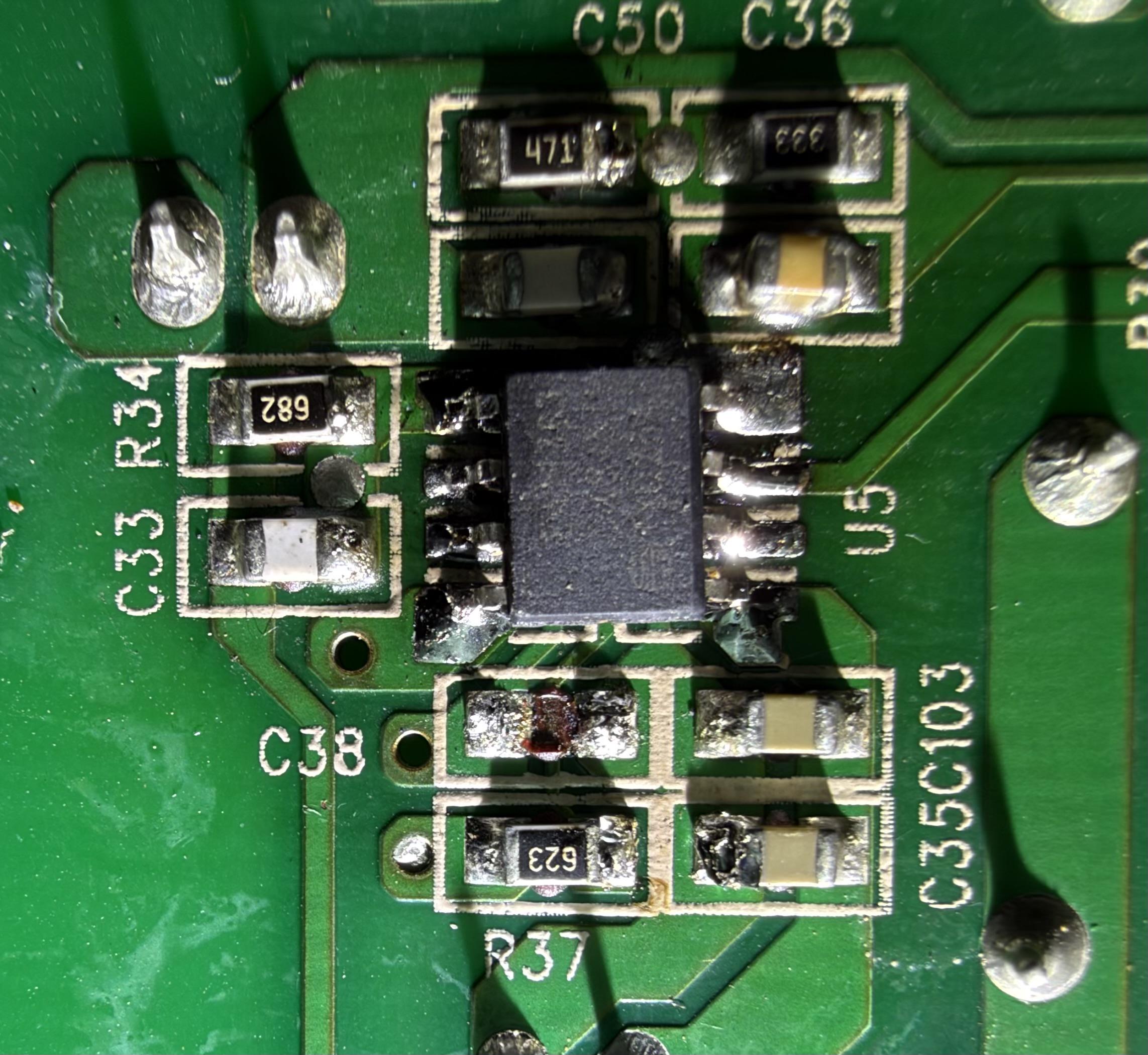
Legacy Repair attempt 500w power supply, lost capacitor

Post image
0 Upvotes

I found some guidance online about the failures on these supplies. This one is a 500w supply for the switch 24 500w.

I was replacing U5 which was identified as some to go out and in doing so, I’ve lost C38. I felt something hit my leg when I was working on it but I haven’t been able to find it on the floor.

Does anyone know what C38 is?