r/Ubiquiti • • 1d ago

Weekly Thread Sunday, Nov 22 2026 - Weekly Off Topic / Complaints / Pictures / Everything Else Thread

0 Upvotes

Welcome to the weekly thread that covers everything off topic, fluff, etc!

Feel free to post anything to this thread, as long as it has some relation to Ubiquiti - pictures, rants, whines, complaints, easy small questions you don’t want to make a whole post for, or even just sharing the picture of your cat sitting on top of your EdgeRouter!

Only rules here are to be civil, no personal attacks, etc stuff like that.

Have a great week everyone!


r/Ubiquiti • • Apr 05 '26

Weekly Thread Sunday, Apr 5 2026 - Weekly Off Topic / Complaints / Pictures / Everything Else Thread

10 Upvotes

Welcome to the weekly thread that covers everything off topic, fluff, etc!

Feel free to post anything to this thread, as long as it has some relation to Ubiquiti - pictures, rants, whines, complaints, easy small questions you don’t want to make a whole post for, or even just sharing the picture of your cat sitting on top of your EdgeRouter!

Only rules here are to be civil, no personal attacks, etc stuff like that.

Have a great week everyone!


r/Ubiquiti • • 17h ago

Complaint Ubiquiti leaked my unique email (iCloud). I'm in the EU. This is either breach or unlawful processing under GDRP.

424 Upvotes

Back in 2023 I set up a unique iCloud Hide My Email address only for Ubiquiti.

Since about last month it's been getting mail from companies I never heard of. Ubiquiti, or someone they gave my email, leaked it or sold it. What the fuck is going on?


r/Ubiquiti • • 2h ago

Whine / Complaint We need an ENVR-Core G2, and other things

7 Upvotes

Preparing to drop ~$150k on cameras. Want the ENVR-Core for storage expandability, but alas... no Edge AI capabilities. For my deployment I'd probably need 10 AI Keys :(

Also, can we get proper permissions structures within Protect while we're at it? I should be able to set up a user and give them access only to the views they need.

And speaking of views, how about we develop multi-view support for rotating TV displays. That's only been a thing in other systems for like 20 years.

Oh, and if we're going to market this as "enterprise", can we get an actual enterprise sales channel? I should not lose a year of warranty and have to pay MORE than the store price because we have to buy through a VAR. I can't just throw this much on a credit card.

So many little things in the system that make it not quite enterprise. And yet... My finger is still on the $150k shopping cart buy button. They'll probably announce an upgraded NVR right after I place my order.


r/Ubiquiti • • 5h ago

Question Increased Invalid Traffic after USG-Lite upgrade to 6.0.17

Post image
6 Upvotes

This morning I upgraded my USG-Lite to 6.0.17. After doing so, and rebooting all my network hardware for extra measure, I'm getting a significant amount of "Invalid Traffic" blocks reported in flows. Previously I was not getting any such reports in flows. wanted to ask if others are seeing the same? Is it normal to see such blocks multiple time per minute? It may be the prior zone firewall rule did not have the setting enabled to report to flows and I was unaware of the frequency of invalid traffic?


r/Ubiquiti • • 22h ago

Installation Picture I only need one more POE

Post image
115 Upvotes

This is my current setup. When I bought our home I decided Ubiquiti was the only option. I’m military and move quite frequently so 95% of this will stay with the house when I leave. My problem is that I am one POE port short for my back door camera. I currently have two Cameras, an Aqara M3 hub and 2 APs that require POE. Is there an easier way to set this up with one more POE rather than buying another switch?

I know it’s not the prettiest setup, first time doing this network thing and smart house stuff. I’ll do better in the next one.

EDIT: You all are great. I learned 2 things: 1) The Aqara M3 has a USB-C power option and 2) There or POE power adapters. I just used the USB-C connection. Thank you for the simple fix!


r/Ubiquiti • • 2h ago

Question Power Transfer Switch for Single PSU Devices

Thumbnail reddit.com
2 Upvotes

r/Ubiquiti • • 14m ago

Question Is UNVR instant the right choice for my protect setup?

0 Upvotes

I currently am running 2 g6 instants on my UCG fiber with 4tb SSD. I plan to add 4 g6 pro turrets as well as a doorbell lite.

Based on the capacity calculator, this would be way too much for the UCG fiber and slightly too much for the UNVR instant. However, older posts here seem to suggest that the instant can easily handle this workload. I don’t have any other rack mount size gear so I’d like to avoid upsizing if possible, but would a UNVR instant be a wise choice given that I’ll be above capacity from the beginning? Does anyone here run this many cameras off of just a UCG Fiber? I’d be willing to downgrade the instants to 2k if it saved me the trouble of getting a new device and HDD.


r/Ubiquiti • • 5h ago

Question Unify Talk with Telekom SIP Trunk

2 Upvotes

Hi all,

I'm trying to get UniFi Talk working with a Deutsche Telekom CompanyFlex SIP trunk (business product, not a normal MagentaZuhause line) and I'm stuck.

Setup: UDR7 on 6.0.17, Talk 5.4.8, unlocked Talk phone. DrayTek Vigor 167 as a bridge in front, PPPoE runs on the UDR7. Static signaling port 6767 is enabled, firewall allows 6767 from Telekom's 217.0.0.0/8, codec set to PCMA.

The built-in "Deutsche Telekom" template uses tel.t-online.de as proxy, which doesn't work for CompanyFlex. CompanyFlex gives you a customer-specific outbound proxy like <id>.primary.companyflex.de, but that name only has _sip._tcp SRV records and no A record. With it in the proxy field, Talk didn't send anything at all.

So I put the IP of the SRV target in directly, with ;transport=tcp. That at least got a REGISTER out over TCP, but Talk uses the phone number as the AOR and Telekom answers:

f:<sip:+49331XXXXXXXX@tel.t-online.de>

m:<sip:gw+DeutscheTelekom.1.49331XXXXXXXX@<public-ip>:6767;transport=udp;gw=...>

→ 403 Wrong Service

Then I entered the CompanyFlex registration number as the phone number instead. Telekom accepts that, but now complains about the Contact:

f:<sip:+4919929600000XXXXXX@tel.t-online.de>

m:<sip:gw+DeutscheTelekom.1.4919929600000XXXXXX@<public-ip>:6767;transport=udp;gw=...>

→ 403 Wrong Contact format see 1TR119

What stands out is that the REGISTER goes out over TCP, but the Contact still says transport=udp. And as far as I know, CompanyFlex (spec 1TR119) wants a trunk-style Contact (RFC 6140 / bnc). I can't find a way to change either in Talk.

So, a couple of questions:

• Is the Telekom template supposed to work with CompanyFlex at all, or only with consumer lines?

• Is there a way to control the Contact header / transport through custom fields?

• Has anyone actually got CompanyFlex running with Talk?

If it's simply not supported, consider this a feature request. CompanyFlex is basically Telekom's standard business trunk in Germany now, so I doubt I'm the only one running into this.

Happy to share anonymized captures if that helps.

Thanks!


r/Ubiquiti • • 7h ago

Quality Shitpost Does anyone use a UPS 2U and a Power Distribution Pro?

2 Upvotes

I have an unused Power Distribution Center

I would like to add a 2U UPS to keep my network online during an outage.

I currently have a complete AV Rack and use a WattBox to reset my AV Gear. I will keep my AV Gear on the Watt Box because it cleans the power to my system and acts a Surge Protector which I don't Believe Unifi has.

How would I configure the System?

Do my Modem, Dream machine, switch and NVR to the UPS?? Can I reset each individually? Would I need to still run each to PD?

Would I even Need the PD if I have the UPS? I can do the network gear to UPS and the AV Gear to Watt box?

Thanks!
Photos would be great as well!


r/Ubiquiti • • 1d ago

Question Big difference between Ubiquiti design center and reality

Thumbnail gallery
54 Upvotes

I'm planning the U7 Pro XGS placement in my 3 story 3950sqft home. I used the Ubiquiti design center to import a blueprint of my third floor (first image). with one centrally placed U7 Pro XGS, I was impressed with the coverage (second image) Then I used WifiMan app to do a signal test. I was surprised how different the coverage was.

to temporarily attach the AP to the ceiling, I mounted it to a 2x6 board and then used two metal adjustable support poles to hold the 2x6 board to the ceiling. could the metal poles be causing too much interference? Were my expectations too high? what am I missing? TIA

EDIT: I confirmed the scale is correct and that I am using drywall for the walls. The AP is on the 3rd floor ceiling above the open stairs that extends down to the main floor entry way. There are some railings in the upstairs hallway around those stairs that appear as walls in my signal scan.

added the railings and room labels in this screen shot and also 6 GHz design center screenshot. https://imgur.com/a/rPSWpxa

I plan to redo the scan using 5 GHz. thanks for all the helpful comments so far


r/Ubiquiti • • 3h ago

Question G5 Turret Ultra (Hallway mode) with AI Port Smart Detection issue

1 Upvotes

I've had about 3 AI Ports that are currently paired with G5 Turret Ultra/Dome and G4 Instants all over my house and it was working pretty good. Reason I had to do it is for animal (specifically cat) detection as it was very poor without AI Port.

With the Black Friday sale, I bought another one which will cover all my cameras that still need it.

But when I paired the AI Port with the G5 Turret Ultra in Hallway mode, it first switched the resolution from 2K to HD quality only and the smart detection is pretty bad. It is actually worse than just using the built-in animal detection of the G5. I also can't switch back the resolution to 2k for some reason.

Face/Person detection works great, but I bought these AI ports specifically for animal detection only.

Any one experienced this issue? I mean I also tried to pair it with my other known good AI ports and it was all the same.

The G5 Turret Ultra (hallway mode) is placed indoor and gets adequate lighting all the time.


r/Ubiquiti • • 4h ago

Question UX7 – Wi-Fi ping spikes every 12 seconds (5 GHz & 6 GHz)

1 Upvotes

On my network I like to play competitive games on WiFi (not ideal, I know). But I've been experiencing some latency issues with my Express 7, running firmware 5.2.15. Wondering if anyone has had similar experiences.

When pinging my local gateway, I get consistent latency spikes every 11–12 seconds. Normally, the ping is around 3–5 ms, but it regularly jumps to 50–100 ms, sometimes even reaching 250–350 ms. This 12 second pattern shows up in every test.

The timing is very consistent (both on 5GHz and 6Ghz, Mac and iPad). I use the UX7 as a single AP, in close proximity, no meshing.

Here's an example from a continuous ping test:

What I've found so far:

  • Different channels and channel widths don't seem to help.
  • The issue occurs when pinging the local gateway (192.168.20.1), so it isn't related to the internet connection (pinging Cloudflare does show the same pattern).

I also tested another UX7 at my parents' house, also running 5.2.15, but in AP mode. Using the same iPad, the local ping was stable at 3–4 ms, without the recurring spikes.

Has anyone else experienced this? I have really been scratching my head at what causes this. But after a lot of troubleshooting I can only think of a software/hardware problem of the UX7.


r/Ubiquiti • • 19h ago

Question Anyone used these round junction boxes for AP ceiling install?

Post image
16 Upvotes

Installing some U7 Pros and was thinking about using these for the install to be able to store a bit of the ethernet cabling. I have drywall ceilings.
If you didn't use these, did you just drill holes in the drywall and install the metal plate it comes with?


r/Ubiquiti • • 8h ago

Solved Zone based firwall rules - solved?

2 Upvotes

Hi,

After update to Unifi OS 6.x on the UDR7 and network 11.0.99 I checked my originally made ZB firewall rules. Something strange I noticed:

- ping from IoT (danger zone) to my main network (safe zone) don't go through - as they indeed should not

- on my Mac that is on the IoT network as a test,

--> pinging my printer ip-adres times out

--> But I can still choose my printer from the main network, launch a print command ... but it doesn't print.

Am I worried about 'nothing' or is my main network not entirely safe from the IoT network?

Thanks (I'm not a network savvy person)


r/Ubiquiti • • 20h ago

Thank You USL entry sensor on fenced door

Post image
17 Upvotes

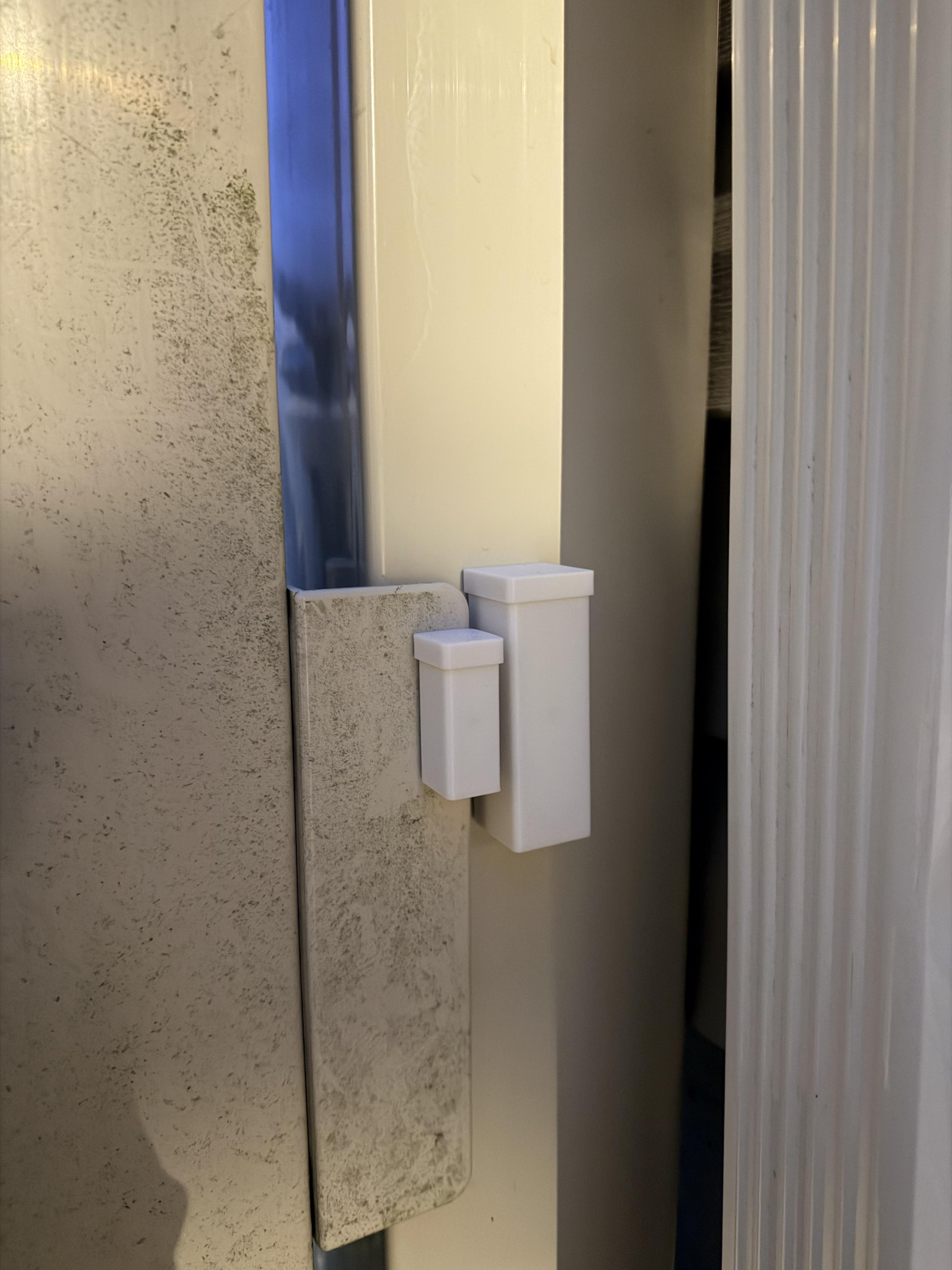
Someone posted a 3D case for the USL entry sensor. Printed them out and just installed them for my backyard fence door. It works great.

Previous thread: https://www.reddit.com/r/Ubiquiti/s/eMgUubxmen


r/Ubiquiti • • 5h ago

Question Ubiquiti UAP-AC-M with UMA-D external antenna on OpenWrt: Does it work out of the box or need special settings?

0 Upvotes

I have a Ubiquiti UAP-AC-M paired with the external UMA-D directional antenna.

On the stock UniFi firmware, simply attaching the UMA-D to the RP-SMA connectors isn't enough,you have to explicitly enable the UMA-D antenna option in the controller settings, otherwise it behaves as if only the default small antennas are connected.

I'm planning to install OpenWrt on this UAP-AC-M, and I want to make sure before proceeding:

  1. Once OpenWrt is installed, does the UMA-D antenna work immediately through the RP-SMA ports without any special switch?
  2. Is there any specific configuration needed in OpenWrt (such as setting the Antenna Gain for 2.4GHz and 5GHz) to get proper TX power and full performance from the UMA-D?
  3. Has anyone here actually run a UAP-AC-M + UMA-D setup on OpenWrt? Any issues with signal or stability?

Thanks in advance!


r/Ubiquiti • • 14h ago

Question Is this normal

5 Upvotes

It also asks for restart but can’t connect to it


r/Ubiquiti • • 1d ago

User Equipment Picture My Upgrade

Thumbnail
gallery
340 Upvotes

Had a lot of idle time over the Summer and decided to upgrade with UniFi. Tore out all of the equipment and the structured panel, and installed a 12U rack with an all-UniFi bill of material. As always was more work than expected as the original drops were all too short for the new design so had to integrate an auxiliary path panel in the structure behind the 12U. Really happy with the result, and granularity of control that UniFi provides over the 8-node VELOP mesh it replaces.

12U Slim Rack
OCD Vent 1U
USW Pro 24 POE
Patch 24
UDM Pro Max
Patch 24
USW Pro 24
OCD Vent 1U
OCD Brush 1U
Power Distribution Pro 2U
UPS 2U


r/Ubiquiti • • 18h ago

No, it’s not EOL G4 Pro dead after 5 years

7 Upvotes

I've had a G4 pro mounted in an eave, 30ft up. Protected from the weather, no concerns there. Worked flawlessly for almost 5 years, one month shy. Died overnight, no warning or degradation prior. Happened the first night we got below freezing. Risked the ladder at 44, pulled it down. Assumed from internet research it was just the Ethernet daughter board and it would be an easy reflow job. Short summary, it was not. I rang out the pins, board was fine.

Only thing I can assume is that the regulator or voltage converter went bad. Absolute shame, because the inside was spotless. Tried to contact support, waited 30 mins and bailed. I assume it would be a "it's out of warranty and eol" issue, which sucks considering the lifespan I've had from much cheaper units with comparable resolutions for a few corporate accounts.

Any other experiences with this sort of failure? I have other bullets but the ladder is not my friend and the cost for the cameras is making me consider other options.


r/Ubiquiti • • 8h ago

Thank You Critique My Potential Home System Order

0 Upvotes

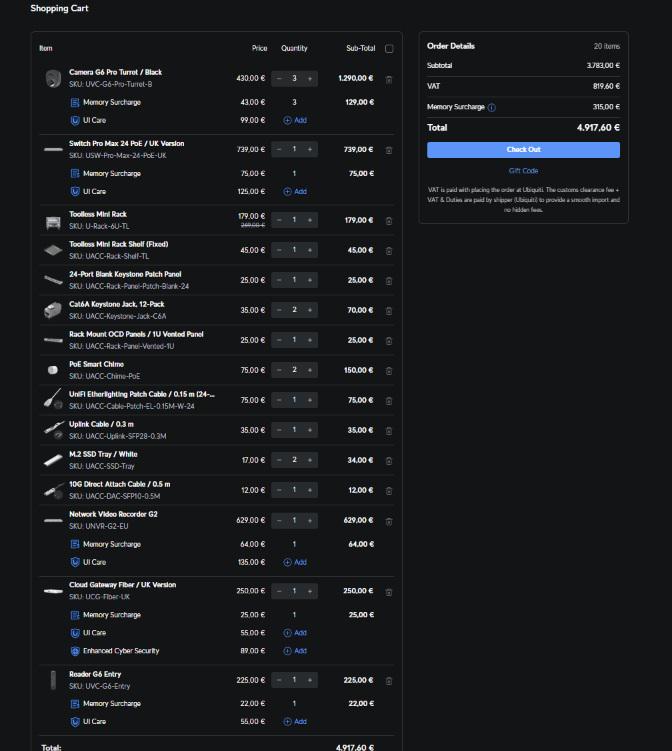
After any input to steer me on the right path. This is for a new build property. All CAT6a homerun to central location. I am checking if there is anything people would do differently?

900Mbps Fibre to Home via the UCG

Probably 4 x 4tb HDD in the NVR G2

G6 Entry and G6 Pro Turrets on soffits for perimeter and driveway duties

Switch will power the cameras and the APs

Eventually we will have an electric gate so will have POE++ CAT6a for access control to that location.

Every room will have at least one CAT6a run. (4 bedrooms, 2 sitting rooms).

Anything I should do differently? Cost is about my limit. I was toying with G6 Turrets in two of the positions and using the G6 Pro only for the driveway. Not much else I was sure I would change.

Thanks for the help!


r/Ubiquiti • • 20h ago

Blog / Video Link Ubiquiti Unifi USL-Relay as Coin-Op Mech in Stern Pinball

10 Upvotes

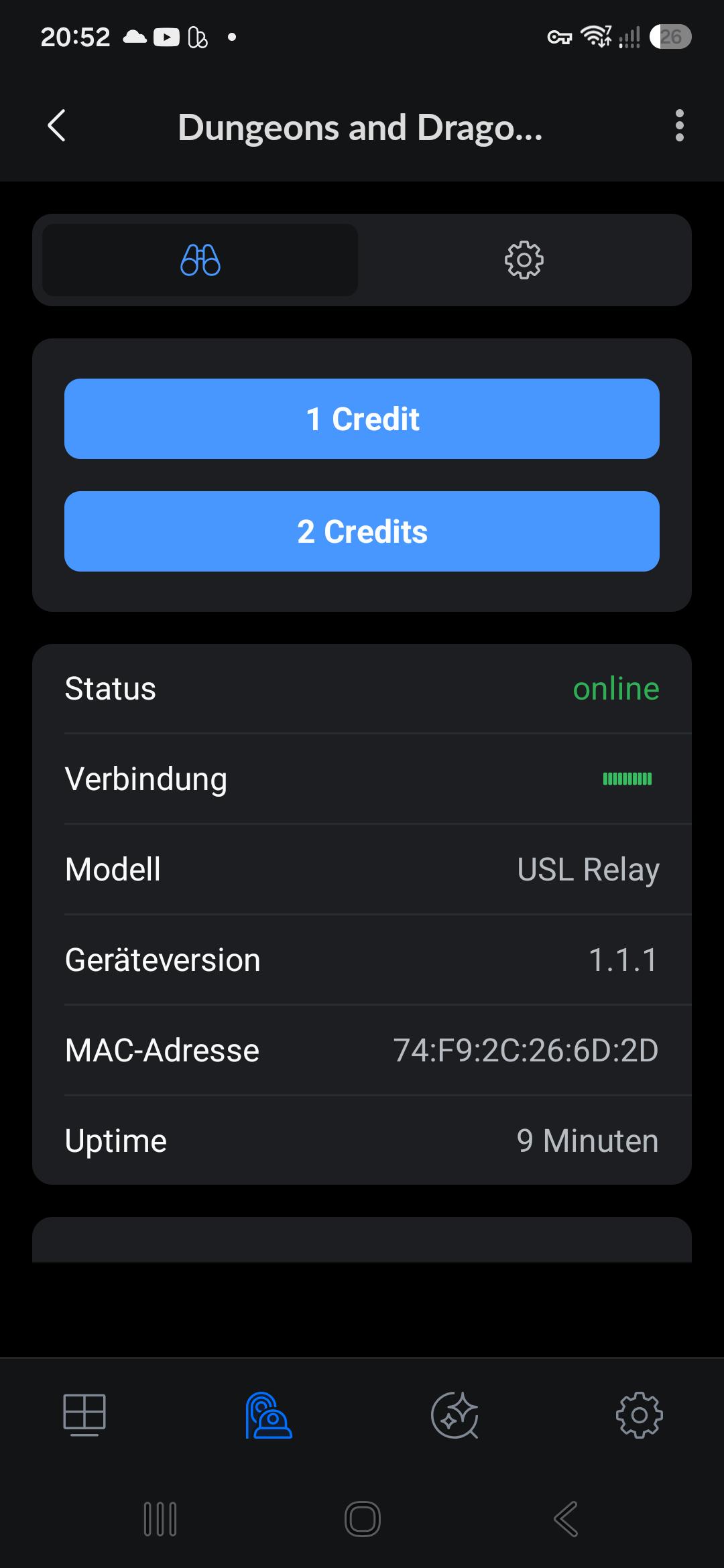
Now I can control credits of my Stern Dungeons and Dragons Pinball machine. Oh Ubiquiti I need more IoT Stuff :).

https://youtube.com/shorts/V8QAtJRqGik?si=LNEYIttzSMnI1eZ8


r/Ubiquiti • • 19h ago

Question Would a UNVR Instant be good for a rental property

7 Upvotes

Have a full unifi system for our own home but have a 3 story townhouse rental property with failing Nest cameras due to age. I could either start replacing these individually or make a larger switch now. I have managed to use poe injectors with a converter to power the Nest Cam batteries but this is a lot of complexity to explain to some renters. Have ethernet to the locations needing cameras but not to the doorbell.

Some of the downsides of the Nest cams are setup when prior tenants do not remove the cameras from their account and poor wifi when tenants inevitably use the modem/router combo from ATT/Xfinity. Ideally, the UNVR Instant would be an easy process to reset and setup during turnover. It would also allow monitoring when there's no wifi in-between renters. That said, there's the whole complexity of managing the UNVR if something goes wrong whereas the nest cams are rather straightforward.

Has anyone deployed a protect system to a rental property with the explicit plan to let the renters manage/have access to the system? I would not maintain an account post handover. I would also need to buy an old G4 doorbell wifi or wait for something new to come from Ubiquiti.


r/Ubiquiti • • 9h ago

Question G4 Doorbell Pro

1 Upvotes

Hi all,

I'm UK based and would like to replace my current Ring wired doorbells with a G4 Doorbell Pro and a standard G4 Doorbell (both WiFi - not POE).

A friend who is an electrician fitted the Ring doorbells around 4 years ago and looking at the bell chime box, he's bypassed the actual mechanical chime (which I did not need and will not need with the G4's), and seems to have fitted resistors.

The original wired doorbells were fitted when the house was built in the 90's and only in the last couple of weeks have managed to locate the transformer (not had chance to see what it's VA is).

So both Ring doorbells are running off a single transformer, I would like to replace these Ring doorbells with the Unifi models (as above) that I already have.

I've seen lot's of information about transformers, but still uncertain about what I need to power both from a single transformer without either underpowering or killing them (or the transformer).

And are resistors needed? If so which type?

Thank you in advance.