r/Ubiquiti • • 10m ago

Whine / Complaint TIL the USW-Pro-Max-48-PoE only has the same number of PoE++ ports as the USW-Pro-Max-24-PoE

Thumbnail
gallery
1 Upvotes

Both have only 8 x GbE PoE++ and 8 x 2.5 GbE PoE++ ports.

Found out when a couple of APs started crying about not having ++ power, when we thought all of the 2.5 GbE ports would be PoE++ (as they are on the 24-port version). Turns out the same is true for the USW-Pro-48-POE vs USW-Pro-24-POE.

Never spotted it before I suppose because never needed PoE++ much before, except to drive the odd Flex or Ultra switch.


r/Ubiquiti • • 43m ago

Question Best alternative to the UniFi Intercom Viewer while it's out of stock?

1 Upvotes

Hi,

Since the Intercom Viewer is still out of stock, I am looking for an alternative.
Has anyone deployed a setup with tablets and wall mounts? Any other good ideas?

Thank you!


r/Ubiquiti • • 2h ago

Question New home network in old house

1 Upvotes

I'm planning the network for an old house i am about to rent. I only have one Cat7 cable per floor: basement to ground floor, basement to 1st floor, and from the 1st floor on to the 2nd floor.

I want WiFi plus about 4 Ethernet ports in the basement for TV and in 1sr floor for my office. Since there's only a single cable per floor, do I need a switch at every wall plate with an AP hanging off it? The 2nd floor cable also starts on the 1st floor, which makes PoE a bit awkward.

Do I really need a switch plus an AP on every floor, or is there a cleaner way to do this? I'm open to any suggestions on the whole setup.

Thanks!


r/Ubiquiti • • 4h ago

Question New Ubiquity system syggestion

1 Upvotes
EquipmentQty
G6 Entry Doorbell (Black)1
G6 Pro Bullet (White) - Side of the hose (Narrow and long side set back1
G6 Pro Turret (White) Corner of the house on balcony eve mount - looking to 12m wide street frontage and balcony is about 9 m inside of the street1
G6 Pro Turret (White) - to install on the other side of the house facing the driveway - wall mount1
G6 Pro Turret (White) on the one side of the house looking 12m wide backyard - 10m long1
G6 Turret (White) - Looking from the second side of the narrow side set back1
UDM Pro1
Pro Max 16 PoE1
WD Purple 8TB HDD1
10G Direct Attach Cable1
rack mount adapter1

As per the table, want to invest in the new Unify system. In Australia, new build. Cat 6 are already installed.

NBN - HFC connection - most likely end up with 11/40 or 500/40 connection.

Already own Deco X55 x 3 so want to use them if I can.

Am I on the right track?


r/Ubiquiti • • 4h ago

Question Where is Unifi OS Server 6 with Unifi Network 11?

4 Upvotes

I'm running self hosted Unifi OS Server with Unifi OS and still no update to v6. Is there an ETA?


r/Ubiquiti • • 6h ago

Question Network 11.0.104 - IP addresses assigned out of range?

1 Upvotes

I've got roughly 60 devices in my house, UCG Fiber (6.0.17) OS (11.0.104) and 3 U7-in-wall APs (8.8.14)

I had updated everything about a week ago. The house was running fine since, possibly even smoother.

This morning my wife said the Kitchen TV was no longer online. I took a look. It could see all of the SSIDs in the house (primary, guest, IoT) but it could not connect to any of them. Continually failed. I tried everything, could not get it to connect. Meanwhile 5 other Roku devices were all humming along across the different access points. I even tried setting up an open SSID with no security - TV still could not connect.

In my troubleshooting I grabbed an old U6-Pro and fired it up because I was completely out of ideas. I could not get it to adopt, even though I had used it in the past 3 months. It would not adopt.

In looking at my console I saw the AP had an IP of 192.168.1.20 and my network was set up on 192.168.20.1/24. I did a hard reset to the AP and was able to adopt it and get it working. For grins I looked into my console and even though I could not get the TV to connect to the internet, I saw the TV in my console. At 192.168.2.20.

WTH?

I have never had an issue with DHCP before and there is no other DHCP on the network. My Proxmox server is 192.168.20.30 and it does not have DHCP enabled, it defaults to the Unifi network for addressing.

Can anyone explain what might be going on?


r/Ubiquiti • • 6h ago

Question Blocked encrypted traffic

1 Upvotes

I have a guest network on “Hotspot” zone. All external traffic is allowed. It was working fine for a while but about a week ago guests started to get this warning on iOS:

“Privacy Warning
This network is blocking encrypted DNS traffic.
The names of websites and other servers your device accesses on this network may be monitored and recorded by other devices on this network.”

Browsing the safari works but when using apps not working. It’s strange that no settings was changed and it just started to happpening so I suspect it’s new version of iOS or unify network that might causing this?
What should I do look for in network settings?


r/Ubiquiti • • 7h ago

Question U7 Pro Max?

0 Upvotes

I am looking to add an access point to the hallway in our second floor, to supply the whole floor (1500 sq ft) and also the guest room above. The location is at the base of the stairs to the attic. Do you think the U7 Pro Max can adequately service this? Any others to consider?


r/Ubiquiti • • 7h ago

Question Best reputable place to get 8311 sfp+ module

0 Upvotes

as the title states. Any reputable places to get the 8311 sfp+ module for att ?


r/Ubiquiti • • 7h ago

Installation Picture First Build

Thumbnail
gallery
121 Upvotes

This is the first time building a network system.

Running a Dream Machine Pro, Two, UPS 2U, Two Power Distribution Pros. UNAS Pro 4 and eight G6 Bullets with twenty G6 Pro turrets. There are three switches: two Pro Max 48-port and one 24-port. One AI key and One UNAS Pro 4. I understand I did not need the AI key with G6 cameras. I have older cameras that will help later. I have 16 TB of storage in the NVR and 8 TB in the NAS. I'm running three access points: two U7 Pros and one U6. I also installed door controls on six doors with Fail-Secure Strike Locks with USL-Entry on every door.

I believe the Dream Machine has one 16 TB drive. I'm planning on adding another drive later for the NVR portion of the Dream Machine. I'm not finished with the polished look just yet. I just got the system running correctly over the past weekend.

I have built many desktop computers and many other types of electronics. I found installing, setting up, and then maintaining network systems to be more fun than I anticipated. I wish I had done this 20 years ago; I would have had a different career. I truly had fun.

This took me about a month to completely install by myself.


r/Ubiquiti • • 7h ago

Question Trying to get my UVC-G6-Turret to adopt over layer 3 using command line (set-inform), and it just won't work. If anyone can help, it would be greatly appreciated!

0 Upvotes

The G6 Turret is on another subnet, with two routers between the camera and the UniFi console. Communication between all devices in the subnets seems to otherwise work fine, all the routes appear to be as they should be and all the firewall rules between these subnets are blanket allow for all protocols and ports (these are all internal trusted subnets). I have confirmed that I can access port 8080 on the UniFi console from the camera by trying to wget the "http://192.168.0.250:8080/inform" URL and getting a web server response (it was an HTTP 400 error response, but I assume that's to be expected in this case). For clarity, I'll try to provide a basic visual representation of the routing below:

192.168.200.64 <---> [ 192.168.200.1 (router 2) 172.16.0.2 ] <---> [ 172.16.0.1 (router 1) 192.168.0.1 ] <---> 192.168.0.250 (UniFi)

When I attempt to get the camera to adopt with this command, however...

set-inform http://192.168.0.250:8080/inform

...the command just returns "1" and nothing happens, either on the device or in my UniFi interface. It just doesn't work. I've also tried setting the ubnt vendor option settings in the DHCP server for the camera's subnet, but that also results in nothing, I assume for the same reason whatever that may be.

This is the first time I've needed to do a layer 3 adoption and I'm out of ideas, I just can't find anything wrong. Does anyone with more knowledge and experience see something I might have missed? Any thoughts? Thanks so much for any help!


r/Ubiquiti • • 7h ago

Quality Shitpost From 2025 to 2027 Changes ...

7 Upvotes

Started down this Rabbit hole with Recommendations from a Local AV Guy. It was Late 2025. I knew nothing about networking.
Started with I wanted a controlled Network with some new Cameras

Dream Machine Pro. A 24 Port 1 Gig switch. Some U7 Access Points. Some G6 Turrets.

I slowed added more APs, A doorbell lite, NVR Pro, a bunch of 2.5 Mini Switches behind each TV, upgraded switch to 48 1 gig POE, added a few Amps , ....

After almost 2 years in the unifi world I'm completely Sold and Hooked. Its might just be the test Tech Company Ive ever used.

Today I upgraded my ISP to 8 Gig and went all in on 10 Gig Network:
Did a thing this morning and ordered this:

Unifi 42U Rack

Lots of OCD Panels

2 Patch Panels, Premium Patch Cables

Dream Machine Beast

48 XG POE ++ 10 Gig switch

6 E7 Access Points

8 G6 Pro Turrets

NVP Pro G2

Power Distribution Pro

2U UPS

12 Power Amps for Whole Home Audio

G4 DoorBell Pro (Back ordered)

20K later ... LLLLFFFFFFGGGGGGGGGGGGGG


r/Ubiquiti • • 8h ago

Question Three US-48-500W switches stuck Adopting/Disconnected — invalid fingerprint error; recover without losing port settings?

1 Upvotes

Last week Monday 11/18/2026 shortly after 1am Eastern, all 3 of my US-48-500W switches rebooted or something (the network was down briefly but came back up without intervention) and now they show Adopting or Disconnected in the UniFi Controller. Interestingly all 7 of my UniFi APs are showing Connected.

Is there a way to re-adopt these switches while preserving their existing port names, VLAN settings, and other configuration? I’m trying to avoid manually reconfiguring 3 switches and almost 144 switchports.

My self-hosted UniFi Controller (on Windows) is quite old: v6.0.23 but was working fine until last week.

I’m able to SSH into the switches and run commands:

1IDF-US-48-500W-Switch-US.7.6.11# info
Model:       US-48-500W
Version:     7.6.11.17272
MAC Address: b4:fb:e4:1c:xx:xx
IP Address:  192.168.168.32
Hostname:    1IDF-US-48-500W-Switch
Uptime:      423469 seconds
NTP:         Synchronized
Status:      Not Adopted (http://192.168.168.203:8080/inform)

I also ran set-inform on the 1IDF switch twice but didn’t notice any changes:

1IDF-US-48-500W-Switch-US.7.6.11# set-inform http://192.168.168.203:8080/inform
Adoption request sent to 'http://192.168.168.203:8080/inform'.  Use UniFi Network to complete the adopt process.

I cold-booted all 3 switches and rebooted the UniFi Controller computer. I have the weekly auto-backups and a full backup from a few days ago saved on another computer.

I found this error (and similar for the other 2 switches) repeating in the UniFi Controller log server.log:

[2026-11-21T12:33:29,909] <inform-76> ERROR inform - invalid fingerprint: expecting[c7:9a:91:38:19:35:86:8c:df:a2:e7:b2:76:xx:xx:xx],
...
{error_reason=4, last_error_str=    Timeout (http://192.168.168.205:8080/inform), last_managed_e_time=166, last_managed_s_time=0, timestamp=2026-11-18T18:59:57},
{error_reason=1, last_error_str=    Unable to resolve (http://unifi:8080/inform), last_managed_e_time=166, last_managed_s_time=0, timestamp=2026-11-18T19:00:37},
{error_reason=6, last_error_str=Not Adopted (http://192.168.168.205:8080/inform), last_managed_e_time=166, last_managed_s_time=0, timestamp=2026-11-18T19:01:17}
...
Magic: 544e4255
Version: 0
HW Addr: B4-FB-E4-1C-xx-xx
Flags: 13 (gcm crypted) (compressed)
IV: 0a17f5efb6455132253dc6b23173xxxx
Data Version: 1
Data Length: 13386
, _devsiteid=576c30e6a8e19dccd2e6xxxx, _id=5ba2681d4c8e740c7ccexxxx, _devextip=192.168.168.157}

Full log entries or logfile available upon request.

I just noticed that the Inform IPs are either 192.168.168.203 or 192.168.168.205. The UniFi Controller has multiple IPs and is listening on all. A trace of network traffic (available upon request) from the switch to the controller, similar for either IP:

POST /inform HTTP/1.1
Host: 192.168.168.203:8080
Accept: */*
User-Agent: AirControl Agent v1.0
Content-Type: application/x-binary
Content-Length: 11339

 And the reply back to the switch:

HTTP/1.1 404
Content-Length: 0
Date: Sat, 21 Nov 2026 07:05:43 GMT

The response has Content-Length: 0. Is the empty response body relevant to the adoption failure?

Has anyone run into the ERROR inform - invalid fingerprint: error and successfully re-adopted their switches? I’m hoping there’s a straightforward fix I’ve missed. Thank you!

Written by me, with editing help from Copilot.

Edit: Can someone tell me, if I factory-reset one of the switches, is there a chance I'll be able to Adopt it and restore the config?


r/Ubiquiti • • 8h ago

Question Hiro 24" Roku TV stops connecting to Internet

Thumbnail reddit.com
0 Upvotes

Currently running Cloud Gateway Fiber with the latest Unifi OS (just updated today while troubleshooting the issue. U7 in-wall APs


r/Ubiquiti • • 9h ago

Question Are UDB Pros just flaky?

0 Upvotes

I’ve had two UDB Pros meshed and bridging between physical sites for about a year. Then I had a hardware failure in one, got a replacement, and now the replacement gets stuck in isolated mode as of a few days ago.

I brought it to the home network site and wired it into the network and it connected great. Claude-assisted diagnostics analyzing all of the logs show nothing obviously wrong with it.

While it was remote it had dropped back to the failover IP address as it couldn’t reach the DHCP server. So there’s something failing with the radio uplink I think? But it’s working enough to be seen as isolated.

It’s outside, under cover so shouldn’t be experiencing weather aside from temps being down to the mid 30s Fahrenheit around here overnight.

I did upgrade to the latest firmware, 1.5.3, but that’s running on both devices in the bridge. Maybe something broke in that release.

Other thoughts?


r/Ubiquiti • • 9h ago

User Guide I made an Android TV app that shows whether your UniFi gateway's VPN is actually on, and switches its country from the couch

0 Upvotes

Router VPN Dot, the free, open-source Android TV app that shows a small dot telling you whether your TV is really going through the VPN, when the VPN runs on the router and not on the TV.

What's new

- The status line now shows the VPN server's name, not just its IP: CONNECTED to al122 · 1.2.3.4

- The README now has a short section on what the app adds to the router's own kill switch.

- Small fixes: clearer setting names and a more accurate About screen.

How it checks the VPN

  1. It gets the TV's public IP (from ipify) and asks proxycheck.io whether that IP belongs to a VPN. Green means yes, red means no, amber means unknown.
  2. On a UniFi gateway it also reads the WireGuard tunnel status straight from the router every 15 seconds, over your home network. While the dot is green and the tunnel hasn't changed, that local check is enough, so no outside service is contacted.
  3. The public IP is checked again only when something changes: the app starts, the network changes, the tunnel drops or you switch server. Without UniFi it checks every 60 seconds.

Why not just use the kill switch?

Turn it on; it's the real protection. But it can't tell you when:

- another traffic route quietly sends the TV out without the VPN (an old or duplicate rule);

- the tunnel is up but the exit IP isn't seen as a VPN;

- a streaming app refuses your current server. From the TV you can switch server, or pause the VPN for the TV only.

Other VPN providers

- The dot works with any VPN and any router.

- Tunnel status, pause, kill switch and the route warning work with any WireGuard client on a UniFi gateway.

- Server switching and server names are NordVPN-only for now.

GPL-3, no account, no analytics. The app updates itself from the GitHub releases and asks before installing.

https://github.com/MaurizioJJ/router-vpn-dot


r/Ubiquiti • • 10h ago

Question Bridged att modem no longer accessible

1 Upvotes

I used this guide https://www.reddit.com/r/Ubiquiti/comments/b1x5l6/how_to_properly_configure_the_arris_bgw210_for/ to bridge my att modem and it use to be accessible at the 192.168.48.1 ip address, not sure when it happened but now i can no longer pull it up by that ip.. Im guessing one of the newer UI network updates broke it.


r/Ubiquiti • • 11h ago

Question How to restrict traffic going over 5g backup?

0 Upvotes

Hello,

I'm considering replacing some pfSense routers with UDMs, and as a part of that I'm looking to add some 5g backups. My network includes a main PBX at our primary site, and a backup PBX at our DR site. We have a dual hub site-to-site VPN that keeps all of the sites connected, and we use BGP to ensure failover of the hubs, and simplify distribution of prefixes. The question is: If I have separate tunnels for the main WAN and backup WAN, is there a way to block certain types of traffic (like backups or SMB) from going over the backup tunnels? I don't want to accidentally eat up my cellular plan with a ZFS replication or PBS sync that decides to resume while we're on backup internet. I did some poking and if this is possible, the answer isn't immediately obvious to me. Any input would be appreciated.

EDIT:
Ok, so it looks like I can specify a site-to-site tunnel in the source and destination fields in the firewall rules - so that's more granular than I realized. When I select an IPSec tunnel as the destination, the UDM is going to match traffic going through that tunnel, right? Not just traffic destined for that tunnel interface address? I find the wording to be a bit strange.


r/Ubiquiti • • 11h ago

Question 3 famiglie, 1 ingresso: ogni famiglia necessita del PROPRIO Assistente domestico + Apple Home con video, audio bidirezionale e sblocco. È possibile?

Thumbnail reddit.com
0 Upvotes

r/Ubiquiti • • 11h ago

Question Remote camera at marina boat slip?

3 Upvotes

Hi all. I'm looking for advice/feedback on installing a remote camera at my marina so that I can monitor my boat in its slip. At my house (which is close to my marina, but not line of sight), I have an existing Unifi setup including a UCGF (connected via gig fiber), a separate UNVR, a bunch of existing cameras, etc. Ideally, the camera at my slip would connect back to that UNVR so that everything is in one place.

My slip has shore power and two AC outlets, so power isn't an issue (either on the slip, or on the boat in the slip). It doesn't have connectivity, though, so I need to solve for that. I don't yet have the camera, so open to whatever there, but I would like to mount the camera on one of the pilings at the slip, rather than having it on the boat (I'd like to be able to see conditions at the marina even when my boat isn't there).

Looking at Ubiquiti's offerings, it seems like I have something along the lines of the following options.

  1. Starlink: Put Starlink on the boat for connectivity. I'd then also need one of the smaller cloud gateways *on* the boat, an access point on the boat, and then a wireless bridge between the camera and the boat (the camera is like 10ft from boat, but I don't want to hook up an ethernet cable when I dock - that's insane). All of our boating is within a few miles of the shore with cell access, so I don't really *need* Starlink other than for the camera. I don't love this option because of the amount of hardware it involves that salt will eventually murder. My boat is an open dual console without a cabin so those the gateway is going to have a short life.
  2. UniFi 5G Max Outdoor: From what I've read, this device is just a modem, so this is effectively the same as the Starlink option, just with different connectivity. Given the need to still have a gateway, it seems like I'd need to install this on the boat, just like Starlink, since I'm not mounting a gateway at the slip. I do wonder how resilient this device is to a marine environment versus the Starlink.
  3. Mobile Router Industrial: This seems like the simplest option from a hardware standpoint. It also seems like the most "resilient" since the hardware at the slip (where it's calm, protected, etc) is going to get significantly less salt water spray than anything *on* the boat. If my understanding is correct, all I would need is this plus the camera (and PoE injects for the slip) with ethernet running from the camera into this. It sounds like I can then setup a site magic VPN between this and my existing UCGF and the UNVR there will then treat this camera like it's actually on-site. Is that right? The documentation is pretty terrible, so it's not clear to me if this is possible without paying for the "Mobility Cloud" service. I have no need to manage the thing remotely, so I can just walk to the marina if I need to update it or fiddle with it.
  4. None of the above: Forget about Ubiquiti and go with one of those Reolinks that are all-in one. I'd *really* like to have the camera appear in my UNVR and I'd like to be able to live-stream video rather than just view snapshots, so I'm this doesn't seem ideal either. That said, if people have recs on hardware, I'd love to hear it.

One of the most important dimensions here seems to be the bandwidth requirements and cost of my connectivity. Do the 4G plans that work with the MRI have enough bandwidth for continuous 4K and the latency for a PTZ camera to work? If not, is it sufficient for 2K or HD? If not, how about non-continuous recording with me opening via the app maybe once or twice a day to peek? How much data does that actually consume per month? And what does a data plan that support that cost?

Or, alternatively, let's say I was able to convince the marina (which is family owned and not one of those PE-owned behemoths) to install wifi at the marina. How does that change things? Assuming the wifi had internet access, is it possible to have a camera connect to my UNVR remotely?
That aside, has anyone used any of this hardware and cameras in a marine environment like this? Trust me, I know salt is unforgiving, but I wonder how long I can get away with it before everything dies.

Would love to hear from anyone who has experience with this or any other thoughts!


r/Ubiquiti • • 12h ago

Question IP Address mix match

1 Upvotes

I recently installed an NVR for my camera system for two buildings on the same WiFi. For some reason, on the third octet, some cameras say 20, some say 0 which is tied to the NVR. I tried physically resetting the cameras to be readopted but they only show up for the server it was originally on with 20.

I’ve come up with a theory of disabling Protect on the server and then resetting the cameras so they’re forced to see only the NVR. Would that fix it?


r/Ubiquiti • • 12h ago

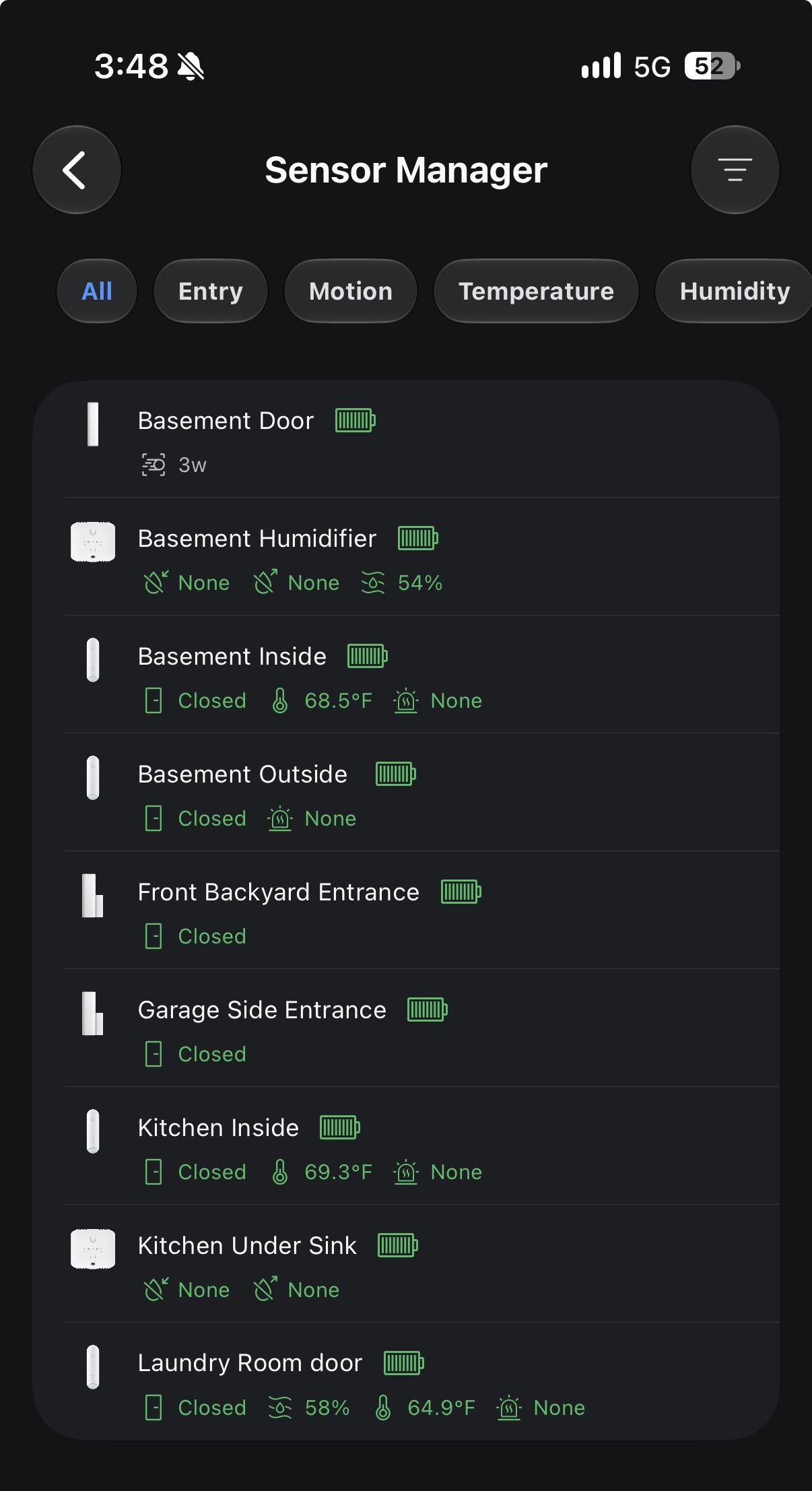
Question how do you name your sensors?

Post image
13 Upvotes

Curious how folks are naming their sensors? I’m wondering if I should add prefixes like [Water Sensor] or [Door Sensor]


r/Ubiquiti • • 12h ago

Question Cannot adopt Dream Router 7 with Express 7 as mesh parent

0 Upvotes

I set up Express 7 as mesh parent, connected to ISP modem. After that I set up Dream Router 7 as a satellite and there is no option to adopt DR7 as new device. DR7 new device only has option to connect to modem to do new set up.

Yes, I want Express as mesh parent since it has only 1 LAN port and stay in a far to reach cornet with my ISP modem and DR7 as satellite because it has 3 LAN.

Please help


r/Ubiquiti • • 13h ago

Crappy Installation Picture The UPS 2U Pro is a chonky boi.

Thumbnail
gallery
44 Upvotes

Had been checking stock almost daily for three months. Wanted something to backup the entire rack… this gets the job done. I have the TecMojo swinging wall-mounted half-depth rack, and I had to use flat 3-pin extenders for the power cables just to get the rack to shut, since it pushes the absolute limit of equipment depth for the rack.