r/Ubiquiti • • 8h ago

Blog / Video Link Introducing: UniFi Network 11.1

456 Upvotes

Enterprise networking at scale, powerfully simplified.

🔹 Supernets for multi-site SD-WAN

🔹 Organization-wide Blueprint Routing Policies

🔹 Zero-touch site provisioning

🔹 Redesigned WiFi Hotspot Engine

Learn More: https://ui.social/NET-11-1


r/Ubiquiti • • 7h ago

Thank You PSA: UniFi OS 6.0.19 (rolling out) patches 58 CVEs

111 Upvotes

Rolling out to basically everything: https://community.ui.com/releases

CVEs fixed in nginx, APT, c-ares, zlib, and PostgreSQL

— — — — — —

Overview

UniFi OS 6.0.19 includes the improvements and bugfixes below.

Bundled

Improvements

  • Improved firmware download resiliency.
  • Improved UniFi OS performance on large deployments.
  • Improved Shadow Mode stability.
  • Updated nginx to 1.30.7, addressing CVE-2026-123007, CVE-2026-123633, CVE-2026-125283, CVE-2026-121810, CVE-2026-123634, CVE-2026-113425, CVE-2026-120967, CVE-2026-123640, and CVE-2026-118899.
  • Updated APT to 3.0.4, addressing CVE-2026-109518.
  • Updated c-ares to 1.34.9, addressing CVE-2026-33630, CVE-2026-69184, and CVE-2026-69186.
  • Updated zlib to 1.3.1-1+deb13u1, addressing CVE-2026-27171 and CVE-2026-85091.
  • Updated PostgreSQL to versions 16.16 and 14.25, addressing CVE-2026-6460, CVE-2026-6467, CVE-2026-14661, CVE-2026-16237, CVE-2026-16240, CVE-2026-18447, CVE-2026-116303, CVE-2026-116304, CVE-2026-116306, CVE-2026-116307, CVE-2026-116308, CVE-2026-116309, CVE-2026-116311, CVE-2026-116312, CVE-2026-116314, CVE-2026-116315, CVE-2026-116316, CVE-2026-116317, CVE-2026-116319, CVE-2026-116320, CVE-2026-116321, CVE-2026-116323, CVE-2026-116326, CVE-2026-116327, CVE-2026-116328, CVE-2026-116330, CVE-2026-116331, CVE-2026-116332, CVE-2026-116335, CVE-2026-116336, CVE-2026-120139, CVE-2026-120141, CVE-2026-120143, CVE-2026-120145, CVE-2026-120146, CVE-2026-120147, CVE-2026-120148, CVE-2026-120149, CVE-2026-120150, CVE-2026-120151, CVE-2026-120152, CVE-2026-120153, and CVE-2026-120154.

Bugfixes

  • Fixed an issue where the Storage tab could crash during an application update.

r/Ubiquiti • • 5h ago

Installation Picture The center of my U6 Pro fell off randomly

Post image
71 Upvotes

When my dad messaged me about it he cited “it was windy outside” as the reason…


r/Ubiquiti • • 8h ago

Sensationalist Headline New product: U7 Mesh Wall

Thumbnail
store.ui.com
92 Upvotes

Not super exciting for those of us who live and die by wired uplinks, but for those who can't or don't want to manage it, this mesh-only AP might be just what you're looking for. It's less sophisticated than a UX7 for the same price (no 6GHz -- specs roughly match the U7 Lite), but it plugs directly into a wall outlet with no wires anywhere and no PoE requirement.

It seems to be a replacement for the unfortunately named and long-discontinued U6 Extender.

Bonus: it's already in stock!


r/Ubiquiti • • 5h ago

Question Will Ubiquiti Seek Conditional Approval?

26 Upvotes

Does anyone know (preferably someone from Ubiquiti if they are authorized to disclose it) if Ubiquiti will be looking to get Conditional Approval so that new Unifi products are not under the FCC ban? I understand I could buy older products already on shelves but I really don't like the idea of buying old gear closer to EOL and having to rebuy sooner. I also like the look of some of their latest products, but can't piece together a network as things stand.

Does anyone have news on this?

Please don't downvote just because of the FCC ban - we all know the state of things sucks - I'm just trying to find out if I'll be able to buy newer Ubiquiti products anytime soon. I think we can all get behind that question.

Edit: for those who are not aware, the FCC has a ban on non-US made home networking equipment that took effect earlier this year. Companies have to apply for conditional approval to get an exception - currently Ubiquiti is not on the list of companies approved: https://www.wired.com/story/us-government-foreign-made-router-ban-explained/


r/Ubiquiti • • 6h ago

Sensationalist Headline Dream Machine Beast and PPPoE speeds - no CPU bottleneck on fast fiber line

14 Upvotes

Hi all,

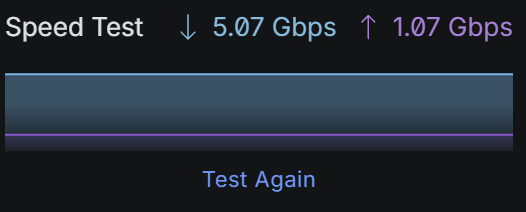
Just wanted to report my own tests (your mileage may vary). I run a Dream Machine Beast with a 5 Gbps down and 1 Gbps up fiber connection with PPPoE, and running the built-in speed tests give me the full down and up speeds.

Posting this because there have been contradicting reports of PPPoE being CPU bound and speed bottlenecked by this, which is something I cannot confirm.

A.


r/Ubiquiti • • 21h ago

Installation Picture First Build

Thumbnail
gallery
206 Upvotes

This is the first time building a network system.

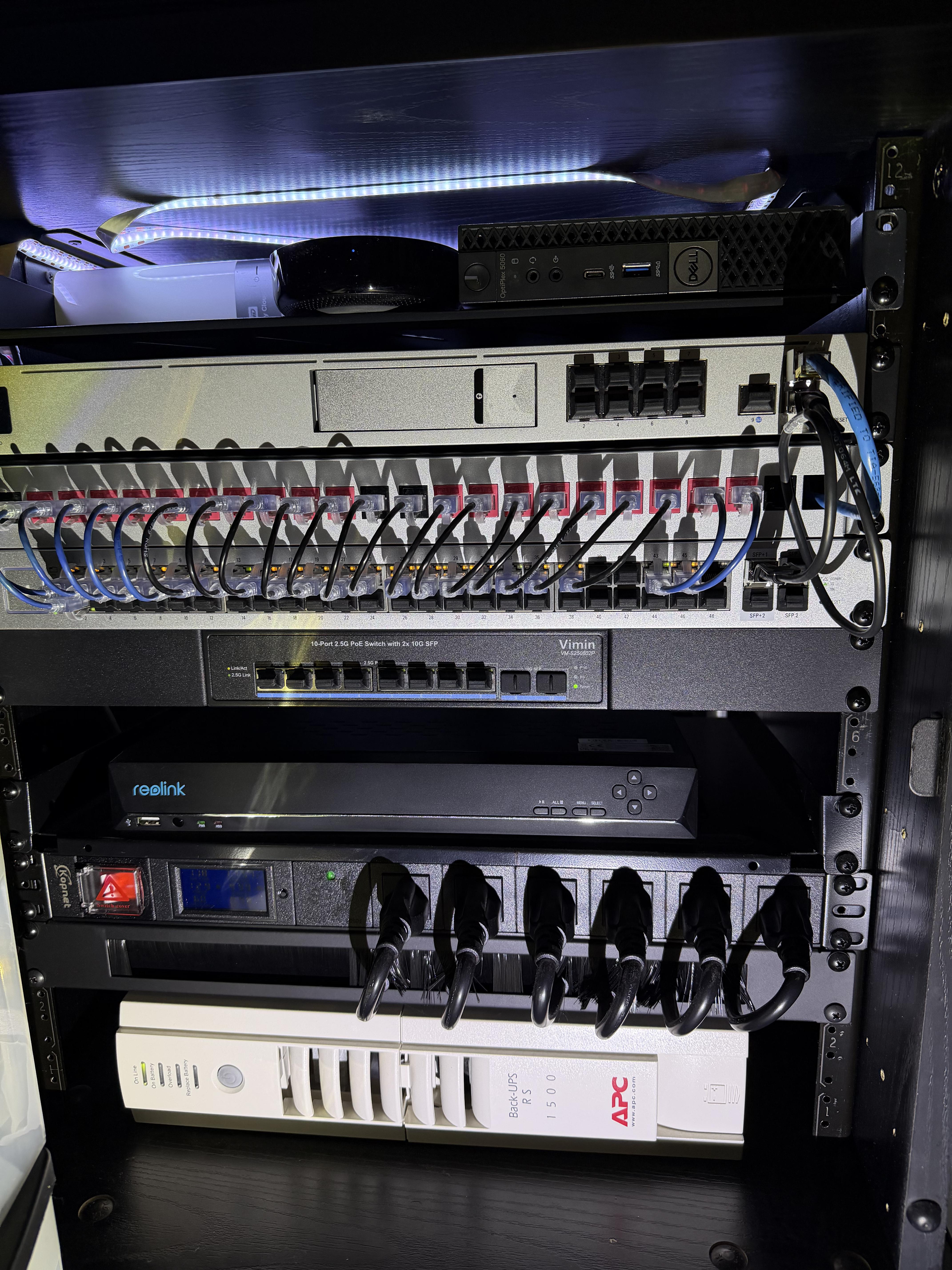
Running a Dream Machine Pro, Two, UPS 2U, Two Power Distribution Pros. UNAS Pro 4 and eight G6 Bullets with twenty G6 Pro turrets. There are three switches: two Pro Max 48-port and one 24-port. One AI key and One UNAS Pro 4. I understand I did not need the AI key with G6 cameras. I have older cameras that will help later. I have 16 TB of storage in the NVR and 8 TB in the NAS. I'm running three access points: two U7 Pros and one U6. I also installed door controls on six doors with Fail-Secure Strike Locks with USL-Entry on every door.

I believe the Dream Machine has one 16 TB drive. I'm planning on adding another drive later for the NVR portion of the Dream Machine. I'm not finished with the polished look just yet. I just got the system running correctly over the past weekend.

I have built many desktop computers and many other types of electronics. I found installing, setting up, and then maintaining network systems to be more fun than I anticipated. I wish I had done this 20 years ago; I would have had a different career. I truly had fun.

This took me about a month to completely install by myself.


r/Ubiquiti • • 1h ago

Question UPS 2U - 1 year on - to buy or not to buy?

5 Upvotes

Looking into getting the 2U UPS. From my research looks like it’s a mix bag. What are people’s experiences now 1 year on? I’ll be using it with a UCG-Fibre ; 16 Pro Max POE : UNVR instant so if anyone has a similar setup keen to hear experience.


r/Ubiquiti • • 9h ago

User Equipment Picture Best way to stack?

Post image
19 Upvotes

I need brains better than mine. I tried Gemini and they didn’t get it right. Can someone show me what I think I want it to look like.
Is there a website that I can play with the stack and see how it looks before I tear apart my whole home network?
I’m looking to re-arrange my cabinet.
From the NVR down it can all stay the same.
Can someone show me a rendering of
I’d like the udm at the very top -1u
Then the patch panel-2u
Then 48 port switch-3u
Then another patch panel-4u- blank is fine
Then the smaller 8port switch-5th u
Then iot shelf-6th U.
Or honestly any other feedback would be greatly appreciated. I just to optimize what I have. I’m not getting a bigger rack. Thank you in advance.


r/Ubiquiti • • 13h ago

Whine / Complaint TIL the USW-Pro-Max-48-PoE only has the same number of PoE++ ports as the USW-Pro-Max-24-PoE

Thumbnail
gallery
40 Upvotes

Both have only 8 x GbE PoE++ and 8 x 2.5 GbE PoE++ ports.

Found out when a couple of APs started crying about not having ++ power, when we thought all of the 2.5 GbE ports would be PoE++ (as they are on the 24-port version). Turns out the same is true for the USW-Pro-48-POE vs USW-Pro-24-POE.

Never spotted it before I suppose because never needed PoE++ much before, except to drive the odd Flex or Ultra switch.


r/Ubiquiti • • 5h ago

User Guide ISP TV app took 12 s per channel change behind a UDM (ISP box in bridge mode): root cause and fix

6 Upvotes

TL;DR: ISP box in bridge mode behind a UDM Pro Max. The ISP's Android TV app took ~12 s per channel change. A packet capture showed the ISP box trying to open a TCP connection back to the TV, and the UDM dropping it. A source-restricted port forward fixed it: 11.5 s down to 37 ms.

Setup: French ISP Free, Freebox Server in bridge mode, UDM Pro Max (Network 11), TCL Google TV on Ethernet running Free's TV app (OQEE). My original install is in this video (French): https://www.youtube.com/watch?v=4JlqF4_1a-8&list=PLNY9XBGmGyGiFbjmaUe0kLpvS4RXMicQC&index=2

What the capture showed during one channel change

LAN side:

TV -> 212.27.38.253:554  OPTIONS   200 OK
TV -> 212.27.38.253:554  DESCRIBE  200 OK
TV -> 212.27.38.253:554  SETUP     Transport: FBXAVPTCP;client_port=36381
... no RTSP reply, TV gives up after 3.0 s, retries 3 times

WAN side, 4 ms after the SETUP:

212.27.38.253 -> <WAN IP>:36381  SYN   (retransmitted, never answered)

FBXAVPTCP is a vendor transport: the box connects back to the client on the port the client announced. Behind NAT that inbound SYN has nowhere to go, so the app waits 3 × 3 s and then falls back. 212.27.38.253 is the ISP box itself (0.2 ms away, same MAC as the WAN gateway).

Control test: an Apple TV on the same network sends nothing to the box when changing channels, and it never had the problem.

Fix

Policy Table -> Create New Policy -> Port Forwarding:

  • Protocol: TCP only
  • From: Limited -> 212.27.38.253
  • WAN port and forward port: 32768-60999
  • Forward IP: the TV (give it a fixed IP)

If a port in that range is already used (e.g. 51820 for WireGuard), UniFi rejects the range. Write it as 32768-51819,51821-60999.

Result: 37 ms between tearing down one channel and PLAY 200 on the next. One attempt instead of three.

Limit: one forward = one TV, because every client picks a random port from the same ephemeral range. For a second Android TV I added a firewall Reject (not Block) on TCP 554 from that TV to the box, so the app gets an immediate refusal and falls back right away instead of timing out.

Zone-based firewall gotcha: the rule's Source Zone must be the zone that actually contains the TV's network. Mine pointed at the wrong zone and silently never matched (hit counter stayed at 0).

Posting in case it helps anyone running an ISP box in bridge mode behind UniFi with a "call me back" style streaming protocol.


r/Ubiquiti • • 1d ago

Thank You Soooo. That explains the turret being offline today

Thumbnail
gallery
340 Upvotes

I’m open to sensible ideas on repairing this. What have you got for me?


r/Ubiquiti • • 1h ago

Question Replacing a USG router

3 Upvotes

Hi all

We have a couple of clients who still use the old USG router, from what I have just read the UniFi Security Gateway (USG) is no longer supported starting with UniFi Network 11 (released October 2026).

We currently use a third party controller that all our clients devices connnect to.

We want to replce the USG and buy a similar form factor and control it from our third party controller, from what I have researched unifi sell Cloud gateways but they come with their own controller to manage the unfi APs, etc on the network.

Can we buy a router doesnt come with a built in controller?


r/Ubiquiti • • 1h ago

Question Cloud Flair Dns outage blocking connection to UCG/UDM

2 Upvotes

Hello all I'm curious if anyone is having the same issue as me. Both my ucg and udm out of the box look to cloud flair (1.1.1.1) for dns and ping testing. Roughly 2 days ago I lost the ability to connect via site manager to them because cloudflairs dns server is not fully working. I could remote into the udm via ssh and a local connection to reset the device but I can with my ucg. Does anyone have any suggestions or experiencing this issue?


r/Ubiquiti • • 3h ago

Question No U6 on U6 devices

Post image
3 Upvotes

r/Ubiquiti • • 9h ago

Question UniFi Network 11 DNS Issues?

7 Upvotes

Hi all,

Anyone else experiencing issues with DNS since Network 11?

I was on Network 10 and playing GTA 6 on launch day without issues. My UCG-Fiber updated overnight to Network 11 and I suddenly couldn't connect to PSN anymore.

Powercycled the router, changed the DNS I am using between all the major providers. Tried both ethernet and Wi-Fi, nothing worked.

Connected the PS5 to my phone's hotspot, immediately connected to PSN. Went into the PS5 network settings and connected back to Ethernet and changed the IPv4 DNS server to 1.1.1.1 and immediately connected to PSN.

Then on my Windows 11 desktop, both Steam and Call of Duty MW4 get stuck trying to login. The moment I changed the IPv4 DNS settings or connected to a VPN, both immediately loaded.

Will more than likely downgrade back to Network 10 at some point this week.

Thanks!


r/Ubiquiti • • 7h ago

Question Can't access my unifi router

Post image
5 Upvotes

My husband runs a volunteer fire Dept, when it was built the networking guy for the contractor set everything up. We have never been able to access the info router, recently we changed ip providers and now have a static ip for live oak fiber. My problem is, I can't access the router no matter what I do. It wants a username and password and we have no clue what that is. There is no password reset, we can't call unifi because there is no way for anyone to access the routers since it's not connected to the internet. My question is, what is the best way to be able to get into this router? We do have some ubis around the station in the ceiling connected, but there is no Internet at the moment due to the static ip and not being able to change it in the router. Any advice or thoughts I should try??


r/Ubiquiti • • 5h ago

Question Best UniFi hardware for Network application

Thumbnail reddit.com
3 Upvotes

r/Ubiquiti • • 3h ago

User Equipment Picture Sharing my 3D model for replacement top cover for G5 PTZ and G6 PTZ

Thumbnail makerworld.com
2 Upvotes

So I lost the top cover for my G6 PTZ, and Ubiquiti does not sell replacements you can only buy things like the conduit adapter. So I modeled one and it turned out perfect. Printed in PETG for exposure outdoors, and locks in just like the original with tabs.

I did some looking and could not find anything and I also noticed a post in here a few months ago asking for this so I thought I would share in case anyone has this issue in the future.


r/Ubiquiti • • 6h ago

Question When UniFi CyberSecure Content Filtering is configured to operate on a VLAN, is there any way to exclude or exempt a single specific host?

Post image
3 Upvotes

When UniFi CyberSecure Content Filtering is configured to operate on a VLAN, is there any way to exclude or exempt a single specific host?

If not, the alternative would require manually adding each individual host on that VLAN as a source for content filtering, while leaving off the host(s) I'd like to exempt - which seems inefficient.

* I tried adding the host to 'Detection Exclusions' in Threat Management, but that didn't work for content filtering, only IDS.

* I tried to create a new Content Filter rule with the host I'd like to exclude, hoping that the explicit rule would supercede the more general one - but without setting some kind of content restriction (e.g. Basic, Enhanced, or Ad Block), I wasn't even able to save it.

* To clarify, I'm not looking to exempt a host or domain from being reached by DNS, I'm looking to exempt content filtering from applying to that host at all.

Is there something I'm missing?


r/Ubiquiti • • 9h ago

Quality Shitpost UniFi UPS 2U went offline immediately after switch firmware upgrade, but still powers all connected devices

Thumbnail
gallery
5 Upvotes

I'm seeing a strange issue with my UniFi UPS 2U and I'm curious if anyone has experienced something similar.

Environment:

  • UDM SE (powered via UPS 2U)
  • UNAS Pro (powered via UPS 2U)
  • UNVR(powered via UPS 2U)
  • USW Aggregation
  • USW-16-PoE Garage (UPS 2U connected to port 9)
  • Network 11.0.104
  • UniFi OS 6.0.17
  • UPS 2U firmware 1.6.9 (updated some time ago)

Timeline:

  1. Upgraded USW Aggregation.
  2. Upgraded another switch.
  3. Upgraded USW-16-PoE Garage.
  4. Immediately after the USW-16-PoE Garage reboot, the UPS 2U went offline.

The event log shows:

  • Last connected: 12:46
  • Device went offline: 12:48

Current state:

  • UPS 2U still powers:

    • UDM SE
    • UNAS Pro
    • UNVR
  • Switch port remains active.
  • Port 9 still identifies the device as "UPS 2U".
  • MAC address is still visible on the port.
  • Connection speed is FE (which is expected for UPS 2U).
  • Device settings, UPS pairings and configuration are still visible in UniFi.

However:

  • Device shows "Device Unreachable".
  • No ping response on the configured static IP (192.168.4.210).
  • Device is not visible as a client.
  • Connected IP is shown as "-" on the switch port.
  • All management actions (Restart, Remote Power Cycle, Remove, etc.) are greyed out.
  • Restarting the switch again did not help.
  • Disabling/enabling the switch port multiple times did not help.

What makes this particularly odd is that the UPS is clearly still functioning as a UPS and supplying power, but the management plane appears completely dead.

Has anyone seen a UPS 2U get stuck in a half-alive state after a link flap or switch reboot? Any recovery options other than scheduling a maintenance window and power-cycling the UPS itself?


r/Ubiquiti • • 7h ago

Question Unifi Network 11 Matter Support - Set Up Steps

3 Upvotes

I have updated to Network 11.0.104 so I now have the Matter section within Settings. It see my Thread Border Router (an Echo Dot Max) but it doesn't have much info - no channel info and zero for devices. Am I correct in assuming I have to manually (re)add each of my Matter devices using pairing codes into the Unifi Matter settings section? I guess I was assuming it would automatically see all the devices via the Thread Border Router and / or WiFi (for the non-thread based Matter devices). Thanks!


r/Ubiquiti • • 3h ago

Quality Shitpost Smoke/CO Detector in stock

0 Upvotes

As of 11/24 @ 14:02


r/Ubiquiti • • 1d ago

Crappy Installation Picture The UPS 2U Pro is a chonky boi.

Thumbnail
gallery
62 Upvotes

Had been checking stock almost daily for three months. Wanted something to backup the entire rack… this gets the job done. I have the TecMojo swinging wall-mounted half-depth rack, and I had to use flat 3-pin extenders for the power cables just to get the rack to shut, since it pushes the absolute limit of equipment depth for the rack.