r/UsbCHardware • • 1h ago

Troubleshooting [HELP] SANDISK ULTRA DUAL DRIVE GO USB NOT DETECTED. NEED TO RECOVER CRITICAL DATA

Post image
1 Upvotes

Hey guys, need a little help here 🙏

My SanDisk USB (Ultra Dual Drive Go) suddenly stopped working. It has my entire DJ library (+3k tracks) and some important personal stuff on it, with unfortunately no backup 🥲

It used to get really hot when connected to my MacBook, and the connector felt a bit weird then completely stopped. Now it’s not recognized by any computer, not even Windows or Disk Management.

If anyone knows how I could make it work again or retrieve the data It would really mean a lot 🙏

Brand/model: SanDisk Ultra Dual Drive Go, 128GB.
Filesystem: exFAT /FAT32.
OS: macOS also tested on Windows.


r/UsbCHardware • • 5h ago

Question Hub for a mac, or screens with a built in hub?

2 Upvotes

I've been given an M3 Max macbook pro as a work machine to replace my old M1 mac. I want to take advantage of the ability to use more screens and upgrade my desk setup without adding loads more cables, but I'm not sure of the best way to go about it on mac. I want to get 2 27inch 1440p monitors, and would like to have the option of adding a third in the future, ideally I'll be able to charge the mac with the same cable that carries the monitor signal, so I only ever have to plug and unplug one thing. As far as I know, my options are to either:

  1. buy a thunderbolt 4 or 5 dock, connect monitors to the dock, then connect the dock to the laptop.
  2. Buy 2 monitors which support daisy-chaining, which I think needs to be over thunderbolt both in and out

Both thunderbolt docks and thunderbolt monitors seem to be really expensive, but what will be the least expensive way to go about it? I'd appreciate recommendations for docks and/or screens which will enable this, please.

So far I think the best option I've seen is an Amazon Basics Dock and 2x MSI pro MP275Q, which seems like a setup I'd be happy with although it doesn't give the option of adding a third monitor through the hub in future. Are there any other options I should consider that come out at a similar total price (£330)?


r/UsbCHardware • • 7h ago

Troubleshooting UGREEN Revodok 3121: 3s Black Screens with Paid Content

1 Upvotes

My monitors go black for ~3 seconds whenever I open Spotify (web or desktop), even when I just bring the app back from minimized while it’s already playing. It happens with Prime Video too.

Setup: ThinkPad P16 on its own charger, 2x MSI PRO MP273QP monitors (1440p/60 Hz), UGREEN 4K webcam, keyboard, and Ethernet. Reproduced with one monitor on DP or HDMI, and with two on DP + HDMI or dual HDMI.

Anyone seen this? Could it be HDCP, and is there a fix?


r/UsbCHardware • • 10h ago

Troubleshooting Seagate One Touch Desktop (USB-C bus-powered, needs 15W) on Raspberry Pi 5 – any powered hub that works?

1 Upvotes

I have two new Seagate One Touch Desktop HDDs (8TB + 24TB, 2025 model, no power adapter – bus-powered via USB-C, Seagate says it requires a USB-C port with ≥15W). They work fine on my MacBook (5 Gbps).

On a Raspberry Pi 5 (USB-A 3.0 ports only, official 5A PSU, usb_max_current_enable=1) with USB-C→USB-A cables they only show up as a USB Billboard device at 12 Mbit/s, the LED blinks red (= "host not providing 15W" per Seagate). Tried several cables.

Has anyone gotten these (or other 15W USB-C bus-powered drives) working on a Pi or another USB-A-only host? Looking for a self-powered hub whose USB-C data ports each supply 5V/3A and that works with a USB-A upstream. Candidates I found: i-tec CACHRGHUB10C, CalDigit Element Hub. Any confirmed experience? Returning the drives is not an option.


r/UsbCHardware • • 10h ago

Question Hello, need help finding an HDMI Adaptor that support a USB-C/2.0 tablet and phone

0 Upvotes

If I understand correctly, it must be 3.0 to work on an average hdmi-usb c adaptor. I mistakenly got a device that couldnt support a display link so I want to find work arounds such as an HDMI Adaptor that supports ones without a display link.

I want an affordable one with a trustable brand since im low on funds. I also need it wired as the projectors dont have a wireless connection here.

My main device is a Huawei Matepad 11.5" so it doesnt sadly have a display link.

I heard U-green has one but I dont really know where to look for adaptors with certifications that can help my problem.

TLDR: my devices dont have a display alt mode and am looking for an HDMI adaptor that can support my devices, I need it wired.


r/UsbCHardware • • 10h ago

Troubleshooting Is ~3.2 GB/s write normal for a Predator GM7 4TB in a UGREEN Thunderbolt 5 enclosure?

2 Upvotes

I’m using a MacBook Pro M5 Pro (24 GB RAM, 1 TB internal SSD) with a UGREEN 45789 / D705 Thunderbolt 5 enclosure (80 Gbps, active fan) and an Acer Predator GM7 4 TB (BL.9BWWR.120, PCIe 4.0 x4). macOS reports an 80 Gbps Thunderbolt link, and the SSD is running at PCIe 4.0 x4 inside the enclosure.

All tests were on the external drive:

  • Blackmagic Disk Speed Test: 3,165 MB/s write, 5,989 MB/s read
  • AJA System Test (4 GB): 3,124 MB/s write, 5,951 MB/s read
  • Separate sequential test: 3,215 MB/s write, 6,610 MB/s read (median of three 5 GiB runs, macOS file cache bypassed, writes flushed)

The SSD was around 37–41 °C during the short tests, with no SMART media errors reported. It works fine for my video workflow, but the write speed is consistently about half the read speed.

Is that expected for this SSD/enclosure combo on a Mac, or is there something worth checking? If you’ve tested a GM7, NM790 or 990 Pro in the same enclosure, what write speeds did you get, and with which test settings?

Lots of money for this 4TB and im wondering if this is normal speed...


r/UsbCHardware • • 13h ago

Looking for Device Desk or floor mats heated via USB-C

0 Upvotes

Has anyone found heated desk or floor mats, which I can power with USB-C?

Everything that I found, requires AC power.


r/UsbCHardware • • 18h ago

Discussion Why does my phone charge slower while I'm using it?

0 Upvotes

Got the 18 Pro a few weeks ago along with an Anker nano charger, mostly because it has a little screen that shows the watts. Now I watch it way too much :)

What I didn't expect is how much the number jumps around. With the phone sitting on the desk it's in the 30s. The second I open a game it drops to around 10 and stays there until I put the phone down. Not sure if the phone is holding back on purpose or something's off with my setup.


r/UsbCHardware • • 19h ago

Discussion Is there a phone charger that lasts more than a year?

0 Upvotes

I've gone through four chargers since last Christmas. Most were the cheap ones from the pharmacy or a gas station when I forgot mine somewhere, and they all die the same way. They get hot, then they charge on and off, then they just stop.

I'd rather pay more once and have one sit on my nightstand for years. Nothing fancy, just something I don't have to replace every few months.


r/UsbCHardware • • 21h ago

Looking for Device Looking for a USB-C dock with a removable cable and no HDMI

0 Upvotes

Currently on the hunt ofr a USB-C Hub/dock without HDMI, and without etherent. Has to have a removeable cable, (preferably not come with a cable, as i'll be supplying my own) 4-8 USB-C ports and USB-C Audio support.


r/UsbCHardware • • 1d ago

Question Can you plug usb hub charging stations into power strips safely?

1 Upvotes

devices like these:

https://a.co/d/09cHJ1TB

https://a.co/d/08qSCAnX

And say you're only charging things like 2 or 3 devices at a time in the usb hub, like a high end power bank and a phone, or a switch 2 on its own, etc

or does it matter if the device(s) is heavy duty more

or do most peripherals not draw much or prevent much draw in general

i dont know much about electronics and only know about the term daisy chaining so explain it like im 5 i guess if its safe and i can leave things in there without worrying no matter the quality of most power strips


r/UsbCHardware • • 1d ago

Review Trying out a new KVM

Thumbnail
gallery
7 Upvotes

Hey y'all. first time poster, but long time lurker. (just realized I never joined the sub, but i've used it to get a lot of advice for cables and hardware here).

I've been testing out this new KVM called the iDock B30 from AV Access. I did get this for free to test out, however all of my thoughts are my own. If I don't like a thing, You'll know.

I got some good and some bad but I'll start off with my configuration first.

My config

I have a Surface Laptop Studio, a Steam Deck, and an old prebuild connected to the KVM. The KVM can run all of the things no problem. It also supports two monitors, but I only have a use for one since my main display is just ultrawide. The Steam Deck is connected directly to it, and the prebuilt is connected to it as well. The laptop is connected via my CalDigit TS4. It uses a Thunderbolt port to get the display output. I'll explain why in the bad section. The keyboard port has multiple devices hooked up to it via a dock I had lying around. Everything works pretty good.

The Good:

This is pretty cool. it can take my laptop no problem. It works great when you use it to spec. I love that I can use my keyboard to switch between devices. I also love that everything is seamless.

I have a few tricks that I've used with this. I have a Raspberry Pi that's connected to my Home Assistant that allows me to switch the KVM from one device to the other with a keyboard shortcut. The Raspberry Pi Zero 2 W is what I use, and it's connected via MQTT to the Home Assistant. This was one of those things that I thought was a pretty cool use case.

Everything works as expected, but there are some caveats. Getting into the bad now.

The Bad:

The first thing I noticed when I was trying to set up everything was that I couldn't use my full monitor's display refresh rate. That's because my monitor is limited on the HDMI port and won't go up to 180 Hz. I have the HP Omen 34c G2. There's no way for me to get the full refresh rate since I can't convert the HDMI output into display port. So I'm stuck at 100 hertz for my two monitors and 75 for my laptop. This was a huge bummer for me, but it is what it is. At least it's not 60.

I was originally going to replace this with my CalDigit TS4, but I ended up not doing that since the power delivery is well below the needed amount. It's at 67 watts and my computer needs 90 watts, so I couldn't do it. This is why I have it hooked up directly to the CalDigit. It frees up all the ports in my CalDigit, so that's nice, but I would rather just have one thing considering the cable mess that I have under my desk.

Another thing I noticed is the limitation for the keyboard port. I know it's USB 1.1, so that's probably why. But I can't use 8,000 Hz polling rate with my Hall Effect keyboard. I don't really game via keyboard, so I don't really have a gripe about that. But using 8000hz versus 1000hz is definitely a difference. First world problems I guess.

Last thoughts

Overall I think this is a really great addition to the set up, but I don't really need it. It's nice to have, but it does get me in trouble at times. The fact that I can switch over from one PC to another is super nice, but also can get me in trouble since I work from home. Gaming a click a way I guess lol. I do like how I was able to make the switch "smart" with a bit of ingenuity. If you plan on getting this specific dock, just make sure you check if your monitors can output at their full rated hz over HDMI before you get it. I made that mistake.


r/UsbCHardware • • 1d ago

Question Question about voltme

0 Upvotes

I had bought a voltmee charger last year and I know it's still covered under the warranty. Today I tried plugging it in and the light flashes for a second and then shuts off. I never had this issue even with a cheap 5 Watt charger. It seems that there's no way to contact the company and I'm wondering if they're out of business?

Such a shame that the product didn't even last 2 years.

Thankfully I just bought a ugreen charger for another issue... Still wish I could have gotten a replacement though since it's covered under warranty.


r/UsbCHardware • • 1d ago

Question One Touch desktop external drive power need

Thumbnail reddit.com
2 Upvotes

r/UsbCHardware • • 1d ago

Question Black Friday Anker Nano USB-C Cable vs Apple USB-C Cable

3 Upvotes

Because of black Friday deals a 1m Apple cable is $14.99 while the Anker Nano is $13.99. The Apple 2m is $23.99 while the Anker Nano is $15.99. Given the small difference, especially on the 1m, is one better than the other? I've had great experiences with Apple cables. My Anker Powerline III cables have all frayed.


r/UsbCHardware • • 1d ago

Looking for Device Looking for a reliable PD charger for my Vivo X200 (India

0 Upvotes

I lost my original Vivo 90W charger. Can anyone suggest a good PD charger that actually works well with the Vivo X200? I'm from India, so I'd prefer something easily available here. It doesn't necessarily need to be 90W—even 45W is fine.


r/UsbCHardware • • 1d ago

Looking for Device BougeRV refrigerator refuses to take power by USB-C from a powerbank.

0 Upvotes

I have a BougeRV CRD2 V2.0 portable refrigerator with removable battery. The battery has two ways to charge built into it, USB-C and a XT60, plus the 12V or AC cord plugged into the fridge.

The problem is this refrigerator battery's USB-C PD refuses to play ball with older versions. It insist upon being the Source when connected to my Olight Ostation 230WH Lithium-Ion powerbank.

I turn on the Ostation, plug the USB-C cord into it, then into the BougeRV battery. That procedure is supposed to make the last thing plugged in be the Drain. But not this one. It ignores protocol and asserts itself as the Source and will try pushing power OUT the USB-C port even when the Ostation is fully charged.

It'll sit there wasting its own charge because BougeRV's technical people still haven't produced a new firmware update to fix it. YES I updated the refrigerator and battery firmware and have checked frequently since I informed them about the problem.

The refrigerator supports up to 100 watt in or out its USB-C port. The Ostation does 65 watt.

What does work is using the 12V cord to the Ostation's 12V socket but that will only use about 1/4 of the Ostation capacity due to the refrigerator's battery saver setting, even on its lowest setting.

So what I'm needing is a USB C to C cord where it forces one end to be the Source and the other the Drain, overriding any attempt by the device I want to be charged to be the charger.


r/UsbCHardware • • 1d ago

Troubleshooting Anker A2697 140w Smart Display Charger PPS bootloop issue (Galaxy S26)

1 Upvotes

So I just recently got a Galaxy S26 and tried charging it with my Anker 140w 4 port smart display charger for the first time.

However, the charger goes into an infinite bootloop with my S26. It will charge it for a few seconds, then it will stop charging the phone, the charger will turn off for a second or two, then the screen will come back on and say "140W" (which is what it does when you first plug it in) then the issue repeats itself over and over.

I've tried all of the typical troubleshooting steps, unplugging the charger for several minutes to hours, using different cables, pligging it in to differenr ports, plugging it in to different outlets etc but nothing fixes it.

So my question is: did Anker fix this issue on newer versions of the A2697? (and B2697, the only difference is the color)

The charger works perfectly with everything else, from my tablet to my laptop to power banks and power stations, small low wattage gadgets etc. So the charger isn't like completely broken, but its obviously having PPS issues with the S26. Which is odd because my old S22, which also used PPS and charged at SFC 1.0 25w, charged perfectly on this charger.

I have already reached out to Anker for a replacement, but after looking around online and talking to AI about it (lol), I guess there's no guarantee that a newer replacement unit will not have this issue as well. If that's the case, I'd rather not go through the trouble of dealing with CS to get a replacement.

So, anyone that owns this charger and has a newer Samsung, please share your experiences, and let me know if a newer version of this charger fixed this issue or if it effects all versions and manufacture dates of this charger.

Thanks!


r/UsbCHardware • • 1d ago

Question Baseus vs Anker 100W charger?

Thumbnail
gallery
18 Upvotes

Has anyone used the Baseus AH22 or Anker B121B? I’m trying to decide between these two. Which would you go with?


r/UsbCHardware • • 2d ago

Troubleshooting Powerbank problem

1 Upvotes

Hey guys, I need some advice.

Yesterday, my Genshin Impact Green 20,000mAh power bank was working perfectly fine. I accidentally left it charging overnight using my 67W charger.

When I woke up, it was extremely hot. Now, it won't turn on at all. No LED lights, no response when pressing the power button, and no visible swelling.

Has anyone experienced something similar? Could the battery or charging circuit be damaged? Is there any way to repair it?

The video show what happen when I charge using different changer.

Would appreciate any advice. Thanks!


r/UsbCHardware • • 2d ago

Review Initial thoughts on 105W GaN charger system, with Samsung products and Asus Laptop

Thumbnail
gallery
5 Upvotes

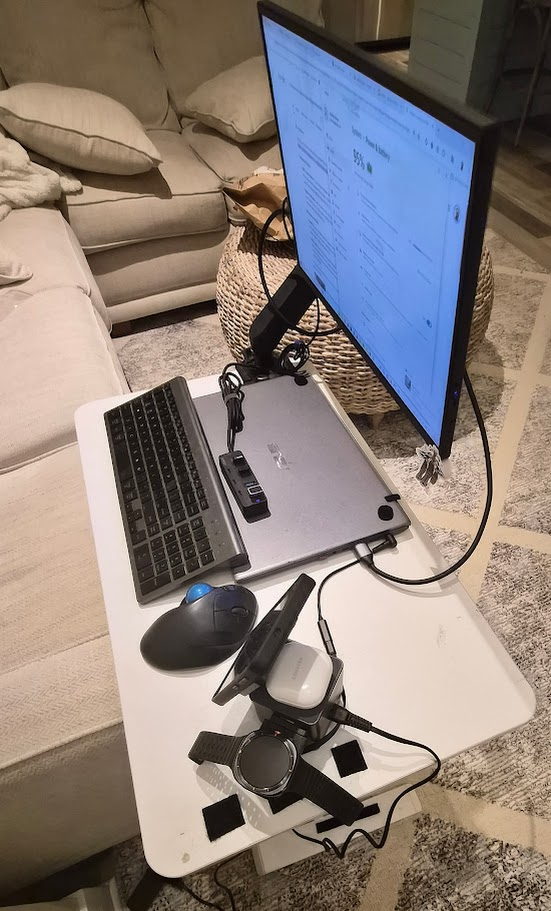
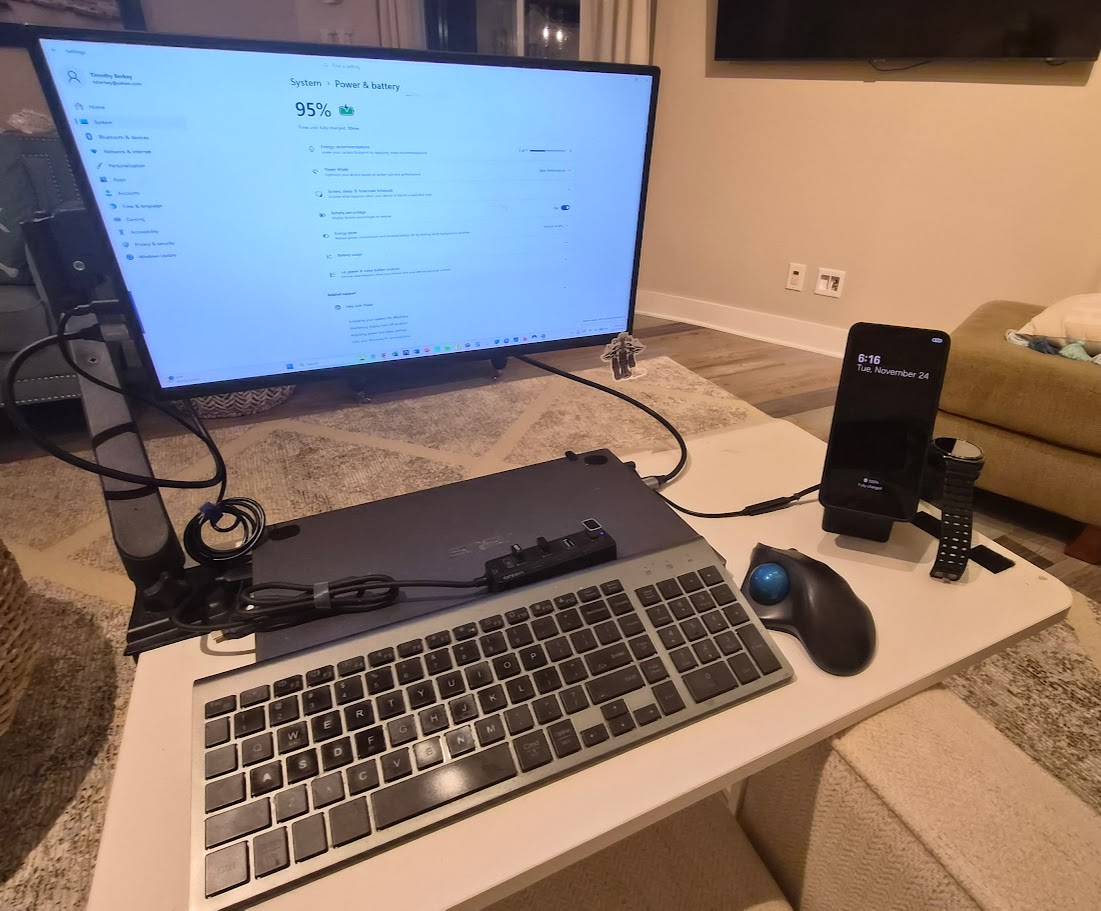
My situation is, I have very little desktop space to deal with as we live most of the year in our motorhome. You can see in the pics how small my desktop really is. Anyway, I have been intrigued by many of these multi-device charging stations that can also power laptops. I've been using a 3-in-1 for my phone, watch, and buds but also have wires going everywhere as well as a really unsightly power strip attached to the desk itself.

I had one narrowed down (SKEGIC brand name) but the rep I contacted via email tried to tell me that the Qi charging wouldn't work for my Samsung phone and buds. (Say WHAT?!?) So, I did some further research and discovered this person truly shouldn't be working in customer support.

Anyway, I ended up buying this unit (SUGOOL brand name) on Amazon for 60 USD and another 9 for the usb-to-barrel plug. The built-in 65W USB-C cable seems to be delivering power at (at least) the same level as the actual charger plug that came with my Asus laptop. When I unplug one and plug the other in, the minutes left until full charge are pretty much the same. I am pretty sure my laptop only draws 45W so easily within the range of this output cable. My phones (Z Flip 7 and S26+), Galaxy Watch Ultra, and Buds 2 are all charging nicely at the same time. (This unit did not come with the pad for my watch but I had one from my old 3-in-1 that I knew would work so I cannibalized that one.)

I have no idea what the longevity of this product will be but I'm loving how much of my tiny desktop I can see, as well as the much cleaner look. Either way, I hope this helps someone who is considering one of these units


r/UsbCHardware • • 2d ago

Looking for Device USB hub or dock for work laptop?

1 Upvotes

I’m looking for advice on upgrading our office hardware setup. I want to pitch a clean, reliable solution to my boss, but I’m caught in the middle of deciding whether a solid USB-C Hub or full-fledged Docking Stations make more sense for our team's needs.

Currently, our setup relies on plugging one display directly into the laptop and using cheap, faulty USB-C adapters/hubs just to get the second monitor connected and provide extra USB ports.

Here is our team breakdown and environment:

  • Team size: < 10 developers.
  • Laptops: Mostly Windows (Lenovo ThinkPads, Legions, ASUS - basically gaming laptops), plus 1 MacBook.
  • Thunderbolt support: Only 3 or 4 machines have Thunderbolt ports; the rest have standard USB-C ports.
  • Displays: Every workstation has 2 external monitors (HDMI or DisplayPort connections).
  • Peripherals: Keyboard, mouse, USB headset/headphones, occasional external storage (flash drives, portable SSDs/HDDs).
  • Network: We want Ethernet ports built-in, as some of our laptops lack native Ethernet ports.

Here are some of my questions:

  1. Given that not all laptops have Thunderbolt, is a full-featured Docking Station worth the investment over high-quality powered USB-C hubs?
  2. For higher-draw laptops, is USB-C PD via a dock sufficient for office tasks, or should those users keep their OEM high-wattage power bricks plugged in alongside the dock/hub?

Would appreciate any recommendations on specific models or general setup strategies for a team with mixed OS/port specifications. Thanks in advance!

Edit: Also looking to take advantage of Black Friday and Cyber Monday deals on Amazon.


r/UsbCHardware • • 2d ago

Troubleshooting Laptop type-c hub not supporting dual monitor

0 Upvotes

I have Dell Precision 5570 w/ type-C ports. I have been using a simple adapter (Newmight brand) which I got for $30-40 on Amazon. It supports charger, 2 monitors (HDMI), mouse, keyboard, web cam.

Past few months, the monitors go out for 2-3 seconds every now and then. But the frequency has increased, so much that its impacting my work. I researched a bit wrote an AI prompt and discovered that the adapter is not able to support the charge from charger and monitors.

I am okay to spend on a new type c hub, but dont want to spend a ton. I guess what I want to know is: is the wattage something I should look for? This one says 150W. Amazon link

Monitors are regular LG 21" and on 60 Hz.


r/UsbCHardware • • 2d ago

Troubleshooting Never again slow cables! I found a solution! (free)

Post image
0 Upvotes