r/androidafterlife • • 14h ago

Discussion Found my ol' Sony Xperia M5 while cleaning. Still working too!

Thumbnail
gallery
92 Upvotes

Android 6. Fully working. Battery's shot but can last the day idling if on Stamina Mode (was this Sony's battery saver mode?). We had it all back then. Cool power button, camera button, MicroSD card slot, IP68 rating, headphone jack and a notification/charging light that I remember was a lot more configurable and useful than Google Pixel's HiLight.


r/androidafterlife • • 8h ago

Discussion I found My dad old phone , what can i do?

Thumbnail
gallery
20 Upvotes

r/androidafterlife • • 5h ago

Guide [GUIDE] Ultimate Survival Guide for the Galaxy Tab 3 Lite (or any device that runs kitkat)

Thumbnail
gallery
7 Upvotes

hi guys, i decided to write this guide for the galaxy tab 3 lite using a SM-T113NU (goyavewifixtc) as a baseline, documenting all of my steps which are needed to make this device as usable as possible, if you have any questions feel free to ask
Guide Link (Google Docs)
xda thread


r/androidafterlife • • 11h ago

Discussion Old Shazam (music recognition app) patch(es) someday?

Thumbnail
gallery
16 Upvotes

I thought of this post because nobody tried to patch the original old Shazam app versions. I tried to patch it back in summer 2026, but because it's a POST request with XML, well predicting errors are hard here because of how the app versions are coded. So ended up giving up for a few months until doing this post.

It's not impossible but that would take days (or even weeks) to revive the old Shazam on Android devices and build up custom server with source code stuff bla bla bla and all that.

The Pre-mid-2010 versions don't have a setup screen but because they're discontinued YEARS ago, it would error out saying the phone is not supported (The real cause: dead servers).

Versions from 2010 to approx. 2012 use "http://goog.shazamid.com/orbit/RequestConfig1" at startup, and in https://pastebin.com/vK09EbPX you can see what's going on with this POST request.

Versions from approx. 2012 to approx. 2015-2016 use the newer "http://goog.shazamid.com/orbit/RequestConfig2" at startup, and in https://pastebin.com/ZQRbhzwH you can see what's going on with that POST request.

None of those have old documentations so it's not easy currently to revive them.

But hopefully one day they could be patched making sure any old Android phone/tablet (even to as low as Android 1.0) can have a music recognition app again. That would require a custom server with a custom/different API (not Shazam's).

The versions I like are:

https://www.apkmirror.com/apk/apple-inc/shazam/shazam-find-music-concerts-1-1-release/shazam-find-music-concerts-1-1-android-apk-download/ (2009)

https://www.apkmirror.com/apk/apple-inc/shazam/shazam-find-music-concerts-1-3-release/shazam-find-music-concerts-1-3-android-apk-download/ (2010)

https://www.apkmirror.com/apk/apple-inc/shazam/shazam-find-music-concerts-2-1-1-release/shazam-find-music-concerts-2-1-1-bb70020-android-apk-download/ (2010)

https://www.apkmirror.com/apk/apple-inc/shazam/shazam-find-music-concerts-3-3-0-release/shazam-find-music-concerts-3-3-0-bb71229-android-apk-download/ (2011)

https://www.apkmirror.com/apk/apple-inc/shazam/shazam-find-music-concerts-3-13-2-release/shazam-find-music-concerts-3-13-2-jb77505-android-apk-download/ (2013)

https://www.apkmirror.com/apk/apple-inc/shazam/shazam-4-7-2-release/shazam-4-7-2-jb88587-android-apk-download/ (2014)

What do you think when it would happen?

Thank you.


r/androidafterlife • • 6h ago

Help Issues with updating bootloader on HTC Wildfire S

Thumbnail
gallery
6 Upvotes

If anyone actually has experience with these super old androids/htcs help would be much appreceated

I wanted to custom rom my HTC Wildfire S (codename Marvel S), in order to do that you need to

  1. In most cases update bootloader
  2. Unlock it using HTCDev
  3. Recovery and ect...

So in order to update bootloader you need to get RRU package which almost always contains

  1. radio
  2. system
  3. hboot (bootloader)

ect...

Well i decided to flash the newest package out there (big mistake) and everything passed with OK except for hboot (bootloader) which it decided to bypass, so i did some digging and apparently you need to first flash bootloader 1.03.... before to actually be able to flash the newest version, except virtually all packages come with everything like system, radio and the phone wont let you downgrade it. there is barely any packages of the newest firmware/rom letalone the old version. so now i am stuck with the old bootloader which cant be unlocked and the newest everything else. and its not like you can just remove everything else from the rru package .zip as htc decided to for some reason make it so that if you modify the zip in any way, the sigature is gone and you cant flash it

Thank you in advance!


r/androidafterlife • • 8h ago

Discussion Installed LineageOS 20 on a Galaxy A01

Post image
6 Upvotes

Context - yesterday a friend ofng a custom ROM for this phone was pretty easy, considering this is a member of the A family. And yes, i did a completely de-Googled install

Edit: actually she gave it to me two days ago and i only installed Lineage yesterday


r/androidafterlife • • 3h ago

Help Could someone please port WhatsApp Legacy 2.0 to Android 2.3.6? I really need it!

2 Upvotes

I NEED THIS!!


r/androidafterlife • • 2h ago

Help pinterest for 4.3?

1 Upvotes

looking for a patched app or anything similar so i can run pinterest on my blackberry


r/androidafterlife • • 6h ago

Discussion sm-j530f afterlife

Thumbnail
gallery
2 Upvotes

Hi. So, I've been doing some urban scavenging recently and found this sm-J530F in the bin. It was covered in snow, mud etc, and at first I thought it was dead, but I took it home, opened it, cleaned it up, and now it actually works! I have flashed a relatively debloated custom ROM onto it, and it's still a pretty neat phone. I'll do some more debloating on it later so it runs even faster. I'll probably keep experimenting with it for a few days, and then idk what I'll do with it. If anyone needs it for a project or something, I can post it to you if you cover the postage. The phone is currently in one of the Baltic countries.

P.S. Idk why it shows up as an SM-M105M in neofetch. The model number on the back cover is clearly SM-J530F.

P.P.S. Alright, in an emergency, I could send it to someone and pay for the postage myself, but only in case you're somewhere in Europe or nearby. I can't even imagine how much it would cost to ship something to another continent... Thanks.

P.P.P.S. I haven't tested it fully yet. SIM slot etc works, but I haven't called anyone from it yet. I can do it easily if someone will request it etc.

P.P.P.P.S. looks like that mic and speakers are dead. so this can't be used as primary phone probably.


r/androidafterlife • • 17h ago

Help What should I do with this thing

Thumbnail
gallery
11 Upvotes

I found a Samsung Galaxy Ace Style LTE G357 in my grandmas house, what do I do with it. Got some old apps on it tho


r/androidafterlife • • 9h ago

Discussion Coming soon: artemisOS

2 Upvotes

Not exactly about old phones, but thought it would fit :)


r/androidafterlife • • 1d ago

Discussion Samsung Galaxy Y on Android 2.3.6 with working Play Store and Spotify 1.2.5.3 working for the most part.

Thumbnail
gallery
41 Upvotes

I bought that phone in like May 2023, logged into my google account in 30th May 2024 and till this day it somehow connects to google as shown on last pic and since then play store also works. Also, ofc with help of AI, we managed to get Spotify 1.2.5.3 working in like around 80%. Connects directly to Spotify servers.


r/androidafterlife • • 7h ago

Help Apps para Android 2.3.6

1 Upvotes

Hola a todos. Tengo un teléfono muy muy viejo y me gustaría poderlo convertir en algo más "nuevo". Me gustaría utilizarlo tipo para estudiar (Para usar ChatGPT, entrar a educamosCLM y navegar por Internet). He estado mirando navegadores y hay uno que tengo actualmente que no me va bien. Es que carga una pagina (por ejemplo educamosCLM) y cuando le doy a iniciar sesión se refresca la pagina y me enseña lo mismo. ¿Podríais pasarme porfavor algun navegador y app de IA para mi movil? Gracias de antemano a todos


r/androidafterlife • • 1d ago

Discussion Any apps recommended for this OG samsung galaxy camera? Gc120

Thumbnail
gallery
73 Upvotes

r/androidafterlife • • 15h ago

Discussion Is this the right community to share my collection of portable and offline installers of android emulators? Im new here

3 Upvotes

r/androidafterlife • • 1d ago Bravo

Guide Android 7 Nougat - Ultimate Survival Guide 2027

13 Upvotes

Guide last updated: 24/11/26

I’m writing this to make it easier to answer questions from other users. I’ll try to make everything as straightforward as possible here and keep this guide up to date. If any links are broken, an app no longer works, or you have any suggestions for additional content, let me know in the comments!

(In this tutorial, I'm assuming that your phone has been completely reset to factory settings.)

1. Initial configuration

Once your phone has been reset to factory settings, the first thing I recommend you do is update the system certificates, since some of the default certificates in Android 7 have expired, causing problems with loading content from the internet and preventing you from using several apps on this list.

To update the certificates on Android, follow the step-by-step instructions in this tutorial here: https://www.reddit.com/r/androidafterlife/comments/1r2uk1l/guide_how_to_add_tls_certificates_to_fix_some/

Once all the certificates have been updated, you can proceed to the next step.

2. Updates and Services

I believe that, by default, systems like Android 7 and later still automatically connect to Google's servers and automatically update the Google Play Store, even allowing you to update the apps that come pre-installed on your phone through the store without having to sign in. However, if you don't plan to connect your phone to the internet, or if Android didn't update the app automatically, these are the latest versions available as of the time I'm writing this:

Google Play Store: https://www.apkmirror.com/apk/google-inc/google-play-store/google-play-store-54-3-08-release/
Google Play Services: https://www.apkmirror.com/apk/google-inc/google-play-services/google-play-services-26-46-32-release/

Even though I can still log in to the Play Store normally in this version so far, I don’t really like doing that, since it ends up increasing data collection and, consequently, background processes, which drain the battery and affect the overall performance of even high-end phones like the Galaxy S6. That’s why I prefer to use the Aurora Store, which is open source and doesn’t require a login, instead.

Aurora Store: https://f-droid.org/packages/com.aurora.store/

As for other apps pre-installed on the device, I recommend that you disable any that you won’t work anymore, such as Google+, Google Hangouts, Google News… Or apps you don’t really plan to use, such as Google Photos, Google Play Books… Doing this will free up some space and may even make your phone run faster by removing these unnecessary background services. Once they’re removed, you can download updates for the remaining apps (if there aren’t any updates available for them through the Aurora Store) via APKMirror, where you can search for compatible APKs using the search options.

https://www.apkmirror.com/?post_type=app_release&searchtype=apk&s=play+services&minapi-max=24&bundles%5B%5D=apk_files

Even so, if you want to sign in to your Google account on the device and are having trouble, try updating WebView; that usually fixes the problem of not being able to sign in.

https://www.apkmirror.com/apk/google-inc/android-system-webview/android-system-webview-114-0-5735-60-release/

3. Browsing the Internet

For browsing the internet, Firefox is undoubtedly the best option in this case. This is mainly because of its wide variety of extensions and the fact that the browser does not rely on the system's WebView to render pages.

https://www.apkmirror.com/apk/mozilla/firefox/firefox-fast-private-browser-143-0-4-release/

In Firefox, I recommend that you try out the recommended privacy extensions, but above all, I recommend that you install Adblock Origin. H264lify is also highly recommended if you want to watch YouTube in your browser.

https://ublockorigin.com/
https://addons.mozilla.org/en-US/firefox/addon/h264ify/

4. Communications and Social Media

The list of social media platforms that still supports Android 7 is currently short, and that number is likely to shrink further. Even so, you can still use these apps through your browser still work well. Currently, the social media platforms that still natively support Android 7 are:

(As I said, most of these apps are still being updated, so I recommend checking to see if there are new versions available. Or just let Aurora Store check and update them up for you, wink wink)

Another option for those who don't want to use the web version of the apps is to use alternative clients or patched apps. However, I am not responsible for your data—be careful with alternative clients or patches from unknown sources!

5. Games

As for this list of games here, I'll organize them from the least resource-intensive to the most resource-intensive, so if you have a more basic phone, you'll know which ones to choose.

If you have any other game suggestions for me to add here, just let me know in the comments!

I think that’s all. I’ll try to keep this guide up to date. As I said at the beginning, if any links are broken, an app no longer works, information is out of date, or you have suggestions for additional information, let me know in the comments! Thanks to everyone for your help.


r/androidafterlife • • 1d ago

Discussion Information - T110 backports (old4-2goyas)

12 Upvotes

Greetings, I am Neptune, lead tester for this project named old4-2goyas, I suppose that prior to this you've seen my Android 4.0.4 backport post from the GT-P5100 to the SM-T110, well, I have updates and a coming soon list.

Initially, updates.

The 4.0.4 port should resume development tomorrow once our developer can go back to helping me and I will be able to help test, but there is a key difference this time: we are not porting the P5100, we're porting from the P3110 now.

  • Reasons for such: 7.0" UI, which fits our Galaxy Tab 3 Lite, probably more stability, aswell. The same development effort has also been made for the SM-T113, but it remains as a private project for now, but I can provide a video, only of the T113 version working.

Coming soon:

  • Honeycomb port to the SM-T110 from the Galaxy Tab 7.0" Plus
  • Honeycomb port to the SM-T113 from same device

Stay tuned on our work!

😉


r/androidafterlife • • 1d ago

Discussion rate my phone

Thumbnail
gallery
63 Upvotes

r/androidafterlife • • 17h ago

Help Mi sd card

Thumbnail reddit.com
1 Upvotes

My phone is a Motorola edge 60 fusion


r/androidafterlife • • 1d ago

Guide Android 6.0 Marshmallow - Ultimate Survival Guide 2027

6 Upvotes

Guide last updated: 25/11/26

I’m writing this to make it easier to answer questions from other users. I’ll try to make everything as straightforward as possible here and keep this guide up to date. If any links are broken, an app no longer works, or you have any suggestions for additional content, let me know in the comments!

(In this tutorial, I'm assuming that your phone has been completely reset to factory settings.)

1. Initial configuration

Once your phone has been reset to factory settings, the first thing I recommend you do is update the system certificates, since most of the default certificates in Android 6 have expired, causing problems with loading content from the internet and preventing you from using several apps on this list.

To update the certificates on Android, follow the step-by-step instructions in this tutorial here: https://www.reddit.com/r/androidafterlife/comments/1r2uk1l/guide_how_to_add_tls_certificates_to_fix_some/

Once all the certificates have been updated, you can proceed to the next step.

2. Updates and Services

Although it’s common practice to update the Google Play Store and Google Play Services first, I recommend that you don’t do that. Because even though Android 6 is still technically supported by Google in this regard, the latest versions of these apps—especially Play Services—can really drain performance and battery life, even on high-end phones from that era, such as the S5, for example. Plus, they collect a ton of data and can create new security vulnerabilities on the device.

Instead, I recommend using the Aurora Store along with MicroG Services. They are open-source alternatives to the Play Store and Play Services that do not affect device performance, do not collect user data, and do not require users to log in to use them or download apps.

Aurora Store: https://f-droid.org/packages/com.aurora.store/
MicroG Services: https://github.com/microg/GmsCore

As for other apps pre-installed on the device, I recommend that you disable any that you won’t work anymore, such as Google+, Google Hangouts, Google News… Or apps you don’t really plan to use, such as Google Photos, Google Play Books… Doing this will free up some space and may even make your phone run faster by removing these unnecessary background services. Once they’re removed, you can download updates for the remaining apps (if there aren’t any updates available for them through the Aurora Store) via APKMirror, where you can search for compatible APKs using the search options.

https://www.apkmirror.com/?post_type=app_release&searchtype=apk&s=&minapi-max=23&bundles%5B%5D=apk_files

Even so, if you want to sign in to your Google account on the device and are having trouble, try updating WebView; that usually fixes the problem of not being able to sign in.

https://www.apkmirror.com/apk/google-inc/android-system-webview/android-system-webview-105-0-5195-136-release/

3. Browsing the Internet

For browsing the internet, Firefox is undoubtedly the best option in this case. This is mainly because of its wide variety of extensions and the fact that the browser does not rely on the system's WebView to render pages.

https://www.apkmirror.com/apk/mozilla/firefox/firefox-fast-private-browser-143-0-4-release/

In Firefox, I recommend that you try out the recommended privacy extensions, but above all, I recommend that you install Adblock Origin. H264lify is also highly recommended if you want to watch YouTube in your browser.

https://ublockorigin.com/
https://addons.mozilla.org/en-US/firefox/addon/h264ify/

4. Communications and Social Media

The list of social media platforms that still supports Android 6 is currently short, and that number is likely to shrink even further. Even so, you can still use these apps through your browser; sites like Twitter and Bluesky still work well. Currently, the social media platforms that still natively support Android 6 are:

(As I said, most of these apps are still being updated, so I recommend checking to see if there are new versions available. Or just let Aurora Store check and update them up for you, wink wink)

Another option for those who don't want to use the web version of the apps is to use alternative clients or patched apps. However, I am not responsible for your data—be careful with alternative clients or patches from unknown sources!

5. Games

As for this list of games here, I'll organize them from the least resource-intensive to the most resource-intensive, so if you have a more basic phone, you'll know which ones to choose.

If you have any other game suggestions for me to add here, just let me know in the comments!

I think that’s all. I’ll try to keep this guide up to date. As I said at the beginning, if any links are broken, an app no longer works, information is out of date, or you have suggestions for additional information, let me know in the comments! Thanks to everyone for your help.


r/androidafterlife • • 18h ago

Help Have you patched Google maps for Android 5 ?

0 Upvotes

r/androidafterlife • • 1d ago

Help Is it possible for someone to patch the old Xiaomi Market with lyano market?

Post image
3 Upvotes

Title ok ok ok yeah ok ok


r/androidafterlife • • 20h ago

Help Ayuda con mis archivos

1 Upvotes

Hola, buenas noches, Cambie de teléfono hace mucho porque mi teléfono antiguo se arruinó, pero migre los archivos de esa SD a otra memoria, y me dí cuenta que tengo archivos encriptados de Files by Google, ahora, me gustaría ver cómo puedo ver esos archivos en mi teléfono. Gracias de plano. 🫪


r/androidafterlife • • 1d ago

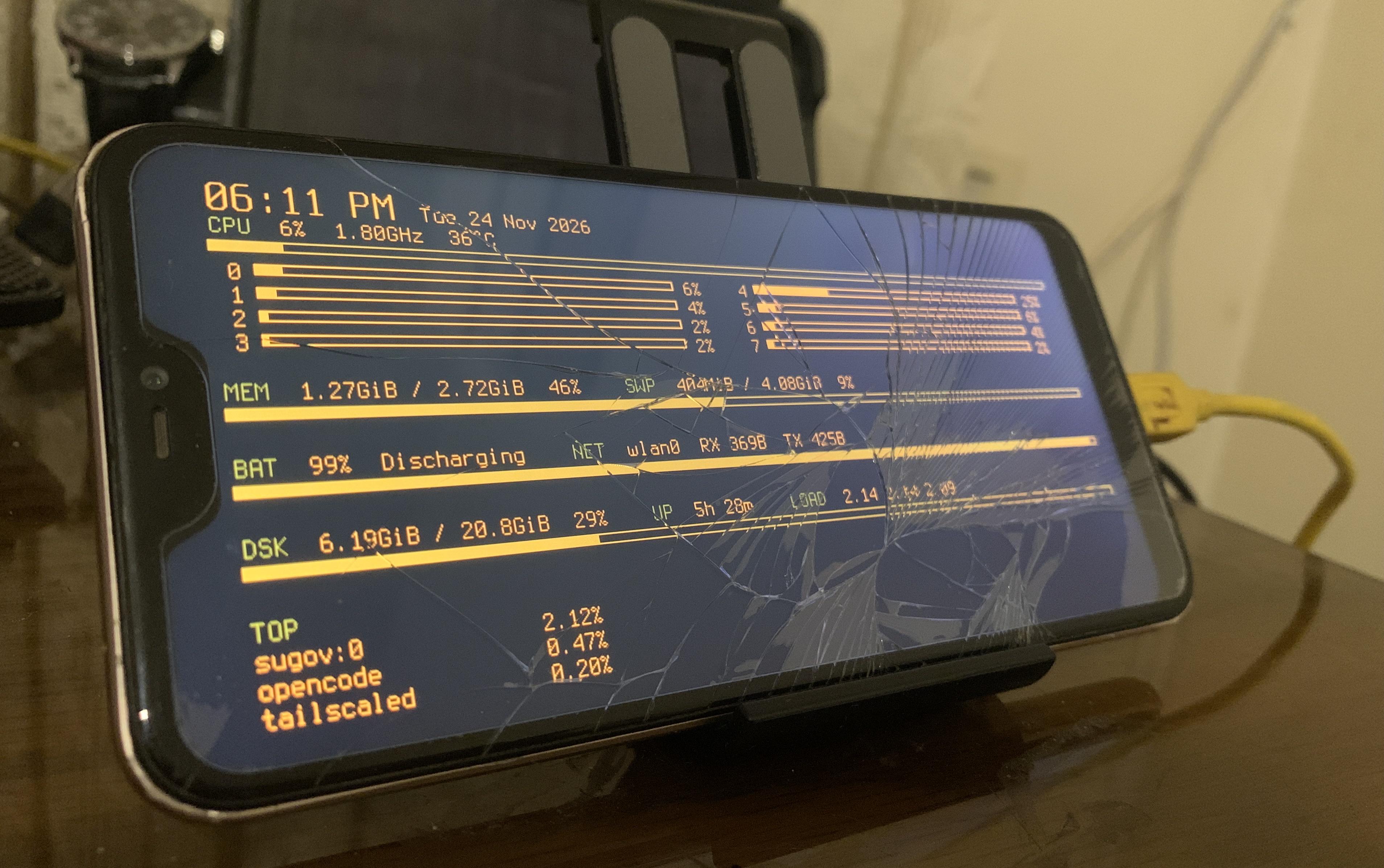
Guide Mi A2 Lite with no battery now it's an always-on postmarketOS server

Post image
10 Upvotes

r/androidafterlife • • 1d ago

Discussion Old KineMaster 2019's version running in 2026

4 Upvotes

The version I'm running is 4.11.13.14060.DF ("chinese" apk mod from september), which, from what I've seen in the APK information in ZArchiver, is compatible with Android 4.1.