r/captureone • • Sep 19 '25

Welcome word & Community Guidelines

16 Upvotes

Hello community 🙌

We want r/CaptureOne to be a space where users of all skill levels can learn, share, and improve together. Treat others with respect, share helpful feedback, and keep discussions constructive, so everyone can get the most out of their experience here. 

To maintain a healthy environment, please adhere to our community guidelines:

  1. Keep it about Capture One
    All posts should relate to Capture One software, including workflows and educational material.
  2. Be kind and respectful
    Treat all members with respect. Harassment and personal attacks will not be tolerated. Healthy, constructive discussion is what makes this community work.
  3. No piracy discussions
    Any discussions, links, or hints about pirated software will result in a ban.
  4. No trolling, spamming, or self-promotion
    Stay on topic. Spam, trolling or irrelevant advertising will be removed.
  5. Feedback and feature requests
    Keep feedback constructive, so everyone can learn. Specific feature improvements can be requested directly at Improve Capture One. For the camera & file support requests, go to Camera Request page.
  6. Bugs and technical issues
    This Subreddit is not an official support platform. If you suspect a bug or encounter a technical issue, report it directly to our tech team at support.captureone.com. Use the official channel to help us resolve the problem as efficiently as possible.

r/captureone • • 23m ago

General Question CaptureOne Import Problem

1 Upvotes

I've sent my iPhone photos to a folder on my Mac desktop via Air Drop.

I've selected all the photos in that folder for import into Capture One a CaptureOne catalog, with the option that each image will be copied into the Capture One Catalog.

I'm receiving the message: No vaild collection selected

"Can not import into currently selected collection. Please select an Album collection or choose a different Collection "Import To" option.

What am I doing wrong???


r/captureone • • 23h ago

Guides & Tutorials My workflow for archiving Capture One exports as JPEG XL (free, open-source tools)

10 Upvotes

Since Capture One doesn't export JPEG XL, I've been archiving my edits with a TIFF-to-JXL step after export. Sharing the workflow in case it's useful to anyone else who wants smaller archives without giving up 16-bit or their color profile.

1. Export from Capture One A 16-bit TIFF recipe in whatever color space you edit in (I use ProPhoto RGB). Nothing special; the recipe stays the same.

2. Convert to JXL masters This is where I ran into trouble at first: plain cjxl/djxl give you back a generic profile, and most apps I tested got ProPhoto/AdobeRGB wrong. So I wrote a small toolkit for it, jxl-photo (free, MIT). You point it at the export folder and it:

  • keeps the original ICC profile, and gives it back byte for byte if you decode to TIFF to edit again, even from a lossy JXL
  • keeps EXIF/XMP (visible in IrfanView, XnView MP, etc.)
  • understands C1's export folders, and a re-run only converts the photos you re-exported
  • can delete the TIFFs for you, but only after decoding each JXL and checking the pixels match

3. Built for whole libraries I wrote it for thousands of 45 MP files, so almost all of a run's time goes to the codec itself:

  • several photos are encoded in parallel, as many as your free RAM allows, so a big batch never runs out of memory
  • the image goes to cjxl straight from memory, each master is written to disk only once, and metadata goes through a single ExifTool process that stays open for the whole run
  • with an SSD as staging, the library's hard drive mostly just reads, and finished files are moved over in bulk
  • re-runs are cheap: up-to-date photos are skipped by date alone, and checking a master reads only a few KB of it
  • presets and folder lists (CSV) can run unattended on a schedule

4. What it saves 45 MP ProPhoto exports from my Z7/Z8:

  • 16-bit TIFF: 273 MB
  • JXL lossless: 173 MB
  • JXL d=0.1 (near-lossless, what I recommend for masters): 31 MB
  • JXL d=1.0 (visually lossless): 5.5 MB

5. Sharing and re-editing From the masters it makes JPEG or lighter JXL copies (sRGB, resized, with sharpening matched to C1's screen/print presets), or the full 16-bit TIFF back if I want to bring a photo into C1 again.

6. Browsing in Windows Explorer JXL thumbnails are painfully slow in Explorer with Microsoft's extension, since it decodes the whole photo. I also made jxl-thumb, which reads only the small preview at the start of the file: 16 masters of 25-45 MP show up in about 1 second instead of 37, with correct ProPhoto/AdobeRGB colors.

Links:

jxl-photo: https://github.com/rsilvabr/jxl-photo

Windows version (unzip and run, everything bundled): https://github.com/rsilvabr/jxl-photo-exe

jxl-thumb: https://github.com/rsilvabr/jxl-thumb

Both are free and open source; I'm not selling anything. If you try it, test on a small batch first. Happy to answer questions about the workflow.


r/captureone • • 1d ago

General Question Any sales on Capture one Perpetual?

11 Upvotes

Looking to get the new Capture one Software, and would love to know if anyone has seen it on sale anywhere? The loyalty discount isn't that great on the actual C1 website.


r/captureone • • 2d ago

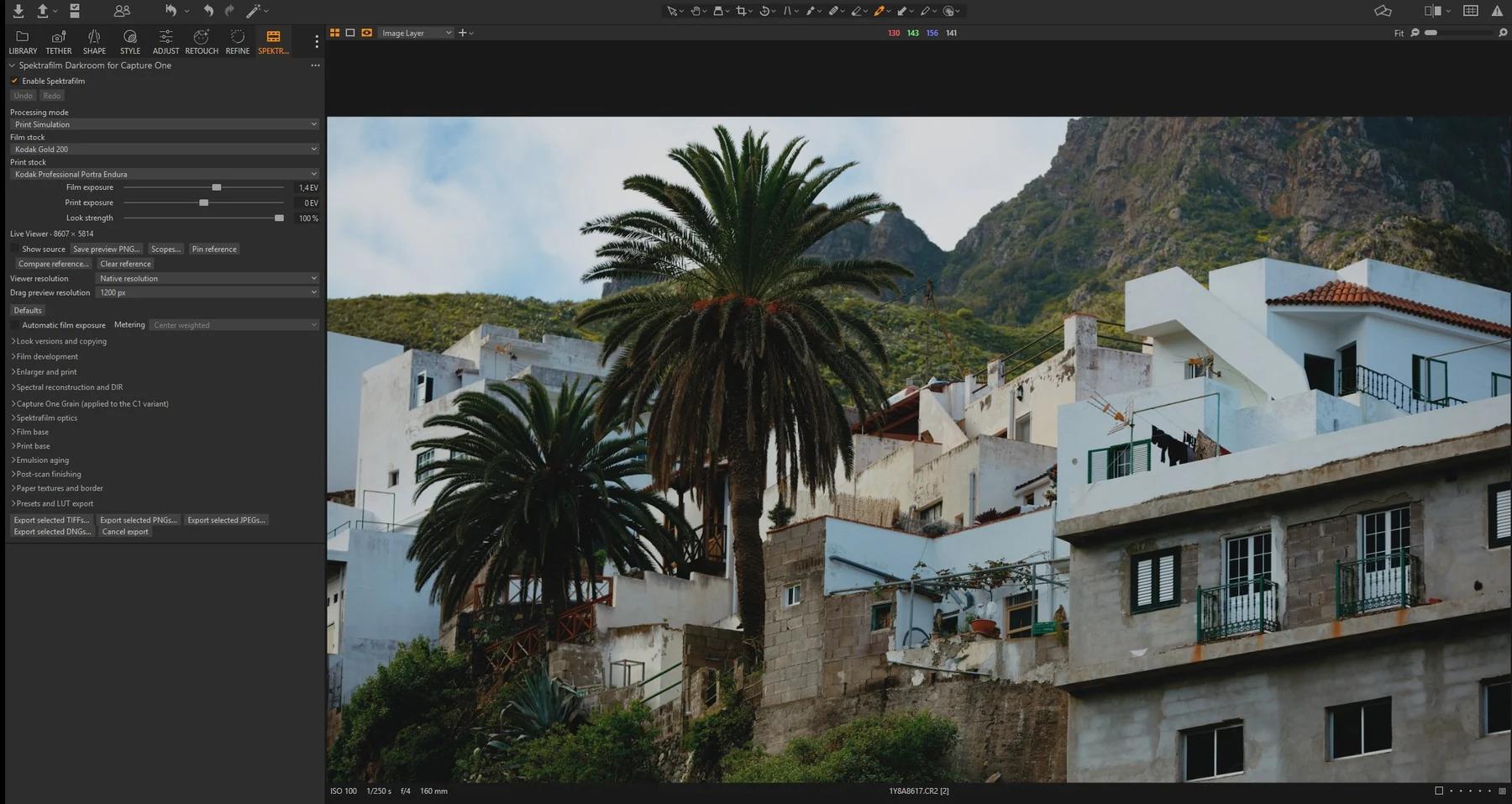
Miscellaneous Spektrafilm Darkroom for Capture One 16.9: a fork of Spektrafilm for Capture One with recipe export, look history and a full manual. Free and open source.

Post image
61 Upvotes

Hey everyone. A week ago Luka posted his Spektrafilm for Capture One here. I wanted the same thing on the current Capture One, so I took his experimental branch, moved it to Capture One 16.9 and kept going. The result is on GitHub as Spektrafilm Darkroom for Capture One.

Like the original, it starts from Capture One's own RAW development and shows the film and print simulation live in the Viewer, in a tool tab. What I added on top:

  • Capture One 16.9 support (tested on 16.9.0.3894, Windows).
  • A faster Viewer. Resolution follows the zoom and quick frames keep the sliders responsive on big files.
  • Export through Capture One's own recipes. With the panel on, the normal Export writes the film image with every active recipe: folders, token file names and counters, JPEG, TIFF, PNG, PSD and PSB, the recipe's ICC profile and size, metadata, watermark and output sharpening. You get a list of the files before it starts, and an interrupted export can be resumed.
  • Look history. Undo and redo in the panel, named look versions, presets, and copy/apply between photos. Settings are saved per variant.
  • Post-scan finishing. Exposure, contrast, micro contrast, curves, toning, scan geometry, paper textures and borders.
  • More darkroom controls. Enlarger filtration, preflash, print and film base, emulsion aging, several grain models, colour-only LUT export.
  • A full user manual in English, 18 chapters with example images: what every control does, recipes for common looks and a troubleshooting chapter. It ships in the ZIP as offline HTML.

None of this would exist without the people whose work it connects. Andrea Volpato created spektrafilm, the open spectral model of film and print built from real sensitometry and dye data. Aedan Diez wrote the GPU-powered OFX port whose Vulkan renderer makes live adjustment possible. Luka Kauzlaric wrote the original Capture One integration that this project started from. All three projects are worth a look: Andrea's spektrafilm · Aedan's spektrafilm OFX · Luka's Spektrafilm for Capture One

Which one should you use? If you are on Capture One 16.4, use Luka's original; it is developed separately and supports that version. If you are on 16.9, this fork is for you.

The fine print. It is an unofficial, independent project: not made or supported by Capture One. It loads through a .NET startup hook and uses internal interfaces of Capture One 16.9, so a Capture One update can break it and you use it at your own risk. It needs Windows 11 64-bit, Capture One 16.9.0.3894 and a GPU with Vulkan 1.1. It starts Capture One through its own desktop shortcut; starting Capture One the normal way loads it without the panel. Nothing is sent over the network.

Install: download the ZIP, extract it, close Capture One, run Install Spektrafilm Darkroom for Capture One.cmd, then start Capture One from the Spektrafilm Darkroom for Capture One desktop shortcut and pick a catalog or session. Try it on a test catalog first.

GitHub repo, manual and install guide · Download v1.2.4

I'd love to hear what works on other GPUs, which film and paper combinations you end up using, and what breaks. Bug reports and pull requests are welcome on GitHub.

For transparency: I programmed this fork together with Claude, Anthropic's AI model. It wrote much of the code, the tests and the manual under my direction, and I tried the results in Capture One.

If you want to support the people behind the engine and the original integration:

r/captureone • • 2d ago

How To? Need help with Activation

1 Upvotes

I signed up to the Trial as I shot with a GH7 yesterday and the version i have a perpetual license for does not support the files.

Upon activation the Welcome Capture One windows Freezes

These are the things I tried so far

  1. WMI (Windows Management Instrumentation) troubleshooting
  2. uninstalling and reinstalling capture one
  3. Running Capture One with administrative privileges
  4. Making another ADMIN account on my computer and activating it on that
  5. Ive also tried using different browsers
  6. I have also used the "DISM /Online /Cleanup-Image /RestoreHealth" method of repairing any issues with windows
  7. I even disabled my Firewall and Private DNS blocking
  8. I've tried running the activation by using my mobile phone data instead as well
  9. I've tried installing older versions of Capture One and none of them seem to work. The last version that I can install, go through the login process on the browser and the handoff process goes fine is 16.2.6. The handoff from the browser to the app does not freeze capture one and the app lets me put in a serial number. However the serial keys I have attached to my account do not work. Even the one for the latest version.

I've had no response from a support ticket I raised so I'm seeing if anyone here might be able to help. It feels like I have an adobe subscription at this point.


r/captureone • • 3d ago

How To? How to provide preference for one image before panorama stitching?

1 Upvotes

I have two shots of a butterfly that I want to stitch into a panorama. In the better image of the butterfly (wings more open, and the butterfly is more in focus) the right of the frame is cut off, so I only want to use about 30% of the second frame to fill in that side and give a more balanced composition. However when I stitch the two as a panorama, Capture one always outputs the stitch using the worse version of the butterfly. How can I give preference to the better photo so the stitch only uses the second image to fill in the right hand side of the frame? Thanks


r/captureone • • 4d ago

Workflow Advice Curve: Linear Scientific 2026

12 Upvotes

If anyone was curious about new addition in Capture One base characteristic tool that appeared some time ago. This new curve appeared without any mention in C1 support manual. There is literally zero explanation what it is and why it is. I talked with Phase One representative recently about it and he told me that it is real linear curve for XH and RC systems. I suspected this as standard linear scientific curve appeared to have crushed blacks and I had to manually tweak tonality. So if you work with this camera systems and require linear tone response this curve is the way to go according to Phase One. If anyone from Capture One support read this please update your support manual with information about this. Edit: I added some screenshots to illustrate difference in tone mapping between curves. Don't look at printed values on Device Level Target. All values on GoldenThread targets are "rounded" for production batch. Real numbers are slightly different.

Linear Scientific with manual corrections. Pickers show correct values for given patch.
Linear Scientific without manual correction.
Linear Scientific 2026 without any manual corrections.

r/captureone • • 4d ago

Technical Issue "Open with..." leads to Windows "select App to open file"-window / C1 16.2.6

2 Upvotes

Dear community,

I have run into an issue that is new to me.

I wish to edit my files in another program, so I go "Open with" -> "[Program]".
This used to just work: It opened the program and within it all file(s) I had selected.

Now, this leads to the "chose an app to open this file" menu from windows itself.

This behavior ignores standard-apps.
If I try to load 20 files in another program, I get the windows dialogue also 20 times.
Each one opened in the background.

Is there a way around this?


r/captureone • • 5d ago

How To? Viewing by File Name order in Capture One Live?

2 Upvotes

Is it possible to share a Capture One Live folder and view it by file name order? I only see the option to view by date shot. I am sharing it as a review folder after the shoot, not live during the shoot. Am i doing something wrong? I'm on All-in-One


r/captureone • • 6d ago

Software News Capture One 16.9.1 & Capture One mobile 4.3

17 Upvotes

Hi community,

Our new 16.9.1 version is now available for download.
It brings tethering to the Hasselblad X2D II 100C and adds barcode and QR code detection to tethered capture.

The Source Filename token is now available on Windows, the Keystone loupe gets new options, Multi-User Sessions are more stable, and our C2PA support is updated. You can now edit the skin mask in Body Skin Retouching, and AI Crop in Next Capture Adjustments is available in AppleScript.

Check the release notes to learn more.


r/captureone • • 7d ago

General Question C1 for hobbyists

6 Upvotes

I just switched from Lightroom to C1 to manage my personal photos and edit some of my RAW files.

I like it overall but it’s slow and clunky (especially when scrolling a catalog). But it seems like the feature set is geared towards fashion professionals and brand management.

Anyone use C1 for things besides portraits/faces? What things do you really like about C1 vs other programs?

Welcome any tips as well for smoother use. On an M1 Max 32GB ram. About 20K photos in a catalog, mostly RAW. Catalog is on my SSD and the originals on my NAS. Only connect to the NAS if I want to make significant edits to RAW files, otherwise I’ve found it actually slows scrolling.


r/captureone • • 7d ago

General Question Capture One Pro License. Worth it?

7 Upvotes

Is the Capture One Pro License worth it as a mainstay editing platform? I need an editing app for editing RAW photos


r/captureone • • 6d ago

General Question How consistent is Capture One's colour accuracy compared to Lightroom?

0 Upvotes

Capture One and Lightroom are both good with RAW files, but there can be a huge difference in colour accuracy and consistency in editing workflow. Some photographers like the colour editing tools in Capture One, while others prefer the ease of use of Lightroom. If you shoot RAW often, how consistent is your experience with Capture One (particularly, colour matching from picture to picture)?


r/captureone • • 7d ago

Technical Issue After resetting the preferences, Capture One creates a new catalogue every time I open it

5 Upvotes

After resetting the preferences (as suggested by support in order to solve an issue I had), Capture One creates a new catalogue every time I open it.

Does anyone know how to stop this?

I've looked through the settings but haven't been able to find the right one.


r/captureone • • 8d ago

How To? Auto-feathering AI masks when batch-applying a Style?

5 Upvotes

Hi everyone,

I’m running the latest version of Capture One and I’ve built a custom Style that uses AI People Masking to automatically detect skin across a batch of photos.

The issue is that the raw AI mask edges are way too harsh, so I have to manually go through every single photo and apply Feather Mask one by one.

Since I’m applying the exact same feather radius to every image in the batch:

  1. Is there any built-in way to save the Feather / Refine value inside a Style or copy it along with the AI mask layer?
  2. Is there a batch workaround to apply Feather Mask across all selected variants at once without clicking through hundreds of photos manually?

Any tips or workflow tricks would be hugely appreciated!


r/captureone • • 10d ago

Miscellaneous Spektrafilm for Capture One is up on GitHub. Real, professional emulation - free for everyone.

Thumbnail
gallery
158 Upvotes

Hey everyone, I wanted to use spektrafilm on my RAWs while I was still editing them in Capture One. I finally got it running as a tool tab and put the integration up on GitHub as Spektrafilm for Capture One.

It starts from Capture One’s own RAW development, and you can change film and print stocks, exposure, halation, diffusion, and grain while watching the actual Viewer. The panel can float, settings autosave per variant, and there’s a 16-bit TIFF/PNG export path. I’ve been enjoying being able to dial in a print look while I’m still making the rest of my edits.

Huge credit to Andrea Volpato, the original creator of spektrafilm. He took real film measurements and turned them into an open model of how exposure, development, printing, and scanning affect an image. That’s an incredible amount of careful work to put out in the open. I built the Capture One integration because I liked what he’d made enough to want it in my everyday workflow. And a big thank you to Aedan Diez for the GPU-powered OFX port that makes live adjustments possible here. Both projects are well worth a look. Andrea’s original spektrafilm · Aedan’s spektrafilm OFX

It’s an independent integration for Capture One 16.4.6.2414 on Windows x64 with a Vulkan-capable GPU. Grab the ZIP, extract it, run Install Spektrafilm for Capture One.cmd, then open a test catalog from the Spektrafilm for Capture One desktop shortcut. I’d love to hear what works on other GPUs and what film and paper combinations you end up using. I've got a ko-fi link below for a little fundraising, I'd love to be able to test it on the latest capture one version. GitHub repo and install guide· Download v0.1.1

If you want to chip in, here’s where you can support each developer.

- The original film simulation and stock profiles. Andrea Volpato on Buy Me a Coffee

- The GPU-powered OFX port. Aedan Diez on Ko-fi

- The Capture One integration. Luka on Ko-fi

I’m Luka. You can find my photography and the other things I’m building on my site, including Lensflare, a film shoot planning platform that includes a 3d set planner with accurate, through the lens camera and lighting emulation . My site · Lensflare.io


r/captureone • • 10d ago

Technical Issue Capture one problem with color exporting!

2 Upvotes

I recently changed from Lightroom to Capture one, and so far I like it, but I just noticed that when I export and send the images to my phone I’m having a changing colors, I see the photos on my phone a bit different that in my computer, it’s like on the phone they are more to green warm tones and I can see clearly the difference! I had try few things on the way to export but nothing has change so far! Anyone have any tips or face this type of issues! I used MacBook Pro m5 and iPhone 16pro!


r/captureone • • 11d ago

Technical Issue Speeding up catalog startup time?

6 Upvotes

I’ve got a catalog for an ongoing portrait project in a theater. It currently contains ~16k images, all of which are keyworded with name, social handle, title, production and program. Maybe 300 distinct subjects.

My issue is that this catalog now takes 5-10 minutes to open. I’ve had catalogs with hundreds of thousands of images with fewer keywords that opened much more quickly. The images are all shot with a Sony A1, I’ve got catalogs shot with medium format images that aren’t this slow. I’ve tried verifying the catalog, no change. I have bigger catalogs on the same drive with fewer keywords that open faster.

Is there any other thing I can try to improve the opening time for this catalog? Or am I just stuck starting it and then going to do another task while it works?

I’m still on v22, on a Mac, but this is easily the catalog that takes the longest…I don’t have this trouble with any other one, no matter the size.


r/captureone • • 11d ago

Technical Issue Healing Mask tool indicator is replaced by cursor

3 Upvotes

When I use the Healing Mask tool, the circular indicator is replaced by a cursor – except for when I adjust the size/hardness.

Has anyone else seen this – and perhaps found a way of stopping it?

I see it both on the display on my MacBook Pro and on my external monitor. Restarting Capture One does not solve it.

(Capture One 16.9.0.10; macOS 27.2.1.)


r/captureone • • 12d ago

Technical Issue Negative conversion and auto-levels pre applied to my scans. help?

1 Upvotes

Hello. I'm scanning a roll of film, and open capture one. take the first tethered shot, go to set white balance, make sure I'm in photography mode, and set curve to linear response. Except auto levels have already applied to the image. The whole negative is washed out red, and the option to set the base characteristic to Film Mode is available. I look at the levels and see that they are already auto-adjusted.

I've scanned many rolls of film, but usually a few months apart, so not a regular thing for me. is there a step I'm forgetting?

I always forget the steps, so I literally just follow the tutorial from the youtube guide.

Any help greatly appreciated. ty.


r/captureone • • 13d ago

Release Discussion Vectorscope

22 Upvotes

Can't believe Adobe Lightroom got vectorscope before capture one when C1 apparently has the better color management and correction.

This is something that should have been added a while back honestly. Vectorscope, false color, depth masking - very easy to implement but instead we get AI hair edge retouching


r/captureone • • 13d ago

Workflow Advice Quick update for anyone testing Trinity on Capture One (v0.7.039-beta)

7 Upvotes

If you downloaded the Trinity beta recently, you might want to grab the updated build: I just pushed v0.7.039-beta to sort out a few edge cases that showed up during exports.

(For context if you missed the earlier post: I've been building a Windows plugin for Capture One to export directly to JPEG XL, AVIF, and WebP straight from your regular Export Recipes. I got tired of exporting massive 80MB TIFFs just to run them through external converters to get modern web formats with wide gamuts intact).

This update fixes:

  • Improved stability when processing large batches through export recipes.
  • Minor recipe preset registration glitches on Windows 11.
  • A cleaner installer package.

Both the .exe installer and the standalone .coplugin are updated at rod.cl/trinity (it's completely free, built purely to scratch my own itch in studio work).

If you're testing it and run into anything strange, drop a comment here or over at r/trinity4CaptureOne so I can patch it.


r/captureone • • 13d ago

General Question Blemish removal for body retouching?

5 Upvotes

I was thinking the new body retouching would have blemish removal and even skin like face retouching but it's only even skin option as of now.

Is blemish removal for body retouching coming soon?

I'm surprised it's missing because blemish removal works great.