r/crealityk1 • u/docdig • 1h ago
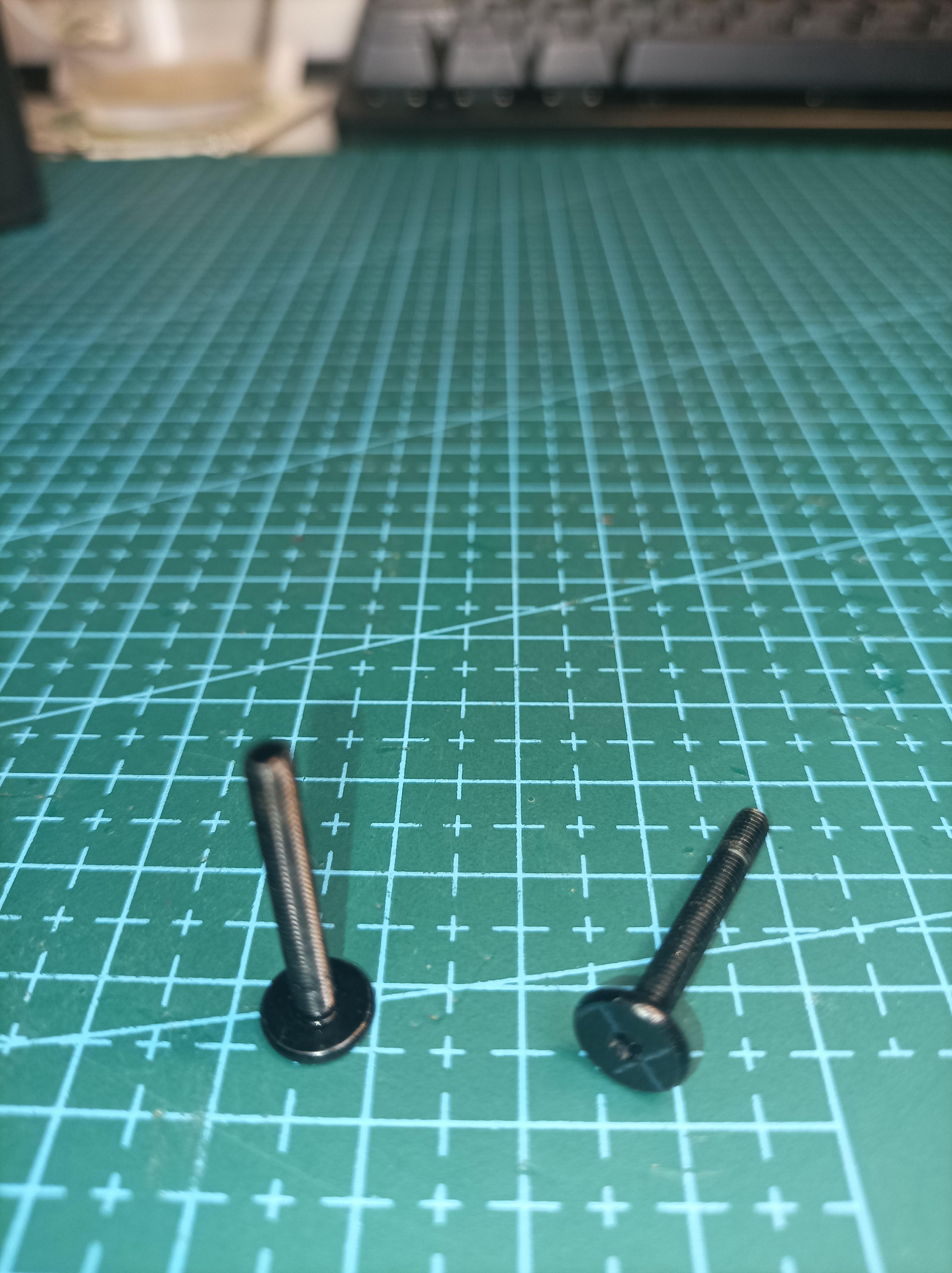
Question help identifying screws
removed the bottom of my K1C to do some maintenance and these 2 m3 x 25 screws fell out. I cant seem to find where they come from, has anyone got any ideas
r/crealityk1 • u/Creality_3D • Sep 04 '26
Beyond Nozzles. Conquer Materials.
K3 is supercharged with KliTek™
🔹 4.8s nozzle changes
🔹 Multi-material in one
🔹 Up to 5x faster
🔹 Waste-free
Unfolds an all-new chapter in multi-color and multi-material printing.
r/crealityk1 • u/Creality_3D • Sep 12 '26
Built to take creative freedom to the next level,
K3 brings together five core capabilities to push the boundaries of how you print, combine, and create:
🔹 Ultra-fast waste-free printing
🔹 Mix nozzle printing
🔹 Multi-hardness TPU printing
🔹 CMYK full-color printing
🔹 Native root access
More freedom in materials, colors, nozzles, and control — K3 opens up a new space for creativity.
r/crealityk1 • u/docdig • 1h ago
removed the bottom of my K1C to do some maintenance and these 2 m3 x 25 screws fell out. I cant seem to find where they come from, has anyone got any ideas
r/crealityk1 • u/Army-Vet-9606 • 8h ago
i recently got a Official Creality Chamber Heater to install in my K1 Max. Has anyone done this already? Looking for tips on install before i go putting unnecessary holes in my machine.
r/crealityk1 • u/FastAd5655 • 6h ago
r/crealityk1 • u/CrazyH18 • 19h ago
Hey all. I have been trying to figure this out for a while. Got some spaghetti mess, a couple prints in a row. Filament was coming from a dryer, and AI suggested slowing the print speed down. This worked, but still leaves me with a problem.
AI has me chasing down belt tension. I feel like an idiot plucking the belts, and not really sure what I'm doing.
So when it prints, it ends up slamming the front and sides as it slides around trying to print. I have lubed everything, and really just don't know what I'm looking for now.
Any help is appreciated.
EDIT: Attached videos
r/crealityk1 • u/4E0ncrown • 2d ago
r/crealityk1 • u/Human-Bar-8374 • 2d ago
EL otro día tuve una impresión fallida, cosa que de vez en cuando pasa y lo acabo arreglando, pero esta vez no es así, pruebo de todo, cambio boquillas, las limpio, le doy a extruir, pero al imprimir saca lamentables hilitos en vez de filamento, cosa que me frustra mucho ya que esta impresora desde q la compre me ha dado miles de problemas, también me quiero quejar del vidrio de la puerta de mi impresora, que mientras arreglaba el problema de la extrusión de repente se agrieto entera. Cualquier ayuda es agradecida.
r/crealityk1 • u/mrhsnowman5 • 3d ago
My printer crashed on me and I couldn't find any solutions so I just took to replacing the main board. The unit acts as if its new and has begun its calibration, though the print jerks and moves much faster and it seems to be trying to calibrate for a much bigger bed. I didn't let the unit finish calibrating because it was smashing into the side and was too loud for the time of night in my apartment, so it still needs its "initial" calibration
Edit: issue solved in the comments
r/crealityk1 • u/Advanced_Disaster133 • 3d ago
I got given a printer from work that has an issue with gaps in the prints and it always seems to be around the same height. Where should I look first to fix this? I'm aware it could be under extrusion but it seems to be perfectly fine until it gets to certain heights (this being the reason they were getting rid of it)
r/crealityk1 • u/Layer_High • 3d ago
Tenho uma Creality k1
Estive com esse problema de anormalidade de conexão no bico(BM0111) troquei o bico por um paralelo(pelas avaliações funcionava perfeitamente) porém o problema persistiu;
Pode ser problema na placa ?
r/crealityk1 • u/fedupwthshit • 3d ago
r/crealityk1 • u/savijOne • 4d ago
Hi All,
Title says it all. I have an original K1 Max I bought when they first came out. It was great till it wasnt. A couple years ago I was no longer able to print consistently on the right side of the plate. The front right is the worst. I went through every calibration and adjustment (there are old posts to show it). I eventually got to the belts and it made it much better. I still could not print on the front right but everything else was doable. Right now it prints but its not reliable. Prints come off the bed easily and when it happens its usually on the right side of the plate. I recently upgraded to a DXC (1st gen) and just got a new PEI sheet (yes I always wash with soap and water). I got some visionminer nano polymer adhesive and installed a cartographer v4 with simpleAF thinking the mesh might be better with a carto. Still the same issue. My bed is not flat (it IS a K1 Max afteral) but its within .3 which should be no problem for a bed mesh to compensate. I can do a paper test and see the right side is low. With the mesh on, its way better but I can still feel slight drag differences on the right side.
First layer tests show gaps on the right side and look great on the left side. The middle of the plate is somewhere in between but there are no gaps. Between the plates, cartographer, DXC extruder and the time spent trying to get a first layer I don't want to put any more money into this money pit. I know people are going to suggest a new bed and heater, but thats another $250 I would have to put in. I could have bought a new machine by now. I don't mind spending money on a hobby, I come from the Ender 3 days, but I dont want to keep pouring money into things that didn't work. I'd rather spend it on upgrades and fun tinkering ideas. This machine just plain doesnt work right and I'm kind of out of ideas. Anyone seen anything like this or have any suggestions before I just sell it as-is with a description of whats wrong with it?
Here is what I have done so far:
Calibrations:
Physical Adjustments:
Last thoughts:
I think since I had this issue with both load cells and cartographer its not mesh related. Manual paper testing shows the mesh corrects for almost all the issues. It is still lower on the right side but if the mesh isnt compensating there, I feel like it has to be a mechanical issue of some kind throwing the mesh off. Maybe gantry racking, but Im not even sure the K1 Max can be racked square and Im not sure its worth the time if that isnt a possibility anyway, I'm just not sure.
Im willing to take time to fix this thing but I dont want to put any more money into it. I started collecting motors, pulleys and belts for a BCJ upgrade but I dont want to do that till I know I can print consistently.
Any other ideas?
Thank you all, I appreciate this community so much!
r/crealityk1 • u/xkitkatx10 • 4d ago
Ciao a tutti, la mia K1C mi dà questo messaggio di errore. Cosa potrebbe essere?
BM0111 - Connessione ugello anomala.
Ho già sostituito la testina di stampa.
Si può risolvere? Quanto potrebbe valere se la rivendessi? Ha 300 ore di stampa.
r/crealityk1 • u/StructureRound3848 • 4d ago
Hey everyone,
If you updated your Creality K1 / K1 Max / K1C to firmware 1.3.5.22+, you probably noticed that your camera feed in OrcaSlicer completely broke / went black.
Creality closed the legacy port 8080 MJPEG stream (/?action=stream) and moved video exclusively to internal WebRTC on port 8000. Most solutions online tell you to "just root your printer via SSH", but like many of you, I didn’t want to root my printer to keep official warranty, stability, and hassle-free OTA updates.
I built an open-source, zero-root local bridge that runs silently on your PC and fixes this completely.
Instead of just showing a raw video feed and wiping out your printer controls, it integrates a Unified Control Dashboard right inside OrcaSlicer's Device tab:
✨ What it does:
go2rtc with automatic MJPEG fallback.start_bridge.bat (or Creality_Cam_Fix.exe - No Python installation required).print_host_webui) to: http://127.0.0.1:1984/dashboard.html(P.S. If OrcaSlicer hides that box in your preset, there’s an included one-click patch_orcaslicer.bat that patches your config automatically).
🔗 GitHub Repository & Free Download:
👉 https://github.com/okanyyurt/Creality_Cam_Fix
Hope this helps anyone struggling with the 1.3.5.22 camera blackout. Feedback and PRs are always welcome! Happy printing! 🚀
r/crealityk1 • u/Creality_3D • 4d ago
Hall 12 Level 1, B49 📍
16:15 - 16:30 (GMT+1), Thursday 19. Nov '26
FORMNEXT 2026 product launch has been rescheduled.
Be the first to see what’s next. See you there! 🚀
r/crealityk1 • u/Creality_3D • 5d ago
🔥 BFCM Mega Sale Is Live on Amazon! 🔥
This Black Friday & Cyber Monday, bring your ideas to life for less 🖨️✨ 3D printers, scanners, laser engraver, filaments & accessories — everything to design, print and create 📦
🎁 For beginners & pros ⚡ Limited-time Creality deals 🚀 Build more, spend less
👉 Shop now: https://gtly.link/iYmhm1cqU

r/crealityk1 • u/RMC_Team • 5d ago
I have second hand K1.
The hot end gets hot but while printing the temperature goes down and printing stops and gives CB2564 error.
What can i do ?
I bought and changed the heater but still has the same issue.
r/crealityk1 • u/vol6z • 5d ago
Since I got my K1C 2 weeks ago, it always shows that the printer is offline but it's on and printing
Any solutions?
r/crealityk1 • u/MiokylGehenna • 5d ago
I have a K1C (2025 revision). My stock motor got damaged during a filament jam (I ripped them by accident), and Creality support sent me a replacement one. Before that I had also ordered an aftermarket kit from Alibaba: a 3DSWAY Upgrade Extruder for Creality K1 / K1C / K1 Max Hummingbird Extruder With Motor.
https://www.alibaba.com/product-detail/Upgrade-Extruder-for-Creality-K1-K1C_1601914119639.html?spm=a2756.trade-list-buyer.0.0.2aca76e9wbInj3
What I found:
So right now I’m running the aluminum Hummingbird body with my original 12-tooth motor. The prints so far look fine and print-in-place hinges came out OK, but I haven’t measured extrusion precisely.
Questions:
Since this is the 2025 revision there’s no root, so I can’t change the rotation distance. Any experience or advice is welcomed. Thanks!
r/crealityk1 • u/anthon8er • 6d ago
Hey all
I was at school and wanted to check on my print and got this message and thought it was no big deal and I’d check it out when I got home when I got home I checked the cable on the camera and it was all good and the connection is in good but then I started a test print and got this error code AL0506 which from my research mean the lidar has also stopped working?? I’ve had this printer maybe a month and a half and it has sub 500hrs on it any advice would be lovely I don’t really care about the lidar tbh but the camera is nice on longer prints
Edit I also recently switched from Crealitys slicer to orca
r/crealityk1 • u/sappige_memerijen • 6d ago
Hi all, my K1C is giving me prints like the one in the photo. I replaced extruder gears previously due to one of the gear fins breaking off…
The solid infill lines don't touch each other, so you can see through to the layer below, and some patches are thin or missing while others look fine. I'm also getting wispy strings everywhere and small fuzzy blobs dragged across the surface. The perimeters look bad and not great layer adhesion.
This is with Creality Hyper PLA at 220, and also AzureFilm PETG at 235 °C, sliced in the Creality Slicer with the stock profile. So far I've tried different fillaments, recalibrating temp, belts but no dice.
Can anyone recognize these issues and know what I have to do to fix?