r/davinciresolve • • Jul 23 '26

Welcome to r/davinciresolve

63 Upvotes

r/davinciresolve • • 17d ago

Release Notes DaVinci Resolve 21.2 Release Notes

144 Upvotes

DaVinci Resolve 21.2 has been released!

You can download the update from the support page or by going to DaVinci Resolve>Check for Updates.

Pre-Installation Notes

For DaVinci Resolve 21.2, BMD has taken efforts to keep the project libraries compatible with DaVinci Resolve 20.3.3. While this allows you to access the project library with 20.3.3, individual projects created or opened in 21.2 will no longer be accessible in 20.3.3.

BMD recommends a full project library backup as well as individual project backups (as required) before opening projects in 21.0 or later.

Reminders

Bug Reports need to be submitted to Blackmagic Design. You can post them on the official forums or contact BMD support directly if you have Studio.

Feature Requests need to be submitted to Blackmagic Design. You can post them on the official Feature Request Subforum or in the download form for Resolve.

Bug Reports and Feature Requests posted on Reddit and in this thread will not be addressed or seen by Blackmagic Design.

What’s New in DaVinci Resolve 21.2

  • Support for Apple MacBook Pro with PROLED XDR touch screens.+
  • Support for Blackmagic Design Gen 6 LUTs.
  • ResolveFX False Color support for Gen 5 and Gen 6 color science.
  • Extracted audio files now retain source timecode.
  • Multicam clips now open as source clips in source timelines.
  • Open in Timeline with Source Viewer supports clips and multicams.
  • Menu action and shortcut to restore last active edit points.
  • Command or Ctrl marquee selection now uses last edit point type.
  • Conform lock multiple timeline clips to one media pool clip.
  • Convert in out to compound clip replaces clips in situ.
  • Separate context action to create compound clip from in out range.
  • Stop playback option applies to playhead nudges and mouse clicks.
  • Edit menu options now persist after UI layout reset.
  • Support for EXIF metadata in PNG files.
  • Improved AI assistant color and Fusion capabilities.**
  • AI assistants can download extras needed for advanced features.**
  • AI assistants can export frames or order thumbnails as grid.**
  • Multiple scripting API improvements.++,**
  • Addressed network drive audio issues for some MXF clips.
  • Addressed slow MP3 audio only renders.
  • Addressed missing clips in some AAF imports.
  • Addressed incorrect audio timecode for AAF with interlaced media.
  • Addressed OGraf template loading from network and zipped paths.
  • Addressed OGraf render timeouts and memory usage issues.
  • Addressed slow loading of media from XDCAM drives.
  • Addressed flashing media offline frames with some H.265 clips.
  • Addressed source track changes in collaboration source timelines.
  • Addressed loss of OpenFX from MultiMaster trim groups on reload.++
  • Addressed hang editing MultiText keyframes during render cache.
  • Addressed issues with italics in imported TTML subtitles.
  • Addressed data burn scaling issues for render resolutions.
  • Addressed HE-AAC decode issues for some clips on Windows.
  • Addressed incorrect channel order for WAV files with iXML tracks.
  • Addressed crash decoding some multi-channel DNG files.
  • Addressed render in place handles for frame based formats.
  • Addressed audio input device preference reset after restart.
  • Addressed GPU memory error for some OpenFX on Windows.
  • Addressed artifacts in Sony XAVC Long GOP MXF renders.
  • Addressed missing Text+ inspector controls in older projects.
  • Addressed anchoring issue with Text+ CLS box extend controls.
  • Addressed issues with CustomTool LUT name controls.
  • Addressed issue with clip EQ pasted Q and frequency attributes.
  • Addressed ACES 2.0 artifacts on Windows and Linux.
  • Addressed MainConcept H.265 CRF render crash.
  • Addressed network paths with accented characters on macOS 27.
  • Addressed file size estimates for spanned RED clips.
  • Updated Fusion tool and scripting reference developer documents.
  • General performance and stability improvements.

Hardware Requirements

Minimum system requirements for Mac OS

  • macOS 15 Sequoia or later.
  • 8 GB of system memory or 16 GB when using Fusion.
  • At least 16 GB for advanced AI tools.
  • At least 32 GB for background rendering and analysis.
  • For monitoring, Blackmagic Design Desktop Video 12.9 or later.
  • Apple Silicon based computer.

Minimum system requirements for Windows

  • Windows 10 Creators Update.
  • 16 GB of system memory or 32 GB when using Fusion.
  • For monitoring, Blackmagic Design Desktop Video 12.9 or later.
  • Integrated GPU or discrete GPU with at least 4 GB of VRAM.
  • At least 16 GB VRAM for advanced AI tools.
  • At least 32 GB RAM and 12 GB VRAM for background rendering.
  • GPU which supports OpenCL 1.2 or CUDA 12.8.
  • AMD/Intel official drivers from your GPU manufacturer.
  • NVIDIA Studio driver 581.57 or newer.

Minimum system requirements for Windows for Arm

  • Windows 11 for ARM.
  • Qualcomm Snapdragon X Elite or NVIDIA RTX Spark processors.
  • NVIDIA Studio Driver 616.0 or newer for NVIDIA RTX Spark processors.
  • 16 GB of system memory or 32 GB for 4K or when using Fusion.

Minimum system requirements for Linux

  • Rocky Linux 8.6.
  • 32 GB of system memory.
  • For monitoring, Blackmagic Design Desktop Video 12.9 or later.
  • Discrete GPU with at least 4 GB of VRAM.
  • At least 16 GB VRAM for advanced AI tools.
  • At least 32 GB RAM and 12 GB VRAM for background rendering.
  • GPU which supports OpenCL 1.2 or CUDA 12.8.
  • AMD official drivers from your GPU manufacturer.
  • NVIDIA Studio driver 580.119.02 or newer.

Notes

  • We have moved the ability to script in Python to the Studio version. The Python API was being used to hack studio features into the free version. DaVinci Resolve relies on studio license sales to pay for the engineering team. Unlike subscriptions, which have become normal but lock people's work up unless you pay monthly, we want to offer a differentiation from charging monthly license fees.
  • DaVinci Resolve and the Project Server can still work with network libraries based on PostgreSQL 13 and above.
  • Sony Camera Control on Windows needs the Sony IEDT application to be installed from the Sony website.
  • Intel Driver: With DaVinci Resolve Studio 20.2.3, AI features like Magic Mask 2, Depth Map and Super Scale show a vastly improved performance on Windows with modern Intel platforms. Users will need a compatible Intel GPU (discrete or integrated) that supports OpenVINO, and a minimum driver version of 32.0.101.8247 to leverage these improvements.
  • Rendering Immersive Projects: Improvements to edge blend in immersive projects include changes that more closely align the Resolve and visionOS previews. This will change the render for existing immersive projects.

Documentation & Asterisks

21 New Features Guide

Immersive Workflow Guide

Resolve 21.1 Reference Manual

Fusion 21.1 Reference Manual

Resolve 21 Studio & iPad Features

Resolve 21 Supported Codecs

* - Affinity Files are not supported on Linux.

** - Studio Only

+ - Additional fees, licensing, and/or hardware required.

++ - The Scripting API had previously been available in the console on the free version, but Workflow Integrations, the native UIManager, and external access require the Studio version.


r/davinciresolve • • 7h ago

Discussion I see a lot of complaining about the new Resolve, what version is the safest?

12 Upvotes

Getting my speed editor tomorrow along with resolve ofc, so I am hyped up and I don't want to have any issues from the start cuz I am leaving premier pro for that reason


r/davinciresolve • • 2h ago

Help Magic Mask weird tracking glitches on MacBook

2 Upvotes

hey im facing an error on magic mask, whenever im trying to magic mask its creating a weird lines or set of lines on any clip that i do the mask on

im on macbook m3 pro only happens on the macbook pc seems fine the output file has also has errors white lines or weird glitches


r/davinciresolve • • 13h ago

Help Media management doesn't reduce the size.

Post image
11 Upvotes

I'm trying to reduce the size of a timeline in DaVinci via Media Management to send it to the colorist. I have tried everything, yet the entire material is only reduced to 10-15 GB. Does anyone have a tip on what might be causing this?

Thanks a lot!!


r/davinciresolve • • 9h ago

Help | Beginner face refinement node is not working on face

2 Upvotes

hi , firstly the face refinement node is not working in colour page its not detecting face so is there any ways i can refine my face texture . secondly i want to hide the neck part , i tried to hide the next by using power window and HDR Wheels and reduce the exposure to mimic the natural shadow does it look good or there is other options that i use to do this thanks .


r/davinciresolve • • 13h ago

Help Considering switching from Premiere to Resolve Studio for massive transcript-based audio projects — will performance be better?

3 Upvotes

PC: Ryzen 3900x, 64g ram, RTX 3090

I’m considering switching from Adobe Premiere Pro to DaVinci Resolve Studio, primarily because Premiere’s performance has become increasingly frustrating with my workflow.

I work almost exclusively with audio, using Premiere’s text-based editing functionality to assemble dialogue from hundreds of recordings.

My typical project:

24+ hours of source audio across hundreds of individual files.

Files organized by speaker, with one large source sequence per speaker containing all their recordings.
I search the source sequence’s transcript for specific words or phrases, select the text, and insert the corresponding audio into a separate destination sequence using keyboard shortcuts.

I repeat this process constantly, often assembling sentences from different recordings.

The destination sequence has multiple audio tracks for dialogue, background music, and occasional sound effects.

Editing is relatively simple: cuts, fades, gain adjustments, and basic mixing.

The problem:
Premiere can do everything I need, but it becomes painfully sluggish with projects of this size. Even with all the media on an SSD, searching transcripts, navigating, and editing can become frustratingly slow.
UI responsiveness is my absolute highest priority. I need to be able to search for a word, audition different instances, select a passage, insert it into my destination sequence, and immediately continue editing without delays.

My questions for experienced Resolve Studio users:
How well does Resolve handle source timelines containing 24+ hours of audio and hundreds of clips?

Can I transcribe an entire source timeline and repeatedly search/select dialogue from it, similar to Premiere’s text-based editing?

Can I select text from a source transcript and insert the corresponding audio into a separate destination timeline using keyboard shortcuts?

Does transcript search remain responsive with extremely large amounts of dialogue?

Are there any practical timeline-length limits, transcription limitations, or performance issues I should know about?

Would splitting the source material into multiple shorter timelines help, or is there a better way to organize this workflow in Resolve?

I’m not particularly concerned with video editing features or advanced effects. I’m looking for the fastest, most efficient way to assemble spoken dialogue from a very large searchable audio library.

I know Resolve Free would let me test general timeline performance, but my understanding is that transcription/text-based editing requires Studio, so I can’t properly evaluate the most important part of my workflow before buying.

Has anyone used both Premiere and Resolve Studio for this kind of large-scale transcript-based editing? Would switching actually improve responsiveness, or am I likely to encounter similar bottlenecks?

I’d especially appreciate firsthand experience with large projects rather than general claims that one editor is faster than the other.


r/davinciresolve • • 7h ago

Help | Beginner Davinci Realistic Resolve Performance Issues

1 Upvotes

Hey Everybody,

I would be happy to hear whether the situation I am dealing with is normal.

I have severe playback issues when editing footage off the Canon C50 - 7K Opengate H265.

4k footage from the R5II can sometimes have issues as well.

It’s to the point where the playback audio gets ahead of the video.

This is before effects, noise reduction, AI Voice Isolation, etc - We are talking about 5-10 plain videos with 4 audio channels on a single timeline.

GPU and memory usage is well under what would be considered full. The machine in question is a Macbook Pro M1 Max 64 GB of RAM.

The Mac is plugged into the mains, no other apps are opened (just a workflow integration with Epidemic. The timeline resolution is 1080, sometimes 4k.

I haven’t used proxies much, but I don’t think that’s needed given the specs.

I do have about 20 Projects on the Home page.

I do use the SSD to render the cache, but this is about effects which are not even used yet - cleared.

I have allocated maximum resources to resolve, including 48 Gigs of memory.

I also have at least 100 GB of SSD free on the disk. The footage is not edited off an external SSD.

The version is the Studio one, main release is 21.


r/davinciresolve • • 10h ago

How Did They Do This? Can’t Link Proxy to Raw Footage

1 Upvotes

Hey all!

So, I have an issue. We shot some footage on the Nikon ZR in r3d. The camera also makes mp4s with the same naming convention.

The editor used the mp4 for the edit and now moving into color, I wanted to use the raw footage.

Now the issue is, since we didn’t make the proxies in DaVinci and the mp4s don’t have the same time code, I can’t get it to link properly.

What I have done so far is duplicate the timeline into the high resolution, then selected the clips, unclicked conform lock so it’s off, went to the media page, made a bin for the r3d files, tried to conform the clips.

The only thing that sort of worked was using the reconform with the file name since they are the same. However, this just throws all the raw clips onto the timeline and removes any adjustments made in the edit.

Are we royally screwed here? Do I need to grade off the mp4s?

Any help is appreciated.


r/davinciresolve • • 14h ago

Help Looking for Log footage

1 Upvotes

Hi guys, I'm looking for some Google Drive link footage of a live concert shot in log, just some seconds of it to test my power grade. I'll put a link for it as a comment if it works out well. Thanks again!


r/davinciresolve • • 18h ago

Help Is there any plugin or tool that allows to see (!) /edit the spectogram in DaVinci Fairlight like in Audacity?

2 Upvotes

And I wanna specify, like in Audacity, cause I haven't fully explored in Audition but I think there you can't rlly see in Multitracks the audios as spectograms, only in the Waveform panel and that's quite annoying. Call me a beginner or weird, but I find it more comfortable editing audio watching the spectogram, even if just as a reference. I feel they're more trustful when you have to see exactly when specific sounds begin or to understand a little bit what are you working with, etc.

Idk if there's anything remotely similar in DaVinci, cause I really wanna use this software more often, and it has quite the great amount of tools Audacity just don't have. But this specifically is a tool I haven't seen brought and would like to know if someone has done a plugin similar to this (did a quick search and looks like DaVinci doesn't have this natively 😔). Like, I can work with how it already looks like, but being able to see the spectograms would be such a plus cause I'm so used to change between spectogram and the classic waveform while editing.

Idc if it's just a visualizer, I just wanna see my spectograms back in my workflow 💔

I have DaVinci's Ver 20.3.3 on Windows11


r/davinciresolve • • 17h ago

Help | Beginner Resolve for Linux Dos and Donts

1 Upvotes

I'm planning to switch to Linux (most likely CachyOS or Fedora) and I want Davinci resolve up and running as best as it could compared to Windows.

What should be my dos and don'ts in terms of installing any files/codecs/software and so on, for Resolve to work smoothly?


r/davinciresolve • • 18h ago

Help | Beginner Video quality best settings?

0 Upvotes

Hey guys! I’d like to clarify a couple of things.
Let’s say I have gameplay footage recorded at 1440p and a webcam recording at 4K. What timeline resolution should I use to make sure both outputs look sharp and not blurry?
My concern is that if I set the timeline to 1440p, the webcam footage will look blurry, but if I set it to 4K, the gameplay footage will look blurry.
What would be the best approach in this situation?


r/davinciresolve • • 1d ago

Help | Beginner Beginner trying to learn manga animation in DaVinci Resolve Fusion Need help with the Paint node

Post image
44 Upvotes

Hey everyone!

I'm currently learning manga animation in DaVinci Resolve, using Fusion.

I'm following a tutorial and trying to separate parts of a manga image using Polygon masks and the Paint node.

I've already cropped out the different parts, but I'm stuck with the Paint node. I can't seem to paint on the image, and my brush strokes aren't appearing anywhere.

I've attached a screenshot of my current node setup.

I'm still a beginner with Fusion, so I'm probably missing something obvious in my node connections or Paint settings.

Could someone take a look at my node setup and explain what I'm doing wrong?

I'd really appreciate a step-by-step explanation. Thanks!


r/davinciresolve • • 21h ago

Help Fusion effects don't show up on main timeline???

1 Upvotes

I am working on a project that is pretty heavy in weapon effects on the fusion page and when I add in the effects and play back the clip in fusion I can see all the effects working perfectly, but when I go to the main timeline some of them disappear while others show up and they are all in the node tree the same. How do I fix this?

the two images of the film are the same frame


r/davinciresolve • • 1d ago

Help How do I copy an entire movie's color grading to another release of the same film?

1 Upvotes

I'll explain better what I mean: suppose I have a 4K HDR souce that I want to tonemap to SDR using DaVinci Resolve and the Dolby Vision 100 nits trim. But I don't have access to the Dolby Vision metadata that would allow me to perfectly recreate the SDR grade intended by the colorist. But I have a 1080p blu-ray sourced from the same 4K restoration and with framing that matches the UHD near-perfectly. Said blu-ray is likely to use the SDR grading from the Dolby Vision 100 nits trim. My question is this: since I don't have access to the actual 100 nits trim, but I have access to a 1080p blu-ray that looks exactly like it, is there a way to use the blu-ray's grade to tonemap the 4K HDR source? In other words, can I tonemap a 4K HDR blu-ray to SDR in a way that its tonemapped version will have the exact same color grading as the 1080p blu-ray, in a situation where I don't have the Dolby Vision metadata, but I have the 1080p blu-ray?

If this process requires me to convert both the UHD and the BD to ProRes, I can do it without issue. DoVi_Scripts' workflow 8-2-5 even converts SDR to ProRes 100-nit HDR.


r/davinciresolve • • 1d ago

Discussion Speed Editor + Resolve 21 studio sale prices and availability

Post image
17 Upvotes

Hi everyone,

Not complaining but just wanted to share my thoughts that just the last hour of sale realized that they do not deliver to Denmark so sale doesn't make sense just to buy Studio only, because I wanted it with speed editor and price for it in DK not that much different (312eur).🙌🏻🤷🏻


r/davinciresolve • • 16h ago

Help Why after exporting da vinci relslove created those lines?

Post image
0 Upvotes

I used standard youtube exporting method.
I use windows, da vinci 21.1 build 14.


r/davinciresolve • • 1d ago

Help Masking + Corridro key

1 Upvotes

SOLVED: You can use a mask manager node to merge the two.

I'm using the new corridor key to green-screen some effects for my short film Yet for some reason it can't seem to handle removing both the green and the mask I've made for the car window.

Any- guides on if I'm missing a node or have it put in the wrong place?

(Studio V21 on windows)


r/davinciresolve • • 1d ago

Help Camera Gyro Stabilization adding ghost movement?

Thumbnail gallery
0 Upvotes

I'm having an issue with using the camera gyro to stabilize in resolve. Shot on bmcc6k full frame.

When not stabilized, clips look normal. But when I stabilize with gyro data, it adds this motion going down and to the right, on every single clip, no matter where I start it. Why is this happening?

First gif is no stabilization, second gif is stabilized.


r/davinciresolve • • 1d ago

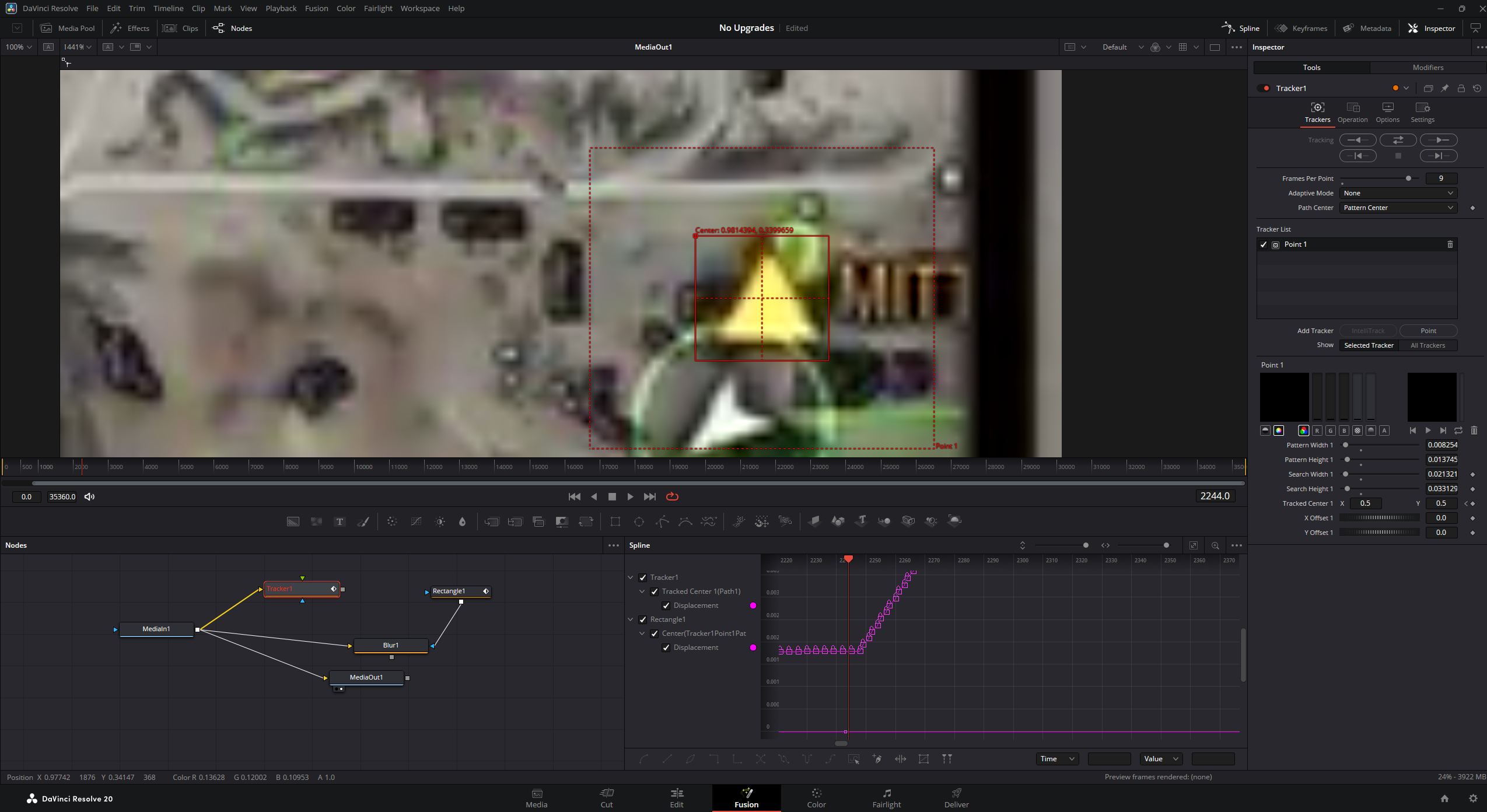
Help | Beginner Help with tracking points

3 Upvotes

I want to track this yellow triangle, but for some reason tracker refuses to get tracking information (on the right, first black box, it does not set the tracking image)

I have no idea why it doesn't track, once I got it working, then it stopped working

If this is important information, I want to track something in the past, I have tracked something in future, got the right positions, and now I want to record it in past.

Also when I tried to do this manually, it started lagging so much, and it crashed...


r/davinciresolve • • 1d ago

Help | Beginner Si grabo con una Sony A7III, que corrección de color recomiendan para lograr Lut Cinematográfico?

0 Upvotes

Normalmente firmo en la Patagonia chilena con mi cámara Sony A7III y quiero saber qué corrección de color básica tengo que considerar en daVinci para lograr un cinematográfico


r/davinciresolve • • 1d ago

Help | Beginner How to fix Color banding?

Thumbnail gallery
1 Upvotes

How do I fix this colour banding? I shot this in 10 bit log profile and I use the free version of da Vinci resolve, I tried debanding effect but it doesn’t work..

I edit in MacOS on 21.1.1 davinci resolve build 10


r/davinciresolve • • 1d ago

Help Why does this happen when I use the glow node?

Thumbnail gallery
1 Upvotes

I'm currently using the glow node in the fusion page becuase it gives the best results however it looks wildly different in the edit page. Is there any reason for this?