r/radioVibes • u/kc2syk • 4h ago
from SQ6EMM: Custom firmware for Icom IC-705 / IC-9700 (transverter support, A/B bootloader)

2
Upvotes
r/radioVibes • u/kc2syk • 4h ago
r/radioVibes • u/Jaded_Increase_6202 • 10h ago

IonoProp shows the state of the ionosphere and tells radio amateurs which
HF band is open, and where to. It downloads current ionosonde and solar
data, models the ionospheric layers above your QTH, and gives band-by-band
advice for 15 target areas (plus any you add), from 160 m up to 6 m.
It runs on Linux (including Raspberry Pi), Windows and Android, and is
free, with no ads and no registration.
Download: https://github.com/hg0mv/ionoprop/releases/tag/v0.9.1
r/radioVibes • u/Jaded_Increase_6202 • 11h ago
SSTV Next 0.13 - free SSTV transceiver for Linux and Windows
Hi everyone,
Version 0.13 of SSTV Next, my free and open-source (GPLv3) SSTV program, is out today.
Main features:
- 25 analog modes (Robot, Scottie, Martin, PD, Wraase, Pasokon, FAX480) and digital
SSTV (HamDRM), compatible with EasyPal and QSSTV. Both decoders run at the same time.
- Weak-signal reception: pictures start and hold down to about 0 dB SNR (2.5 kHz),
also without a VIS header.
- Repeated pictures (ISS events, nets) are recognised, aligned and combined into one
cleaner picture.
- Signal report on every received picture: SNR, mistuning and the sender's sound card
clock error - and you can quote it on your reply picture.
- The program learns your own sound card clock error and can correct your transmission.
- SSTV scanner via CAT: stops where a picture is coming in, offers to send when the
frequency is quiet (it never transmits by itself).
- Template editor, FSK ID with callsign auto-fill, Hamlib rig control, ADIF log,
left/right input channel for two receivers or an SDR.
Download: https://github.com/hg0mv/SSTV-Next/releases
Documentation: https://github.com/hg0mv/SSTV-Next/wiki
Feedback and on-air reports are very welcome.
73 de HG0MV

r/radioVibes • u/ConvictedOrange • 1d ago
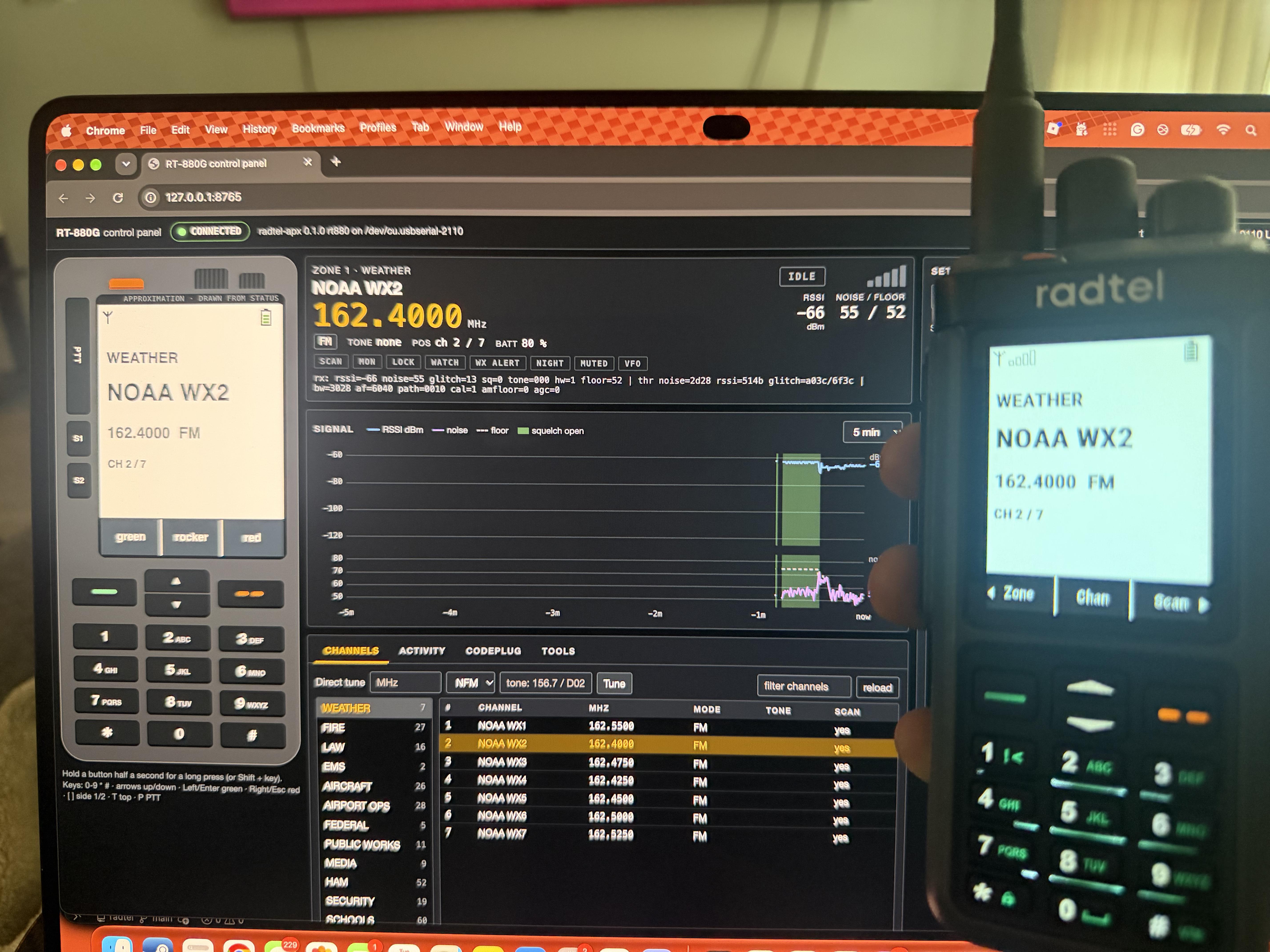
Got an old Radio you don’t use anymore? Interface clunky, missing features you want? Modern agents are able to literally build your own dream firmware, obviously there is risk and you should be cautious about how you approach it, and what features you are enabling (or disabling) on your radio, but it’s unbelievable what can be done by an average user nowadays.
r/radioVibes • u/SultanPepper • 1d ago

r/radioVibes • u/ea2eoe • 1d ago
r/radioVibes • u/TIGlobal • 1d ago
Hi all! I'm a solo dev from Romania and I just released morɬSE, an Android app for learning and practicing CW.
What it does:
It's free with ads; there's an optional Pro (no ads, unlimited modes, stats + PDF export).
Google Play: https://play.google.com/store/apps/details?id=com.tiglobal.morse
It was shaped a lot by feedback from hams during testing, so I'd really appreciate yours: what's missing, what's annoying, what you'd want next. Next up: leaderboards and a QSO simulator. 73!
r/radioVibes • u/SnakebiteCafe • 2d ago

I'm studying. I asked my chat thing to assemble info about this phenomenon as relates to the General Class and stick it together. I enjoy a good graphic and I enjoy good info - bonus when the two are combined.
r/radioVibes • u/Possible-Low-952 • 2d ago
Hi all, M7TJF here. I got tired of hunting through GitHub pages and old often pretty ugly/confusing project sites for ham software, so I built HamCrate.
It's a free catalogue of open-source amateur radio apps, with downloads for Windows, macOS, Linux and Raspberry Pi (as available for each app).
Each app tracks new official releases, so it stays up to date automatically so long as a git repo is provided. Every file is malware-scanned and comes with a SHA-256 checksum. You can filter by platform and category and vote up the apps you rate.
There are no ads and no fees. One of the apps, weechat-radio, is my own, but the site is for everyone's software.
If you have an app that you would like to add you can register and add it yourself - I will approve the app and hamcrate will auto manage the page for you.
My inspiration was Steam but for Ham radio
73, Tobias M7TJF

r/radioVibes • u/rquick123 • 2d ago
Thought this might be of interest to all you vibecoders, the SDR# Vibe Development Kit
https://www.rtl-sdr.com/sdr-vdk-create-your-own-sdr-plugins-by-prompting-an-ai-coding-agent/
r/radioVibes • u/payne • 3d ago
Wanted a way to talk about questions in the ham radio exam pool easily. This vibe coded MIT licensed browser app lets you take a practice exam (or just a few questions) and then share a URL so that your friends can see how they do on the EXACT same questions -- same order, same answer order. e.g. https://pq.n3pay.net/KRQMC3 is a two question quiz from the technician pool.
My hope for this app is that it will be fun to talk about the questions with my friends. You might like it too. And I hope HamStudy.org creates a feature to do what this app does because HamStudy.org is the best and I only built this because I don't always want randomized questions.
https://github.com/payne/popQUIZ has the source code.
r/radioVibes • u/AlertKangaroo6086 • 4d ago
Hi all,
I built Fieldbook, a web-based HAM logger that is intended for casual logging and the avid POTA activator. It's designed to work offline once you've visited the website on your device (its a Progressive Web App).
Here are some bits that I've been really working hard on over the past few months:
I'd really appreciate if anyone could give me some feedback on the project please, it's something fun that I created after getting licensed this year and not being able to find a logger that felt "right" for me. I've got a few users already, but would love some wider feedback.
There is a Pro trial if you wish to make the most of all the features for 14 days :)
Website: https://fieldbook.cc
Web app: https://app.fieldbook.cc
Thank you in advance, and I look forward to hearing your thoughts!
Jack - M7UJC.
r/radioVibes • u/zeneval • 4d ago
When mainline Linux recently marked the TI OMAP2420 for removal, I pulled an old Nokia N810 out of a drawer to see how far a 300-ish MHz ARM11 handheld with 128 MB of RAM could go.
The Nokia N810 is the kind of tech trash that's hard to throw away. What would it take to use the thing as a little Linux computer again?
So, I built Pocket, a lightweight desktop and windowed TUI for the 800x480 display. It also runs services over SSH, so several terminal views can share one radio receiver. Paired over Bluetooth to a handheld radio, it decodes APRS and plots stations on offline maps while checking local elevation data for ridge obstructions and line-of-sight paths without cell service. For off-grid messaging, it runs a terminal LXMF client and offloads Reticulum to an external HTIT LoRa node, which took some surgery on microLXMF parsing and reconnect recovery to stay under the 128 MB ceiling (and I fixed a few LXMF vulns along the way too).
The biggest rabbit hole was graphics though. Nokia shipped the N810 without a driver for its PowerVR MBX GPU, so I studied a Nokia N95 firmware dump (same OMAP2420 silicon), reconstructed the GPU's command stream, and wrote a clean-room kernel driver and Mesa backend with a few different agents working together in tandem. Now it drives a terrain mesh at 70+ FPS and frees the CPU for packet and audio work, alongside getting the CPU stable at an overclocked 480 MHz.
My day job is a software engineer, been doing this for decades, but Claude makes me so irate! I loathe it, total trash.
Part of this was an excuse to tinker with various AI agents in a fun way without the stress of production systems or caring what the code looks like. Give an agent a kernel tree, a set of old board files and a boot log, and there's plenty for it to dig through. Software can't solve everything though, you can spend a long time reading code before you think to try a different piece of plastic, lol (mini as adapter issues)
Keeping the AI on rails while giving them collaborative control over shared hardware was a big part of the experiment.
I used AI agents across the kernel patches, Mesa work, and hardware bring-up, which only stayed productive because of a harness that treats "it works" as a claim requiring specific evidence. Host tests, VM builds, installs, running processes, reboot persistence, and physical or over-the-air observations are tracked as separate states, and the agents must declare which ones it actually verified. Any hardware action, like rebooting, flashing, loading a module, etc, is gated behind explicit authorization naming the target, operation, and recovery plan.
Performance claims have to state the hardware, clocks, workload, dimensions, duration, and statistics, keeping startup and paging separate from steady state and rendering separate from panel transfers. Active graphics experiments sit behind frozen checkpoints that agents can't touch.
Whenever an agent makes a mistake that reveals a needed constraint, and that becomes a new rule that goes straight into AGENTS.md.
The journal, kernel patches, and source are up at https://gordol.github.io/n810-revival/ and https://github.com/gordol/n810-revival.
If you want to try Pocket on a modern Linux or macOS box without hunting down 20-year-old Nokia hardware, clone the repo and run `make -C pocket n810` with Python 3.11+ and Make.
I'd love to hear from anyone building portable Linux field rigs, Bluetooth KISS setups, or Reticulum/LoRa terminals. Coming soon over the holidays will be CAT control and hf rig integration... and whatever other weird ideas I get.
For shits, I also got it running Symbian ARM apps natively (not emulation, but runtime syscall translation), and intend to do the same with Windows CE apps next.
Anyone else resurrecting old tech trash for fun?
r/radioVibes • u/sv1teu • 4d ago
Calling all CW operators! Looking for testers for CW Buddy, By SV1TEU.
I've been developing CW Buddy, an open-source, browser-based toolkit for amateur radio CW operators, now on v2.0
I'm looking for experienced CW operators and anyone interested in CW to put it through its paces and help me improve it.
I'm particularly interested in feedback on:
- Real-world CW decoding performance.
- Different sending speeds and signal conditions.
- Usability during actual radio operation.
- Bugs, suggestions and ideas for new features.
🌐 Try it here: https://cw-buddy.sv1teu.me
💻 Open source: https://github.com/gethanos/SV1TEU-CW-Buddy
No installation required. Just open it in your browser and give it a try!
Whether you're a seasoned CW operator or just getting started, your feedback is welcome here and for bugs or new features on GitHub 👋
73 de Thanos, SV1TEU
r/radioVibes • u/Bubbly_Mud_3929 • 4d ago

I’m building SDR NOW, an AI-assisted macOS app for people getting started with an RTL-SDR dongle. I want the first session to be simple: connect the receiver, find a station, hear it, and know what to try next.
The current build has a spectrum and waterfall, band presets, scanning, and short tips. I’ve also been experimenting with optional achievements for things like saving a first recording or receiving an SSTV image.
If you’d just plugged in your first dongle, what would you click first? What would you leave out or hide until later? What’s one thing you wish your first SDR app had explained?
The screenshots show the receiver in simulator mode and a preview of the achievements. If you’ve helped someone get started, I’d love to hear where they got stuck.
r/radioVibes • u/TheGoldenGodchild • 4d ago
I’ve been working on an RTL-SDR interface which is more user-friendly, incorporating more intuitive controls first, and placing the more technical aspects into its own area. I found that many interfaces were far too complex for someone starting out, and wanted something easier to approach.
Any feedback would be greatly appreciated! I’d like Skywave to be as technically proficient as possible, but as a newcomer, I don’t possess the level of knowledge to know what I’m missing.
r/radioVibes • u/8communist8 • 5d ago
r/radioVibes • u/Euphoric_Ad5358 • 6d ago

r/radioVibes • u/Wonderful_Stable8628 • 7d ago
r/radioVibes • u/gregwont • 8d ago
I built Antenna Workshop with AI coding assistance, and I’m looking for a few radio operators and antenna builders to try it with a real project. It’s a free, open-source public beta for planning antennas and working through feedline and RF questions.
I’d particularly appreciate feedback on what works, what’s confusing, and where a result needs a better explanation. If you find a calculation that doesn’t look right, sharing the inputs and what you expected would really help. Contributors are welcome too.
The calculations are starting points for planning, not guarantees of installed performance or a compliance certification.
Try it: https://radiobook.ca/antennas/
Source and feedback: https://github.com/gregweir/AntennaWorkshop
I’m the developer and author behind RadioBook. The tool is free to use; no book purchase is needed.
73, Greg, VA1GW
r/radioVibes • u/shredjesse • 8d ago

Hey everyone. Like all things I do for radio lately it was to improve my experience with a radio I came to own. I picked up a Quansheng UV-k1 to review for https://realradioreviews.com/ utilizing the F4HWN custom firwmare. Said firmware really improves the radio, but makes a lot of UI sacrifices in favor of saving space for "nifty" features most users probably just don't care about beyond a passing curiosity.
So I made a UI focused version of the radio, added 16 character names (up from 10), and a scan temporary skip feature just like ICOM has which is amazing for skipping an in-progress conversation about dentures until they likely run out of steam.
Next up I made it ultra easy to flash the firmware over USB through our webapp.
Lastly since the CHIRP editing of this radio with F4HWN firmware was such a hacky experience full of cautions and warnings... I took the already written a web channel editor for ICOM ID-52, 5100, 5200 and 705's and extended it to the Firmware flashed UV-K1 radio and set it up so you can program the radio over USB.
Radios can be had for $20-40 depending on if you trust some of the cheaper online china direct websites or go to Amazon.
Site to flash the radio:
https://kflash.repeater-scores.app/
Memory Channel Generator (use this so your radio doesn't start empty)
https://repeater-scores.app/icom-channel-builder/
Memory Channel Editor:
https://repeater-scores.app/memory-editor/
r/radioVibes • u/mmitchelloc • 9d ago

I got tired of needing a laptop and cable to reprogram my BJ-9000 (a rebadged Radtel RT-950 Pro), so I built a web app that programs it over Bluetooth straight from a phone browser.
App: https://facenot.github.io/bj9000-programmer/
Source (MIT): https://github.com/facenot/bj9000-programmer
What it does
Connects over BLE using Web Bluetooth. On Android, use Chrome. On iPhone, use the free Bluefy browser, because Safari doesn't support Web Bluetooth.
Reads the radio first and saves a backup you can download. Undo last write puts the radio back exactly as it was.
Loads channels from CHIRP-format CSVs, one file per zone (Zone03_LOCAL.csv = zone 3 named LOCAL). You can also load a single .zip of all your zones, with no unzipping on the phone.
Previews exactly what will change, writes only the 128-byte blocks that differ, and reads every block back to verify it.
Edits APRS settings: callsign, SSID, symbol, beacon, path, and fixed position, which can come from your phone's GPS.
Adds a one-tap CB 40-channel template. CB only works after you switch the radio's Work Band to 18–64 MHz.
Supports both the 10×99 (firmware 0.24+) and 15×64 zone layouts.
Contains no channel data. Your files stay on your phone.
Status / caveats
I've used channel writing on my own BJ-9000. APRS writing is tested against a simulated radio only, and a few APRS option mappings come from the manual's menu order, so they're marked as unconfirmed. Take a backup first.
The protocol is based on the MIT-licensed RT-950 Pro CHIRP driver work by 2E0NBS, PE1HVH and nivingoonesekera. This is an independent JavaScript implementation, so credit to them.
There's a starter CSV in the repo with calling frequencies, APRS, a repeater example and NOAA.
Mind your licence: the radio will happily program frequencies you're not allowed to transmit on. Set those channels to Duplex = off (receive-only).
If you have an RT-950 (non-Pro) or another variant and it reports a different model string, please open an issue with the string and your firmware version.
Feedback and PRs welcome.
r/radioVibes • u/ThatMukeCoombs • 11d ago
I've been working on radio apps for years, from PCR-1500 scanner apps to one-off SDR# plugins. This is Wavefront, a kind of consolidation of all I've done and learned, assisted by Claude Code - and Claude can control everything except transmit via a built-in MCP. It decodes CW, PSK, RTTY, SSTV, FreeDV, WEFAX, FT4, FT8, wispr, and the list will keep growing. It can also control RTL-SDR devices over USB with all the same modems. At the moment I'm not putting it out for external testing, but I do want to espouse a particular position as a pri developer - I think "vibe coding" is great for making stuff just for yourself. This app works exactly as I want it, it follows my own established workflow, I like the looks and feel of it, and I can add and adjust as I want to without alienating or irritating any other users. That's ehat I think vibe coding, or personal AI-assisted dev, should be about. 99.99999% of vibe coded apps will make $0.00 and that's no different to hand-crafted apps, so just write for yourself and enjoy the fruits!
r/radioVibes • u/nutstobutts • 14d ago

I was a missileer from 2012 to 2016 and I built the site missileer.watch that streams 11175 kHz USB from a receiver at KPH in Point Reyes, CA (thanks to the Maritime Radio Historical Society) and logs every Emergency Action Message it hears.
What's new since it launched a few weeks ago:
Next up: an optional callsign beside your name on the board, for licensed hams.
It's completely free. I'm just trying to show off the field I worked in, and I'm always looking to add more features so let me know what else you'd love to see!
r/radioVibes • u/Armysarge101 • 15d ago

Ham Radio Tools puts the amateur radio bench reference in your pocket, and it works completely offline. Buy it once, use it in the shack, at a portable site or on a mountain with no signal.
Antennas and feedlines
Dipole, vertical, loop, Yagi and beam planning, SWR and return loss, feedline loss, baluns and ununs, matching networks, VSWR charts and standing-wave plots.
Propagation and planning
Band plans (ITU, national and your own installed plans), shortwave broadcast schedules with an "on air now" view, greyline and beam headings, coordinates and distance.
Operating
UTC and world clocks with an ID reminder, a logbook with ADIF import and export, a Morse trainer, a CW sender and decoder (typed, tapped or from the microphone).
Electronics
Ohm's law, dB and power conversions, reactance and resonance, dividers, filters, component helpers and unit converters.
Noise hunting
QRM hunting checklist, source sketches, a harmonic finder and a DIY sniffer-loop guide.
Built for phones
Charts and illustrations resize and zoom to fit any screen.
Privacy first
No account, no ads, no analytics and no internet permission at all. Your logbook and settings stay on your device. The only permission is the microphone, used only if you choose to decode CW from the air.