r/reolinkcam • • 3h ago

Wi-Fi Wired Camera Questions Doorbell Sucks

2 Upvotes

Reolink newbie here. Ring customer for many years. Just replaced most of my Ring cameras with Reolink Wifi (can't do POE, unfortunately). I have a small property with an old house and got a Hub Pro, a Trackmix for my driveway, Lumus for back and front yard. Still on the fence about returning the Elite SE, which I really like because of the 60 vertical, but haven't really found a good use for. My fave is the Elite Pro Wifi, which I am using on the curb. Such a wide view and excellent clarity day and night (IR)! Also got a Lenovo Tiny for Scrypted/Apple - we'll see if I can manage to get that going. The one Ring camera I can't replace yet is the 4k doorbell. The Reolink doorbells are just terrible IMHO. Quality/appeal of that big plastic box sucks, and the lens just does not capture enough vertical/horizontal and needs to be much more wide angle. Really, the Ring is so much superior here. I'm hoping Reolink will catch up with a new wired non-POE flatter 4k model soon so I can replace it, but meanwhile I am keeping it without the cloud subscription. The other thing I wish would get changed is the Trackmix view. There should be an option to switch from wide to zoom instead of having both on the screen at the same time. As mentioned, the Zone function is inferior to Ring as well, and improvement there would be appreciated. The offering at Reolink is vast and can be confusion. Where they falls a bit short is in the Wifi section. They need to have a good wide angle fixed camera, instead of all the tracking/moving cameras. All my areas is narrow and long, so the currently available Wifi cameras cover only part of my property, and the tracking is useless to me. The area generally directly under the camera is not covered. Give me a fixed wide angle (but not fisheye)! Other than that, I'm still getting used to the new setup, but I am liking it so far!

r/reolinkcam • • 13h ago

Issue Resolved/Question Answered Reolink app zones plotting feature is crap!!

Post image
13 Upvotes

I bought a doorbell v2 and I am coming from a ring and eufy. Plotting motion zone is a headache. I tried painting all then erasing what I need to be notified about but it keeps erasing everything when I use my fingers to get the zones right. It's a headache with the other brands I could just plot lines easily. Also good luck defining the zones at nigh because the paint is light dark sigh. Ring is the gold standard


r/reolinkcam • • 12h ago

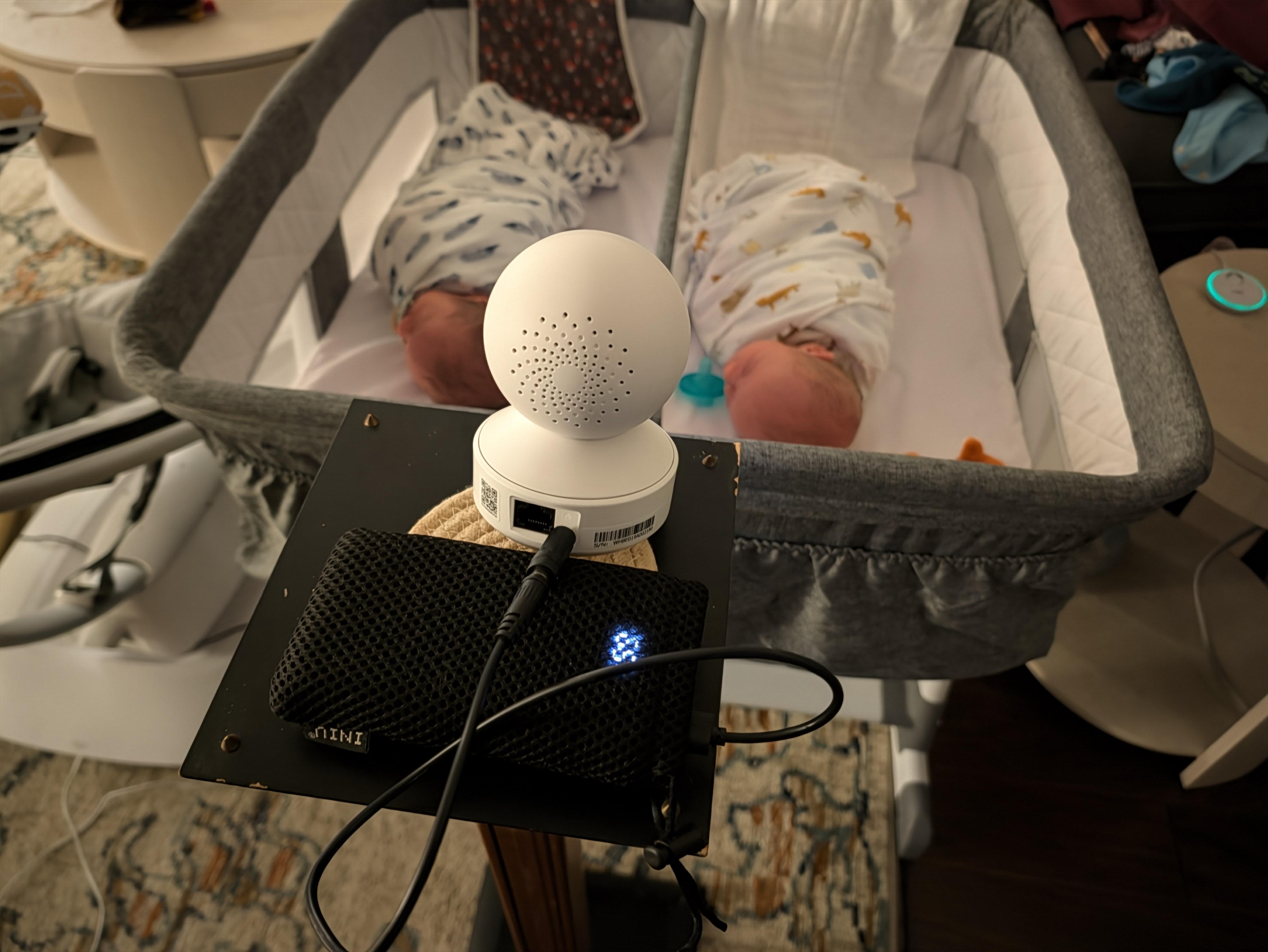
DIY & Tips The E1 pro can run off a battery bank

Post image
16 Upvotes

Tonight I realized the camera uses 5V so I figured it may be able to use a battery bank. I already had this cord that converts USB to a barrel plug. Works perfectly and after 8 hours it only drew the battery down 20%.

It's been a lifesaver bc I'm pulling the night shift with these two boys, and having a power cord cut across the living room would have been less than ideal.


r/reolinkcam • • 4h ago

Software Question Reolink streaming app that runs on AppleTV, Mac, and iPad [Free, No Ads, No signup] - its live now!

7 Upvotes

Previous post: https://www.reddit.com/r/reolinkcam/s/L7jsCYRuKR

Thanks to all those who helped here in TestFlight, I got some good feedback and fixed some issues. Mac Version is still pending, but Apple has approved the others and they are out there. Still free, still no ads, still no signup. I really built this because I wanted it.

https://luci.blue/mimir

Feedback links are there, or feel free to comment here.


r/reolinkcam • • 2h ago

PoE Camera Question Reolink Camera at Work This Morning

23 Upvotes

One Big Boy


r/reolinkcam • • 2h ago

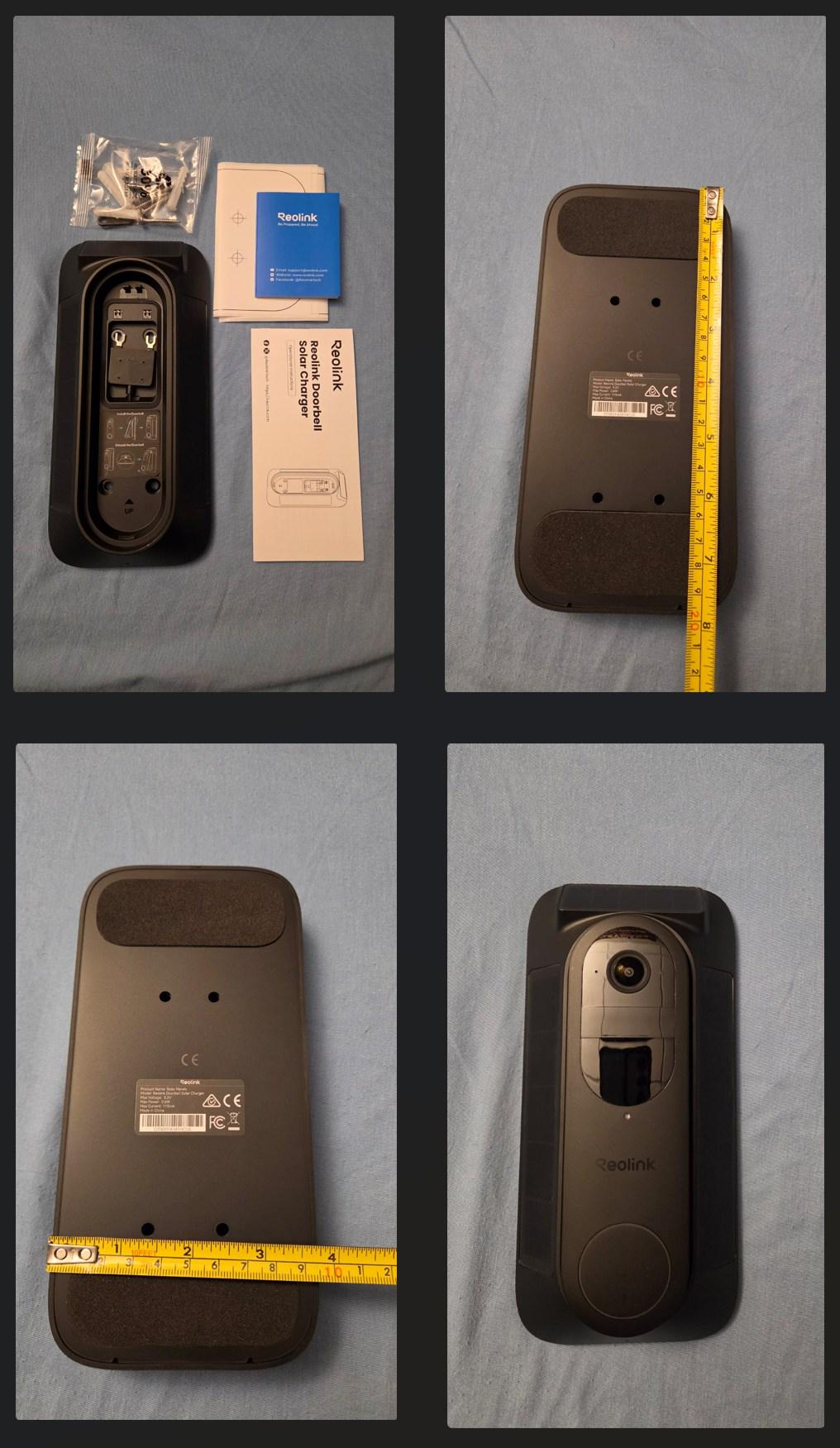
Trial & Review Battery doorbell solar charger base mini review

3 Upvotes

I've been trying out the solar charging base with my 2nd Gen Battery Doorbell, and figured I'd share how it's performed for me so far.

I've had it mounted for about 5 weeks now, in a south facing spot where this time of year it gets sun from approximately Noon to 4pm. For this test I drained the battery down to around 50% before starting.

So straight to the point, here's a Home Assistant chart of its battery level from the last 5 weeks:

As you can see there, this is very much a trickle charger, which is to be expected considering the panels are tiny and only provide 0.6W of power (even their smallest standalone panel is 3W).

If you get sun most days and it doesn't get too cold then it should have no problem eventually getting to and staying at 100%. However, you can see on my chart there the days that I got no sun. There around November 13th it was cloudy for several days in a row and temps were starting to get down around freezing. Then the weather was much clearer and warmer starting on the 17th. It still only gained about 9% in a week though, so like I said... very much a trickle charger.

A few other random notes...

  • Yes, it can work with the 1st gen battery doorbell as well.
  • If you have the 2nd gen battery doorbell you can connect it to the base with 2 methods. Either the screw-on Y terminals, or it has contacts that line up with 2 contact points on the back of the doorbell, which makes it much easier to remove from the base. You can see those options here:
  • I tested both methods to see if the charging rate would be better one way or another. It didn't seem any different.
  • I noticed that when I connected it using the contacts that neither the Reolink app nor HA would register that it was charging. So I initially thought that they didn't work. However, I then noticed after a few hours that the battery level was actually going up. So for some reason when using the contacts the status won't show that it's charging even though it really is. Just something to be aware of in case you buy one and think it's not working.

In conclusion, if you currently are using either of their battery doorbells in battery mode and have it in a place where it gets some sun this would be a good purchase. At best you'll never have to take the doorbell down to charge manually again, at worst it will make it so that you don't have to do so as often.

Oh, and here are some images from when I unboxed it:


r/reolinkcam • • 8h ago

Announcements Reolink APP V4.65 is Released

Thumbnail
gallery
7 Upvotes

What's New:
1.Added an option to include or exclude access to recorded videos when sharing a device.
2.Added fast-forward and rewind buttons for video playback.
3.Added a setting to automatically turn off the light (Elite Floodlight WiFi) after a specified time when switched on manually.
4.Fixed various bugs.
Download Center:  https://reolink.club/appandclient


r/reolinkcam • • 8h ago

Wi-Fi Wired Camera Questions Which Reolink camera to buy?

2 Upvotes

I have two cameras in mind and not sure which to go for, I would be buying two of them. The Reolink Lumus Pro or the E1 Outdoor Pro. Would anyone have had these, are they any good? Thanks in advance for any advice 😊


r/reolinkcam • • 14h ago

Software Question Noise detection

2 Upvotes

I know some cameras have certain noise detection, like my E1 has a ‘crying baby’ notification, I wonder if Reolink has tried any other noise detection, like sirens, or fireworks?


r/reolinkcam • • 14h ago

Wi-Fi Wired Camera Questions Old Newbie Seeking Advice on Setup

3 Upvotes

I just purchased an RLK12-500WB4 kit and need some advice setting it up. I'm new to Reolink and to reddit.

I have read everything I can find but still confused. I'm 78 years old and a bit of a luddite. So here is my Question.

I have 2 Asus RT AX86U PRO routers set up in mesh mode with good strong wifi signal and would like to use my home network instead of the internal wifi of the RLN12W.

What would be the easiest less confusing method for an old man like me?

  1. Just setup according to Reolink instructions and then change the SSID and password on monitor or client app for windows after setup.
  2. First setup the cameras as standalone to the home network before powering on the RLN12W and then add the cameras after changing the SSID and password on the monitor during initial setup of nvr.

Also, how many passwords do need? Can the account and nvr passwords be the same with a separate password for cameras?

Any advice is appreciated.


r/reolinkcam • • 19h ago

Question Push notifications, again.

2 Upvotes

Bought a couple floods and a doorbell camera with the home hub. Setup was easy and all went according to plan for about 3 days. As of yesterday both me and my wife no longer receive notifications from any camera. We've gone through the settings and when we test the push notifications it always comes through on the test through the camera and hub settings page. But then no notification outside of that. Any thoughts? Wife has apple, I have android, and cameras are wifi if that makes a difference.