r/reolinkcam • u/No_Lifeguard_8689 • 6h ago
PoE Camera Question Reolink Camera at Work This Morning
41
Upvotes
One Big Boy
r/reolinkcam • u/ToTouchAnEmu • 17h ago
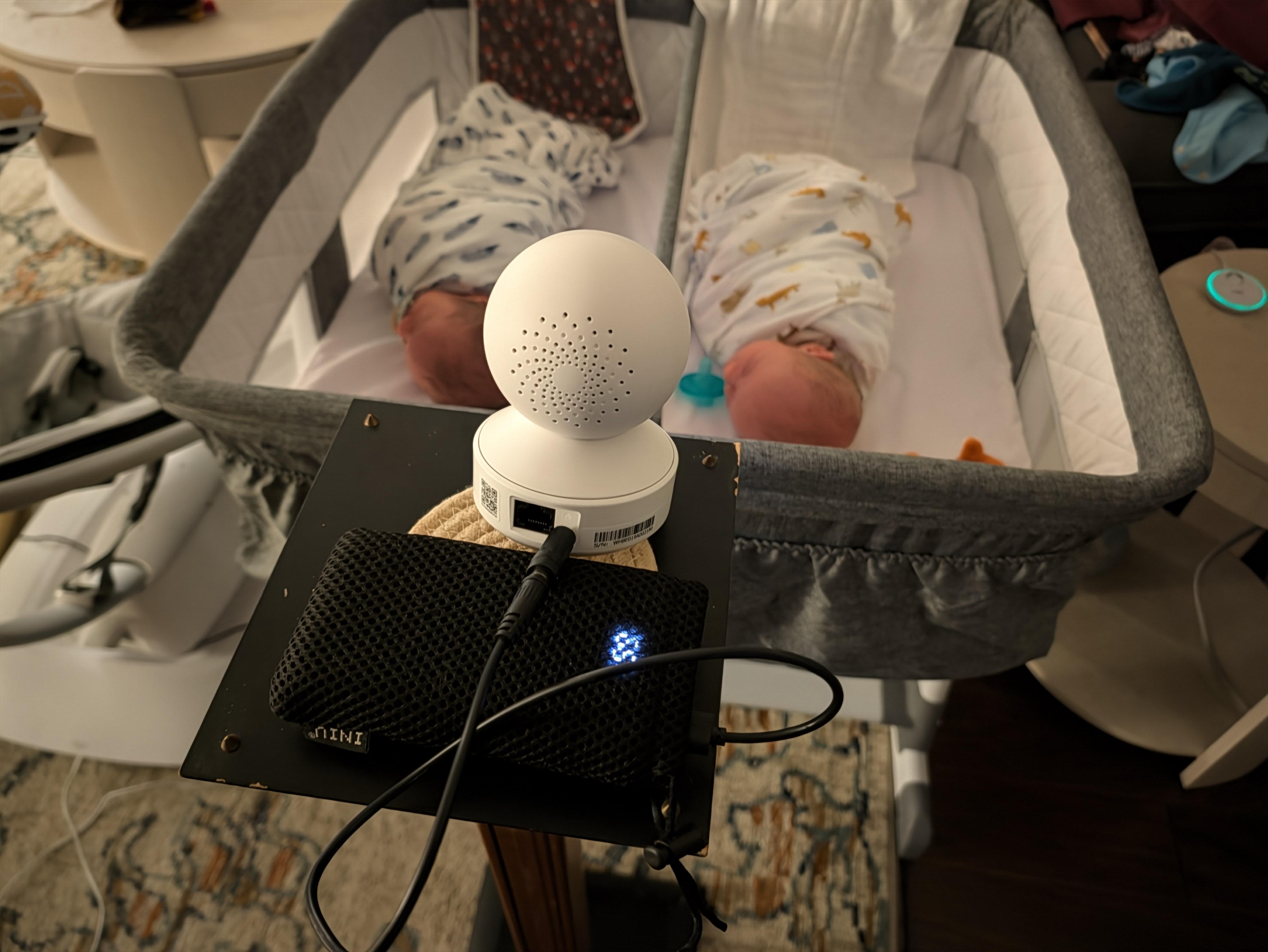
Tonight I realized the camera uses 5V so I figured it may be able to use a battery bank. I already had this cord that converts USB to a barrel plug. Works perfectly and after 8 hours it only drew the battery down 20%.
It's been a lifesaver bc I'm pulling the night shift with these two boys, and having a power cord cut across the living room would have been less than ideal.
r/reolinkcam • u/kemistrypops • 18h ago

I bought a doorbell v2 and I am coming from a ring and eufy. Plotting motion zone is a headache. I tried painting all then erasing what I need to be notified about but it keeps erasing everything when I use my fingers to get the zones right. It's a headache with the other brands I could just plot lines easily. Also good luck defining the zones at nigh because the paint is light dark sigh. Ring is the gold standard
r/reolinkcam • u/Psychological-Bowl47 • 8h ago
Previous post: https://www.reddit.com/r/reolinkcam/s/L7jsCYRuKR
Thanks to all those who helped here in TestFlight, I got some good feedback and fixed some issues. Mac Version is still pending, but Apple has approved the others and they are out there. Still free, still no ads, still no signup. I really built this because I wanted it.
Feedback links are there, or feel free to comment here.
r/reolinkcam • u/Willson1_ • 12h ago

What's New:
1.Added an option to include or exclude access to recorded videos when sharing a device.
2.Added fast-forward and rewind buttons for video playback.
3.Added a setting to automatically turn off the light (Elite Floodlight WiFi) after a specified time when switched on manually.
4.Fixed various bugs.
Download Center: https://reolink.club/appandclient
r/reolinkcam • u/mblaser • 6h ago
I've been trying out the solar charging base with my 2nd Gen Battery Doorbell, and figured I'd share how it's performed for me so far.
I've had it mounted for about 5 weeks now, in a south facing spot where this time of year it gets sun from approximately Noon to 4pm. For this test I drained the battery down to around 50% before starting.
So straight to the point, here's a Home Assistant chart of its battery level from the last 5 weeks:

As you can see there, this is very much a trickle charger, which is to be expected considering the panels are tiny and only provide 0.6W of power (even their smallest standalone panel is 3W).
If you get sun most days and it doesn't get too cold then it should have no problem eventually getting to and staying at 100%. However, you can see on my chart there the days that I got no sun. There around November 13th it was cloudy for several days in a row and temps were starting to get down around freezing. Then the weather was much clearer and warmer starting on the 17th. It still only gained about 9% in a week though, so like I said... very much a trickle charger.
A few other random notes...

In conclusion, if you currently are using either of their battery doorbells in battery mode and have it in a place where it gets some sun this would be a good purchase. At best you'll never have to take the doorbell down to charge manually again, at worst it will make it so that you don't have to do so as often.
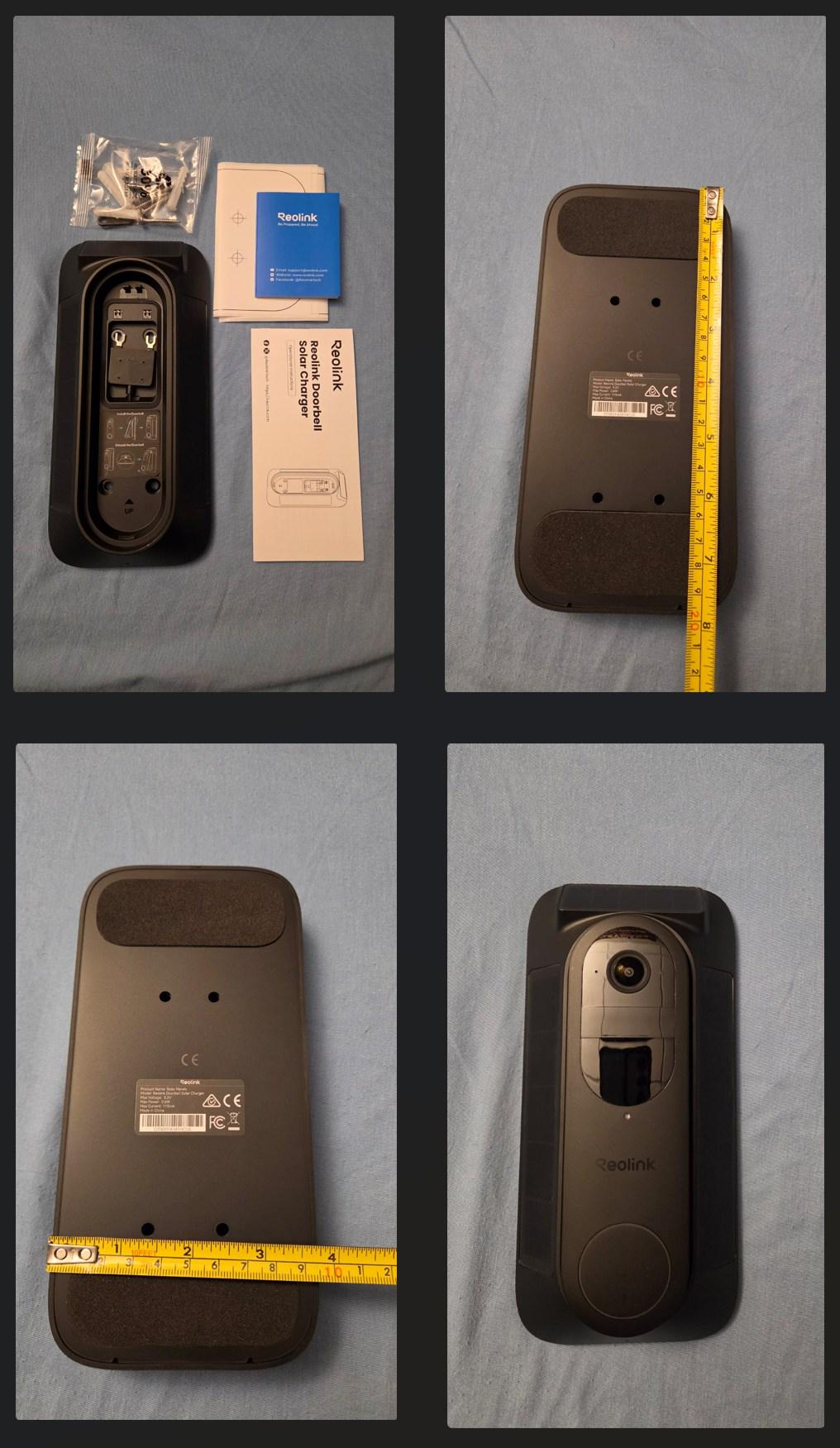
Oh, and here are some images from when I unboxed it:
r/reolinkcam • u/juanhelo128 • 19h ago
I just purchased an RLK12-500WB4 kit and need some advice setting it up. I'm new to Reolink and to reddit.
I have read everything I can find but still confused. I'm 78 years old and a bit of a luddite. So here is my Question.
I have 2 Asus RT AX86U PRO routers set up in mesh mode with good strong wifi signal and would like to use my home network instead of the internal wifi of the RLN12W.
What would be the easiest less confusing method for an old man like me?
Also, how many passwords do need? Can the account and nvr passwords be the same with a separate password for cameras?
Any advice is appreciated.
r/reolinkcam • u/AnythingAcceptable55 • 1h ago
I would really like to know what your guys' thoughts on these two brands. I currently have Ring and Wyze, tired of the subscription costs and cloud storage. Love the interface but tired of having to pay for cloud storage and features.
I've been leaning towards Eufy but I've recently seen a lot of negative comments about them but I've also seen similar comments to Reolink as well.
So I'd like to really get a feel of what you guys really think. I'm looking to purchase a floodlight cam, doorbell, and a solar cam/light for my backyard and hopefully more cameras as the years go by.
I will not be using PoE so please try to give feedback based on wifi/solar/hardwire experiences.
r/reolinkcam • u/angrycatmeowmeow • 6h ago

It had to have recognized an animal, because generic motion doesn't get pushed.
r/reolinkcam • u/New-Humor9915 • 13h ago
I have two cameras in mind and not sure which to go for, I would be buying two of them. The Reolink Lumus Pro or the E1 Outdoor Pro. Would anyone have had these, are they any good? Thanks in advance for any advice 😊
r/reolinkcam • u/Far-Transition2244 • 18h ago
I know some cameras have certain noise detection, like my E1 has a ‘crying baby’ notification, I wonder if Reolink has tried any other noise detection, like sirens, or fireworks?
r/reolinkcam • u/oh3bastard • 23h ago
Bought a couple floods and a doorbell camera with the home hub. Setup was easy and all went according to plan for about 3 days. As of yesterday both me and my wife no longer receive notifications from any camera. We've gone through the settings and when we test the push notifications it always comes through on the test through the camera and hub settings page. But then no notification outside of that. Any thoughts? Wife has apple, I have android, and cameras are wifi if that makes a difference.
r/reolinkcam • u/Mic54321-762 • 1h ago
Iv just picked up a Reolink d340p doorbell camera. Connected to my nvr as POE, but I can't use the video calk function. I'm unable to add it as a device. Is there any work around for this other than trying to power the doorbell with something other than my NVR and then trying to connect it as a device instead of a camera?
r/reolinkcam • u/Philou2007 • 2h ago

Hallo miteinander,
vielleicht kann man mir helfen, da ich mit meinen Latein am Ende bin.
Ich habe eine verkabelte Drahtklingelanlage, bestehen aus einem Hager ST303 Klingeltrafo, einem elektrischen Türgong (siehe Foto) und einen Taster an der Tür.
Nun haben wir die Reolink Doorbell 2rd gekauft, da diese mit mechanischen und elektrischen Gongs eingebunden werden kann.
Nachdem ich alles installiert habe und den Strom wieder eingeschaltet habe, klingelte der Gong ununterbrochen.
Ein Arbeitskollege meinte, ich sollte Eltako dazwischen setzten, weil der Türgong auf minimale Stromspannungen anspringt.
Also ein 12 Volt Eltako dazwischen, trotzdem klingelte der Türgong wieder durch.
Ich habe dann 20,6 Volt AC am Klingeltrafo bei 12 Volt und 6 Volt bei 8 Volt gemessen, also viel er raus, weil der Ruhestrom schon größer war als 12 Volt.
Dann habe ich einen Shelly dazwischen gebaut, die Klingel funtioniert.
Da ich aber vom Verteilerkasten nur 3 Drähte zum Gong und 3 Drähte vom Gong zum Taster habe und schon zwei für den Gong benötige, kann ich keine Verdrahtung über AC herstellen, da mit zwei + und einem -, die Klingel wieder durch klingelte.
Also bestellte ich mir ein Hutschienennetzteil mit 24 Volt DC. +1 zum Shelly, vom Shelly zum Gong und wieder zurück. +2 zur Reolink zur Stromversorgung der Doorbell und über den einzigen - Anschluss wieder zurück.
Die Doorbell bekommt Strom, aber der Gong klingelt wieder durch.
P.S. Wir wissen, das Reolink eine Chime besitzt, diese läuft auch provisorisch, jedoch können wir uns nicht mit den Klingeltönen anfreunden. Diese geht zurüch.
Danke im vorraus
r/reolinkcam • u/itllgrowback • 2h ago
Hi folks - I have two Reolink NVRs each running eight cameras. Both NVRs currently have IP addresses on my LAN and the router sees them. I can access both NVRs from the Android app, without fail or issue. But the last time I opened the Windows client (which had been working previously), it prompted me to update to the latest version - and since I did so, it gives me "Connection Failed" or Timeout messages when trying to see either NVR on my desktop. After being unsuccessful, I removed both devices and tried to add them as New, but it returns the same messages. The issue could have existed prior to the update, but I had no trouble with it until the time I opened it and it prompted me to update.
I am using the UIDs to connect, and have digitally copied them from the NVRs and confirmed they're correct. I have confirmed that the UID function is turned on at each NVR, and I have not found any setting blocking UIDs at the router.
I have also tried the "Scan Device(s) in LAN" which returns no results. My Windows machine is connected currently to the same LAN as the NVRs.
I can access both NVRs from my Android phone whether on the same LAN or away from home, so I don't think this issue has to do with router settings (which have remained unchanged in this timeframe).
TL;DR: I have been unable to connect either of the NVRs to my Windows client since I updated to v8.21.32, though I can still connect remotely to the NVRs using other clients.
Any advice?
r/reolinkcam • u/centex99 • 3h ago
I posted this then removed and am adding back…
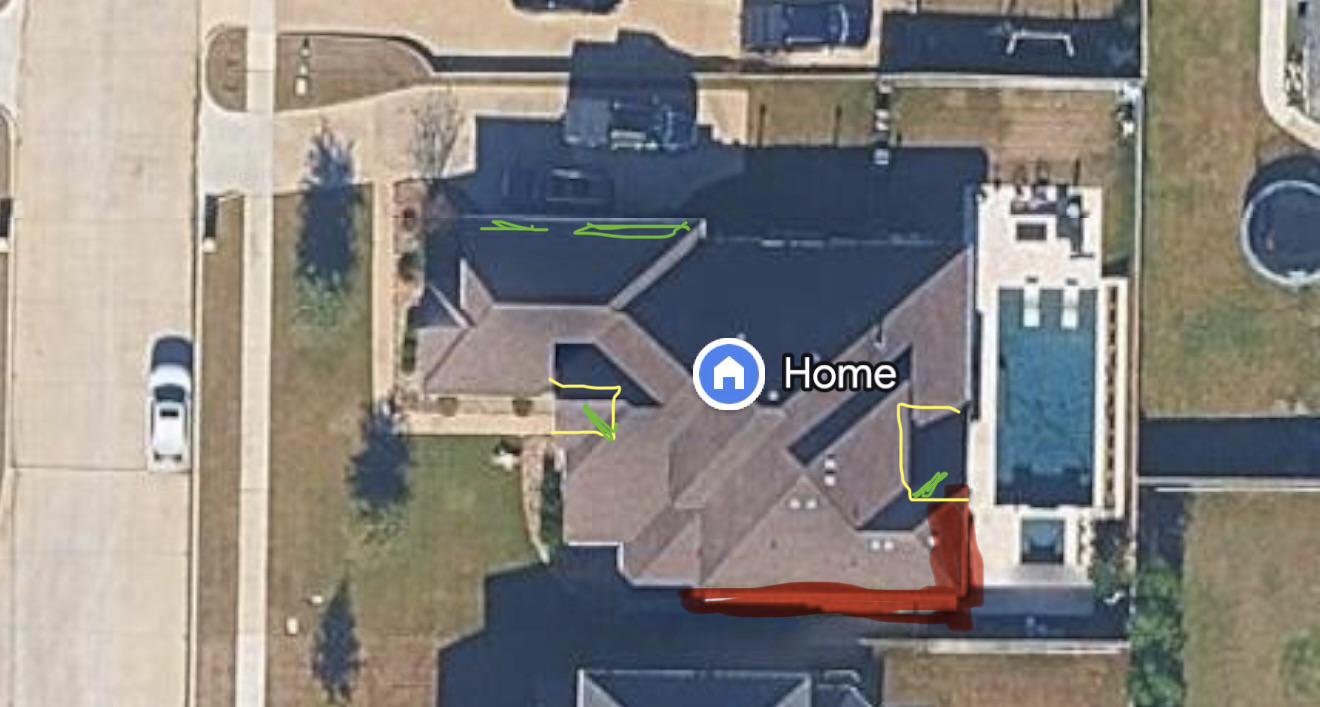
Top two green are garage doors, other two are standard entry doors. Yellow is covered entry and patio. Red highlighted is second floor roofline only.
Suggestions on models and locations for cameras? Budget is fairly flexible. Going to run Ethernet to dedicated switch connected to a NAS and Frigate on home lab setup.
r/reolinkcam • u/HumanWithComputer • 6h ago
I bought a Gen2 battery doorbell and have been trying to get it working for hours by now. The Android app with which I have connected three cameras before was being difficult. Even when I momentarily completely disabled my firewall against my principles it would't add the device. On a Windows client I was able to add it and obviously provide the WiFi credentials. After that still no way to connect on Android. Choosing LAN and adding the IP address used to work and after entering the password I could connect to new cameras in the past. Not now.
I wondered whether the Android app version was a factor. I hadn't updated in a while because I had read some negative experiences with a later update here. But I saw now the newest version is very recent (19 November) so I hoped things would have improved. Not wanting to risk my main tablet or phones in actual use I first updated my oldest Moto G6 On Android 9 which was giving difficulties with the older app too. It actually found the device when scanning my LAN where other devices turn up zilch and I could connect to it using the latest app. So I updated my Moto G 5G. It sees a 'My Device' and recognises it as a doorbell. It can see the UID but says Network information: Not detected and 'Connection Failed'. All my previous cameras still worked.
I then bit the bullet and updated the app on my (main device) tablet on Android 11. Same problem. It 'sees' the device but also gives Connection Failed.
What the heck is going on? I'm running out of problem solving options here. How do I get this doorbell working?
r/reolinkcam • u/wolleinsb • 7h ago
Reolink newbie here. Ring customer for many years. Just replaced most of my Ring cameras with Reolink Wifi (can't do POE, unfortunately). I have a small property with an old house and got a Hub Pro, a Trackmix for my driveway, Lumus for back and front yard. Still on the fence about returning the Elite SE, which I really like because of the 60 vertical, but haven't really found a good use for. My fave is the Elite Pro Wifi, which I am using on the curb. Such a wide view and excellent clarity day and night (IR)! Also got a Lenovo Tiny for Scrypted/Apple - we'll see if I can manage to get that going. The one Ring camera I can't replace yet is the 4k doorbell. The Reolink doorbells are just terrible IMHO. Quality/appeal of that big plastic box sucks, and the lens just does not capture enough vertical/horizontal and needs to be much more wide angle. Really, the Ring is so much superior here. I'm hoping Reolink will catch up with a new wired non-POE flatter 4k model soon so I can replace it, but meanwhile I am keeping it without the cloud subscription. The other thing I wish would get changed is the Trackmix view. There should be an option to switch from wide to zoom instead of having both on the screen at the same time. As mentioned, the Zone function is inferior to Ring as well, and improvement there would be appreciated. The offering at Reolink is vast and can be confusion. Where they falls a bit short is in the Wifi section. They need to have a good wide angle fixed camera, instead of all the tracking/moving cameras. All my areas is narrow and long, so the currently available Wifi cameras cover only part of my property, and the tracking is useless to me. The area generally directly under the camera is not covered. Give me a fixed wide angle (but not fisheye)! Other than that, I'm still getting used to the new setup, but I am liking it so far!
r/reolinkcam • u/SamVimes341 • 8h ago
Hi everyobe. Just got the wifi wired doorbell to record continuously but can't seem to play back across the footage. The SD card shows writes and has over 3GB written. What am I missing? Thanks.
