r/shortcuts • • Jun 16 '26

OS 27 beta What's New in Shortcuts in iOS 27 (Beta Megathread)

129 Upvotes

Updates:


Hey everyone, here's a megathread of everything new in the iOS 27 beta, currently on developer beta 2.

This is covering Apple features and community comments – no third-party apps for now, but feel free to start a thread in the comments.

Here's the outline:

  • Describe a shortcut
  • Automations

    • Notification
    • Keyboard
    • Easier toggling (Beta 2)
  • Storage
  • Otherwise If
  • New action groups

    • Lists
    • Text
    • VPN
    • Sharing
    • Accessibility
    • Messages
    • Photos
    • Mail
    • Reminders
    • Get What's On Screen
    • Cloud Pro, Broad World Knowledge in Use Model
  • More

    • Shortcuts Programming Language
  • Feedback

Describe a shortcut

Automations

Notifications

Keyboard

Storage (Memory)

Otherwise If

New actions

More

Feedback submitted to Feedback Assistant

Matthew Cassinelli:

  • FB23135397 (Shortcuts can't load lists; please ensure performance at scale (What happens when people have tons of App Intents/Custom Shortcuts/folders?))
  • FB23102150 (Shortcuts takes 35 seconds to launch for users with many shortcuts (thousands))
  • FB23102201 (The App Shortcuts picker for the Action button/Custom Shortcuts widget is extremely slow to load many shortcuts)
  • FB23135882 (Run Shortcut control in macOS unusable for larger libraries; "Choose Shortcut" in Control Center does not show full list/search)
  • FB23103377 (New Shortcut incorrectly always adds "Show on Apple Watch", causing immediate sync delays)
  • FB23135151 (Shortcuts widget gets corrupted when multiple are added in stack)
  • FB23134678 (Too many taps to change icons on iOS; add the "Choose Icon" option to All Shortcuts context menu (for parity with MacOS))
  • FB23134888 (Can't "Choose From List" from keyboard commands on macOS; Add navigate & select options when Multiple is selected)
  • FB23135054 (Add search to "Choose Folder" in Shortcuts widget; list becomes long to scroll with many folders)
  • FB23135596 (Adding shortcuts to Folder ruins Sort Order; add toggle to move new shortcuts to end of folder list instead of beginning)
  • FB23135959 (Improve Spotlight/Ask Siri loading performance when switching between Applications, Files, Shortcuts actions, Clipboard with Command+1/2/3/4)
  • FB23137602 (Too many folders hides App Shortcuts; Re-add ability to collapse Folders vs App Shortcuts view)
  • FB23137833 (Add the SF Symbols picker for Shortcuts glyphs rather than a limited set of icons; introduce Icon Designer)
  • FB23137870 (People don't know how to run shortcuts with Siri; Be more clear a Custom Shortcut title is trigger phrase with dismissable Siri tips)
  • FB23137923 (Add a "Description" field in Shortcut Details that shows up in iCloud link share, "Get My Shortcuts" entity details; context for Siri AI)
  • FB23137968 ("Set Captions" action for Apple TV Remote does not work; unable to control Subtitles using Shortcuts)

Updates:


r/shortcuts • • Mar 27 '26

Announcement How to use flairs

22 Upvotes

How to use flairs on r/shortcuts (so your post doesn’t get nuked or ignored)

Flairs are labels. You pick one so people instantly know what your post is about. Pick the wrong one and congrats, you’ve confused everyone.

---

First rule: always use a flair

No flair = your post is either ignored or removed. Nobody enjoys guessing what you meant.

---

Pick the right flair (this is not a personality test)

- Help

You already made a shortcut and it’s broken or not doing what you want. You want someone to fix it or explain what went wrong.

- Help (Mac)

Same as above, but your problem is on Mac. Yes, that matters because Mac Shortcuts can behave differently.

- Shortcut sharing

You built something and want to share it. You must explain what it does properly. “Cool shortcut lol” is how your post gets deleted.

- Shortcut sharing (JB)

Same as sharing, but it only works on a jailbroken device. If people need to hack their phone to use it, say so.

- Shortcut sharing (mac)

Your shortcut only works on Mac. Don’t trick iPhone users into disappointment.

- Tip/guide

You figured out a useful trick or workaround. You’re teaching something, not asking.

- Tip/guide (mac)

Same idea, but Mac-specific.

- Request

You want a shortcut but can’t build it yourself. This is you politely asking the internet to do work for you.

- Request (mac)

Same, but for Mac users.

- Discussion

You want opinions, ideas, or a conversation about Shortcuts. Not help, not sharing, just talking.

---

Special flair (pay attention, this one’s new)

- Appstore (app)

Use this when you’re posting about an app that works with Shortcuts. Either you made it or found it. The key point: the app connects with Shortcuts (actions, automations, etc.).

If it has nothing to do with Shortcuts, don’t use this just because you like the app.

---

How to choose without overthinking it

Ask yourself one question:

“What do I want from this post?”

- Fix something → Help

- Show something → Shortcut sharing

- Teach something → Tip/guide

- Ask for something → Request

- Talk about something → Discussion

- Share actual news → News

- Show an app tied to Shortcuts → Appstore (app)

If you’re on Mac, pick the Mac version. Not complicated.

---

Final reality check

Flairs exist so the subreddit doesn’t turn into a digital junk drawer. Pick the correct one, write a clear post, and people will actually help you instead of scrolling past like you don’t exist.


r/shortcuts • • 3h ago

Shortcut Sharing Anti doomscrolling shortcut

10 Upvotes

Just wanted to share a shortcut I made that has helped me cut down on mindless scrolling :) It’s a simple menu that opens other short and fun activities more beneficial than loads of short form content, while giving grace for situations in which I do want to spend a little bit of time on instagram. I’ve thought about having it pop up again after a certain amount of time, but I’ve found that having it open at all helps me be more conscious of the time im spending so I tend to spend less time when I do select yes anyway.

Here’s the link: https://www.icloud.com/shortcuts/50842b2aa0214732b255818c2ebfaad9

Let me know if you have any suggestions to make it better! :)


r/shortcuts • • 2h ago

Appstore (App) You asked for it: Cherri Shortcuts can now sign exports on your own Mac

Thumbnail
gallery
2 Upvotes

Update for anyone who saw my earlier post about Cherri Shortcuts, the iPhone app where you write Shortcuts as code and export/import them straight into/from the Shortcuts app.

The feedback I heard most was about shortcut signing. iOS only imports signed shortcuts, so every export went through my signing server, and a lot of you said, fairly, that you didn't want your shortcuts leaving your hands. So, v1.0.5 adds another option—use your personal Mac to sign your exported shortcuts instead!

What's new

  • Cherri Helper: a free Mac menu bar app that seamlessly facilitates the connection between Cherri Shortcuts on your iPhone and your Mac on your local network. Simply install it, scan the QR code it shows with the app, and then all exports will sign on your own Mac instead of my server!
  • Setup: Tap Signing in Settings → My Mac. When this is selected, export never falls back to my server. If your Mac can't be reached, the app alerts you and your code will not leave your device.

System Requirements

  • macOS 13 or later
  • Signed in to iCloud (required for Apple's Shortcut signing process)
  • Mac & iPhone must be on the same Wi-Fi network

Privacy and Security

  • With My Mac selected in Settings → Signing, nothing is sent to my server.
  • No account creation or sign-in necessary.
  • No ads, anywhere. ever.
  • No analytics collected, in either app.

How the Helper Mac app behaves: it lives in the menu bar, opens nothing on its own after first setup, starts at login (by default, but can be turned off in settings), and automatically checks for updates. It's a direct download (.DMG), not on the Mac App Store. It can be downloaded and sent to your Mac from the Cherry Shortcuts app Settings or from the link below.

  • Note: the .DMG is signed with my Apple Developer ID and notarized by Apple, so macOS can verify its authenticity. You'll still see the normal "downloaded from the internet" prompt the first time you open it, like any app installed outside the Mac App Store.

Download Cherri Shortcuts from the App Store

Get Cherri Helper on your Mac

As always, if you have any questions about Cherri Shortcuts or the new Cherri Helper macOS companion app to host shortcut signing on your own Mac, drop a comment! 

🍒🔨


r/shortcuts • • 2h ago

Shortcut Sharing I made a shortcut that charts my Apple Watch exercise minutes and tells me what changed

Thumbnail
gallery
2 Upvotes

I make Charty, an app that builds charts from Shortcuts actions. Version 2.1 added two things I think you guys might like:

  • The new Analyze Chart action takes a chart and returns a short written analysis as text. Charty works out the comparisons itself (recent days against earlier ones, peaks, the longest drop) and Apple Intelligence turns them into sentences. Since it's just text, you can send it anywhere: a notification, a note, a message, your journal.
  • Lock Screen widgets show any chart your shortcut builds.

The shortcut in the images: https://www.icloud.com/shortcuts/51b68ef196b14e7a81d06dc3b780d3a3

  1. Find Health Samples: exercise minutes for the last 15 days, grouped by day
  2. New Chart and Add Series: one bar per day
  3. Add Moving Average: a 7-day trailing average as a line
  4. Style Bar Series, Style Line Series and Style Axis: colors and a date axis
  5. Update Widgets, so the Lock Screen widget redraws
  6. Export Chart As Image and Analyze Chart
  7. Split Text, keeping the first two lines, then Show Notification with the chart attached

The text in the notification is the real output, unedited.

Upfront, so nobody finds out after downloading:

  • Styling, Lock Screen widgets and Analyze Chart need Charty Premium ($1.99/month or $9.99/year). A free account can try the app and build basic charts, but this shortcut stops at its first styling step.
  • Analyze Chart needs an iPhone with Apple Intelligence turned on. The analysis runs on Apple's own models, on the device or through Private Cloud Compute.
  • Exercise minutes come from an Apple Watch. Without one, swap in any other Health type.

Happy to answer questions about the actions. I'd also love to hear what you'd send the analysis into.


r/shortcuts • • 11h ago

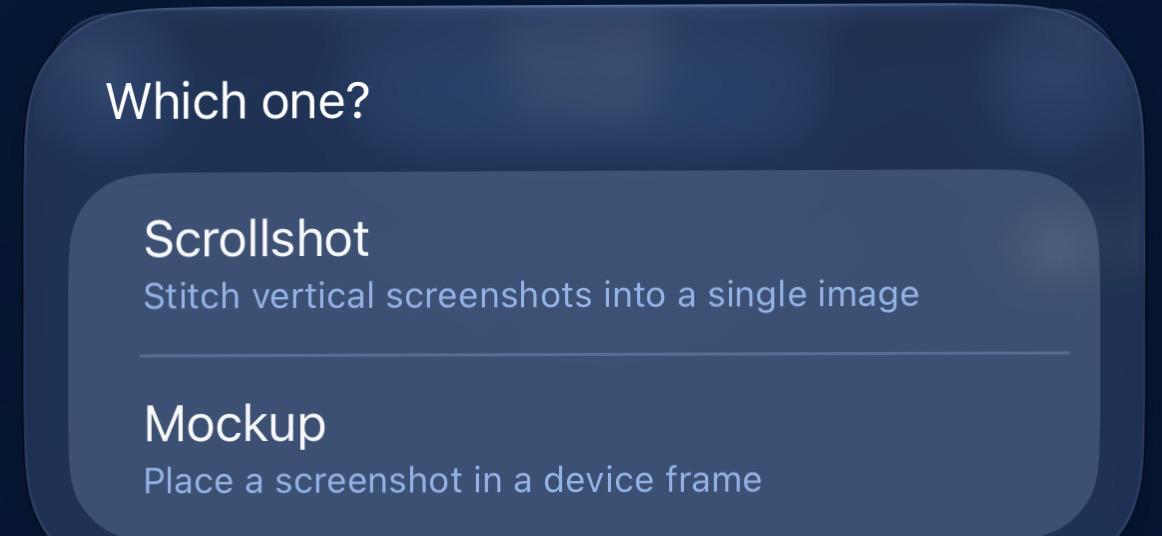
Shortcut Sharing [Shortcut] Picsew All-in-One: Stitch Screenshots, Create iPhone/iPad/Apple Watch Mockups & Combine Image

Post image
7 Upvotes

An all-in-one shortcut I made for Picsew. It brings together a few useful image tools in one place, so you don’t have to go through the same steps manually every time.

Features:-

📸 1. Screenshot Stitching

• Stitch multiple screenshots into one long vertical image.
• Manual Mode: Select the screenshots you want to stitch.
• Automatic Mode: Use recent screenshots without manually selecting them.
• Automatically processes the images through Picsew.

📱 2. Device Mockups

• Turn screenshots into device mockups.
• Supports iPhone, iPad, and Apple Watch.
• Includes multiple device models and colour options.
• Randomly selects a mockup style from the available options.
• Uses Picsew to generate the mockup.

🖼️ 3. Combine Images

• Combine multiple images horizontally into a single image.
• Useful for side-by-side comparisons, before/after images, or sharing multiple screenshots together.

📤 4. Flexible Output Options

• Save to Photos: Save the processed images directly to your photo library.
• Copy to Clipboard: Quickly paste the result into another app.
• Share: Open the iOS Share Sheet to send the result wherever you want.
• Quick Look: Preview the result before deciding what to do with it.
• When multiple images are produced, choose whether to save them individually or combine them.

5. Share Sheet Support

• Run the shortcut directly from the iOS Share Sheet with selected images.
• You can also run it independently and select images when needed.

Requirements:

• iPhone/iPad with the Shortcuts app
• Picsew installed

🔗 Link:
https://www.icloud.com/shortcuts/8ac06bcac5874cf29c3dbf924c576d9a


r/shortcuts • • 1h ago

Help Siri activated playlist details

Thumbnail
gallery
1 Upvotes

As the title suggests, I'm building a shortcut that gives me specific details about the current playlist I'm listening to. I'm currently trying to summate the duration of each track in the playlist, and get Siri to speak out the remaining number of minutes. The part I’m figuring out is how to add the duration of each track. Here’s what I’ve got so far if anyone can shed some light.

CAVEAT: in the photo ‘stop the shortcut’ is only there as a separator, whilst I'm building the shortcut to test out different parts


r/shortcuts • • 2h ago

Request Shortcut for "jiggling" on Microsoft Teams app?

0 Upvotes

I think this is possible to set up with accessibility stuff.

Basically just want something to set up so It scrolls up and down on teams, to keep it awake. Is this possible?


r/shortcuts • • 2h ago

Help How to highlight word and share to shortcut as input?

0 Upvotes

Not working as I expected. Is it even possible?

I highlight one word. Then hit share to a specific iOS Shortcut I added to my share sheet.

It's supposed to use this highlighted word and get the definition of it (the rest of the shortcut is set up and working).

I there a way to do this?


r/shortcuts • • 7h ago

Shortcut Sharing X media downloader

2 Upvotes

I’ve created a new iOS Shortcut called x MEDIA DOWNLOADER.
It lets you share an X (Twitter) post directly to the shortcut and extract the video for downloading.
Features:
Download videos from X posts
Extract available video quality
Save videos to your Photos
Simple share-sheet workflow
I’m sharing this as my first public Shortcut release and would appreciate feedback, suggestions and bug reports.
RoutineHub: https://routinehub.co/shortcut/27173/
More features and improvements are planned!


r/shortcuts • • 4h ago

Help Shortcut notification gets stuck

Post image
1 Upvotes

When I trigger this alarm creation shortcut this notification shown in the screenshot gets stuck. Any idea why and how to solve it?


r/shortcuts • • 4h ago

Solved A shortcut that opens and plays the last song from YouTube music in wireless CarPlay

1 Upvotes

Due to the nature of how wireless CarPlay works this shortcut only works for wireless apple carplay systems and adapters. NOT WIRED.

To start I looked for youtube music actions within shortcuts to shortly realize that theres none which sucks because you cant simple tell shortcuts to open and play youtube music when carplay launches... however I found out how people were triggering YouTube music to open and play pla and songs from the url open block which is pretty sweet. But theres no block that can just resume your latest playback with it. But I got a url open command that opens youtube music and plays a 0 second dummy video that skips and then plays your last song as a mix which is exactly what I wanted!!

issue: this works great when your not connected to carplay. Running an automation where the url open command runs when CarPlay is detected opens the youtube music app but doesn't play anything. Something I realized too is if you open the youtube music app it actually doesn't save the last song when you are on CarPlay but the moment you disconnect it remember exactly what song was playing before CarPlay 

so the only way I thought it to work was by finding something that would determine the exact moment before I was gonna do carplay to open the url command on my phone to play the music and then CarPlay would pick it up on its end

This is where the nature of wireless apple CarPlay comes in. In order for carplay to work the adapte/car initiates a bluetooth connection for and then a wifi connection for the actual interface to show. Both need to be connected for the iPhone to believe its connected to CarPlay. 

so by changing the shortcut to start the open url command from a bluetooth device (wireless carplay adapter/car) and then to quickly run the open url on the phone that resumes the last song and then when carplay connects it then résumé's playback in the car!

problem: apple makes you use your password to do things behind the lock screen 😭😭

only fix: disable password and face id to make it fully automatic 

here is the final result:https://www.icloud.com/shortcuts/930615838efa4de588fd6654c3812829

Assuming you use wireless CarPlay and your iPhones password is disabled this will be fully automatic

You change change the url to open playlists and albums and songs if you want to play that instead of the default last played song like this

youtubemusic://watch?list=songorplaylistid&shuffle=true


r/shortcuts • • 14h ago

Help Countries visited

3 Upvotes

Total amateur here but trying to learn.

I created the below shortcut in an attempt to track the countries I have visited. It seems to be close to working as expected, however, I can’t get the loop to remove countries I have already visited from the overall add country list of 195 countries so there is no possibility of duplicates.

What am I doing wrong? Any help is greatly appreciated.

Also open to a better overall solution. Ideally, I think it would be better to only have one add/remove option showing a list of all countries having the ones visited already checked. Not sure if this is possible though.

https://www.icloud.com/shortcuts/d8b9193ec71a41499eb5a2c6e13d642e


r/shortcuts • • 8h ago Mindblown

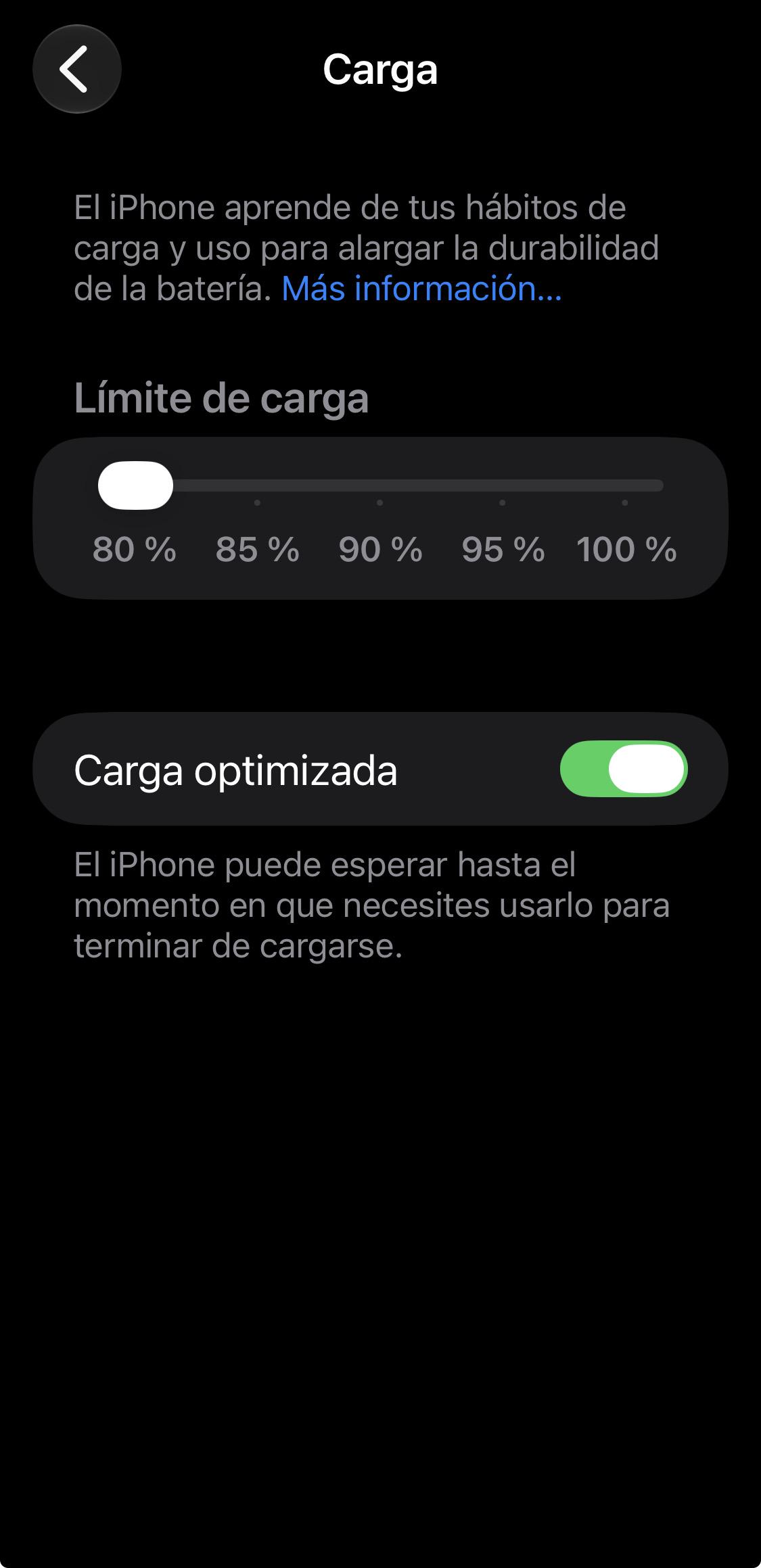
Tip/Guide Menu oculto limite carga bateria 80% Iphone 14 pro a traves de atajo

Post image
0 Upvotes

Fue a partir del Iphone 15 la opcion de entrar a la configuracion de la bateria para limitar la carga al 80%, 85%, 90%, 95%

Haciendo pruebas con atajos he conseguido acceder a un menu oculto en mi Iphone 14 Pro Max que me permite configurar esto, pero solo puedo acceder a traves de atajos.

Lo he probado en un Iphone 13 y no funciona. No he tenido ocasion de probarlo en 13 Pro Max ni en 14 normal, imagino que 14 Pro sera igual que 14 Pro Max.

https://www.icloud.com/shortcuts/ccdd1fe7f85f4fff966d57bb0455925d

Curioso, el 14 Pro Max admite gestionar esto, pero no lo incluyeron en los menus…


r/shortcuts • • 18h ago

Help Is there any way to activate Reachability via Shortcut?

5 Upvotes

I really want to put Reachability on my Action Button, but this function appears to be locked down for some bizarre reason. Is there any method it can be activated by shortcut?

I know about Back Tap. I don't want it on Back Tap.


r/shortcuts • • 1d ago Bravo Popcorn

Discussion What's the most creative thing you've built with Apple Shortcuts?

418 Upvotes

Today is my birthday! And all I want is to hear the most creative ways you're using Apple Shortcuts.

I'm especially interested in things beyond setting alarms or opening apps. What have you built that solves an unusual problem, saves you time, or does something you didn't know Shortcuts could do?

What does it do, and how did you make it work? I'd love to hear about the actions, apps, or tricks behind it. No need to share the shortcut itself if it's personal.

I'd love to steal... I mean, learn from your ideas. Haha


r/shortcuts • • 7h ago

Appstore (App) I set up my Lock Screen once, and a Shortcuts automation redraws it every morning with that day's plan

Thumbnail
gallery
0 Upvotes

Hey all,

Disclosure first: I'm on the team that makes Trace, an iPhone planner, so yes, this one needs an app. The part I want to share is the automation.

The GIF is me laying out my Lock Screen in the app: a year progress bar, this week, my events and to-dos, a D-day countdown and a sticker. The phone in the clip is set to Korean. The app and the action are in English too (second pic).

The layout is only half of it. The app adds a Shortcuts action, Generate Lock Screen Wallpaper, that redraws that layout with whatever is on your calendar and to-do list at the moment it runs. So I never touch it day to day. I stop the alarm, and the Lock Screen already shows today.

Setup (about a minute, iOS 17+)

  1. New shortcut: Generate Lock Screen Wallpaper, then Set Wallpaper for Lock Screen. Tap the arrow on Set Wallpaper and turn off Show Preview (second pic)
  2. Automation tab → + → Alarm → Is Stopped, pick Run Immediately and turn Notify When Run off → Next → choose that shortcut

It's only as fresh as the last run. If you add things during the day, a second automation on App → Trace → Is Closed covers that.

On privacy: the action draws the wallpaper on the phone. It reads your calendar locally and renders the image, no network call. Typing a plan as a sentence is different, that goes through our server to OpenAI / Google Gemini, and the optional AI backgrounds are made with Gemini on our server.

Pricing, upfront: nothing in the clip needs a subscription, and neither do the action or the automation. Color palettes, the animal/plant/weather progress shapes, two of the eight layouts, the 2-day to 2-week date ranges, custom fonts and D-day photos need Basic ($3.99/mo or $29.99/yr) or Premium ($5.99/mo or $44.99/yr).

I also have some one-time codes for 30% off the first year of Basic ($20.99 in the US; for people without a current subscription, good until Dec 9). Not pasting them here, but if you want one, say so in a comment and I'll DM it.

App link: https://apps.apple.com/app/apple-store/id6503812022?pt=126570331&ct=cm_reddit_shortcuts&mt=8

Curious what trigger you'd use instead of the alarm.


r/shortcuts • • 17h ago

Help Issues sorting and finding largest photos and videos via shortcut

1 Upvotes

I’m trying to clear up some space from legacy photos and videos on my phone and MacBook and have followed these instructions for this shortcut, but every time I go to run the shortcut, it doesn’t work. So I think Apple may have changed to some sort of setting? I have about 30,000 photos to go through. I get the error “there was a problem running the shortcut” and no further guidance about size limits etc.
Running it off a 24GB M5 MacBook Air. So there should be enough juice in the MacBook to be able to execute it.

https://www.youtube.com/watch?v=WIM2yoXiaxs&t=


r/shortcuts • • 1d ago

Request Screenshot without side system showing on iPhone Duo ?

1 Upvotes

Has anyone found a way to take a Screenshot without side system showing on the right on iPhone Duo(the time, wifi symbol ect) ? Is it possible ?

Is there a shortcut that can be created for this?

Thanks


r/shortcuts • • 1d ago

Help How to get ai to create calendar entry

1 Upvotes

I am trying to create a shortcut that looks at my scanned handwritten timecards (scanned to PDFs) and use a cloud model to read the timecards and create calendar entries from it. But since the cloud model can’t create the calendar entries directly, I think I need the cloud model to create different variables for date and times and then I can use a create event action for the calendar entries. Unfortunately the cloud model will only return one result, not multiple variable like I need.


r/shortcuts • • 1d ago

Help Certain things not showing up?

Thumbnail
gallery
0 Upvotes

r/shortcuts • • 1d ago

Request Looking for a shortcut that when I toggle dark mode on or off it changes the wallpaper

1 Upvotes

Couple of years ago go that was a behavior that was possible without a shortcut but it didn’t make it out of the beta. I want to have that function back as an automation.


r/shortcuts • • 2d ago

Help Don’t forget your phone CarPlay shortcut.

Post image
23 Upvotes

Can anyone help me setup a shortcut to not forget my phone when I disconnect from CarPlay. Tried all sorts of stuff but the alert never plays or only plays at a super low level.


r/shortcuts • • 1d ago

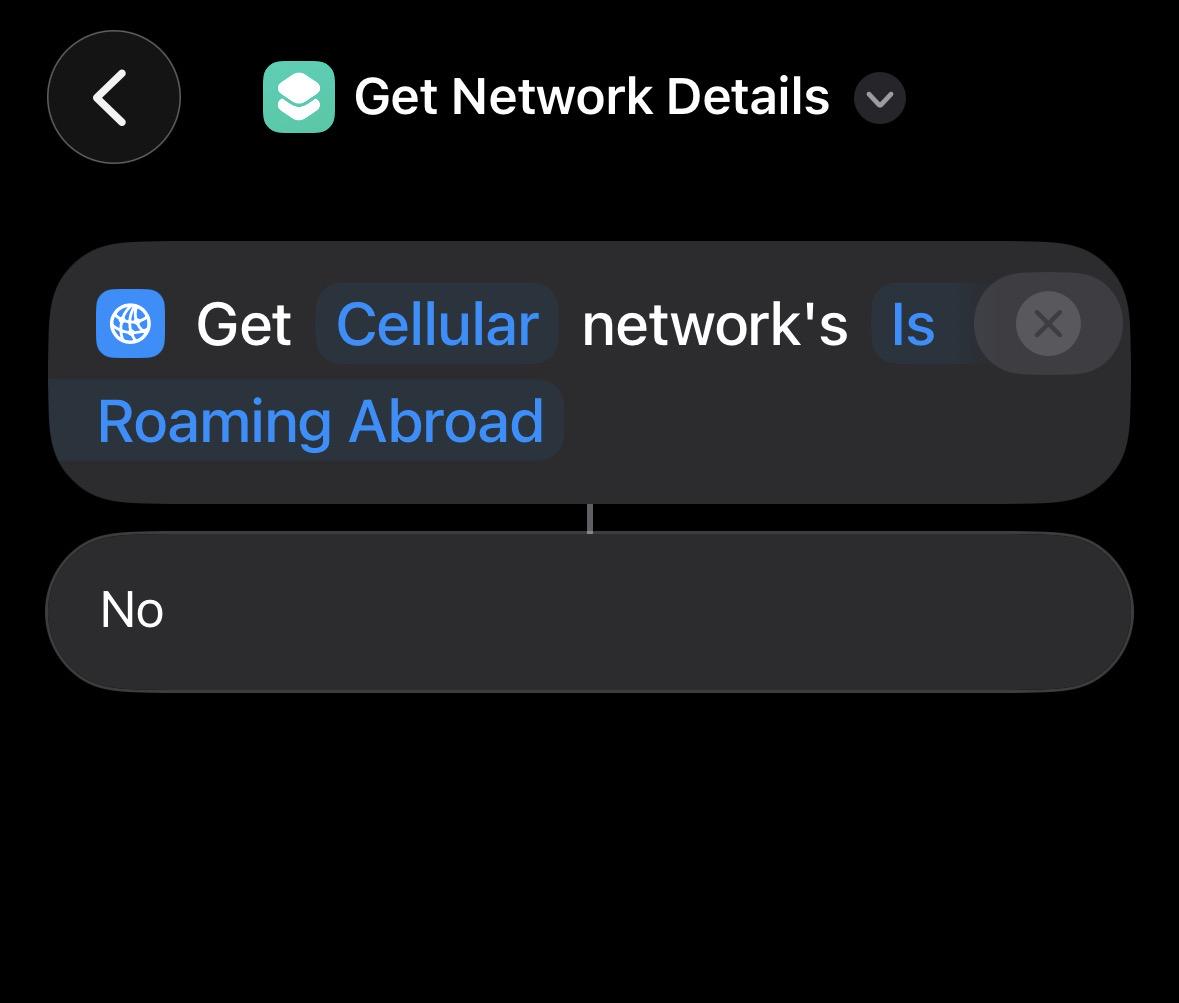
Help How to verify if the phone has Cellular ON?

Post image
3 Upvotes

i have to tested everything, and no output is depending on the cellular’s connectivity.