r/DigitalPlanner • u/Tesorin_App • 3h ago
Made 50 digital planners in my note-taking app.
2
Upvotes
r/DigitalPlanner • u/petvas72 • 3h ago
Hi everyone!
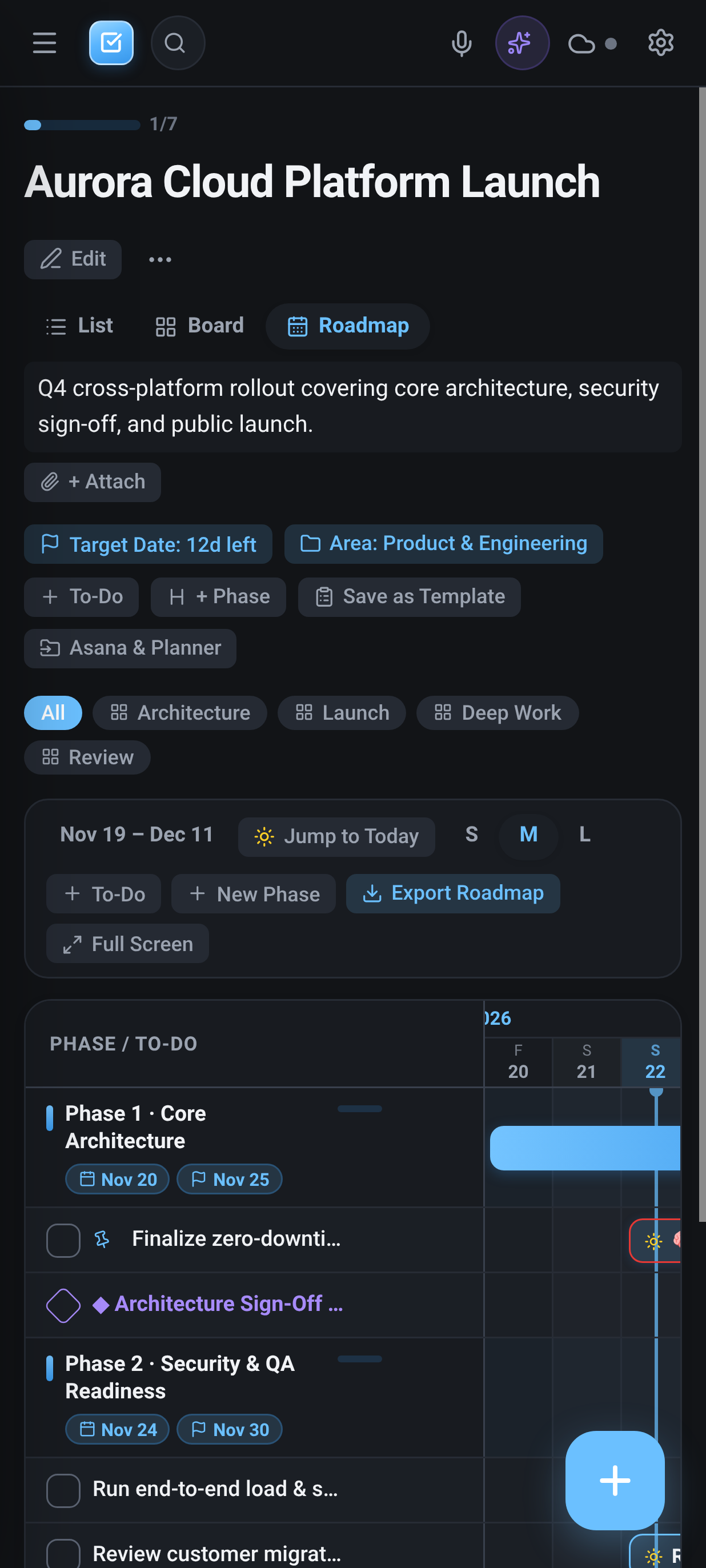
Thingsbook 3.0 (v3.0.0, Build 111) is officially out for Android (phones, tablets, foldables & Googlebook), ChromeOS / Web (standalone offline PWA), and macOS (native Swift + SwiftUI Universal app for Apple Silicon & Intel).
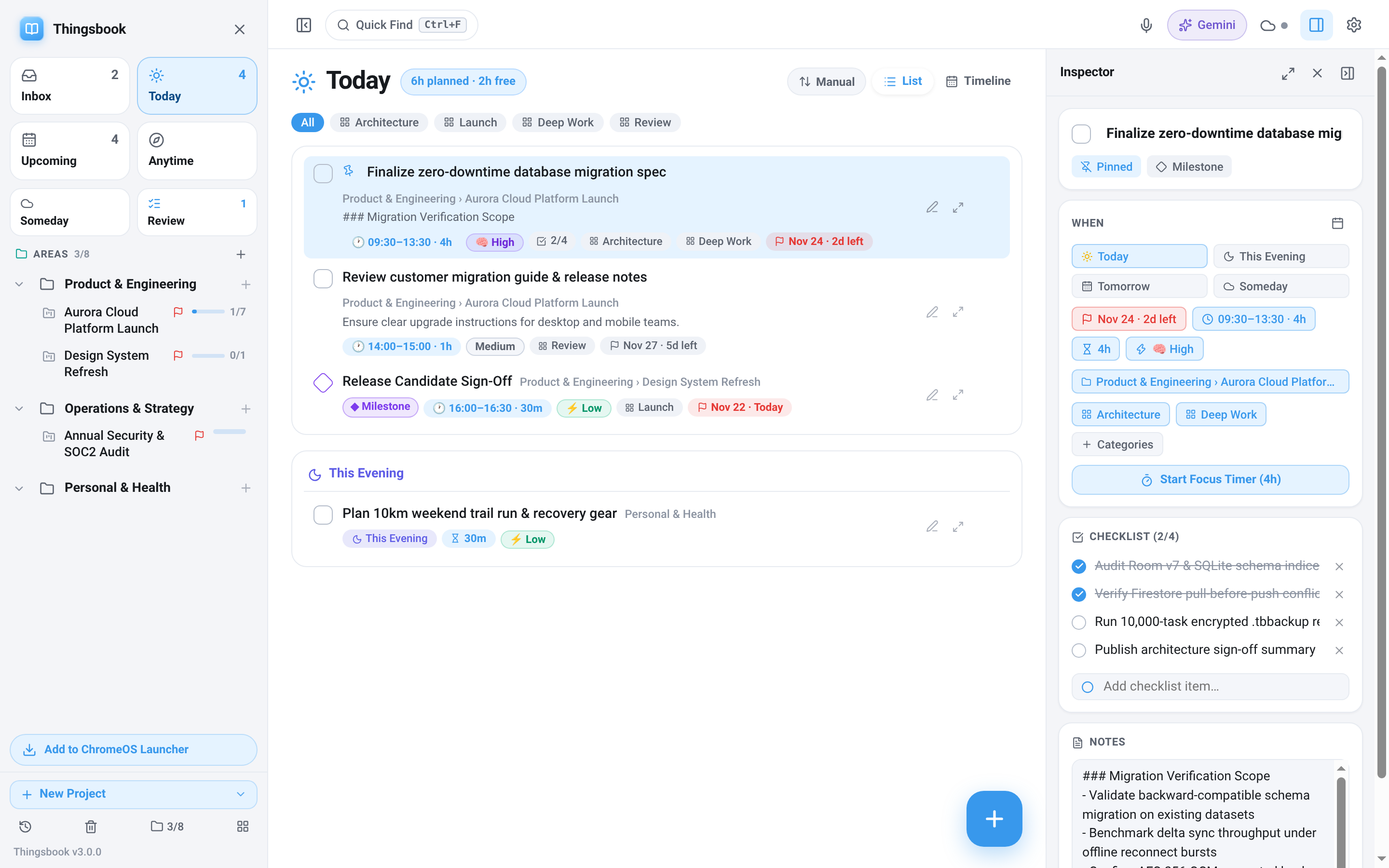
If you tried or used Thingsbook v2.0, v3.0 is our biggest leap yet. While v2.0 focused on core GTD lists, Weekly Review, basic templates, and daily timeblocking, v3.0 transforms projects and wide-screen workflows without losing the calm, offline-first GTD speed.
| Area | Thingsbook v2.0 | Thingsbook v3.0 (New & Upgraded) |
|---|---|---|
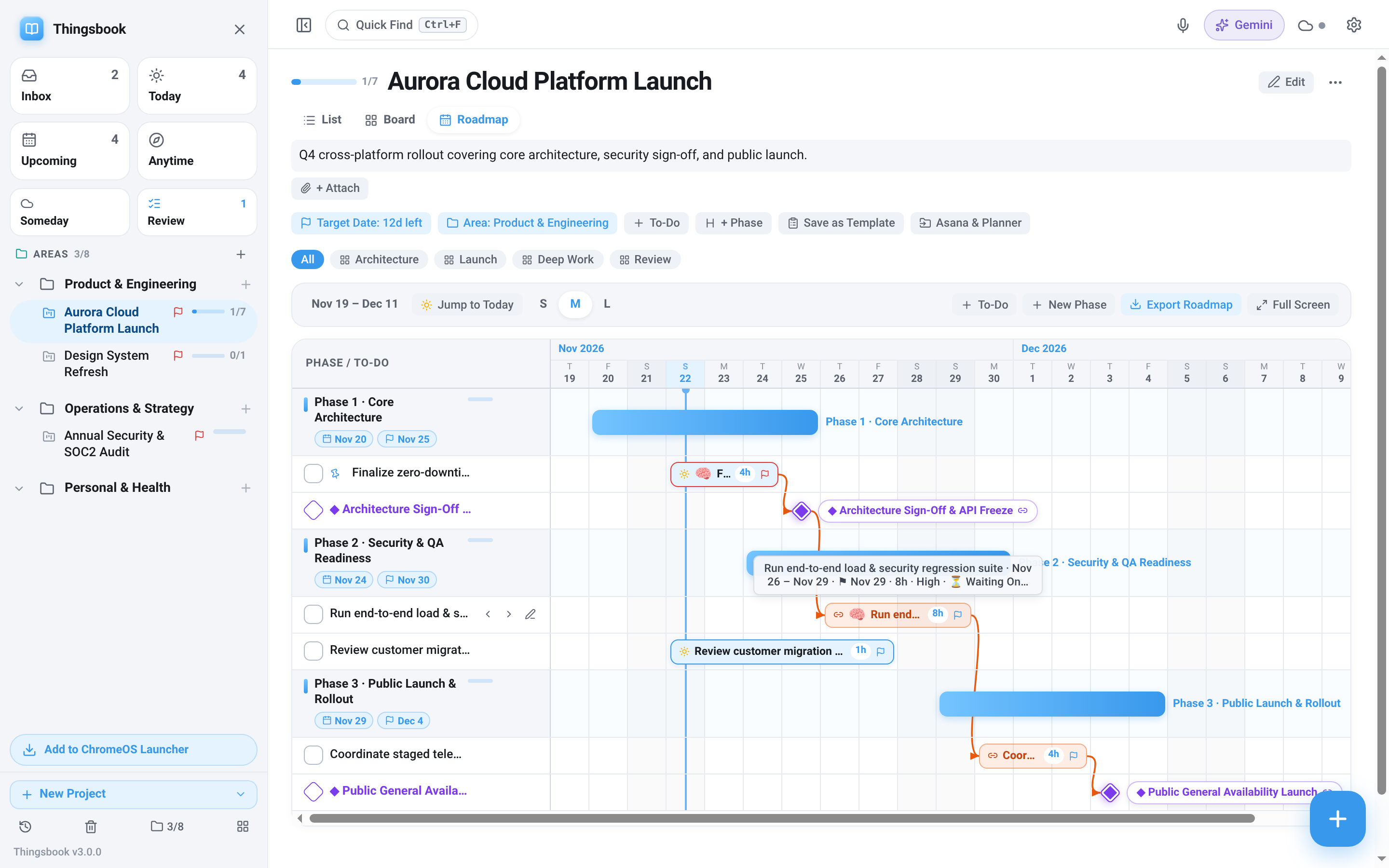
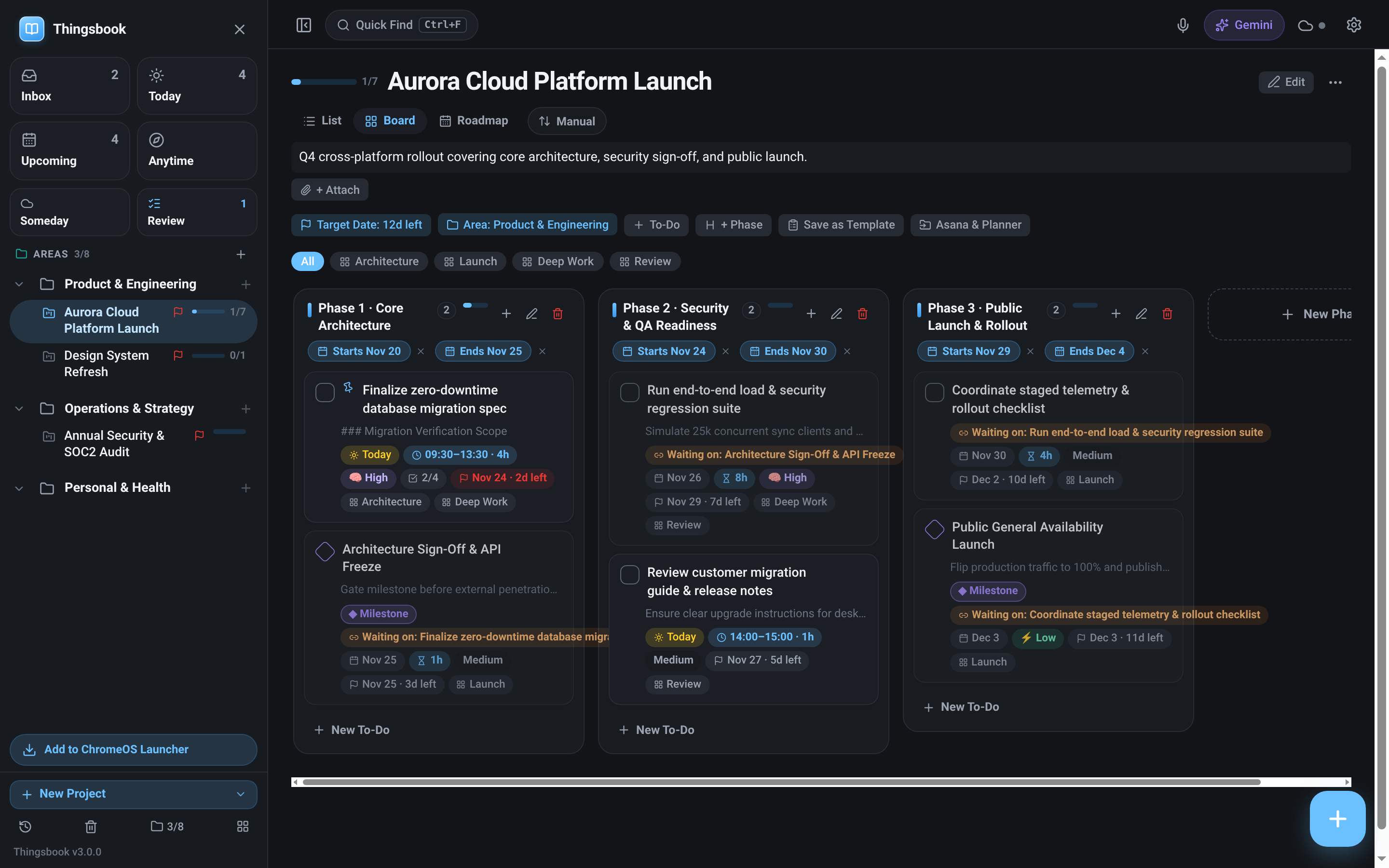
| Project Views | Single vertical List view with plain text headings | 3 switchable modes: List, Kanban Board, and Interactive Gantt Timeline / Roadmap |
| Phases & Milestones | Static headings (no dates), no milestones | Phases with Start & End dates, completion rings, and 45° Milestone Diamonds (◆) |
| Roadmap Exporting & Presentation | None | Full-Screen Presentation Mode (F / ⌃⌘F) + multi-page Vector PDF (A4/Letter) & High-DPI PNG export |
| Task Dependencies | Independent tasks only | Waiting On / Blocks dependencies with cycle prevention, ⏳ indicators & curved SVG timeline connectors |
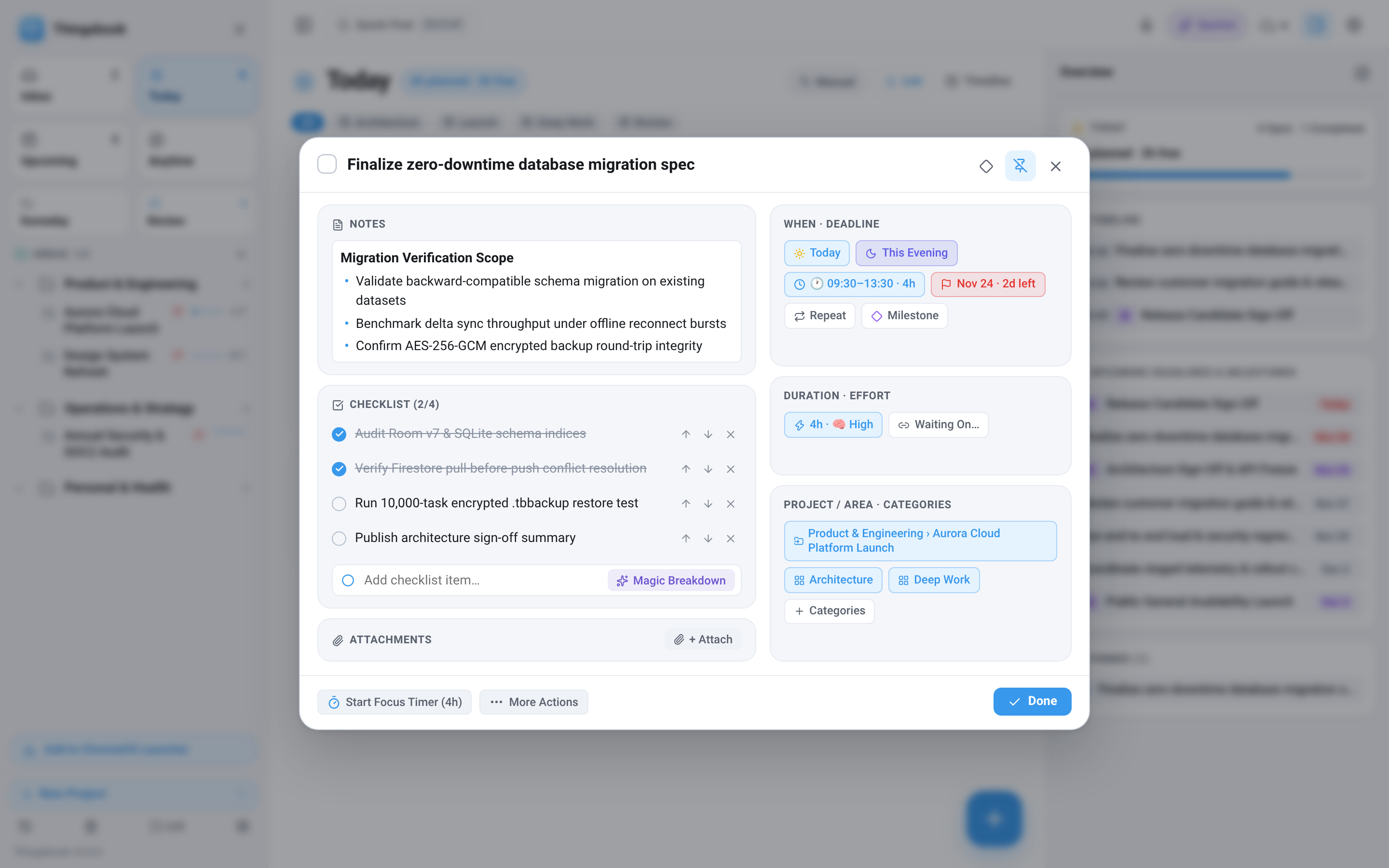
| Task Editing & UI | Inline single-column card expansion | Soft Bento UI + symmetric 2-Column Soft Bento Task Modal + 1-click inline badge & title quick-edit |
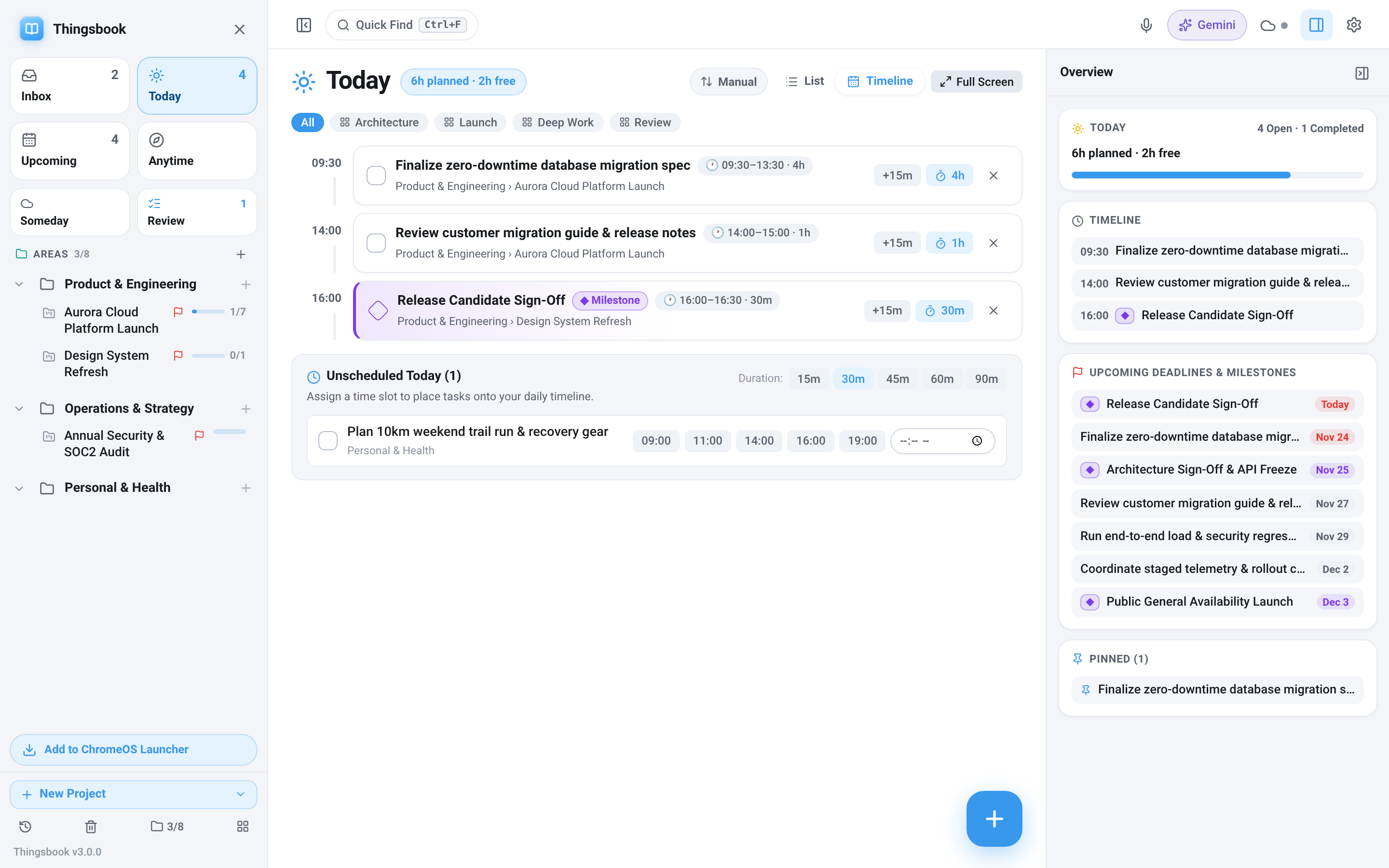
| Wide-Screen Layout | 2-column (Sidebar + Task List) | 3-pane workspace adding a collapsible Right-Side Inspector & Overview Panel |
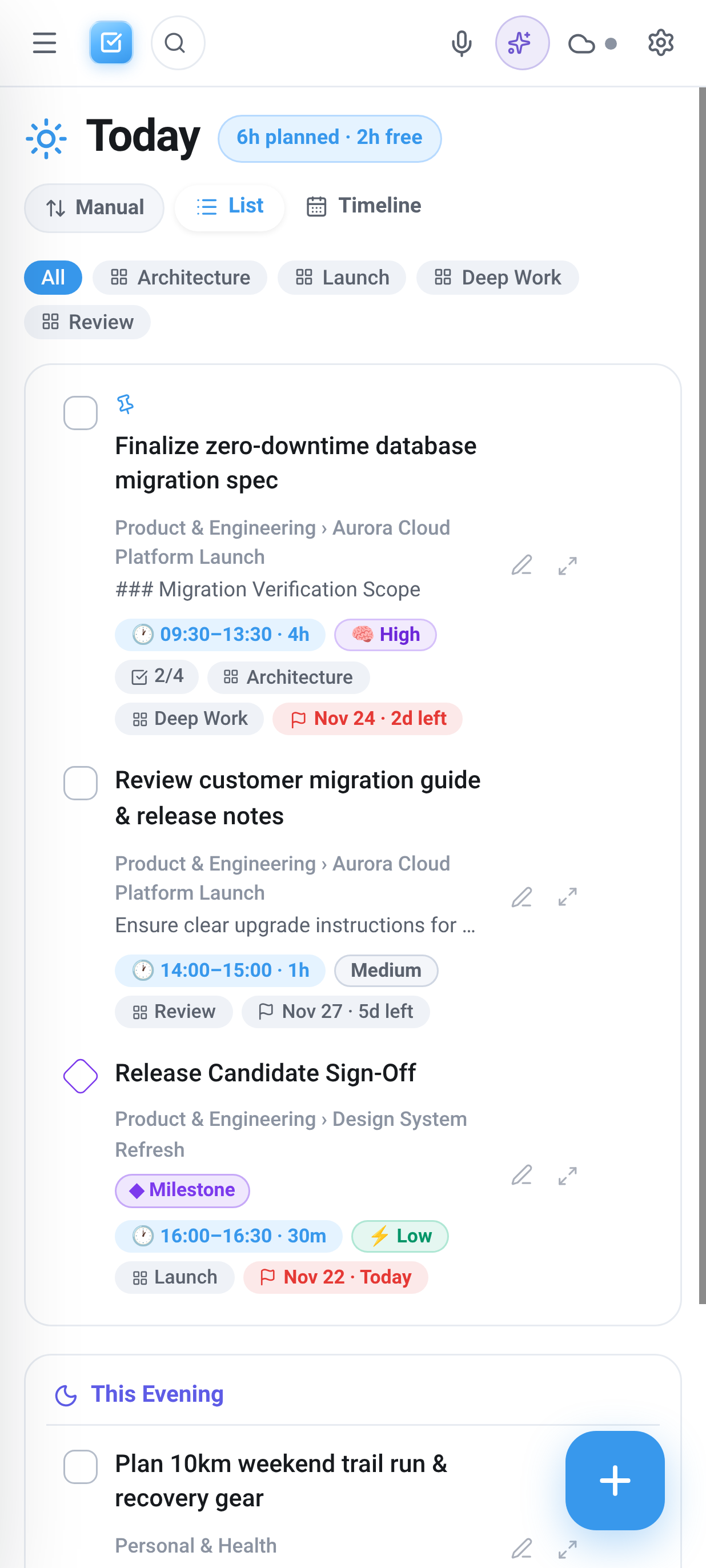
| Durations & Effort | 15m–2h tied closely to timeblocks; no effort | Standalone 5m to 4h (half-day), 8h (full-day) & multi-day (5d) durations + Low / Medium / High Effort + Today Capacity Bar |
| Sorting, Pinning & Perspectives | Manual list order only | Pin to Top (📌), 5 sort modes (Manual, Deadline, Duration, Effort, A–Z), and optional Custom Perspectives |
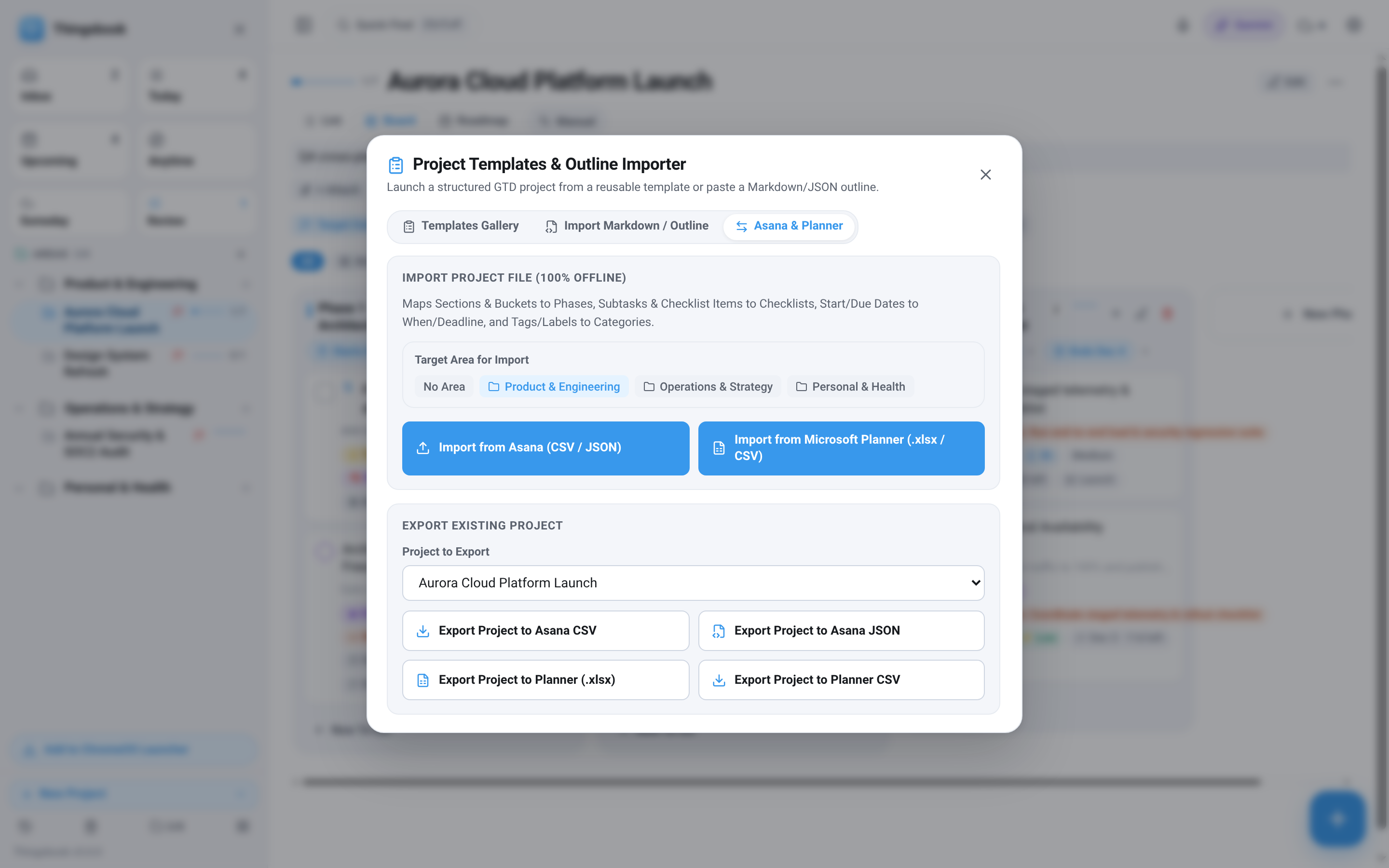
| External Project Interop | Basic Markdown outline & flat CSV | Round-trip Asana (JSON/CSV) & Microsoft Planner (.xlsx/CSV) import/export with Target Area preselection |
| Localization | 517 strings × 5 languages | 650 strings × 5 languages (EN, DE, FR, IT, ES) with 100% cross-platform parity |
v2.0, projects were strictly vertical lists. In v3.0, every project switches seamlessly between List, Kanban Board, and Interactive Gantt Timeline / Roadmap.Interactive Gantt Timeline & Milestones (◆):
◆), rendered on the timeline as a 45° royal-violet diamond with a non-clipped floating callout pill.v2.0’s cramped inline expansion for deep editing—pairing Markdown Notes, Checklists (✨ Magic Breakdown), and Attachments on the left with When/Deadline, Milestone toggle, Effort, Duration, Timeblock, Waiting On dependencies, Project/Area/Phase, and Categories on the right. Collapsed rows also gain 1-click interactive badges and inline quick-rename (✏️ / F2).Waiting On Dependencies: Link prerequisite tasks with automatic circular-dependency protection, ⏳ blocked badges, and curved dependency arrows on the Gantt Timeline.5m up to 4h, 8h, or custom multi-day spans (2d, 5d, etc.)—preserved independently even if you clear a daily timeblock—and see your daily planned · free capacity bar in Today (accounting for calendar meetings).Low / Medium / High), Pinned Tasks & View Sorting: Prioritize key tasks at the top of any view and sort views by Manual, Deadline, Duration, Effort, or Alphabetical.resource_subtype: "milestone", Sections → Phases, Subtasks → Checklists, and Tags) and Microsoft Planner .xlsx/CSV, complete with Target Area preselection (or right-click any Area in the sidebar to import directly into it).◆), Dependencies & Mouse Tooltip: https://raw.githubusercontent.com/petrosvassiliou/thingsbook-android/main/docs/screenshots/v3-project-timeline-milestones.png4h/8h Durations): https://raw.githubusercontent.com/petrosvassiliou/thingsbook-android/main/docs/screenshots/v3-project-kanban-dark.png3x Retina Views (Today & Dark Project Roadmap): https://raw.githubusercontent.com/petrosvassiliou/thingsbook-android/main/docs/screenshots/v3-mobile-today-light.png · https://raw.githubusercontent.com/petrosvassiliou/thingsbook-android/main/docs/screenshots/v3-mobile-roadmap-dark.pngUpgrading from v2.0.x / v2.1.x / v2.5.0 to v3.0.0 (Build 111) is 100% automatic and in-place—all existing tasks, projects, templates, attachments, encrypted .tbbackup archives, and Firestore sync sessions migrate cleanly with zero data loss:
v3.0.0): Download Thingsbook-v3.0.0-GTD-Full.apk (or use Settings → App Update → Check for Updates in-app)Thingsbook-macOS-v3.0.0-Universal.dmg (or use Settings → Updates → Install & Relaunch, or run curl -fsSL https://raw.githubusercontent.com/petrosvassiliou/thingsbook-android/main/macos/install.sh | bash)(Note: Thingsbook is an independent open-source project and is not affiliated with or connected to Cultured Code.)
Thanks to everyone who tested the 3.0 betas and shared feedback—let me know how the new project views and inspector feel on your setup!
r/DigitalPlanner • u/1greatbigworld • 4h ago
Looking for options on some digital planners. I really like the layout of the Full Focus Planner and the Keys2Suvcess planner. Looking to run in OneNote primarily on my iPad Pro 13” and potentially an iPad mini a20. One key requirement is two way communication with my calendar (Corporate Outlook) so that any invites auto populate to my planner. Would also like some type of AI integration with my email for creating task lists and follow ups from reading my email. Appreciate any suggestions.
r/DigitalPlanner • u/gaborauth • 17h ago

Hi guys!
I've been working on the Scribble Calendar & Planner app for years. The idea is simple: the freedom of a handwritten paper planner, without being limited to a PDF - a living planner where your writing, your real calendar events and your daily planning work together. Think of it as a paper planner that knows what day it is. 🙂
What's new in version 1.12.0?
One planner on your iPad and your Android tablet
- Your pages sync between an iPad and an Android tablet through Google Drive, and between Apple devices through iCloud Drive too
- Writing on two devices at the same time is now safe: a new sync server keeps track of which device changed which page, so no strokes get lost - and your pages still stay on your own cloud drive, not on our server
- The sync screen shows the server's state, and you can switch the server off to sync through your cloud drive alone
- A new device joining iCloud Drive sync now waits until iCloud has listed your existing pages, so it no longer starts an empty planner of its own
More room to write:
- Full-screen mode: hide the toolbar for more space on the page; a small panel in the corner switches between pen and eraser and brings the toolbar back
- Turn pages by swiping on the page
- Choose the line, grid or dot spacing of each note page
A new look:
- A brighter design made for tablet and phone screens
- A new Settings screen with colour themes
- A dark mode, for the pages too - nice for planning in the evening
What is it?
Year, Quarter, Month, Week and Day views, with handwriting and notes on every page, and your Google Calendar or Outlook events next to your own writing.
It's free to download, and most of the planning and handwriting is free. Premium is a one-time purchase for creating, editing and deleting calendar events (plus the two extra themes). Sync is an optional subscription, and downloading synced pages stays free.
I'd love to hear from this community!
- If you plan on more than one device, how do you keep your PDF planner in sync today?
- What should a live planner do that a PDF planner can't?
App Store: https://apps.apple.com/app/id6809502400
Google Play: https://play.google.com/store/apps/details?id=com.scribblecalendar
Full changelog: https://scribblecalendar.com/changelog
Thanks for checking it out! :)
r/DigitalPlanner • u/moonrider-original • 20h ago
I've been trying to find a digital planning setup that works completely offline (for travel, or when I don't want to rely on the cloud), but most of the apps I tried were either subscription-based or required an account just to add a simple reminder.
Since I have a development background, I ended up building a tool called Orbitika to solve this for myself. It's a single app with a retro dot-matrix UI that includes a solid set of planning tools:
📅 PLANNING & LISTS
📊 TRACKERS & GOALS
The Vibe:
It's not a full digital planner (it won't replace GoodNotes or Notability) and other creator who built fantastic digital planning app showcase in here, but it's meant to be a lightweight, 100% offline companion for all the trackers and lists that don't need to live inside a heavy PDF notebook and the most important i built my app and tested in old android 8.0+/ iphone x (might be one sitting in your drawer) and above.
It’s free to download (no ads, no signup) along with other 50+ Offline Tools and Games, and I’d genuinely love to know if this is the kind of simple tool other people here would find useful, or if you prefer keeping everything inside one big planner file.
You can search Orbitika in Playtore or Appstore if you would like to try.
r/DigitalPlanner • u/Special-Stage6709 • 1d ago
r/DigitalPlanner • u/Zealousideal-Cod4301 • 1d ago
so I made a simple, aesthetic planner with daily, weekly, monthly & yearly pages to keep everything organized in one place.
Made it here 100% free for anyone who needs it 💜
r/DigitalPlanner • u/Tesorin_App • 1d ago
r/DigitalPlanner • u/organizeddashboard • 1d ago

Hey guys, so this is my current favorite book tracker (google sheets)
It's super cozy and it fills itself in, so I actually keep logging my books.
Below is a full explanation of this book tracker.
Your Reading Life
Main Dashboard: A yearly goal ring, 12 live stats, a rating chart and a reading status donut.
Currently Reading: Every book you're reading right now and how far you are in each.
My Shelf & Genre Shelf: Your books show up as spines on a shelf, by year or by genre.
Book Finder: See the cover, genre, pages, format and start and finish dates for any book.
Coming Soon & Last Finished: Upcoming releases with their dates, plus your recently finished books with star ratings.
Track & Review
Organized Tracker: One row per book, with dropdowns for genre, trope, mood, pace, format and source.
One Status, Every Tab: Set a book to Finished, Reading, TBR, Wishlist or DNF and every tab updates.
Progress & Reading Days: Your dates turn into reading days, and your current page turns into a percentage.
Book Review Page: Cover, stars, summary, favourite quote, favourite moment and your full review.
Cover Gallery: Up to 40 covers per page. Filter by genre, status, mood, rating, year, author or format.
Plan What To Read Next
Wishlist Tracker: Priority, price, release date, buy link and total cost.
Release Countdown: How many days are left until each release you're waiting for.
To Be Read: Pages, estimated reading hours, format and source for every TBR book.
TBR Jar: Can't decide? It picks your next read at random.
Calendar, Series & More
Reading Calendar & Log: Log your reading sessions and see which book you read each day, pages read and days read.
Series Tracker: Series show up on their own, with covers in reading order, a progress bar and an average rating.
Quotes Dashboard: Save quotes with page and character, tag your favourites and get a quote of the day.
Gifts & Lending: Plan book gifts by person and occasion, and track lent or borrowed books with due dates and overdue alerts.
Year At A Glance: A cover for every month, books finished per month, your top genre and author, and the best book in each genre.
Reading Bingo: A 25-square reading challenge.
It works with physical books, ebooks, Kindle and audiobooks (by pages or listening hours). There's no book limit, and you can track more than one year.
r/DigitalPlanner • u/ahin29 • 1d ago

r/DigitalPlanner • u/Plannivelledigital • 1d ago
r/DigitalPlanner • u/kermit780 • 1d ago

I created the app because I was using E ink devices and got used to the layout and usability, but for practical reasons could not justify carrying two devices around. Also, the E ink devices are fairly expensive and I already had an iPad that I carry everywhere because of its versatility. So I designed the app around how I used my E ink planner/notebook.
r/DigitalPlanner • u/OkReindeer1419 • 1d ago
Eine App iOS Store, die PDFs laden kann und dann die so anpasst, dass sie die PDF sich mit iOS synchronisieren kann. So etwas gibt es leider nicht. Man kann zwar in einigen Apps PDFs eigene Planner, die er erstellt hat laden aber keine der PDF kann mit iOS synchronisieren, nur mit eigenen, die die Apps bereitstellen. Es wäre ein GameChanger, wenn jemand so etwas programmieren könnte und man seinen eigenen Plan als PDF erstellen kann zum Beispiel mit Claude und diesen dann in diese App lädt und die App in so Umbau, dass man ihn in der App benutzen kann und mit iOS synchronisieren kann.
r/DigitalPlanner • u/Lucjjj • 1d ago

Most planners assume the hard part is fitting everything in. For me it's starting. So I built this one the other way round: the day cards are there to get you going, and nothing counts how many days you missed.
It's ADHD-friendly by design, works in tablet apps like GoodNotes or Notability.
Here it is : https://shop.obenpaper.com/b/xBkZ8
r/DigitalPlanner • u/malozyalli • 1d ago
r/DigitalPlanner • u/victoor89 • 1d ago
My phone calendar is full of meetings and appointments, and the things I actually look forward to get lost in there: trips, a couple of concerts, long weekends with friends, everyone's birthdays. The year view in Apple Calendar is basically dots. What I wanted was a paper wall calendar for the big stuff, but on my phone.
So I made Big Year (I'm the dev). It's one screen with the twelve months, and every plan takes whole days, no hours. You long-press a day and drag across the days to create a plan, pick a type with an icon and a colour, and it shows as a bar over those days. Birthdays and anniversaries repeat every year on their own. When the year gets crowded there's a day list month by month and a quarter view.
The part I use most is sharing: you can export the year as an image sized for a story or a post, or print it as an A4 or Letter PDF and stick it on the fridge.
What it doesn't do, so nobody is disappointed: it doesn't sync with Apple or Google Calendar, there are no widgets, it's iPhone only (iOS 26), and you can't share a calendar with someone else. No account, no ads, no analytics, everything stays on the phone.
Price: the first five plans are free. After that it's a one-off unlock or a weekly subscription. It launched yesterday, and as a launch sale the one-off unlock is 75% off until 30 November.
https://apps.apple.com/app/id6837002080
How do you all handle the year-at-a-glance part? Do you keep a separate yearly page for trips and birthdays in your digital planner, or does it all live in the monthly spreads?
r/DigitalPlanner • u/armoon1 • 1d ago

I've been reading everyone's suggestions and really appreciate the support. I'm already working on improvements based on your feedback. Please watch for the updates.
New changes are adding dark mode, sync Apple Calendar, bigger fonts for iPad, different date format, changing what day week starts, improving drawing feature, fixing some bugs, and many. more.
I'm so grateful for all your recommendation and I hope it makes the app fit more into your need.
------------------------------------------------------------------------------------------------
Here’s what Bloom offers at a glance:
📱 Available for iPhone and iPad: Get Bloom free on the App Store
I'm working toward my first 1,000 downloads, and I'd really appreciate your support! If you find it useful, please share it with friends and leave a review. Every download and bit of feedback means a lot! 🙏❤️
r/DigitalPlanner • u/Inkand123 • 1d ago

I made a 2027 PDF planner for fixed rotations like 24/48 and Kelly. Most planners assume a Monday-to-Friday week, so you end up writing your shift days into every month by hand.
You pick your rotation and first shift date, and every shift for the year is already on the month pages. January is free so you can check it against your real schedule. The full year is $6.99, one time, through Gumroad. I made it, so I'm biased.
r/DigitalPlanner • u/armoon1 • 1d ago

I recently launched Bloom – Daily Life Planner, a FREE productivity app I designed to help people stay organized, plan their future, and keep track of everything in one place.
From daily tasks, appointments, and goals to gym workouts, budgets, travel plans, medications, habits, and much more, Bloom is packed with features to make everyday life easier and more productive.
🌎 Supports multiple languages!
📱 Available FREE on the App Store (iPhone only):
https://apps.apple.com/us/app/bloom-daily-life-planner/id6829106550
I'm working toward my first 1,000 downloads, and I'd really appreciate your support! If you find it useful, please share it with friends and leave a review. Every download and bit of feedback means a lot! 🙏❤️
r/DigitalPlanner
•
u/hash1e
•
1d ago
I spent years trying to make bullet journaling and digital planners stick. They never did, and I think I finally know why.
Most daily layouts I see are crowded. Habit tracker, to-do box, gratitude, notes, water intake, mood, schedule. Every one of those boxes is a small daily decision: fill it or skip it. Skip a few and the page looks half-finished, and that's when people quietly stop. The time you spend filling the page also becomes the task, which is the opposite of getting things done.
So I tried the reverse. One page, three steps, and each step feeds the next:
STEP ONE, Priorities and actions: Write your three priorities for the day, then break each one into up to three small actions. This is the part most planners skip. A priority like "finish the proposal" doesn't tell you what to do at 9 AM. "Outline the three sections" does.
STEP TWO, Time block for actions: Hours from 6 AM to 6 PM. Take the actions you just wrote and place them in the day. It's a plan built from your actions, not a blank hourly grid you have to invent a day for.
STEP THREE, What may spill into tomorrow: Be honest about what probably won't fit and write it down. Nothing stays floating in your head, and tomorrow's Step One starts with it.
The idea is that the page is a short process rather than a collection of boxes: decide what matters, break it into things you can start, put them in the day, and park what doesn't fit. Everything on it has a job, and there's no space that exists just to be filled.
What I deliberately left off: habits, gratitude, mood, notes, water. Not because they're bad, but because each one is a reason to skip the page on a busy day. If you want those, a separate page works better than crowding this one.
I've attached a free PDF of January so you can try it for a week. It's hyperlinked and made for GoodNotes and CollaNote. Every page links back to the month and week, and each day links forward and back.
Free PDF Download Link (Google Drive)
https://drive.google.com/file/d/1QAyX5jC0hRb3cM3-HDPRTzwnrXeLVNj5/view?usp=sharing

Things I'd really like to know:
Happy to hear it's all wrong. I'd rather find out now.
r/DigitalPlanner • u/Traditional_Baby9438 • 2d ago
I built a simple and clean weekly planner for iphone called Weeklii.
Shows your entire week in one clean view. Repeats itself once the week ends.
Reports available for each week. Would really appreciate if people could try it.
[appstore link](https://apps.apple.com/ie/app/weeklii/id6756281596)
r/DigitalPlanner • u/eve9656 • 2d ago
I made a Notion planner called Life Reset with a simple idea: you shouldn't have to organize your tasks over and over just to know what to focus on.
Here's how it works:
Brain Dump: Add your tasks in one place.
Today: Tasks automatically show up when they're due.
Energy Views: Find tasks based on their energy level.
Past Due & Undated: Keep other tasks accessible without cluttering your daily view.
Week Wins: Keep track of what you've completed.
The goal was to create a planner that gives you structure without making you feel overwhelmed.
Would love to hear what you think!