r/DigitalPlanner • • 17h ago

Scribble Calendar & Planner - version 1.12.0

Post image
11 Upvotes

Hi guys!

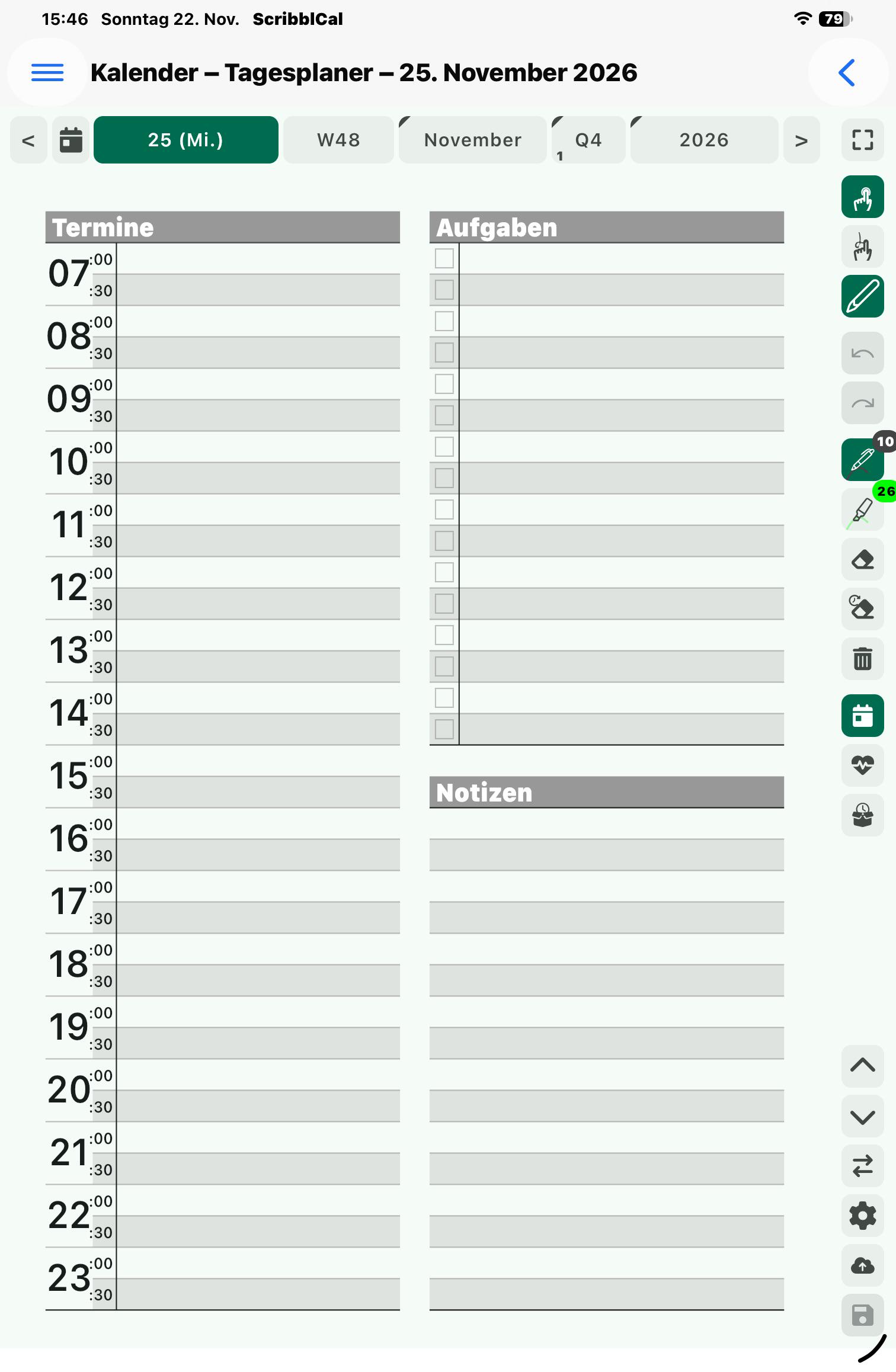
I've been working on the Scribble Calendar & Planner app for years. The idea is simple: the freedom of a handwritten paper planner, without being limited to a PDF - a living planner where your writing, your real calendar events and your daily planning work together. Think of it as a paper planner that knows what day it is. 🙂

What's new in version 1.12.0?

One planner on your iPad and your Android tablet

- Your pages sync between an iPad and an Android tablet through Google Drive, and between Apple devices through iCloud Drive too
- Writing on two devices at the same time is now safe: a new sync server keeps track of which device changed which page, so no strokes get lost - and your pages still stay on your own cloud drive, not on our server
- The sync screen shows the server's state, and you can switch the server off to sync through your cloud drive alone
- A new device joining iCloud Drive sync now waits until iCloud has listed your existing pages, so it no longer starts an empty planner of its own

More room to write:

- Full-screen mode: hide the toolbar for more space on the page; a small panel in the corner switches between pen and eraser and brings the toolbar back
- Turn pages by swiping on the page
- Choose the line, grid or dot spacing of each note page

A new look:

- A brighter design made for tablet and phone screens
- A new Settings screen with colour themes
- A dark mode, for the pages too - nice for planning in the evening

What is it?

Year, Quarter, Month, Week and Day views, with handwriting and notes on every page, and your Google Calendar or Outlook events next to your own writing.

It's free to download, and most of the planning and handwriting is free. Premium is a one-time purchase for creating, editing and deleting calendar events (plus the two extra themes). Sync is an optional subscription, and downloading synced pages stays free.

I'd love to hear from this community!

- If you plan on more than one device, how do you keep your PDF planner in sync today?
- What should a live planner do that a PDF planner can't?

App Store: https://apps.apple.com/app/id6809502400
Google Play: https://play.google.com/store/apps/details?id=com.scribblecalendar
Full changelog: https://scribblecalendar.com/changelog

Thanks for checking it out! :)

r/DigitalPlanner • • 4h ago

Looking for recommendations on digital planner using one note and iPad.

3 Upvotes

Looking for options on some digital planners. I really like the layout of the Full Focus Planner and the Keys2Suvcess planner. Looking to run in OneNote primarily on my iPad Pro 13” and potentially an iPad mini a20. One key requirement is two way communication with my calendar (Corporate Outlook) so that any invites auto populate to my planner. Would also like some type of AI integration with my email for creating task lists and follow ups from reading my email. Appreciate any suggestions.


r/DigitalPlanner • • 3h ago

Made 50 digital planners in my note-taking app.

2 Upvotes

r/DigitalPlanner • • 9h ago

Foto grüner Hintergrund

Post image
2 Upvotes

r/DigitalPlanner • • 3h ago

Thingsbook 3.0 is out — What’s new since v2.0: Kanban Boards, Interactive Gantt Timelines & Milestones, Soft Bento UI, Wide-Screen Inspector & Asana/Planner Import (Android, ChromeOS & macOS)

1 Upvotes

Hi everyone!

Thingsbook 3.0 (v3.0.0, Build 111) is officially out for Android (phones, tablets, foldables & Googlebook), ChromeOS / Web (standalone offline PWA), and macOS (native Swift + SwiftUI Universal app for Apple Silicon & Intel).

If you tried or used Thingsbook v2.0, v3.0 is our biggest leap yet. While v2.0 focused on core GTD lists, Weekly Review, basic templates, and daily timeblocking, v3.0 transforms projects and wide-screen workflows without losing the calm, offline-first GTD speed.


Quick Comparison: Thingsbook v2.0 vs. v3.0

AreaThingsbook v2.0Thingsbook v3.0 (New & Upgraded)
Project ViewsSingle vertical List view with plain text headings3 switchable modes: List, Kanban Board, and Interactive Gantt Timeline / Roadmap
Phases & MilestonesStatic headings (no dates), no milestonesPhases with Start & End dates, completion rings, and 45° Milestone Diamonds (◆)
Roadmap Exporting & PresentationNoneFull-Screen Presentation Mode (F / ⌃⌘F) + multi-page Vector PDF (A4/Letter) & High-DPI PNG export
Task DependenciesIndependent tasks onlyWaiting On / Blocks dependencies with cycle prevention, ⏳ indicators & curved SVG timeline connectors
Task Editing & UIInline single-column card expansionSoft Bento UI + symmetric 2-Column Soft Bento Task Modal + 1-click inline badge & title quick-edit
Wide-Screen Layout2-column (Sidebar + Task List)3-pane workspace adding a collapsible Right-Side Inspector & Overview Panel
Durations & Effort15m–2h tied closely to timeblocks; no effortStandalone 5m to 4h (half-day), 8h (full-day) & multi-day (5d) durations + Low / Medium / High Effort + Today Capacity Bar
Sorting, Pinning & PerspectivesManual list order onlyPin to Top (📌), 5 sort modes (Manual, Deadline, Duration, Effort, A–Z), and optional Custom Perspectives
External Project InteropBasic Markdown outline & flat CSVRound-trip Asana (JSON/CSV) & Microsoft Planner (.xlsx/CSV) import/export with Target Area preselection
Localization517 strings × 5 languages650 strings × 5 languages (EN, DE, FR, IT, ES) with 100% cross-platform parity

Everything New & Changed Since v2.0 in Detail

1. Three-Mode Project Workspaces: List, Kanban Board & Interactive Gantt Timeline

  • In v2.0, projects were strictly vertical lists. In v3.0, every project switches seamlessly between List, Kanban Board, and Interactive Gantt Timeline / Roadmap.
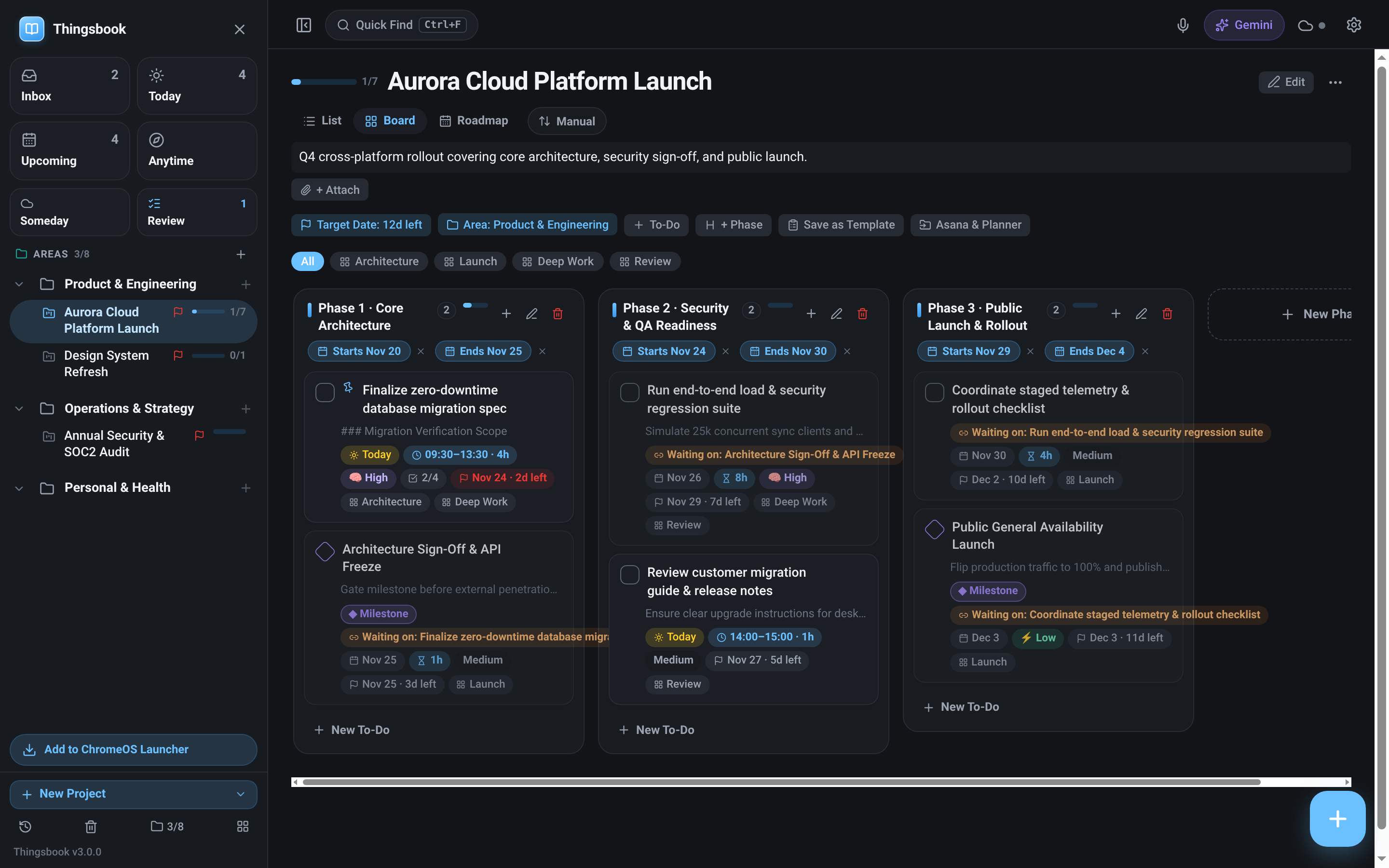
  • Kanban Board: Headings are now full Phases with optional Start & End dates, per-phase progress rings, multi-task drag-and-drop across columns, and one-click promotion or cleanup of ungrouped (General) tasks.
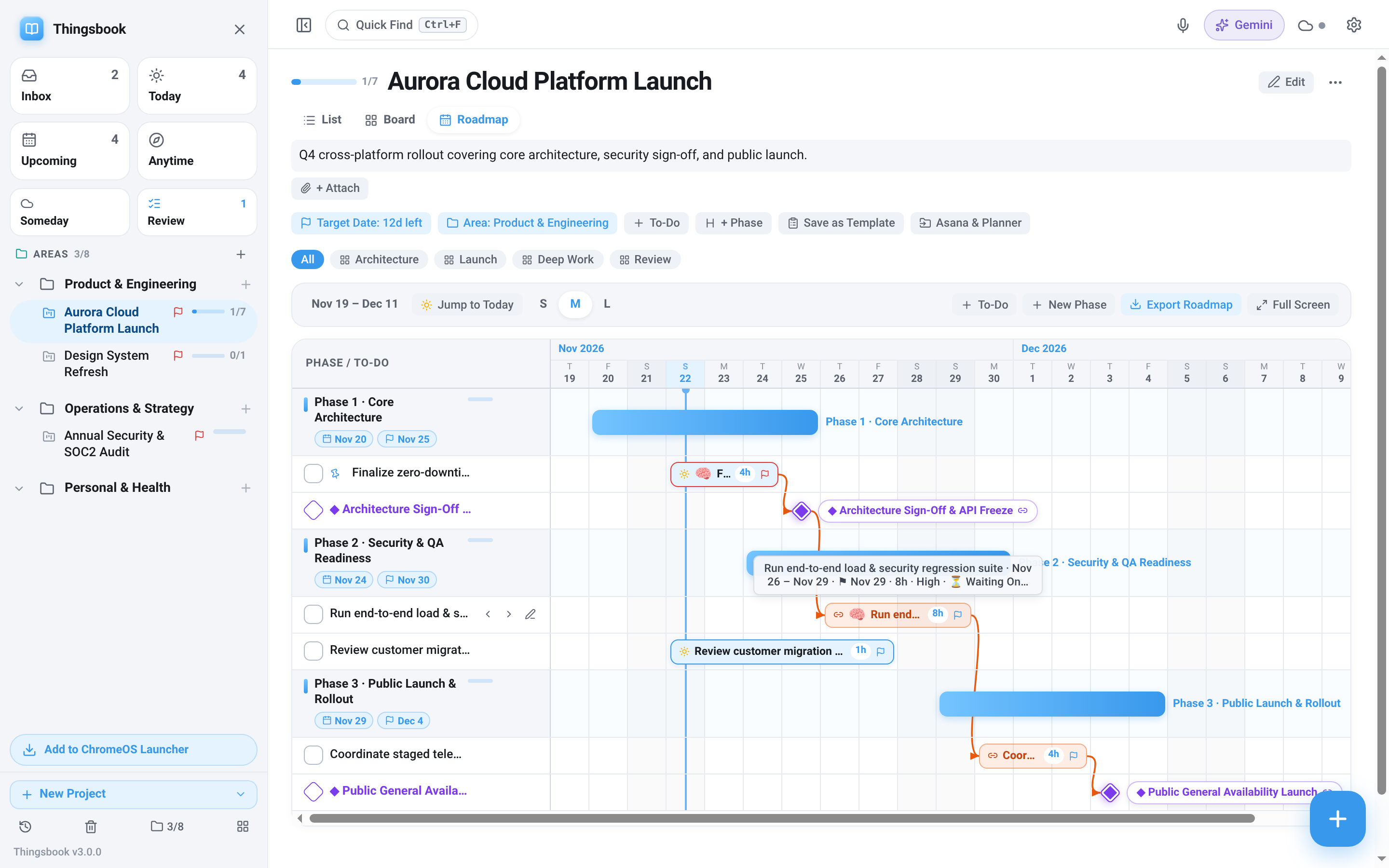
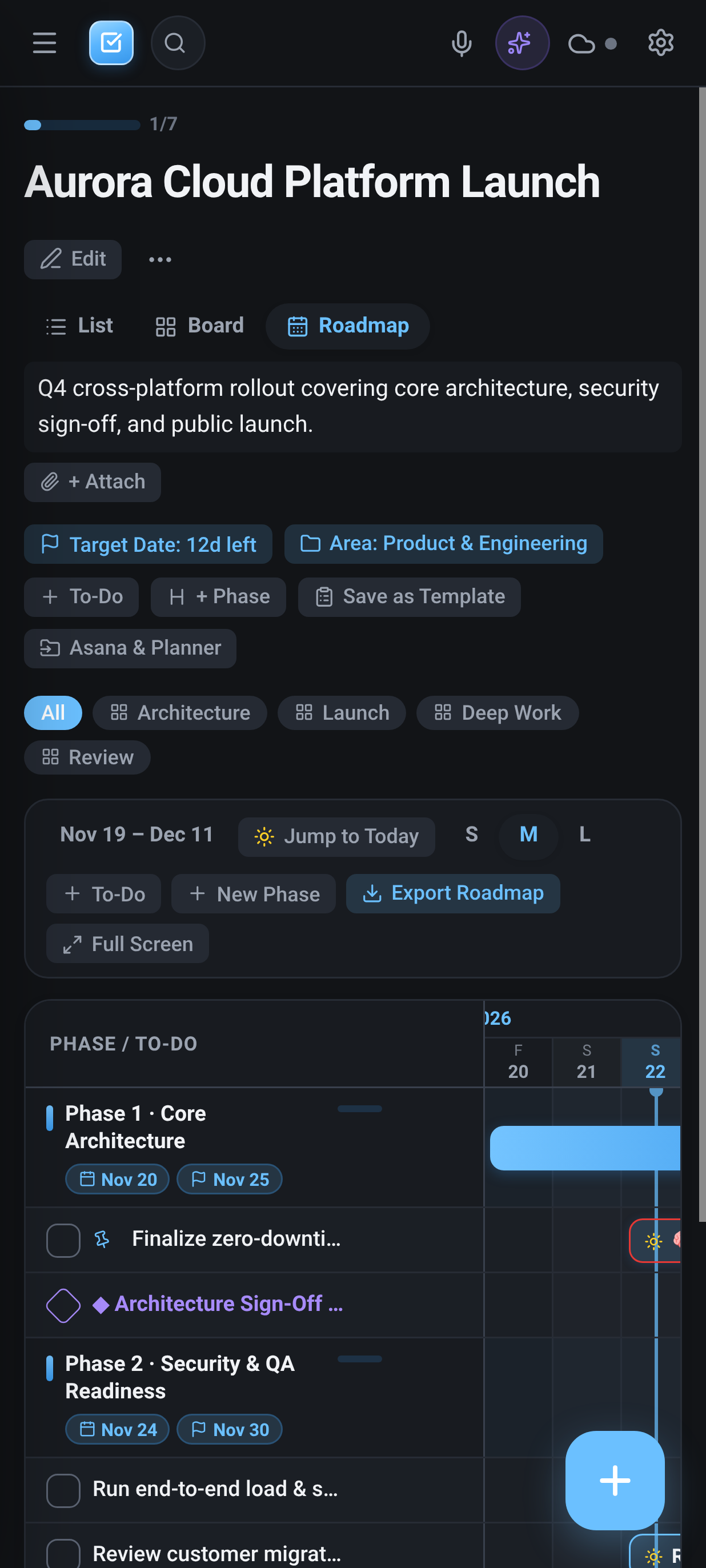
  • Interactive Gantt Timeline & Milestones (◆):

    • Mark any task as a Milestone (◆), rendered on the timeline as a 45° royal-violet diamond with a non-clipped floating callout pill.
    • Press-and-Drag Rescheduling: Hold and drag tasks, milestones, or entire phases horizontally to shift schedules cleanly with zero accidental hover drift.
    • Mouse-Only Hover Tooltips: Hovering over timeline tasks with a mouse/trackpad surfaces a crisp summary (dates, deadline, duration, effort, checklist count, and blocker status) while staying silent on touchscreens.
    • Full-Screen Mode & Vector PDF / PNG Export: Present timelines distraction-free (in both Today and Project views) or export multi-page Vector PDFs and High-DPI PNGs filtered by custom date windows and phases.

2. Soft Bento Redesign, Two-Column Task Modal & Wide-Screen Inspector

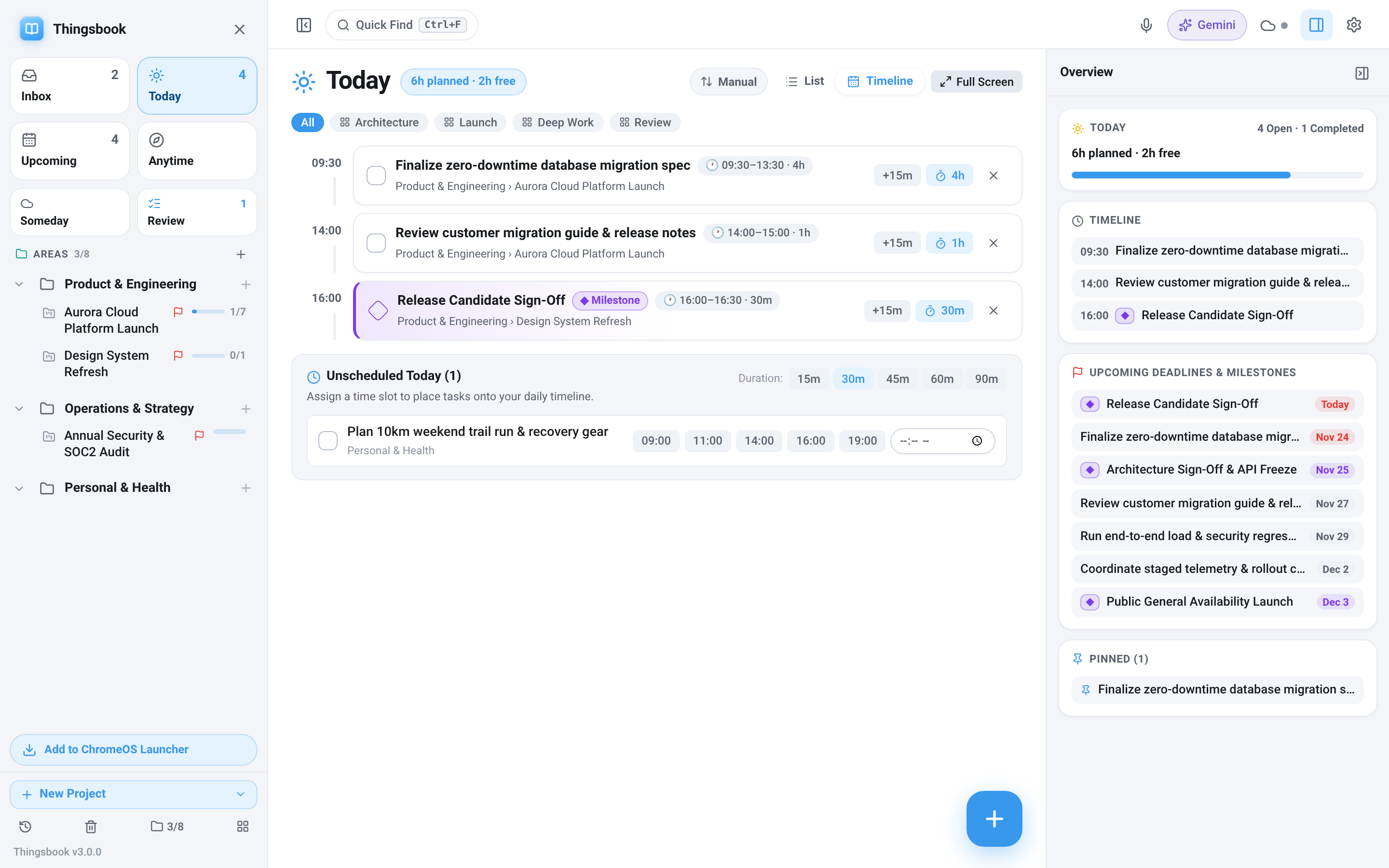
  • Calm Soft Bento Sidebar & Cards: Redesigned sidebar with a 2×2 Focus Bento grid, Mini Bento cards, collision-free footer dock, and zero-layout-shift hover highlights.
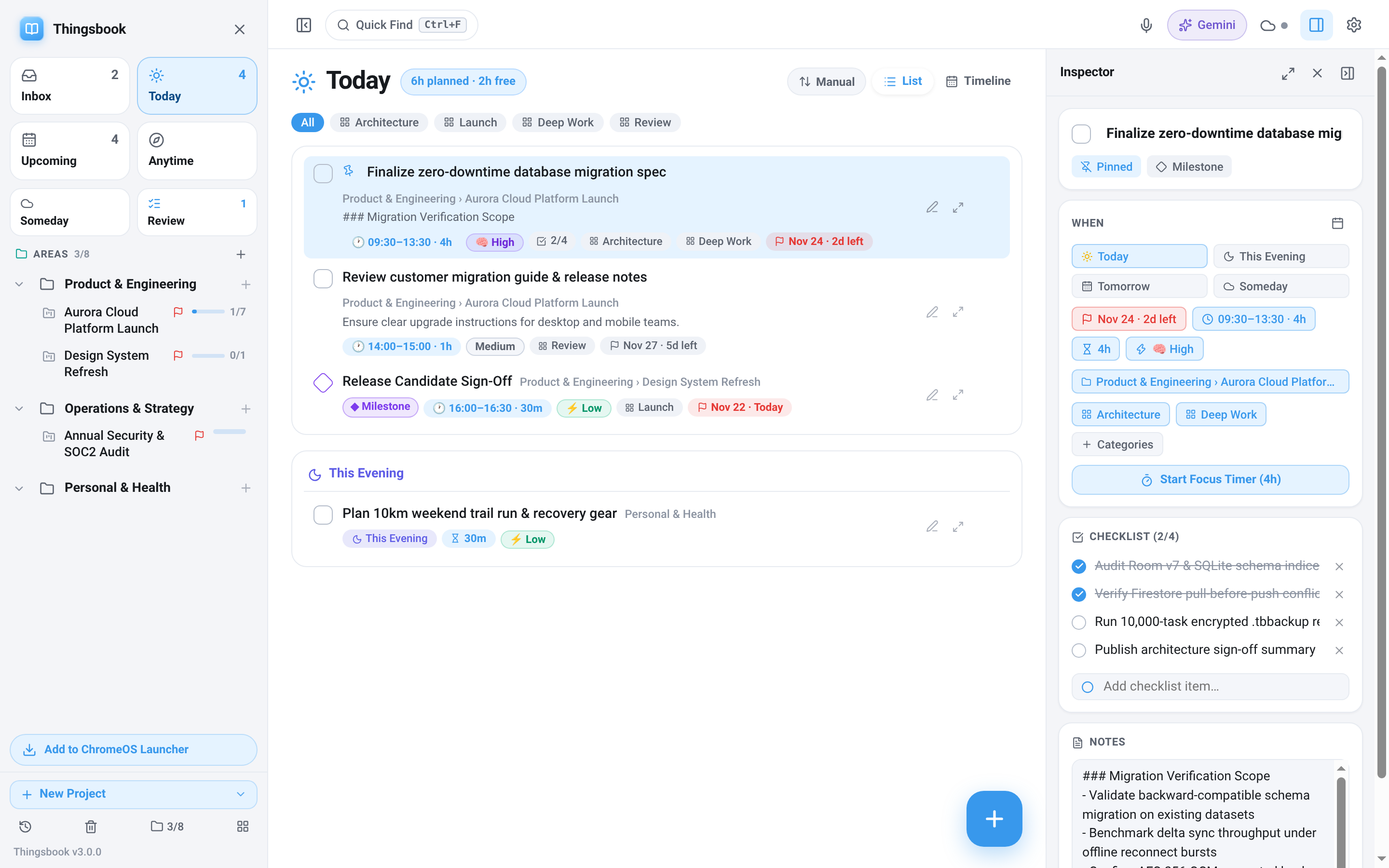
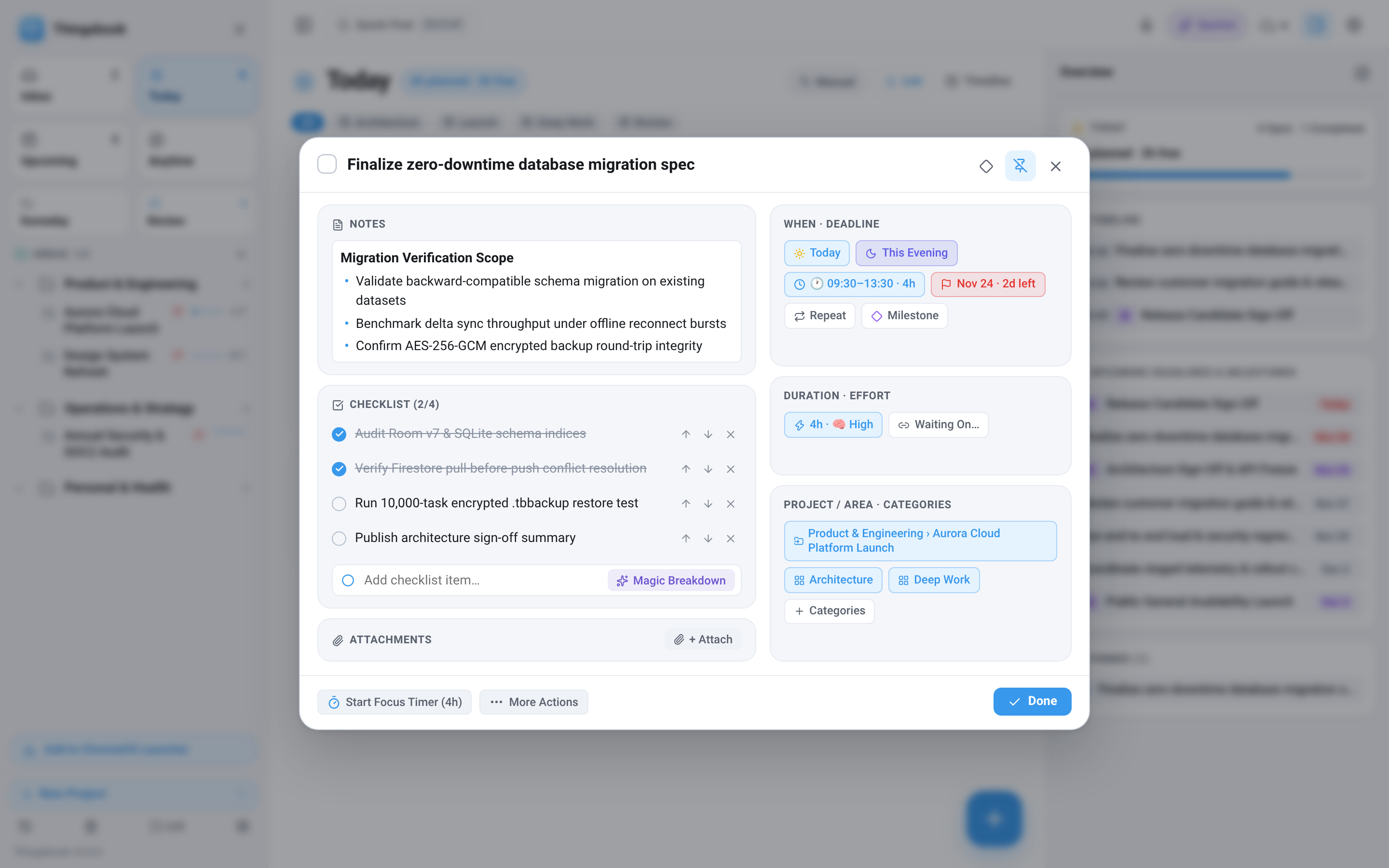
  • Two-Column Soft Bento Task Modal: Replaces v2.0’s cramped inline expansion for deep editing—pairing Markdown Notes, Checklists (✨ Magic Breakdown), and Attachments on the left with When/Deadline, Milestone toggle, Effort, Duration, Timeblock, Waiting On dependencies, Project/Area/Phase, and Categories on the right. Collapsed rows also gain 1-click interactive badges and inline quick-rename (✏️ / F2).
  • Wide-Screen Right-Side Inspector Panel: Maximizing the app on macOS, ChromeOS, Googlebook, or tablets now opens a third pane on the right: click any task for instant Selected Task Inspection (with 1:1 desktop single-click selection parity across platforms), or deselect to view a live Overview of Today’s planned vs. free capacity, mini-timeline, upcoming deadlines & milestones, and pinned items.

3. Task Dependencies (Waiting On), Pinning, Effort Scale & Full-Day / Multi-Day Durations

  • Waiting On Dependencies: Link prerequisite tasks with automatic circular-dependency protection, ⏳ blocked badges, and curved dependency arrows on the Gantt Timeline.
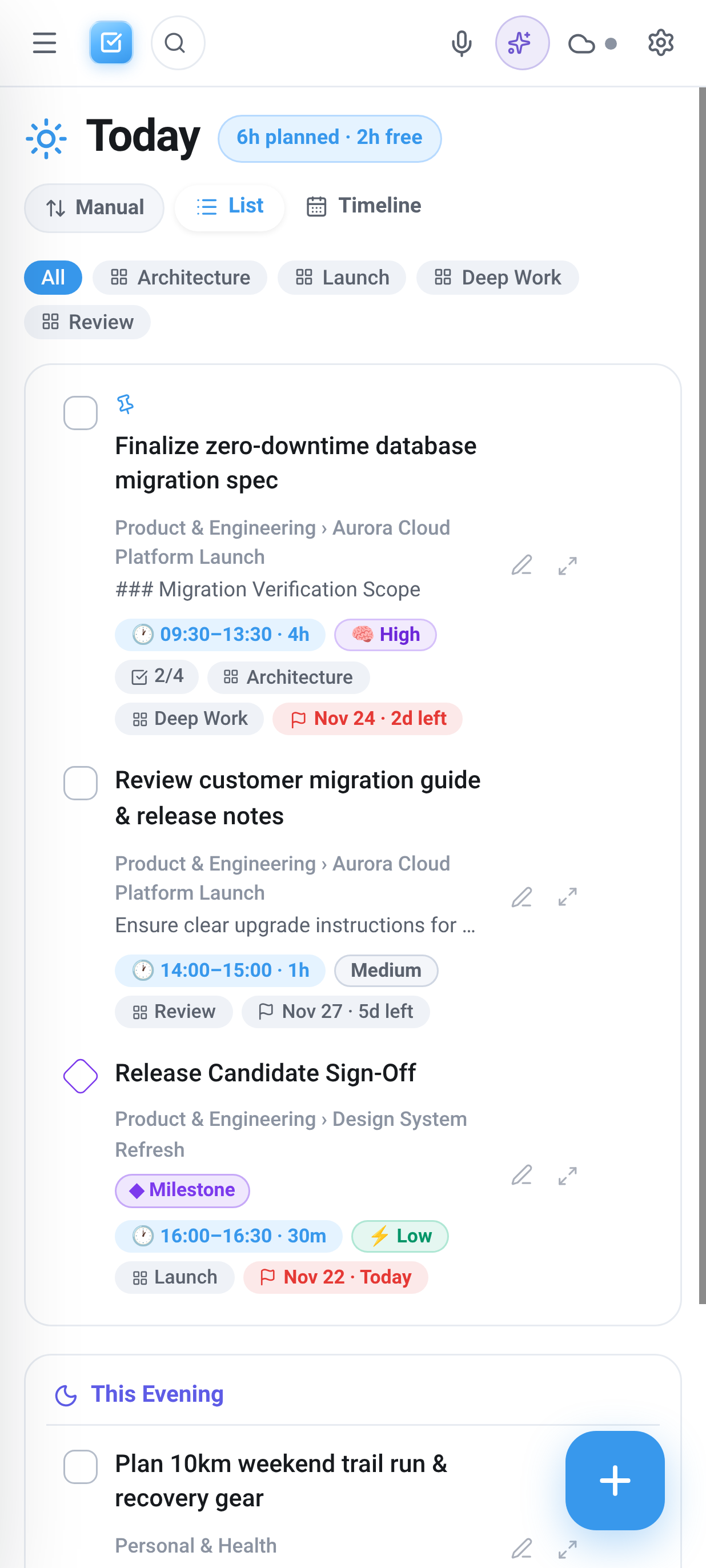
  • Expanded Durations & Today Capacity: Estimate tasks from 5m up to 4h, 8h, or custom multi-day spans (2d, 5d, etc.)—preserved independently even if you clear a daily timeblock—and see your daily planned · free capacity bar in Today (accounting for calendar meetings).
  • Effort (Low / Medium / High), Pinned Tasks & View Sorting: Prioritize key tasks at the top of any view and sort views by Manual, Deadline, Duration, Effort, or Alphabetical.

4. Round-Trip Asana & Microsoft Planner Import/Export + Categories Suite

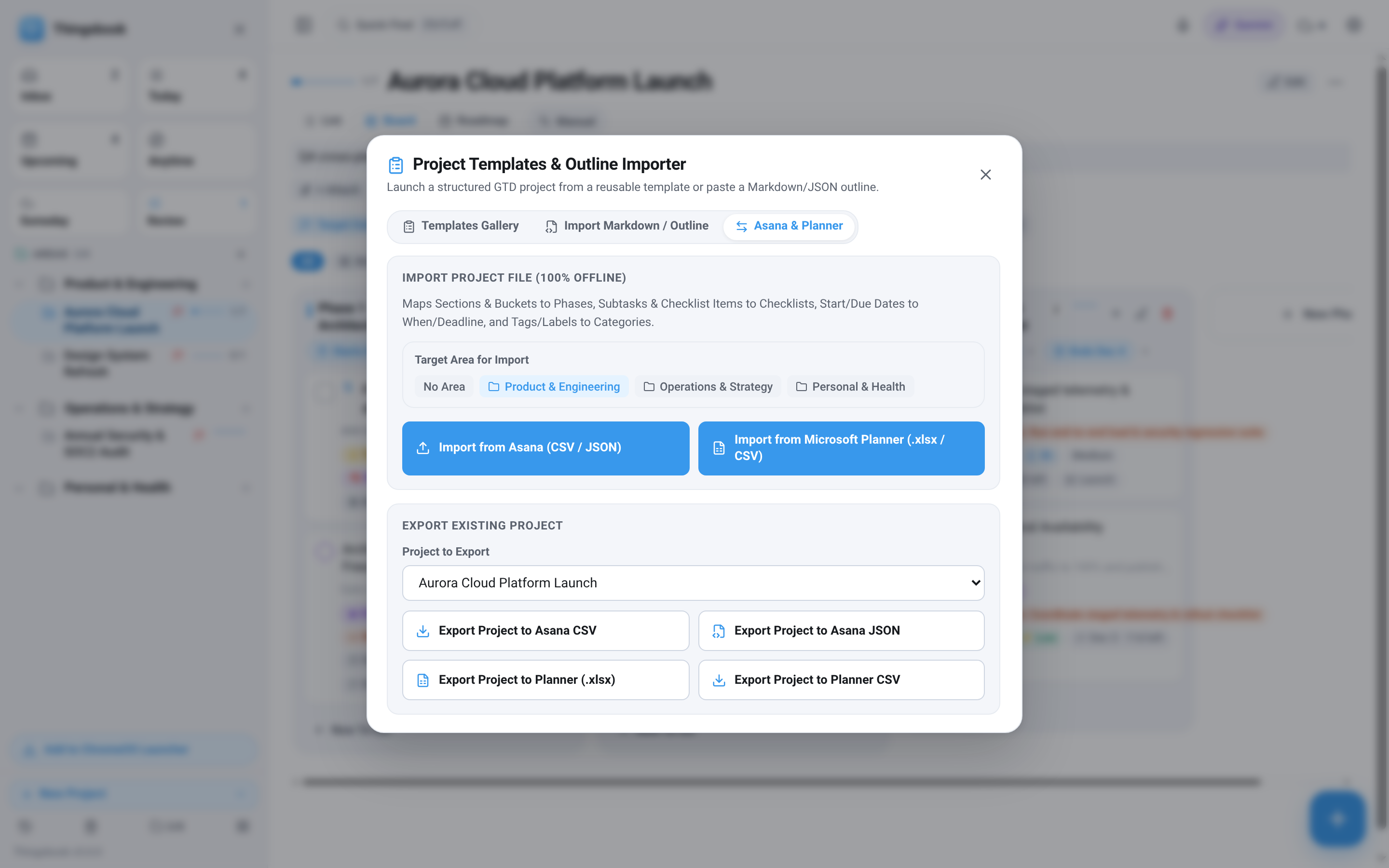
  • Asana & Planner Migration: Import and export full projects via Asana JSON/CSV (including resource_subtype: "milestone", Sections → Phases, Subtasks → Checklists, and Tags) and Microsoft Planner .xlsx/CSV, complete with Target Area preselection (or right-click any Area in the sidebar to import directly into it).
  • Categories (Tags) Power Suite & Optional Perspectives: Color-coded categories, tag merging, usage counts, and multi-rule Custom Perspectives (kept hidden by default for a clean sidebar, toggleable anytime in Settings).

High-Resolution v3.0 Screenshots (2x / 3x Retina)


Seamless Zero-Data-Loss Upgrade from v2.0 & Download Links

Upgrading from v2.0.x / v2.1.x / v2.5.0 to v3.0.0 (Build 111) is 100% automatic and in-place—all existing tasks, projects, templates, attachments, encrypted .tbbackup archives, and Firestore sync sessions migrate cleanly with zero data loss:

(Note: Thingsbook is an independent open-source project and is not affiliated with or connected to Cultured Code.)

Thanks to everyone who tested the 3.0 betas and shared feedback—let me know how the new project views and inspector feel on your setup!


r/DigitalPlanner • • 20h ago

I built a simple offline tool with trackers and reminders - not a fancy but simple enough for tracking and planning

1 Upvotes

I've been trying to find a digital planning setup that works completely offline (for travel, or when I don't want to rely on the cloud), but most of the apps I tried were either subscription-based or required an account just to add a simple reminder.

Since I have a development background, I ended up building a tool called Orbitika to solve this for myself. It's a single app with a retro dot-matrix UI that includes a solid set of planning tools:

📅 PLANNING & LISTS

  • Reminders: Track birthdays, events, and important dates.
  • Gift List: Keep track of presents and souvenirs to buy.
  • Grocery List: A simple, offline shopping checklist.
  • Travel List: Passport, tickets, and packing checklist.
  • Personal Expiry: Track insurance, passports, and document renewals.

📊 TRACKERS & GOALS

  • Year in Pixels (Countdown): Visualize your year and save up to 10 goal countdowns.
  • Savings Tracker: A retro dot-matrix piggy bank that fills up as you save.
  • Habit Streaks: Track No-Spend, No-Social-Media, Water, Coffee, and Fruit/Veg.
  • Mood & Sleep Logs: Daily tracking with animated pixel faces and sleep quality charts.
  • Pet Care & Service Logs: Vet visits, vaccines, and car WOF/Rego reminders.

The Vibe:
It's not a full digital planner (it won't replace GoodNotes or Notability) and other creator who built fantastic digital planning app showcase in here, but it's meant to be a lightweight, 100% offline companion for all the trackers and lists that don't need to live inside a heavy PDF notebook and the most important i built my app and tested in old android 8.0+/ iphone x (might be one sitting in your drawer) and above.

It’s free to download (no ads, no signup) along with other 50+ Offline Tools and Games, and I’d genuinely love to know if this is the kind of simple tool other people here would find useful, or if you prefer keeping everything inside one big planner file.

You can search Orbitika in Playtore or Appstore if you would like to try.