r/Hewlett_Packard • • May 26 '26

Moderator Post HP Instant Ink Referral Code Megathread

3 Upvotes

If you want to post Instant Ink referral codes, you may do so here *only*. Posting them in other places may result in a ban.


r/Hewlett_Packard • • Jul 11 '24

META Hello From the New Mod!

13 Upvotes

Hello! I'm u/TheDoctore38927, and as of a few hours ago, I've been granted the ability to moderate this subreddit! I'm currently the head mod at r/HPLaptops, and I also moderate a few other unrelated subreddits.

I've made a few changes just to get things set back up, and I'll see how the subreddit reacts and works with them and adjust as needed. Below are a few of the main changes

  1. Added auto mod capabilities, along with a few other automations to make moderations a little more responsive.
  2. Added user flairs. There are now user flairs that you can make yourself! There is also a flair for HP employees. There will be a different fair for verified employees of HP (support agents and such), that will be available by request only. It will also be a different color to distinguish them form the non-verified employees. If there are any questions about the validity of the flair, please send a modmail with the username and I will investigate.
  3. Changed some rules. Mostly, it's just misc. stuff and a relaxation of the advertisement rule (as long and it's clear it's an ad, it is allowed), and rants (as long as it's not illegal or unsafe/unsavory, it's OK)
  4. Some new community ideas! I created a poll on dark v light mode and I intend to make some more polls as time wears on to help dictate the sub.

In that vein, if you have any ideas, feel free to reach out via modmail with anything!


r/Hewlett_Packard • • 5h ago

Question/Problem Cooling fan not operating correctly

Post image
2 Upvotes

I've tried blowing air through the vents, I've tried updating the BIOS, no success... any ways to fix my partner's laptop?


r/Hewlett_Packard • • 3h ago

Question/Problem Perspectives on my M140W

1 Upvotes

Bought this printer some years ago because I needed something cheap to scan with. And I needed a printer because my previous Samsung did not work anymore because the driver was too old for it. Now I have a HP M140W.

Bought the first laser cartridge, and it said that it should print 999 pages. I guess I could print something over 100 pages with it. Recently had to buy a new one. They're like 60 euros here.

Do you have any tips? I live in the EU and was thinking if it's somehow possible to hack this thing and use third-party laser cartridges? I'm grasping at straws here.


r/Hewlett_Packard • • 3h ago

News HP non-GAAP EPS drops 10.8% in Q4 despite revenue growth beat — RuntimeWire

Thumbnail
runtimewire.com
1 Upvotes

r/Hewlett_Packard • • 5h ago

Question/Problem Boot device not found…Hard Disk (3F0)

Post image
1 Upvotes

Ive had the envy 2-in-1 x360 for a little over a year i believe.

I was watching a show and the whole screen froze for a good 15min, so i restarted it (holding power button down until screen went dark and fans turned off).

when i turned it back on, it showed this screen.

I’ve tried:

-following the instructions on the website (most did not apply/did not match the options on my BIOS menu)

-restarting it 3+ times

-running all tests on the F2 menu (all succeeded)

I don’t know what else to do. I can’t go out and buy an SSD or USB, and i don’t have a separate laptop.


r/Hewlett_Packard • • 14h ago

Question/Problem No longer a Programmable Key?

1 Upvotes

So I am upgrading from a ProBook 440 to an omnibook 7, and on my old laptop I had a programmable key that I could, through the HP programmable key app, make it do things such as run macros or open apps. On my new laptop I see the same key however it can only open the HP app or the omen control centre.

Is it no longer a programmable key or am I missing how to change it? Any changes I make in the old app are lost when I close the app, and I can't find a tab in the HP app to fix it

Edit: Windows version: 26H2 Product name: HP Omnibook 7 Laptop 16-bh0xxx Product number: D78GXPA#ABG


r/Hewlett_Packard • • 14h ago

Question/Problem HP IQ uninstall

1 Upvotes

Does anyone know how to uninstall HP IQ via intune?


r/Hewlett_Packard • • 18h ago

Question/Problem will switching out of S mode to download roblox make my computer run slow ?

1 Upvotes

I have a 14inch hp, Processor is AMD Athlon Silver 7120U with Radeon graphics, RAM is 4.00 GB and my Storage is 237 GB and i’ve used 62.3 GB. I only use this computer for school work and i don’t run nothing major on it but i want to play roblox but don’t want my computer to end up running slow.


r/Hewlett_Packard • • 19h ago

Question/Problem HP 4650

1 Upvotes

My HP 4650 won't turn on.

I unplug it and plug it back in the screen lights up briefly but then nothing else happens.

Is this printer cooked?


r/Hewlett_Packard • • 1d ago

Printer Try and beat this error code: HP Envy 6455

Thumbnail
youtube.com
1 Upvotes

Just out of the blue the printer decided to have a party


r/Hewlett_Packard • • 1d ago

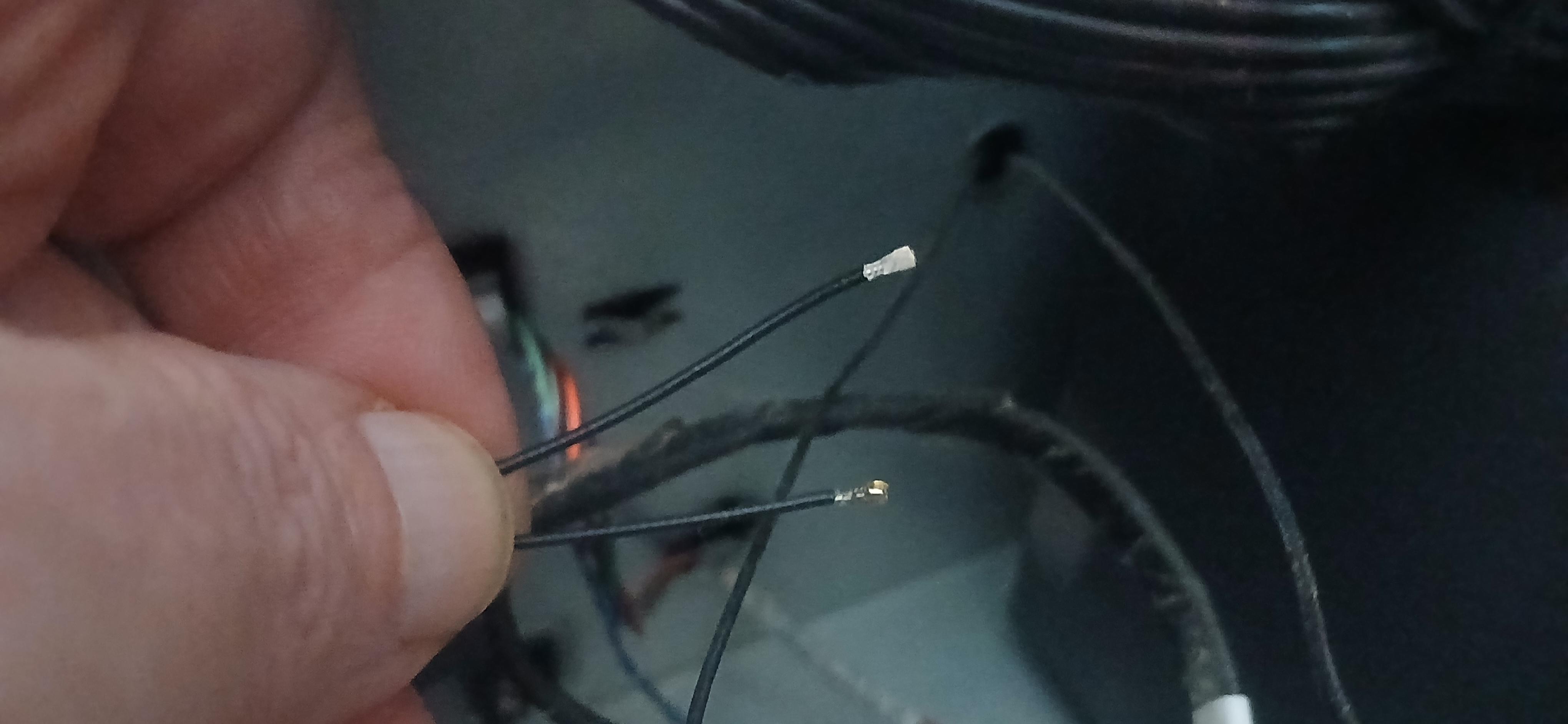
Question/Problem Need to identify wires on HP Envy Phoenix Desktop Case 860-014 and reconnect to MB

Post image
1 Upvotes

I replaced the PSU on an old desktop(HP Envy Phoenix Desktop 860-014 Prod #: M9Z95AA). While doing so I unplugged these 2 wires from the MB as they were getting in the way. Foolishly, I did not mark or take a picture of where they plugged in. These wires lead into the case through the hole you see above and to the right of them in the picture. What exactly they connect to I don't know, I can't find easy access to that portion of the manufacturer's case.

The MB is the original HP Thimphu‑K (Pegatron, Intel 100‑series, LGA1151, DDR4‑2133). The HP spec sheet is missing from their website (the link has no image).

(I would have liked to leave an image of the precise motherboard with labels but I am having some difficulty finding an image I am 100% certain of.)

So finally, my questions:

  1. What are these wires leading to in the case?
  2. Where do they plug into the MB?

Thank you in advance for your assistance.


r/Hewlett_Packard • • 1d ago

Question/Problem HP 15-df0000 won't start after battery change but it did once....?

2 Upvotes

I had a swollen battery but it was still working, replaced battery. Restarted and it came up OK. Battery manufacturer recommended draing battery to 2% and then charging again so I let it run with no charger until it turned off. Then charged and tried to turn it on. Nothing. Tried the unplug charger, , hold on button 15 seconds, plug in again trick , nothing. I don't hear a peep or anything when I mash the on button. When plugged in a while, like overnight, the little light by the charger port is white which I believe means it's charged. If I unplug and plug back in it starts out white and then changes to orange and stays orange for a while before turning white again. Unplugged there is no light on at all there is that normal? I don't remember. Any ideas? I hate to think I ruined a working laptop by changing a battery.


r/Hewlett_Packard • • 1d ago

Question/Problem ZBook Firefly G9 Fan Control

1 Upvotes

Recently got myself a HP ZBook Firefly G9. It's amazing, except the problem is that if i try to play any game (Honkai Star Rail etc), The PL1 stays at 28W (max pl1) for about 30 seconds before it starts to crawl down to 15W. after which its pretty annoying to use the laptop unless i use ThrottleStop to manually set the PL1 to 28W. I'd like to find a way to make the fans kick in earlier and max out earlier too, but am unable to find a method to control the fans of the laptop. Any ideas?


r/Hewlett_Packard • • 1d ago

Question/Problem My laptop is making this type of noise

2 Upvotes

Same as title from laptop cpu is making this type of voice It sounds like this from today


r/Hewlett_Packard • • 1d ago

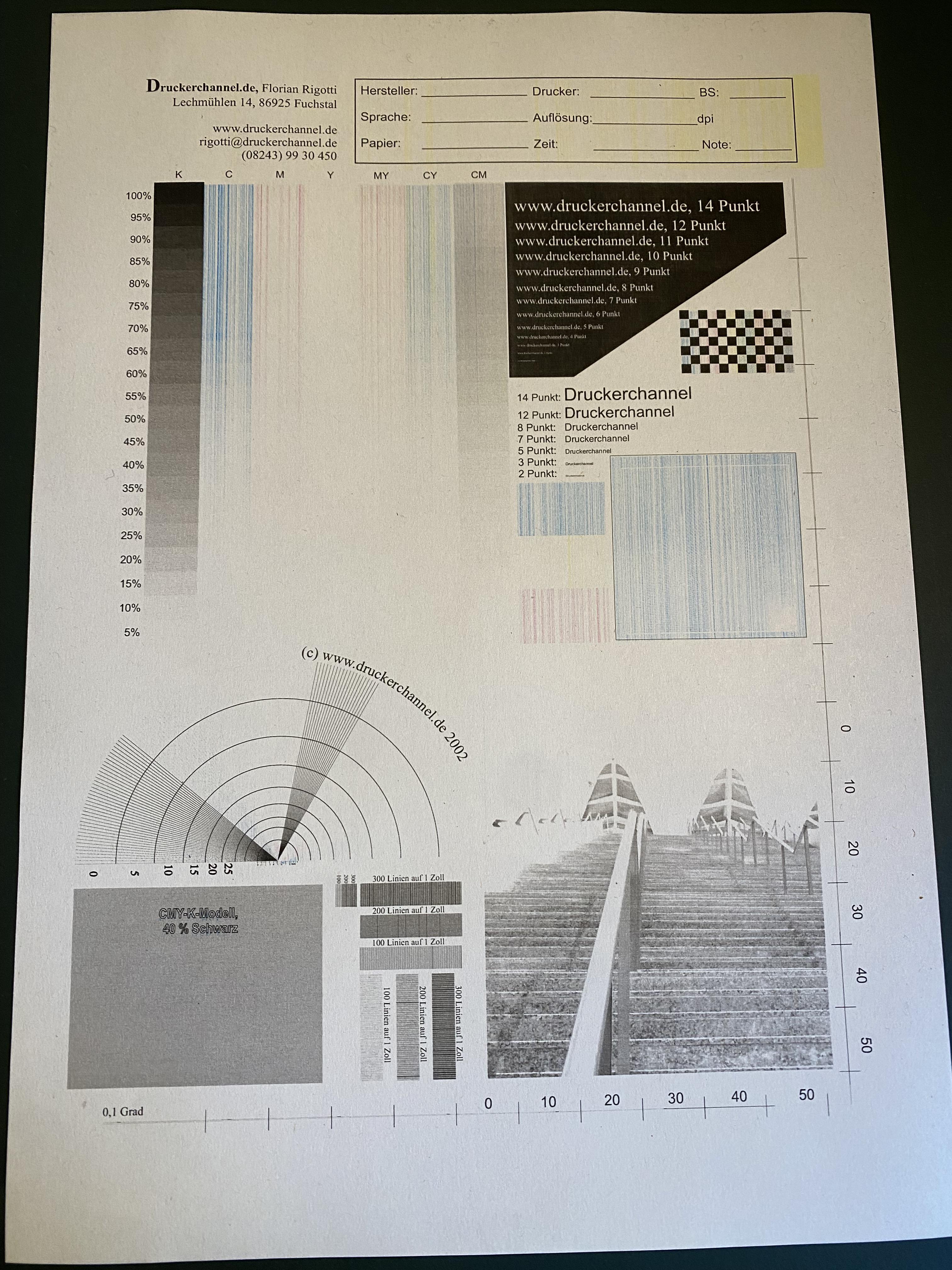
Printer hp laserjet mfp m281fdw color printing problems

Post image
1 Upvotes

Hey you all I have been using my up printer since 2018 and it’s been working well until a few months ago. The colored pages turn out as you can see on the foto I took. When I go into settings and check about how much ink per color is in it tells me it’s 3/4 full…
Has anyone else experienced this and is there a way to help?
Thanks in advance


r/Hewlett_Packard • • 2d ago

Question/Problem HP Spectre x360 Convertible Model 15 (EB0020CA) Battery Bloated

2 Upvotes

Recently got a hand-me-down Spectre 15, and noticed the case was a little open. Didn't think much of it, until I noticed the battery was awful (about 5 seconds to go 100% to 0%).

I did some research, and found out the battery was swollen. I can't find any replacements that are OEM, and I don't want to trust some kind of amazon knockoff.

Has anyone had the same problem, and if so, what to buy to replace it?


r/Hewlett_Packard • • 2d ago

Question/Problem iPad Pro compatible scanner printer question

2 Upvotes

work 98% entirely on my iPad Pro. The only thing I use a MacBook for is to scan physical artwork. I current have an Epson WF 7840 (I think that’s the right number) and though I can use the Epson smart scanner app to use my scanner/printer to scan the art at my preferred DPI (600) I’m unable to scan as a TIFF unless it is strict B&W, I can’t if it’s grayscale or color which is a problem if I’m scanning pencil work. I can do that on my Mac. I don’t know if Brother, Xerox or HP scanner/Printers have an iPad compatible app that allows me to scan at 600 dpi and as a tiff in grayscale or B&W. Looking at the sites haven’t been overly helpful. Brother’s customer service said I can scan at 600 dpi. I don’t want to have to go and buy one to find out the hard way. So does anyone have any insight on this? Because it is the last little piece for me to go fully iPad only


r/Hewlett_Packard • • 2d ago

Question/Problem HP ZBook Studio G8 back cover retaining clips cracked

2 Upvotes

is it ok to leave a cracked back cover clip inside my machine? I have just removed my back cover 3 days ago to reseat my battery and perform an ec reset, actually not a big problem until today i heard a rattle sound from inside when i tilt it left and right. i already know that it is my back cover clip because it's not my first time dealing with this problem. I want to know what material they use for the back cover clip (hope it's plastic and not some kind of alloy) because i couldn't find any clue about it everywhere on the internet.

now I'm facing an option where:

A. if i remove the back cover i could possibly add more stress to other clips when i assemble it back.

B. i could just leave it there if it's plastic.

C. get it out immediately and start looking for back cover replacement.

note: I live in Indonesia where Zbook parts are hard to find (never thought i have to deal with this kind of thing)


r/Hewlett_Packard • • 2d ago

Question/Problem Any Way To Assign A Button To Open The Calculator?

1 Upvotes

I just bought a HP OmniBook X Flip. The computer doesn't have a numeric pad, but does have a built-in calculator app.

I realize I can place an icon on my task bar, but would prefer a keyboard button option if possible.


r/Hewlett_Packard • • 2d ago

Question/Problem All lights blinking Hp Smart tank 580

1 Upvotes

So, I was printing when the printer suddenly stopped working, and all the indicator lights started blinking at the same time. I’ve already tried a couple of troubleshooting steps:
Unplugging the printer’s power cable, waiting for 60 seconds, and plugging it back in.
Restarting the printer by holding down the power button.
Disconnecting the printer from the power source and plugging it back in.
However, the issue still persists, and all the lights continue to blink.


r/Hewlett_Packard • • 2d ago

Question/Problem Sudden 0.40 GHz CPU throttle after BIOS F.49 (InsydeH20) update via HP Support Assistant.

2 Upvotes

Product: HP Notebook - 15-da0040nq

Operating System: Microsoft Windows 10 (64-bit)

Hi everyone,

I ran into a problem after updating my BIOS through the HP Support app earlier this year. I installed BIOS version F.49 via the official support app, and right after that update, i started getting severe periodic throttling down to 0.40 GHz every few minutes in games such as Project Zomboid, Rim World, Minecraft even when temperatures stay below 75C. (Never reached 90C+

I've tried troubleshooting this on my own, including using ThrottleStop, without any luck getting rid of the 0.40 GHz drops. When I checked the HP support site again recently under available downloads for my model, I noticed the listed BIOS version is back to F.48 Rev.A 

Did something go wrong or get pulled with the F.49 release, or could the support assistant have pushed a bad/incompatible build?

Has anyone else seen a BIOS update trigger 0.40 GHz throttling at normal temperatures—and if so, how did you fix or work around it?

I would like to downgrade back to F.48, which worked without this issue, but I am concerned that firmware rollback restrictions could block the process and risk bricking my laptop.

My laptop specs : 

Laptop model : HP Notebook 14-da0040nq

Board ID: 84A7 (Version 80.50)

Processor: Intel Core i5-8250U (4 cores, 8 logical processors, 1.60 GHz base)

Graphics: NVIDIA GeForce MX130 (4 GB VRAM) and Intel UHD Graphics 620

Memory: 16.0 GB

OS: Windows 10 Pro (64-bit)

BIOS: Insyde F.49 (8/20/2024)

BIOS Mode / SMBIOS: UEFI, SMBIOS 3.0

EC Version: 80.50

Secure Boot: Off

The official forum flagged my post as spam, so this place is my last hope to fix the issue.


r/Hewlett_Packard • • 2d ago

Question/Problem Omen max 16 5080 gpu screen stuuter and display issue on Nvidia

Thumbnail reddit.com
0 Upvotes

r/Hewlett_Packard • • 2d ago

Question/Problem Reboot to print

2 Upvotes

Why do I need to reboot my PC every time I want to print?

HP Smart Tank 6000

HP Coor Laser Jet MFP M182nw