r/SteamDeck • u/ForDayz13 • 2h ago
Game Review On Deck GTA 6 on Deck thanks to Xbox
Xbox Series S -> Steam Deck and running smooth at 59-60fps, all the console comparisons aside I’m glad this is an option at all, the future is now.
r/SteamDeck • u/ForDayz13 • 2h ago
Xbox Series S -> Steam Deck and running smooth at 59-60fps, all the console comparisons aside I’m glad this is an option at all, the future is now.
r/SteamDeck • u/FalconGood4891 • 4h ago
I use my deck as a console, so connect it through Ugreen Hub with 100w PD to TV HDMI, controller ble connectors. And the charger I use is of Samsung 35W duo charger or Oneplus 60w charger which is connected to the hub. Still this dialog box is coming all the time, it becomes a irritating hinderence during game. I have no mod or software installed on deck, I haven't tampered with software too.
Questions -
- is there something I'm doing wrong ? Can 35w charger be used safely? Or will it damage my deck? Can it be turned off?
r/SteamDeck • u/Desperate-Creme-5673 • 7h ago
Hi everyone!
I've been working on DeckShell, an experimental replacement for the Gaming Mode interface on the Steam Deck. Instead of the Chromium-based UI, it renders Home, Library, game pages, the STEAM menu, Quick Access Menu and Settings natively with Rust + Slint. Steam stays the backend: DeckShell only replaces what you see and touch.
Repo + install: https://github.com/Kit1112/DeckShell
What works today
Languages: English and Russian are built in. The language is picked automatically from your Steam language. The repo has a short guide (with a ready prompt for your AI coding agent) for adding your own language.
Important caveats, please read
Safe to try: DeckShell installs but stays OFF (stock Steam UI) until you enable it yourself. There is a kill switch (hold Volume-Down or B at start, or create a "disable" file), a one-command rollback and an uninstall command. Nothing in /usr or the SteamOS image is touched, and there is no root or sudo.
Install (Desktop Mode or SSH, as the deck user):
curl -fsSL https://github.com/Kit1112/DeckShell/releases/latest/download/install.sh | bashThen run echo hybrid > ~/.config/deckshell/mode and restart Gaming Mode. You can read the script first, it's about 80 lines.
License and legal: PolyForm Noncommercial 1.0.0. You can use, fork and share it freely, but not for commercial use. It's an unofficial fan project, not affiliated with Valve, made only to improve the Deck experience. It reproduces the look of the Steam UI, so it may embed Steam-derived assets. I don't claim anyone's copyrights and will remove any part or the whole repo if a rights holder asks.
Help wanted: bug reports (Deck model, SteamOS version, logs with personal data removed), translations, and tackling stubs. The project is largely built with AI coding agents, so contributions made with your own AI tools are very welcome (see CONTRIBUTING.md and AGENTS.md in the repo).
Happy to answer questions. Feedback is welcome, including harsh feedback.
r/SteamDeck • u/WealthyPoverty • 8h ago
Self explanatory. GTA 6 is out, and I love it, the fact it isn’t on Steam is killing my vibe, because I love the trackpad when play shooters.
I tried using the Deck as Controller plugin for Decky Loader, but no dice.
r/SteamDeck • u/universal_notions • 8h ago
Saw that it's on sale on Steam.
If it doesn't run well at all, what other games that are similar to it would anyone recommend getting instead?
r/SteamDeck • u/massiveidort • 12h ago
This thread was created a few weeks ago talking about it but the user deleted it for some reason: https://www.reddit.com/r/SteamDeck/comments/1xh1teh/games_suddenly_freezing_after_the_newest_update/
In a nutshell, games would randomly freeze seemingly out of nowhere. But they only froze visually, they were still running normally underneath. It wasn't a crash or anything.
Here's a video I took about a week ago. https://streamable.com/wotqr0
(Can't directly upload videos on my reddit client sorry)
I tried switching to GE-Proton and thought that fixed it but yesterday my game froze again.
I did notice a few days ago there was an update that mentioned some Proton fixes. So I'm going to try going back to default Proton instead of GE-Proton and I'm hoping this squashed the bug for good. Just wondering if anyone is still encountering this issue.
r/SteamDeck • u/bananite • 9h ago
same settings as the previous vid, running at 1280x800 with everything maxed.
r/SteamDeck • u/OntesHS • 14h ago
The Super Smash Bros. Brawl PC port brings native support with the REX mod that adds over 100 characters, and it feels wonderful on the Steam Deck.
r/SteamDeck • u/Smallmacdude10 • 1h ago
r/SteamDeck • u/botttingbotter • 9h ago
So I bought my steam deck on 2026 march and it's at 97% battery health,and till now November it's on 92% battery health.
I'm not really a expert on this ,but is it usually how steam deck battery health work's?
I often connect my steam deck to a monitor and play while charging it at the same time, I've lock it on 80% full battery.even when I don't connect to a monitor I still doesn't let the deck battery below 25%.
Idk if it's suppose to be like this, as I said I'm not an expert on this and I just know some basics.
I expect my steam deck to last 3~5 year's,but in this situation I'm worrying the deck won't really last long.
Are there any advise for keeping my deck battery health healthy and able to last long?
Sry if there's any bad English (
r/SteamDeck • u/Koboldwithaquill • 4h ago
It seems really hard to find any basic instructions for using the decky plugin to undervolt. Every tutorial that I see only shows you how to undervolt in the BIOS, which looks a bit more risky and you can't set it per-game that way.
So, in the decky plugin you get four sliders that correspond to the deck's four cpu cores. When someone says they achieved a "-40" undervolt, does that mean every core slider was turned up to 40, or is that the total amount from each core, like if you turned each slider up to 10? I turned each slider up to 20 and it seems to work pretty well, but I'm not sure if that's supposed to be like a crazy good undervolt or barely anything.
r/SteamDeck • u/MichaelMichael7991 • 5h ago
Just had a question regarding if I should consider the Steam Machine or remain with my Steam Deck for now.
The games I play, currently on the Deck, are the likes of Doom, Blood, Selaco, Cultic, etc. "Boomer"/Retro shooter games.
Is the Deck powerful enough to remain with it until something happens to it or should I upgrade to the Machine?
I currently only play my Deck docked, hooked up to my TV, with an Xbox controller. I don't ever use it as a handheld. Any input is appreciated. Thanks!
r/SteamDeck • u/chispacane • 15h ago
I recently bought this dock as a replacement for my other third party dock, ethernet worked fine until I changed it , I plugged ethernet cable in and powered it from the wall, the Lan LEDs on the dock show up normally, still green and blinking amber,but it doesn't connect no matter what, any help Is appreciated,thanks!
r/SteamDeck • u/_Bombd_ • 17h ago
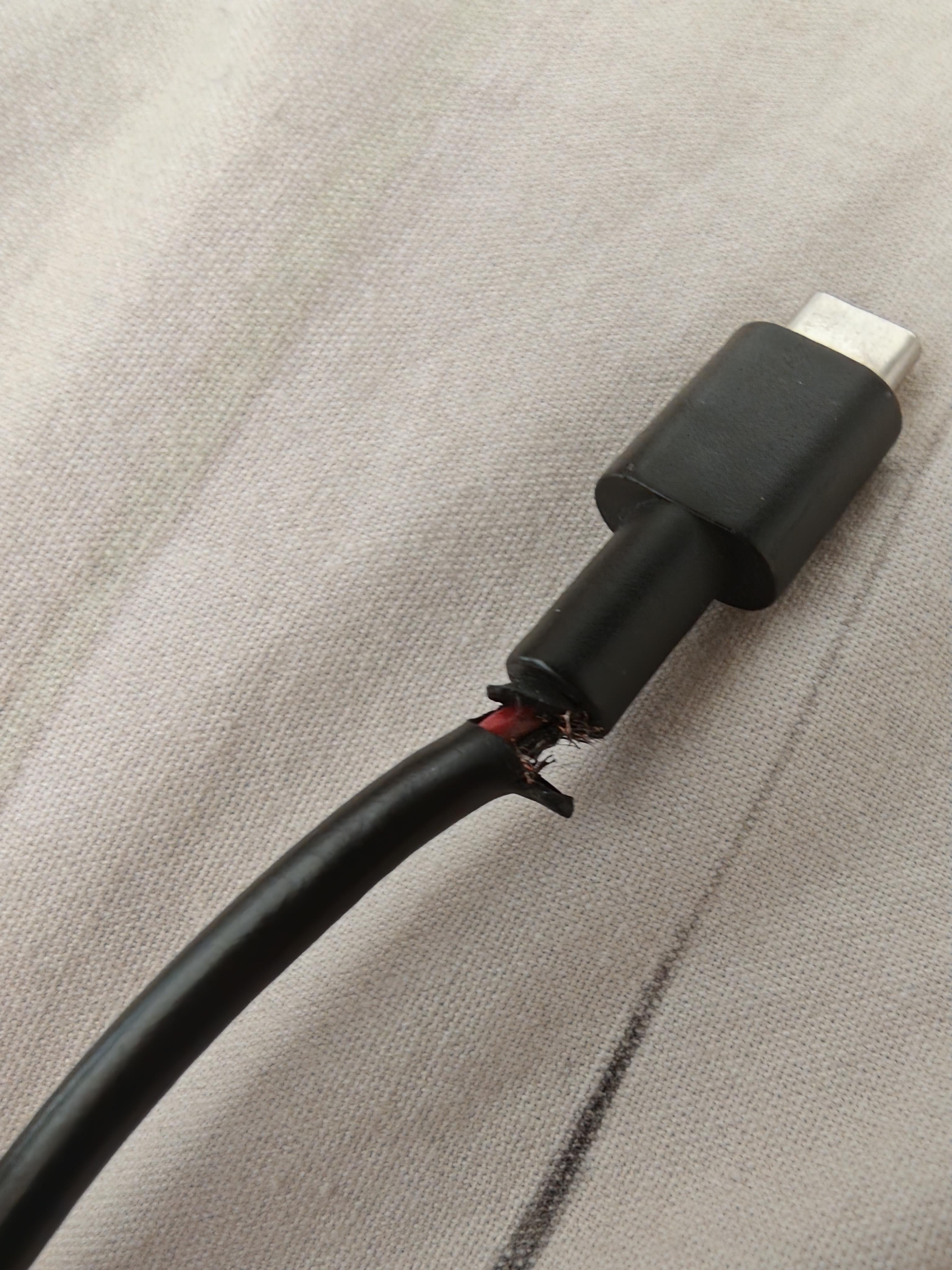
The best charger in the house that everyone used...
Is this the end?
r/SteamDeck • u/Dry_Maize_911 • 20h ago
Does anybody know where I might be able to find a replacement for this ribbon cable I broke during a shell swap? I've been looking around online and can't seem to find anyone selling them. Ifixit doesn't seem to sell them, I contacted steam and asked if they could point me in the right direction and they just offered me their own repair services. The ribbon cable's identification reads AWM E118077 20706 105C 60V VW-1 HF and it connects the right controller board to the motherboard.
r/SteamDeck • u/worty1905 • 19h ago
I don’t know how it happened, but after a year of ownership, for the first time I dropped my deck (while it was charging). It now won’t charge using the official charger, and the official charger won’t charge other devices. I am holding out hope as a spare 9w charger I have lying around does still charge the deck very slowly, so I’m picking up a 45w charger later today. I’m praying to all deities that I only damaged the charger and not my beautiful boy.
r/SteamDeck • u/nNerck • 13h ago
Excuse my greasy dirty screen. It's been like this for weeks and I dont why. I'm tired of rebooting it and/or using nested desktop for stuff.
I've seen people talk about "X11 this" or "Wayland that", but i'm not linux savy enough to know if there's any relation to this issue.
Also logging out doesn't work. I'm asking as a last resort, cause I don't want to do a factory reset
Thanks in advance!
r/SteamDeck • u/AKATSUKI_KUN7 • 7m ago
am new to steam deck, and i really hate flatpack or appimage and i want to use pacman and yay, is it safe and is there any thing that i should keep in mind, i don't know where i read that but someone was saying that if i did that and i updated the steam deck it will break or smt.
and thx
r/SteamDeck • u/Cyan_UwU • 1h ago
r/SteamDeck • u/Edwardvansloan • 21h ago
I have a portable external monitor that does not support orientation changes on its own. Desktop mode allows display flipping, but my game performance has been much worse than in gaming mode.
Alternatively, if there were a way to modify my monitor’s firmware, I would look into that.
r/SteamDeck • u/Electricio • 1h ago
Currently on version [3.8.16] - 20260716.1 and I cannot update my steam deck to version [3.9.5] - 20261023.100
Every time I try to update from gaming mode, I get "Update Error: An error was encountered during the update process, please try again"
In the discover app in Desktop mode, I can see the update and when I try to update, it appear to go through... but when I click refresh it shows up again.
And even restarting the Steam Deck, the update has still not gone through.
Also every time I restart the Steam Deck or turn it on, the time zone resets to Pacific Standard Time, as well as all other settings default to American English (I am on British English).
The only way for me to change back to my time zone is in Desktop mode, as when I try to change it from gaming mode it will not apply.
As well as every time I restart the Steam Deck or turn it on, it disconnects me from the Wi-Fi and makes me forget all networks. The only way for me to connect to the internet is through Desktop mode, as ever time I try to connect from gaming mode it just says "Failed to connect to the internet."
The Steam Deck says I have 111.3 GB free in my Internal Drive.
I have disabled Wi-Fi Power Management, and still having trouble with the Wi-Fi.
I have tried to revert back to an earlier Steam Deck version, but have had no success in downloading the earlier version.
One of the only things I haven't tried is to factory reset it...
r/SteamDeck • u/Cultural_Caramel_577 • 7h ago
Got annoyed that there's no decent launcher on Steam Deck that actually handles flatpaks and Proton without being a pain in the ass. So vibe coded my own.
It's FOSS, single binary, no dependencies. If you want to use it, go ahead. If it's shit, tell me why. Not trying to sell anything, just tired of fighting with other launchers. Let me know if you guys found a better way to handle this, or if l'm missing something.
r/SteamDeck • u/Qopinjaxi • 20h ago
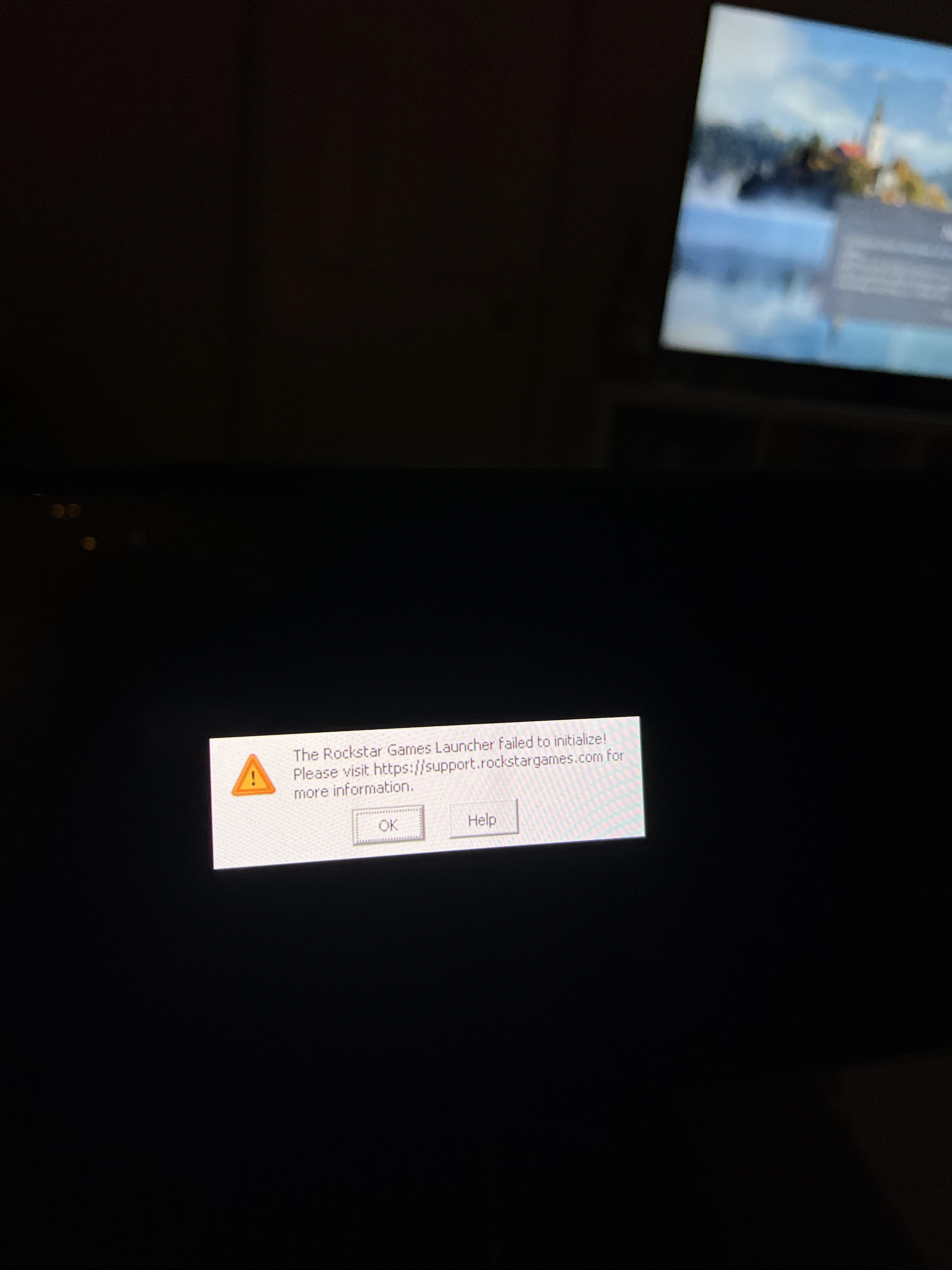
Having this popping up on all Rockstar games I tried to play (tried GTA Trilogy and RDR2). Any way to bypass the launcher or reinstall it?
r/SteamDeck • u/PortalDragon457 • 12h ago
So I am thinking about getting my own Steam Deck but I want to make my own custom intro/start up movie. Does any one know what are the steps I can do to make my own or anyway I can go about it?