r/WordpressPlugins • • 8h ago

Discussion [DISCUSSION]What are the best Black Friday deals for WordPress users this year?

0 Upvotes

Black Friday is here, and there are quite a few deals floating around for WordPress plugins, themes, hosting, SEO tools, and other useful stuff.

Curious what deals people have found worth buying this year? Anything on AppSumo, lifetime deals, or tools that are actually worth the money in the long run?

I came across a few interesting offers, but would love to see what the WordPress community is picking up this year. Especially deals that aren't just marketing hype and actually offer long-term value.


r/WordpressPlugins • • 22h ago

Free [FREE] ByteKeel PixTag — fills missing image alt text from file names, and flags IMG_1234-style files for a human instead of guessing

1 Upvotes

Missing alt text is an accessibility gap that is slow to fix by hand once a Media Library grows.

We built a small free plugin for the boring part. It reads what's already on the site (the file name, the attachment title, or a template with the post title) and writes alt text, and optionally the image title, to the standard WordPress fields. Everything runs on your server: no AI, no API key, no external requests.

What we focused on:

  • red-leather-sofa-scaled.jpg → "Red Leather Sofa". It strips -scaled, -rotated, -1024x768, -e1699999999999, numbers and extensions, and keeps non-Latin characters.
  • It does not write junk from IMG_1234, DSC01234, PXL_…, Screenshot 2026-11-12 at…, hashes or UUIDs. Those images get a "Needs review" mark so a person writes the alt.
  • The "only images missing alt text" bulk scope never touches alt someone already wrote.
  • Bulk processor with progress, a log and a Stop button. There's no automatic undo, so try the per-image Generate button first.

Limits, honestly: it doesn't look at the picture, it doesn't run on upload, and it doesn't change alt text that page builders store inside post content.

I'm the developer at ByteKeel. It's brand new (released 20 Nov), so bug reports and file-name patterns it gets wrong are very welcome.

https://wordpress.org/plugins/bytekeel-pixtag/


r/WordpressPlugins • • 11h ago

[FREE] AI-Powered WordPress Speed Optimization using CortexWP & FlyingPress

Post image
0 Upvotes

Introducing the first AI-Powered WordPress Speed Optimization from CortexWP + FlyingPress.

https://cortexwp.ai/features/speed-optimization

CortexWP AI tests your website in a real browser, checks what's slowing it down, and configures FlyingPress + Other Speed Optimizations for you automatically. It also checks if any caching setting or optimization setting broke your page, and it reverts it on its own. No more need to manually test if anything broke after using a caching plugin.

FlyingPress is by far the best speed optimization and caching plugin for WordPress. CortexWP AI extends it further by allowing AI to actually test your website, find what's making your website slow, and fix those using FlyingPress, and finally testing if anything broke. It continues trying different optimizations until it finds the best page speed score.

No need to manually test your pages after using a caching plugin, or try out what works best for your website. CortexWP AI finds that automatically for you and configures it in FlyingPress + Other Speed Optimizations; all you gotta do is sit back and relax.

It's free to get started: https://cortexwp.ai

Disclaimer: CortexWP is not affiliated with FlyingPress. CortexWP is not a part of FlyingPress, and FlyingPress is not a part of CortexWP. FlyingPress is an awesome performance optimization and caching plugin, and CortexWP simply works on top of it, combining FlyingPress with visual regression tests and real browser checks. When you use FlyingPress, you agree to the FlyingPress Terms of Use.


r/WordpressPlugins • • 23h ago

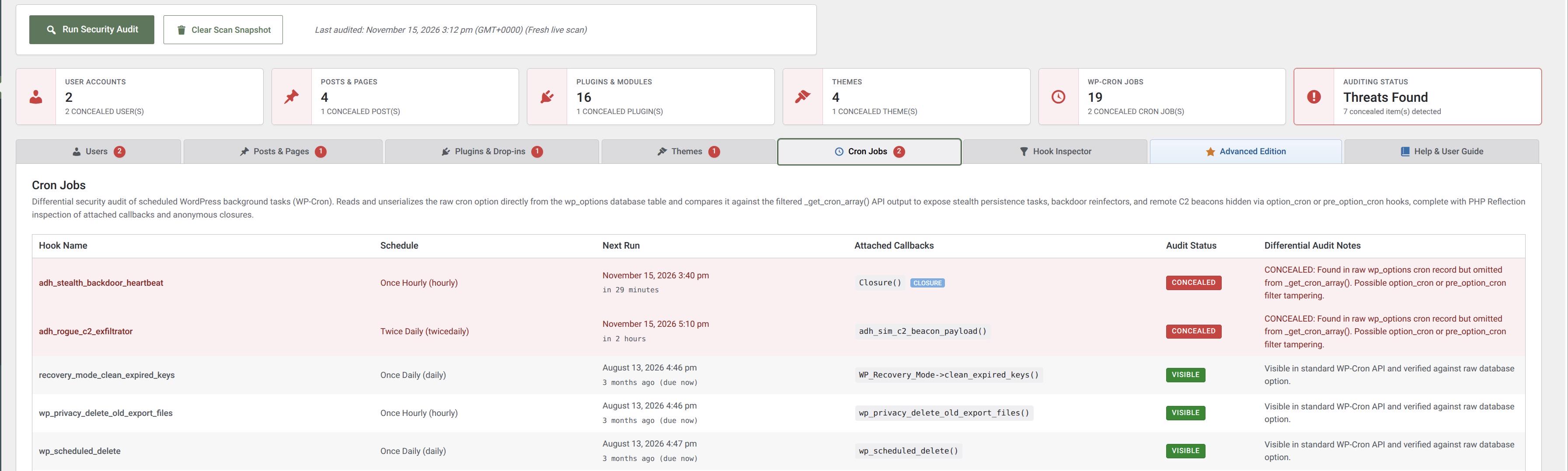
Freemium [FREEMIUM] I have developed a free plugin to identify malware that conceals itself from WP-Admin through filter hooks (users, posts, plugins, crons).

Post image
5 Upvotes

When cleaning up hacked WordPress sites lately, I kept running into malware that hides itself from standard dashboard views and signature scanners by hooking into pre_user_query, posts_where, all_plugins, or injecting stealth wp_cron tasks.

Instead of relying on malware signatures, I built a lightweight diagnostic plugin (Aystat Detect Hidden) that runs differential checks - comparing raw database tables (wp_users, wp_posts, wp_options) directly against the output of filtered WordPress APIs. When something is hidden or a suspicious cron callback is attached, it uses PHP Reflection to trace the exact file path and line number of the hook.

It’s free on the repo and doesn't leave bloat behind after an audit: https://wordpress.org/plugins/aystat-detect-hidden/

There is also a paid Advanced version for agencies and incident-response workflows that adds:

One-click remediation: Directly delete or purge detected rogue users, hidden posts/pages, and malicious cron tasks from the scan results

Whitelisting: Ignore known-safe custom hooks or legitimate MU-plugins to prevent false positives

Automated background scans & email alerts: Scheduled WP-Cron checks with instant notifications if new stealth items appear

Agency reporting & automation: Exportable PDF/JSON security audit reports and WP-CLI support (wp aystat audit) for bulk site maintenance

Would love feedback from anyone here who handles incident response or site cleanups - especially on any other core hooks or persistence vectors you've seen malware use to cloak itself recently.

r/WordpressPlugins • • 3h ago

[FREE] Sell tickets from your own WordPress site: no WooCommerce, no subscription, offline door scanner

0 Upvotes

I'm the developer. Smooth Entree is an event calendar and ticketing plugin for small venues: a pub with live music, a quiz night, a choir concert, a village hall. There's no subscription and no WooCommerce. The guest pays a 10 cent service fee per ticket (25 cents from €20), and the payment goes straight to the venue's own Mollie or Stripe account through Connect, so I never hold anyone's money.

The parts I spent the most time on: a door scanner that runs in the phone's browser and keeps working offline (tickets are signed and stored on the phone, scans sync later), a free seating chart where guests pick numbered seats on a phone, and the last ticket or seat never being sold twice (the database itself is the lock).

You can try it without installing anything: https://wordpress.org/plugins/smooth-entree/?preview=1. Feedback welcome, especially from anyone who sells tickets for a small venue or a club.

Buying tickets on the event page: no cart, no account
Guests pick their own seats on the seating chart, also on a phone
The door scanner runs in the phone's browser and keeps working offline