r/WordpressPlugins • • 16m ago

[FREE] I built a free AI customer support plugin for WordPress - would love some feedback

Post image
1 Upvotes

I've been working on a WordPress plugin called Flexatech AI Customer Support, and I've just released it on WordPress.org.

The idea is to let a WordPress website answer visitors' questions using its own content, pages, posts, products, FAQs and PDFs, instead of having to manually answer the same questions over and over.

Some of the features currently included:

  • AI chatbot trained on your website content
  • Answers with source references
  • FAQ and suggested questions
  • Ticket submission when the AI can't answer
  • Conversation history and usage statistics
  • Daily AI spending limit

It uses the WordPress AI Client (WordPress 7.0+), so you can connect your preferred AI provider through WordPress.

I built this mainly because I wanted a simple, native WordPress solution rather than another SaaS subscription.

It's free, and I'd genuinely appreciate feedback, bug reports or suggestions on what could be improved.

Plugin: https://wordpress.org/plugins/flexatech-ai-customer-support/

Thanks!


r/WordpressPlugins • • 7h ago

[FREEMIUM] Tedrix - automatic SEO for WordPress, for Google and AI answers. Looking for a few testers

1 Upvotes

Hi all, small favor to ask. I made Tedrix, automatic SEO for WordPress sites, for Google and for AI answers. With Autopilot on, Tedrix takes over the site's SEO. Every week it looks at what people actually search for, rewrites the titles and descriptions that hold pages back, picks up pages that start to slip, keeps an eye on competitors and sends a summary of every change. Every change can be undone.

The plugin is free to install from WordPress.org and includes a check of the site and a few rewrites. Autopilot is part of the paid plans, through a Tedrix account the plugin connects to.

It's early, and I'd love a few people to try it on a real site and tell me what's confusing, broken or not worth it. As a thank-you, testers get Autopilot (normally $129/month) free for 6 months. After that it goes back to the free plan, and nothing is charged unless you pick a paid plan. No review asked for.

Install the plugin here, and when you create your Tedrix account, enter the code BETATESTER under "Have a code?". The 6 months start right away: https://tedrix.io/p/reddit-wpp?till=wp

Reply here and I'll help you set it up.


r/WordpressPlugins • • 8h ago

Free [FREE] Tickets² 1.0 is out: event tickets and RSVPs for WordPress with no cut of your sales (Calendar² add-on)

1 Upvotes

Hi all. I'm Brandon, from the small UK company behind Calendar². A week ago I asked here for beta testers for its ticketing add-on. Disclosure as always: I make this.

Tickets² 1.0 is now out, and the free plugin is a normal download. It's built on one rule: we don't take a cut of your ticket sales. Money goes straight to your own Stripe account, and Stripe's normal fee is the only fee, on any plan.

What's in the free plugin:

  • free RSVPs ("Going" / "Not going"), and paid tickets through Stripe's hosted checkout (card, Apple Pay and Google Pay, plus local methods like iDEAL or Klarna if you switch them on). Card details never touch your site;
  • ticket types with sale prices and sale windows, per-order limits, capacity per date or shared across types, coupons and booking fees;
  • repeating events sold date by date, or with a series pass that covers every date;
  • full and partial refunds from the order screen. If you cancel a date in Calendar², it can email everyone and refund them in batches, but only when you press go;
  • QR check-in from any phone's browser (no app), plus a Door Staff role that can check people in and nothing else;
  • ticket emails with QR codes and a calendar file, and a "My tickets" page for buyers;
  • moving from Event Tickets: RSVPs, tickets, orders, attendees and check-ins, with a dry run first and a way back.

Pro adds a waitlist, "reserve now, pay by bank transfer or at the door", and custom questions on each ticket. It's $79/yr for one site ($149 for 5, $299 unlimited), like Calendar² Pro, and it keeps working if the licence lapses: the licence only covers updates and support.

Thanks to the beta thread. One commenter set out a nasty case: a series pass checked in on one date, then that date moved and another cancelled. I ran it against the code, and the "date moved" half was a real bug: a pass could get in twice. It's fixed in 1.0, and their exact sequence is now in the test suite. If you're one of the testers who emailed, your 50% off the first year of Pro still stands. Reply to my email and I'll send the code.

Not in 1.0, so nobody wastes an install: tickets on ordinary pages and posts (Calendar² events only), PayPal, donations / pay what you want, wallet passes and seating charts.

It needs Calendar² 1.2.1+, WordPress 6.5+ and PHP 8.1+. Calendar² is still in review at WordPress.org, so both free zips are on our site for now: https://plugins.bsquared.software/tickets?utm_source=reddit&utm_medium=post&utm_campaign=tickets-1-0-launch

As before, tell me what's missing for your events, or what breaks.


r/WordpressPlugins • • 10h ago

[FREE] Sell tickets from your own WordPress site: no WooCommerce, no subscription, offline door scanner

0 Upvotes

I'm the developer. Smooth Entree is an event calendar and ticketing plugin for small venues: a pub with live music, a quiz night, a choir concert, a village hall. There's no subscription and no WooCommerce. The guest pays a 10 cent service fee per ticket (25 cents from €20), and the payment goes straight to the venue's own Mollie or Stripe account through Connect, so I never hold anyone's money.

The parts I spent the most time on: a door scanner that runs in the phone's browser and keeps working offline (tickets are signed and stored on the phone, scans sync later), a free seating chart where guests pick numbered seats on a phone, and the last ticket or seat never being sold twice (the database itself is the lock).

You can try it without installing anything: https://wordpress.org/plugins/smooth-entree/?preview=1. Feedback welcome, especially from anyone who sells tickets for a small venue or a club.

Buying tickets on the event page: no cart, no account
Guests pick their own seats on the seating chart, also on a phone
The door scanner runs in the phone's browser and keeps working offline

r/WordpressPlugins • • 15h ago

Discussion [DISCUSSION]What are the best Black Friday deals for WordPress users this year?

0 Upvotes

Black Friday is here, and there are quite a few deals floating around for WordPress plugins, themes, hosting, SEO tools, and other useful stuff.

Curious what deals people have found worth buying this year? Anything on AppSumo, lifetime deals, or tools that are actually worth the money in the long run?

I came across a few interesting offers, but would love to see what the WordPress community is picking up this year. Especially deals that aren't just marketing hype and actually offer long-term value.


r/WordpressPlugins • • 16h ago

Promotion [PROMOTION] EntryFold — a browser concept for Gravity Forms batch PDF exports

1 Upvotes

Hi everyone, I'm the developer of EntryFold, a planned add-on for Gravity Forms and Gravity PDF. I've made a browser prototype of one workflow: select a batch of entries, use one configured PDF template, and export either a combined PDF or a ZIP of individual PDFs. Important: this is a concept demo with fictional entries and a fixed sample layout. It doesn't connect to WordPress, there's no installable plugin yet, and real template compatibility hasn't been tested. Gravity PDF already offers Bulk Generator. I'd like to hear from people who use these tools: does your current setup cover this workflow well? If not, what part still takes too much work? You can try the sample exports without an account: https://entryfold-1702-interest.pages.dev/?utm_source=reddit&utm_medium=community&utm_campaign=entryfold_concept&utm_content=wordpressplugins The site has an optional interest list. The planned early price is $19 one-time, but there's no payment being collected and the release, features and price aren't guaranteed. This is an independent project, not affiliated with Gravity Forms or Gravity PDF. Feedback in the comments is welcome; leaving an email isn't required.


r/WordpressPlugins • • 1d ago

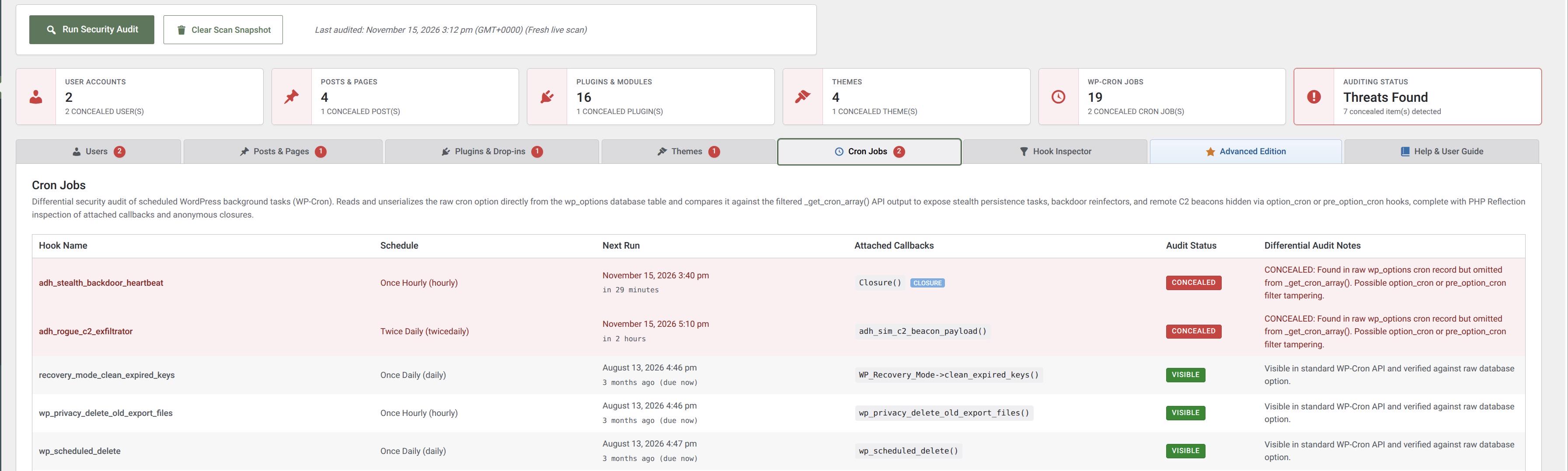
Freemium [FREEMIUM] I have developed a free plugin to identify malware that conceals itself from WP-Admin through filter hooks (users, posts, plugins, crons).

Post image
5 Upvotes

When cleaning up hacked WordPress sites lately, I kept running into malware that hides itself from standard dashboard views and signature scanners by hooking into pre_user_query, posts_where, all_plugins, or injecting stealth wp_cron tasks.

Instead of relying on malware signatures, I built a lightweight diagnostic plugin (Aystat Detect Hidden) that runs differential checks - comparing raw database tables (wp_users, wp_posts, wp_options) directly against the output of filtered WordPress APIs. When something is hidden or a suspicious cron callback is attached, it uses PHP Reflection to trace the exact file path and line number of the hook.

It’s free on the repo and doesn't leave bloat behind after an audit: https://wordpress.org/plugins/aystat-detect-hidden/

There is also a paid Advanced version for agencies and incident-response workflows that adds:

One-click remediation: Directly delete or purge detected rogue users, hidden posts/pages, and malicious cron tasks from the scan results

Whitelisting: Ignore known-safe custom hooks or legitimate MU-plugins to prevent false positives

Automated background scans & email alerts: Scheduled WP-Cron checks with instant notifications if new stealth items appear

Agency reporting & automation: Exportable PDF/JSON security audit reports and WP-CLI support (wp aystat audit) for bulk site maintenance

Would love feedback from anyone here who handles incident response or site cleanups - especially on any other core hooks or persistence vectors you've seen malware use to cloak itself recently.


r/WordpressPlugins • • 1d ago

[FREE] I built a WordPress plugin to turn spreadsheets into reviewed drafts

Post image
1 Upvotes

Copying spreadsheet rows into WordPress one by one gets repetitive. I built Prajesh Draft Importer to help turn that content into new drafts.

You can:

  • Download a CSV or Excel template for your content type.
  • Upload your completed sheet and review validation results. eurs- Select which rows become drafts.
  • Support eligible custom fields, including simple ACF fields.

It creates new drafts without updating existing content. No account, tracking or external service required.

Plugin details:
https://www.prajeshganatra.com/plugins/prajesh-draft-importer/

Step-by-step tutorial:
https://www.prajeshganatra.com/tutorials/import-excel-wordpress-drafts/

Download:
https://wordpress.org/plugins/prajesh-draft-importer/

I’m the developer—feedback and suggestions are welcome.


r/WordpressPlugins • • 1d ago

[FREE] I built a WordPress plugin to reuse and organise FAQs across pages

Post image
1 Upvotes

Updating the same FAQ answer on multiple pages gets repetitive. I built Prajesh FAQ Organizer to manage answers in one place and reuse them across your site.

You can:

  • Choose and arrange different FAQs for each page.
  • Display them as an accordion or plain list.
  • See which pages use each FAQ.

Add the [pg_faqs] shortcode, then select your questions in the page editor. Edit an answer once, and it updates wherever it appears.

Free, with no account, tracking or external service required.

Plugin details:
https://www.prajeshganatra.com/plugins/prajesh-faq-organizer/

Step-by-step tutorial:
https://www.prajeshganatra.com/tutorials/different-faqs-wordpress-pages/

Download:
https://wordpress.org/plugins/prajesh-faq-organizer/

I’m the developer—feedback and suggestions are welcome.


r/WordpressPlugins • • 18h ago

[FREE] AI-Powered WordPress Speed Optimization using CortexWP & FlyingPress

Post image
0 Upvotes

Introducing the first AI-Powered WordPress Speed Optimization from CortexWP + FlyingPress.

https://cortexwp.ai/features/speed-optimization

CortexWP AI tests your website in a real browser, checks what's slowing it down, and configures FlyingPress + Other Speed Optimizations for you automatically. It also checks if any caching setting or optimization setting broke your page, and it reverts it on its own. No more need to manually test if anything broke after using a caching plugin.

FlyingPress is by far the best speed optimization and caching plugin for WordPress. CortexWP AI extends it further by allowing AI to actually test your website, find what's making your website slow, and fix those using FlyingPress, and finally testing if anything broke. It continues trying different optimizations until it finds the best page speed score.

No need to manually test your pages after using a caching plugin, or try out what works best for your website. CortexWP AI finds that automatically for you and configures it in FlyingPress + Other Speed Optimizations; all you gotta do is sit back and relax.

It's free to get started: https://cortexwp.ai

Disclaimer: CortexWP is not affiliated with FlyingPress. CortexWP is not a part of FlyingPress, and FlyingPress is not a part of CortexWP. FlyingPress is an awesome performance optimization and caching plugin, and CortexWP simply works on top of it, combining FlyingPress with visual regression tests and real browser checks. When you use FlyingPress, you agree to the FlyingPress Terms of Use.


r/WordpressPlugins • • 1d ago

Free [FREE] ByteKeel PixTag — fills missing image alt text from file names, and flags IMG_1234-style files for a human instead of guessing

1 Upvotes

Missing alt text is an accessibility gap that is slow to fix by hand once a Media Library grows.

We built a small free plugin for the boring part. It reads what's already on the site (the file name, the attachment title, or a template with the post title) and writes alt text, and optionally the image title, to the standard WordPress fields. Everything runs on your server: no AI, no API key, no external requests.

What we focused on:

  • red-leather-sofa-scaled.jpg → "Red Leather Sofa". It strips -scaled, -rotated, -1024x768, -e1699999999999, numbers and extensions, and keeps non-Latin characters.
  • It does not write junk from IMG_1234, DSC01234, PXL_…, Screenshot 2026-11-12 at…, hashes or UUIDs. Those images get a "Needs review" mark so a person writes the alt.
  • The "only images missing alt text" bulk scope never touches alt someone already wrote.
  • Bulk processor with progress, a log and a Stop button. There's no automatic undo, so try the per-image Generate button first.

Limits, honestly: it doesn't look at the picture, it doesn't run on upload, and it doesn't change alt text that page builders store inside post content.

I'm the developer at ByteKeel. It's brand new (released 20 Nov), so bug reports and file-name patterns it gets wrong are very welcome.

https://wordpress.org/plugins/bytekeel-pixtag/


r/WordpressPlugins • • 1d ago

[DISCUSSION] What do you think about the recent Videopress updates?

Thumbnail reddit.com
0 Upvotes

r/WordpressPlugins • • 1d ago

[PREMIUM] I built Content Framework to make WordPress client handoffs easier

0 Upvotes

Hi everyone!

Content Framework is a WordPress plugin that gives clients a dedicated page editor with fields organized by section, while developers maintain control over the layout.

The idea is to bring Figma’s design-system approach to WordPress content: reusable components, sections, and templates that developers define, while clients manage the content separately.

A few key features:

- Page Modes to switch between predefined page states.

- Global Sections with shared content and per-page overrides.

- Template Switching to prepare new layouts before publishing.

- ACF compatibility so you can continue using existing fields.

There’s also a live editor demo you can try without installing anything.

We’re offering 35% off the first year until November 30 for Black Friday.

https://contentframework.io/

Would love to hear what other WordPress developers think!


r/WordpressPlugins • • 1d ago

Premium WooCommerce Product Search 7.9.0 is available [PREMIUM]

Thumbnail
reddit.com
1 Upvotes

r/WordpressPlugins • • 2d ago

[FREE] An AI crawler log for WordPress that checks if GPTBot visits are actually real

2 Upvotes

Most of the AI bot plugins I looked at just trust the user agent. Anyone can send GPTBot as a user agent, so a lot of what they count as AI crawlers is fake.

So I built one that checks each visit against the IP lists OpenAI, Anthropic and the other AI companies publish. If the IP matches, the visit is verified. It only calls a visit spoofed when it's certain and says unverified otherwise, so a real crawler never gets flagged by mistake. That check stays off until you switch it on.

It also shows which of your pages no verified AI crawler has fetched yet, and counts visits that arrive from ChatGPT and Perplexity answers.

It's free and open source with no paid version, and it doesn't store IP addresses. Full disclosure, I run agentnumber10.com, which sells an AI visibility tool. This plugin is separate from that and needs no account.

One limit to know about. When a caching plugin serves the page, WordPress never runs, so no plugin can log that visit. It tells you when it sees a cache and treats the numbers as a minimum.

If you try it, I'd really like to know which caching plugin you run and whether the numbers look right against your server logs.

https://wordpress.org/plugins/an10-ai-crawler-analytics/


r/WordpressPlugins • • 3d ago

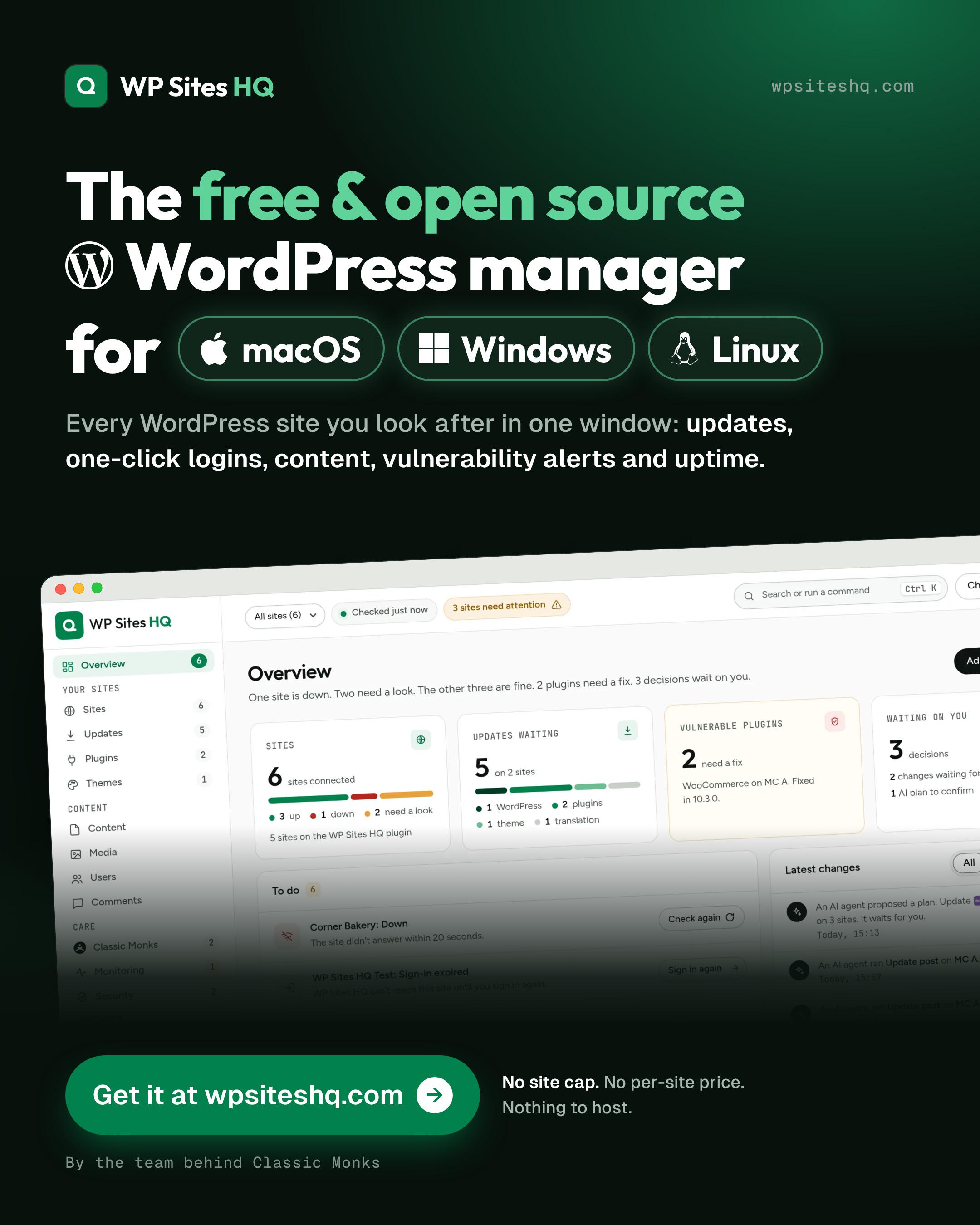
[FREE] Free, open source, and no site cap

Post image
10 Upvotes

Managing WordPress sites shouldn't come with a monthly bill per site.

WP Sites HQ is the desktop alternative to ManageWP and MainWP. It's free and open source, and it runs on macOS, Windows and Linux.

✓ Updates across every site, in one pass
✓ One-click wp-admin logins
✓ Content, vulnerability alerts and uptime
✓ No site cap, no per-site price, nothing to host
✓ Your sites and keys stay on your own computer

It's in beta, so tell me what breaks and what's missing. I read every reply.

Get it free: https://wpsiteshq.com

Cloud dashboard or desktop app: which one do you trust with your client sites?


r/WordpressPlugins • • 2d ago

[PROMOTION] Frontman: edit an existing WordPress site by selecting a page element

1 Upvotes

Someone asks you to change the header. Before editing anything, you have to find whether it's controlled by the theme, an Elementor template, or something else. Then you need to check which other pages use it.

How do you approach that when you're taking over a site?

I'm working on Frontman, an AI editor for existing WordPress sites. This is the workflow we're focusing on: select an element in a live preview, describe the change, and have Frontman use its supported WordPress tools to update it. The preview refreshes afterward for review. Custom themes and unsupported builders can still need a different workflow.

I'm curious how much time people spend finding what controls the page compared with making the requested edit or checking what else it affected.

What's a small update that took you much longer than whoever requested it expected? And what would you check first if you had to do it again?

https://frontman.sh


r/WordpressPlugins • • 2d ago

Free [FREE] Upgravo – see which plugins will break before you switch to PHP 8.2–8.5

1 Upvotes

My host kept warning that PHP 8.1 is going away, and the plugin everyone recommends for this (PHP Compatibility Checker by WP Engine) is abandoned and only checks up to PHP 8.0. So I built a replacement.

Upgravo scans your plugins and theme on your own server and tells you, per plugin:

- Breaks: fatal on the PHP version you pick (8.1 to 8.5), with file and line

- Notices: deprecated, still runs

- Hidden: findings that don't apply (code already guarded by version checks), with the reason

It runs in short batches, so it finishes on shared hosting. No exec(), no uploading your code anywhere. CSV export and a WP-CLI command.

Free on WordPress.org: https://wordpress.org/plugins/upgravo/

I'm the author. Feedback welcome, especially false positives.


r/WordpressPlugins • • 2d ago

[FREEMIUM] I built a recurring events add-on for the free The Events Calendar

1 Upvotes

If you run a weekly service, class or meetup on the free The Events Calendar, you end up copying the event by hand every week, so I built RecurKit. Open an event, tick Repeat this event, pick the weekdays, and end it after a number of occurrences or on a date (up to 52 per series). Each occurrence is created as a normal event through The Events Calendar's own API, so it shows in every calendar view, can be edited on its own, and stays in place if you remove RecurKit. Under Events > Series you can see each series, edit one occurrence or every later one at once, or delete the whole series. Everything above is free and stays free; a paid add-on covers monthly rules like "2nd Tuesday" and skip dates. It is new on WordPress.org, so feedback on what breaks or what is missing is very welcome: https://brightlabs.app/apps/recurkit/?utm_source=reddit&utm_medium=social&utm_campaign=q124-wordpressplugins

I built this.


r/WordpressPlugins • • 2d ago

Help [premium] TheEventsCalendar - Event Tickets Commerce – Selected ticket categories don't match tickets in checkout basket

1 Upvotes

Hi everyone,

I'm experiencing a strange issue with The Events Calendar / Event Tickets Commerce on my WordPress website.

When customers select tickets for an event, the ticket categories and/or quantities displayed in the purchase basket don't match what was originally selected on the event page.

For example:

  • A customer selects tickets from specific categories on the event page.
  • After proceeding to the purchase basket, different ticket categories or incorrect quantities appear.
  • The basket does not accurately reflect the customer's original selection.

I'm using Event Tickets Commerce with Stripe for payment processing.

I also noticed the following error in the plugin logs:

Invalid event type for webhook event: payment_intent.created

The Stripe Payment Intent has the status requires_payment_method, but I'm not sure whether this webhook warning is related to the basket issue.

Has anyone experienced something similar?


r/WordpressPlugins • • 2d ago

Review [FREEMIUM] I built Visigate to reuse server-side visibility rules across Blocks, Elementor, and menus

0 Upvotes

Hey everyone, I’m the developer behind Visigate. I built it because I wanted to set up a visibility rule once and reuse it. For example, you can schedule a banner and its matching classic menu item with the same date rule, then change the dates in one place.

Visigate evaluates rules in PHP when WordPress builds the page. If a rule hides an element, Visigate leaves it out of the generated HTML. It adds no CSS or JavaScript for visitors. Rule sets also work with synced patterns, shortcodes, and a visigate_visible() PHP helper.

There’s a View As preview and an inspector to help admins figure out why something is hidden. You can also see where a rule set is used before changing it. Cache Check flags pages where a cached response could show the wrong version and sends no-cache signals where supported, including to LiteSpeed Cache.

The core plugin is free. I also offer an optional paid Pro add-on. Visigate on WordPress.org

If you try it, I’d also love to hear where you got stuck in the rule builder or what the plugin listing left unclear.


r/WordpressPlugins • • 3d ago

Free [FREE] - MBR Performance v2.1.5

Post image
1 Upvotes

MBR Performance is a Free and Open-Source alternative to WP Rocket - in reality, it's more feature-rich than Rocket. In addition to advanced, three-tier full-page caching, MBR Performance delivers over 50 individual optimizations for websites, servers, and browsers.

MBR Performance also ships with the Performance Doctor, which analyzes a site and recommends to new users where the greatest savings can be made. And when you've optimized and tweaked your website, the built-in Real User Monitoring (RUM) will report on the experience your real visitors are getting. Recording and showing your Core Web Vitals (CLS, INP and LCP) from the get-go, and all the data remains secure on your site.

MBR Performance is currently trusted to manage the performance for over 8000 websites around the world. It's 100% free, and there's no 'pro' version waiting to ambush you around the corner. There's no nonsense in turning off the best features until you pay - everything, every optimization, every setting and every cache are all provided for free.

The plugin comes with a 45-page User Guide, which details every feature and what you can expect from it. MBR Performance is fully supported by me, the developer and author of the plugin.

Website & Download - https://mbr-performance.co.uk/
GitHub Repository - https://github.com/HarbourBob/MBR-Performance


r/WordpressPlugins • • 3d ago

[PROMOTION] For all the Notion Wordpress Users. Robust Two way Sync between Notion & Wordpress plugin

Thumbnail
gallery
1 Upvotes

as a heavy notion user myself. i built a app / plugin that let's you manage and schedule your wordpress posts directly from notion. there is also a two way sync option.

it also includes other platforms like - LINKEDIN, WEBFLOW and

INSTAGRAM, TIKTOK are coming soon.

Link - https://syncsched.com


r/WordpressPlugins • • 3d ago

[FREE] MBR Bulk WP Detector v2.4.1

Post image
0 Upvotes

You have a list of 100s of URLs, but which ones are on WordPress? You could check each one manually, but that's mind-numbing.

With MBR Bulk WP Detector, either paste or load a list of unlimited URLs and boom - in a few seconds, it returns those that are WordPress and those that aren't. Turn on the Deep Scan mode, and it will return:

  • Email Address
  • Company Name
  • Telephone Number
  • Active Theme
  • Front-facing Plugins
  • Page Builder
  • Widgets Used

Now, armed with serious information, your email campaign turns from a cold call into the type that says I've done my homework!

Hello,
I've been looking at your website and noticed that you're living on a WordPress platform and using the Hello Elementor Theme. Your website is looking great, by the way, and I see that it was built with Elementor and your store is powered by WooCommerce...

MBR Bulk WP Detector is a must-have marketing tool for any agency, marketer or freelancer. It's 100% FREE and open-source, with every line of code published on GitHub.

Website & Download - https://littlewebshack.com/plugins/bulk-detector/
GitHub Repository - https://github.com/HarbourBob/MBR-Bulk-WP-Detector