r/gigabyte • u/Nice_Title721 • 4h ago
Trying to get my gigabyte 5070 to to send signal
reddit.com
1
Upvotes
r/gigabyte • u/Various-Background-8 • 5h ago
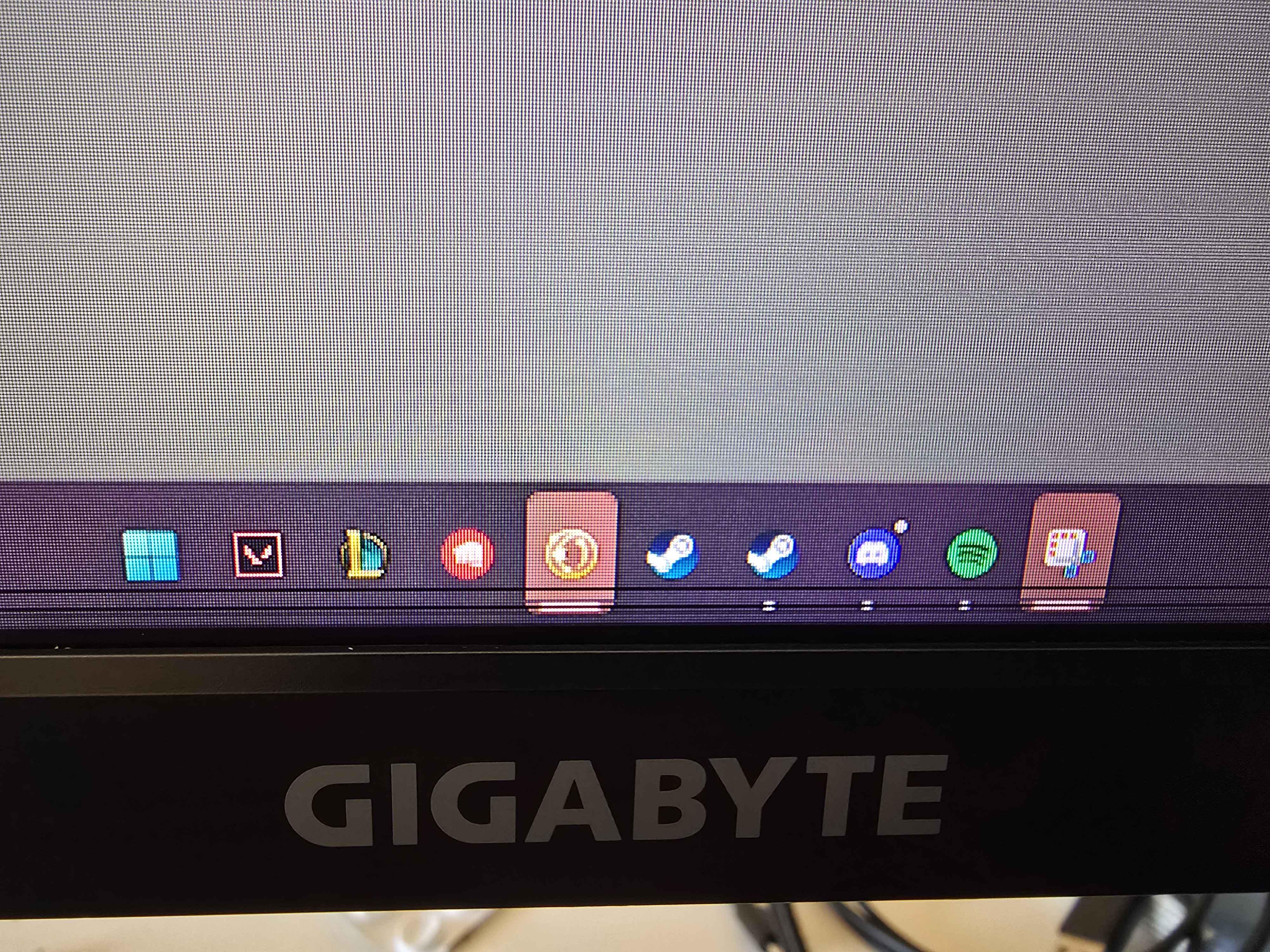
Hey everyone,
My Gigabyte M27Q X (manufactured August 2024) recently started showing persistent horizontal flickering lines along the bottom edge of the screen. From searching this sub, it looks like a pretty common panel/T-Con issue with this model, so I already opened a support ticket with Gigabyte.
Just to rule out any remaining edge cases before sending it in, here are my specs and everything I’ve already tested:
PC Specs:
Troubleshooting already done:
Since I don't have the purchase receipt on hand right now, I asked Gigabyte to process the warranty based on the manufacturing date (August 2024).
Has anyone here (especially in Germany / EU) gone through Gigabyte's RMA process for the M27Q X without a receipt, and how smooth was it?
r/gigabyte • u/TheAwesomeShaz • 11h ago
I have submitted and RMA request I was told that I will get a replacement for my G24F2 monitor but it has been 2 weeks since I have received the cardboard box to pack my monitor in and they have not reverted back to me since
I have tried contacting their support number and the service person said she will inform them
I have also mailed about it on their service email - service.india@gigabyte.in
How long can I expect for them to respond and does an RMA request expire?
Are they doing this to prolong and postpone my request so my warranty runs out?
r/gigabyte • u/Fragrance1191 • 12h ago
Can u/GIGABYTE_monitor or anyone else please confirm?
Thanks.
r/gigabyte • u/Main_Material8157 • 16h ago
Im trying to enable secure boot but everytime I try to open uefi I get stuck on the AMI screen. it tells me to press del but it doesn't do anything. Any way I can fix this?
r/gigabyte • u/VivianAviana • 17h ago
build has been opperation for over a year now but suddenly this issue has started,
POST flashes the sequence in title than all mobo lights go out as well as fans turning off, case lights and gpu lights stay on, monitors turn on but than say they dont read a signal and go back to sleep, keyboard and mouse led's do not power on
ive reseated my ram in every configuration, reset cmos, took out the gpu to try putting from the cpus integrated graphics and the same issue has persisted
build list: https://pcpartpicker.com/user/ElspethOfValeron/saved/#view=G4vQGX
r/gigabyte • u/ilivedownyourroad • 20h ago
5090 miracle time woot woot!!! :-D
hey there so the web page on my browser isnt working properly so when i click on ? it does nothing but go blank. Pls assist.
thanks for any help :)
r/gigabyte • u/erMaela • 22h ago
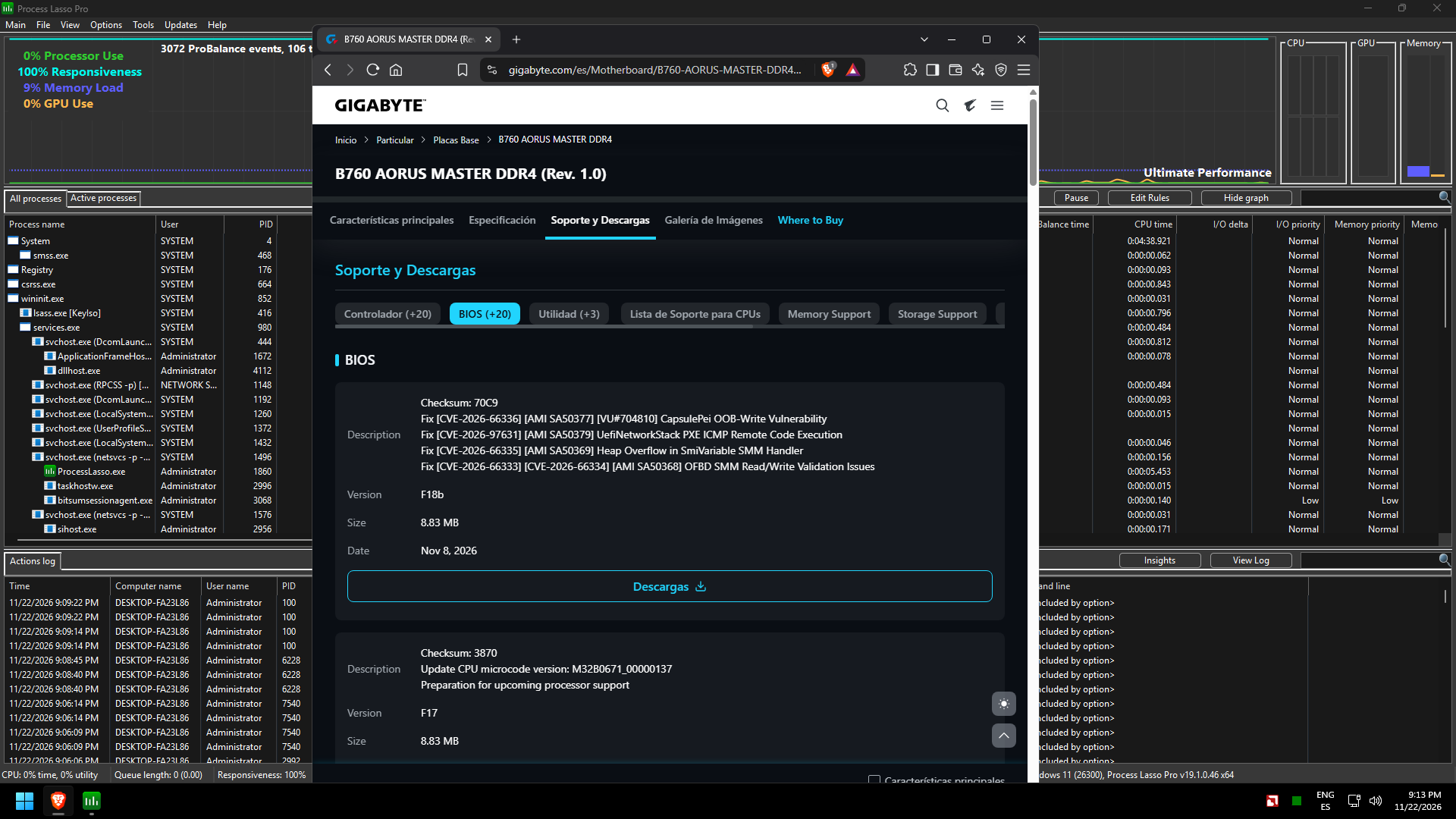
Hi guys, I want to know if anyone did try this bios version. Im on f16.
In f17 the gb downloader service is missing (bios menu). I always disable it, but the menu is missing and i cant disable it. Thats why I stay on f16.
I want to know if f18b restored that menu.
Thanks
r/gigabyte • u/Tasty_Version8344 • 1d ago
I have a GIGABYTE Radeon RX 9070 XT Gaming OC 16GB with GCC 26.10.21.01 and GBT_VGA 26.11.12.01.
I discovered a strange issue with GIGABYTE Control Center (GCC) and AMD Adrenalin.
Here's the exact sequence:
I've reproduced this behavior multiple times. Switching AMD Adrenalin back to Default restores the automatic settings, but simply opening the Radeon graphics card page in GCC triggers Custom again.
Has anyone experienced this? Why does GCC automatically override AMD Adrenalin's Default fan settings?
What did you do to fix it? Did you uninstall GBT_VGA, disable GCC, or find another solution that preserves RGB lighting and motherboard fan control?
I'd really appreciate hearing what worked for you!
r/gigabyte • u/This-Woodpecker5608 • 1d ago
I have a B550M DS3H AC (Rev. 1.5) I have checked on the motherboard
In bios i have Version F1 so i download the file mb_bios_b550m-ds3h-v1.5_f1.zip onto a fatman32 usb.
When i try to flash the file i get hit with an error message that says ''BIOS ID CHECK ERROR''
Please help me
r/gigabyte • u/shimmybee • 1d ago
I've seen others have this issue but can't seem to find a solid solution! Please if anyone can help in simple terms (I'm a dummy)
RGB is on on the ram sticks and peripherals. PC is otherwise completely fine, no issues other than RGB that I can see. RGB Just not working on Fans (Lian LI).
- B650 AORUS Elite Ax Ice
- AMD Ryzen 7 7800X3D 8 Core
- Power supply = Corsair CX600 ATX / EPS 8- Plus Bronze Power Supply Unit 600w
- Corsair Vengeance Pro SL
- Thermalright Forzen Nott ARGB 72.37 CFM Liquid CPU Cooler
- Windows 11
BIOS Version - F39, 15/01/2026
BIOS mode UEFI
Tbh this began months, maybe even a year ago. RGB stopped working one day, was okay for the next few days then stopped again. Repeated a few times until eventually it just stopped. I tried finding solutions back then but gave up after not finding any solid causes and I kinda hoped it would be fixed.
Please has anyone came across this before and found a solution? I'm honestly really frustrated
r/gigabyte • u/EonsOfZaphod • 1d ago
r/gigabyte • u/Agitated_Client_5628 • 1d ago
r/gigabyte • u/abhi_chan • 1d ago
I have a Gigabyte GS27FA connected to my rx 6600 gpu. The screen started going black for some reason, it went black and went back on, went back n forth for a few more time than showed 'OUT OF RANGE'. I have using this monitor for more than a year and haven't seen this issue before. I just did a little google and it said my gpus outputting graphic with higher refresh than what my monitor can handle?? So temporarily i lowered my refresh rate to 60hz in windows settings, and that seem to have solved it. But my games look horrible now. When i try to increase the refresh rate it goes back to black screen on and off shit. Can someone tell me whats wrong? or has the monitor gone faulty?
r/gigabyte • u/giokspa10 • 1d ago
The 1st photo is a screenshot of this purple squares photo from my phone.
The 2nd is the same photo displayed on my laptop.
Does this specific laptop screen do a terrible job at displaying purple or is it just me? I didn't find anybody talking about this online. I noticed it when I opened Geometry Dash and my icon set looked completely different than on my phone. I want to know whether I can do something about this or if the screen simply can't display these colors correctly.
r/gigabyte • u/No-Subject594 • 1d ago
My laptop was working perfectly fine yesterday and today I’ve went to start it up and the battery light is on but I can’t seem to get it started. Anyone with a similar issue? It is only 15 months old and I have been into the shop and my warranty has ran out by 2 months
r/gigabyte • u/RoaksGold • 1d ago
Processor 13th Gen Intel(R) Core(TM) i7-13620H (2.40 GHz)
Installed RAM 16.0 GB (15.7 GB usable)
Graphics card NVIDIA GeForce RTX 4050 Laptop GPU (6 GB)
Intel(R) UHD Graphics (128 MB)
Storage 214 GB of 954 GB used
Device ID C0FF434F-4FA3-49F5-AC82-9BCEF30B14EF
Product ID 00342-22371-02549-AAOEM
System type 64-bit operating system, x64-based processor
Pen and touch No pen or touch input is available for this display
Edition Windows 11 Home
Version 26H2
Installed on 11/20/2026
OS build 26300.10075
Experience Windows Feature Experience Pack 1000.26100.505.0
So I noticed these issues around 7 days ago. I do schoolwork and play Guild Wars 2 on this, and maybe whatever I find on Steam. It was working fine. The fans are a little loud, but I haven't had many issues with this computer.
Seemingly, it's gotten; the screen dims. There are afterimages. I am typing this out, and it keeps going between the two moments. I don't know what happened. The only thing that has changed is that my computer updated. It did crash once; the fan got consistantly loud, and it restarted, but I haven't had that issue again. I really have no idea what is causing this. I tried many fixes, except hooking the HDMI up to another screen to see if it's hardware or software (I'll test that later). I am probably going to take it to a shop and see if it can be fixed cheaply (hopefully). I can deal with this for now, but I have finals soon, and I kinda need this to not get worse. Any advice or hot fixes you have, I will gladly accept. I have tried uninstalling graphics stuff. Changing settings, etc. If you have anything or at least an idea of a reason, I would gladly appreciate it.
r/gigabyte • u/Calm-Buffalo-3881 • 1d ago
I've been having an issue with my monitor for thr past few weeks where when I turn my computer on, sometimes my secondary monitor turns the backlight on but has no display. I also cannot access the monitor's on board menu through the button on the back. Sometimes it fixes itself with a few power cycles, or by unplugging it for a minute and then plugging it back in, but today none of the usual fixes are working.
I'm looking for any possible other things to try before declaring the monitor dead.
r/gigabyte • u/Igaotankudo • 1d ago
Comprei essa placa-mãe recentemente, de segunda mão, mas notei que o LED dela não acende e ela também não é reconhecida pelo RGB Fusion. Ela apenas acende quando ligo a fonte de alimentação e, logo em seguida, apaga. Alguém poderia me ajudar?
r/gigabyte • u/Practical-Island6594 • 1d ago
Hi all, I recently swapped motherboards from a Gigabyte motherboard to an Asus motherboard and I was too lazy to reinstall Windows so I just kept my old Windows SSD and I have been manually removing old drivers and replacing them with new ones.
I noticed in system32 some files named GigabyteUpdateService.exe and GigabyteDownloadAssistant.exe. Can I safely get rid of these files, and are there any other traces on my system? I once had Gigabyte Control Center installed, but uninstalled it before replacing my motherboard.
r/gigabyte • u/tyzv_ • 1d ago
everytime i start gimate, my gimate does the loading screen thingy and crashes?? what do i do??
r/gigabyte • u/Early-Sea3737 • 1d ago
r/gigabyte • u/Mcsener • 1d ago
Hi everyone,
I built a new gaming PC back in September with the following specifications:
I spent quite a bit of time researching different RTX 5080 models before purchasing this card. I specifically chose the AORUS MASTER because of its premium cooling design and generally positive thermal reviews.
I've been using the card for approximately two months, and until recently, I was completely satisfied with it.
I haven't noticed any significant performance issues, FPS drops, crashes, or instability.
Even in demanding games at 1440p with maximum graphics settings and ray tracing/path tracing enabled, my GPU core temperature generally stays around 60–65°C.
However, while running some benchmark tests out of curiosity, I discovered something that has me quite concerned.
After researching other owners' results, I found several reports of the same RTX 5080 MASTER running with GPU-to-hotspot temperature differences of approximately 8–15°C.
My card, however, behaves very differently depending on the workload.
In certain stress tests, the GPU core temperature stays around 60–67°C, while the GPU hotspot reaches 90–94°C.
This results in a 26–30°C temperature delta between the GPU core and hotspot sensors.
All tests were performed at an ambient room temperature of approximately 23–25°C.
| Test | GPU Temp | GPU Hotspot | Delta |
|---|---|---|---|
| FurMark (10-minute mark) | 57°C | 70°C | 13°C |
| AIDA64 GPU Stress Test | 62.6°C | 92.2°C | 29.6°C |
| OCCT (5-minute mark) | 67.4°C | 93.6°C | 26.2°C |
| Marvel's Spider-Man 2 (1440p, RT, Ultra) | 60–62°C | 78–87°C | 18–25°C |
| GTA V Enhanced (1440p, RT, Ultra) | 60–62°C | 78–87°C | 18–25°C |
During 3DMark testing, the hotspot also reaches approximately 91°C and can remain at that temperature under sustained load.
What concerns me most is the inconsistency between workloads.
For example:
I understand that different workloads can produce different temperature distributions across the GPU die.
However, I'm unsure whether this level of variation is expected for this particular card.
I believe my system has excellent airflow.
My cooling configuration includes:
All GPU fans are working properly.
The fact that my GPU core and VRAM temperatures generally remain around 60–65°C also suggests that overall cooling performance is quite good.
To rule out software or firmware-related problems, I've tried the following:
Unfortunately, the hotspot behavior remains similar.
I haven't opened the graphics card or removed the heatsink because I don't want to risk my warranty or disturb the factory-applied thermal interface material.
My main suspicions are:
These are only possibilities, not confirmed diagnoses.
The ambient temperature during all my testing was only 23–25°C.
During summer, the temperature in my room can become considerably higher.
If the GPU hotspot is already reaching 90–94°C under current conditions, I'm worried about how the card will behave during hotter months.
I also wonder whether a consistently large hotspot delta could affect the card's long-term reliability, even if gaming performance currently appears normal.
I'd really appreciate some advice from people who own this specific GPU or have experience with GPU cooling systems.
Just to clarify: My GPU performs well in games, and I haven't experienced crashes or obvious performance degradation. My concern is the unusually large hotspot delta compared with results I've seen from other owners of the same model.
I really don't want to send a relatively new, expensive graphics card in for warranty service unnecessarily, especially when I'm otherwise happy with it.
But at the same time, I don't want to ignore a potential manufacturing or cooling issue that might become worse over time.
I've attached screenshots of my benchmark and temperature monitoring results.
If anyone with the same AORUS RTX 5080 MASTER could share their own hotspot temperatures and deltas, that would be extremely helpful.
Thanks in advance for any advice or suggestions!
