r/gigabyte • • 1h ago

Cannot boot Windows 11 26H2 on a B760 GAMING X AX (Rev 1.3)

1 Upvotes

I've run into a problem with a B760 GAMING X AX motherboard. After updating to Windows 11 26H2 it fails to boot, rebooting before automatically entering recovery mode. Windows can boot into safe mode however.

The reason I believe it's linked to the new Windows version is that trying to use the system repair option from a Windows 26H2 USB stick results in an unexpected reboot. But I can use the system repair option from a Windows 26H1 stick with no problems.

Memory has been tested and BIOS is updated to F19b.


r/gigabyte • • 2h ago

Z790 Eagle AX F5 to F8 Update Fail

Thumbnail gallery
1 Upvotes

I click update, it says it will reboot on the way it updates. then downloads it into "UPDATE FAIL" below status. I dont know if this is important but i restarted my pc and it still doesnt work. Will i need this update? If it doesnt let me update i might as well not do it


r/gigabyte • • 10h ago

Support 📥 Gigabyte Aorus 5 laptop keys light but wont turn on

3 Upvotes

My Laptop was running fine until it just turned off. It now wont turn on, but will only flash the rgb keys momentarily before turning off. No sign of life from the monitor. The light by the charger flashes while it's attempting to turn on. I've tried unplugging batt and CMOS and discharging and retrying to no avail. It will flash its keyboard and charging light without the battery plugged in while plugged in so I assume its not the power brick. Could the CMOS have gone bad? Any advice on the matter is much appreciated!


r/gigabyte • • 7h ago

Owners Gigabyte GO27Q24A QD OLED

1 Upvotes

Does anyone here own this monitor and could confirm whether they're happy with their purchase? Thanks!


r/gigabyte • • 7h ago

Suggestion 💭 Looking for optimal undervolt settings for Gigabyte RX 9070 XT Gaming OC

1 Upvotes

Hey everyone,
I'm dialing in an undervolt on my Gigabyte Radeon RX 9070 XT Gaming OC 16GB to keep temps and fan noise down without giving up stability or performance. I know every card varies with the silicon lottery, so I'm looking to compare notes with other Gaming OC owners on what's been stable for daily gaming.
Any advice is highly appreciated 🙏


r/gigabyte • • 8h ago

G5 KF Mini DisplayPort not working. Has anyone tried VBIOS 95.07.16.C0.02?

1 Upvotes

Hi everyone,

I’m trying to connect two external screens to my G5 KF (i5-12500H, RTX 4060), but I can only get the HDMI port to work.

I’m using an Ewent EC1458 MiniDP-to-HDMI adapter. I’ve tried it with both a Gigabyte GS25F2 monitor and a Samsung TV, and neither gets detected in Windows. Both screens work fine when connected directly to the laptop’s HDMI port with the same cables.

I’ve already updated the NVIDIA driver to 621.24, restarted and reconnected everything, but no luck. I’m on Windows 11, system BIOS FB12 and VBIOS 95.07.16.80.6b.

Gigabyte’s support page has a “miniDP compatibility update,” version 95.07.16.C0.02, dated February 5, 2024. I haven’t installed it yet because I’ve seen mixed reports: some people say it fixed MiniDP, while others lost HDMI afterwards. It’s hard to tell which firmware version and laptop model they were using.

Has anyone here installed that exact update on a G5 KF, not the KF5, and got HDMI and MiniDP working at the same time? Especially interested if you updated from the same VBIOS I have.

Also, did anyone solve this just by switching to an active MiniDP-to-HDMI adapter without flashing anything?

If you did update the VBIOS, was there anything you needed to do first, and were you able to back up the original?

Thanks!


r/gigabyte • • 9h ago

KBC/EC update on the Gigabyte G5 MF (2023) laptop

0 Upvotes

I saw a couple of posts about this, that some people have the same problem, but there is no single solution. After launching ECWinFlash.exe as administrator, 3 windows pop up:

  1. IO.DLL error!, used NTport.DII or run on Administrator
  2. Before continuing, please close all other application!
  3. This project is a EC rom-file of 128k size! I understand the problem is specifically in the 1st window.

I understand the problem is specifically in the 1st window.

After launching the program, the Old ROM Information section shows

Project Name: bbbbbbbbbbbbbbb

EC Version: 1.bbbbbbbbbbbbbbbbbbbbbbbbbbbbbb

When trying to select the file NPxxRNx-Y.10, the program throws the error "The project name of ROM file is different with system!!" and the program closes.

I tried creating a folder named "123" at "C:" as advised

I launched it as administrator

I downloaded the file from the official website several times

I tried unzipping the archive with different archivers

Nothing helped

Is there any solution?

upd: also wanted to add that my BIOS version is FB12, and the KBC/EC version is FB04.
I want to update to FB10, which is available in the drivers section on the official website.


r/gigabyte • • 16h ago

Support 📥 Gigabyte M27Q X (Mfg. Aug 2024) – Horizontal flickering lines at the bottom of the screen. Anyone dealt with EU RMA without receipt?

Post image
2 Upvotes

Hey everyone,

My Gigabyte M27Q X (manufactured August 2024) recently started showing persistent horizontal flickering lines along the bottom edge of the screen. From searching this sub, it looks like a pretty common panel/T-Con issue with this model, so I already opened a support ticket with Gigabyte.

Just to rule out any remaining edge cases before sending it in, here are my specs and everything I’ve already tested:

PC Specs:

  • Monitor: Gigabyte M27Q X (2560x1440 @ 240Hz)
  • GPU: NVIDIA GeForce RTX 4060 Ti (8 GB)
  • CPU: AMD Ryzen 7 5800X
  • Motherboard: MSI X670E Gaming Plus WIFI
  • RAM: 32 GB
  • OS: Windows 11

Troubleshooting already done:

  • Swapped DisplayPort cables and tested different ports on the RTX 4060 Ti.
  • Tested 60 Hz, 144 Hz, and 240 Hz, custom timings (CVT reduced blanking), and forced 8 bpc / RGB output.
  • Disabled HDR and FreeSync / Adaptive Sync.
  • Clean GPU driver reinstall, disabled hardware acceleration, and tested disabling Windows MPO via the Registry.
  • Cross-checked with a secondary monitor on the exact same PC and cables — the secondary monitor works completely fine, while the flickering stays on the M27Q X regardless of primary/secondary display order.

Since I don't have the purchase receipt on hand right now, I asked Gigabyte to process the warranty based on the manufacturing date (August 2024).

Has anyone here (especially in Germany / EU) gone through Gigabyte's RMA process for the M27Q X without a receipt, and how smooth was it?


r/gigabyte • • 15h ago

Trying to get my gigabyte 5070 to to send signal

Thumbnail reddit.com
1 Upvotes

r/gigabyte • • 22h ago

Support 📥 Are they doing this to prolong and postpone my request so my warranty runs out?

3 Upvotes

I have submitted and RMA request I was told that I will get a replacement for my G24F2 monitor but it has been 2 weeks since I have received the cardboard box to pack my monitor in and they have not reverted back to me since
I have tried contacting their support number and the service person said she will inform them
I have also mailed about it on their service email - service.india@gigabyte.in

How long can I expect for them to respond and does an RMA request expire?
Are they doing this to prolong and postpone my request so my warranty runs out?


r/gigabyte • • 23h ago

GS22F12I monitor is true 8-bit or 6-bit+FRC ?

2 Upvotes

Can u/GIGABYTE_monitor or anyone else please confirm?

Thanks.


r/gigabyte • • 1d ago

b650 POSTing cpu,dram,cpu, than holding dram for several seconds before light going out, not booting to bios

3 Upvotes

build has been opperation for over a year now but suddenly this issue has started,

POST flashes the sequence in title than all mobo lights go out as well as fans turning off, case lights and gpu lights stay on, monitors turn on but than say they dont read a signal and go back to sleep, keyboard and mouse led's do not power on

ive reseated my ram in every configuration, reset cmos, took out the gpu to try putting from the cpus integrated graphics and the same issue has persisted

build list: https://pcpartpicker.com/user/ElspethOfValeron/saved/#view=G4vQGX


r/gigabyte • • 1d ago

Can't open uefi bios

1 Upvotes

Im trying to enable secure boot but everytime I try to open uefi I get stuck on the AMI screen. it tells me to press del but it doesn't do anything. Any way I can fix this?


r/gigabyte • • 1d ago

Aggressive FAN. GIGABYTE Control Center automatically overrides AMD Adrenalin Default fan settings – Radeon RX 9070 XT

2 Upvotes

I have a GIGABYTE Radeon RX 9070 XT Gaming OC 16GB with GCC 26.10.21.01 and GBT_VGA 26.11.12.01.

I discovered a strange issue with GIGABYTE Control Center (GCC) and AMD Adrenalin.

Here's the exact sequence:

  1. AMD Adrenalin is set to Default, with automatic Radeon graphics card fan management.
  2. I open GIGABYTE Control Center and simply switch from the motherboard view to the Radeon graphics card Fan Control page.
  3. Without changing anything or clicking Apply, AMD Adrenalin automatically switches from Default to Custom.
  4. The Custom profile activates a very aggressive fan curve that I NEVER configured myself, reaching 100% fan speed around 70°C.
  5. While playing Warzone, I've recorded Radeon graphics card fan speeds up to 4,359 RPM, making my PC extremely loud.

I've reproduced this behavior multiple times. Switching AMD Adrenalin back to Default restores the automatic settings, but simply opening the Radeon graphics card page in GCC triggers Custom again.

Has anyone experienced this? Why does GCC automatically override AMD Adrenalin's Default fan settings?

What did you do to fix it? Did you uninstall GBT_VGA, disable GCC, or find another solution that preserves RGB lighting and motherboard fan control?

I'd really appreciate hearing what worked for you!


r/gigabyte • • 1d ago

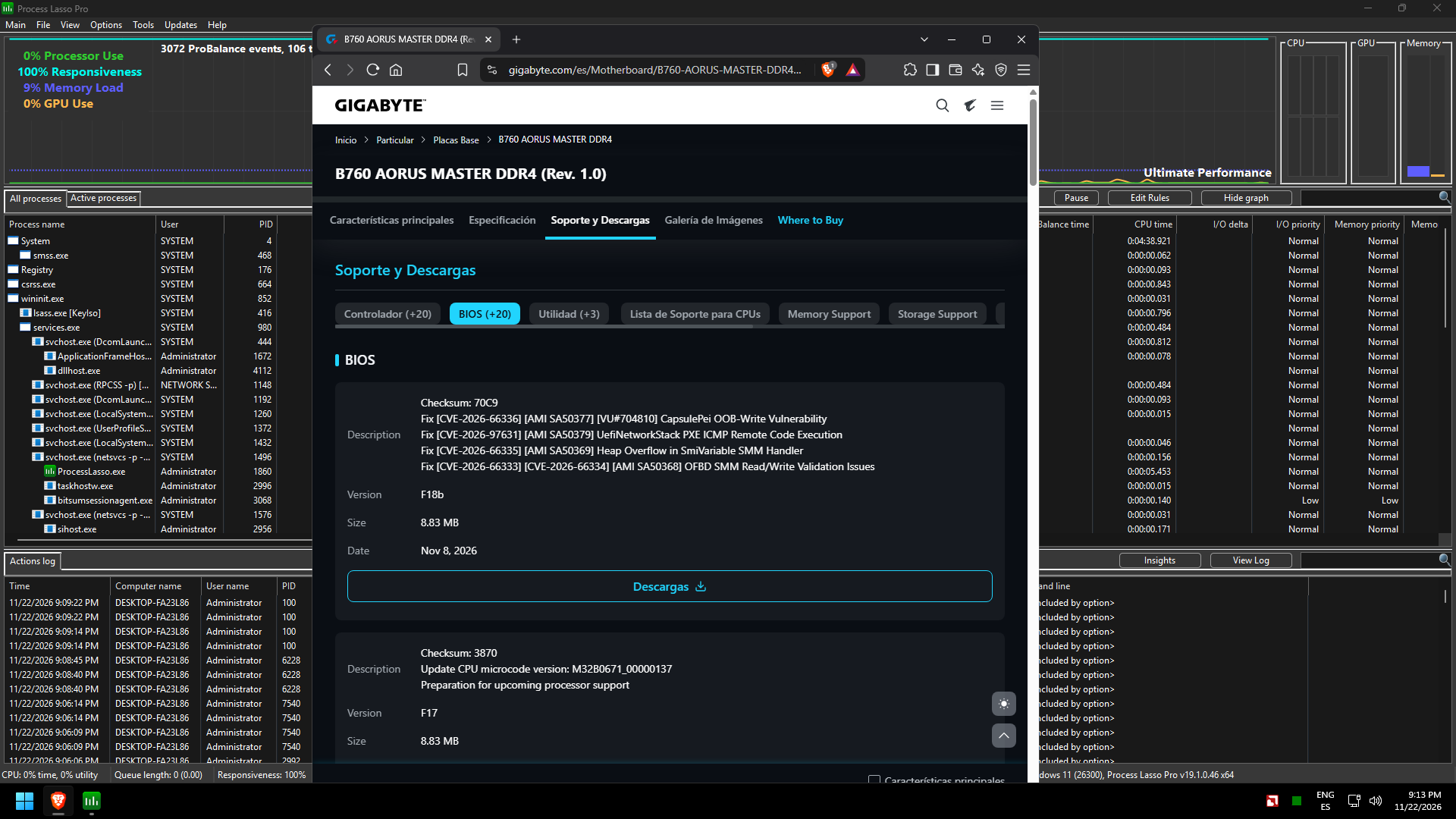
Discussion 💬 AORUS MASTER B760 DDR4 - NEW BIOS F18b

1 Upvotes

Hi guys, I want to know if anyone did try this bios version. Im on f16.

In f17 the gb downloader service is missing (bios menu). I always disable it, but the menu is missing and i cant disable it. Thats why I stay on f16.

I want to know if f18b restored that menu.

Thanks


r/gigabyte • • 1d ago

Support 📥 Gigabyte’s reply to my eSupport email

Post image
3 Upvotes

r/gigabyte • • 1d ago

Can't update bios ''BIOS ID CHECK ERROR''

1 Upvotes

I have a B550M DS3H AC (Rev. 1.5) I have checked on the motherboard
In bios i have Version F1 so i download the file mb_bios_b550m-ds3h-v1.5_f1.zip onto a fatman32 usb.
When i try to flash the file i get hit with an error message that says ''BIOS ID CHECK ERROR''
Please help me


r/gigabyte • • 1d ago

RBG on Fans not working. Red CPU light on mobo (B650 Aorus Elite ax ice). RGB worked for a day after uninstalling Gigabyte CC and installing SignalRBG now back to not working...

1 Upvotes

I've seen others have this issue but can't seem to find a solid solution! Please if anyone can help in simple terms (I'm a dummy)

RGB is on on the ram sticks and peripherals. PC is otherwise completely fine, no issues other than RGB that I can see. RGB Just not working on Fans (Lian LI).

- B650 AORUS Elite Ax Ice

- AMD Ryzen 7 7800X3D 8 Core

- Power supply = Corsair CX600 ATX / EPS 8- Plus Bronze Power Supply Unit 600w

- Corsair Vengeance Pro SL

- Thermalright Forzen Nott ARGB 72.37 CFM Liquid CPU Cooler

- Windows 11

BIOS Version - F39, 15/01/2026

BIOS mode UEFI

Tbh this began months, maybe even a year ago. RGB stopped working one day, was okay for the next few days then stopped again. Repeated a few times until eventually it just stopped. I tried finding solutions back then but gave up after not finding any solid causes and I kinda hoped it would be fixed.

Please has anyone came across this before and found a solution? I'm honestly really frustrated


r/gigabyte • • 1d ago

Support 📥 New PC Build - RAM is not as performant as shown

Thumbnail reddit.com
1 Upvotes

r/gigabyte • • 1d ago

Gigabyte a16 problem with processor degrees

Thumbnail reddit.com
1 Upvotes

r/gigabyte • • 1d ago

Support 📥 GS27FA shows "out of range"

1 Upvotes

I have a Gigabyte GS27FA connected to my rx 6600 gpu. The screen started going black for some reason, it went black and went back on, went back n forth for a few more time than showed 'OUT OF RANGE'. I have using this monitor for more than a year and haven't seen this issue before. I just did a little google and it said my gpus outputting graphic with higher refresh than what my monitor can handle?? So temporarily i lowered my refresh rate to 60hz in windows settings, and that seem to have solved it. But my games look horrible now. When i try to increase the refresh rate it goes back to black screen on and off shit. Can someone tell me whats wrong? or has the monitor gone faulty?


r/gigabyte • • 1d ago

Purple looks terrible on my Gigabyte Gaming A16 laptop (GA63H).

Thumbnail gallery
1 Upvotes

The 1st photo is a screenshot of this purple squares photo from my phone.

The 2nd is the same photo displayed on my laptop.

Does this specific laptop screen do a terrible job at displaying purple or is it just me? I didn't find anybody talking about this online. I noticed it when I opened Geometry Dash and my icon set looked completely different than on my phone. I want to know whether I can do something about this or if the screen simply can't display these colors correctly.


r/gigabyte • • 1d ago

Gigabyte laptop No power

1 Upvotes

My laptop was working perfectly fine yesterday and today I’ve went to start it up and the battery light is on but I can’t seem to get it started. Anyone with a similar issue? It is only 15 months old and I have been into the shop and my warranty has ran out by 2 months


r/gigabyte • • 1d ago

Discussion 💬 Weird afterimages, lines, and dimming started. (help plz)

1 Upvotes

Processor 13th Gen Intel(R) Core(TM) i7-13620H (2.40 GHz)

Installed RAM 16.0 GB (15.7 GB usable)

Graphics card NVIDIA GeForce RTX 4050 Laptop GPU (6 GB)

Intel(R) UHD Graphics (128 MB)

Storage 214 GB of 954 GB used

Device ID C0FF434F-4FA3-49F5-AC82-9BCEF30B14EF

Product ID 00342-22371-02549-AAOEM

System type 64-bit operating system, x64-based processor

Pen and touch No pen or touch input is available for this display

Edition Windows 11 Home

Version 26H2

Installed on ‎11/‎20/‎2026

OS build 26300.10075

Experience Windows Feature Experience Pack 1000.26100.505.0

So I noticed these issues around 7 days ago. I do schoolwork and play Guild Wars 2 on this, and maybe whatever I find on Steam. It was working fine. The fans are a little loud, but I haven't had many issues with this computer.

Seemingly, it's gotten; the screen dims. There are afterimages. I am typing this out, and it keeps going between the two moments. I don't know what happened. The only thing that has changed is that my computer updated. It did crash once; the fan got consistantly loud, and it restarted, but I haven't had that issue again. I really have no idea what is causing this. I tried many fixes, except hooking the HDMI up to another screen to see if it's hardware or software (I'll test that later). I am probably going to take it to a shop and see if it can be fixed cheaply (hopefully). I can deal with this for now, but I have finals soon, and I kinda need this to not get worse. Any advice or hot fixes you have, I will gladly accept. I have tried uninstalling graphics stuff. Changing settings, etc. If you have anything or at least an idea of a reason, I would gladly appreciate it.