r/homeautomation • • 4h ago

PERSONAL SETUP Yale is horrible

10 Upvotes

Posting so other Yale owners know what to expect. My Yale Assure pushbutton deadbolt's keypad died — LEDs chasing, error beep on every press, including the master code. App control still worked. The only fix was a full factory reset, which wipes all user codes, because swapping the batteries scrambled the keypad/module sync. That's a design flaw: a routine battery change shouldn't brick your front door's keypad.

I've bought multiple Yale locks and battery life has been a constant problem on top of this. I filed a report with Yale support. Their answer: my purchase (Nov 24, 2023) is outside the 2-year electronic warranty, so no repair or replacement — just a 20% discount code to buy another one. One year out of warranty on an expensive lock, and the "loyal customer" offer is a coupon.

If you're shopping smart locks, factor in how the company treats you when something breaks just past warranty. I wish I had.


r/homeautomation • • 8h ago

PERSONAL SETUP Made a Skådis mount for the Hue Dimmer Switch

Thumbnail gallery
9 Upvotes

r/homeautomation • • 1h ago

NEWS Made a free tool so my webcam can tell the dog from the cat (local LLM, Telegram alerts, Home Assistant)

Thumbnail
youtube.com
0 Upvotes
Side project I've been building: Survany, an open-source browser extension that turns any camera or tab into an AI sensor.

- Rules in plain English ("someone at the fence?", "water leak?")
- Cheap local detector first, AI only on candidates
- Works fully local with Ollama, LM Studio, vLLM or llama.cpp
- Telegram + email alerts
- Home Assistant actions via MCP, only after you tap Approve

No face recognition, no audio. A sign saying "unlock the door" held up to the camera is just part of the scene, not a command.

AGPL, feedback very welcome: https://github.com/PacifAIst/survany - https://survany.com

r/homeautomation • • 7h ago

ZIGBEE Smart bathroom fan timer switch?

Thumbnail reddit.com
3 Upvotes

r/homeautomation • • 15h ago

QUESTION Zigbee motion sensors in the garage drop off every cold night. Range, batteries, or something else?

12 Upvotes

Setup: Home Assistant on a mini PC, Sonoff Zigbee dongle on a USB extension, about 30 devices. Two Aqara motion sensors in the detached garage roughly 15 meters from the house.

They work fine all day, then go unavailable most nights once it drops below freezing and come back mid morning. I added a smart plug halfway as a router last month and it didn't change much.

Is this the coin cells struggling in the cold, or is the garage just too far even with a router? Would lithium batteries help, or should I put a second router inside the garage?


r/homeautomation • • 9h ago

QUESTION How to detect whether a window shutter is closed, partially open or fully open at 180°?

2 Upvotes

Hi everyone,

I'm looking for a smart home solution to detect the position of exterior hinged wooden window shutters.

Unlike a standard door/window contact sensor, I need to distinguish between three different states:

  • Closed (0°)
  • Partially open (any angle between 0° and 180°)
  • Fully open (180°, folded back against the exterior wall)

I've attached an image to better illustrate the type of opening mechanism.

The reason is that I have motorized outdoor awnings controlled by several existing Home Assistant automations. If an automation extends the awnings while a shutter is partially open, the shutter could tear the awning fabric. I would therefore like to add a safety condition to my existing automations to prevent this from happening.

Ideally, I'm looking for a solution with the following characteristics:

  • Home Assistant compatibility
  • Zigbee or Wi-Fi connectivity
  • Battery-powered
  • Suitable for outdoor installation
  • Reliable position detection

I've been considering magnetic contact sensors, accelerometers, gyroscopes and tilt sensors, but I'm not sure which approach would work reliably for rotation around a vertical axis.

Does anyone know of an existing commercial product that could achieve this? Has anyone implemented something similar?

I'm also open to DIY solutions, although I'd prefer an off-the-shelf device if available.

Thanks in advance!

P.S. English is not my native language, so I used AI to help translate this post.


r/homeautomation • • 13h ago

QUESTION How do you stop package alerts firing on every leaf? I send driveway snapshots to a vision model on synexa

4 Upvotes

Setup:

Home Assistant on a mini PC, Reolink doorbell, Frigate for person and car detection.

When Frigate sees a person at the porch, an automation grabs a snapshot and sends it to a vision model through the synexa API, which answers whether there is a package on the step.

The model part works well. The issue is the trigger: wind and moving shadows in the afternoon still wake it up 30 to 40 times a day.

Do you gate this with a zone plus a minimum dwell time, or compare against a reference image first? Curious how others keep the call count sane.


r/homeautomation • • 13h ago

ZIGBEE Turned a discarded retail electronic shelf label into an open Zigbee 3.0 node (Hanshow Nebular 154, Telink TLSR8359) and looking for testers with real hardware

Post image
4 Upvotes

r/homeautomation • • 17h ago

DISCUSSION Smart colour ceiling lights available in the EU – bathroom, hallway and bedrooms

Thumbnail
reddit.com
4 Upvotes

r/homeautomation • • 22h ago

PERSONAL SETUP I added a Play Sound button for my Apple devices to Home Assistant

8 Upvotes

I wanted to see the devices and people I already follow in Find My on my Home Assistant dashboard, so I built a custom integration called Apple Find with help from Codex.

It creates GPS trackers for your Apple devices and for people who already share their location with you. My favorite part is the Play Sound button on supported device pages. If a device is somewhere nearby, I can ring it from Home Assistant.

It runs in HA Core and uses Apple's Find My services, so the map shows the latest report Apple has made available. On HA 2026.11 or later, add the GitHub repository via Settings → Marketplace → Add from link, install the integration, and sign in from Devices & services.

GitHub repo, setup steps, and screenshots with fictional locations

If you try it, I'd be interested in which devices show the Play Sound button.

How Apple Find compares with the built-in iCloud integration and iCloud3

Home Assistant’s built-in iCloud integration

It already tracks devices and has Play Sound.

I ran into repeated 2FA failures with this integration on my mainland China account. Mainland China iCloud uses regional icloud.com.cn endpoints, and the built-in setup screen doesn’t offer a region setting. I haven’t confirmed whether the endpoint selection caused my 2FA failures.

iCloud3

iCloud3 offers more device-tracking options, including Family Sharing devices and location updates from the HA Companion App. In my setup, it took several screens after sign-in to import and review devices. I found the settings and on-screen explanations hard to follow when all I wanted was to see my Find My locations in HA.

Apple Find

I wanted setup to feel like opening Find My. Sign in and complete 2FA, and Apple Find automatically creates trackers for supported devices and people who already share their location with you in Find My. That includes friends outside your Family Sharing group, and they don’t need to install the HA app.

Apple Find uses the native People and Devices services that power Apple’s Find My app. The built-in iCloud integration and iCloud3’s iCloud source get device locations through iCloud’s web endpoints.

Apple push notifications can prompt an early check for shared People locations, so a new report can show up in HA sooner than the next scheduled poll. Apple Find also reuses its Apple session. In my initial testing, I didn’t have to sign in again. Apple can still expire the session and require 2FA.

On your Lovelace dashboard, you choose which trackers to add to your map or cards, so you can show just the people you want on that dashboard.

Location history update

In my setup, Apple Find can give the Location History Card more recorded points along a trip than I get with the built-in iCloud integration or iCloud3. More closely spaced points make the trail look smoother and follow bends in the road more closely. With sparse updates, the card draws a straight line between recorded positions, so the trail can cut across a bend or appear to leave the road. The number of points depends on how often Apple makes fresh locations available.

The screenshot shows a real Apple Find trail with the place and tracker labels changed for privacy.


r/homeautomation • • 1d ago

HOME ASSISTANT Melodious: offline framework for Logitech Harmony hubs + remotes, with two-way Home Assistant device control and no Logitech cloud

Thumbnail
github.com
66 Upvotes

Logitech stopped making Harmony remotes in 2021, but a stock Harmony Hub still needs Logitech's app and cloud to change anything. I've been building Melodious (with tons of community help, thanks r/logitechharmony) to fix that. It runs on the hub itself, next to Logitech's firmware, and takes over what the cloud did: devices, activities, remote setup and syncing. Your existing setup stays as it is, managed locally.

For home automation, the useful part is that the hub and Home Assistant work in both directions.

Your IR gear becomes part of Home Assistant. An old amp or soundbar that only takes IR shows up in Home Assistant as a power switch, an input selector and command buttons. You can put it in automations ("when I unlock the front door, turn on the amp and switch it to the turntable"), on dashboards, or control it by voice through Home Assistant's Alexa or Google setup.

Your Harmony remote controls Home Assistant. Lights, networked TVs, Chromecast devices, etc, any entity, in Home Assistant can sync onto the Harmony to be used activities and assigned to remote buttons. One press of Watch TV can turn the TV on over the network, turn on the soundbar over IR, switch inputs, and dim the lights, and lock your front door through Home Assistant. The Home Control buttons on the Companion, 950 and Elite can run lights or scenes directly.

It doesn't depend on anyone's cloud. Everything runs on the hub and your network, so it keeps working if Logitech's servers go away. You can set up a factory reset or used hub from scratch with the desktop app, without a Logitech account. If you'd rather not rely on the hub's Wi-Fi, it can run on wired Ethernet through a USB adapter (experimental).

Screenshots below: the setup wizard, and Home Assistant devices on the hub.

It's free. Latest release and docs: https://github.com/schlambos/harmony-hub-control/releases/latest

Home Assistant integration (add as a custom repository in HACS): https://github.com/schlambos/ha-melodious

Happy to answer questions here, and bug reports are welcome on GitHub issues.


r/homeautomation • • 1d ago

INSTEON Lumos

Post image
12 Upvotes

r/homeautomation • • 20h ago

PERSONAL SETUP esp32 access control

Post image
3 Upvotes

r/homeautomation • • 1d ago

QUESTION Driveway vehicle exit sensor solution

Post image
6 Upvotes

This picture of our driveway. We'd like to add a automatic vehicle exit sensor, but do not want to cut or drill into the concrete driveway and also have it hardwired, so no batteries. There is a Dam on one side and steep cliff on the other and we also have A/c power running along both sides for lights.

We were originally looking at magnetometers like Cartell CP4, but later found out it may cause phantom openings due to the power running along the driveway for the lights.

We were then recommended the Optex OVS-02GT or the Bircher Easy Loop as they use microwaves for detection. We find the Bircher one more suitable.


r/homeautomation • • 19h ago

QUESTION Lutron, Eaton, Leviton, etc

Thumbnail reddit.com
0 Upvotes

r/homeautomation • • 22h ago

QUESTION Teletask for temperature control

1 Upvotes

Are there any users of Teletask on this sub who can give me some guidance as to how to actually use the system.

I have asked Teletask for a user manual but they are unable to do so because

"the solution can depend on your system installation".

Note this was in answer to a request for a user manual not question that required a "solution" beyond, how do you turn your heating on.

The system dates from the build of the home between 12-14 years ago.

I have a control unit (with no panel of any sort that would tell you anything about its operation) by the fuse boxes for the house wired to all the lights and light switches and presumably the valves that control the underfloor heating but despite me thinking I've turned the heating on there seems to be zero correlation between the temperature set on the wall panels, the ambient temperature that is definitely being measured in the rooms and whether the heating is being triggered. The boiler itself is set on for continuous heat and there is a towel rail/radiator in a bathroom that is outside the circuits controlled by Teletask that is indeed on all the time.

If I had a manual of some sort I'm pretty confident that I could have a stab at making use of what looks like it might be quite a useful bit of kit but the interface is utterly lacking anything that intiution alone might unlock.


r/homeautomation • • 1d ago

NEWS I made a Home Assistant card to replay location history

Thumbnail
gallery
42 Upvotes

I wanted to pick a time on the Home Assistant map and see where my trackers were at that point. I found a feature request for the same thing and ended up building a custom card for my own dashboard with help from Codex.

The timeline works a bit like trimming a video in QuickTime. Drag anywhere to move the playhead, or drag the orange handles to replay just part of the day. Each person or tracker gets a row showing when they moved, and the routes outside the selected time range fade on the map.

It reads latitude and longitude from Home Assistant Recorder for any device_tracker that provides coordinates, as well as person entities linked to those trackers. I’ve been using it in a full-screen Panel view, and the screenshots in the README show both desktop and mobile with fictional tracks.

GitHub repo, install steps, and screenshots

If you try it on a phone, I’d love to hear how the timeline feels to drag.


r/homeautomation • • 1d ago

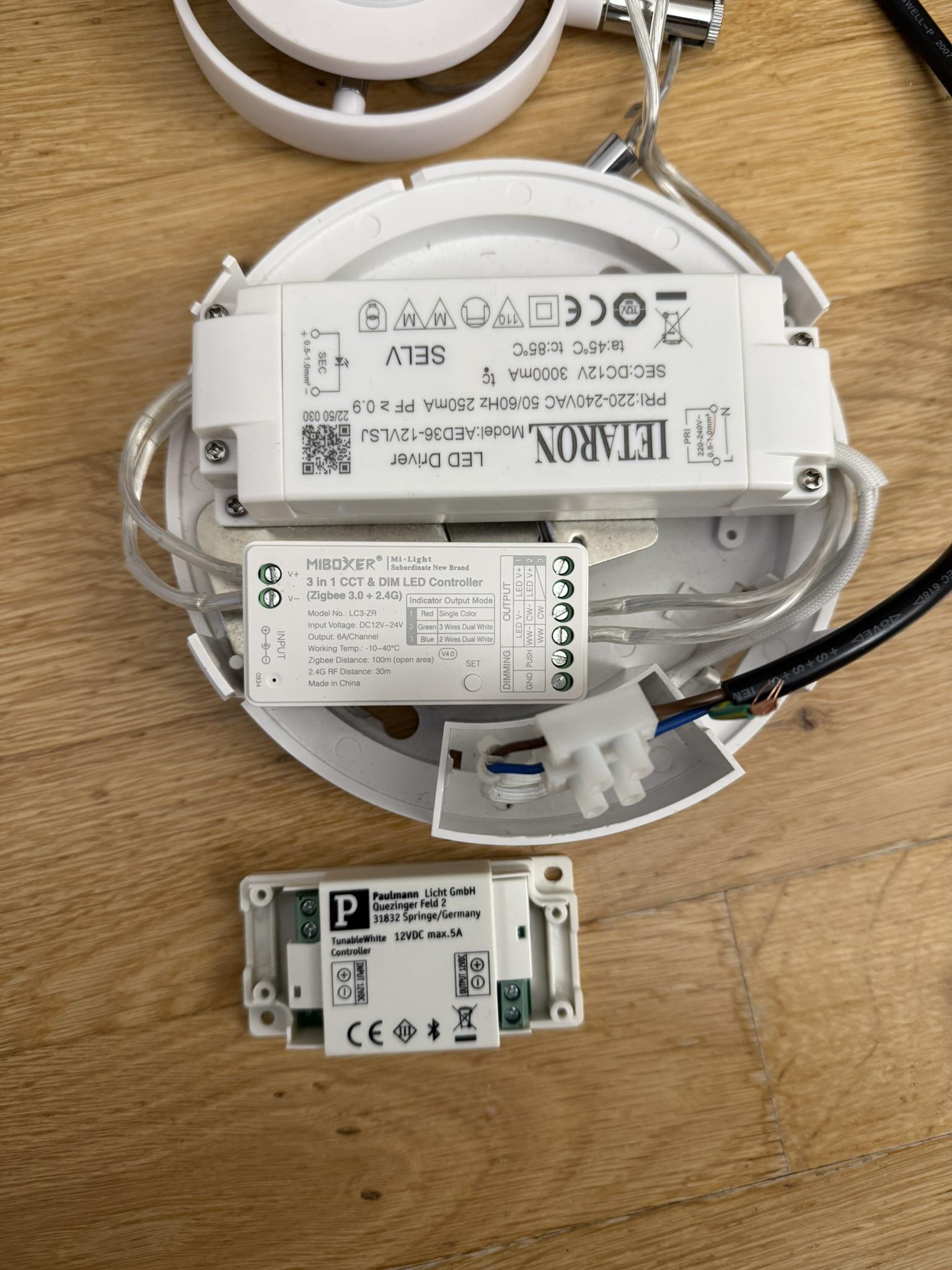
PROJECT I converted my old Paulmann Bluetooth cable lighting system to Zigbee / Philips HUE for just €25 with full dimming and tunable white!

Post image
12 Upvotes

I recently managed to convert my old Paulmann RoundMac Bluetooth cable lighting system to Zigbee, keeping all the original LED spotlights. It turned out to be an incredibly simple modification!

I thought I'd share this because I couldn't find a straightforward solution online, and there might be others with the same system.

The problem

My Paulmann cable lighting system originally used a proprietary Bluetooth controller and could only be controlled through the now-discontinued Paulmann app or the Paulmann BOSS remote control.

I wanted to integrate it into my existing Hue smart home setup, preferably using Zigbee, without replacing the entire lighting system.

Initially, I considered reverse-engineering the Bluetooth protocol using an ESP32 and even looked into BLE sniffers to replicate the original remote.

The discovery: Reversing the LED polarity!

While investigating the original controller, I noticed something interesting: Although the LED spots support both warm and cool white, they are connected using only two wires (+ and −).

Out of curiosity, I swapped the polarity of one LED spotlight, connecting + to − and vice versa.

To my surprise, the spotlight still worked perfectly, but warm white and cool white were now reversed! When I selected cool white in the original Paulmann app, the spotlight produced warm white, and vice versa.

This was the key discovery: The LEDs apparently use a two-wire CCT configuration, where reversing the polarity changes which LED channel is activated.

That meant I might not need to reverse-engineer the Bluetooth protocol at all. I just needed a compatible Zigbee controller capable of driving two-wire CCT LEDs!

The solution: MiBoxer LC3-ZR

I found the MiBoxer LC3-ZR, a Zigbee 3.0 controller specifically designed for two-wire CCT LED systems.

It costs around €25 and supports Zigbee integration with different smart home ecosystems.

The conversion was surprisingly straightforward:

  1. Disconnect the power supply.
  2. Remove the original Paulmann Bluetooth controller.
  3. Connect the existing 12V power supply to the MiBoxer LC3-ZR.
  4. Connect the two existing LED wires to the new controller.
  5. Restore power and pair the controller with a compatible Zigbee gateway, just took me 1 minute.

And that's it!

The result

I tested the new controller with my Philips Hue Bridge, and everything works beautifully:

  • Switching on and off
  • Smooth, stepless dimming
  • Full warm-white to cool-white adjustment
  • Smooth fade-in and fade-out when switching the lights on and off, just like original Hue bulbs
  • Direct pairing with the Hue Bridge
  • No additional proprietary gateway or ESP32 required
  • All original Paulmann LED spotlights retained

The whole experience is now practically indistinguishable from using native Philips Hue lights!

Compatibility with other smart home systems

The MiBoxer LC3-ZR uses Zigbee 3.0, so the solution potentially works with other Zigbee-based smart home systems as well.

The manufacturer documents compatibility with:

  • Philips Hue Bridge
  • Tuya-compatible Zigbee gateways
  • Certain Amazon Echo devices with built-in Zigbee hubs
  • MiBoxer Zigbee gateways

Other platforms, such as Home Assistant with ZHA or Zigbee2MQTT, may also be possible, although I haven't verified compatibility with this exact controller.

Personally, I've only tested Philips Hue, where all the functions work perfectly.

Hardware used

Total cost of the upgrade: approximately €25.

Important note

This worked with my specific Paulmann system because the LED spots use two-wire polarity-dependent CCT control. Not all LED lighting systems work this way, and reversing polarity might not be safe for arbitrary LED products. This is just my personal DIY modification!

Conclusion

I originally expected to spend quite some time reverse-engineering Paulmann's Bluetooth protocol. Instead, a simple polarity experiment revealed that the entire system could be converted to Zigbee by replacing just one controller.

I'm quite happy how well everything works, especially the smooth dimming and transitions.

Hopefully this helps someone else who wants to modernize an older Paulmann Bluetooth lighting system without replacing all the spotlights!


r/homeautomation • • 17h ago

PERSONAL SETUP My HA died one afternoon and I only found out in the shower, so I built an OpenTelemetry add-on for it

Thumbnail
reddit.com
0 Upvotes

r/homeautomation • • 1d ago

QUESTION Best way to control external light with a timer/remotely

4 Upvotes

I would like to remotely control external led light that has a switch inside. After some reading, am thinking that a relay behind a switch may be a good option. Would I need anything else apart from the app to make it work?

This is in the UK so not sure if there is a neutral wire or not. Am also considering a solution to which I can add more interior lights later.


r/homeautomation • • 1d ago

QUESTION *Brightest* Outdoor Patio Style String Lights?

Thumbnail reddit.com
0 Upvotes

r/homeautomation • • 1d ago

DISCUSSION My most-needed home automation upgrade: devices that remember their own maintenance

4 Upvotes

I used to think reminders to replace things like appliance filters were unnecessary. You only need to do it once in a while. Surely I could roughly keep track?

Then I ended up with more stuff at home and realized how unreliable “roughly” was. The water filter needs replacement cartridges, the air purifier needs its filter cleaned, and the robot vacuum has parts to clean too. None of it is difficult, but ask me when I last did any of it and my best answer is, “Probably not that long ago?”

Luckily, my Viomi reminds me when the filters need replacing. That’s a feature I probably would’ve skimmed past on a spec sheet. Now I actually appreciate it. At least I don’t have to suddenly remember one day and dig through old orders to work out how many months it’s been.

So there’s another thing I want from smart home devices now: help remembering the little maintenance jobs. Ideally, they should remind me when something needs doing, without me having to remember to open an app and check.

What smart features have actually made your life easier? I’m taking notes so I can have fewer things to keep track of.


r/homeautomation • • 1d ago

QUESTION What are good led lights that sync with the tv?

1 Upvotes

My sister has seen some on tik tok and wants something like it so i was wondering if anyone here has bought some or knows what brands are good?


r/homeautomation • • 1d ago

FIRST TIME SETUP UPS recommendations for hub and router

Thumbnail reddit.com
0 Upvotes