r/homeautomation • • 13h ago

NEWS I made a Home Assistant card to replay location history

Thumbnail
gallery
30 Upvotes

I wanted to pick a time on the Home Assistant map and see where my trackers were at that point. I found a feature request for the same thing and ended up building a custom card for my own dashboard with help from Codex.

The timeline works a bit like trimming a video in QuickTime. Drag anywhere to move the playhead, or drag the orange handles to replay just part of the day. Each person or tracker gets a row showing when they moved, and the routes outside the selected time range fade on the map.

It reads latitude and longitude from Home Assistant Recorder for any device_tracker that provides coordinates, as well as person entities linked to those trackers. I’ve been using it in a full-screen Panel view, and the screenshots in the README show both desktop and mobile with fictional tracks.

GitHub repo, install steps, and screenshots

If you try it on a phone, I’d love to hear how the timeline feels to drag.


r/homeautomation • • 3h ago

HOME ASSISTANT Melodious: offline framework for Logitech Harmony hubs + remotes, with two-way Home Assistant device control and no Logitech cloud

Thumbnail
github.com
16 Upvotes

Logitech stopped making Harmony remotes in 2021, but a stock Harmony Hub still needs Logitech's app and cloud to change anything. I've been building Melodious (with tons of community help, thanks r/logitechharmony) to fix that. It runs on the hub itself, next to Logitech's firmware, and takes over what the cloud did: devices, activities, remote setup and syncing. Your existing setup stays as it is, managed locally.

For home automation, the useful part is that the hub and Home Assistant work in both directions.

Your IR gear becomes part of Home Assistant. An old amp or soundbar that only takes IR shows up in Home Assistant as a power switch, an input selector and command buttons. You can put it in automations ("when I unlock the front door, turn on the amp and switch it to the turntable"), on dashboards, or control it by voice through Home Assistant's Alexa or Google setup.

Your Harmony remote controls Home Assistant. Lights, networked TVs, Chromecast devices, etc, any entity, in Home Assistant can sync onto the Harmony to be used activities and assigned to remote buttons. One press of Watch TV can turn the TV on over the network, turn on the soundbar over IR, switch inputs, and dim the lights, and lock your front door through Home Assistant. The Home Control buttons on the Companion, 950 and Elite can run lights or scenes directly.

It doesn't depend on anyone's cloud. Everything runs on the hub and your network, so it keeps working if Logitech's servers go away. You can set up a factory reset or used hub from scratch with the desktop app, without a Logitech account. If you'd rather not rely on the hub's Wi-Fi, it can run on wired Ethernet through a USB adapter (experimental).

Screenshots below: the setup wizard, and Home Assistant devices on the hub.

It's free. Latest release and docs: https://github.com/schlambos/harmony-hub-control/releases/latest

Home Assistant integration (add as a custom repository in HACS): https://github.com/schlambos/ha-melodious

Happy to answer questions here, and bug reports are welcome on GitHub issues.


r/homeautomation • • 23h ago

OTHER If you haven’t treated yourself to a robot vacuum yet. Do it.

Post image
13 Upvotes

r/homeautomation • • 19h ago

HOMEKIT Got native Apple HomeKit running on a Broadlink RM4 Pro

12 Upvotes

I started this project because I wanted to get my 300 MHz gate working in HomeKit and ended up getting HomeKit running directly on the RM4 Pro itself.

It pairs with Apple Home as a bridge without relying on Homebridge, Home Assistant, Scrypted or any additional hardware.

I opened up the RM4 Pro, soldered some wires to the UART pads (I suck at soldering lol) and flashed ESPHome using seb5594’s firmware:

https://github.com/seb5594/ESPHome-Broadlink-RM4-Remote-Firmware

All subsequent updates are now done over Wi-Fi, but I left the uart wires attached and tucked back into the case

The RM4 Pro has a Realtek RTL8720CF with 256 KB of RAM and 2 MB of flash. With the help of Claude, I ported esp-homekit and wolfCrypt.

It’s super bare bones right now. Claude built a basic web UI for learning and managing IR/RF codes directly on the RM4.
There were quite a few issues getting everything working, particularly with mDNS, HomeKit characteristic compliance and FlashDB storage limitations.

One of the main reasons I wanted to do this was because the stock Broadlink firmware only supports 315 and 433 MHz. Turns out the hardware itself is capable of 300 MHz, and under ESPHome I’m now able to learn and transmit at that frequency.

I’m using it daily to control my 300 MHz gate and Woozoo IR fan in my office (power, three-speed slider and oscillation), all directly from the Apple Home app.

TV and AC support have passed host tests, but I haven’t tested either on actual hardware yet.

Still very much experimental, but I plan on continuing to build it out with the help of Claude.


r/homeautomation • • 7h ago

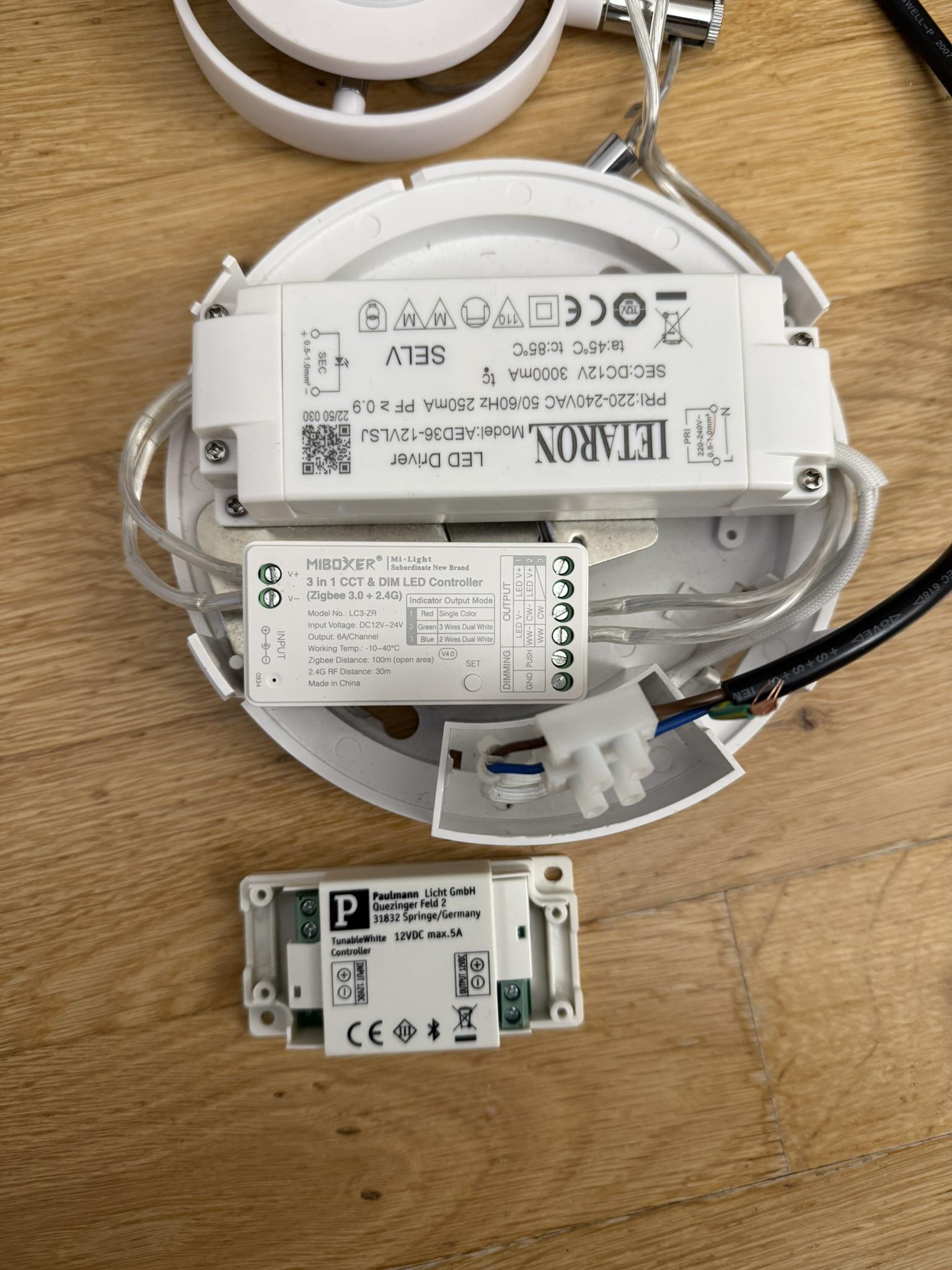
PROJECT I converted my old Paulmann Bluetooth cable lighting system to Zigbee / Philips HUE for just €25 with full dimming and tunable white!

Post image
11 Upvotes

I recently managed to convert my old Paulmann RoundMac Bluetooth cable lighting system to Zigbee, keeping all the original LED spotlights. It turned out to be an incredibly simple modification!

I thought I'd share this because I couldn't find a straightforward solution online, and there might be others with the same system.

The problem

My Paulmann cable lighting system originally used a proprietary Bluetooth controller and could only be controlled through the now-discontinued Paulmann app or the Paulmann BOSS remote control.

I wanted to integrate it into my existing Hue smart home setup, preferably using Zigbee, without replacing the entire lighting system.

Initially, I considered reverse-engineering the Bluetooth protocol using an ESP32 and even looked into BLE sniffers to replicate the original remote.

The discovery: Reversing the LED polarity!

While investigating the original controller, I noticed something interesting: Although the LED spots support both warm and cool white, they are connected using only two wires (+ and −).

Out of curiosity, I swapped the polarity of one LED spotlight, connecting + to − and vice versa.

To my surprise, the spotlight still worked perfectly, but warm white and cool white were now reversed! When I selected cool white in the original Paulmann app, the spotlight produced warm white, and vice versa.

This was the key discovery: The LEDs apparently use a two-wire CCT configuration, where reversing the polarity changes which LED channel is activated.

That meant I might not need to reverse-engineer the Bluetooth protocol at all. I just needed a compatible Zigbee controller capable of driving two-wire CCT LEDs!

The solution: MiBoxer LC3-ZR

I found the MiBoxer LC3-ZR, a Zigbee 3.0 controller specifically designed for two-wire CCT LED systems.

It costs around €25 and supports Zigbee integration with different smart home ecosystems.

The conversion was surprisingly straightforward:

  1. Disconnect the power supply.
  2. Remove the original Paulmann Bluetooth controller.
  3. Connect the existing 12V power supply to the MiBoxer LC3-ZR.
  4. Connect the two existing LED wires to the new controller.
  5. Restore power and pair the controller with a compatible Zigbee gateway, just took me 1 minute.

And that's it!

The result

I tested the new controller with my Philips Hue Bridge, and everything works beautifully:

  • Switching on and off
  • Smooth, stepless dimming
  • Full warm-white to cool-white adjustment
  • Smooth fade-in and fade-out when switching the lights on and off, just like original Hue bulbs
  • Direct pairing with the Hue Bridge
  • No additional proprietary gateway or ESP32 required
  • All original Paulmann LED spotlights retained

The whole experience is now practically indistinguishable from using native Philips Hue lights!

Compatibility with other smart home systems

The MiBoxer LC3-ZR uses Zigbee 3.0, so the solution potentially works with other Zigbee-based smart home systems as well.

The manufacturer documents compatibility with:

  • Philips Hue Bridge
  • Tuya-compatible Zigbee gateways
  • Certain Amazon Echo devices with built-in Zigbee hubs
  • MiBoxer Zigbee gateways

Other platforms, such as Home Assistant with ZHA or Zigbee2MQTT, may also be possible, although I haven't verified compatibility with this exact controller.

Personally, I've only tested Philips Hue, where all the functions work perfectly.

Hardware used

Total cost of the upgrade: approximately €25.

Important note

This worked with my specific Paulmann system because the LED spots use two-wire polarity-dependent CCT control. Not all LED lighting systems work this way, and reversing polarity might not be safe for arbitrary LED products. This is just my personal DIY modification!

Conclusion

I originally expected to spend quite some time reverse-engineering Paulmann's Bluetooth protocol. Instead, a simple polarity experiment revealed that the entire system could be converted to Zigbee by replacing just one controller.

I'm quite happy how well everything works, especially the smooth dimming and transitions.

Hopefully this helps someone else who wants to modernize an older Paulmann Bluetooth lighting system without replacing all the spotlights!


r/homeautomation • • 4h ago

QUESTION Best way to control external light with a timer/remotely

5 Upvotes

I would like to remotely control external led light that has a switch inside. After some reading, am thinking that a relay behind a switch may be a good option. Would I need anything else apart from the app to make it work?

This is in the UK so not sure if there is a neutral wire or not. Am also considering a solution to which I can add more interior lights later.


r/homeautomation • • 7h ago

DISCUSSION My most-needed home automation upgrade: devices that remember their own maintenance

4 Upvotes

I used to think reminders to replace things like appliance filters were unnecessary. You only need to do it once in a while. Surely I could roughly keep track?

Then I ended up with more stuff at home and realized how unreliable “roughly” was. The water filter needs replacement cartridges, the air purifier needs its filter cleaned, and the robot vacuum has parts to clean too. None of it is difficult, but ask me when I last did any of it and my best answer is, “Probably not that long ago?”

Luckily, my Viomi reminds me when the filters need replacing. That’s a feature I probably would’ve skimmed past on a spec sheet. Now I actually appreciate it. At least I don’t have to suddenly remember one day and dig through old orders to work out how many months it’s been.

So there’s another thing I want from smart home devices now: help remembering the little maintenance jobs. Ideally, they should remind me when something needs doing, without me having to remember to open an app and check.

What smart features have actually made your life easier? I’m taking notes so I can have fewer things to keep track of.


r/homeautomation • • 14h ago

HOME ASSISTANT Trying to make my X430 schedule mostly hands-off with HA

4 Upvotes

I've got about 0.9 acre of mostly TTTF outside Pittsburgh.

The back third slopes down and gets uneven around a few mature trees. With my old 21" self-propelled mower, the whole yard was usually a 3-3.5 hour job. That's a big reason I went with the X430.

Fall is where the fixed schedule starts getting annoying. Between overseeding, changing growth rates, cooler temps and wetter mornings, I need to change it more often. I pulled X430 into HA through Navimow HACS integration. The mower setup stays in Navimow, just testing a setup where HA decides when to send the start command instead of me constantly changing the Navimow schedule.

Right now it checks:

- a month-based minimum gap since the last mow

- no rain from my gauge in the last 24 hrs

- X430 is docked

- inside my mowing window

The 24-hour rain rule is just what’s been enough for my yard so far.

Curious whether the same logic will hold up through a full mowing season. Probably post an update after fall.


r/homeautomation • • 22h ago

QUESTION Extension Cord -> Smart Plug safe?

4 Upvotes

I have an outlet above fireplace mantle but it has fake rocks around so can’t fit smart plug to it (IKEA ones).

is it safe to get a short UL rated extension cord that plugs into outlet, the my smart plug, then my Christmas lights?


r/homeautomation • • 21h ago

PERSONAL SETUP Smart Home Automation on Budget

3 Upvotes

After reading through many articles and following discussions in various social media platforms , realized that many people spend a bomb to implement even basic Smart Home Automation by going with so called expert companies. Sharing my basic knowledge based on the setups that I have done at my home with the hope it helps newbies to go DIY and save money for better things.

Here are the smart home product categories and connected devices u will need :

  1. Zigbee hub (to connect the smart devices to internet and also connect them to Smart voice device). This is your backbone of network
  2. Zigbee Smart switch modules (to make the electrical switches smart and at far low cost instead of changing switch boards). This way u can make a regular switch smart (Only On and Off achieved)
  3. Zigbee or WiFi panel lights and bulbs that will now let you control the colors or on/off individual lights versus single switch (achieved in Serial 1)
  4. ⁠Then come Voice Assistants to control devices by voice
  5. ⁠Smart Appliances & Climate Control Split AC
  6. ⁠Home Theater & Entertainment (Amazon Fire TV Stick, WiFi enabled Home theater systems
  7. Apps to integrate with Voice assistant and schedule

This maybe overwhelming information but happy to help share guidance and also share the products that I have used.

Note: Some of the installations will need an electrician (Panel lights or Smart switch modules)


r/homeautomation • • 7h ago

SECURITY Smart lock that allows disable of pin codes?

2 Upvotes

I am looking for a smart lock that supports fingerprint recognition and app access but denies user codes (preferably on per user basis). I share a gate with a neighbor and I know they will give codes to visitors and friends which I don't want. I know fingerprint recognition is not 100% reliable so I need app backup. Any recommendations?


r/homeautomation • • 17h ago

PERSONAL SETUP Smart home ideas for a middle-aged woman living alone in a single-family home.

Thumbnail reddit.com
2 Upvotes

r/homeautomation • • 29m ago

QUESTION What are good led lights that sync with the tv?

1 Upvotes

My sister has seen some on tik tok and wants something like it so i was wondering if anyone here has bought some or knows what brands are good?


r/homeautomation • • 3h ago

FIRST TIME SETUP UPS recommendations for hub and router

Thumbnail reddit.com
1 Upvotes

r/homeautomation • • 5h ago

PERSONAL SETUP "Spotlight" home hub kiosk on a cheap android-based photo frame. Connects to a google account to pull calendar events, tasks, photos, and weather.

Post image
1 Upvotes

r/homeautomation • • 5h ago

QUESTION Voice controlled lock?

Thumbnail reddit.com
1 Upvotes

r/homeautomation • • 9h ago

QUESTION Smart Multipoint Lock

Thumbnail reddit.com
1 Upvotes

r/homeautomation • • 11h ago

PERSONAL SETUP Best simple (or simple ish) automations

Thumbnail reddit.com
1 Upvotes

r/homeautomation • • 9h ago

QUESTION Smart home handles most things except the kid

0 Upvotes

Hi all, we've had a fairly full smart home for about four years: lights, locks, scenes, the usual. Most of it works. What broke this week wasn't a device.

School email came in. Someone read it. Someone said ""got it."" By dinner nobody could tell me who was doing Thursday pickup, or whether the form ever got signed. The lights automate, the locks work, the routines fire on schedule. But anything with a person in it tends to live in one person's head.

Anybody else run into this? And if so, is there a setup that handles the handoffs between people, shared lists, wall displays, notifications that need an acknowledgment, rather than device automations alone? Has anything stuck?

Some context on why I care: I've been building Oraki, a family agent. Each person gets a private conversation and memory, plus shared family memory for things like schedules and who handles pickup. The data and apps sit on a box at home, the model runs in the cloud. Early days: no automatic email reading, no HA or platform integrations.

Five of us across five rooms. We aren't in duress, the routines still run, but voice doesn't seem to cover this one.

Thanks!


r/homeautomation • • 21h ago

QUESTION Three months of vandalism timestamps and now I know what to buy

0 Upvotes

After the third mailbox incident in three months, I did what any reasonable person does and made a spreadsheet of every event, timestamped, from my existing cams. The pattern that emerged changed my shopping list. Every single incident happened between 1am and 4am, and in every clip the person knew where my old cam was and walked around its cone of vision like it was a puddle. So recording is covered, the evidence locker is full, and the police response to mailbox number three was a form email. What the data says I actually need is something that acts during the event, not after. The light that comes on when someone crosses the property, ideally attached to something that follows them across the yard, since my clips show people ignore fixed lights completely but react to anything that tracks them. Anyone turned their setup from an evidence machine into something that interrupts? What finally made the night visitors choose a different yard?