r/minilab • u/Licraul • 2h ago
Desde un portátil hasta un rack de 10 pulgadas que gestiona mi empresa de contabilidad, además de un nodo de IA local en una eGPU OCuLink.
gallery
9
Upvotes
r/minilab • u/root0ps • 3h ago
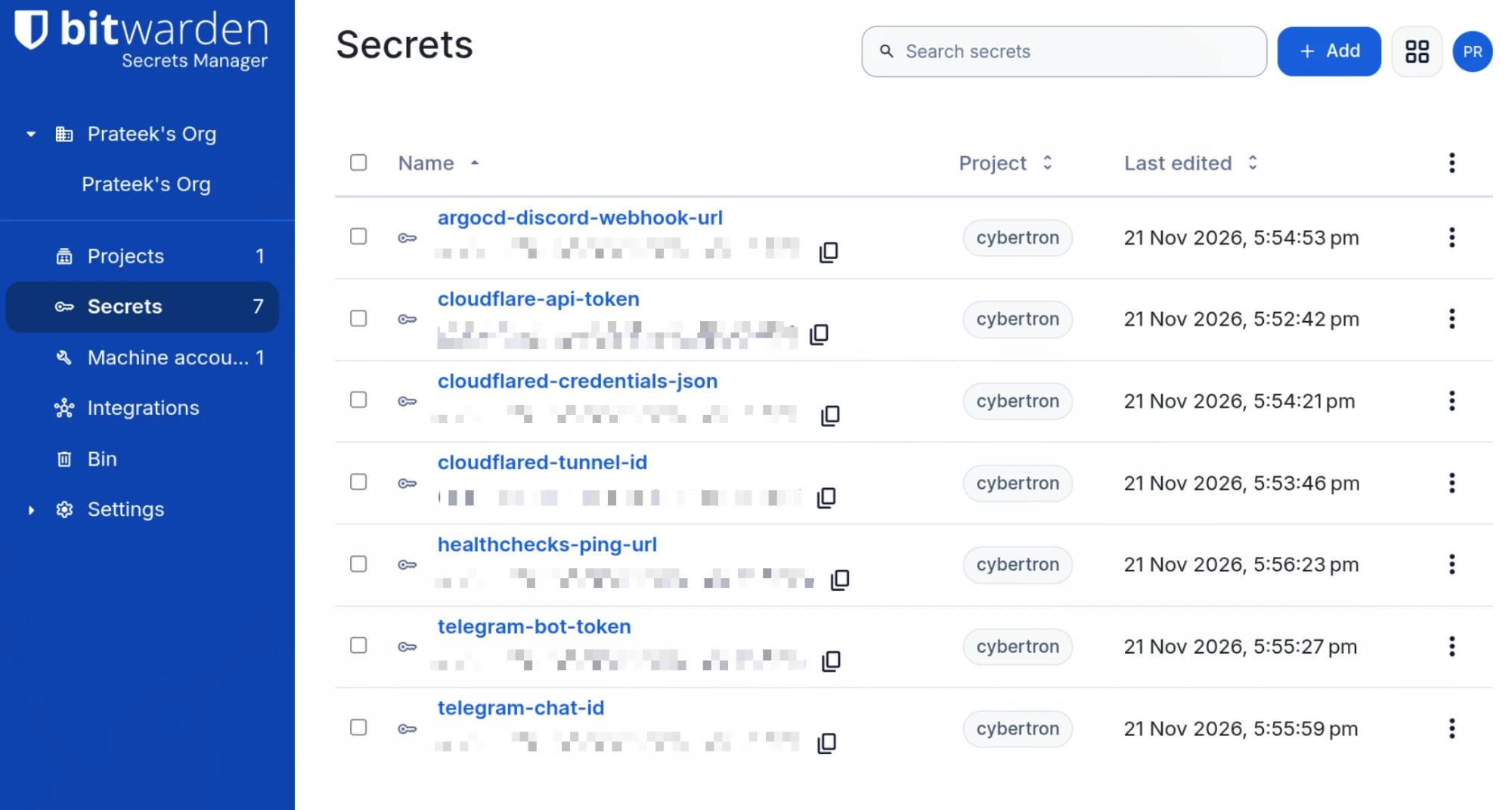
My homelab cluster runs from a public Git repo through Argo CD, except Secrets. Those were still kubectl create secret from my laptop.
Now they live in Bitwarden Secrets Manager. External Secrets Operator syncs them into normal Kubernetes Secrets.
Git only holds references, no values. The cluster’s access is read-only, and a rebuild needs one token.
r/minilab • u/aquilex88 • 4h ago

r/minilab • u/Orca_Blue777 • 2h ago
I have a Raspberry Pi 4 8gb and Im planning to build a 10 inch rack. Usb boot seems to be the most reliable method of using this rpi. My question is, how are y'all setting up usb boot physically on a 10 inch rack ? I can't find any images of racks with Rpis on usb boots here.
Follow up question, should I just stick to an sd card for the OS and have logs written to the RAM directly. I have heard of this concept and would greatly appreciate any resources to implement this instead.
To add further context. This is my entry into minilabbing in general. So on the RPI, I need to host 3 essential services; NUT server, Unifi controller and some sort of dashboard to transmit to a small display on the rack.
I used to host a minecraft server on the pi a while back and now it seems like it will be underutilized. Please share your opinions on what else I can run.
r/minilab • u/amarggos • 15h ago
I had 8 bots and personal APIs running on an old 4 GB Celeron N3060 netbook on Debian 13. Docker + Coolify/Portainer ate half the RAM before starting a single service, so I built a lightweight native panel on top of systemd + SQLite + Linux /sys/class/ sensors instead.
At idle it sits at 27 MB cgroup memory with zero background polling daemons, and gives you 1-click systemd templates (with MemoryMax= and CPUQuota=), Starter Pack presets, live WebSocket logs + Git deploys, GitHub webhooks, optional Caddy HTTPS, native systemd timer backups, and temp/battery monitoring.
Repo: https://github.com/DevModee/Aeros-Panel
Curious what lightweight setups people here run on old x86 laptops or 2-4 GB mini PCs.
r/minilab • u/geraldjust • 1d ago

Making a dual HPE 12v hot swappable 500w power supply. Takes up 2U space but will have a power distribution board on the top that will use a combination of barrel jacks and PCIE power 2x3pin plugs. They it will be switchable via mosfets. The microcontroller will be able to get the current reading supplied by each PSU so i can monitor the power supplies. should be good enough to power all my switches and the couple of mini PCs i have along with 4 HDD drives.
this is my first revision. later might switch out the physical fuses with some eFuse chips.
r/minilab • u/_fayad • 19h ago
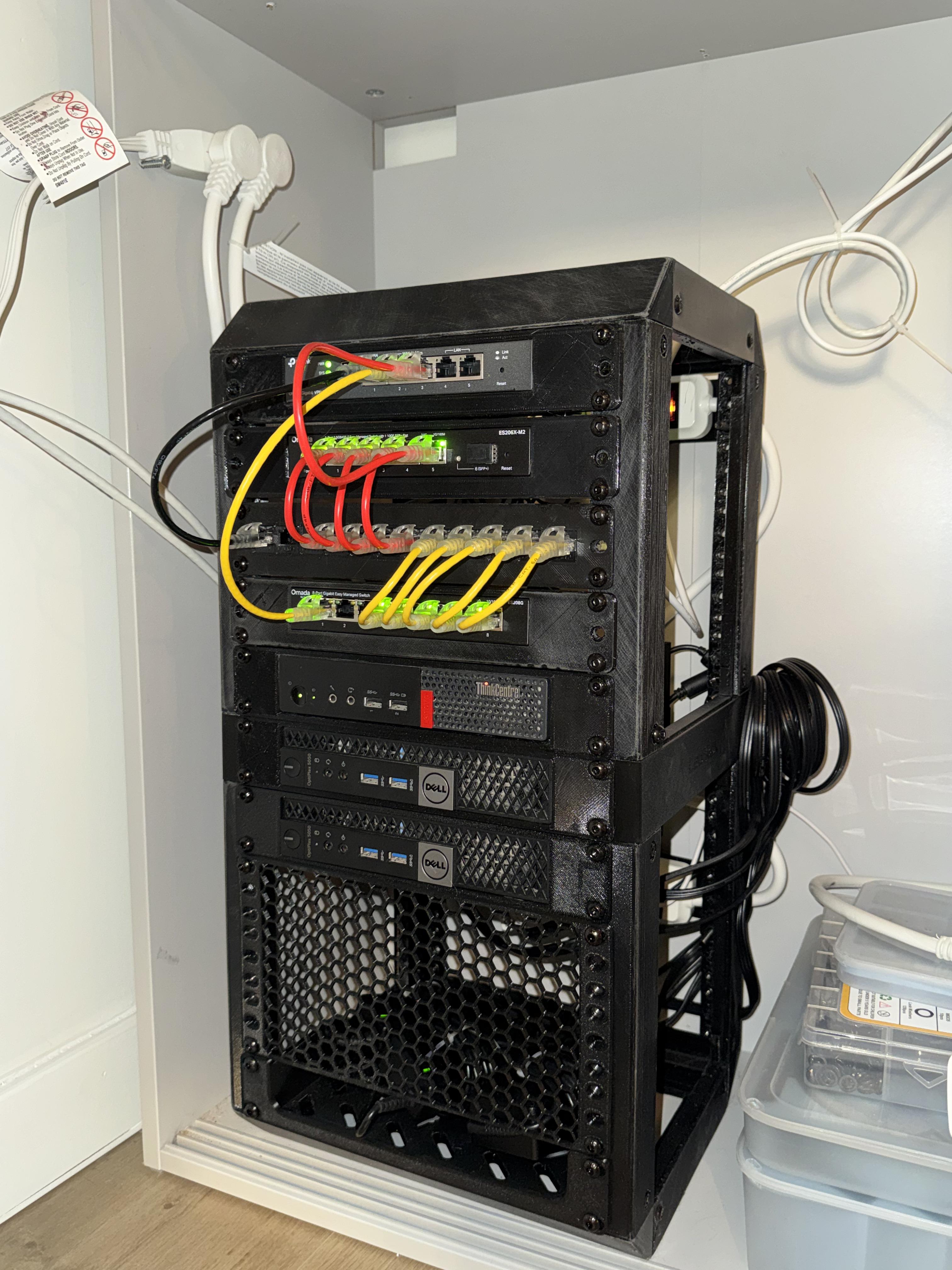
Hey everyone! Hoping everyone's well!
Just wanted to show off what I have so far in my homelab.
The goal was to build a small distributed data processing cluster and I think I have made decent progress on that front hehe
Networking:
Omada Gigabit ER605 - 5 port 1G router
Omada Gigabit ES208 - 8 port 1G switch
Omada ES206X-M2 - 5 port 2.5G switch (+1 extra SFP port)
Omada EAP650 (not shown) - 1G WiFi6 AP
Connected over patch panel for cable p0rn
Compute:
Lenovo ThinkCenter M910Q Tiny - i5-6500T, 32GB DDR4 RAM, 256GB NVMe M.2 SSD, 120GB SATA SSD, 2.5G M.2 NIC
Dell Optiplex 5050 Micro - i5-6500T, 16GB DDR4, 128GB NVMe M.2 SSD, 256GB SATA SSD, 2.5G M.2 NIC
Dell Optiplex 5050 Micro - Dell Optiplex 5050 Micro - i5-6500T, 16GB DDR4, 128GB NVMe M.2 SSD, 2TB SATA HDD, 2.5G M.2 NIC
Operations:
3-node Proxmox cluster with 6 Ubuntu VMs (provisioned using Terraform, configured using Ansible, Flux bootstraps to kubeadm cluster based on Git source of truth) and Tailscale LXC, Pi-hole LXC, Omada Controller LXC
Larger of storage devices in LVM-thin pool (I don't know why I tried Ceph initially, clearly not built for it, unless...?)
Rack:
LabRax 10+1U (2x Lab Rax + 1U extension and joiner block)
Bunch of cable organizing prints and power strip mounts
Software:
Kubernetes cluster:
- MetalLB
- cert-manager for internal TLS certs
- Traefik Gateway
- Longhorn
- Cloudflare tunnel
- Monitoring stack - Loki, Tempo, Prometheus, Alloy, Grafana
- RustFS (standalone mode)
- CNPG (cluster of 3)
- Redis
- Data stack - Airflow, JupyterHub, Trino, Polaris, Superset, SparkOnK8s
I have it all set up for basic use for small-scale data jobs (I have not benchmarked anything yet), but my goal is to set up comprehensive monitoring dashboards once I figure out what makes sense to monitor for me and wire up Slack notifications accodingly.
Honestly, I don't know where this post is going but I would love to engage with the community to learn more about what they think about this (I'm just having a terrible few weeks at work and with life) and how I could leverage this for career opportunities in cloud engineering, devops, data engineering etc.
Thanks for lending an ear (eyes??)
r/minilab • u/Proud-Invite5450 • 1d ago
I ended up with an ASUS Pro Q870M-C-CSM (LGA1851 / mATX) and want to use it for my first home server build. I'm pretty new to both LGA1851 and self-hosting in general, so I want to keep things simple and power-efficient from the start.
On the hardware side, I'm looking at pairing it with a 65W Core Ultra 5 (like a 225 or 235) for low idle power and QuickSync, plus some DDR5 and NVMe drives. Since I don't have a case yet and have a 3D printer, I'm planning to print a compact mATX frame or enclosure. As a business board without VRM heatsinks, I know it relies on general airflow across the PCB, so I'm trying to plan fan placement properly in the printed case.
For the OS, instead of adding a hypervisor layer I probably don't need yet, I'm leaning toward running a lightweight Linux distro bare-metal (like Debian or Fedora Server) with Docker or Podman for containers.
A few quick questions for people running similar setups:
Appreciate any advice on the hardware pairing or initial setup.
r/minilab • u/Rainbove • 1d ago

Has any of you tried these? 4U, 6U and they come even with 9U for a very good price. As I have no 3D printer I think I am going to get one. I do not want a door or a black panel and i rather put it on my table then on the wall, so these seems to be perfect.
Has anyone here used it? What do you think? Is it okay quality?
r/minilab • u/Existing_Fact_4638 • 1d ago
Hello,
I want to make myself a present for christmas: the GeeekPi DeskPi RackMate T2. I've googled a lot and found different values for the following measurement:

Can someone tell me whether the 212 mm refers to the inside of the tray or to the inner dimension between the two profiles?
Or maybe someone who has the rack at home could measure it for me.
Thank you very much in advance.
Currently my lab isn't ready for two reasons and the first being cooling the mini PC inside, I am prepapring three of them inside of a T1 Plus U8 and from perspective I can see I'll need to install two fan rack (possibly 80mm fan)
The problem I am facing is how to power the fans or is there an alternative solution for my problem? Like maybe using USB powered fans as a rack fan? (Btw I can't use 120V I have to use a step down for it to work)
r/minilab • u/Global-Tap-3406 • 1d ago
Hi all,
I've been building rynas, a web interface that turns a plain Debian 13 server into a NAS. You install Debian your way, add one package, and manage everything from the browser.
https://github.com/rylos/rynas
It is deliberately technical and powerful
r/minilab • u/cokeandcock • 2d ago
After the last electricity bill I tore the rack apart. What's left is a single N100 mini PC, 9W idle measured at the wall, everything else sold.
Setup: Proxmox, 6 LXC, all with cgroup limits set instead of "just let it run". Jellyfin with QuickSync via /dev/dri and the render group so the CPU isn't doing the transcoding. Immich, Paperless, Vaultwarden, HA, Uptime Kuma. Storage hangs off a USB DAS and is only mounted for the nightly restic run.
Thermals: it stands upright with 2cm of air under the desk, CPU stays under 70°C while transcoding, fan spins audibly but not annoyingly. A 120mm USB fan blows in from the side, quiet enough for the living room since then.
What I miss: nothing. Before this I burned 140W idle for the exact same services, for three people in the household.
What's tight: one PSU, one NIC, one stick of RAM. Backups go to the DAS and an offsite bucket, and I ran a full restore drill before the rebuild, not after.
If you're on the fence: the box cost 180 € and pays for itself in under half a year. Going from four servers to one was the best move I made.
What would you even put on a 9W budget at this point?
r/minilab • u/Equivalent_Tooth_48 • 2d ago

Hi everyone!
I'm pretty new to homelabbing. I first tried in January, but I got lost fast and ended up copy-pasting commands I didn't understand. This time I want to do it properly, so I'd love some advice on how to plan which services run where before I install anything.
the 2 messy pic is my current setup (I'm waiting for some new parts)
the nice pic is my old setup, but I didn't understand a single thing about what I had installed
Hardware
- Switch: TP-Link TL-SG108PE
- Router: Ubiquiti UniFi Cloud Gateway Ultra (no UniFi switch)
- Raspberry Pi 5 (1 GB RAM) + 2x 2 TB drives
- Raspberry Pi 5 (8 GB RAM) + 512 GB SSD (m2 hat)
- Raspberry Pi Zero 2 W
- All running Raspberry Pi OS Lite 64-bit
What I want to run
- A Minecraft server ? on the 8gb?
- Home Assistant
- Homelabel
- AdGuard Home ?
- Tailscale ?
- Caddy ?
- Docker + Dockge (simpler than Portainer?)
- Authelia ?
- OpenMediaVault for the two 2 TB drives ?
Thanks in advance!
r/minilab • u/One-Grocery-2812 • 3d ago

Build: four Pis on slide-out drawers (custom fit to the various Pis - 3B, 3B+, 4 and Zero in this build) and a PoE switch to power everything on its own shelf. Everything fits in one 10" unit printed in PLA on a P1S. Build details and what it runs are in my r/homelab post: here
Future Growth: I designed the build on Bayforge.app, a free Pi-rack generator I’m working on, which designs fully modular racks. The rack ears (not in these photos) print a piece per U and the rear hood a piece per row. When I add my next Pi, I can print the new row and add it on top, so nothing I’ve already printed becomes obsolete. I’ve also tried to make maintenance and upgrades less fiddly: there are optional clip-in parts and pull-out pins (for the fans, for example) in place of some of the screws and nuts.
No rack: as you can see, I don’t have a rack to fit this into yet. The generator produces a frame too, and that will be my next upgrade. I’m planning a fully printed one for this 10" build, but it also supports printed corners on 2020 extrusion for heavier or 19" builds.
Last picture is the exploded preview from the app, which shows how everything fits together.
Any must-have additions I should make sure the generator supports?
r/minilab • u/Odd_Instruction_1440 • 2d ago
r/minilab • u/Empty_Score5916 • 2d ago
r/minilab • u/Sgt_Chilipepper • 4d ago

Top to bottom:
- Arris modem/router
- Unifi Cloud Gateway Fiber (not here yet)
- 8-port switch
- patch panel
- Lenovo 1 (Bazzite, Jellyfin & Moonlight client)
- Lenovo 2 (Home Assistant & AdGuard) (AG not yet)
- Ugreen NAS (Docker, Jellyfin, Immich, Navidrome, Backups, KX Bridge,...)
Still waiting for a few parts, but everything is up and running. Once all my orders are here, I have to do some cable management.
M75Q (Lenovo 1) runs Bazzite with some light games (hades 2, ori,...) directly on it. For heavier titles, I use Sunshine / Moonlight to stream from my gaming PC.
It's my first setup and everything works surprisingly well. Still, I'm open & gratful for input and suggestions.
r/minilab • u/alliejanej • 3d ago
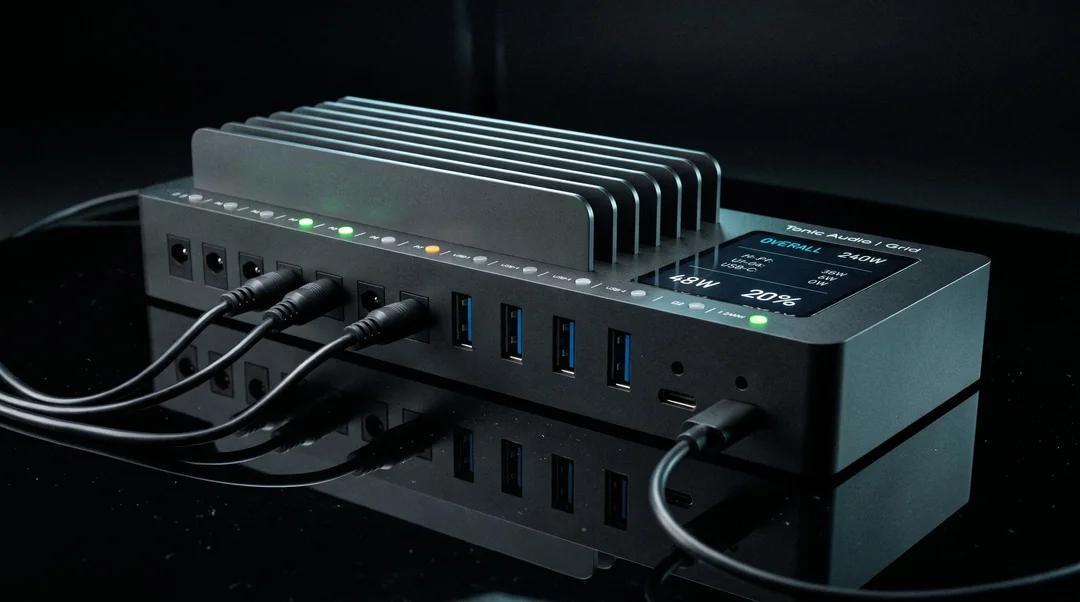
Hey all, posted this project to a few subreddits like r/diyelectronics and r/hwstartups and then r/homelab had people there suggest to post here, as minilabs need a programmable power supply too, not just live music rigs.
My biggest question as you read the description below: For your homelab/minilab, how many power channels would you need? Max voltage / current needed? Total power available to a rack? 10" or 19" or the current form factor as-is? Would you want multiple USB-C PD Source ports? If so, what power negotiations for each? 30W? 60W? 100W? more?
From the r/homelab comment thread, the consensus seems to be trending towards the following desired specs:
(Quick aside: It's funny there's interest here, as the product we designed before this was a NAS specifically for audio professionals. Unfortunately the RAM/NVMe shortage and pricing killed that project for the time-being, so we moved to this as our next product. But we're no strangers to homelabs, two of us running clustered Proxmox setups in our homes, and we self-host much of our internal infrastructure.)
Description from the prior posts below:
I got so tired of the pile of wall warts and power strips for my music gear, I'm building a programmable power supply: 7 isolated DC channels with barrel jacks: configurable voltage, polarity, and max current settings. Also a four port USB hub, and a 100W USB-C charge port for a laptop or tablet. With all of it powered by a single USB-C power brick like you use for your laptop today.
I have a music solo act where I play live, and had some close calls with unplugged power bricks during soundchecks. I finally had it and started asking around on popular forums on how the heck other people solved this.
Most the answers I got was the same approach I already took, or a me-too-wish-this-existed response. So started designing it.
It's still in the early stages (thus the renders), but the first pass of the enclosure is designed. Have the main layout done. Now getting the first critical path board fabbed and shipped here in the next week.

Also trying something a little different with this product by designing it in the open, with weekly videos tracking how the product development is going, both the wins and the setbacks. It's kinda scary to develop like this as it's very vulnerable, but it's also awesome to share with others how our tiny team goes about building new products.
I'll aim to post here regularly with updates if there's interest. Otherwise we'll be posting updates on the blog at https://tonicaudio.com/blog and via YouTube: https://youtu.be/9xP5pFiPCFk . If you're interested in following along with this project outside of Reddit, the mailing list signup link is here: https://grid.tonicaudio.com.
(Mods: if these links are against the rules, please let me know and I'll remove them. Def not trying to be spammy!)
r/minilab • u/mixmeister30 • 3d ago

Good evening
My new 10-inch 3d rack is uploaded on makerworld. Free to print
Happy printing 💪👍


